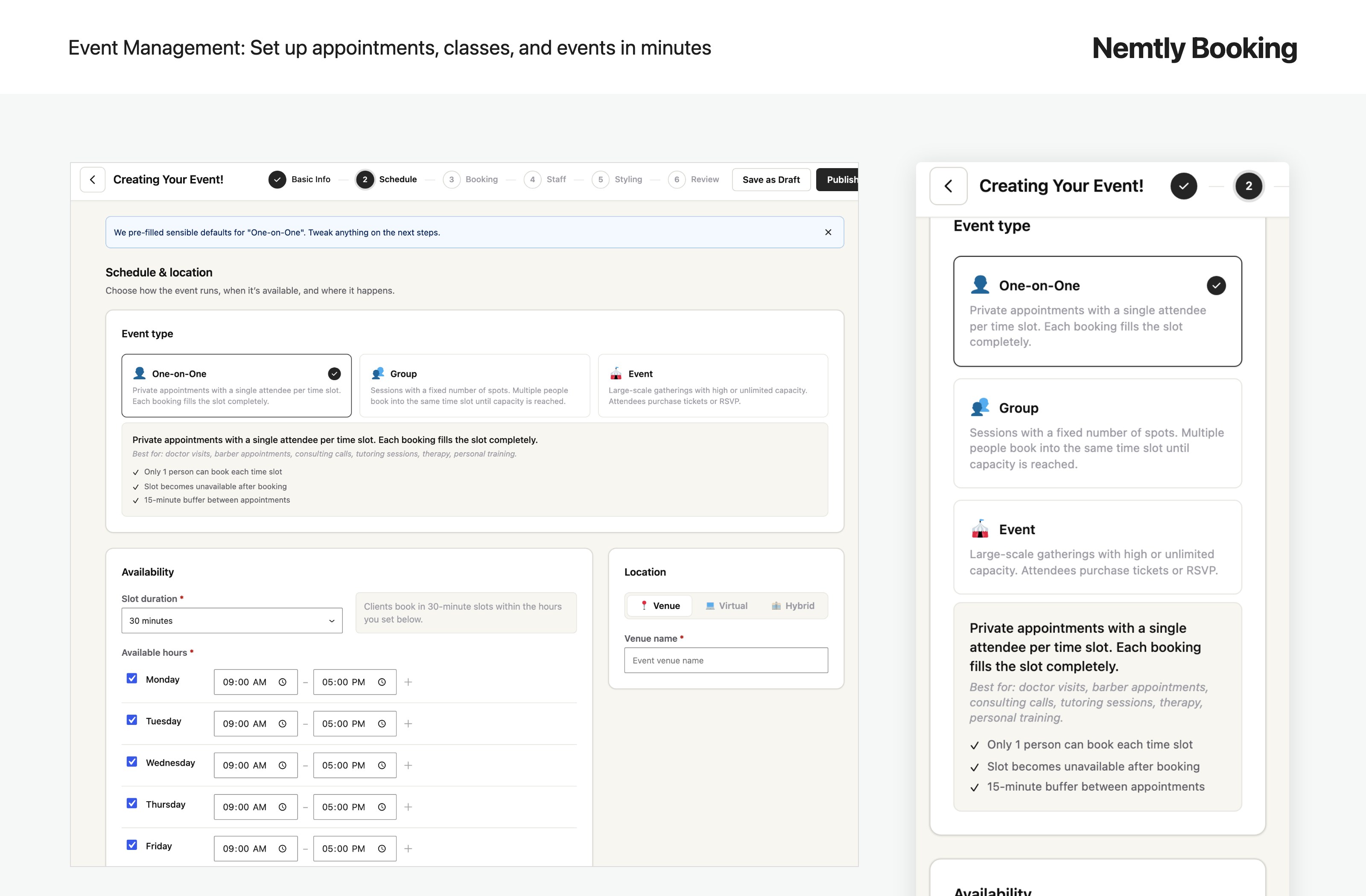
Nemtly Booking lets your customers book appointments and events 24/7, with real-time availability, Stripe payments, Google Calendar sync, and automated email reminders. Whether you run workshops, manage client consultations, or schedule fitness classes, get a fully functional booking system on your WordPress site in minutes.
Appointment Scheduling
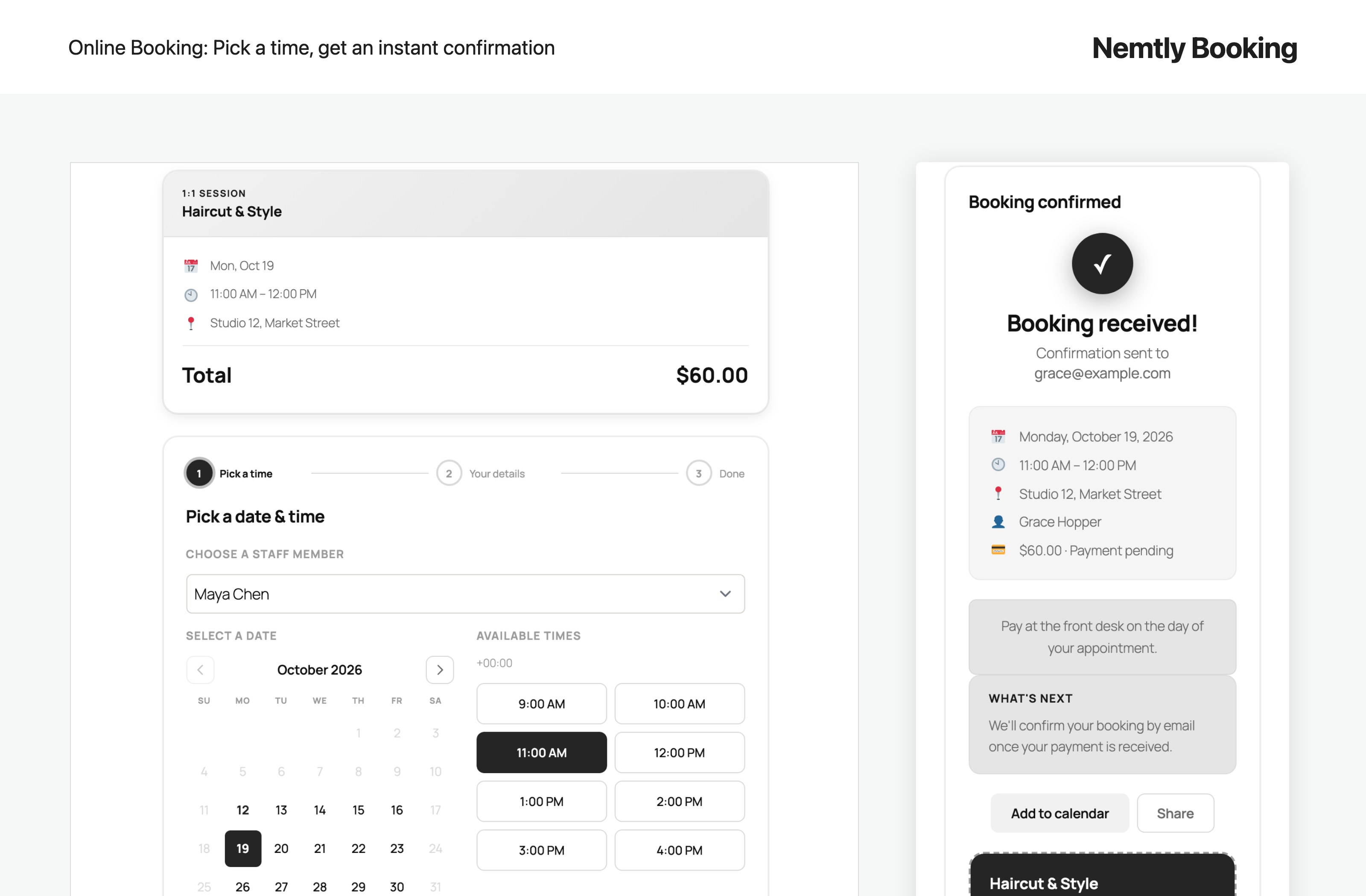
Real-time availability with automatic conflict prevention
Set business hours, buffer times, and capacity limits
Slot-based events with recurring availability patterns
Global business hours default: set once in Settings, inherited by all new events
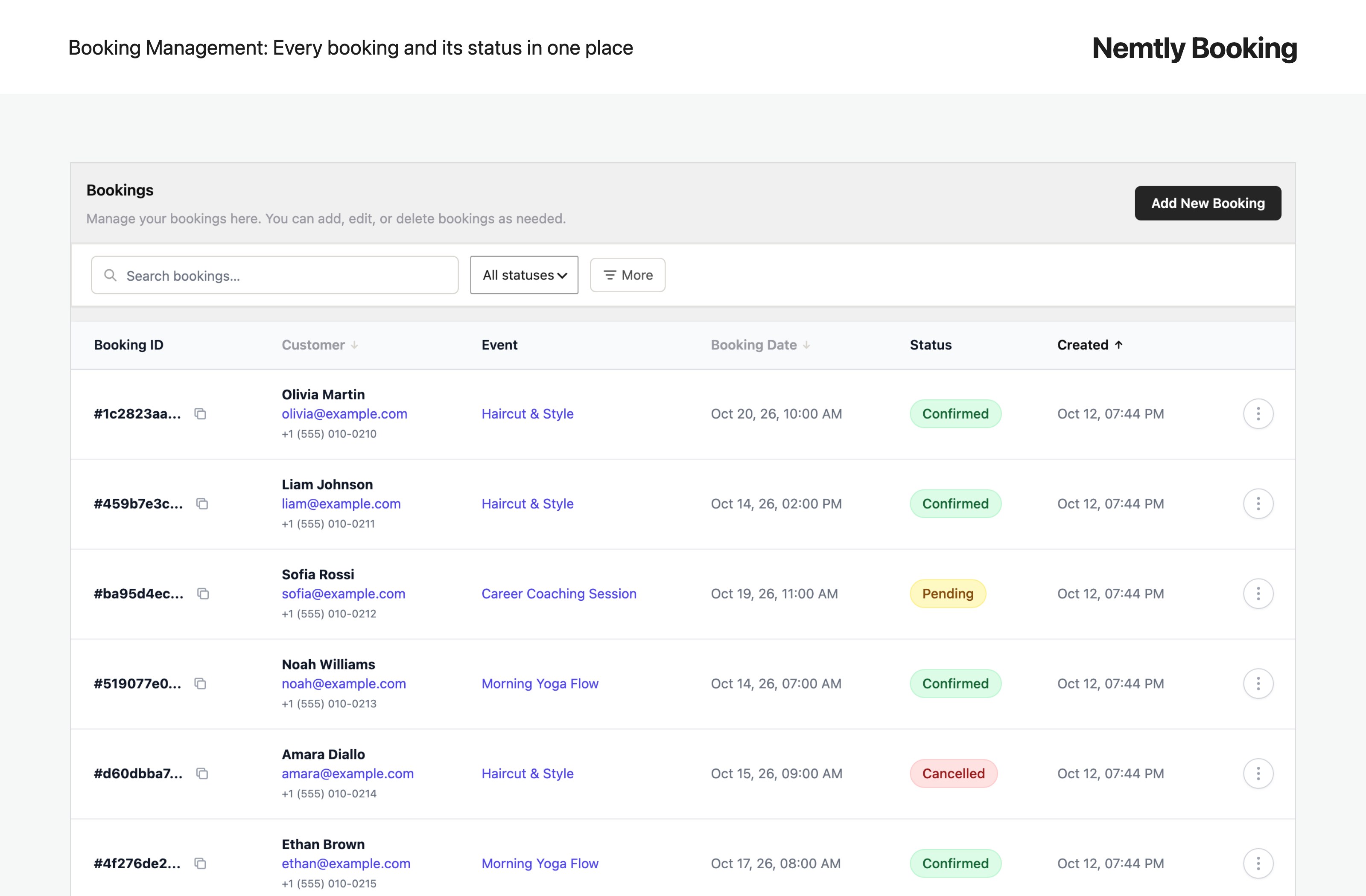
Manual approval: hold free, offline-paid, or card-paid bookings until you approve them, site-wide or per event
Customer dashboard with booking history and magic link login
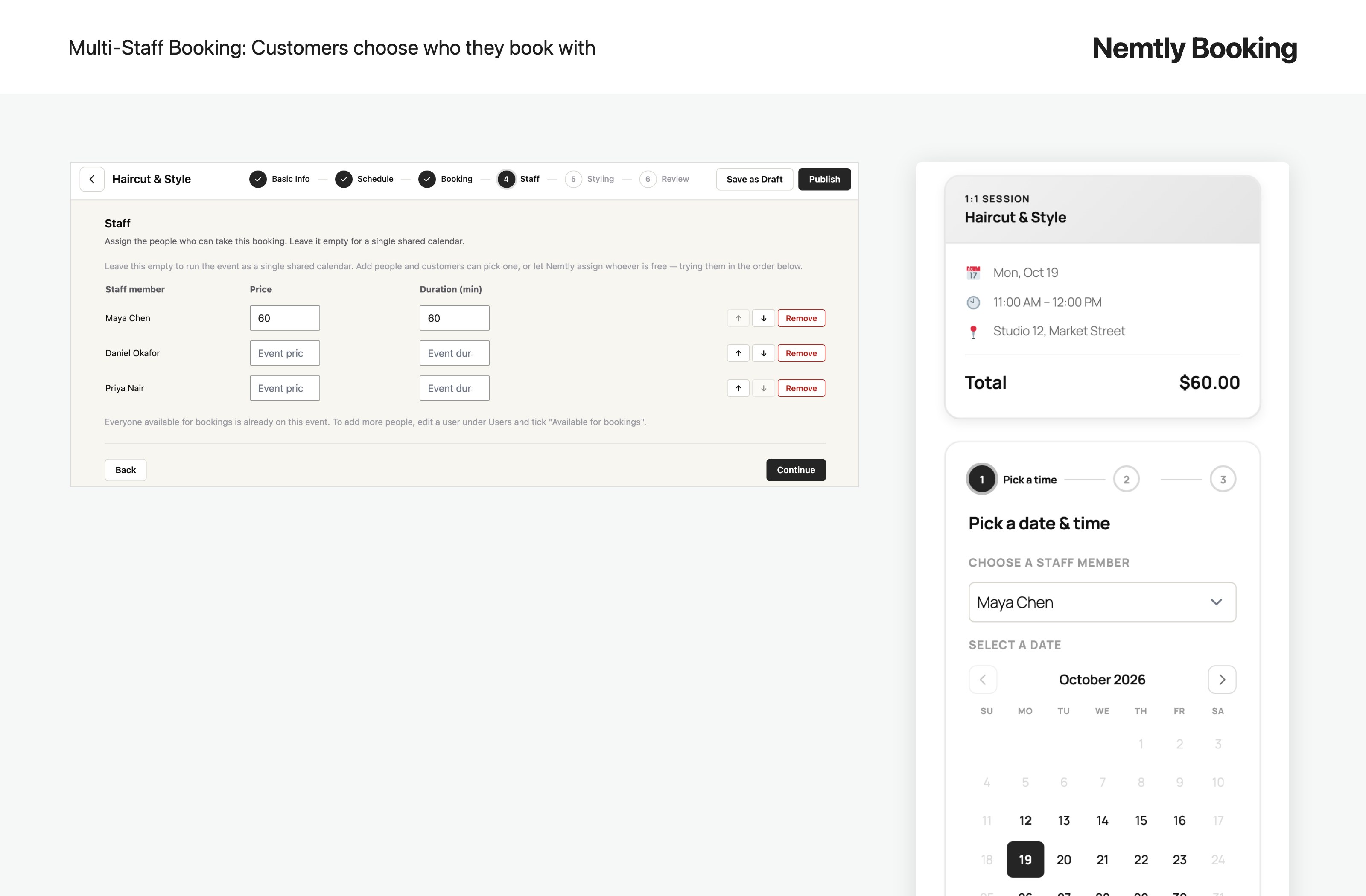
Multi-Staff Booking
Let several staff members take bookings for the same service: stylists, doctors, trainers, tutors
Each staff member has their own working hours, price, and appointment length
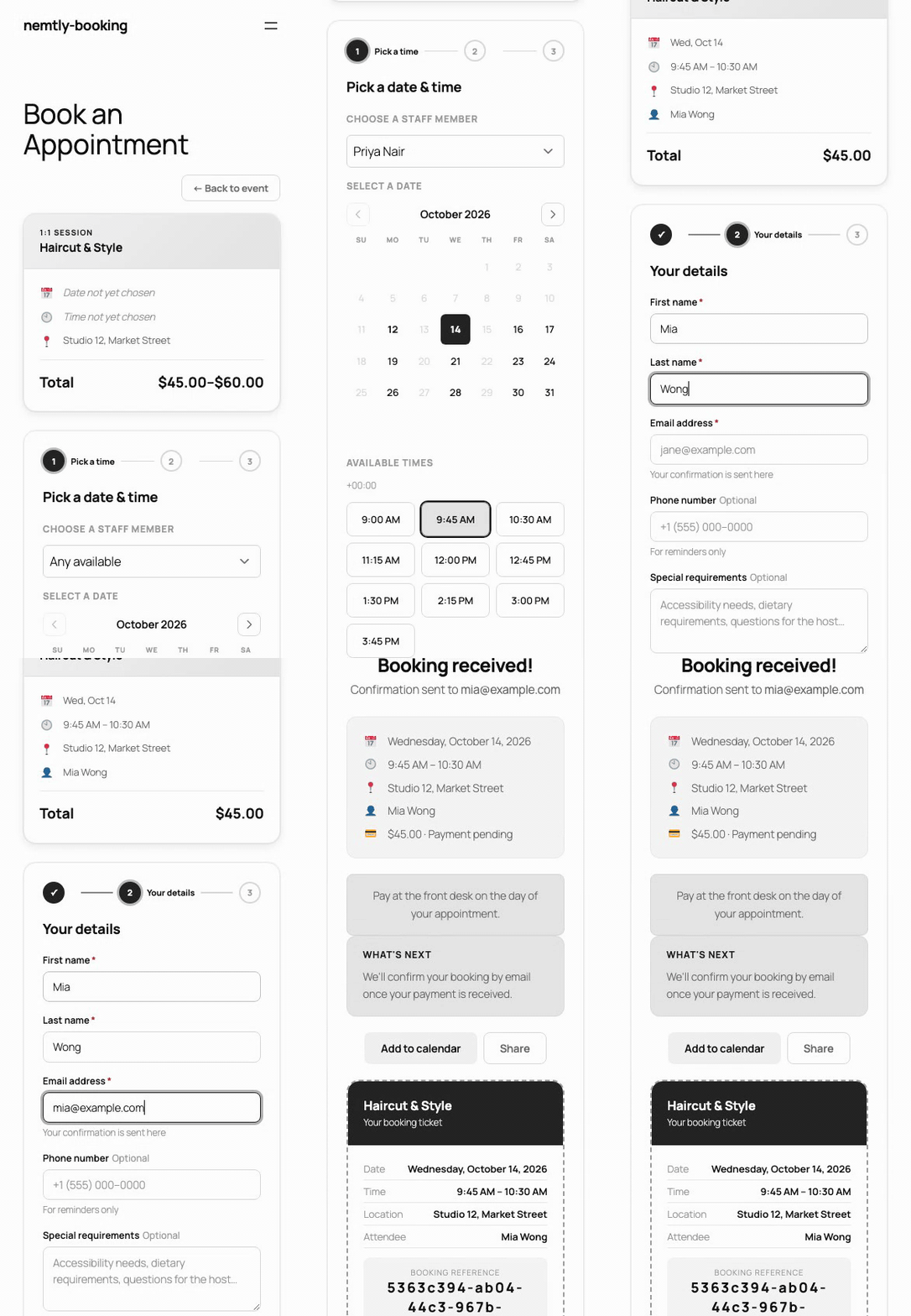
Customers pick a specific person or choose “Any available”
The calendar only shows days and times the chosen person actually works
Staff dashboard: staff sign in and see only their own bookings
Event Management
Create one-time, recurring, and slot-based events
Category and tag organization for filtering
Set pricing per event, free or paid with Stripe
Google Calendar two-way sync: set it up once and forget it
Customer Experience
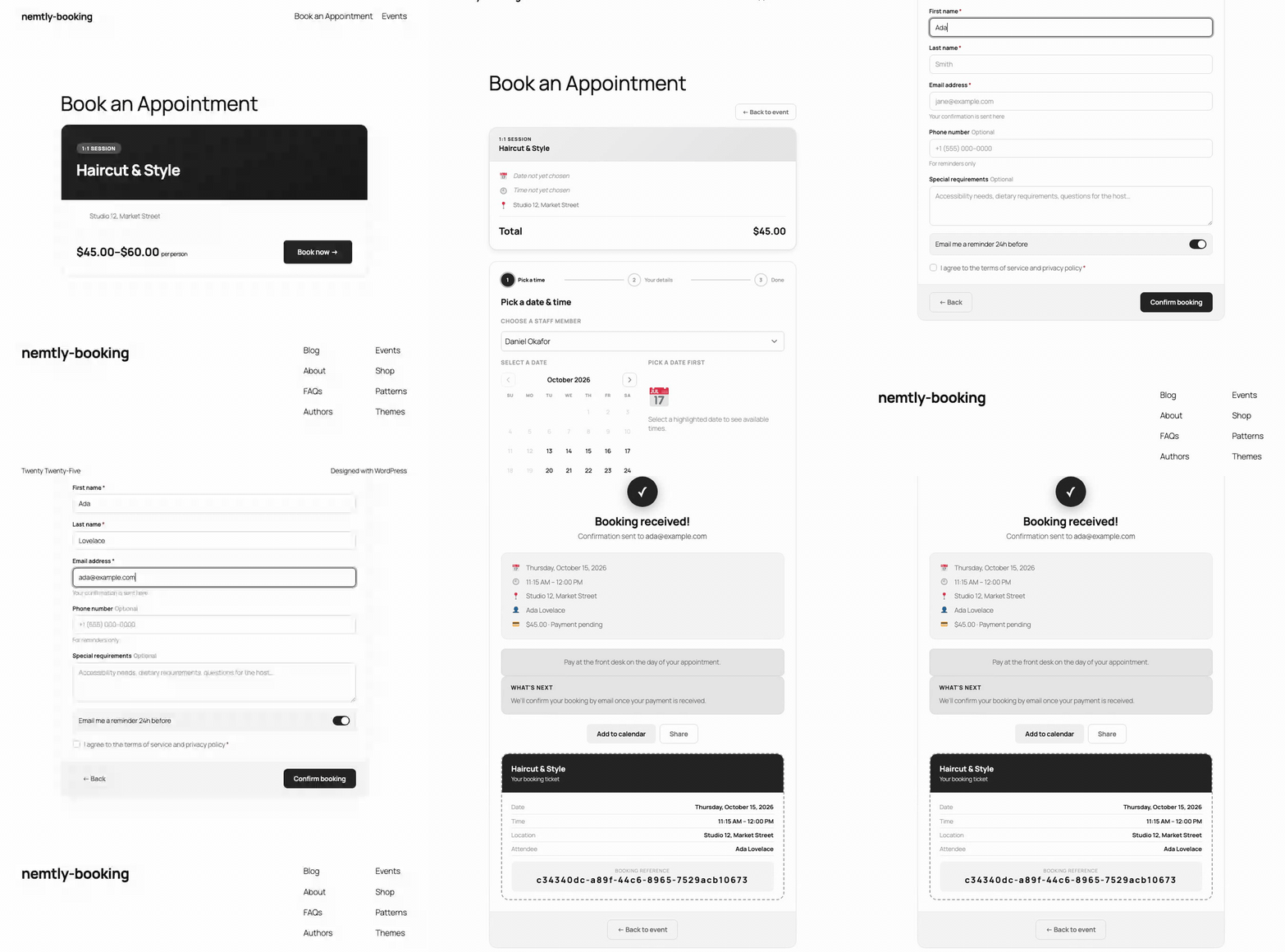
Booking forms with real-time calendar and time slot selection
Booking form builder: ask your own questions, site-wide or per event
Add to calendar: confirmation emails include a calendar file, plus Google, Outlook, and download buttons after booking
Automated email confirmations and reminders to reduce no-shows
Timezone-aware display: visitors see available times in their local timezone automatically
CAPTCHA spam protection: optional text math challenge or Cloudflare Turnstile
Magic link login, no passwords for customers
Mobile-friendly booking interface
Gutenberg Blocks, Elementor Widget, and Shortcodes
Build your booking pages with native WordPress blocks, an Elementor widget, or classic shortcodes.
Blocks
Nemtly Events: Query Loop variation for event listings, with inner blocks for Event Date, Event Price, Event Location, and Booking Trigger (Button)
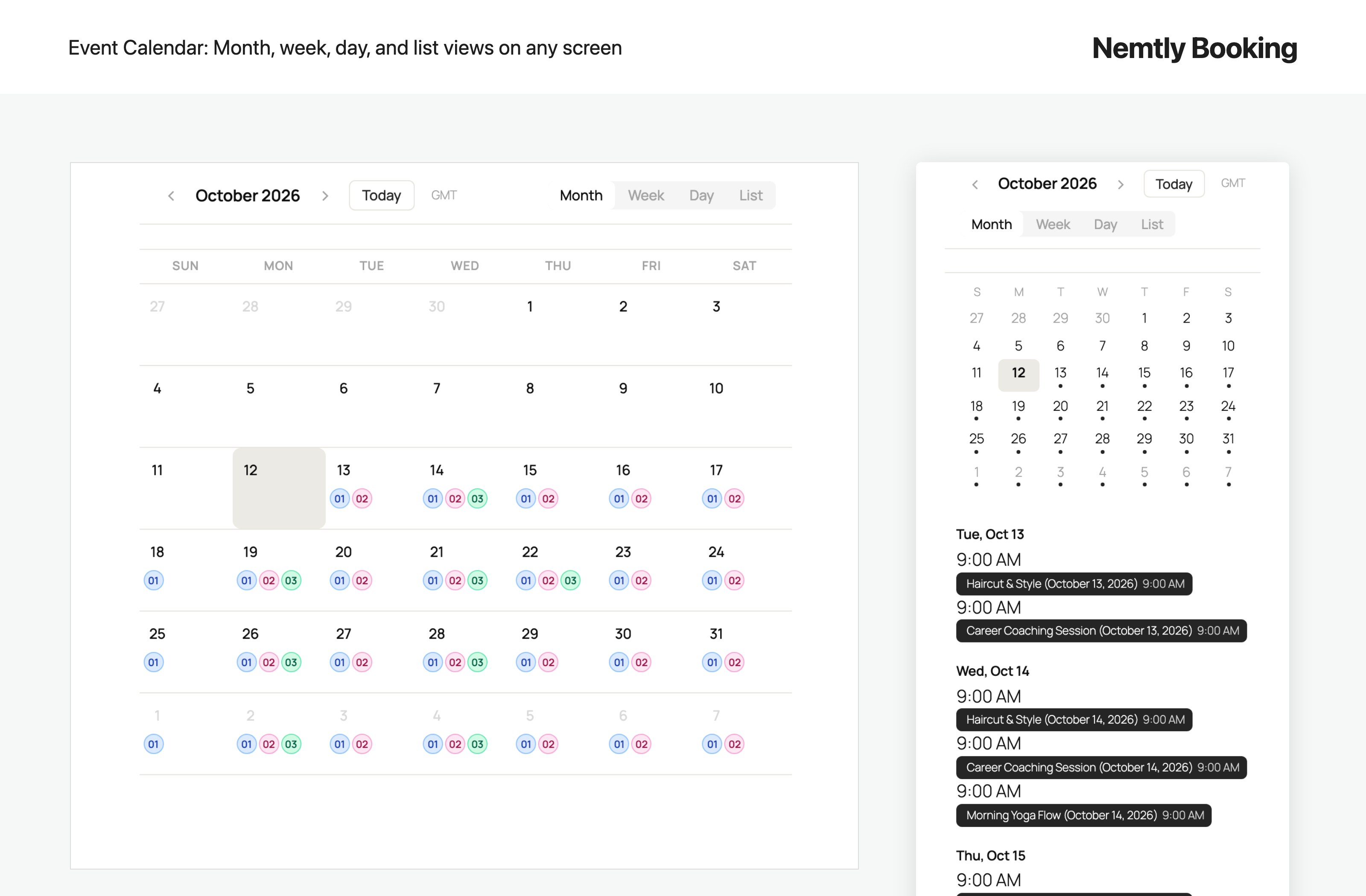
Event Calendar: Interactive calendar with month, week, day, and list views
Booking Calendar: Inline booking widget with date picker, time slots, and checkout
Shortcodes
[nemtly_event_list]: List of upcoming events
[nemtly_event]: A single event with its inline booking form
[nemtly_calendar]: Interactive event calendar
[nemtly_booking_calendar]: Inline booking calendar for one event
[nemtly_booking_form]: Booking form
[nemtly_booking_dashboard]: Customer dashboard
Elementor Widget: The Event Calendar widget (month/week/day/list views) is available as a native Elementor widget with full style controls. Drag it onto any Elementor-powered page. Requires Elementor (free).
For Service Providers
Stop managing bookings via email or phone. Nemtly gives consultants, therapists, and personal trainers a fully automated booking system. Clients book and pay themselves. You get a dashboard of confirmed appointments. Running a salon, clinic, or studio with a team? Add your staff and let clients book the person they want.
For Event Organizers
Host workshops, meetups, or conferences. Manage capacity, pricing, recurring dates, and registrations in one place. Display a calendar on your website. Automated confirmations and reminders keep everyone on track.
For Fitness and Education
Schedule classes, training sessions, or courses. Set capacity limits, recurring slots, and pricing. Students and clients see real-time availability and book 24/7.
Quick Setup
Install and activate the plugin
Create your first event or service
Add an Event Calendar block or shortcode to any page
Start accepting bookings
Built with WordPress Standards
WordPress security best practices and PCI-compliant Stripe integration
WordPress 5.8 or higher and PHP 7.4 or higher. No special PHP extensions are required. The plugin works with any properly coded WordPress theme.
Can I use this for both appointments and events?
Yes. Nemtly handles one-time appointments, recurring service bookings, and ticketed events all from the same plugin. You do not need separate plugins for events and appointments.
What payment methods are supported?
Stripe via Payment Element for online payments. This includes credit cards, Apple Pay, Google Pay, and other methods enabled in your Stripe account. You can also record manual payments for cash, checks, or bank transfers.
Can I set up recurring availability for appointment slots?
Yes. Create a recurring pattern like “Every Tuesday and Thursday, 9 AM to 5 PM, 30-minute slots” and the plugin generates available slots automatically.
Does it sync with Google Calendar?
Yes. Two-way sync: your WordPress events push to Google Calendar and vice versa. Set it up once in Settings and it stays in sync automatically via OAuth2.
Can several staff members take bookings for the same service?
Yes. Mark any WordPress user as available for bookings, set their working hours, and assign them to an event. Each person can have their own price and appointment length. Customers choose a staff member or “Any available”, and staff can sign in to see only their own bookings.
Can I use it for free events?
Yes. Pricing is optional per event. You can run free events, paid events, or a mix of both.
Does it work with my theme?
Yes. Nemtly Booking follows WordPress coding standards and works with any properly coded theme, including block themes and classic themes.
Can I display events without the Block Editor?
Yes. Shortcodes cover the main views: [nemtly_event_list], [nemtly_event], [nemtly_calendar], [nemtly_booking_calendar], [nemtly_booking_form], and [nemtly_booking_dashboard].
Is there a customer dashboard?
Yes. Add the [nemtly_booking_dashboard] shortcode to any page. Customers log in with a magic link, no passwords needed, and can view their booking history.
Does it send email reminders?
Yes. Automated email confirmations go out when a booking is placed, and you can configure reminder emails to send before the event to reduce no-shows.
Can I charge different prices for different events?
Yes. Each event has its own pricing settings. Set custom prices per event, or leave pricing blank for free events.
How many events or bookings can I create?
There are no limits. Create as many events and accept as many bookings as you need.
Can customers reschedule or cancel bookings?
Customers can reschedule their own bookings from the customer dashboard once you turn it on under Settings > Rescheduling, where you also set a deadline and a limit per booking. Admins can confirm, cancel, or reject bookings from the admin panel.
Does it work with page builders like Elementor?
Yes. The Event Calendar is available as a native Elementor widget with live editor preview, multi-view calendar (month/week/day/list), and full style controls, no shortcode needed. Gutenberg blocks and shortcodes also work inside any page builder that supports them, including Elementor, Beaver Builder, and Divi.
Are there video tutorials?
Yes. Step-by-step videos covering setup, appointment booking, the booking form builder, multi-staff booking, group classes, and Stripe payments are on the Nemtly YouTube channel.
Is the plugin translation-ready?
Yes. All strings use the nemtly-booking text domain and are translation-ready. You can translate it using any standard WordPress translation method.
New – Attendee list with a session filter, CSV export and print sheet
New – Use business hours button in the event editor
Improved – Multiple choice questions are now called Radio
Improved – Staff column in the admin Bookings list
Fix – Online meeting links stay private until a booking is confirmed
Fix – Pending bookings are no longer told they are confirmed
Fix – Prices show the site’s currency symbol
Fix – Slots are hidden when no assigned staff member is working
Fix – The first multiple-choice label selects its option
Fix – Add and Edit Booking form styles are restored
2.5.0 25-10-2026
New – Booking form builder: add your own questions to the booking form, site-wide or per event
New – Conditional logic for booking form questions: show or hide a question based on earlier answers
New – Customers can reschedule their own bookings from the booking dashboard, with an optional deadline and limit (Settings > Rescheduling, off by default)
New – Event Countdown block and [nemtly_countdown] shortcode
New – Capacity progress bar in the admin Events list
New – Manual approval: choose which free, offline-paid, or card-paid bookings wait for your approval. Rejecting a paid card booking refunds it
New – Confirmation and cancellation emails attach a calendar file (.ics), on by default
New – Add to Google Calendar, Outlook, and Download buttons on the booking confirmation
New – Booking lifecycle hooks for confirmed, cancelled, rejected, rescheduled, and status changes, with who made the change and why
Improved – Free bookings are confirmed straight away
Improved – A rescheduled booking emails the customer and admin with the old and new time, attaches an updated calendar file, moves the Google Calendar entry, and gets a fresh reminder
Fix – Staff members can no longer view another staff member’s booking
Fix – Stripe webhooks and refunds handle zero-decimal currencies such as JPY
Fix – Settings save again after the dashboard page is deleted
Fix – The booking cutoff is enforced, and closed slots and days are hidden
Fix – The text CAPTCHA answer is checked on the server
Fix – Full group sessions offer the waitlist, and waitlisted bookings are labelled in the admin list
Fix – The Price block shows the event’s real price in the editor
Fix – Event Calendar block view toggles and Week Starts On setting work again
Fix – Calendar filters apply to recurring events
Fix – Online meeting links and venue fields save and clear correctly
Fix – Staff keep their role and profile styles
Fix – The setup wizard keeps its working hours, sample event days, and preview link
Fix – The event editor header fits the screen
2.4.1 13-10-2026
Fix – Saving settings without changing anything no longer shows “Failed to save settings”
Fix – Bookings awaiting payment are now titled “Booking received” instead of “Booking confirmed”
Fix – The staff picker on the booking form now has a label for screen readers
Fix – Event wizard steps keep their names for screen readers on phones
Improved – Staff price and duration fields show the event’s value as a hint instead of cut-off text
2.4.0 13-10-2026
New – Multi-staff booking: assign several staff members to an event, each with their own working hours, price, and duration
New – Customers can pick a specific staff member or “Any available” when booking
New – Staff dashboard where staff see only their own bookings
New – Staff settings on the user profile, saved with the WordPress “Update User” button
New – Staff step in the event form
Improved – Booking calendar only offers days the selected staff member works
Improved – Booking summary shows the selected staff member’s price, or a price range for “Any available”
Improved – One-on-one events with staff treat each staff member as a separate slot, so one booking no longer blocks the time for everyone
Improved – Staff-aware time slots respect buffer times
Fix – Logged-out visitors can now book. Previously the booking form failed to load or submit unless you were signed in as an administrator
Fix – The Events list now shows each event’s confirmed booking count instead of 0
Fix – The Bookings list shows the booked time instead of 12:00 AM, and no longer shows the previous day for sites west of UTC
Fix – The admin header showed version 2.0.1 since 2.1.0, which also stopped browsers from loading updated plugin CSS and JavaScript after an upgrade
Removed – The [nemtly_events_new] shortcode, which failed to render. Use [nemtly_event_list] instead
2.3.0 05-07-2026
New – Elementor Event Calendar widget with multi-view (month/week/day/list), categories, tags, and full styling controls
New – Global business hours setting as default for new slot-based events
New – Timezone-aware slot picker: visitors see available times in their local timezone
New – CAPTCHA support (Text math challenge or Cloudflare Turnstile) with admin toggle
2.2.0 20-06-2026
New – Per-event styling system with template presets (Mono, Bold, Warm, Ocean, Forest, Festive)
New – Setup wizard with business-type personas, work hours, notifications, payments, and branding steps
New – Classic theme support via template loader for archive and single event views
New – Single event shortcode and extended shortcode library
Improved – Booking form wizard with new AvailabilityEditor, StylingStep, ReviewStep, and booking sub-components
Fix – Replace deprecated get_page_by_title() with WP_Query
2.1.1 31-03-2026
New – Categories & Tags admin page for organizing events
Improved – Availability editor with clearer active/inactive day styling
Fix – Pin dependencies to maintain PHP 7.4 compatibility
2.1.0 31-03-2026
New – Categories & Tags admin page for organizing events
Improved – Availability editor with clearer active/inactive day styling
Fix – Pin dependencies to maintain PHP 7.4 compatibility
2.0.1 23-03-2026
New: Interactive event calendar with month, week, day, and list views, with multi-day event spanning and month navigation
New: Booking Calendar block and [nemtly_booking_calendar] shortcode for inline booking on any page
New: Nemtly Events block, a Query Loop variation for displaying events anywhere in the Block Editor
New: Availability recurrence patterns for slot-based events: recurring availability windows that generate automatically
New: Google Calendar two-way sync via OAuth2
New: Stripe Payment Element with webhook verification
New: Manual payment recording for offline payments
New: Price field for events
New: Timezone dropdown sourced from WordPress site settings
Improved: Frontend event filtering, faster and more accurate
Improved: Stripe webhook handling and payment status tracking