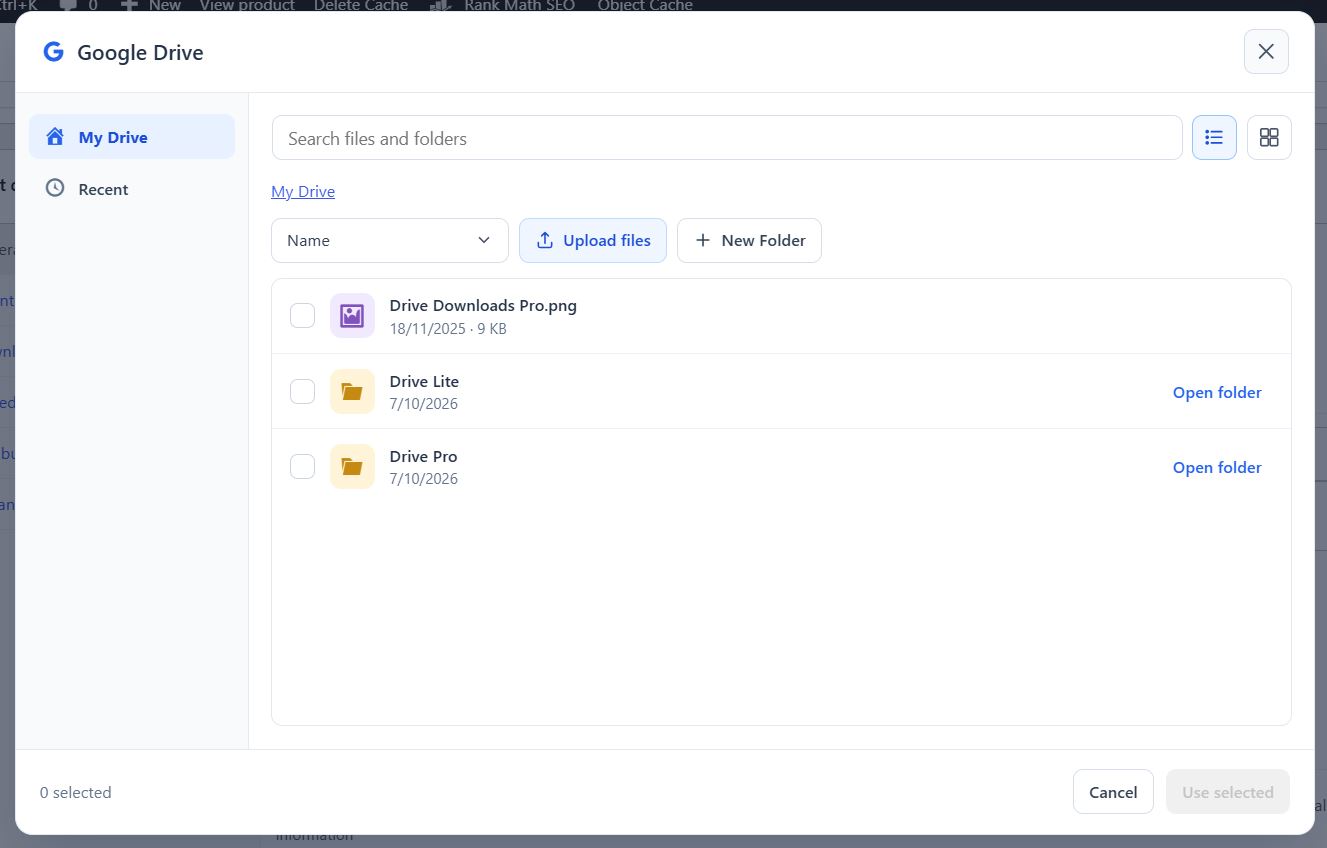
Connect Google Drive to WooCommerce and manage downloadable products more easily. Browse, search and select Google Drive files or folders in the built-in explorer, then add them to WooCommerce products without manually copying links. Works with simple and variable downloadable products.
Your files stay in Google Drive. Customers receive download links through WooCommerce, and access follows the sharing permissions you set in Google Drive.
Video tutorial: Set up the Google Drive API
Watch this step-by-step tutorial to create your Google Cloud credentials and connect Drive Downloads Lite or Pro.
What you can do with Lite
Find files quickly. Browse your folders, search, check recent items and switch between list and grid views.
Add multiple downloads. Select files and folders in the explorer and attach them to simple or variable WooCommerce products.
Upload and organize. Upload files with a progress bar and create new folders when your Google account allows it.
Edit with confidence. Reopen the explorer and see the already-linked file or folder selected, when accessible.
Keep using WooCommerce. Customers receive their download links through WooCommerce, with its usual order and download settings.
Control editor access. Administrators can use the explorer, and Shop Managers can be given access separately. Only grant it to fully trusted staff: the explorer uses an access token for the connected Google account, not a file-restricted WordPress role.
Important: Lite does not make files public, grant individual buyers access, or change existing Google Drive sharing permissions. Customers can open a linked file or folder only when its sharing settings in Google Drive permit it. Check those settings before selling the product.
Lite or Pro: which version fits your store?
Choose Drive Downloads Lite if you want a quick way to add Google Drive files and folders to WooCommerce:
Connect one Google Drive account to your store.
Browse, select and organize Drive files from the product editor.
Deliver standard WooCommerce links that open in Google Drive.
Manage file sharing yourself in Google Drive.
Choose Drive Downloads Pro if you need more control over how customers receive their purchases:
Deliver supported files directly through WooCommerce, without opening Google Drive; supported folders can be packaged as ZIP files.
Give individual buyers private access or use managed sharing links.
Grant and revoke access automatically according to your order settings.
Set delivery rules per product and use files from multiple Google Drive accounts.
Manage customer access and supported WooCommerce subscription changes with less manual work.
Lite is ideal for straightforward shared links. Pro is designed for private delivery and automated access management.
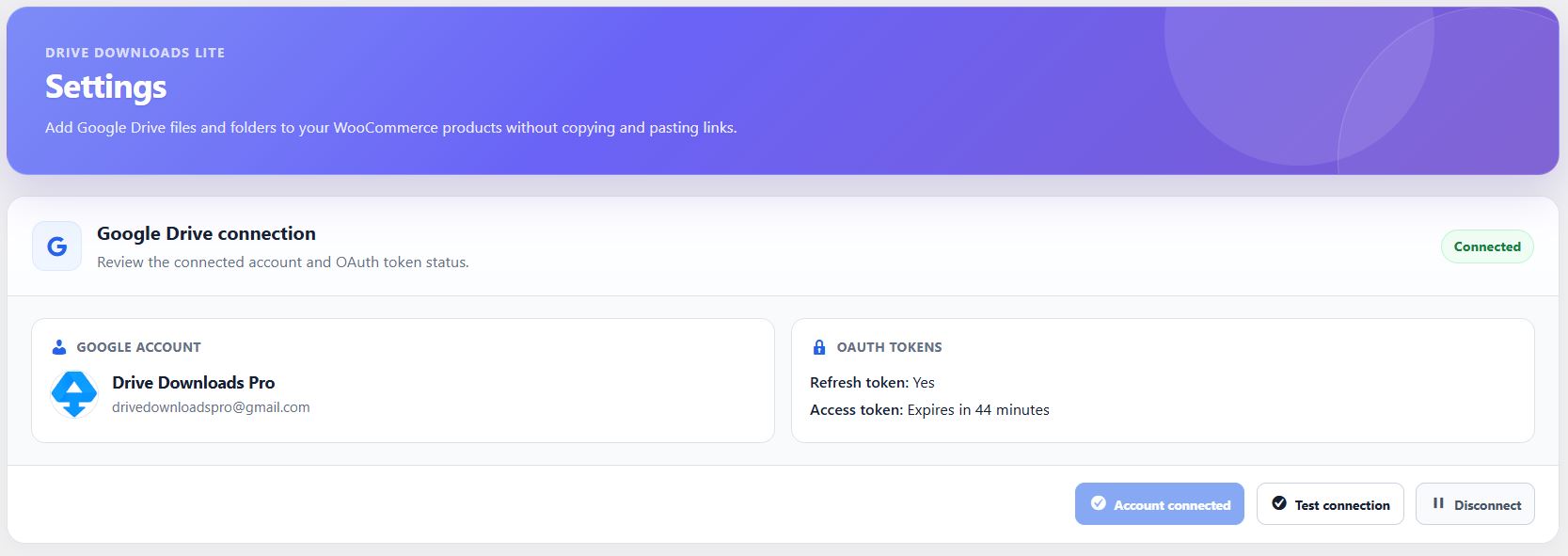
Open Downloads Lite in the WordPress admin and enter your Google OAuth credentials.
Connect the Google account and confirm it can access Drive.
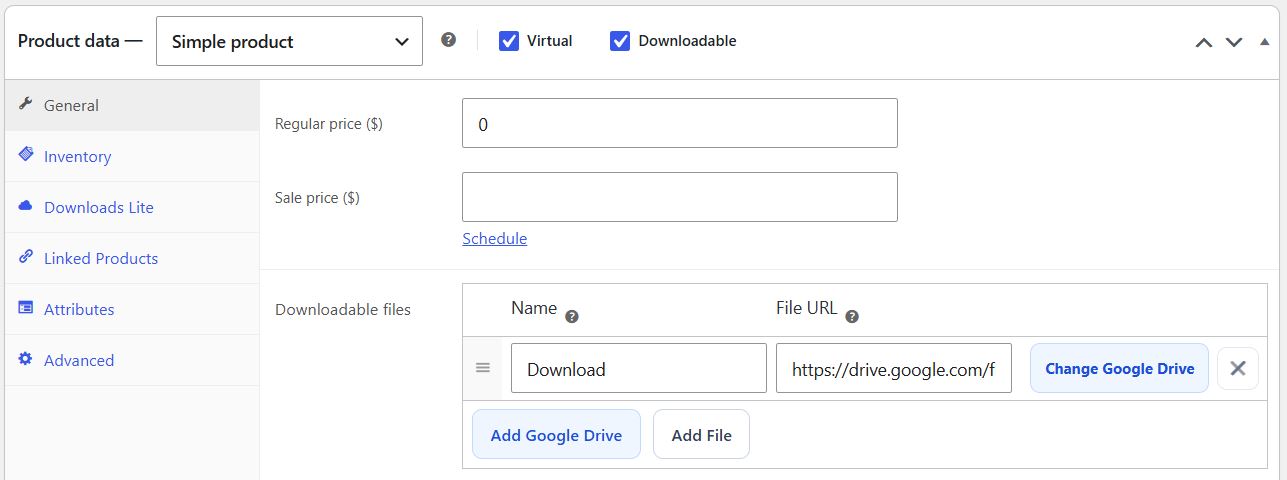
Edit a WooCommerce product and enable Downloadable.
Click Add Google Drive next to Add File to add a Drive download, or Change Google Drive to edit an existing Drive-linked download.
Save the product and confirm that the linked item is shared appropriately with buyers.
External services
Drive Downloads Lite connects directly to Google APIs through an OAuth app that you configure in Google Cloud. A Google account and Google Drive API access are required.
When you connect your account, Google receives an OAuth authorization request, and the plugin exchanges and refreshes tokens with Google’s OAuth service. The plugin uses Google Drive API to access account profile information (name, email address and profile-photo URL) and file/folder metadata such as names, identifiers, types, parents and sharing links. The explorer may request metadata for files and folders that the connected account can access.
When you choose to upload a file or create a folder, the action is sent from your browser directly to Google Drive API. Lite does not send files to the plugin developer’s servers. Selected Drive URLs are stored in WooCommerce on your site. Lite does not automatically change existing files’ sharing permissions or grant access to customers.
Google’s services process the data required for these operations according to their policies:
Can I use Drive Downloads Lite without WooCommerce?
Yes. Create public Google Drive file libraries directly in WordPress and insert them in your pages or posts. WooCommerce is needed only for downloadable-product integration.
How do I create a file library?
Open Downloads Lite > File libraries, select New library, enter a name, select your files or folders, confirm the public links, choose the appearance and save.
How do I display a library in a page or post?
Add the Drive library (Lite) block in Gutenberg and select your library. Alternatively, copy the shortcode from File libraries, such as [ddp_lite_library id="123"] (use your own library ID), and paste it into your content.
Does Lite work with Elementor?
Yes. Add Elementor’s Shortcode widget and paste your library’s shortcode. The dedicated Google Drive Library widget, automatic content assignment and advanced Elementor appearance controls are available in Pro.
Can I use one library on several pages?
Yes. Reuse its block or shortcode wherever you want to show the same library. Changes made to the library are reflected in those locations when the page is rendered again. Clear affected page caches if needed. Lite uses a manually selected library; Pro can automatically show the libraries assigned to the current post or page.
Can I customize the appearance of a library?
Yes. Choose list or grid layout, an accent color and your own download button label. The file name filter can be enabled or disabled separately for each library. Pro provides additional Elementor design controls.
Can I add folders or automatically list their contents?
Lite can link to a Google Drive folder. Visitors open that folder in Google Drive, subject to its sharing permissions. Lite does not automatically add newly created files to the library itself. Live folder browsing and eligible ZIP downloads on your website are available in protected Pro libraries.
Will visitors be able to open any file I select?
Only if the Google Drive sharing settings allow them to open it. Lite does not change sharing permissions. Files intended for public visitors must be appropriately shared in Google Drive. For protected WordPress libraries with user and role restrictions, see Drive Downloads Pro.
Do files download directly from my WordPress website?
Lite opens selected files or folders in Google Drive. It does not proxy library downloads through your hosting server. Pro offers protected delivery through your website for supported files and folders, and can also deliver supported WooCommerce downloads directly.
Can I connect multiple Google Drive accounts?
Lite connects one Google Drive account. Pro supports multiple accounts, including combining items from different accounts in the same library or WooCommerce product.
Can I add Google Drive files to WooCommerce products?
Yes. Lite adds Google Drive URLs to WooCommerce downloadable simple and variable products. WooCommerce handles the normal order download link. Buyers must also have the necessary Google Drive access.
Can I upload files or create folders?
The WooCommerce product explorer supports file uploads and folder creation when the connected account and authorized permissions allow them. Files are uploaded directly to Google Drive from the browser. The WordPress library selector is for browsing and selecting existing files and folders.
Does Lite change Google Drive sharing permissions?
No. Manage sharing in Google Drive. Pro’s WooCommerce integration can manage eligible customer access and shared-link delivery automatically; Pro’s protected WordPress libraries use the connected account to deliver files without changing their existing Google Drive sharing permissions.
What does Pro add compared with Lite?
For WordPress, Pro adds automatic library assignment, a native Elementor widget with advanced styles, multi-account libraries, protected access, role and user restrictions, live folder browsing, eligible ZIP downloads, supported media previews, access limits, activity tracking and custom visitor messages. For WooCommerce, Pro adds supported direct delivery, managed private buyer access, order-based automation and flexible per-product delivery settings.
Protected WordPress delivery uses your hosting resources. Limits include 512 MB per file or folder contents, 250 files per ZIP and 50 MB per supported preview. ZIP delivery requires PHP ZipArchive. Activity records prepared accesses, not confirmed completed transfers. Public links do not provide protected access statistics.
Will upgrading to Pro remove my libraries or WooCommerce downloads?
No. Current Pro versions support existing Lite public libraries and WooCommerce download links. Connect and verify Google in Pro before retiring Lite. Converting a Lite library to protected access or multiple accounts requires selecting its items through Pro; its existing embeds are retained but the converted library requires Pro. Revoke any unwanted public sharing in Google Drive before offering protected access.
Do I need a Google API key or project number?
No. Create a Google Cloud OAuth Client ID and Client Secret and enable the Google Drive API. Follow the installation instructions.
Does Lite support multiple languages and multisite?
The plugin interface includes English, Spanish, French and Portuguese. On multisite each site maintains its own connection. Library names, file names and custom button labels are content entered or selected by the administrator and are not automatically translated.
What information does Lite store?
Lite stores Google OAuth connection settings, encrypted credentials and tokens, cached account profile information, selected file metadata and library settings or WooCommerce download links. File contents are not copied to WordPress. Library records remain when Lite is uninstalled to preserve administrator-created content and compatibility with Pro.
Can I keep the encryption key outside the database?
Yes. Server administrators can define the optional DRIVDOLI_ENCRYPTION_KEY constant in wp-config.php using 64 hexadecimal characters (32 random bytes). Lite migrates existing credentials and removes the previous database key only after verifying stored secrets. Back up the external key securely and do not remove or change it while an account is connected. This is optional.
Improved connection notices and library editor consistency.
Hardened library request validation and protected access handling.
3.0.0
Introduced the new WordPress and WooCommerce edition of Drive Downloads Lite, with reusable public Google Drive file libraries for pages and posts.
Create libraries in list or grid layouts, customize the download button and accent color, and optionally display a file name filter.
Insert libraries using the Gutenberg block or a shortcode, including the Elementor Shortcode widget. Existing WooCommerce downloads and library embeds remain unchanged.
Improved public-facing library messages, editor guidance and the Spanish, French and Portuguese translations.
Updated the WordPress.org description, installation guide, FAQs, screenshots descriptions and Lite/Pro feature comparison.
2.4.13
Improved the Pro feature panel with local SVG check icons, responsive alignment and concise feature labels.
Show only the connected Google account name in the library editor, with a generic label when the name is unavailable.
2.4.12
Show the connected Google account name and email in the library editor.
Match the File libraries menu label with Pro.
2.4.11
Improved Pro feature descriptions for WordPress libraries, including automatic content assignment, Elementor styling and visitor messages.
Simplified upgrade messaging and updated Spanish, French and Portuguese translations.
2.4.10
Matched the public library spacing with Pro and corrected stylesheet cache versioning.
Matched file name filtering and the translated no-results state with Pro.
2.4.9
Clarified Pro library features, protected-only options, multi-account libraries and server delivery limits in the upgrade messages and documentation.
2.4.8
Matched file icons in the library file browser and selected files list with the public library file types.
2.4.7
Improved public file library icons with file type detection, matching icons and a safe fallback for unknown files.
2.4.6
Added a per-library option to show or hide the public-facing file filter. Existing libraries retain their filter by default.
2.4.5
Matched file library switches to the original plugin settings design, preserving existing checkbox behavior.
2.4.4
Updated library translations, including editor controls, browser messages and protected download notices.
Improved WordPress-only screens and contextual feature descriptions.
Added a Pro feature overview to public libraries and updated the plugin display name.
2.4.3
Allow selecting the same shared Drive file from another connected account after reselecting it with a fresh proof.
Clean up newly created library records when metadata cannot be saved.
Clarify standalone WordPress setup and WooCommerce requirements.
2.4.2
Preserve public library sharing confirmation and require a fresh confirmation when the selected links or account change.
Prevent theme link underlines on library download buttons.
2.4.1
Redesigned WordPress file library settings, file picker, editor block and library display to match the Drive Downloads visual identity.
Improved responsive layouts and asset cache versioning.
2.4.0
Added optional WordPress file libraries, shortcodes and a block. WooCommerce integration remains available when installed.
2.3.35 — Pro download compatibility
Prevent Lite from reclassifying downloads explicitly assigned to Pro, including when the Pro editor is unavailable.
Keep Lite downloads and their existing WooCommerce download IDs intact.
2.3.34 — Explorer reliability and permission checks
Recover when the explorer stylesheet fails to load and isolate Lite editor styles from Pro.
Apply Google Drive permissions immediately after token renewal and show a reconnect action when Google rejects the saved credentials.
Stop stalled explorer requests and limit the time spent looking up previously linked downloads before opening the explorer.
Ignore malformed order download permission rows while saving valid WooCommerce rows.
2.3.33 — Product editor explorer loading
Retry loading the built-in explorer when its script is missing from the product editor.
Keep the Lite explorer separate from Pro and distinguish script loading errors from Google authorization errors.
2.3.32 — Lite to Pro compatibility
Keep the Lite product editor available while Pro is being connected.
Preserve the origin of Google Drive downloads on simple products and variations so Pro can retain WooCommerce delivery.
Route Google OAuth callbacks to the correct edition and preserve Pro authorization when both editions use the same OAuth client.
2.3.31
Show connection and reconnection actions that match the Google OAuth status, and verify that the account can list files before reporting a successful test.
Show explorer errors in the product section where the picker was opened and report when WooCommerce requires administrator approval for a new download location.
Add a test link for attached Drive downloads. Open it in a private window to check the buyer’s Google Drive access.
Allow uploads to be cancelled and stop stalled transfers. Keep files that Google already confirmed in the selection.
Clean up each site’s Lite settings when uninstalling from a multisite installation.
2.3.30
Reviewed WooCommerce 11.3 product-download and customer download-permission interfaces, including simple and variable products and HPOS-compatible order data access.
Corrected downloadable-product checkbox handling in the Google Drive picker so variation edits do not modify the parent product’s setting.
Verified WooCommerce customer-download lookups and order-permission validation against the current WooCommerce interfaces; existing credentials and OAuth behavior are unchanged.
Updated WooCommerce compatibility metadata without changing existing Drive connections, linked files, download IDs or customer permissions.
2.3.29
Added an optional external encryption key for Google credentials, with verified migration that preserves existing connections.
Improved Google OAuth disconnect feedback when remote access revocation cannot be confirmed, and verified token persistence before reporting a successful connection.
Hardened settings and picker request validation against malformed inputs, and allowed extra time for slow Google token renewals.
Avoided unnecessary credential and upgrade processing on public storefront requests.
Clarified the access granted to trusted Shop Managers, without changing existing sharing and checkout behavior.
2.3.28
Use WooCommerce’s own blank download-row template when its native Add File handler is unavailable, including products without existing download rows.
Validate name, URL and download-ID fields as matching WooCommerce arrays for simple products and variations, without cloning or changing existing download identifiers.
Updated WooCommerce 11.2 compatibility metadata; existing links, permissions and Google connections are unchanged.
2.3.27
Improved Spanish, French and Portuguese translations across settings and the Google Drive explorer.
Made file-selection messages, confirmation buttons and error notices clearer and more consistent.
Refined the WooCommerce product editing experience and improved overall efficiency.
General compatibility and maintenance improvements without changing existing downloads or Google Drive connections.
2.3.26
Improved the plugin name and short description to make its Google Drive integration with WooCommerce clearer in WordPress.org search results.
Refined the five directory tags and screenshot captions for easier discovery and understanding.
Preserved the Google Drive explorer, WooCommerce integration, existing settings, translations and setup video.
2.3.25
Consistent Google Drive explorer. Updated the My Drive SVG and improved opening and closing without resizing the WooCommerce editor or losing its scroll position.
Improved download naming. Continue automatic download numbering across separate selections and explorer sessions; use original Google Drive filenames when no default name is configured.
Clearer existing selections. Show saved downloads in Add Google Drive and Change Google Drive, without duplicating saved WooCommerce download rows.
Reliable multi-selection. Preserve selected items while browsing folders and safely add or replace multiple downloads within a product or variation.
New Folder preserved. Keep folder creation available when the connected Google account has sufficient write permissions.
Compatible WooCommerce downloads. Preserve standard files, external URLs, existing download links, Google account settings, and the Lite-to-Pro upgrade path.
2.3.24
Consistent WooCommerce actions. Add Google Drive appears alongside WooCommerce’s native Add File action on simple and variable downloadable products.
One button per row. Drive-linked downloads use Change Google Drive; standard files and external URLs retain WooCommerce’s native Choose file.
Preserve existing downloads. Adding Drive files creates new download rows instead of replacing existing WooCommerce files or external URLs.
Improved multi-selection. Multiple selected Drive items are added separately, with rollback if a row cannot be created.
Responsive product editor. Match Pro button sizing, file-action alignment, native delete control and mobile stacked download rows.
No delivery changes. Existing WooCommerce link delivery, Google permissions, connection settings and the Lite-to-Pro upgrade path remain unchanged.
2.3.23
New Google Drive explorer. Browse folders, search for files, view recent items and switch between list and grid views without leaving the WooCommerce product editor.
Faster file management. Select multiple files or folders, upload with a progress bar and create new folders directly in the explorer.
Easier editing. Previously linked files and folders are highlighted when reopening a product download, helping you identify what is already selected.
Better WooCommerce experience. Refreshed the Google Drive button and improved its placement on simple and variable products, including newly added download rows.
Redesigned interface. Updated the explorer, account connection screen and mobile layouts for a more consistent experience.
Simpler Google setup. Removed the need for a separate API key and project number. Existing files and product links remain unchanged; some accounts may need reconnection to use the new explorer.
Improved reliability. Refined connection checks, compatibility with Pro upgrades and handling of existing WooCommerce downloads.
Clearer guidance. Updated translations, setup instructions and the Lite/Pro comparison.