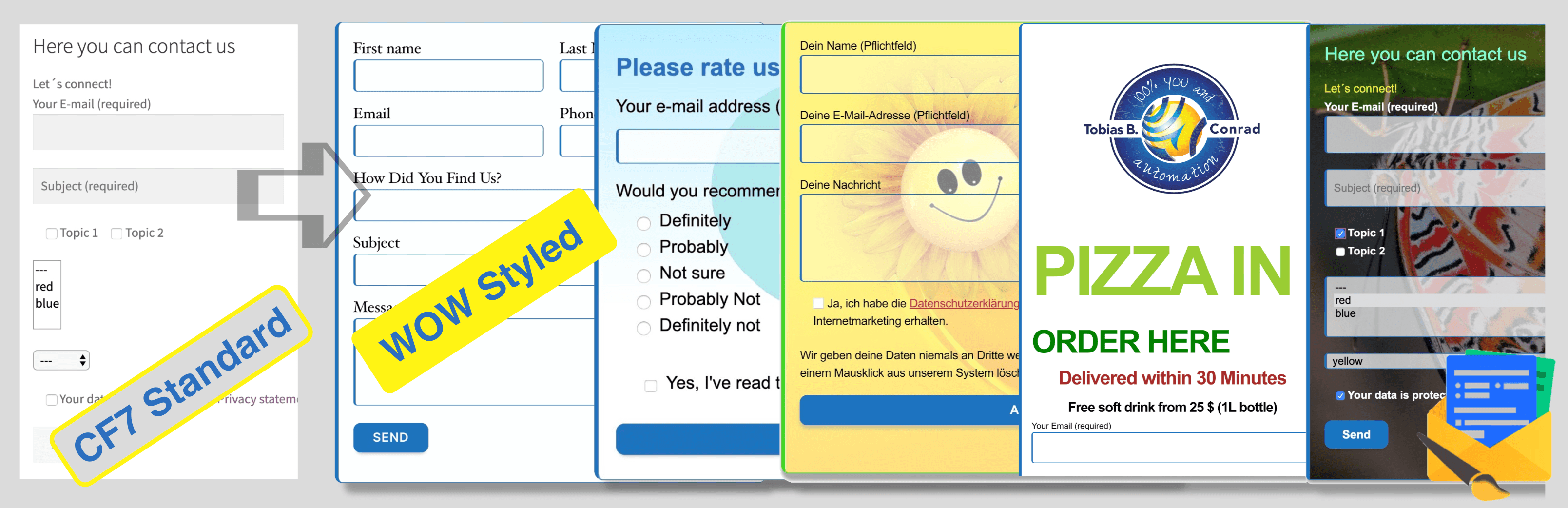
Style your Contact Form 7 forms visually – no coding required.
Many website owners struggle with Contact Form 7 forms that look generic and don’t match their brand. Creating professional-looking forms usually means either hiring a developer or learning CSS. With WOW Styler for CF7, you get a visual styling interface that lets you design forms directly in your browser—no code, no hassle.
See it in action (1:18 video):
The Problem WOW Styler for CF7 Solves
When you have multiple Contact Form 7 forms across your site, each one requires separate styling work. Without WOW Styler for CF7, you’re stuck with:
Forms that all look the same, clashing with your brand
Needing CSS knowledge (or hiring someone) to customize each form
Difficulty placing multiple differently styled forms on one page
Page builders that strip out your CSS, breaking your form design
Time wasted rebuilding form styles for every new form you create
How WOW Styler for CF7 Works
Create one design. Reuse it everywhere. WOW Styler for CF7 lets you:
Style directly in the browser – No CSS editor needed. Visual controls for colors, spacing, buttons, backgrounds, fonts, and more.
See changes instantly – Live preview shows every adjustment in real-time.
Save as reusable styles – Once you’ve styled a form, save it as a scheme and apply it to other forms in seconds.
Adapt for different purposes – Tweak the same base style for different forms (contact, support, sales) on the same page.
Why Choose WOW Styler for CF7?
WOW Styler for CF7 is built for users who already use Contact Form 7 and want professional form design without learning CSS or switching to a new plugin. You keep all your existing forms, integrations, and workflows—you just add beautiful styling.
Live preview shows changes as you make them. Split view lets you compare your published form with your draft side by side. The plugin even pulls your theme’s fonts and colors as a starting point, so you only customize what matters.
Works perfectly with all themes, page builders (Elementor, Thrive, Divi, etc.), and modern browsers.
Who Needs This?
One Main Form? The free version is perfect. Style your primary contact, booking, or support form once and you’re done.
Multiple Forms with Different Purposes? The Pro version lets you create individual styles for multiple forms—ideal for:
Pro only: Animated GIFs, background images, opacity control, “one per line” checkboxes/radio buttons, special CSS loading for page builders
Get Started in 3 Steps
Install and activate WOW Styler for CF7
Go to Contact → CF7 Styler in your WordPress admin
Select a form and start styling with the visual interface
Free Version vs. Pro
Free: One fully styled form with all basic customizations (colors, fonts, spacing, buttons, backgrounds).
Pro: Multiple forms with individual styles, animated backgrounds, GIF support, and advanced layout options. 14-day free trial included—no credit card required.
Integrate with Your Marketing Stack
Use WOW Styler for CF7 with other WordPress tools:
WP2LEADS – Collect form data and send it to your email marketing tool or CRM for automation
WebinarIgnition – Run live and automated webinars on WordPress and invite your best form leads to product demos, trainings, and launch events
Forms collect the right people. Webinars close the sales.
Productivity forms + marketing forms
Use WOW Styler Pro to style multiple CF7 forms for quotes, support, contact, HR, and different departments—each with its own inbox and workflow. Then run separate marketing forms with free webinars, lead magnets, and sales automation in WebinarIgnition. Evergreen webinars build a solid information foundation, and live Q&A sessions focus only on high-intent questions that lead to action.
Can I test the Pro features in a free trial period?
Yes. All Pro features are available during a 14-day free trial. You’ll receive an email reminder before the trial ends so you can decide whether to upgrade to a paid plan.
Who needs more than one styled form on a site?
Shops, agencies, and SaaS providers often benefit from multiple forms:
Shops: separate forms for returns, support, invoice questions, feature requests
Agencies: new client intake, existing client support, project onboarding
SaaS: demo requests, bug reports, feature ideas
Each team can have its own form with its own questions and recipient email, instead of maintaining one large conditional form.
How can I get WOW Styler for CF7 Pro for free?
If you have activated a WP2LEADS Pro license, you can use WOW Styler for CF7 Pro for free.
Join our affiliate program and refer paying customers. You’ll earn 35% commission on each sale—refer 3 customers and your license essentially pays for itself (3 × 35% = 105%).
Find the program details inside the plugin under Affiliation.
Can I propose a plugin customization?
Yes. We welcome feature suggestions. Please describe your use case in the support forum. A short screen recording (without personal data) helps us understand your request faster.
Do you have an affiliate program?
Yes. Earn 35% lifetime commission on every referral through your affiliate link. Write a blog post about WOW Styler for CF7 and get 12 months of Pro access free.
Find all program details inside the plugin under Affiliation.
Watch this video to learn more about earning with the affiliate program:
https://www.youtube.com/watch?v=1eMYnhXzTaU
What are the server requirements for WOW Styler for CF7?
Minimum PHP memory: 64MB. 128MB is recommended for optimal performance.
What if I use Thrive Architect?
We have a video tutorial showing how to add WOW Styler for CF7 styling inside Thrive Architect.
Use the Loco Translate plugin to generate .po and .mo language files. After that, share the generated files via email to support@saleswonder.biz.
Find Loco Translate here: https://wordpress.org/plugins/loco-translate/
Do you reward translations?
Yes. Contribute translations via Loco Translate and send the files to support@saleswonder.biz. We’ll give you 12 months of Pro access as thanks.
How can I update or manage my Pro license?
Option 1 (Recommended): Purchase directly inside the plugin. Your license activates immediately.
Option 2: Buy via email. Download and install the Pro version from your confirmation email, then enter your license key on activation.
Your Pro features activate instantly.
Have fun styling your Contact Form 7 forms like a pro!
How can I report security bugs?
Report security vulnerabilities through the Patchstack Vulnerability Disclosure Program. The Patchstack team will validate, prioritize, and resolve any issues responsibly.
Security: updated the Freemius SDK from 2.13.0 to 2.13.5 (fixes a stored XSS in admin notices).
Tested with WordPress 7.1 and Contact Form 7 6.2.4.1.
New: two ready-made presets in a dropdown. “Klar” and “Step by step (Typeform-like)” fill every value in one click. New installs start with “Klar”.
New: pick two brand colors and let the styler fill in buttons, borders, links, focus and hover. Text on buttons switches to white or dark automatically when the contrast is weak.
New: two-column layout as a setting. Text fields sit side by side, textareas and the button stay full width, phones fall back to one column.
New: step-by-step mode. One field per screen, progress bar, back and next, Enter to continue. Up to three steps are free, more with a license.
New: styling for error messages, success and error responses and the focus ring, each with its own color.
Performance: the frontend script only loads for users who can edit posts, asset versions no longer break browser caching, and the step script uses no jQuery.
Fixed: escaped output and a missing direct access guard reported by Plugin Check.
1.8.0 – 1.8.5, 2026-02-24 – 2026-03-19
Security and usability improvements based on feedback from the WordPress.org Plugin Review Team, Plugin Check (PCP), and Patchstack.
Updated plugin name, license details, headers, text domain handling, and output escaping to match current WordPress.org requirements.
Improved the styling experience so admins can understand changes faster while working with the live form preview and comparing the current form styling more easily.
Improved frontend workflow for admins: clicking the “Open Styler” button near a form now opens that exact form, making it easier to style the form you are currently looking at on the page.
Reduced unnecessary clicks during styling, helping site owners move faster from form setup to a finished design.
✨ Beyond contact forms (only inside the plugin)
After activation, if you have not opted in yet, the admin menu shows “Unlock access +”.
There you can subscribe to receive short email ideas for getting more value from your forms.
Learn how simple contact forms can lead into focused sessions, consultations, or guided visitor conversations.
Discover ways to position your website more clearly as the expert entry point for your topic.
Get practical inspiration for turning one-by-one email replies into a more scalable conversation flow.
The opt-in takes only a few seconds, is completely optional, and you can unsubscribe anytime.
Coming soon
Usability: Open forms with their current style shown more directly.
Fix: Keep the selected form active during styling, instead of sometimes jumping back to the first form in the list.
Your ideas, best idea first
Easy quickstart video for free and paid licenses, so both get the best forms styled in no time
1.7.5 2025.12.23
Thanks for using WOW Styler for CF7.
Updated Freemius SDK for better usability
Confirmed compatibility with the latest WordPress and PHP versions
Aligned plugin name, license, and headers with WordPress.org guidelines
1.7.4 2025.11.18
Updated Freemius SDK for better usability
1.7.3 2025.07.14
Thanks for using CF7 Styler
Changes in this version:
Fix security issue for better security – thanks Patchstack and Vlad for fixing
Updated Freemius SDK for better usability
Happy styling, Tobias CEO
1.7.2 2025.06.09
Working with the latest WordPress
Freemius SDK update with multiple bug fixes and improvements
Better email opt-in and license handling
https://github.com/Freemius/wordpress-sdk/releases
1.7.1 2025.02.09
Freemius SDK update with multiple bug fixes and improvements
Better email opt-in and license handling
https://github.com/Freemius/wordpress-sdk/releases
For great CF7 extensions, check https://add-ons.org/plugin/contact-form-7-add-on-bundle-all-in-one/
1.7.0 2025.01.03
Successful 2025
Frontend security issue – all users should update
Security fix thanks for reporting and fixing
Freemius SDK update with multiple bug fixes and improvements
Better email opt-in and license handling
https://github.com/Freemius/wordpress-sdk/releases
For great CF7 extensions, check https://add-ons.org/plugin/contact-form-7-add-on-bundle-all-in-one/
1.6.9 2024.11.19
Security fix thanks for reporting and fixing
Freemius SDK update with multiple bug fixes and improvements
Better email opt-in
WordPress 6.7 compatible
For great CF7 extensions, check https://add-ons.org/plugin/contact-form-7-add-on-bundle-all-in-one/
1.6.8 2024.09.14
Freemius SDK update with multiple bug fixes and improvements
Better email opt-in
WordPress 6.7 compatible
For great CF7 extensions, check https://add-ons.org/plugin/contact-form-7-add-on-bundle-all-in-one/
1.6.7 2024.07.06
Fix polyfill issue – thanks to WordPress.org plugin team
Freemius SDK update for better email opt-in
WordPress 6.6 compatible
For great CF7 extensions, check https://add-ons.org/plugin/contact-form-7-add-on-bundle-all-in-one/
1.6.6 2024.06.20
Updated Freemius
All working well
1.6.5 2024.03.09
Improved security – thanks Patchstack
1.6.4 2024.01.03
Beautiful Styled 2024
Freemius SDK update for better email opt-in
Database cleanup to reduce stored data
Better license handling
1.6.3 2023.12.19
Freemius SDK update for better email opt-in and license handling
1.6.2 2023.11.23
Freemius SDK update for better email opt-in and license handling
Pro version fixes
1.6.1 2023.11.02
Freemius SDK update for better email opt-in and license handling
1.6.0 2023.10.27
Feature: Support CF7 form styling with new and old form IDs in Gutenberg editor
Freemius SDK update for better email opt-in and license handling
1.5.5 + 1.5.6 2023.09.01
Freemius SDK update
Forms styled again (works with ID and hash attributes)
CF7 5.8 compatibility: Plugin now recognizes SHA-1 hash-based form identification
https://contactform7.com/2023/08/06/contact-form-7-58/
WordPress 6.3 compatible
1.5.4 2023.07.14
SDK update
1.5.2 + 1.5.3 2023.06.15
Freemius SDK update for better license, trial, and opt-in handling
Recommended for all users
1.5.0 + 1.5.1 2023.04.15
Fixed fatal error when activating plugin twice
Freemius SDK fix
New language support: Italian, Vietnamese, Hindi, Spanish (Mexico), Urdu, Russian, Portuguese (Brazil), German, Polish, Spanish (Spain), French, Japanese
Thank you for your trust and support by using WOW Styler for CF7 Pro!