Selling to customers in Europe, North America, Asia, or somewhere else?
YayCurrency makes it easy to offer a localized shopping experience no matter where your buyers are.
It is a powerful yet easy-to-use WooCommerce multi-currency switcher that helps you grow your international sales by letting customers shop and pay in their local currency.
???? With automatic exchange rates, prices based on country, and compatibility with 50+ popular WooCommerce plugins, YayCurrency makes you ready to scale your store.
Sell Globally with Localized Pricing – No Code Needed!
Whether you’re selling in USD, EUR, GBP, or beyond, YayCurrency allows you to display product prices in local currencies and handle payments accordingly. It works out of the box with a quick and intuitive setup, helping you create a frictionless shopping experience for customers worldwide.
Used by WPMayor and trusted by store owners worldwide.
⚡️ FEATURES
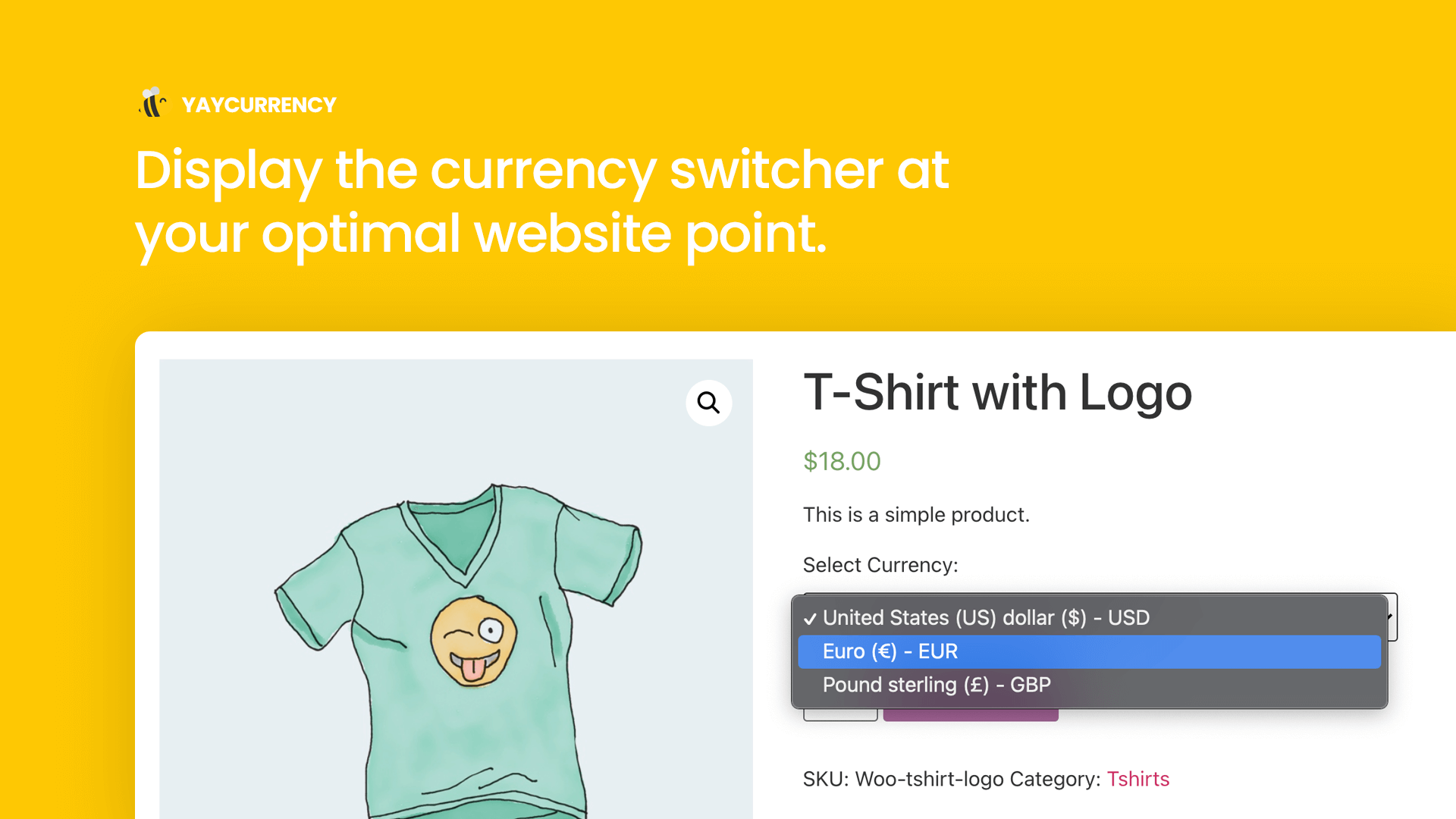
Currency Switcher on Product Page
Show the WooCommerce multi currency switcher dropdown above Add to cart button on WooCommerce product pages, and other popups where your single product appears including Quickview, filters, etc.
Customize Currency Switcher Drop-down
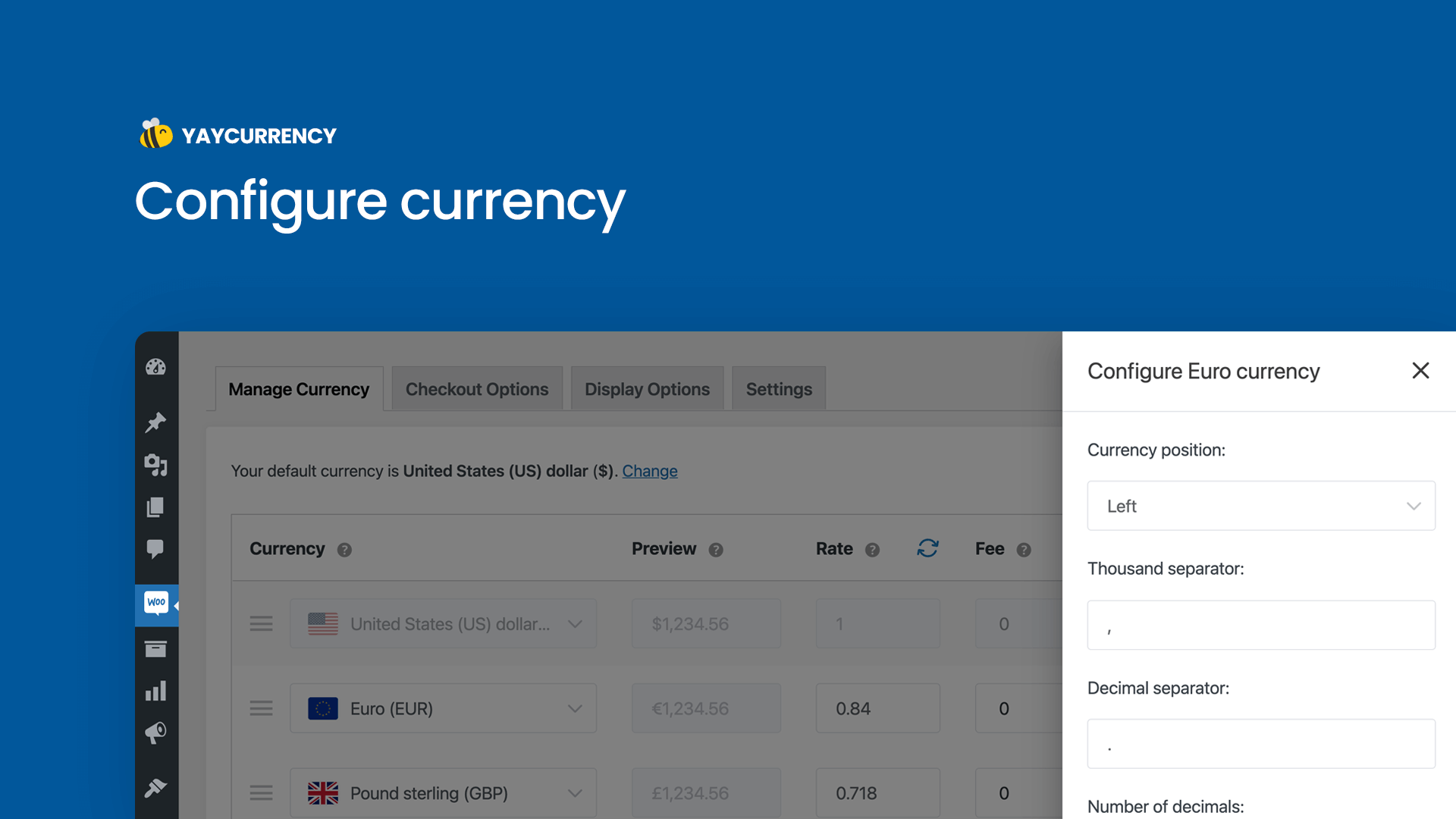
You can customize currency format by displaying country flags, currency symbol, currency code, or both. It’s easy to display the currency switcher anywhere using [yaycurrency-switcher] shortcode. The pricing can be customized using correct formatting for thousand separator, decimal separator, spacing, and rounding.
WooCommerce Sales Reports
Visit WooCommerce > Reports > Orders, and you can view your store performance based on currency. Once filtered, you will easily see your total sales, leaderboards, orders, and top products sold in each currency.
Pretty Price Ending
Round the converted prices to your desired threshold and make them end in target figures (such as 00, .49, .79, .99, and so on). Psychological pricing made easy with YayCurrency. You can run live test calculations to be sure you’ll have the right WooCommerce multi currency outcome.
Manage Conversion Fee
For each currency pair, your bank, payment processor, or money transfer operator may apply a currency exchange fee. To reduce cash loss, you can optionally add a conversion fee to WooCommerce multi currency settings.
Multiple Currency Switcher Widgets
Display the WooCommerce multi currency switcher at your store’s optimal point using the widget customizer and shortcode.
Even when you’re already using various widgets of chatbox, contact button, or other theme widgets, you still can find a sweet spot for the currency converter.
Switchable During Checkout
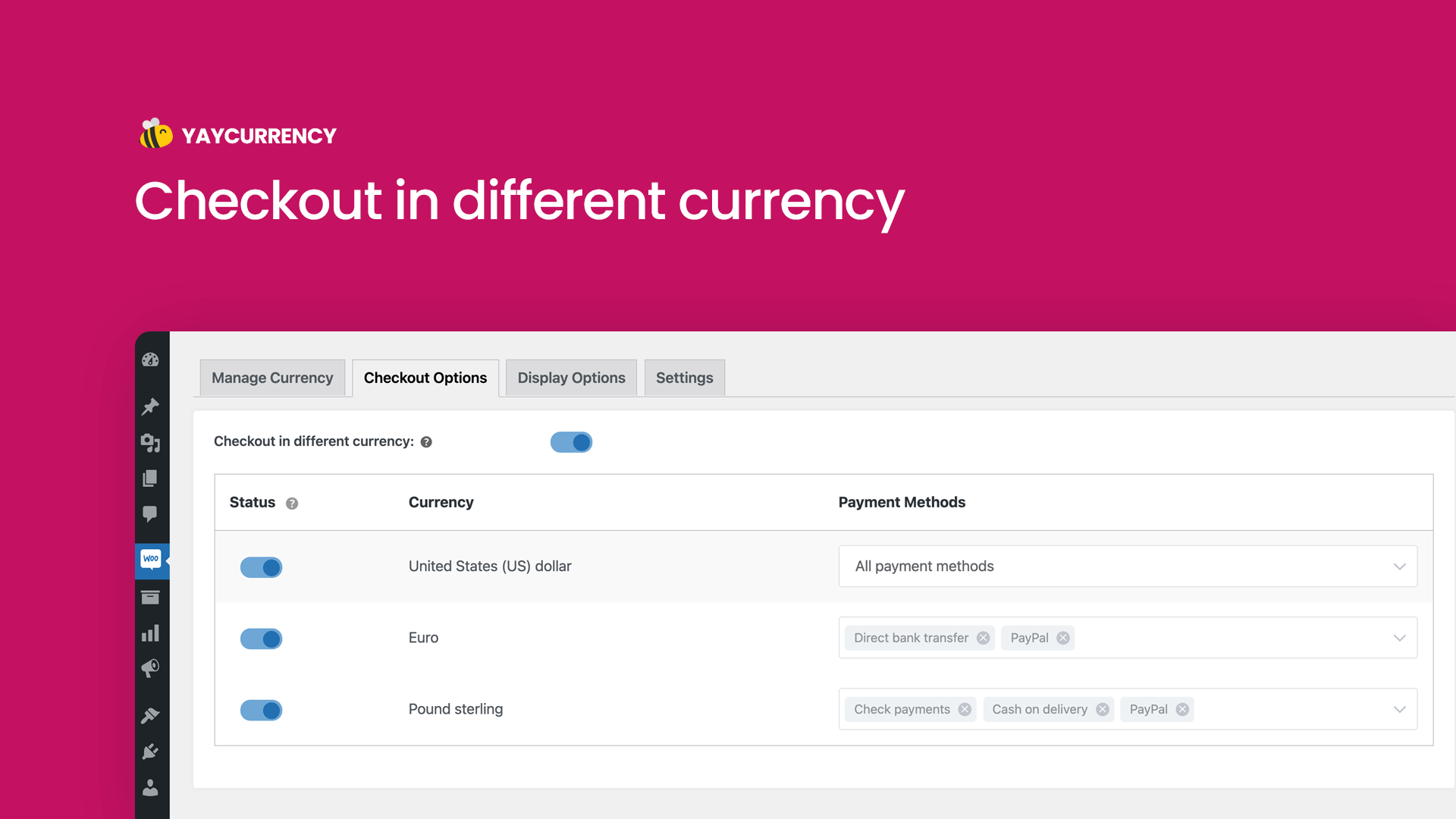
Allow switching currency during checkout and record purchase transactions based on the local supported payment methods. In WooCommerce Orders history, you will see order values recorded in different currencies.
Choose the Geolocation Method That Fits Your Setup (PRO)
Auto Detect: Let YayCurrency intelligently select the best available method
WooCommerce Geolocation: Reliable and built-in option for most stores
MaxMind Geolocation: Advanced accuracy with WooCommerce integration
IP2Location: Alternative database for precise IP-based targeting
???? COMPATIBILITY
Using a third-party plugin? No worries, this WooCommerce multi currency free plugin can work with your favorite WooCommerce extensions:
WooCommerce FedEx Shipping Plugin with Print Label
WooCommerce Custom Product Addons
Woo Cart Product module of Divi theme
B2BKing for WooCommerce
Wholesale Pro by Barn2
WooCommerce TM Extra Product Options
WooCommerce One Page Checkout
Woo Discount Rules plugin
WooCommerce Product Bundles
Advanced Product Field plugin
AG WooCommerce Tyl By NatWest Payment Gateway plugin
Role Based Pricing for WooCommerce plugin
PPOM
LiteSpeed Cache plugin
HivePress plugin
Buy Once or Subscribe for WooCommerce Subscription plugin
???? PREMIUM-ONLY FEATURES
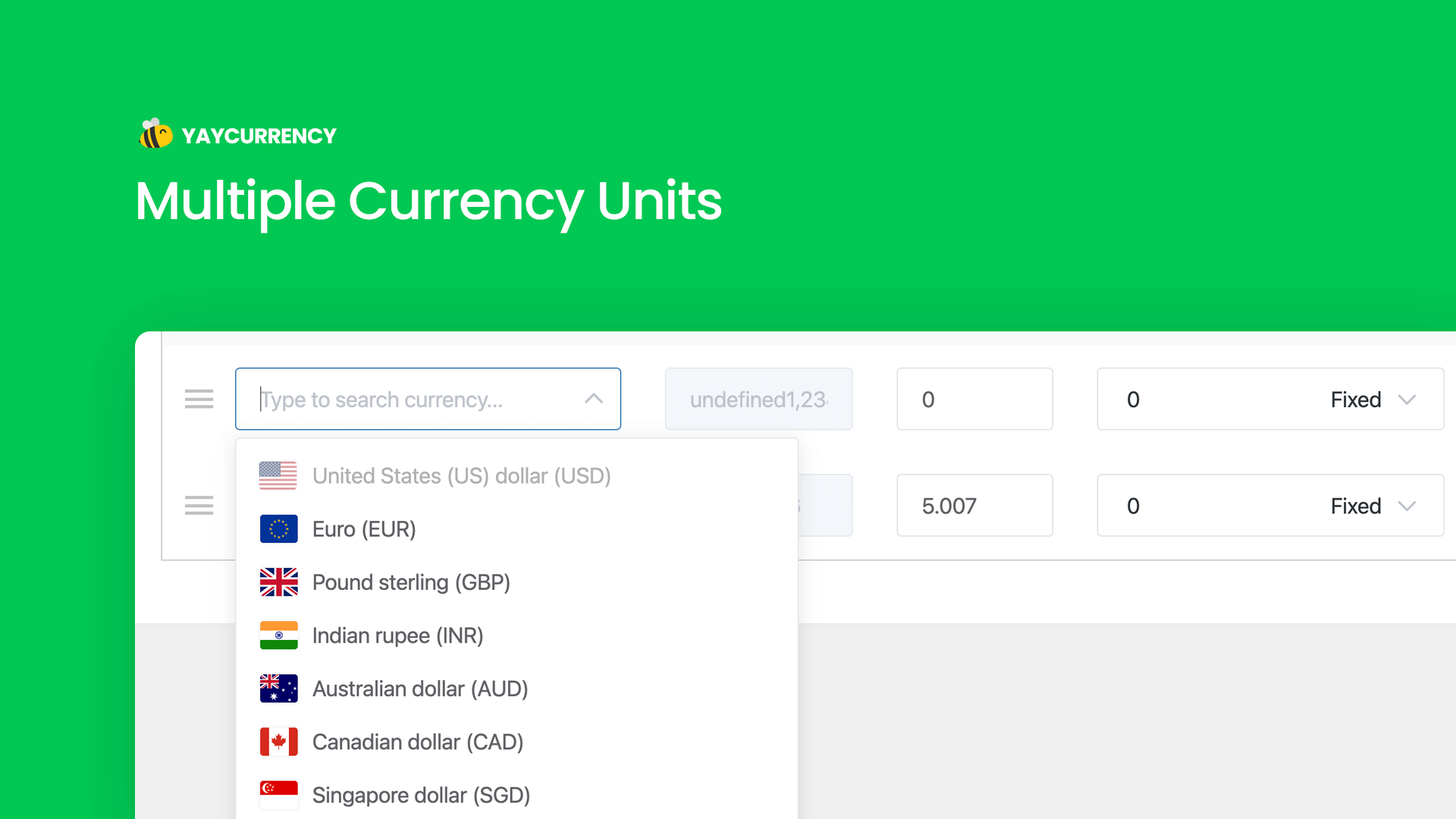
Unlimited Currencies
It supports all currency units in the world, including crypto like Bitcoin (BTC). You can add as many as you need to WooCommerce multi currency plugin.
Price Based on Country
Auto-detect the customer’s IP address and show the product prices in their local currency. You don’t have to config anything as this WooCommerce multi currency plugin is readily built with GeoIP services.
Accept Checkout Payments in Different Currencies
Based on your settings for each local currency, the order can be placed in the currency chosen by the user. And the product prices are also displayed in the selected currency in order confirmation email templates.
Auto-Update Exchange Rate
Exchange rates are automatically updated on regular intervals. You can force the update once in 30 minutes, 6 hours, 7 days, or your custom duration.
Comprehensive Analytics by Currency
You will have full access to your store’s analytics. Under Analytics menu > go to Overview, Revenue, and Orders, you will see a breakdown of sales by currency, product or service category. These provide a detailed and accurate picture of your business, allowing for better decision-making and strategic planning.
???? HOW IT WORKS
YayCurrency works seamlessly with all native WooCommerce payment methods.
Using Direct bank transfer, Check payments, Cash on delivery, PayPal Standard, or Stripe payment gateway? We got you covered!
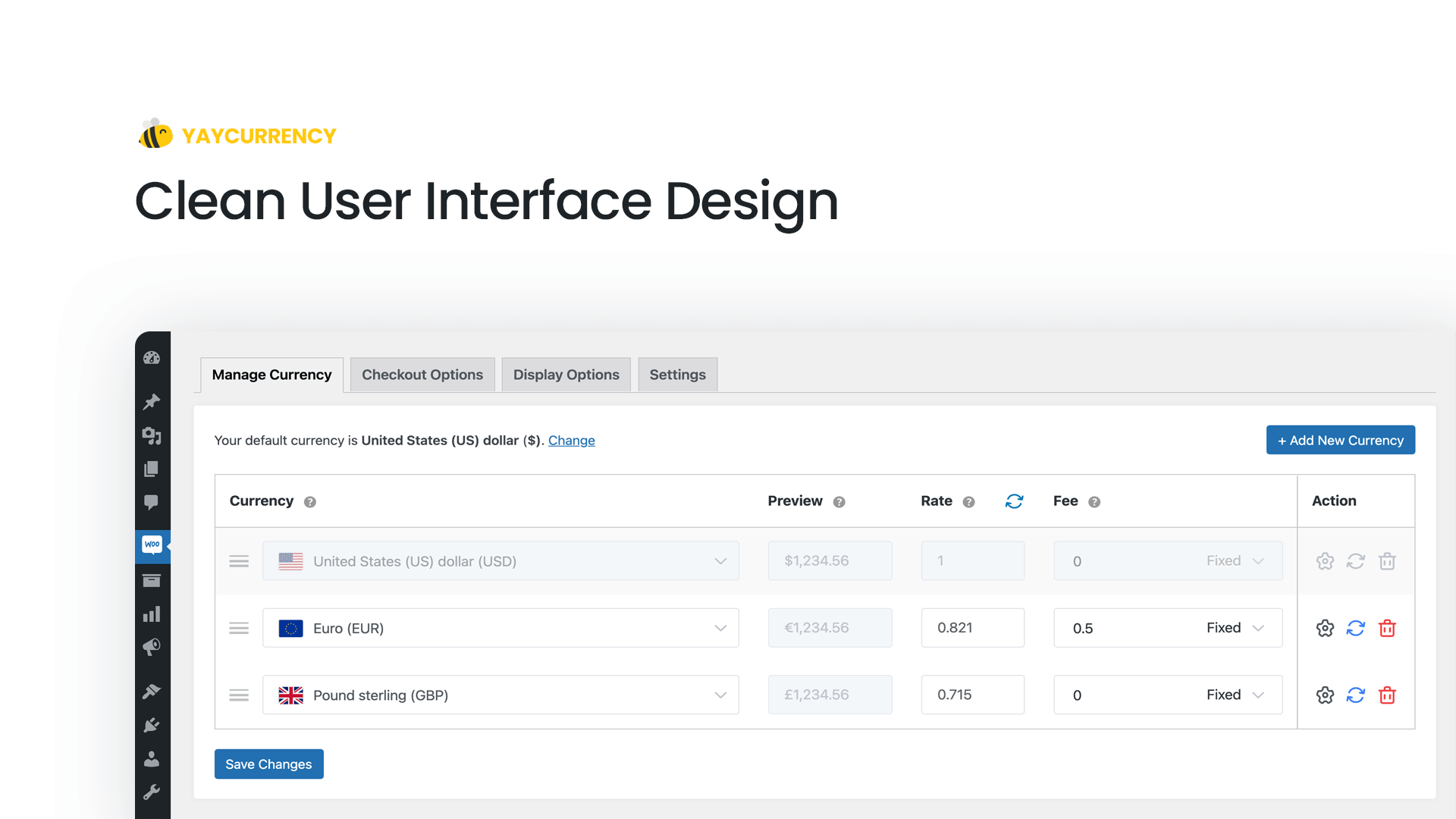
Choose your default currency in WooCommerce > Settings > Currency options.
Then click on Configure multi-currency to start adding other currencies.
When a new currency is added, it takes on your WooCommerce store’s default currency format, including currency symbol position, thousand separator, decimal separator, and number of decimals.
Then, you can localize each currency by changing the formatting options in the currency’s drawer panel.
Global Brands
Want to reach out to your nation’s neighbor or sister countries? Guess what, they’ll definitely love to see your products in their national currency. Why not send them a tailored catalogue now?
Dropshipping Business
So you’re connecting the manufacturers and the end customers? Just start off by selling internationally.
Digital Products
Downloadable and bookable products have a borderless sales potential. Unleash it.
Distributors
This WooCommerce multi currency free plugin works with all major B2B, wholesale, and quote request plugins. Try it.
Just a Startup in Progress?
No worries, try out YayCurrency free version. It is the most beginner- and startup-friendly plugin in the world of WordPress.
Go to YayCommerce → YayCurrency → Manage Currency tab
Click the gear icon next to your currency
Scroll to Rounding section
Enable Custom Rounding
Choose rounding threshold:
0.10 (rounds to nearest 10 cents: $365.37 → $365.40)
0.50 (rounds to nearest 50 cents: $365.37 → $365.50)
1 (rounds to nearest dollar: $365.37 → $366)
10 (rounds to nearest $10: $365.37 → $370)
100 (rounds to nearest $100: $365.37 → $400)
Test with the live tester to preview results
Click Save
This makes prices look cleaner and more professional in each currency.
Why are some prices not converting?
Check these common causes:
1. Price not set in base currency
Go to the product and verify it has a price in your WooCommerce base currency.
2. Third-party plugin conflict
Some pricing plugins override YayCurrency. Check compatibility at YayCommerce → YayCurrency → Advanced Settings tab.
3. AJAX loading issue
If using AJAX-loaded content, prices might not convert. Go to YayCurrency → Settings and enable Compatible with AJAX option (Pro version).
4. Caching plugin interference
Go to YayCurrency → Settings and enable Compatible with Cache Plugins option. Then clear your cache.
5. Custom price display
If using custom code or shortcodes to display prices, you may need to use YayCurrency’s filter hooks. See documentation for yay_currency_should_format_product_price filter.
Can customers check out in a different currency than they browsed in?
Yes, with the Checkout in Different Currency option:
Go to YayCurrency → Checkout Options tab
Enable Checkout in Different Currency toggle
Click Save Changes
Customers will see a currency selector at checkout and can choose their preferred payment currency.
Important: Make sure your payment gateway supports the currencies you enable for checkout. Configure payment methods per currency in the Checkout Options tab.
How do I set specific payment gateways for specific currencies?
Example: Accept PayPal for USD but only bank transfer for EUR.
Go to YayCommerce → YayCurrency → Checkout Options tab
Find the Payment Methods section
For each currency, you’ll see checkboxes for available payment gateways
Check only the payment methods you want available for that currency
Click Save Changes
Now when customers select a currency at checkout, they’ll only see payment methods you’ve enabled for that currency.
Can I force customers to pay in a specific currency? (Pro)
Yes, with YayCurrency Pro:
Go to YayCurrency → Checkout Options tab
Enable Force Currency for Specific Payment Method
Select which currency must be used for each payment gateway
Optionally enable Reload Checkout Page to refresh when currency changes
Click Save Changes
Example: Force all PayPal payments to be in USD, regardless of what currency the customer browsed in.
I got issues. How can I get support?
Please create a topic or contact us to get help. We’re sure to resolve the glitch!
To quickly get the answers, please attach screenshots of currently active WooCommerce plugins on your website.
Fixed: delete_currency REST endpoint issue reported by PatchStack.
Dec 8, 2025 – Version 3.3.1
Fixed: delete_currency REST endpoint issue reported by PatchStack
Oct 29, 2025 – Version 3.3
Added: Sierra Leonean Leone (SLE) currency
Added: Filter hooks to allow custom currencies and change currency flags
Added: The yay_currency_will_not_round_shipping_cost filter hook to disable rounding of the shipping fee
Added: Price formatting support for WooCommerce Blocks (Pro)
Added: A fallback method to fetch the exchange rate
Improved: New admin settings page UI
Improved: Flags icons folder
Improved: Currency settings now sync between WooCommerce settings and the YayCurrency menu
Improved: Currency switcher now features a new frontend style
Improved: Changed the names of multiple filter and action hooks for better clarity
Improved: Ensure the default currency position is set to ‘left’ if not specified
Improved: Ensure the default currency code display is set to ‘not_display’ if not specified (Pro)
Improved: Add a rest API compatible with caching options instead of using AJAX (Pro)
Improved: Caching for geolocate_via_api method (Pro)
Fixed: Compatible with PPOM – Product Addons & Custom Fields for WooCommerce plugin
Fixed: Compatible with PayTR Virtual POS WooCommerce – iFrame API plugin
Fixed: Compatible with Barn2 WooCommerce Wholesale Pro & Barn2 WooCommerce Discount Manager plugins
Fixed: Compatible with Donation Platform for WooCommerce: Fundraising & Donation Management plugin
Fixed: Compatible with FunnelKit Funnel Builder Pro plugin
Fixed: Compatible with FunnelKit Payment Gateway for Stripe WooCommerce plugin
Fixed: Compatible with Art-i Melhor Envio, Art-i Marketplace/Melhor Envio plugins
Fixed: Compatible with WooCommerce Shipit plugin
Fixed: Compatible with WooCommerce blocks (Cart & Checkout pages) when the fallback currency is enabled.
Fixed: Subtotal mini cart not working in Elementor Pro plugin
Fixed: Subtotal mini cart not working in Advanced Product Fields for WooCommerce plugin
Fixed: in_span warning with woocommerce 10.x.x.
WC tested up to: 10.0.4
May 7, 2025 – Version 3.2
Added: Finance API options (Pro)
Added: ETH cryptocurrency
Fixed: Compatible with Barn2 Discount and ProductAddOnsUltimate
Fixed: Compatible with JetSmartFilters
Fixed: Compatible with WooCommerce Appointments plugin
Fixed: Barn2 WooCommerce Wholesale Pro plugin
Fixed: Warning Function _load_textdomain_just_in_time was called incorrectly
Fixed: Warning Format numbers for cryptocurrencies
Fixed: Shipping costs and taxes not being rounded correctly
Jan 9, 2025 – Version 3.1.0
Fixed: Not saved N/A value when auto update exchange rate (Pro)
Fixed: Compatible with WoodMart theme.
Fixed: Compatible with Woo Payment Discounts plugin.
Fixed: Compatible with YITH WooCommerce AddOns Extra Premium Options plugin.
Fixed: Compatible with WooCommerce Bookings plugin.
Fixed: Compatible with WC Price History plugin.
Fixed: Compatible with WooCommerce Simple Auction plugin.
Fixed: Compatible with Advanced Product Fields for WooCommerce plugin.
Fixed: Compatible with WooCommerce Tiered Price Table plugin.
Fixed: Compatible with the WooCommerce PayPal Payments plugin (the ‘Disable the option to checkout in a different currency’ feature) in the latest version, which was not working.
Fixed: Compatible with Quantity Discounts & Pricing For WooCommerce (Discount Table) plugin.
Fixed: The thousand separator and decimal separator do not support the use of the space character.
Fixed: PHP warning: Cannot modify header information – headers already send by …
Added: yay_currency_by_country_code and yay_currency_by_billing_country_code are filter hooks to retrieve the currency based on the country code. — Pro version only
Added: yay_currency_convert_price and yay_currency_revert_price are filter hooks to convert prices to the current currency and revert them to the default currency.
Added: yay_currency_product_price_with_caching filter hook support for the caching option. — Pro version only
Added: Apply to Google Crawlers (or Bots) option. — Pro version only
Added: Show Approximate price option. — Pro version only
Improved: Speed up page loading with transient cache when ‘Auto Select Currency by Countries’ is enabled. — Pro version only
WC tested up to 9.5.1
Oct 4, 2024 – Version 3.0.2
WC tested up to 9.3.3
Added: yay_currency_get_flag_url_by_currency_code filter hook for customizing the flag URL based currency code
Fixed: Compatible with WooCommerce PayPal Payments (from version 2.9.x)
Fixed: Compatible with LearnPress plugin. [https://thimpress.com/learnpress/]
Fixed: The Filter By Price widget not converting based on the selected currency
Fixed: Woocommerce Custom Product Addons (from version 5.x.x). [https://acowebs.com/woo-custom-product-addons/]
Sep 5, 2024 – Version 3.0.1
Improved: Exchange rate calculation using the regular market price, instead the old version close price.
Fixed: Class “JEMTR_Table_Rate_Shipping_Method” does not exist. (site is using Woodmart theme)
Fixed: Compatible with Lottery for WooCommerce plugin [https://woocommerce.com/products/lottery-for-woocommerce/]
Fixed: Compatible with WooCommerce PayPal Payments (Checkout in a different currency option was not working correctly when turned off)
Sep 1, 2024 – Version 3.0.0
Added: Force currency for a specific payment method option. — Pro version only.
Added: [yaycurrency-product-price-html] shortcode, allow displaying product price HTML via product ID.
Added: [yaycurrency-converter] shortcode, allow the display of a currency converter to convert specific values between currencies.
Added: yay_currency_should_format_product_price filter hook to format product price by currency.
Added: Filter, Action Hooks for js file, allow third-party plugins to be compatible with YayCurrency. — Pro version only.
Added: Fixed price for each currency option for bundle and composite product types. — Pro version only.
Added: yay_currency_fixed_prices_on_product_type hook, allowing the display of a fixed price for each currency option on specific product types — Pro version only.
Added: yay_currency_cookie_lifetime_days hook, allows users to set the lifespan of the YayCurrency cookie (default: 30 days). — Pro version only.
Improved: [yaycurrency-switcher] shortcode. Added a few parameters (show_flag, show_name, show_symbol, show_code, device) to allow users to specify which values they want to show or hide on their website.
Improved: Website breaks when using a caching plugin (WP Rocket & LiteSpeed). — Pro version only.
Improved: YayCurrency URL parameters are not working when the slugs contain Cyrillic characters.
Improved: Force payment in a specific currency [Checkout page using Gutenberg blocks]. — Pro version only.
Fixed: Compatible with Funnel Kit Automations. — Pro version only.
Fixed: Compatible with cache plugins (Cache does not correctly detect country currencies). — Pro version only.
Fixed: Compatible with PolyLang plugin. — Pro version only.
Fixed: Compatible with Dokan (admin). — Pro version only.
Fixed: Compatible with WordPress Tour & Travel Booking plugin.
Fixed: Compatible with Tiered Pricing Table For WooCommerce plugin.
Fixed: Compatible with HivePress & HivePress Bookings plugin.
Fixed: Compatible with WooCommerce Product Add-Ons Ultimate plugin.
Fixed: Compatible with LearnPress.
Fixed: Compatible with WooCommerce Bulk Discount plugin.
Fixed: Compatible with B2B Market plugin.
Fixed: Compatible with Quantity Discounts And Pricing for Woocommerce plugin.
Fixed: Compatible with WooCommerce Bookings And Appointments plugin by Pluginhive.
Fixed: Compatible with YITH Booking And Appointment For WooCommerce Premium plugin.
Fixed: Compatible with Advanced Product Fields ProWooCommerce plugin.
Fixed: Compatible with WooCommerce Points and Rewards plugin.
Fixed: Cookie does not change when using URL parameters.
Fixed: Ajax load more products not working (Price & Symbol does not change).
Mar 15, 2024 – Version 2.4.6
Fixed: Compatible with LearnPress plugin.
Fixed: not convert shipping with Shipmondo WooCommerce plugin.
Fixed: MiniCart Elementor pro does not convert the price when YayExtra is activated. – LITE version.
Removed: “calculate_price_by_currency_cookie” function. To replace it, use the “calculate_price_by_currency” function.
Removed: “filtered_by_currency_code” function. To replace it, use the “get_currency_by_currency_code” function.
Mar 12, 2024 – Version 2.4.5
Added: filter hook hide dropdown/switcher in analytics. — Pro version.
Added: filter hook yay_currency_convert_all_orders_to_base detect convert orders .— Pro version
Added: exchange rate by currency at customer placed order via yay_currency_order_rate metadata in Order data.
Added: YayCurrency database update alert. [ Convert all orders to base currency, support for analytic menu ].
Added: YayCurrency Order Info metaboxes.
Added: Reload Checkout page option in Force payment in a specific currency option. — Pro version.
Fixed: Analytics menu, compatible with WooCommerce Subscriptions plugin (Reports). — Pro version
Fixed: Cloudflare APO and WP Rocket conflict Dynamic Cookies. — Pro version
Fixed: Compatible with Woo Subscriptions plugins.
Fixed: Compatible with CTX Feed plugin.
Fixed: Compatible with Woo Product Bundles plugin.
Fixed: Caching with Multiple languages plugin. — Pro version
Fixed: Compatible Erfanmhdi plugin.
Fixed: Compatible with Users Insights plugin.
Fixed: Compatible with cache plugins. — Pro version
Fixed: Checkout notice not display on Checkout page [use blocks].
Fixed: Force Payment currency not work with Fallback currency option. [ Checkout page use shortcode or gutenberg blocks ] — Pro version
Fixed: Compatible with cache plugins option enable not correct with 3rd plugins ( Woo Subscriptions & Buy Once or Subscribe for WooCommerce Subscription ). — Pro version
Fixed: Free shipping min amount not convert.
Fixed: PHP compatible with PHP 8.2 version.
Fixed: WPC Frequently Bought Together for WooCommerce plugin.
Fixed: Compatible with Request a Quote for WooCommerce plugin.
Fixed: Compatible with Event Tickets plugin.
Fixed: Compatible with SlovakParcelService plugin.
Fixed: Compatible with WooCommerce 8.6.1 version.
Fixed: Compatible when active both Request a Quote for WooCommerce & Woo Product Add-ons plugins
Fixed: use multiple shortcodes [yaycurrency-price-html] not work with Compatible with cache plugins option. — Pro version
Fixed: YayCurrency Order Info not work with old WooCommerce version.
Fixed: Customer history metaboxes calculate not correct.
Improved: Reduce Page Load Times.
Improved: Refactor code.
Dec 19, 2023 – Version 2.4.3.1
Fixed: Warning when there’s no currency added
Dec 19, 2023 – Version 2.4.3
Added: Manual Order change currency [Admin]. — Pro version
Added: Minified Javascript file. — Pro version
Added: Force payment in a specific currency option in Checkout page. — Pro version
Added: Force Apply Currency with Shipping country in Cart page. — Pro version
Added: Compatible with cache plugins option. — Pro version
Fixed: Format symbol not correct in Order Received page. — Lite & Pro version
Fixed: Order discount formatted not correct. — Lite & Pro version
Fixed: Shipping cost not converting when set no class cost option. — Lite & Pro version
Fixed: Compatible with WooCommerce TeraWallet plugin. — Lite & Pro version
Fixed: Wrong symbol when checkout by paymendo. — Lite & Pro version
Fixed: Compatible with WooCommerce Bookings and YITH WooCommerce Product Add-ons & Extra Options Premium plugin. — Lite & Pro version
Fixed: Warning Duplicate array key found. The value will be overwritten [phpcs]. — Lite & Pro version
Fixed: Compatible with Oxygen WooCommerce plugin. — Lite & Pro version
Fixed: Compatible with WooCommerce Points and Rewards plugin. — Lite & Pro version
Fixed: Compatible with WC Fields Factory plugin. — Lite & Pro version
Fixed: Compatible with Betheme. — Lite & Pro version
Fixed: Coupon min, max not convert by currency. — Lite & Pro version
Fixed: Compatible with Barn2 WooCommerce Wholesale Pro plugin. — Lite & Pro version
Fixed: Compatible with Buy Once or Subscribe for WooCommerce Subscription. — Lite & Pro version
Fixed: Compatible with YayExtra. — Lite version
Fixed: Revenue not working correct with Timezone — Pro version
Fixed: Error when add more 60 currencies not saved. — Pro version
Improved: Custom param currency url. — Lite & Pro version
Improved: Page load time with Transient cache. — Pro version
Nov 18, 2023 – Version 2.4.2
Fixed: Script conflict with other Woo payment plugins
Nov 1, 2023 – Version 2.4.1
Fixed: Remove Licenses submenu (Free version & WooCommerce.com version)
Fixed: Compatible with AG WooCommerce Tyl By NatWest Payment Gateway plugin.
Fixed: Compatible with B2BKingPro plugin.
Fixed: Compatible with WooCommerce PayPal Payments plugin.
Fixed: Compatible with Role Based Pricing for WooCommerce plugin.
Fixed: Compatible with WooCommerce Product Table.
Fixed: Compatible with B2B Market plugin.
Fixed: Compatible with PPOM plugin.
Fixed: Compatible with Payment Gateway For PayPal WooCommerce plugin.
Fixed: Compatible with Kapee Theme.
Fixed: Variable Price html show not correct when Fixed Product Price for currency enable.
Fixed: Compatible with WooCommerce Product Bundles plugin.
Fixed: Compatible with HivePress plugin.
Fixed: Compatible with WP_Grid_Builder plugin.
Fixed: Compatible with LiteSpeed Cache plugin.
Fixed: Compatible with Shipmondo for WooCommerce plugin.
Fixed: Compatible with Payment Plugins for PayPal WooCommerce plugin.
Fixed: WooCommerce Subscription (Signup Fee is empty)
Fixed: Compatible with WooCommerce PayPal Payments plugin (Checkout in different currency option)
Fixed: Deprecated: Using ${var} in strings is deprecated, use {$var} instead in (PHP 8+)
Fixed: JS error with DOM Found more elements with non-unique id #yay-currency-nonce
Fixed: Compatible with Astra theme
May 31, 2023 – Version 2.0.8
Fixed: Product not on sale still appears (Product with regular price only)
Fixed: Compatible with WooCommerce Subscription plugin (Resubscribe action)
Fixed: Analytics (PRO)
Fixed: Compatible with Enfold theme (PRO)
Fixed: Compatible with WooCommerce Payments plugin & WooCommerce PayPal Payments
Fixed: Update filter symbol hook
May 17, 2023 – Version 2.0.7
Added: YayCommerce Menu
May 09, 2023 – Version 2.0.6
Fixed: Compatible with Elementor Pro
Apr 21, 2023 – Version 2.0.5
Added: Compatible with Elementor Menu Cart Widget Pro
Fixed: Hide switcher on manual order pay page
Fixed: Option currency code position not show on checkout page
Fixed: Price not format when ajax call in July theme
Apr 17, 2023 – Version 2.0.4
Added: Show current currency notice on product page (PRO)
Fixed: Small bugs
Apr 14, 2023 – Version 2.0.3
Added: Compatible with WooCommerce Request A Quote plugin
Added: Compatible with WooCommerce QuickPay plugin by Perfect Solution
Added: Currency filter in WooCommerce Analytics menu (Variations, Categories, Coupons, Taxes)(PRO)
Fixed: Compatible with LearnPress
Fixed: WooCommerce Analytics (PRO)
Mar 30, 2023 – Version 2.0.2
Added: Compatible with YayPricing 1.9
Added: All currencies in WooCommerce Analytics (Users can see a summary of all the sales in all currencies) (PRO)
Mar 17, 2023 – Version 2.0.1
Fixed: Activation error
Mar 16, 2023 – Version 2.0
Added: Filter change currency code on frontend
Added: Filter to change symbol
Added: Filter get price by currency
Added: Fixed prices not display on LearnDash LMS plugin
Added: Filter to switcher
Added: Currency code before dollar symbol
Deleted Option show currency code on dollar symbol
Updated: Translation file
Compatible with WooCommerce version 7.5.0
Fixed: Convert Number of decimals on Default Currency not working
Fixed: Compatible with WooCommerce Subscriptions ( Subscription Renewal)
Fixed: Calculate shipping with Shortcode is Fee not working.
Fixed: Compatible with WooCommerce Funnels plugin
Fixed: bug not show fallback currency in admin
Fixed: Compatible WPML and Polylang plugins
Fixed: Compatible with YayExtra plugin
Fixed: Compatible with WooCommerce Product Add-ons plugin
Fixed: Compatible WooCommerce TM Extra Product Options plugin, Menu cart not working (Elementor Pro)
Fixed: Compatible with Advanced Product Fields for WooCommerce plugin
Fixed: Compatible with July theme
Compatible with Kapee Theme
Compatible with WC 7.4.1
Compatible with B2BKing Pro
Compatible with WooCommerce Simple Auction plugin
Compatible with LiteSpeed Cache plugin
Compatible with WooCommerce Conditional Product Fees plugin
Compatible with WC Product Bundles plugin
Compatible with YITH WooCommerce AddOns ExtraPremium Options plugin
Compatible with WooCommerce Payments plugin
Compatible with LearnPress plugin
Jan 27, 2023 – Version 1.9.2
Added: Currency dropdown to Analytics -> Revenue. (PRO)
Fixed: Bug get incorrect symbol
Fixed: Bug calculate Tax and Coupon price
Fixed: Compatible with WooCommerce Subscriptions plugin for Recurring total
Fixed: Compatible WooCommerce TM Extra Product Options plugin
Fixed: Compatible Rapyd Payment
Fixed: Compatible Woo Discount Rules and Advanced Product Field plugin
Jan 6, 2023 – Version 1.9.1
Added: Compatible with WooCommerce TM Extra Product Options plugin
Added: Compatible with TeraWallet plugin
Added: Compatible with WC 7.2.2
Fixed: Currency Fee not working on Checkout page
Fixed: Custom product price fixed for Each Currency not working on Checkout page
Fixed: Shipping: Change option not change price value. Tax: inclusive of tax not working when use option disable checkout in different currency (or currency with status is 0)
Fixed: Coupon applies working not correctly
Dec 30, 2022 – Version 1.9
Added: Filter to change currency name
Fixed: Compatible with YITH Easy Order Page For WooCommerce plugin
Fixed: Some tax issues (shipping, total…)
Fixed: Form action issue with AMP (Accelerated Mobile Pages)
Fixed: Wrong cart total with Cartflows Checkout plugin
Fixed: Lost total tax with PDF Invoices & Packing Slips
Fixed: Preview issue in Admin UI
Improved: Set cookie process
Improved: UI
Sep 21, 2022 – Version 1.8.9
Added: Disable default currency at Checkout
Fixed: Compatible with WP Rocket plugin
Fixed: Compatible with Elementor mini cart
Fixed: Compatible with Salient theme quick view mode
Fixed: Polylang plugin compatible issue
Fixed: Name Your Price plugin compatible issue
Fixed: WooCommerce Analytics issue
Fixed: Wrong grouped product price when set fixed price per product
Fixed: Shortcode issue with Gutenberg block
Fixed: Some minor bugs
Sep 8, 2022 – Version 1.8.8
Fixed: UI
Aug 27, 2022 – Version 1.8.7
Improved: Get exchange rate from API
Improved: Admin UI
Aug 23, 2022 – Version 1.8.6
Fixed: Compatible with WP Grid Builder Caching plugin
Fixed: Compatible with Name Your Price for WooCommerce plugin
Fixed: Display wrong default currency on store when turn off Auto Select Currency by Countries
Fixed: Shipping fee not display
Fixed: Some small bugs
Aug 9, 2022 – Version 1.8.5
Fixed: Currency switcher in Single Product Page not working
Fixed: Error in Order details page
Aug 4, 2022 – Version 1.8.4
Fixed: Error without WooCommerce
Fixed: Compatible with JetSmartFilters plugin
Fixed: Some minor bugs
Improved: Optimize code
Jul 20, 2022 – Version 1.8.3.1
Fixed: Error when activated
Jul 18, 2022 – Version 1.8.3
Added: Loader to currency switcher
Added: Dropdown to filter orders based on currency in WooCommerce Analytics > Orders
Fixed: Compatible with WooCommerce FedEx Shipping Plugin with Print Label plugin
Fixed: Compatible with WooCommerce Custom Product Addons plugin
Fixed: Compatible with HivePress plugin
Fixed: Only load enable payment methods in Admin UI
Fixed: Wrong payment methods of default currency when turn off Checkout in different currency
Improved: Notice for disabled payment methods in Admin UI
Improved: Display currency switcher as a menu item without laggy
Jul 12, 2022 – Version 1.8.2
Fixed: Compatible with Woo Cart Product module of Divi theme
Fixed: Compatible with B2BKing for WooCommerce plugin
Fixed: Compatible with WooCommerce Product Addons plugin
Fixed: Wrong variation product price when all variations have same price and turn on Fixed Product Price for Each Currency
Jul 1, 2022 – Version 1.8.1
Fixed: Wrong number decimals of default currency
Improved: Notice when the Save button is disabled
Improved: Responsive Admin UI
Improved: Performance
Jun 15, 2022 – Version 1.8.0
Fixed: Compatible with Bookly plugin (Thanks to @jmzolezzi and Bookly team)
Jun 09, 2022 – Version 1.7.9
Added: Fixed price for each currency per product
Added: Compatible with Bookly plugin
Added: Compatible with WP Grid Builder plugin
Improved: UI
Fixed: Missing converted price after VAT Tax price when turn off Checkout in different currency
Fixed: Empty switcher when activating YayCurrency but not add any currency except default one
Mar 18, 2022 – Version 1.7.8
Fixed: Compatible with Flexible Shipping plugin
Fixed: Compatible with YayPricing plugin
Fixed: Compatible with Printful Integration for WooCommerce plugin
Fixed: Compatible with CartFlows plugin
Mar 11, 2022 – Version 1.7.7
Fixed: Return to default currency when can’t detect country from IP
Fixed: Compatible with CartFlows plugin
Fixed: Compatible with Pay for Payment for WooCommerce plugin
Fixed: Compatible with YayPricing
Fixed: Compatible with YayExtra
Feb 25, 2022 – Version 1.7.6
Fixed: Wrong product subscription name when using with Loco Translate plugin; wrong subtotal, total in cart, checkout in WooCommerce Subscriptions
Fixed: Compatible with Price by Country plugin
Fixed: Error with order total in WooCommerce Order list and Order email
Feb 11, 2022 – Version 1.7.5
Added: Option to display currency symbol or currency code
Fixed: Compatible with WooCommerce PDF Invoices & Packing Slips plugin (error when creating notes)
Fixed: Compatible with Betheme theme
Fixed: Compatible with Add Custom Fee to WooCommerce plugin
Fixed: Conversion error when using Free shipping method for a large order
Fixed: Small bugs
Jan 30, 2022 – Version 1.7.4
Added: Support Advanced Product Fields Pro for WooCommerce plugin
Jan 25, 2022 – Version 1.7.3
Added: Support WooCommerce Measurement Price Calculator plugin
Fixed: Compatible with B2B Wholesale Suite plugin
Fixed: Compatible with WooCommerce PDF Invoices & Packing Slips plugin
Fixed: Include/exclude tax for subtotal of cart item based on site’s setttings
Jan 17, 2022 – Version 1.7.2
Fixed: Compatible with WooCommerce 6.1.0
Jan 7, 2022 – Version 1.7.1
Fixed: Compatible with WooCommerce Product Add-ons
Dec 31, 2021 – Version 1.7
Fixed: UI
Fixed: Subtotal VAT in cart item
Fixed: Duplicated default currency in admin
Fixed: PHPCS
Dec 29, 2021 – Version 1.6.9
Added: Compatible with YITH WooCommerce Points and Rewards plugin
Fixed: Buy now link
Dec 20, 2021 – Version 1.6.8
Added: Display switcher before or after short description in single product page
Added: Compatible with YITH Gift Cards plugin
Dec 10, 2021 – Version 1.6.7
Added: Currency code for currencies using the same symbol $ in admin preview
Updated: File .pot
Fixed: Error in themes with skeleton loading
Fixed: Break site when deactivate WooCommerce plugin
Nov 5, 2021 – Version 1.6.6
Added: Currency code for those using the same symbol $
Fixed: Subtotal display in Minicart
Fixed: Return using default currency when not found selected currency
Oct 26, 2021 – Version 1.6.5
Fixed: Compatible with Table Rate Shipping plugin
Fixed: Not sync currency in switcher with currency on site when entering the site at the first time and turn off Auto select currency by countries option
Fixed: Add friendly notice when using WooCommerce PayPal Checkout Gateway/ WooCommerce PayPal Payments and disable Checkout in different currency option
Oct 15, 2021 – Version 1.6.4
Fixed: Compatible with Woocommerce Per Product Shipping plugin
Fixed: Incorrect information in Subscription products
Fixed: Subscription manual renewal
Fixed: Small bugs
Oct 8, 2021 – Version 1.6.3
Added: Types for Rate of currency (Auto and Fixed)
Fixed: Preview in custom rounding prices
Fixed: PayPal payment when turn off Checkout in different currency option
Fixed: Symbol currency in Order email when using Paypal
Fixed: Symbol currency in Orders of user My Account page
Oct 4, 2021 – Version 1.6.2
Added: Skeleton loading
Added: Support WooCommerce Table Rate Shipping plugin
Optimized: Switcher width
Fixed: Shipping fee in Checkout Page
Fixed: Decrease font size for text in switcher when choosing small size
Fixed: Switcher and icon on menu
Fixed: Some bugs
Sep 13, 2021 – Version 1.6.1
Fixed: Arrow point up in Footer Switcher
Fixed: Products sale
Fixed: Small bugs
Sep 10, 2021 – Version 1.6
Added: Option to enable flag, name, currency symbol, currency code
Added: Switcher sizes (Small, Medium)
Added: Support WooCommerce Product Addons plugin
Added: Switcher size for Menu, Widget
Added: Support both Gutenberg and Classic Widget
Fixed: Arrow in Switcher
Fixed: PHPCS
Fixed: Small bugs
Aug 24, 2021 – Version 1.5
Fixed: Payment with PayPal (Validation error)
Fixed: Error with Sale price when switching currency