
Alphabetical Paging WP-SNAP! (WordPress System for Navigating Alphabetized Posts) creates an user interface for navigating alphabetized post titles.
WP-SNAP! (WordPress System for Navigating Alphabetized Posts) creates an alphabetical listing of post titles on a Category or Page template file. Navigation through the listings WP-SNAP! generates is accomplished using the alphabet itself. (For example, if a site visitor clicked on the letter D, any post titles that began with that letter would be showcased.) WP-SNAP! will work on any WordPress 3.0.1 or higher site, but is particularly useful managing glossaries, indexes, reviews, or directories.
WP-SNAP! offers three different navigational styles and integration with both custom permalinks and the WordPress loop. Plugin options can be managed both site-wide and on the template itself with results either restricted to one category or broadened to include child categories as well. The clever web developer should have no problem seamlessly integrating WP-SNAP! into their latest project. Options have also been added to allow the customization of css class names and the appearance of html mark-up.
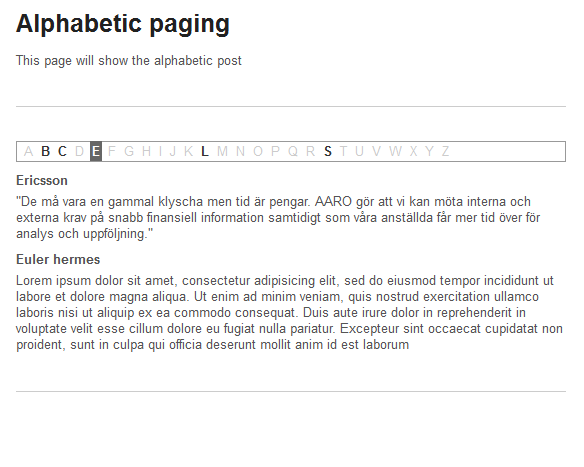
Screenshots
FAQ
Does the plugin still work if I’m calling `wp_snap()` from my theme?
Yes. wp_snap() is kept as a thin alias for alphabetical_pagination() with the same parameter list, so existing themes continue to work unchanged.
I need to embed the index inside a Gutenberg page.
Use the native Alphabetical Pagination block (added in 2.3.0) from the block inserter under the Widgets category — it’s fully server-rendered and supports wide / full alignment. The block sidebar exposes post type, menu style, firstload, category, taxonomy + term, and display attributes. The legacy approach (Shortcode block with [alphabetical_pagination]) still works.
Does it integrate with WooCommerce?
Yes. Enable Settings → Alphabetical Pagination → WooCommerce → Auto-mount on Shop and the index renders above the WooCommerce shop loop and product category archives automatically. The mount uses native WooCommerce action hooks (woocommerce_before_shop_loop, woocommerce_archive_description, or woocommerce_before_main_content — pick from the dropdown) so it never collides with caching / SEO / multilingual plugins that filter WP_Query.
Is it WPML / Polylang compatible?
Yes. The transient letter-availability cache keys on the current language (via wpml_current_language filter or pll_current_language() function), and WP_Query runs with suppress_filters => false, so translated post sets are filtered and cached per-language automatically. Switching language busts the cache for that language only.
Can I get the data over REST for a headless front end?
Yes. Two read-only public endpoints under /wp-json/wp-snap-ext/v1/: GET /letters returns [{ letter, count, href }], GET /posts returns paginated post payloads filtered by letter. Toggle on / off under Settings → Alphabetical Pagination → REST API & Cache.
How do I display the ACF field instead of the trimmed post content?
Go to Settings → Alphabetical Pagination → Content Fallback, enable ACF Excerpt Fallback, and enter the ACF Field Name (e.g. summary). The plugin tries get_field() first, then get_sub_field(), then walks the entire get_fields() tree recursively to find the field even when it lives inside an ACF flexible-content layout, repeater row, or group. Falls back to a trimmed extract of the post content if ACF returns nothing.
My theme has no obvious hook to drop the index into.
Enable Settings → Alphabetical Pagination → DOM Injection → Enable DOM Injection and provide a CSS selector (e.g. .entry-content, #primary > article:first-child). The plugin renders the index into a hidden <template> element in the footer and a ~300-byte vanilla-JS snippet moves it into the matched element on DOMContentLoaded. No jQuery, no dependencies.
How do I sort posts by a custom field instead of the title?
Under Settings → Alphabetical Pagination → Sorting, set Meta Key to your post meta key and Meta Order to ASC or DESC. The letter buckets still derive from post_title, but the order of posts within each bucket follows the meta value. Useful for sorting glossary terms by importance, products by SKU, etc.
Can I use a non-Latin alphabet (Arabic, Chinese pinyin, Cyrillic, Greek, Hebrew, Hindi, Korean, Thai, …)?
Yes. Pick the script from Settings → Alphabetical Pagination → Language → Alphabet Pack. 15 packs are bundled: English, Arabic, Chinese (Pinyin A–Z), German (with Umlauts), Spanish (with Ñ), French, Greek, Hebrew, Hindi (Devanagari), Hungarian, Korean (Hangul Jamo), Russian (Cyrillic), Thai, Turkish, Urdu. Selecting a pack overwrites the freeform Local Alphabet field on save. You can also type a fully custom alphabet directly.
Are the letter counts cached?
Yes. Letter availability is stored as a transient keyed by post_type / taxonomy / term / current language / alphabet pack / menumisc setting. Default TTL is 1 hour (configurable under REST API & Cache → Cache TTL). The cache is invalidated automatically on save_post, deleted_post, trashed_post, untrashed_post, and switch_blog — so editing a post immediately reflects in the index.
Can I customise the output without editing the plugin?
Yes — every render path fires hooks (added in 2.3.0):
wp_snap_ext/before_render, wp_snap_ext/after_render — actions.
wp_snap_ext/pre_render — short-circuit filter (return a string to replace the HTML).
wp_snap_ext/query_args — mutate WP_Query args before the query runs.
wp_snap_ext/letter_href — rewrite letter link hrefs (useful for SPA routers).
wp_snap_ext/excerpt — post-process the resolved excerpt.
wp_snap_ext/render — final filter on the rendered HTML.
See the Developer hooks section above for code samples.
ChangeLog
2.4.2
- Bumped “Tested up to” to WordPress 7.0. No functional changes.
2.4.1
- readme.txt metadata fix — limited Tags to wp.org’s maximum of 5 and trimmed the short description to the 150-character limit. No functional changes.
2.4.0
- Tabbed settings page — the admin panel is reorganised into four tabs using the standard WordPress
nav-tab UI: General, Styling, Integrations, and Developer. After saving, you are returned to the tab you were editing (Post/Redirect/Get), not the first one.
- Styling mode — new “Styling” choice on the Styling tab:
- Default CSS — loads the bundled
snap-style-default.css skin (styled letter strip, post cards, pagination buttons) that mirrors the plugin’s preview.
- No CSS (theme consistent) — loads only the minimal structural
snap-style.css so the output inherits your theme’s typography, colours, and button styles. This remains the default, so existing sites are unchanged on update.
- Only the selected stylesheet is enqueued, and only on pages that actually render the index.
- Developer tab — copy-paste reference with
<pre><code> snippets for the [alphabetical_pagination] shortcode, the alphabetical_pagination() template tag (with a function_exists() guard and the wp_snap() alias note), and the wp_snap_ext/* action/filter hooks.
2.3.0
- Gutenberg block — new server-rendered
wp-snap-ext/index block. Drop the alphabetical index into any post, page, or Site Editor template with one click. No JS build pipeline required; block.json + render.php only.
- WooCommerce auto-mount — toggle the new “Auto-mount on Shop” setting and the index renders above the shop loop / product category archives automatically via the native
woocommerce_before_shop_loop (or woocommerce_archive_description / woocommerce_before_main_content) action. No DOM hacks, no posts_where SQL injection.
- REST API — public endpoints under
/wp-json/wp-snap-ext/v1/:
GET /letters?post_type=…&taxonomy=…&term=… → [ { letter, count, href } ]
GET /posts?post_type=…&letter=A&page=1&per_page=10 → { posts, total, total_pages }
- Toggle on the settings page; uses the transient cache so repeated calls hit memory.
- Documented developer hook API — every render path now fires:
do_action( 'wp_snap_ext/before_render', $context )
apply_filters( 'wp_snap_ext/pre_render', $html, $post_type, $display, $args ) (short-circuit)
apply_filters( 'wp_snap_ext/query_args', $args, $context )
apply_filters( 'wp_snap_ext/letter_href', $href, $letter, $base )
apply_filters( 'wp_snap_ext/excerpt', $excerpt, $post_id )
apply_filters( 'wp_snap_ext/render', $html, $post_type, $display, $args )
do_action( 'wp_snap_ext/after_render', $html, $context )
- Transient letter-availability cache — letter counts are cached as transients keyed by post_type / taxonomy / term / current language / alphabet pack. Invalidated on
save_post, deleted_post, trashed_post, untrashed_post, switch_blog. Default TTL 1 hour (configurable).
- WPML + Polylang awareness — the cache key includes the current language (via
wpml_current_language or pll_current_language()) and WP_Query runs with suppress_filters => false, so translated post sets are filtered and cached per-language.
- Multi-language alphabet packs — pick from 15 bundled scripts (English, Arabic, Chinese pinyin, German, Spanish, French, Greek, Hebrew, Hindi, Hungarian, Korean Jamo, Russian, Thai, Turkish, Urdu). Selecting a pack overwrites the freeform Local Alphabet field on save.
- Appearance toggles — Horizontal/Vertical layout, Uppercase/Lowercase letter case, “Disable empty letters” (renders empty buckets as muted +
aria-disabled), “Hide pagination if one page”.
- Generic taxonomy filter — restrict the index to any registered taxonomy + term ID (beyond the legacy cat/tag args).
- Meta-key intra-bucket sorting — set a post meta key + ASC/DESC to override post_title ordering within each letter bucket. Buckets themselves still derive from post_title.
- Per-page override map — store a
{ post_id => items_per_page } array so /glossary can render 50 items per page while /products renders 20.
- DOM auto-injection — for themes that don’t expose a hook: render the index into a hidden
<template> in the footer and move it into a CSS selector via ~300 bytes of vanilla JS. No jQuery dependency.
- Accessibility preserved —
<nav aria-label>, aria-current="page", explicit role="list" / role="listitem", descriptive aria-label per letter link, aria-disabled on empty letters, visible focus outlines.
2.2.0
- URL parameters migrated to
?alpha_order= and ?alpha_paged= (legacy ?snap= / ?cp= / ?snap_paged= still honoured).
- Post titles are now rendered as links to each post’s permalink.
- Accessibility (WCAG AA): letter navigation wrapped in a semantic
<nav aria-label="Alphabetical Navigation">, every letter link carries a descriptive aria-label, the active letter is exposed via aria-current="page", and visible focus outlines are provided in the stylesheet.
- New “Learn More” CTA below each post excerpt linking to the post permalink, with an
aria-label that includes the post title.
- New Content Fallback settings section: toggle “Use ACF field fallback if post excerpt is missing” + text input “ACF Field Name”. When enabled and ACF is active, the plugin reads the configured field via
get_field() for posts without a native excerpt.
- Frontend post cards now show: linked title → excerpt (native → ACF fallback → trimmed content) → Learn More button.
2.1.0
- Rebranded as Alphabetical Pagination. Existing directory structure and option keys are preserved.
- New template tag
alphabetical_pagination() (the legacy wp_snap() is kept as a backwards-compatible alias).
- New
[alphabetical_pagination] shortcode lets the index be embedded in any post or page. Attributes mirror the template tag arguments (cat, child, menu, firstload, post_parent, post_type, display).
- New “Items Per Page” admin setting registered through the WordPress Settings API (
register_setting, add_settings_section, add_settings_field) and sanitised with absint(). Defaults to 10 if unset.
- The post loop is now paginated; Previous / Next + numbered links are rendered through
paginate_links() below the alphabetised post list.
2.0.0
- Requires PHP 8.1+. Plugin is now organised as typed classes under
includes/.
- Security: prepared statements on the legacy “ignore words” SQL path, full sanitisation of
$_GET / $_POST / $_SERVER reads, escaped output, nonce + manage_options capability check on the settings page (was the deprecated numeric level “8”).
- Settings now stored under the
wp_snap_ext_* option prefix. Legacy key_snap_* values are migrated automatically on activation.
- Stylesheet is registered through
wp_enqueue_scripts and only enqueued on pages that actually call wp_snap().
- Standard navigation queries now use
WP_Query instead of a hand-rolled SQL string.
- Backwards-compatible
wp_snap() template tag retained.
1.0.0
- Original Dinwebb fork of Nathan Olsen’s WP-SNAP! plugin.
