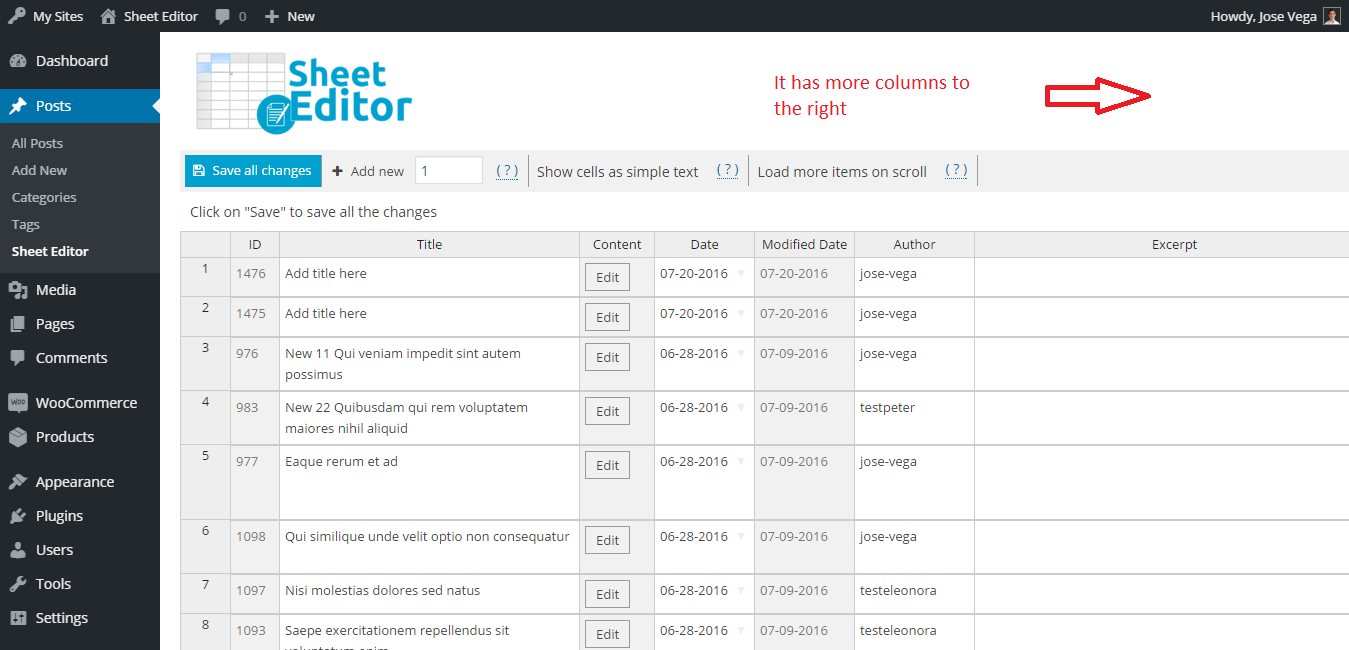
A Spreadsheet created specially for WordPress. Edit posts in bulk using Spreadsheet.
It works with Gutenberg (new editor) and the Classic Editor
You can edit the post content using the Gutenberg editor right on the spreadsheet.
It also works with the Classic Editor.
Awesome things that you can do with WP Sheet Editor
View all your posts, pages, and woocommerce products in a spreadsheet
Edit posts in Spreadsheet (all core fields)
Edit pages in Spreadsheet (all core fields)
Create a lot of posts / products at once
Copy information between posts
Edit WooCommerce Products (Free version limited to title, status, regular price, sale price).
And more…
WP Sheet Editor is perfect for you if…
You are tired of opening several pages to edit your posts
You are tired of wasting time waiting for each post editor to load and save
Features
Spreadsheet where you can edit all the information of your posts, pages, and woocommerce products including post title, post content, post status, post excerpt, featured image, publish date, comment status, page parent, post categories, and post tags.
You can navigate in the spreadsheet with your keyboard
You can order the spreadsheet by any column.
You can edit hundreds of posts without reloading the page
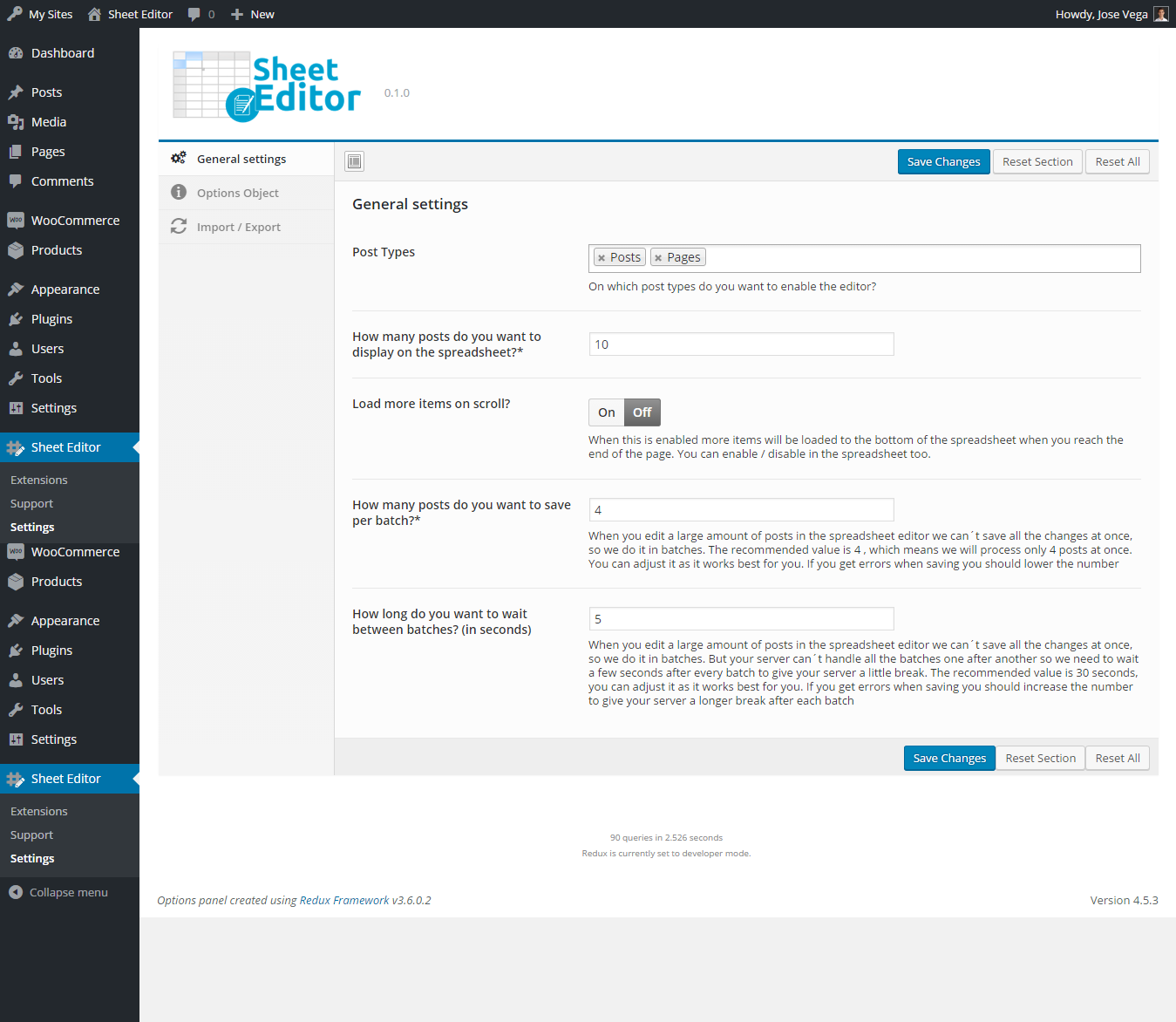
It works on shared hosting (you can adjust the server consumption on the options page)
Developers can add custom columns to the spreadsheet using actions and filters.
WPBakery Page Builder integration. Open the live or backend editor right on the spreadsheet.
Premium features
WooCommerce Spreadsheet:
Edit woocommerce products using the spreadsheet.
It works well with Variable Products, Attributes, Downloadable Products, and Variations.
Do you need to set the same categories to 20 posts? Instead of adding every category manually, just drag one cell and paste it into the 20 cells below. Yes, it´s that easy.
You can copy titles, excerpts, post dates, categories, tags, etc.
You can enable / disable columns on the spreadsheet.
You can rename columns on the spreadsheet
Edit custom post types
You can enable the spreadsheet on ANY custom post type.
For example, you can edit the descriptions or captions of your images (media attachments) to improve your SEO.
If you theme added a “Portfolio” post type, you can edit the items too.
Este plugin te permite editar entradas, artículo, y páginas usando una hoja de cálculo dentro de WP admin.
Tú puedes ver todos los posts y páginas en la hoja de cálculo y rápidamente editar los campos de WordPress.
La versión gratuita te permite:
– Ver todos los artículos, entradas, o páginas en la hoja de cálculo
– Crear y editar artículos, entradas, o páginas rápidamente
– Puedes buscar artículos por palabra clave, fecha, o autor
– Puedes copiar información de un artículo a otro
– Funciona con el nuevo editor de WordPress (Gutenberg)
– Puedes editar estos campos: título del post, contenido, estado, fragmento, imágen destacada, fecha de publicación, habilitar comentarios, página padre, categorías, y etiquetas.
– Editar precios de productos rápidamente usando la hoja de cálculo
La versión de pago te permite:
– Editar todos los tipos de posts: posts, páginas, productos de WooCommerce, eventos, portafolios, etc.
– Exportar e importar posts, páginas, productos para editar en excel o Google Sheets
– Editar todos los campos, el editor mostrará todos los campos del tipo de post. Ej. si son productos = todos los precios, inventario, galerías, etc.
– Hacer búsquedas avanzadas por cualquier combinación de campos (ej. buscar por precio, organizadores, información seo, etc.)
– Editar miles de artículos a la vez en un segundo (ej. eliminar cientos de artículos, reemplazar textos, establecer precios en lotes, actualizar fotos, etc.)
What kind of posts can I edit using the spreadsheet?
Only posts, pages, and woocommerce products with the free plugin.
WooCommerce Products include LIMITED support, you can edit only simple products and you can edit prices only.
The premium plugin allows you to edit ANY custom post types, including WooCommerce products with all their fields.
What post information can I edit using the spreadsheet?
You can edit all the information of your posts and pages, including post title, post content, post status, post excerpt, featured image, publish date, comment status, page parent, post categories, and post tags.
Can I edit WooCommerce products using the spreadsheet?
The free plugin includes limited support for WooCommerce Products, you can edit only simple products and you can edit prices only.
You need the premium version for editing all types of WooCommerce products and all product fields. Read more about the extension.
Can I edit easy digital downloads products using the spreadsheet?
Can I edit custom post types using the spreadsheet?
The free plugin only allows to edit posts and pages.
But we have the premium version that allows you to edit any custom post type, for example, media attachments, posts , pages , courses , jobs , projects , or any other post type added by other plugins.
Yes. The plugin contains several actions and filters for developers. You can add custom columns , modify the spreadsheet behaviour , etc.
Can I use this plugin on cheap / shared servers?
Yes. You can set up the number of posts to save per batch and the waiting between batches. Tweaking those settings you can make it work with any server.
CHANGE – CORE – Don’t use wpautop when saving content
CHANGE – IMPORT – Improve the handling of images
CHANGE – CORE – Allow to view column keys
FIX – CORE – Improve performance on some cells
FIX – Import – Sometimes some columns are not mapped correctly
V 2.20.3 – 2020-09-08
CHANGE – IMPORT – Make more data formatting checks
CHANGE – CORE – Improve the saving process
CHANGE – CORE – Improve support for some devices
CHANGE – CUSTOM COLUMNS – Improve the handling of weird fields
CHANGE – WC Products – Improve the handling of linked products
CHANGE – WC Products – Improve bulk edit of some columns
CHANGE – FORMULAS – Small improvements
CHANGE – CORE – Add support for modern jQuery
CHANGE – CORE – Productivity improvements for some contextual menu actions
CHANGE – WC Products – Small improvements for some columns
CHANGE – IMPORT – Improve productivity
CHANGE – CORE – Improve performance
FIX – COLUMNS MANAGER – It deletes columns by mistake sometimes
FIX – WC Products – Sometimes the formula doesn’t edit all the selected products
FIX – WC Products – Sometimes it changes unnecessary fields
FIX – CORE – Sometimes sheets are not generated
FIX – CORE – Add support for rare wp media settings
FIX – CORE – Sometimes the media library modal doesn’t let you select multiple images
FIX – CORE – Some cells are saving with wrong encoding
FIX – WC Products – Compatibility error with WC Bookings
FIX – SEARCH – Post status search doesn’t work sometimes
V 2.20.2 – 2020-07-22
FIX – CORE – Save popup gets stuck when the changes are saved in < 350ms
FIX – YOAST – Some columns are not saving correctly
FIX – FORMULAS – The replace type doesn’t work sometimes
FIX – CORE – Sometimes columns dont appear in secondary dropdowns but they appear as visible columns
FIX – CORE – Sometimes images aren’t found in the media library when using URLs
FIX – WC Products – Timezone issue when saving sale dates.
V 2.20.1 – 2020-06-26
CHANGE – WC Products – Improve the handling of prices when creating variations
CHANGE – ACF – Improve support
CHANGED – COLUMNS VISIBILITY – Improve the removal process
CHANGE – WC Products – Import – Improve the process
CHANGE – EXPORT – Improve the handling of ghost columns
CHANGE – CORE – Improve performance when loading +800,000 cells at once
CHANGE – FORMULAS – Improve the builder for taxonomy terms
CHANGE – CORE – Improve the handling of advanced settings
CHANGE – WC Products – Improve the bulk edit of some fields
CHANGE – WC Coupons – Improve the search
CHANGE – ACF – Improve the handling of some fields
CHANGE – CORE – Add shortcuts to menu
CHANGE – CORE – Improve the handling of new fields
FIX – WC Products – Sometimes the variation attributes aren’t copied correctly
FIX – CORE – Export doesn’t complete when the current user is not administrator
FIX – FORMULAS – The encoding was wrong sometimes making the replace not match
FIX – ADVANCED FILTERS – Search data columns by empty value returns wrong results
FIX – CORE – Avoided memory leaks
FIX – FORMULAS – Bad value on checkbox
FIX – FORMULAS – Sometimes the edit is not applied to the full list
FIX – WPML – Sometimes changes aren’t synced
FIX – WC Products – Sometimes columns can’t be enabled
V 2.20.0 – 2020-05-20
NEW – CORE – Improve the handling of external images
NEW – FORMULAS – Improved the types of edit
NEW – FILTERS – Improve the search
Products el enlace de metabox variaciones que use id para búsqueda en lugar de title
in the autocomplete dialog for tags, when we use keyboard arrows to move down the list of matching tags, there is no visual indication of which menu item is selected. This means we can’t use keyboard navigation to select items – the arrow keys do work, it’s just we can’t see what is selected. I’m sure a simple CSS tweak would fix this. If/when you release an update to fix this, please let me know at peter@80000hours.org
CHANGE – CORE – Improve the freezing of columns
CHANGE – CORE – Improve the productivity while sorting columns
CHANGE – WC Coupons – Remove duplicate columns
CHANGE – WC Products – Improve performance of the default attributes column
CHANGE – FORMULAS – Improve productivity for executing some edits
CHANGE – COLUMNS MANAGER – Improve the toolbar item
CHANGE – EXPORT – Improve the toolbar item
FIX – WC Products – Sometimes the post type and parent columns aren’t saved
FIX – WC Products – Import – new images are not saved when using the option “skip broken images”
FIX – WC Products – Error when copying more than 100 variations
FIX – FORMULAS – Sometimes columns can’t be copied
FIX – COLUMNS MANAGER – If we specify column formatting manually, don’t overwrite it during automatic detection
FIX – CORE – Sometimes deleted columns also deleted similar columns by mistake
FIX – CORE – Sometimes the save popup gets stuck
FIX – WC Products – When converting a product into variation, the attributes are not migrated sometimes
V 2.19.0 – 2020-04-20
NEW – COLUMNS MANAGER – Improve the handling of columns between users
NEW – WC Products – Improve the handling of custom attributes
CHANGE – Small tweak to the display of advanced settings toolbar
CHANGE – WC Products – Keyword search by sku should allow partial matches
CHANGE – CORE – Prevent data errors during imports