
Effortlessly manage and track the word count of your WordPress posts with the Word Counter Plus plugin. Designed for bloggers, writers, and editors, t …
Word Counter Plus shows how long each post is and how many people read it, right in your admin Posts list. No settings page and no extra screens.
It is built for bloggers, editors, and content teams who want to find thin content, spot their most-read posts, and plan updates without leaving the dashboard.
Word Count column
Every post gets a Word Count column that you can sort. Words are counted when you save a post. Posts that existed before you installed the plugin are counted automatically in the background.
Word Count filter
A word count dropdown next to the date and category filters lets you show only posts within a range:
- 0–600 words
- 601–1000 words
- 1001–2000 words
- 2001–3000 words
- 3001–4000 words
- 4001+ words
Combine it with the category filter, search, or sorting. For example, find short posts in one category that need expanding.
Post Views column
A sortable Views column counts how many times each post is opened on your site. To keep the numbers honest it skips:
- Search engine bots and other crawlers
- Browser prefetch and prerender requests (such as WordPress speculative loading)
- Post previews
- Logged-in users who can edit the post, such as the author or an admin
Sort by Views to see your most popular posts, or combine it with the word count filter to compare long and short posts.
Show views to your visitors
Under Settings → Word Counter Plus you can show the view count (for example “1,204 views”) to your visitors on single posts, on post archives (the blog page, categories, tags, authors and search results), or both. It is off by default.
Choose where it appears:
- After the title, next to the author, date and categories (default). For example, “Written by Admin in News · 1,204 views”.
- Before the content
- After the content
Works with block themes such as Twenty Twenty-Five, and with classic themes.
Lightweight
- Word counts are calculated only when a post is saved.
- A view is a single post meta update. No extra database tables, external services, or tracking scripts.
- Each column can be hidden from Screen Options.
Screenshots
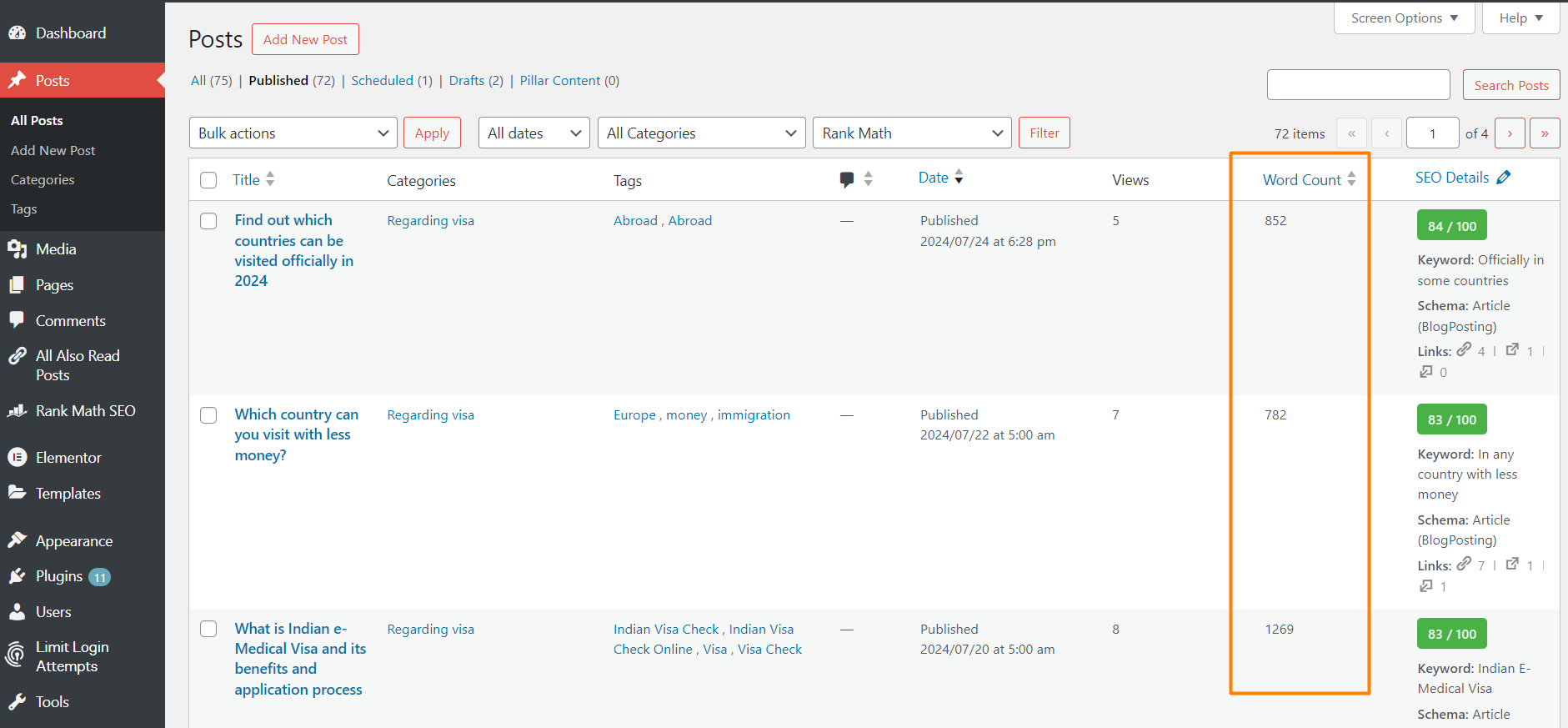
Word Count column on the Posts screen.

Word Count filter dropdown on the Posts screen.

Views column next to Word Count, sorted by most viewed.
How are words counted?
Shortcodes and HTML tags are removed from the post content, then the remaining words are counted. Custom fields and meta boxes are not included.
Is the word count updated automatically?
Yes. The count is updated every time you save or update a post.
My older posts are missing from the word count filter. What should I do?
Nothing. After you activate or update the plugin, older posts are counted in the background in batches of 200, using WP-Cron. On large sites this can take a few minutes. It needs WP-Cron to be running.
How are post views counted?
One view is added each time a single post page is loaded on the front end. Bots, prefetch requests, previews, and users who can edit the post are skipped.
Why do my views not increase?
Make sure you are not logged in as an admin or the post’s author, since those visits are not counted. Also, if your site uses full-page caching, cached pages are served without running WordPress, so those visits are not counted. Exclude single posts from the page cache if you need exact numbers.
Can I change which visits are counted?
Yes. Use the wcp_count_post_view filter. It receives $count (bool) and $post_id. For example, to also count visits from admins:
add_filter( 'wcp_count_post_view', '__return_true' );
Can visitors see the view count?
Only if you turn it on. It is off by default. Go to Settings → Word Counter Plus, choose single posts, post archives, or both, and pick a position. The count uses the wcp-post-views CSS class, so you can style it. Developers can change the markup with the wcp_post_views_html filter.
Where does “next to the author, date and categories” put the count?
In block themes, the count joins the row that shows the author, date or categories, such as “Written by Admin in News · 1,204 views”. If your theme shows none of these, choose “Before the content” instead. In classic themes, it appears at the top of the post content, right below the title and meta.
Does it work with custom post types and pages?
Not yet. Word Count, Views, and the filter work with regular posts.
Does the plugin slow down my site?
No. Word counts are calculated only on save, and a view is a single post meta update. The plugin adds no scripts or styles to your front end.
Can I hide the columns?
Yes. Open Screen Options at the top right of the Posts screen and uncheck Word Count or Views.
Is my data deleted when I uninstall the plugin?
No. Word counts and view counts are kept so they are still there if you reinstall. Only the plugin’s own settings are removed.
How can I get support or contribute?
Ask in the plugin’s support forum on WordPress.org, or open an issue or pull request on GitHub.
ChangeLog
1.4.1
- New: “Rate Word Counter Plus”, “Support” and “Visit author” links on the plugin’s row on the Plugins screen.
1.4.0
- New: Settings → Word Counter Plus page. Choose whether visitors see the view count on single posts, post archives, or both. Off by default.
- New: choose where the count appears: next to the post meta (default), before the content, or after the content.
- New: a Settings link on the Plugins screen.
- New:
wcp_post_views_html filter for the front-end view count markup.
1.3.1
- New: after 7 days, admins see a dismissible request to rate the plugin on WordPress.org, on the Dashboard and Posts screens only. “Maybe later” hides it for 30 days.
1.3.0
- New: sortable Views column that counts post views, skipping bots, prefetch requests, previews, and post editors.
- New: older posts are counted automatically in the background after you activate or update the plugin.
- Fix: sorting by the Word Count column now sorts by word count.
- Fix: the “4001+ words” filter now shows every post with 4001 or more words.
- Improved: the filter input is sanitized and the dropdown has an accessible label.
- Changed: requires PHP 8.0 or later. The plugin already needed it, and the readme now says so.
1.2.7
Tested up to WordPress 7.1. Fixed the readme short description.
1.2.1
Added post-filter screenshot and edited the plugin description.
1.2.0
Increase the plugin security.
1.1.0
Add Word Count Filter feature to filter posts by word count ranges. Improved code structure and performance optimizations.
1.0.0
Initial release of the Word Counter Plus plugin.

