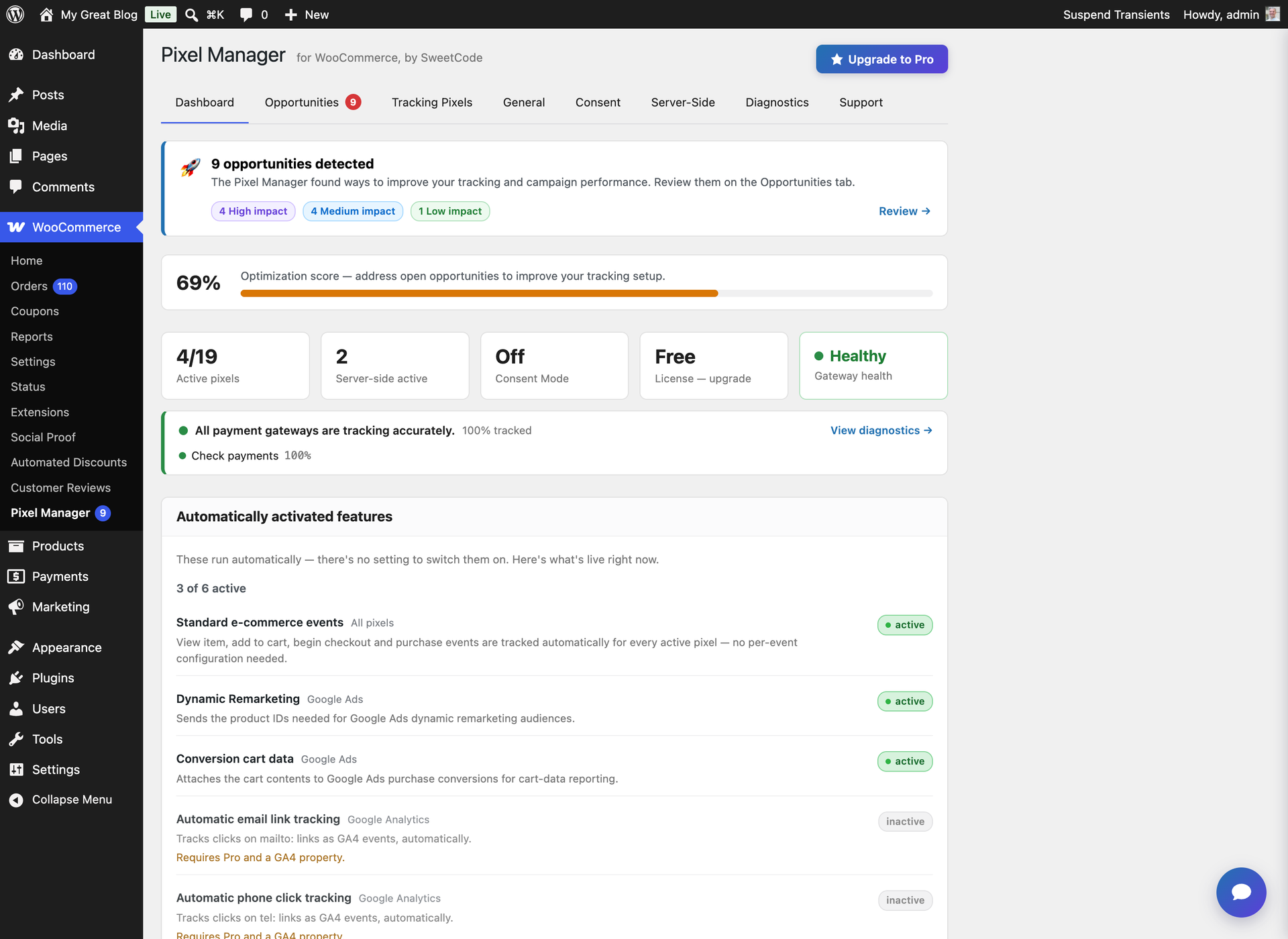
The Pixel Manager is the most complete conversion tracking plugin for WooCommerce. Set up Google Ads conversion tracking, Google Analytics GA4 e-commerce tracking, Meta Pixel (Facebook Pixel) and Conversions API, TikTok Pixel and Events API, and more – in minutes, not hours. No coding required.
Unlike Google Tag Manager (GTM), which requires significant technical expertise to configure WooCommerce e-commerce tracking correctly, the Pixel Manager provides a turnkey solution with over 12 years of development. It automatically handles edge cases like payment gateway redirects, order duplication prevention, and consent mode – all the things that take hours to get right with manual tag management.
???? New: Conversion tracking for OpenAI ads on ChatGPT
OpenAI is rolling out advertising on ChatGPT, and the Pixel Manager is one of the first WooCommerce plugins to support it. The free version installs the OpenAI browser pixel with the full shopping funnel, and the Pro version adds a server-side Conversions API connection and Advanced Matching – so you can measure exactly which purchases your ChatGPT ads drive, from day one. Also new: Microsoft Clarity heatmaps and session recordings (Pro, beta), and the rebuilt, faster Nova admin interface (free).
???? Endorsed by Google’s Tag Team
This plugin was recommended to us by Google’s Tag Implementation Team. That should say enough.
Most WooCommerce tracking plugins only handle the basics: firing a conversion pixel on the thank you page. The Pixel Manager goes much further. It tracks the entire e-commerce customer journey – from product impressions and add-to-cart events through checkout and purchase – across all major advertising and analytics platforms simultaneously. This gives you complete data for conversion optimization, dynamic remarketing audience building, and accurate ROAS reporting.
The Pro version adds server-side tracking (Conversion API / CAPI) that sends conversion data directly from your server to advertising platforms. This bypasses browser limitations like ad blockers, Safari ITP cookie restrictions, and network issues – typically recovering up to 30% more conversions that browser-only tracking misses. Our unique Automatic Conversion Recovery (ACR) feature goes even further by automatically identifying and recovering missed conversions nightly.
Key Benefits
✅ Easy setup – just enter your tracking IDs and you’re done.
✅ Accurate e-commerce event tracking across all platforms.
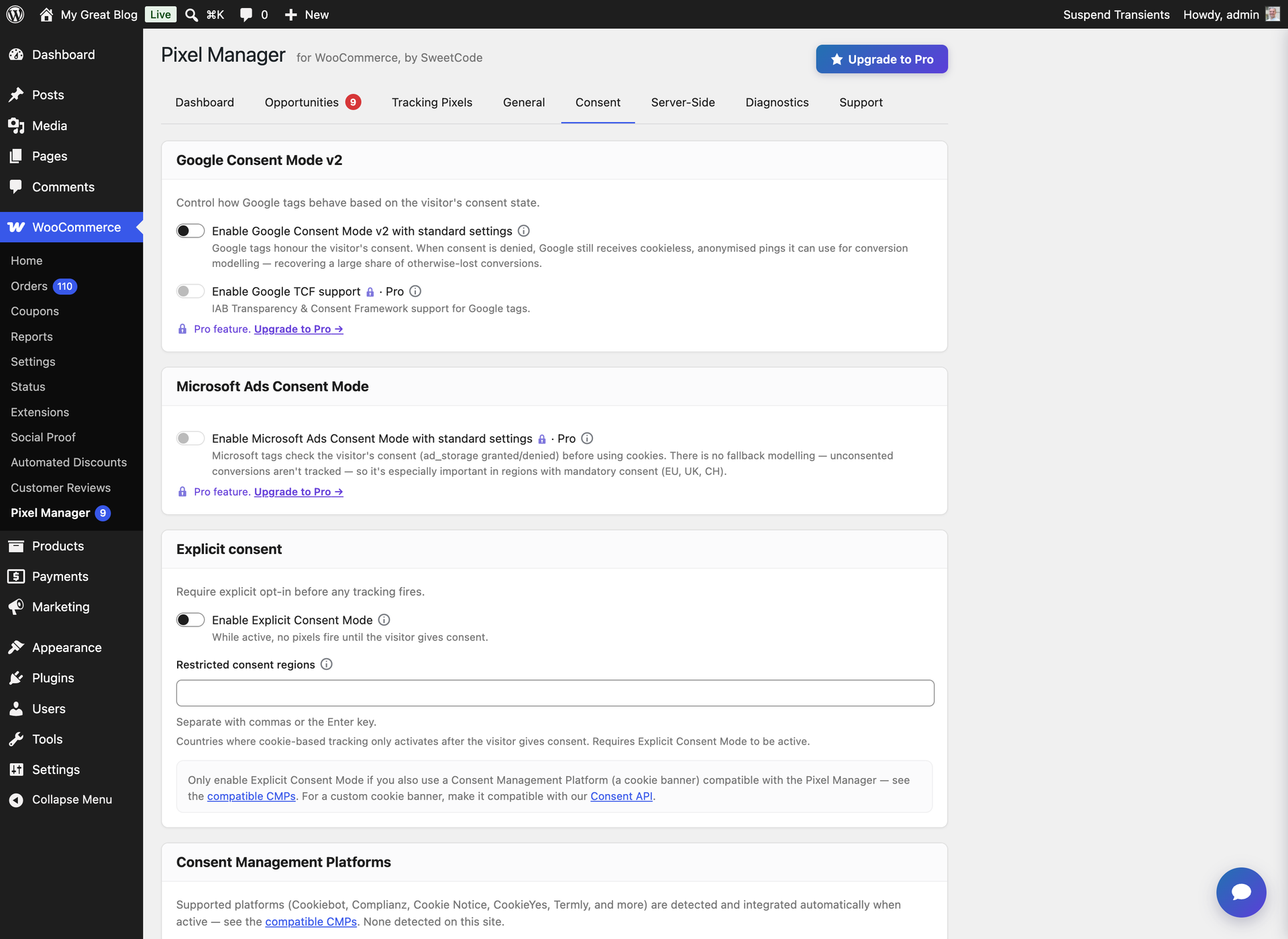
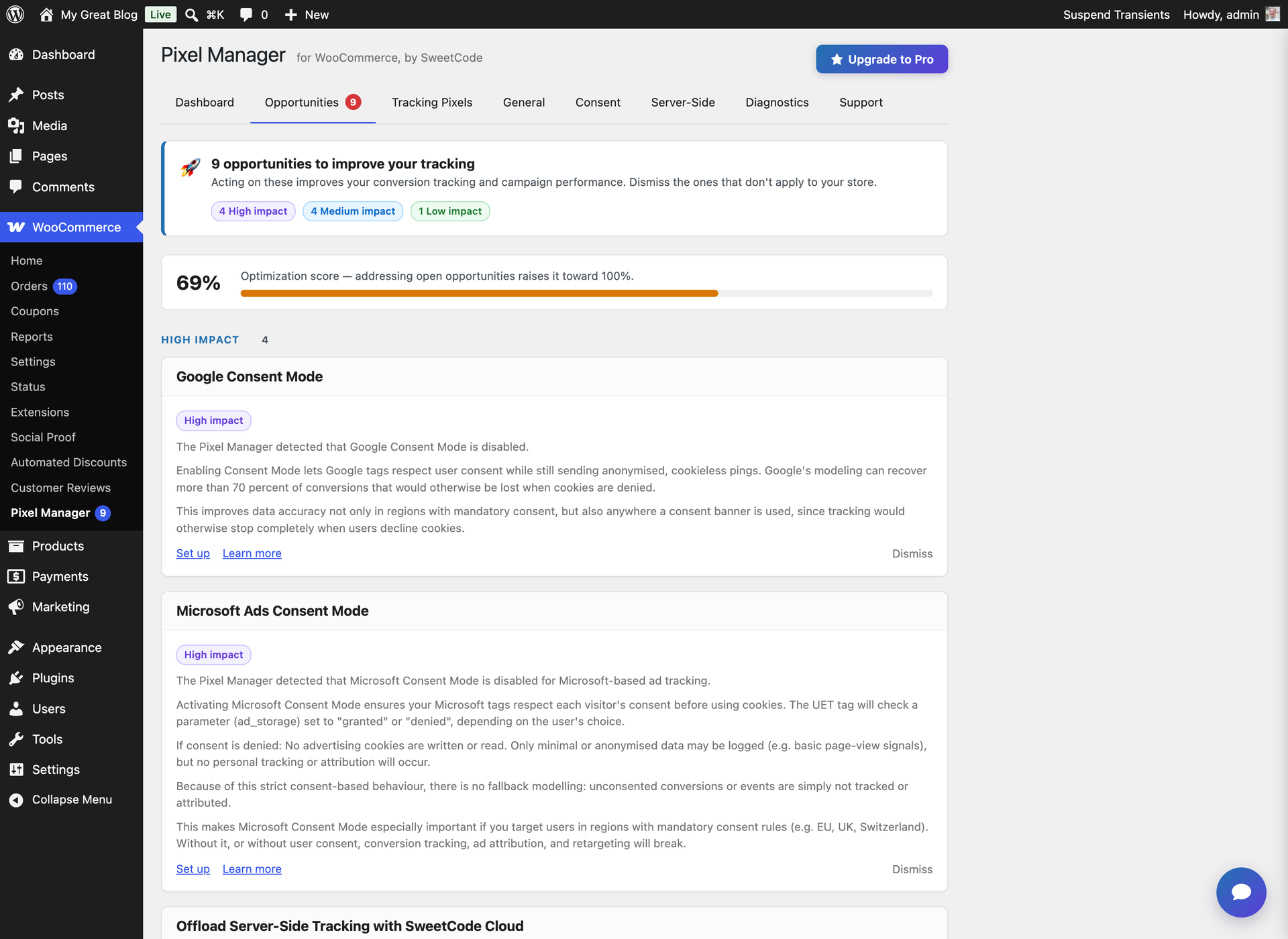
✅ GDPR and CCPA compliant with Google Consent Mode v2.
✅ Works with 15+ consent management platforms out of the box.
✅ Lightweight – won’t slow down your WooCommerce store.
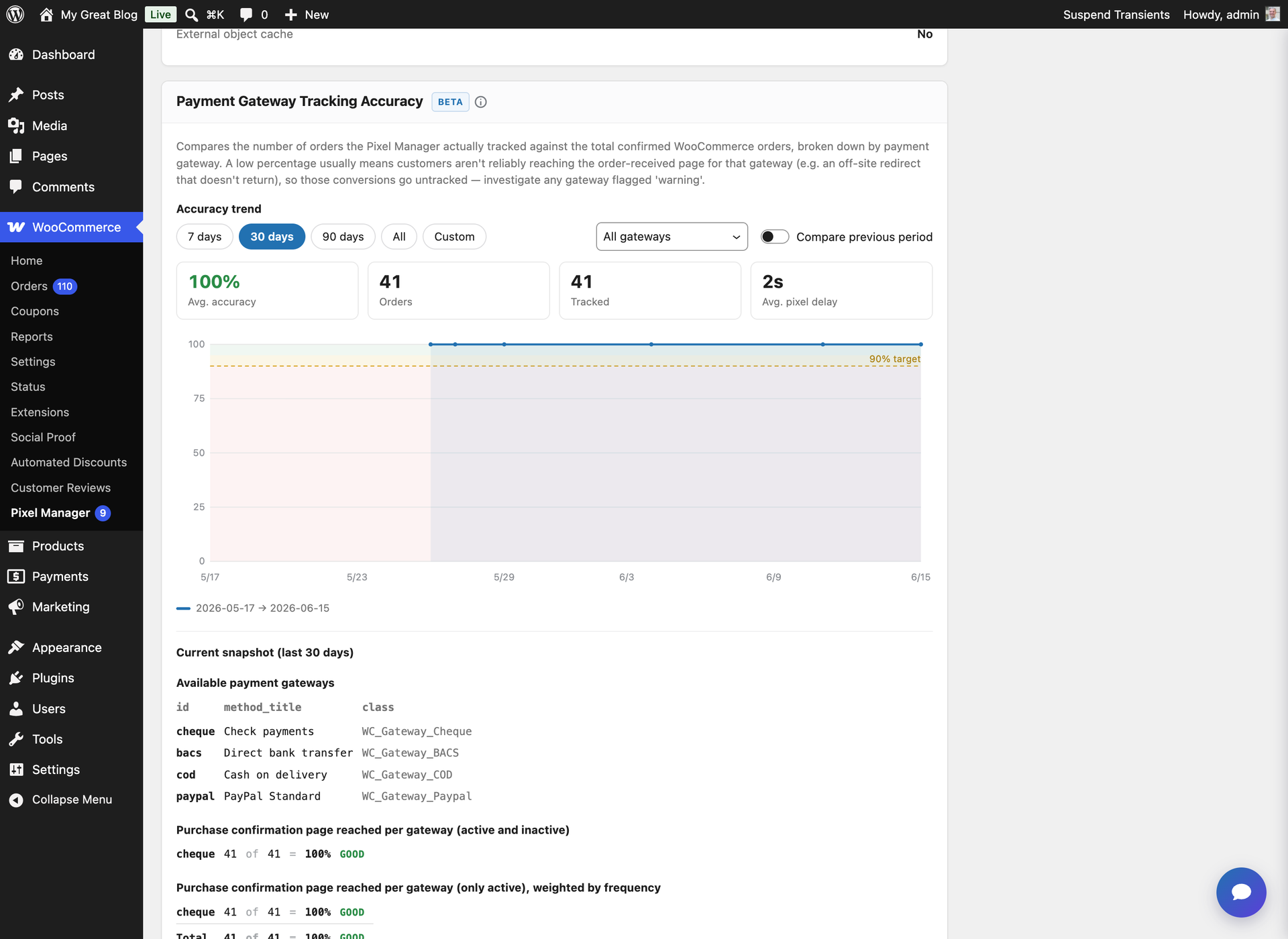
✅ Payment Gateway Accuracy Report – diagnose conversion tracking drops.
✅ Automatic Conversion Recovery (ACR) – recover lost conversions (Pro).
✅ OpenAI ads (ChatGPT) conversion tracking – browser pixel free, server-side (Pro).
✅ AI-ready – AI agents can safely configure the plugin through the WordPress Abilities API.
Free Tracking Pixels
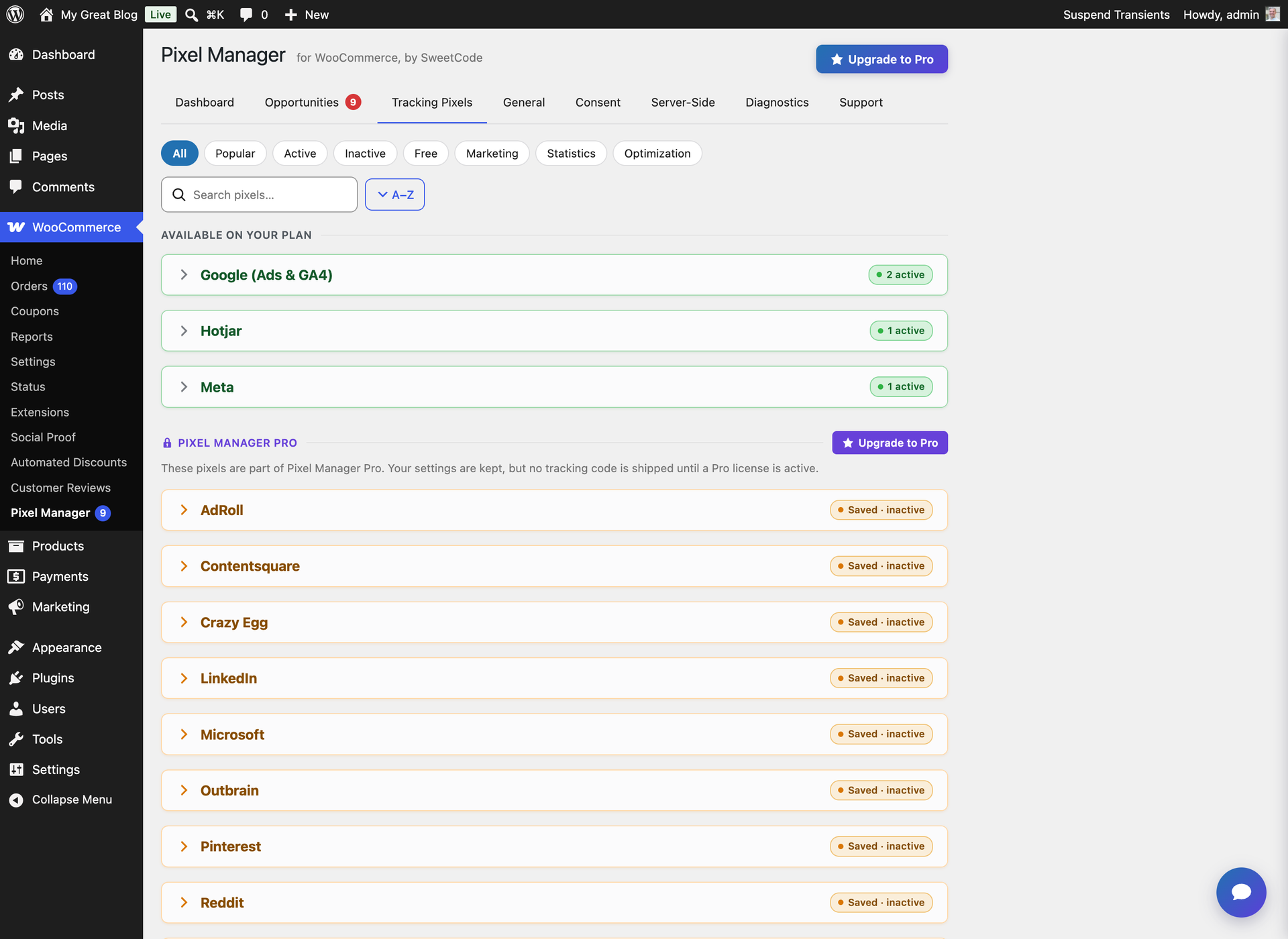
Google Ads Pixel – conversion value tracking, dynamic remarketing, cart item data
Google Analytics Pixel (GA4) – full Enhanced E-Commerce tracking
Meta Pixel (Facebook Pixel) for Meta Ads – remarketing events and custom audiences
TikTok Pixel – full shopping funnel from product view to purchase
Microsoft Ads UET Tag (Bing Ads) – conversion tracking, dynamic remarketing and Microsoft Ads Consent Mode
Pinterest Tag – shopping funnel events with product data
Reddit Pixel – shopping funnel events with product data
Snapchat Pixel – shopping funnel events with product data
OpenAI Pixel – conversion tracking for ads on ChatGPT
Hotjar Pixel – heatmaps and session recordings
The server-side connections behind these pixels (Conversions API, Events API), Advanced Matching, Enhanced Match and Enhanced Conversions are part of the Pro version.
Free Features
Google Tag Gateway for Advertisers – first-party tracking through Google’s servers
Google Consent Mode v2 – full compliance with EU, UK, and US privacy regulations
Google Ads Dynamic Remarketing – build audiences based on product interactions
Google Ads Cart Item Tracking – feed cart data to Smart Shopping and Performance Max campaigns
Google Shopping New Customer Parameter – optimize for new customer acquisition
GA4 Enhanced E-Commerce – track product impressions, add to cart, checkout steps, and purchases
Meta Remarketing Events – ViewContent, AddToCart, InitiateCheckout, Purchase
Basic Order Duplication Prevention – avoid counting the same conversion twice
Customizable filters – fine-tune tracking output for your specific setup
Lazy-loaded product list support – works with infinite scroll and AJAX product loading
AppLovin – conversion tracking through the AppLovin (Axon) pixel, with the full shopping funnel and server-side events through the Conversion API (beta)
Contentsquare Statistics
CrazyEgg Analytics
Criteo Ads – retargeting and audience events through the Criteo OneTag (beta)
GroundTruth Ads – omnichannel engagement and conversion tracking (beta)
Hyros – ad attribution through the Hyros Universal Script with funnel milestone tags (beta)
LinkedIn Ads
Microsoft Clarity – heatmaps and session recordings with e-commerce events (beta)
Mixpanel – product analytics with the full shopping funnel, server-side purchases through the Ingestion API, session replay and user identification (beta)
Klaviyo – consent-gated onsite tracking alongside the Klaviyo plugin, with reliable Started Checkout on custom checkouts, cart, collection and search events, and server-side orders through the Events API (beta)
Nextdoor Ads – conversion tracking through the Nextdoor Universal Pixel (beta)
Optimizely – experimentation and feature testing (beta)
Outbrain Ads
Rumble Ads – conversion tracking for purchases and add to cart events through the Rumble global site tag (beta)
Spotify Ads – conversion tracking through the Spotify Ad Analytics pixel, with the full shopping funnel and server-side events through the Conversions API (beta)
Taboola Ads
Triple Whale – browser pixel and checkout funnel for stores connected to Triple Whale (beta)
The Pixel Manager integrates with all major Consent Management Platforms (CMPs) to ensure your tracking pixels respect visitor consent choices. It supports Google Consent Mode v2, including region-specific consent defaults for the EU, UK, and US states with privacy regulations.
Although we follow security best practices, we wanted to ensure that we didn’t miss anything. So, we had the plugin reviewed by Patchstack, a cybersecurity company specializing in WordPress security.
The summary of their report was: “We were unable to detect any vulnerabilities that would impact the security status of the plugin in a serious way.”
Managed Vulnerability Disclosure Program
We are committed to ensuring the security of our customers and their data. If you believe you have found a security vulnerability in the Pixel Manager for WooCommerce, we encourage you to report it through Patchstack our security partner. Patchstack runs a managed Vulnerability Disclosure Program (mVDP) that helps us receive, triage, and respond to reported vulnerabilities. Patchstack also provides a reward for the responsible disclosure of security vulnerabilities. Report a vulnerability
How does Pixel Manager compare to Google Tag Manager (GTM)?
While Google Tag Manager is free, it requires significant technical expertise and many hours of configuration to set up proper WooCommerce e-commerce tracking. You need to create custom data layers, configure triggers and tags for each platform, handle consent mode integration manually, and test extensively to avoid tracking errors. The Pixel Manager provides a turnkey alternative that’s optimized specifically for WooCommerce with over 12 years of development. It automatically configures the correct e-commerce events, handles edge cases like payment gateway redirects and order deduplication, and includes unique features like Automatic Conversion Recovery (ACR) and the Payment Gateway Accuracy Report that GTM cannot replicate. Most users find Pixel Manager saves dozens of hours compared to manual GTM setup, while delivering more accurate conversion data.
What is server-side tracking (Conversion API / CAPI) and why does it matter?
Server-side tracking sends conversion data directly from your WooCommerce server to advertising platforms like Meta (through the Meta Conversions API), TikTok (through the TikTok Events API), Pinterest, Snapchat, Reddit, OpenAI, and Google Analytics 4 – rather than relying solely on browser-based pixels. This results in more reliable, accurate tracking because it works even when browser tracking is limited by ad blockers, Safari ITP cookie restrictions, browser privacy settings, VPNs, or network issues. Our Pro version typically recovers up to 30% more conversions compared to browser-only tracking, directly improving your campaign optimization and ROAS calculations.
Can I track conversions from OpenAI ads on ChatGPT?
Yes. The Pro version includes an OpenAI tracking pixel with browser-side conversion tracking, a server-side Conversions API connection, and Advanced Matching for improved event matching. You only need to enter your OpenAI pixel ID and, for server-side tracking, a Conversions API token. Purchase conversions are always sent server-side for maximum reliability, so you can accurately measure which sales your ads on ChatGPT generate.
How does Automatic Conversion Recovery (ACR) work?
ACR is our unique Pro feature that automatically recovers conversions missed due to tracking issues – whether from payment gateway redirects (like PayPal), browser limitations, ad blockers, or network problems. It runs nightly using the WordPress Action Scheduler, identifies WooCommerce orders that weren’t properly tracked by your advertising pixels, and sends the conversion data to your advertising platforms retroactively (within the allowed attribution windows). This can recover approximately 50% of otherwise lost conversions, directly improving your Google Ads, Meta, and TikTok campaign performance.
Does the Pixel Manager support Google Consent Mode v2?
Yes. The Pixel Manager fully supports Google Consent Mode v2, including the new ad_user_data and ad_personalization parameters required by Google since March 2024. It also supports region-specific consent defaults for the EU, UK, and 11+ US states with privacy regulations. The plugin integrates with 15+ consent management platforms (CMPs) out of the box, automatically adjusting tracking behavior based on visitor consent choices. This ensures your WooCommerce store is compliant with GDPR, CCPA, and other privacy regulations while still collecting the maximum amount of conversion data allowed.
What WooCommerce e-commerce events does the Pixel Manager track?
The Pixel Manager tracks the complete e-commerce customer journey: product list views (impressions), product detail views, add to cart, remove from cart, begin checkout, add payment info, and purchase events. These events are sent simultaneously to all configured tracking pixels (Google Ads, GA4, Meta, TikTok, etc.) with standardized product data including product ID, name, category, brand, price, and quantity. This comprehensive event tracking powers Google Analytics GA4 Enhanced E-Commerce reports, Google Ads Smart Shopping and Performance Max campaigns, Meta dynamic remarketing ads, and TikTok product catalog campaigns.
Can I use the Pixel Manager to track Google Ads conversions on WooCommerce?
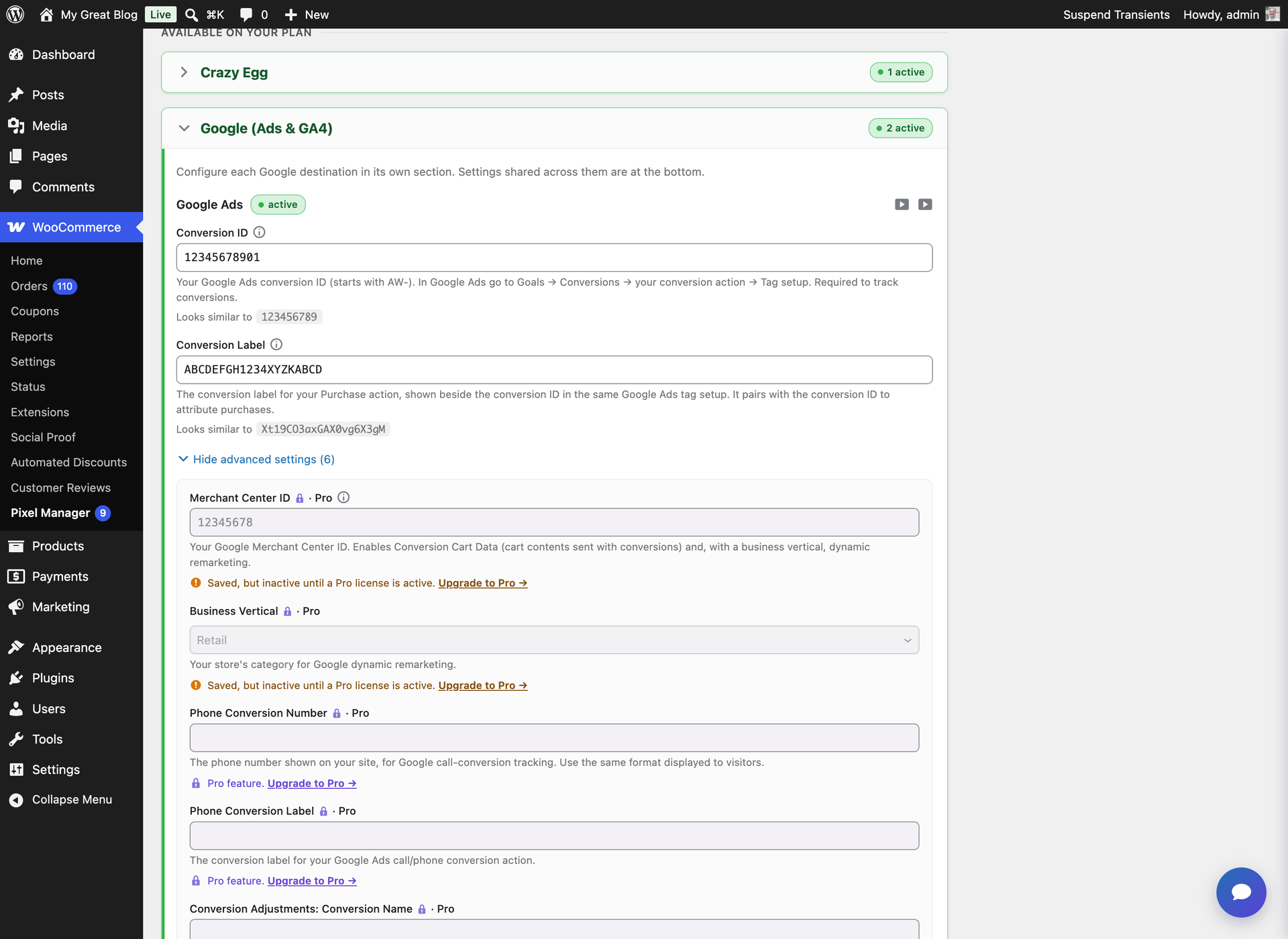
Yes. The Pixel Manager makes Google Ads conversion tracking setup on WooCommerce straightforward. Simply enter your Google Ads Conversion ID and Conversion Label, and the plugin automatically tracks purchase conversions with accurate order values, fires dynamic remarketing events for audience building, sends cart item data to optimize Performance Max and Shopping campaigns, tracks the Google Shopping new customer parameter for new customer acquisition campaigns, and supports Enhanced Conversions (Pro) for improved attribution using first-party data.
Can I track Meta Ads (Facebook and Instagram) conversions on WooCommerce with the Meta Pixel and Conversions API?
Yes. Enter your Meta Pixel ID and the free version installs the Meta Pixel (Facebook Pixel) with the shopping funnel events ViewContent, AddToCart, InitiateCheckout and Purchase, including the product data that dynamic remarketing ads and custom audiences need. The Pro version adds the Meta Conversions API (CAPI), which sends the same events from your server, and Advanced Matching for better event matching. Server-side events reach Meta even when ad blockers or browser privacy settings stop the browser pixel, so your Facebook and Instagram campaigns optimize on more complete purchase data.
Will the Pixel Manager slow down my WooCommerce store?
No. Performance is a core design priority. The back-end code is small and efficient with fast, cached database queries. Larger tasks like ACR processing run during off-peak hours using the WordPress Action Scheduler. The front-end JavaScript library is compiled, tree-shaken to only load code for active pixels, minified, and pre-compressed with gzip and brotli. The Pro version adds lazy loading of the tracking library to further reduce impact on page load time. Many users report the Pixel Manager is faster than alternative tracking plugins and significantly lighter than a comparable Google Tag Manager setup.
Our plugin is designed to work seamlessly with 99.99% of all other plugins. In the rare event of a conflict with a third-party plugin, we typically identify a fix or workaround quickly.
To illustrate its broad compatibility, here are a few examples of third-party plugins that work well with the Pixel Manager:
Async Javascript
Automptimize
CartFlows
Cloudflare Plugin
Cost of Goods for WooCommerce (WPFactory)
Doofinder for WooCommerce
FlyingPress
Hummingbird
Litespeed Cache
Litespeed ESI
NitroPack
Siteground Optimizer
W3 Total Cache
WooCommerce Brands
WooCommerce Composite Products
WooCommerce Cost of Goods (SkyVerge)
WooCommerce Deposits
WooCommerce Google Product Feed
WooCommerce Subscriptions
WooCommerce Wishlists
Woo Discount Rules
WP Fastest Cache
WP Marketing Robot Feed Manager
WP Optimize
WP Rocket
WP Super Cache
YITH WooCommerce Brands
YITH WooCommerce Wishlist
Rest assured, this is just a small sample, and the Pixel Manager should integrate smoothly with almost all other plugins you may use.
Do you have videos that show how to set up the plugin and get most out of it?
Yes, they are part of the step by step documentation. Head over to this link: Documentation
I get a fatal error and I am running old versions of WordPress and/or WooCommerce. What can I do?
As this is a free plugin we don’t support old versions of WordPress and WooCommerce. You will have to update your installation.
I am using an offsite payment gateway and the conversions are not being tracked. What can I do?
Offsite payment gateways (like PayPal Standard) redirect visitors away from your WooCommerce store during checkout, which can prevent browser-based conversion tracking from firing. The free version cannot fully solve this, but the Pro version’s Automatic Conversion Recovery (ACR) feature specifically addresses this problem by detecting untracked orders and sending the conversion data server-side. We generally recommend using direct payment gateways (like Stripe, PayPal Commerce Platform, or Mollie) for the best tracking accuracy and higher conversion rates.
I’ve done everything right in the test, but it still doesn’t work. What can I do?
Here is a non-exhaustive list of causes that might interfere with the plugin code.
Minification plugins try to minify the JavaScript code of the plugin. Not all minification plugins do this good enough and can cause problems. Turn off the JavaScript minification and try again.
Caching could also cause problems if caching is set too aggressively. Generally don’t ever enable HTML caching on a WooCommerce shop, as it can cause troubles with plugins that generate dynamic output.
I see issues in the backend of my shop. Admin pages get rendered weird, and popups don’t go away when I click to close them. How can I fix this?
You probably have some script or ad blocker activated. Deactivate it and the issues should go away. Usually you can disable the blocker for just that particular site (your WooCommerce back end).
Our plugin injects tracking pixels on the front end of WooCommerce shops. As a consequence scripts of our plugin have been added to some privacy filter lists. The idea is to prevent the scripts running if a shop visitor has some ad blocker enabled and wants to visit the front end of the shop. This is totally ok for visitors of the front end of the shop. But, it becomes an issue for admins of the shop who have a blocker activated in their browser and visit the backend of the shop.
Unfortunately, there is no way for us to generally approve our scripts in all blockers for the WooCommerce back end.
Therefore, we recommend admins of the shop to exclude their own shop from the blocker in their browser.
Where can I report a bug or suggest improvements?
Please post your problem in the Pixel Manager for WooCommerce Support forum: Link
You can send the link to the front page of your shop too if you think it would be of help.
How can I report security bugs?
You can report security bugs through the Patchstack Vulnerability Disclosure Program. The Patchstack team helps validate, triage, and handle any security vulnerabilities. Report a security vulnerability.
Tweak: Before sending you to Google, the Google setup assistant now explains which account to sign in with, why to allow all three permissions, and what to do when a company Google account shows “Access blocked”. If you come back without finishing, it lists the usual reasons and offers to try again
Fix: The debug info now reports the purchase confirmation page correctly on shops whose checkout URL has no trailing slash. It showed a broken checkoutorder-received address there and wrongly answered “no” on the is_order_received() line
1.74.2
Release date – 18.11.2026
Fix: The Google setup assistant now connects shops behind Cloudflare’s bot protection, a security plugin or password protection, which answered the connection service’s site check and stopped the connection with “Connection service error (502)”. When something in front of WordPress still blocks a connection request, the assistant says so instead of showing only an error code
1.74.1
Release date – 17.11.2026
Tweak: The deprecation notice for the old window.wpm object now appears once per page. A script that read every property of it filled the browser console with hundreds of warnings on every page
1.74.0
Release date – 16.11.2026
New: Added a Google setup assistant. Connect a Google account once and pick or create the Google Ads conversion action and the GA4 data stream from a list, instead of copying conversion IDs, labels and measurement IDs by hand
Fix: Script blockers that scan inline scripts for vendor URLs, such as the one in WebToffee’s GDPR Cookie Consent, mistook the Pixel Manager’s configuration for a Meta pixel and held it back, which stopped all tracking until advertising cookies were accepted. The configuration no longer contains Meta’s script URL, so each pixel follows its own consent category again
Fix: On custom thank-you pages, such as those of CartFlows or FunnelKit, the Pixel Manager is no longer delayed until visitor interaction by WP Rocket, FlyingPress or Perfmatters, which lost the purchase whenever the buyer left without clicking or scrolling
Fix: When WooCommerce is activated but fails to load, for example after an incomplete update, the Pixel Manager no longer stops the whole site with a fatal error
1.73.0
Release date – 12.11.2026
Fix: With the legacy CookieYes (Cookie Law Info) banner, the Pixel Manager read consent as granted before the visitor answered and after a rejection, also in Google Consent Mode. It now waits for the visitor’s answer, honors the “non-necessary” category and applies the answer on the same page
Fix: With the Google Tag Gateway running through the WordPress handler, GA4 and Google Ads hits were forwarded with HTML-escaped values, so landing pages with several URL parameters were stored as ?amp;gclid=... and campaign attribution broke. Hits now reach Google exactly as the browser sent them
Fix: Microsoft UET Consent Mode no longer writes an empty _uetmsdns cookie before consent. Microsoft ignores that value, so the cookie had no effect; UET keeps running in Microsoft’s denied state as specified
Tweak: Confirmed compatibility with WordPress 7.1 and WooCommerce 11.3.0
Tweak: Updated the bundled third-party libraries to their current releases
Tweak: Updated the translation template (.pot file)
1.72.0
Release date – 04.11.2026
New: Each configured pixel now has an on/off switch that pauses it without losing its settings, stopping both browser and server-side tracking until it is resumed. Paused pixels are marked clearly on the Tracking Pixels tab, the Dashboard and the WordPress dashboard widget
New: view_item_list now sends one event per product list with every item and its position, instead of one event per product, to GA4, Google Ads, Klaviyo, Mixpanel and Criteo. Related products and theme or page builder widgets such as WoodMart’s count as their own lists, and grouped events still go out when the visitor leaves the page
Tweak: The payment gateway tracking accuracy report now warns when on-site gateways such as Stripe and WooPayments measure no orders at all. That points at a firewall or cache rule blocking the order confirmation beacon, or the Pixel Manager script not running on the order received page, not at a payment redirect
Tweak: The Google Tag Gateway proxy now logs requests without a valid tag ID, which crawlers send to the gateway URL, at debug level instead of as warnings, so they no longer flood the debug log
Tweak: When a theme or plugin deregisters jQuery or wp-hooks, WordPress silently drops the Pixel Manager script and no pixel loads; the debug info and the Diagnostics tab now report it and name the missing script
Tweak: The debug info now notes that a failing purchase confirmation page HTTP status was tested server side, since firewalls and bot protection often block such requests while buyers load the page fine
Tweak: The tracking pixel search now also finds pixels by the names people know them under, so searching for ChatGPT shows the OpenAI pixel
Tweak: Every user now gets the Nova settings interface, and the switch back to the Classic interface is gone from the Support page. If Nova runs into a problem on a site, the pmw_use_classic_admin_interface filter brings back the Classic interface
Tweak: With the logger on (pmwloggeron), the order confirmation page now says when the order duplication prevention held back an already reported purchase, and names the nodedupe parameter that tests it again
Tweak: The browser console now warns when the data layer is on a page but the Pixel Manager library did not start, for example because the server sends its script compressed without a Content-Encoding header
Fix: WooAds no longer reports a missing TikTok pixel on shops where the Pixel Manager runs TikTok. The TikTok for WooCommerce pixel code is now hidden only on storefront requests, where its tracking stays off
Fix: Reddit for WooCommerce no longer sends its base pixel, purchase and Conversions API events next to the Pixel Manager’s Reddit pixel, and Snapchat for WooCommerce is now switched off the same way when the Pixel Manager runs Snapchat
Fix: When another plugin or a script optimizer keeps a WordPress core script such as wp-components from loading, the settings page now names the missing script and how to fix it, instead of crashing with a generic interface error
Fix: The standalone Google Tag Gateway proxy now passes its health check when logging is set to info or debug. The check crashed, so the Google tag went through the slower WordPress handler instead
Fix: When the standalone Google Tag Gateway proxy fails to serve the Google tag, it now loads through the WordPress handler before falling back to Google directly, and the visitor’s next pages skip the failed proxy instead of failing the same way
Fix: The payment gateway tracking accuracy report now counts a gateway as active when it received orders in the last 30 days, so orders that a disabled legacy plugin still files under its ID, such as stripe_cc, no longer drop out of the active view and the weighted accuracy
Fix: The payment gateway tracking accuracy report no longer shows a gateway above 100%. An order whose payment method changed after payment now moves its total to the new gateway, and two confirmations arriving at once, or an order placed before the Pixel Manager was active, no longer count as an extra tracked order
Fix: The Environment card on the Diagnostics page now shows the same WordPress memory limit as the debug info, the higher of WP_MEMORY_LIMIT and the PHP memory_limit, instead of the WP_MEMORY_LIMIT constant alone
Fix: Usercentrics Accept, Deny and Save choices now reach the Pixel Manager. With current Usercentrics versions, Meta and other marketing pixels stayed off on the page where the visitor accepted, and from the next page on they loaded even for visitors who had denied
Fix: One rate-limited or failed request no longer moves the visitor’s whole session from the REST API to admin-ajax.php. Only a network error or a missing or blocked REST route does that now; anything else falls back for that request alone
Fix: On shops that ask for consent first, pixels such as Meta that load when the visitor accepts the banner now receive the landing page view and product view of that page, once and with the original event IDs, so ad landing pages are tracked
Fix: GA4 view_item_list and select_item events now send each product’s list position as the item index, which a field name mismatch had dropped. The index counts from 0, as GA4 expects, also on search results
Fix: Pinterest product views are sent as PageVisit again instead of ViewContent, on the tag and the Conversions API. Pinterest requires PageVisit with a product ID for the Verified Merchant Program and catalog sales campaigns, and has flagged such tags as needing attention since 1.67.0
1.71.0
Release date – 20.10.2026
Tweak: The tracking library loaded on every shop page is about 40% smaller, with IP and location lookups loading only on shops that use the IP exclusion list or region-based consent. Pixel code now downloads while the cookie banner check runs, so pixels start sooner
Tweak: The Meta Purchase now carries the order number as order_id, which Events Manager listed as unavailable
Tweak: Cookies the Pixel Manager writes in the browser now carry the Secure attribute on HTTPS pages, which PCI compliance scans check for
Fix: The standalone Google Tag Gateway proxy no longer stops working a week after the last settings change, when it answered every request with a 503 and the Google tag loaded directly from Google instead
Fix: The Google Tag Gateway service worker now registers with every gateway handler. The WordPress handler still logged a service worker scope error on every page after the 1.70.0 fix, and the standalone proxy answered the worker with a 400 error
Fix: The standalone Google Tag Gateway proxy now works when WordPress core sits in its own subdirectory or the content folder is not named wp-content, as on Bedrock, instead of sending every request through the slower WordPress handler
Fix: The standalone Google Tag Gateway proxy now sends empty POST requests with a length. Google refused them with a 411 error
Fix: IP ranges in CIDR notation from the pmw_ip_exclusion_list filter now exclude the visitor in the browser too. A range broke the browser check, so only exact IPs stopped the browser pixels
Fix: Pinterest checkout starts now carry each product’s category and brand, and over the Conversions API also its price, quantity and name, which Pinterest reported as missing
Fix: Settings saved through the admin REST API are now checked against each setting’s type, and a save that names a whole group of settings validates every field inside it, Pro licensing included. A malformed save could store a list as the Google Tag Gateway path, which broke every shop page on PHP 8
Fix: Server-side requests to ad platforms and the debug report’s connection checks now always verify the TLS certificate. A crafted request header or a private server IP could switch the check off, and only sites set to the local environment type skip it
1.70.0
Release date – 13.10.2026
New: With Explicit Consent Mode off, the Pixel Manager now applies the cookie banner’s own pre-decision state, so opt-in banners from Complianz, Cookiebot, CookieYes, OneTrust, iubenda, Usercentrics and others no longer let pixels fire before the visitor answers. For banners that load asynchronously it waits up to two seconds for their answer
New: The debug report lists the other active Google Analytics, Google Tag Manager and ad pixel plugins, so a second tracking setup shows up in the first support reply
New: AI agents can now do everything the admin offers through the Abilities API, from backups, imports and logs to opportunities, SweetCode Cloud and the Google and Meta account connections, with exactly the access their user has in the admin, shop managers included. All abilities appear on the WordPress MCP Adapter’s default server
Tweak: The Meta Conversions API Gateway and Event Setup Tool checks run daily instead of weekly, and both cards say that Meta can keep reporting a removed setup for a while
Tweak: A settings save that a security plugin or host firewall blocks before it reaches WordPress now says so and names the blocked request, instead of showing “API error 403”
Tweak: A Nova page that hits an error no longer takes down the whole admin. Only that page is replaced by a request to contact support, with a button that copies the error details
Tweak: With Explicit Consent Mode on, click IDs from the landing page URL are no longer stored in the browser before the visitor allows marketing. In every mode, declining or withdrawing marketing consent removes the stored click IDs
Tweak: Updated Freemius SDK to the latest version
Fix: The Google setup assistant now shows which permissions you allowed on Google’s consent screen and what stops working for the ones you declined. Reconnecting asks for the declined permissions again instead of silently reusing the earlier choice
Fix: Google Ads conversions with cart data no longer deduct coupons twice. Item prices are now sent before coupons, as Google requires, because Google subtracts the order discount from the cart itself
Fix: Beautiful and Responsive Cookie Consent’s built-in Pixel Manager integration no longer saves a permanent consent record that overrides the banner, which could keep a visitor who allowed marketing denied on every page. Visitors already affected are fixed on their next page view
Fix: Cookiebot declines, Cookiefirst decisions and Usercentrics saved selections now reach the Pixel Manager, and unnamed Cookiefirst and Cookie Compliance categories count as denied
Fix: A pixel that never loads, for example Meta behind an ad blocker, no longer suppresses the page view of every other pixel. The page view waits only when server-side page views are active, for at most three seconds, and never for a pixel the visitor has not consented to
Fix: GA4 keeps tracking when the shop’s server cannot reach Google to check the tag ID, and an ID Google rejects gets an admin notice that explains the GT- alternative. Shops that also send GA4 through another tag, such as a GTM container, may now see page views double and should keep one sender
Fix: Visitors recognised as bots or excluded by the IP exclusion list no longer load any browser pixel, so GA4’s automatic page view and the Google Ads remarketing hit no longer reach Google for them
Fix: The Pixel Manager log no longer stays empty when WooCommerce logging is disabled or its level threshold is higher, and the Logger card says where the entries go
Fix: A failed cart sync request no longer clears the stored cart, so the next page still has cart data for checkout events, and its error message says the request only reads the cart
Fix: With the order subtotal value logic, a Stripe fee paid out in another currency than the order, for example AED on a EUR order, is converted to the order currency before it is deducted. It used to be subtracted as is, which under-reported conversion values and turned small orders into zero
Fix: Turning off order de-duplication or turning on HTTP request logging through the Abilities API now arms the same timers as the admin interface, so de-duplication comes back on after 6 hours and logging switches off after 12 instead of staying that way
Fix: The Google Tag Gateway service worker registers again. Since 1.69.1 the gateway dropped the header Google sends to allow it, so every page logged a service worker scope error in the browser console
Fix: The server-load warnings for the Tag Gateway path and the first Conversions API token now appear when you leave the field, instead of interrupting your typing after the first character
Fix: GA4 add_payment_info events include the selected payment method as payment_type again, on the classic checkout and the Checkout block, and switching payment methods within a second is no longer dropped as a duplicate
1.69.2
Release date – 23.09.2026
Tweak: Moved the code-scanner annotations in the free version onto their own lines, so the WooCommerce.com security audit no longer reports seven sinks that were already escaped or validated
1.69.1
Release date – 22.09.2026
Fix: A post title can no longer break out of the data layer script. WordPress keeps the entities of a closing script tag in a title saved by a Contributor, and the plugin decoded them right before writing the title into its inline script, so the markup after that tag ran on every view of the post. Every inline script now escapes its angle brackets
Tweak: Every value the plugin prints into a script, an attribute or a link now goes through the escaping function that fits that exact position, so a value that a validation rule stops today stays harmless if that rule ever loosens. None of the corrected sites was exploitable
Fix: The browser-to-server event endpoint refuses a purchase named inside a pixel’s own object. It only checked the wrapper’s event field, so an unauthenticated request could hand a fabricated purchase with any value straight to a merchant’s Conversions API. Every pixel object is now searched for a purchase event name, and purchases only ever leave through the order hooks
Fix: A URL that merely carries an order key no longer turns the front page, an archive or a search result into the order confirmation. The plugin printed that order’s customer data into whatever page the key was appended to, and looked the key up however it was shaped. Confirmation pages are also sent with no-cache headers now
Fix: The public rate limits count the connecting address first. The visitor address comes from proxy headers any client can set, so a rotating header used to hand out a fresh allowance per request and write a database row for each one. A real proxy still gets an allowance per visitor behind it
Fix: The Google Tag Gateway proxy no longer forwards the visitor’s WordPress login and WooCommerce session cookies to Google’s servers, no longer follows an upstream redirect on the server, and relays only the response headers a browser needs, so a policy header from upstream cannot apply to the shop’s own origin
Tweak: A settings import now runs every field through the same validator as the settings page, drops keys that are not settings, refuses a schema version the plugin does not know and, on a free tier, keeps the stored values of Pro-only settings. It used to check that a few keys exist and store the file as it was
Tweak: The products data layer cache is capped at 50 entries per page, an order key must look like one before it is looked up, click IDs from the landing URL are validated like those from cookies, the settings version can no longer be written as if it were a setting, log downloads are limited to the plugin’s own logs, the log redaction masks email addresses, and the Hyros referrer URL is encoded in full
Earlier versions
For the changelog of earlier versions, please refer to the changelog in the /changelog-archive/ folder of the plugin or the full changelog on https://sweetcode.com/docs/pmw/changelog/free