Woo Product Remover allows you to remove all woocommerce products from your site. It cleans up your database from products and product variations
Greateck Product Catalog Remover for WooCommerce clears out your entire WooCommerce catalog in one click. It removes products, variations, their metadata and their term relationships, and then cleans up the lookup tables WooCommerce keeps alongside them.
It handles every standard WooCommerce product type, including simple, grouped, external and variable products, plus all of their variations.
Your orders and customers are never touched. Only product data is removed.
This plugin is developed by Greateck and is not affiliated with, endorsed by, or sponsored by WooCommerce or Automattic. “WooCommerce” is a trademark of Automattic Inc., used here only to describe compatibility.
Batched, so large catalogs work
Removal runs in batches over AJAX with a progress bar. A store with tens of thousands of products no longer depends on a single PHP request finishing before the server gives up, which is what used to make bulk deletion fail on big catalogs.
It cleans up what WooCommerce leaves behind
Deleting products straight from the database is fast, but modern WooCommerce keeps several tables keyed by product ID. If those are not cleaned, deleted products keep turning up in search, filtering and reports. This plugin clears all of them:
- Product and variation posts, postmeta and term relationships
wc_product_meta_lookupwc_product_attributes_lookupwc_reserved_stockwc_stock_notifications and its meta tablewc_category_lookup, when categories are removed- Product transients and the object cache
Optional extras
Everything below is off by default, so a normal run only deletes products:
- Product categories, tags and attribute terms
- Product images, including the files in your uploads folder
- Product reviews
- Customer download permissions and download logs
Safe with High-Performance Order Storage
The plugin declares compatibility with WooCommerce High-Performance Order Storage (HPOS). It only reads and writes product data, so enabling HPOS on your store is unaffected.
If you would like some custom work done, or have an idea for a plugin you’re ready to fund, check our site at www.greateck.com or contact us at info@greateck.com
Screenshots

The removal screen, with the optional extras and the confirmation checkbox.
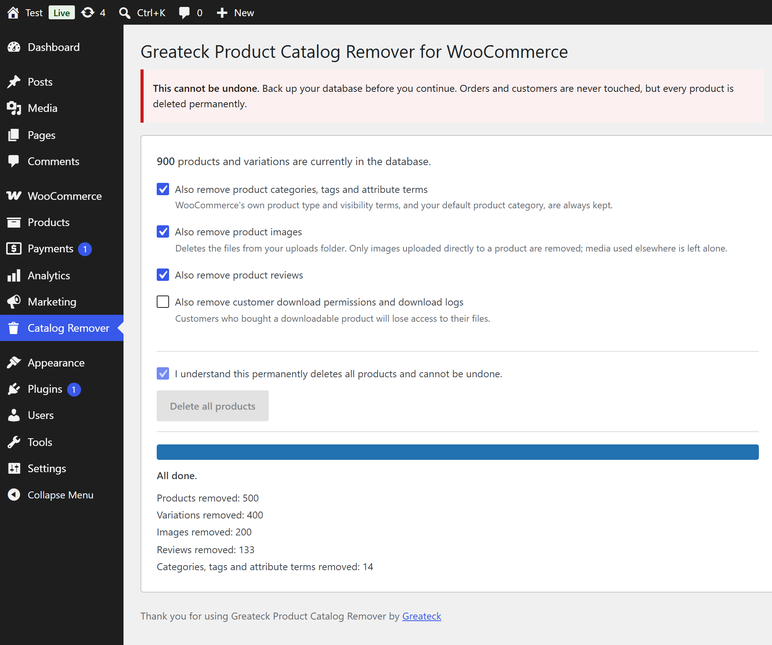
Progress while a catalog is cleared, and the summary of what was removed.
Will this delete my orders or customers?
No. The plugin only touches product data. Orders, customers, coupons and settings are left exactly as they are. This is also why it is safe to use with High-Performance Order Storage enabled.
What if I have no products?
The plugin will tell you there was nothing to remove. It still runs its cleanup pass, which is useful if a previous run was interrupted or if products were deleted some other way and left rows behind.
Does the plugin remove categories, tags and attributes?
Only if you tick the box. The default is to keep them, so you do not have to rebuild your category structure just to clear the catalog.
When you do tick it, WooCommerce’s own internal terms are always preserved: the product type terms (simple, grouped, variable, external), the product visibility terms (featured, outofstock, rated-1 through rated-5), and your default product category. Deleting those would break the store rather than clean it.
Does it delete product images?
Only if you tick that box. When you do, images are deleted through WordPress itself so the files and all generated thumbnail sizes are removed from your uploads folder too.
Only images uploaded directly to a product are removed. If a product simply points at an image from your media library that was uploaded elsewhere, that image is left alone.
How fast is it?
Very. Removal is done in direct SQL rather than loading each product into memory one at a time, so clearing tens of thousands of products takes seconds rather than hours.
I have a huge catalog. Will it time out?
No. Work is split into batches of 200 products per request. If you want to tune that, use the wpr_batch_size filter.
Can I hook into the removal?
Yes. Because deletion is done in SQL, the usual WordPress and WooCommerce delete hooks do not fire, so the plugin provides its own:
wpr_before_delete_batch — passed the array of IDs about to be deletedwpr_after_delete_batch — passed the array of IDs that were deletedwpr_removal_complete — passed the final counterswpr_batch_size — filter the number of products per requestwpr_product_post_types — filter which post types count as productswpr_term_taxonomies — filter which taxonomies the category option clears
ChangeLog
2.0.1
- Renamed to “Greateck Product Catalog Remover for WooCommerce” to comply with the WordPress.org plugin directory naming and trademark guidelines. Functionality is unchanged.
- Added the “Requires Plugins: woocommerce” header so WordPress can check the dependency before activation.
- Added an explicit statement of non-affiliation with WooCommerce and Automattic.
2.0.0
- Updated for WordPress 7.1 and WooCommerce 11.
- Removal now runs in batches with a progress bar, so large catalogs no longer time out.
- Fixed: ticking “remove categories” could delete WooCommerce’s own product type and product visibility terms, along with the default product category, breaking the store. These are now always preserved.
- Fixed: deleted products were leaving orphaned rows in WooCommerce’s lookup tables, so they kept appearing in search, filtering and reports. All product-keyed WooCommerce tables are now cleaned.
- Added: optional removal of product images, including the files on disk.
- Added: optional removal of product reviews.
- Added: optional removal of customer download permissions and download logs.
- Added: declares compatibility with High-Performance Order Storage (HPOS).
- Added: developer hooks for batching and cleanup.
- Product transients and the object cache are now cleared after removal.
- Requires a confirmation before deleting, and all output is properly escaped and translatable.
1.1.0
Adding support to keep categories, tags and taxonomies related to the removed products. These will be kept by default (new checkbox option) to prevent any accidental data loss.
1.0.0

