The easiest way to build an online directory website on WordPress is to install Web Directory plugin. As well it is really easy to convert any existing site into a fully featured directory business website with the directory plugin. WordPress directory plugin for any purposes, and examples would be classifieds, events directory, cars, bikes, boats and other vehicles dealers site, restaurants, pets, real estate portal, wedding site, yellow pages, local directories, map store locator.
Moreover, it also features location based directory. Maps & map markers functionality gives users fast and easy ability to find nearby places by powerful search system.
Renders frontend buttons: submit new listing, my favourites button and these buttons on single listing page: edit listing, print listing, put in/out favourites list, save listing in PDF:
Displays breadcrumbs in the place of this shortcode. This shortcode need when you build custom home page:
[webdirectory-breadcrumbs]
Displays category, location or tag title in the place of this shortcode. This shortcode need when you build custom home page.
[webdirectory-term-title]
Displays category, location or tag description in the place of this shortcode. This shortcode need when you build custom home page:
The plugin offers tons of features. Print listing, save in bookmarks, download in PDF, SEO friendly pages, images, YouTube and Vimeo videos attachments, custom fields, custom icons, customize colors and much more customization options.
Features of wordpress directory plugin
Directory shortcodes, including: listings, maps, categories, locations, search box, slider and their widgets
Compatibility with page builders, like WP Bakery Visual Composer and SiteOrigin
Ability to build Custom Home pages
Demo data import tool
Restrict ads by listings levels
Sticky and featured listings options
Raise up directory listings
Renew expired listings
Upgrade/downgrade listings levels
5-star ratings for listings
Customizable content fields of different types
Font Awesome icons for custom content fields
Category-based content fields
Order directory listings by date, title, distance, content fields
Powerful search by content fields
Adapted for the Relevanssi search plugin
Icons for categories
Search by categories and locations
SEO friendly – fully compatible with Yoast WordPress SEO plugin
Locations search in radius – results displaying on map
Multiple locations for one listing
Google Maps and MapBox (OpenStreetMap) integrated
Search form on a map
Custom map markers
Draw search area on a map
YouTube and Vimeo videos attachments for listings
Images AJAX uploading
Contact listing owner form + integration with Contact Form 7 plugin
Bookmarks functionality
‘Print listing’ option
‘Get listing in PDF’ option
Adapted for reCaptcha
Fully customizable and easy in configuration
The plugin uses custom post types and taxonomies
Responsive design based on Twitter Bootstrap
Custom Google Map styles
Supports RTL (Right To Left) – layout, functionality, UI widgets
CSV import/export/bulk update with ability to import images files
Features of full version
PayPal payment gateway including PayPal subscriptions
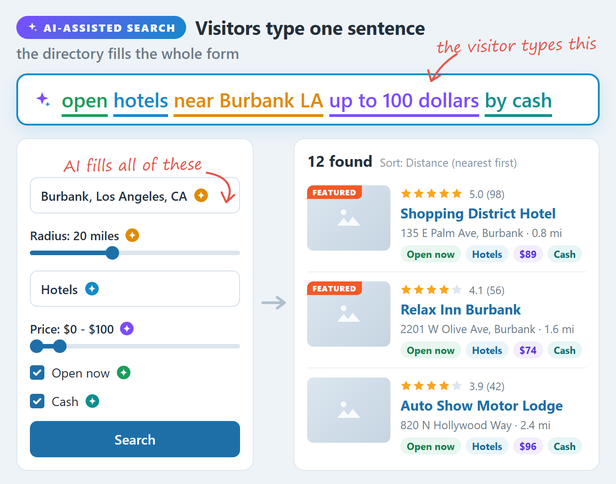
With the AI Assistant Add-on, a visitor types one sentence and the search form fills itself: location, radius, category, price range and filters.
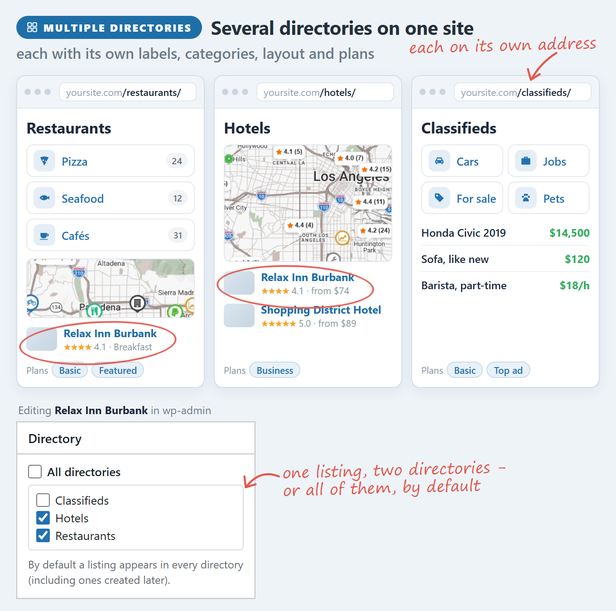
Several directories on one site, such as restaurants, hotels and classifieds, each with its own address, labels, categories, layout and plans; a listing can appear in one, several or all of them.
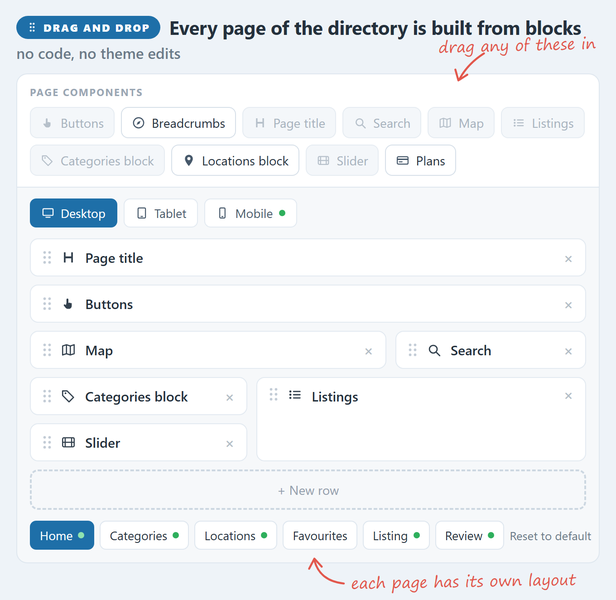
The directory page builder: drag search, map, listings, categories, slider and other blocks into rows, with a separate layout for each page and for tablet and mobile.
Bookings as visitors see them: the next free times on the cards and the listing page, a booking form with the date and the free slots, and the confirmation with a link to manage the booking.
The booking form builder: drag in customer fields and the booking parts (calendar, time slots, start and end time, duration, service, guests); the canvas shows the real slots as you set them.
The bookings calendar of a listing: bookings coloured by status, opening hours, special hours and closed days, blocked time, and confirm, decline or edit in one click.
Listing plans in wp-admin: how long a listing stays live, how many categories, images and videos it gets, a sticky badge, and whether it has a map, claims and ratings.
Google Maps, Mapbox or MapLibre, switchable at any time: icon, rating, price, photo or dot markers, and popups that show the fields you tick.
The search form builder: drag in keyword, address, radius, categories and any custom field; every active filter shows above the results as a chip.
Listings as a grid or a list, sorted the way the visitor picks; the settings set the columns per device, the card image and the fields each card shows.
A listing page with its custom fields: phone, WhatsApp and Telegram links, opening hours, price, lists and files, and a group only logged-in users can see.
The drag-and-drop listing form builder: add fields by type, arrange them in groups, and show a group only for the categories you pick.
Adding a listing in wp-admin with the listing form you built; with the AI Assistant Add-on, one click fills every empty field.
Star ratings in one click, shown on cards, popups and map markers, and listing claims: approve one and the listing passes to its owner.
Categories with their own icons and marker colours, and locations as a Country, State, City tree; the primary location builds the listing URL.
Address input with autocomplete, a Get my location button and a map pin you can drag, plus an address format you arrange yourself.
CSV import with column mapping and a resumable progress bar, full export, and demo content: 5 directories with their maps and pages, and demo listings for the countries you pick.
Email notifications you can switch off or reword, a test-email button, and a contact form on every listing, protected by reCAPTCHA.
WPML and Polylang, with settings per language, and right-to-left languages: the same listing card in English, French and Arabic.
Every listing and category page gets its own title, description, share image and structured data, alongside Yoast, Rank Math, All in One SEO, SEOPress or The SEO Framework.
Seven colour palettes or your own colours, applied to every button, link and badge, and an image lightbox.
The setup wizard, migration from the previous version in resumable batches, and one-click diagnostics.
Listings are created and edited from the WordPress admin. Front-end submission (with optional moderation, expiration and renewal) is part of the full version.
Do I need API keys?
For maps, yes – each map provider needs its own key/token, entered on the settings page. Keys are stored on your site and are never sent to us.
Which map providers are supported?
Google Maps, Mapbox, and MapLibre with MapTiler tiles. You pick one on the settings page.
Is it translation ready?
Yes. A languages/w2dc.pot template is included; translate it with any standard gettext/PO editor.
How do paid listings and membership plans work?
Paid submission, membership plans and WooCommerce checkout come with the full version of Web 2.0 Directory, not the free edition.
New: Bookings. Listings take reservations by time slots, by a start and end time, or by dates (nights or days), with services, guests or places, a break between bookings and a minimum notice. Turn them on in Settings > Bookings. Bookings are free of charge; prices and online payment are in the full version.
New: booking forms, built like listing forms, with a live calendar and slots as you edit, their own colours and ready sample forms. A directory picks its form; a listing can have its own form.
New: instant, manual or request confirmation, and booking emails with a calendar file, a link to cancel, and reminders.
New: a bookings calendar for each listing, by month or week: special hours and closed days, new bookings and blocked time, confirm, decline, move and edit.
New: search by free dates or a free time. Free times show on cards, map popups and the listing page, and the results sort by the earliest free time.
New: the booking form and the free times are blocks, Elementor widgets and WPBakery elements too, and their shortcodes work on any post.
New: the plugin is now Web Directory plugin Free – Booking.
New: the admin listings table can show each listing’s logo and its price, number, list and date-time fields as columns, sorted by price, number or date.
New: the Listing info box links to the listing’s page in every directory it is in. A paused, expired, unpaid or pending listing opens there for whoever can edit it, with a note that visitors cannot see it.
New: an address or keyword field in a search form can show “Try to search:” examples under the box. A click puts one into the field.
New: [webdirectory plans="Gold, Premium"] shows only the listings on the named plans – in the grid, on the map, in search and its suggestions, and in the category and location counts.
Improvement: keyword search puts a company’s own name first – a title that is or starts with the typed name ranks above listings that only mention the words, so a name picked from the autocomplete comes first. “Limited”, “Ltd”, “plc” and similar words no longer widen the results.
Improvement: Edit Map shows Form position, Form width and “Allow form drag and toggle” with “Show search form on the map” off too – they still place a page search form that follows the map to full screen.
Fix: “Best match” on a directory grid without a map ordered the results newest first.
Fix: a Featured Image box added by the theme no longer shows on the listing screen – a listing’s featured image is its logo.
Fix: the map moves to show a popup that its edge or the listings sidebar hides by more than 10 px – after a click on a marker or a sidebar card, and for the popup a hovered listing opens.
Fix: the form builder no longer shows the old Contact form field next to Contact info.
Fix: a click on a marker closes its auto-popup at once, so two popups no longer show for one listing.
Fix: with Polylang 3.9 the listings, the map and search follow the page language again – the plugin looked for Polylang before Polylang had finished loading.
Fix: under OceanWP the plan cards, the directory button, the taxonomy search box and the sort select keep their look.
Fix: on the Table and Mobile views of Edit Directory, an element removed there can be added back, and its settings box lights up when it is selected.
2.4.1 – 2026-11-10
Improvement: in Settings > Plans and Edit Directory a click on any of a plan’s chips opens or closes it.
Improvement: the listing history shows 8 events at a time, with a pager.
Improvement: an administrator can still open a listing hidden from visitors (paused, expired or unpublished) with Preview; the page then says that visitors do not see it.
Improvement: an administrator can create a category or a location, under any parent, right in the listing form – “+ Create category” under the categories, “+ Create location” under the location dropdowns.
Improvement: in the form builder the Address field’s FontAwesome icon, PNG image and Upload PNG image options sit with the default marker, are hidden with it, and show or hide its tabs.
Fix: multi-line text fields keep their line breaks, and with Enable HTML editor their HTML – it showed as tags and was removed on save. Textareas that had the HTML editor in the old version get the option back.
Fix: listing ratings from the old version (its Ratings addon or Ratings & Reviews 1.x) carry over – after updating, run Tools > W2DC Migration again and listings show their ratings instead of 0.
Fix: turning off a plan’s Eternal active period gives its undated listings a new period instead of expiring them.
Fix: a CSV import that keeps a listing’s plan keeps its date.
Fix: changing the plan of a paused listing keeps it paused – the new period counts from Resume – and an unfinished draft stays a draft.
Fix: moving a category or location under another parent shows its listings under the new parent at once – they stayed under the old one until saved again.
Fix: the listing sorts hold when another plugin reorders WordPress queries, and a sort by a custom field or by rating lists only the listings that have a value.
Fix: multi-line text fields that a save in the new version flattened get their line breaks back from the old version’s values, which the CSV import no longer deletes.
2.4.0 – 2026-11-02
New: block editor (Gutenberg) blocks for the directory, each of its elements and the listing page’s elements, with their settings in the block sidebar.
New: the [webdirectory-listing-map] shortcode and Listing map element – the listing on a map, for a listing page laid out by hand.
New: the Search form, Categories, Locations and Tags lists, Front buttons, Listings slider, Listing plans, Listings and Map work on any page: they show the default directory or the one in their Directory option (directory=”…”), their links lead into it, and the search form opens it with the search applied.
New: Settings > Address settings > Location levels – name the levels of your Locations hierarchy (e.g. Federal state, District, City); the names label the location tokens of the Address format and the location dropdowns of the listing form.
New: in Edit Directory the Map element takes Fly to hovered map marker and Marker hover effect for the listing cards: hovering a card pans the map to its marker and opens its popup.
Improvement: Elementor and WPBakery offer the listing page’s elements, the Tags list and the Term description too.
Improvement: the Pricing table element is now Listing plans, and shows the directory’s plans or all plans.
Improvement: on a category or tag page the map opens where the previous directory page left it, or at the map’s starting point.
Improvement: on a location page the map frames every marker of that location.
Improvement: in Edit Directory the Categories, Locations and Tags blocks take their depth and columns per page.
Improvement: in Edit Directory the Delete key removes the selected element, and the selection stays when you switch to a page that has the same element.
Improvement: in Edit Directory the map’s height on a page can be a percentage: 100% runs the map down its row beside a taller element, never under a minimum height; a sticky map takes it of the window.
Improvement: the listings grid remembers the visitor’s grid or list view, like the sort; with the view switch turned off the element’s own view applies.
Improvement: dot markers and markers rendered as HTML (DOM) take the Marker hover effect too.
Improvement: a popup opened by a click or a card hover has a tail pointing at its marker, like the auto popups.
Improvement: saving an edited listing no longer needs the server to accept PUT requests, which some hosts and firewalls block.
Improvement: wp-admin says when no page shows the directory yet – listing links then lead to the plain listing address and open in the theme’s post template.
Improvement: card images are sized for the view and screen the grid opens in – a list view thumbnail gets a variant of its own width rather than the whole row, and a grid on a phone one for its phone column count.
Improvement: in grid view Images as the last Card fields row sits on the card’s bottom edge and runs to its sides, as the top image does, lined up along a row of cards together with a Price row set to bottom right above it.
Fix: on phones and on scaled (HiDPI) screens a tap or click on a marker opens it again – since the sharper markers it landed wide of the marker.
Fix: a sticky element pins below the WordPress admin bar, and a full-height sticky map ends at the bottom of the window.
Fix: with auto popups on, a hovered listing card always opens its listing’s popup, out of turn and past the popup limit.
Fix: an auto popup’s tail reaches its marker – on dot markers and at a slant it stopped short in the air – and shows once the card has grown, not before it.
Fix: in list view a card without an image (Images off in Card fields) no longer leaves an empty band where the image goes.
Fix: a paid listing that waits for a moderator gets its whole period – the days until approval no longer come out of it, also when it is paid during the review.
Fix: Settings > Address format – the + Field menu shows in full instead of being cut off at the edge of the settings panel.
Fix: old sort links (?order_by=…&order=…) to a directory on the front page open the directory again, not the blog or a Page not found error.
Fix: the space key works again in the listing description editor – a space typed at the end of a line was dropped.
Fix: AI-assisted search applies the order a phrase asks for (“… with best rating”) also when the phrase names a place, and the next phrase without one goes back to nearest first.
Fix: a directory page built with Beaver Builder counts as the directory’s page, also after it is saved, so listing links stay under it instead of falling back to the plain listing address.
Fix: the same map placed twice on one page no longer leaves the first copy blank – the first one shows and the copy steps aside.
Fix: the Search form and Breadcrumbs widgets show in Elementor’s panel – Elementor’s own widgets of the same name hid them.
Fix: a Google map loads on a first visit or after the browser cache is cleared – it stayed blank when the map’s settings arrived before Google’s map library.
Fix: activating the full version while this free edition is active no longer stops with a fatal error; the free edition is switched off and the full version stays.
Fix: listing images in cards wider than 300px, such as a two-column grid, are sharp again – the card loads a variant as wide as itself instead of the 300px one, also on themes that strip the image srcset.
Fix: in list view the image keeps its column on the left (on the right in right-to-left languages) wherever Images stands in Card fields, and runs to the card’s edges again.
2.3.6 – 2026-10-21
New: tags get their own section – an address of their own, a page in Edit Directory with a Tags block, and listings and a map narrowed to the tag.
New: Lazy load mode in Map Settings: a map loads with the page, when it scrolls into view, or on a click on its placeholder; until then none of its scripts or requests load, and a search made meanwhile shows once it does.
New: in Edit Directory the map has its own lazy load mode and height for each directory page.
Improvement: the reCAPTCHA diagnostics test a real token from the page, so they catch a key that does not cover this domain – the keys themselves can look perfect while every form says the captcha did not pass.
Improvement: the Google Maps script is loaded the way Google asks for it now (loading=async), so it no longer holds the page up and its warning leaves the browser console.
Improvement: address autocomplete asks Google’s current Places service and falls back to the old one where a project has not enabled it, so a site on a Google project created after March 2025 – which no longer gets the old service at all – has working address suggestions.
Improvement: routes ask Google’s current Routes API and fall back to the old Directions service where a project has not enabled it, which is the same March 2025 cut-off.
Improvement: on Mapbox and MapLibre maps a route is drawn the way it is on Google: its start and end marked A and B, and the map fitted to it.
Improvement: a search in the page address reads plainly – ?address=Paris&radius=20 rather than sf_address=… – and carries the radius it ran with. Links with the old sf_ names still open the same search.
Improvement: a route stays on the map until the new Reset button beside Go takes it off; closing the directions panel only hides the panel. Clicking the route on the map opens the panel again.
Improvement: route steps and the map follow each other: pointing at the route lights up its step in the list, pointing at a step lights it up on the map, and clicking a step zooms the map to it.
Improvement: each search filter chip has an x that removes that filter.
Improvement: a cluster that zooming cannot break up – listings at one address, or a map already at its closest zoom – opens a list of its listings on click instead of doing nothing, and picking one opens its popup.
Improvement: a listings grid shows placeholder cards of the right size while it loads – on every search, page and sort, and on the directory before the page’s scripts have even run – instead of a spinner that collapsed the page.
Improvement: the map diagnostics say whether Places API (New) and the Routes API are enabled for the Google key, and what it means when they are not.
Improvement: the Google key fields name the APIs actually needed now: the browser key’s link switches on the Routes API and Places API (New), and the server key no longer asks for Places, which it never used.
Improvement: a hand-built directory home ([webdirectory custom_home=1]) shows the Edit directory button too.
Improvement: the listing page’s image gallery has its own Lightbox switch in Edit Directory.
Improvement: search forms on one page stay in step: a search from one shows its values in the others.
Improvement: beside a directory’s Search element, the map’s own search form opens on the same values, searches with all of the element’s filters, and adds no second row of chips.
Improvement: in Edit Directory the left column keeps the box you are working in when you switch page tabs, and a selected element’s box is no longer hidden under the top bar.
Improvement: the search form over the map can be folded on the page too, not only in fullscreen; each remembers its own state.
Improvement: the AI-assisted search badge shows only on a search form that has a keyword field.
Improvement: the grid / list view switch above the listings has drawn icons, the same in every browser and font.
Improvement: the Google server API key says what it is for – geocoding the addresses of a CSV import – and the diagnostics test it with the Geocoding API that import uses.
Fix: breadcrumbs start with Home, not the page’s own title, when the directory is the front page.
Fix: a directory used as the front page keeps its category and tag addresses. New directories start on slugs that do not collide with WordPress’s own words there, old addresses still answer, and Edit Directory says when a word is taken.
Fix: plan and term cards keep their look on themes that style every list item and underline every link.
Fix: renaming a directory’s category, location, tag or listing slug no longer leaves every address already published under the old one at 404: they redirect to the new address.
Fix: the address field of the search form waits for the Google Maps script instead of staying a plain text box when the script arrives a moment late.
Fix: a route is fitted into the part of the map the directions panel leaves free, so its start no longer lands under the panel.
Fix: map markers and the auto-popups are sharp in Chrome on high-density screens and at page zoom.
Fix: a category or tag page keeps the map’s starting point instead of jumping to fit every listing in the world.
Fix: a directory’s map shows only that directory’s listings in every page layout.
Fix: in fullscreen, the address suggestions of the search form show. They opened behind the map.
Fix: a search form dragged in fullscreen keeps its spot there, and no longer moves on the normal page after leaving fullscreen.
Fix: on Mapbox and MapLibre maps, an open popup follows its marker into and out of fullscreen, instead of staying behind or seeming to close.
Fix: the starting-address field of the directions panel no longer shows two bars at its sides when focused.
Fix: on Mapbox and MapLibre maps, the list of listings at one place keeps answering clicks after other popups were opened.
Fix: on Mapbox and MapLibre maps, markers and clusters near the edges no longer vanish while dragging after the map framed a search or its radius.
Fix: clicking a cluster on Mapbox and MapLibre zooms in on that cluster instead of around the old centre.
Fix: on narrow screens a map opens at its own height instead of starting at 400px and jumping.
Fix: a theme that pads listing cards differently no longer pushes the card image past the card’s edges.
Fix: a listing page’s map always opens on the listing, instead of where it was last panned to (the map’s saved or URL camera).
Fix: a map’s auto-popup card leaves the map with its marker, instead of clinging to the edge while the map keeps moving.
Fix: the Send message button of the map popup and the directions panel’s Starting address, Go and Computing route can be translated.
Fix: the built-in listing page layout shows the Print and PDF buttons too, not only a Buttons element added in Edit Directory.
2.3.5 – 2026-10-13
Improvement: the directory Slider starts on Contain too, so the listing logos it shows are no longer cropped.
Improvement: Quick Edit is back on the listings table, trimmed to what a listing needs: title, slug, author, tags and status. The publish date, the password and Allow Comments are not on it – a listing’s own dates, audience and reviews are set elsewhere.
Improvement: the Status column names two more states instead of leaving the cell empty: awaiting activation (a guest has not clicked the link in the activation email) and draft (the author has not submitted it yet).
Improvement: the pre-expiration email can go out more than once: enter the days as a list, for example 7,2,1 (2,1 by default).
Improvement: the default pre-expiration email now links to the renewal, and both expiration emails accept a [price] tag.
Improvement: a plan with an “After expiration” plan is no longer renewed, and its reminder email says which plan the listing moves to.
Improvement: time a listing spends paused or waiting for moderation no longer counts against its period: its expiration date moves on by that time.
Fix: replacing or removing a listing’s images now changes the picture it is shared with.
Fix: images deleted from a listing no longer come back on sites moved over from the old version.
Fix: directories no longer appear on their own. A directory sent to the trash counted as absent, so the next admin page load created a replacement named “Listings” and the trash filled up with them. The default directory is created once per site now, and never again.
Fix: a company name made of very short words, like “AG of C”, is found. Words under three letters cannot be in the search index at all, so a phrase of nothing but those used to return nothing; the search now falls back to matching the listing title, and then its text.
Fix: on a big site, a keyword search inside one directory could miss listings that belong to it. The search took its best 2000 matches across the whole site and narrowed to the directory afterwards; it narrows first now.
Fix: the renew link in the expiration emails renews the listing, also when the owner has to log in first.
Fix: when a listing gets a new expiration date (a payment, Mark as paid, a date set by hand, a plan change), the reminder and expiration emails are sent again for the new period.
Fix: a listing in the trash no longer gets expiration emails, and is no longer taken out of the trash when its date passes.
Fix: with renewal turned off, the link in the expiration emails opens the listing instead of a renewal that did nothing.
Fix: in fullscreen, the directory search form no longer joins the map on top of the map’s own search form. When the map shows its own form, that one stays alone; without it, the directory form still comes along.
2.3.4 – 2026-10-07
New: Print and Save as PDF buttons for the listing page (switch them on in the Buttons element of Edit Directory) open a clean printable copy of the listing.
Improvement: the grid / list switch sits right after the number of listings found.
Improvement: the listing gallery takes a Slide ratio and an Image fit in the grid too, and both displays now start on Contain, so a wide logo is no longer cropped.
Fix: a listing waiting for approval is no longer published when its plan period ends or when it is renewed.
Fix: no “your listing has expired” email when the listing moves straight to another plan and stays on the site.
Fix: a map placed beside taller fields on the listing form no longer grows past its Height.
Fix: listings saved through the listing form are found when searching by their location. Existing listings are repaired automatically.
Fix: saving a directory after an update from an older version no longer removes its plans.
Fix: a listing keeps its plan when its directories don’t offer that plan.
Earlier versions
The full version history is in changelog.txt, included with the plugin.