Virtual folder organization and smart management for the WordPress Media Library.
Virtual Media Folders brings virtual folder organization to your WordPress Media Library. Organize your media files into hierarchical folders without moving files on disk—folders are virtual, so your URLs never change.
Features
Virtual Folders – Create hierarchical folder structures to organize mediaDrag & Drop – Easily move media between folders with drag and dropSticky Sidebar – Folder navigation stays visible while scrolling through mediaGutenberg Integration – Filter media by folder directly in the block editorBulk Actions – Move multiple media items at onceKeyboard Accessible – Full keyboard navigation supportInternationalized – Ready for translation (Norwegian Bokmål included)
Free add-ons
Add-On Manager
AI Ability AI Organizer Editorial Workflow Folder Exporter Media Cleanup Migrate Rules Engine Search
VIDEO
How It Works
Virtual Media Folders uses a custom taxonomy to assign media to folders. This means:
Your media files stay exactly where they are on the server
URLs never change when you reorganize
Folders can be nested to create hierarchies
Usage
Organizing Media
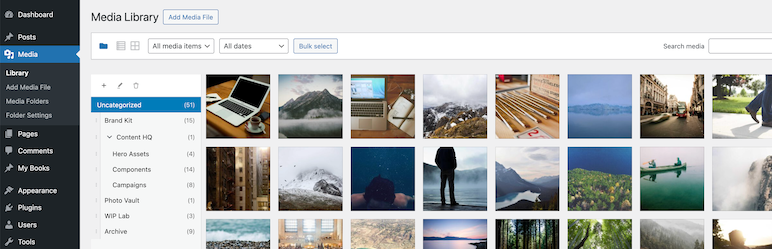
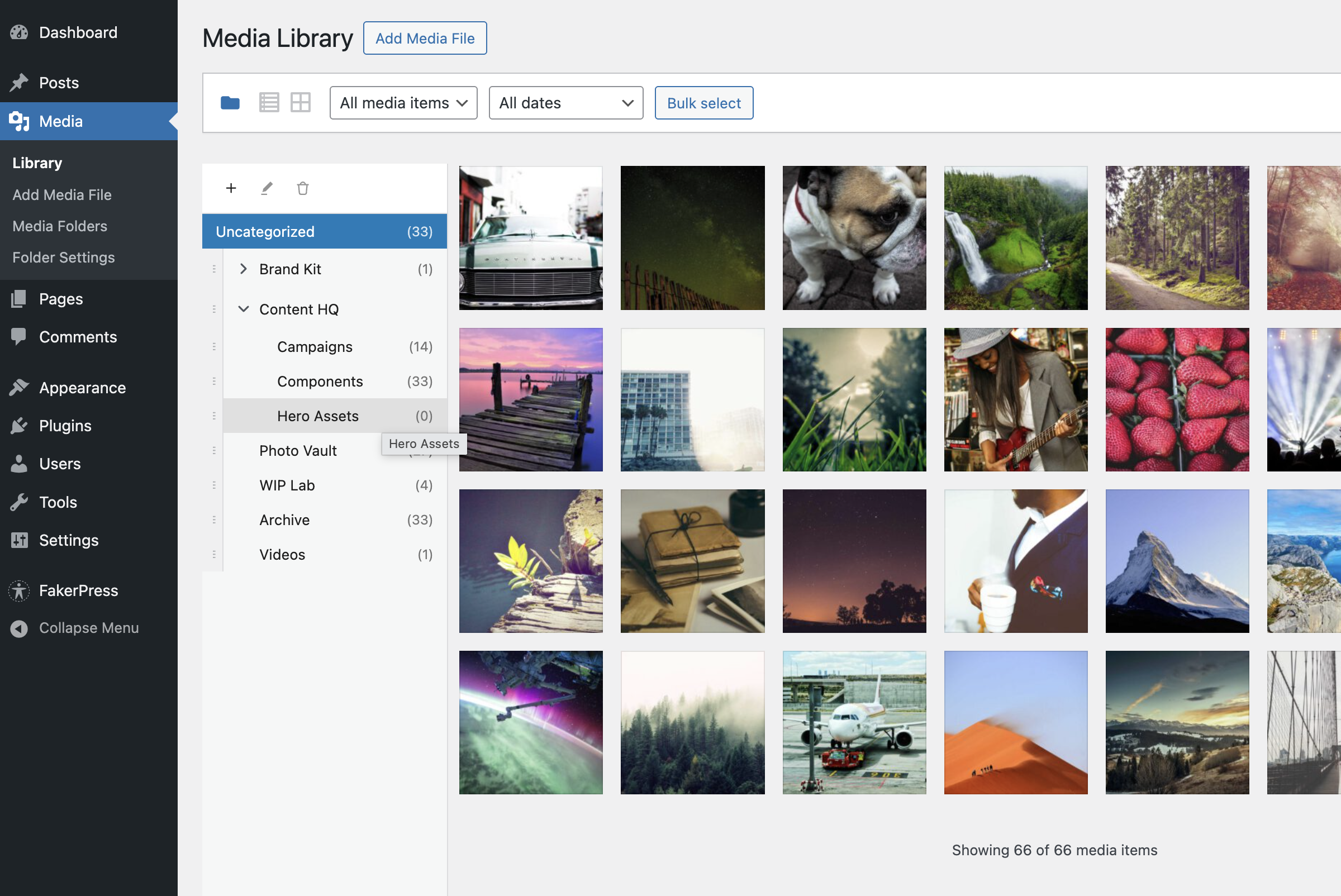
Go to Media > Library
Click the folder icon to show the sidebar
Use + to create folders
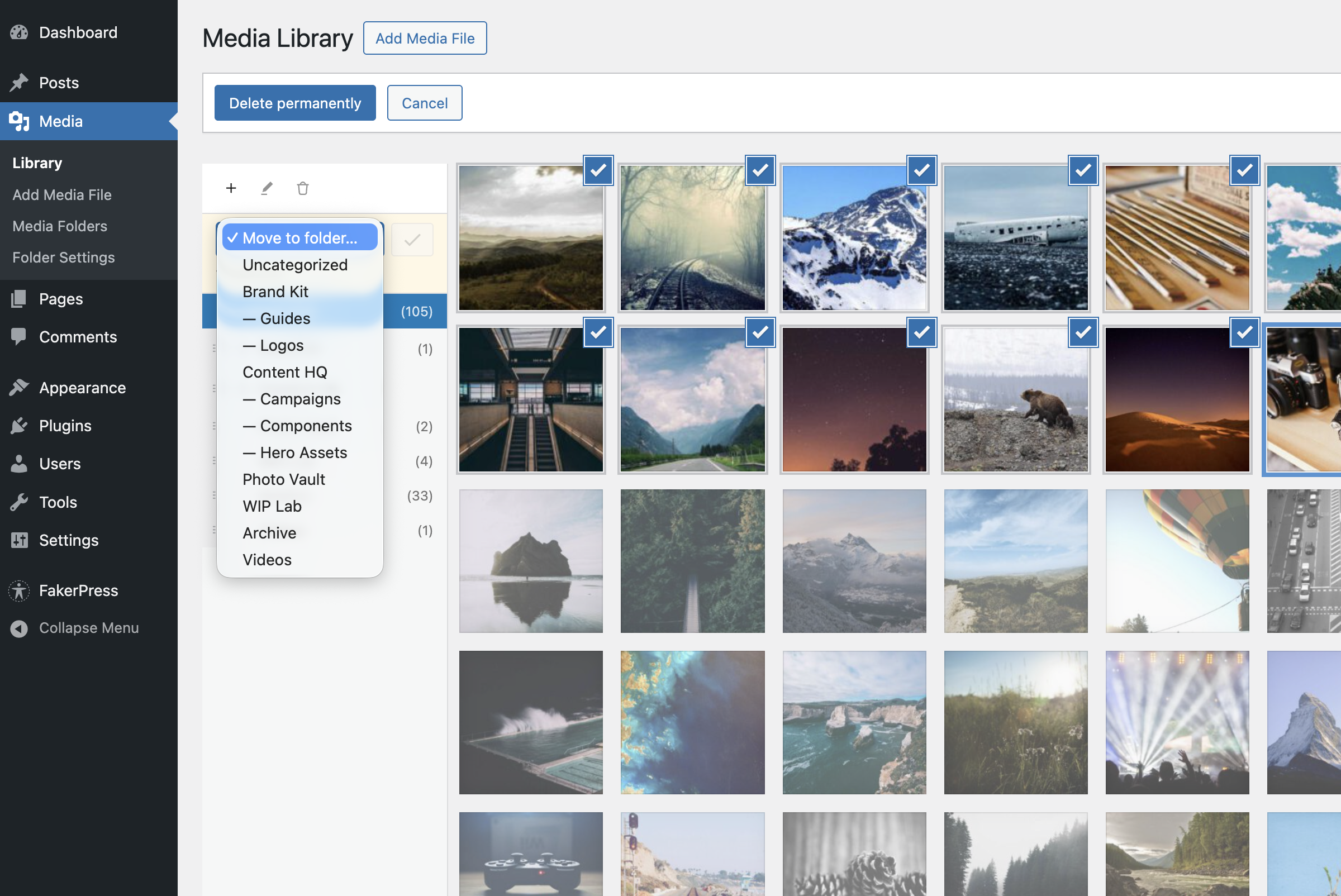
Drag media onto folders to organize / Bulk select media and use the “Move to Folder” action
Click a folder to filter the view
Settings
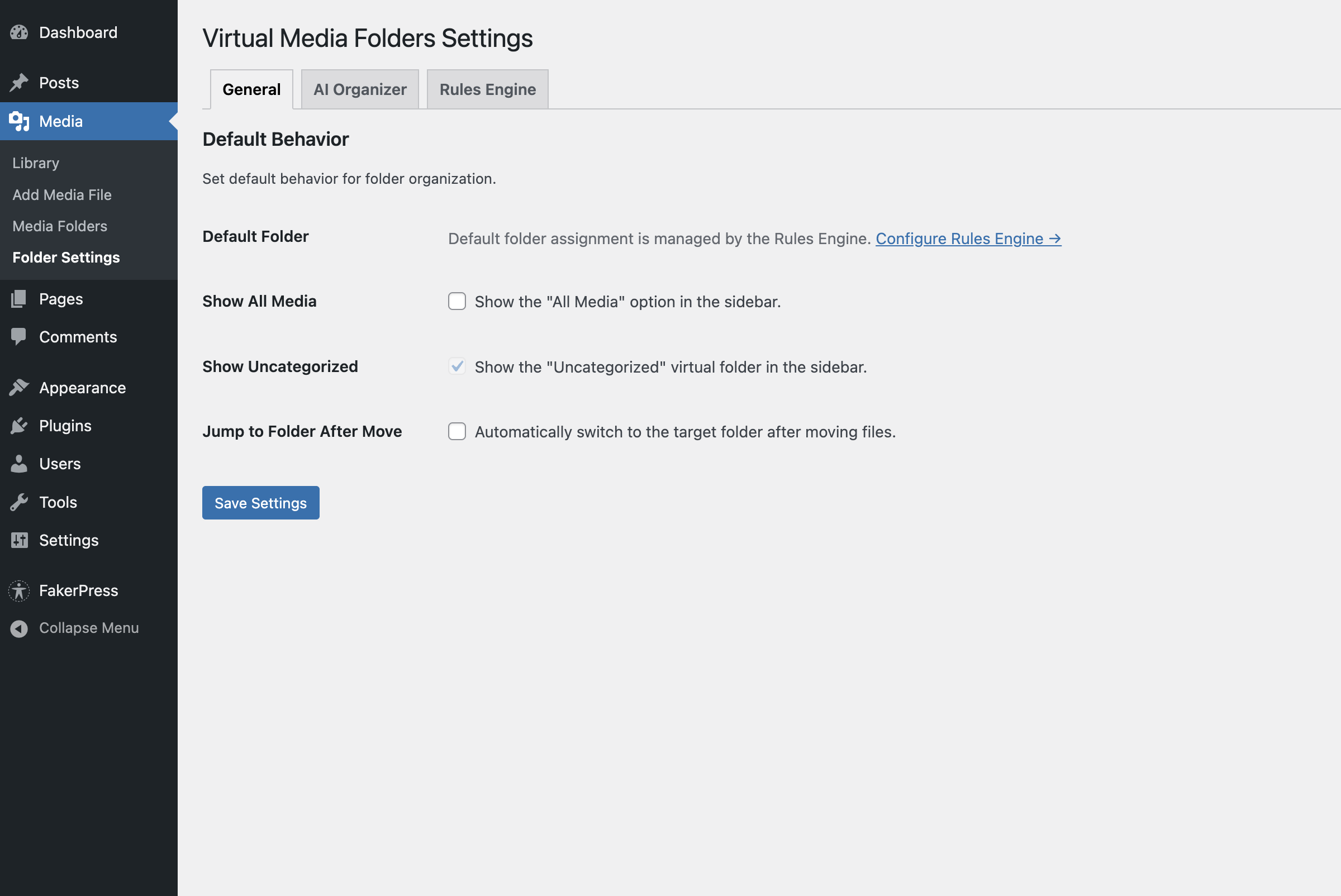
Go to Media > Folder Settings to configure:
Show “All Media” – Display “All Media” option in sidebarShow “Uncategorized” – Display folder for unassigned mediaJump to folder after move – Navigate to target folder after movingDefault folder for uploads – Auto-assign new uploads to a folder
Block Editor
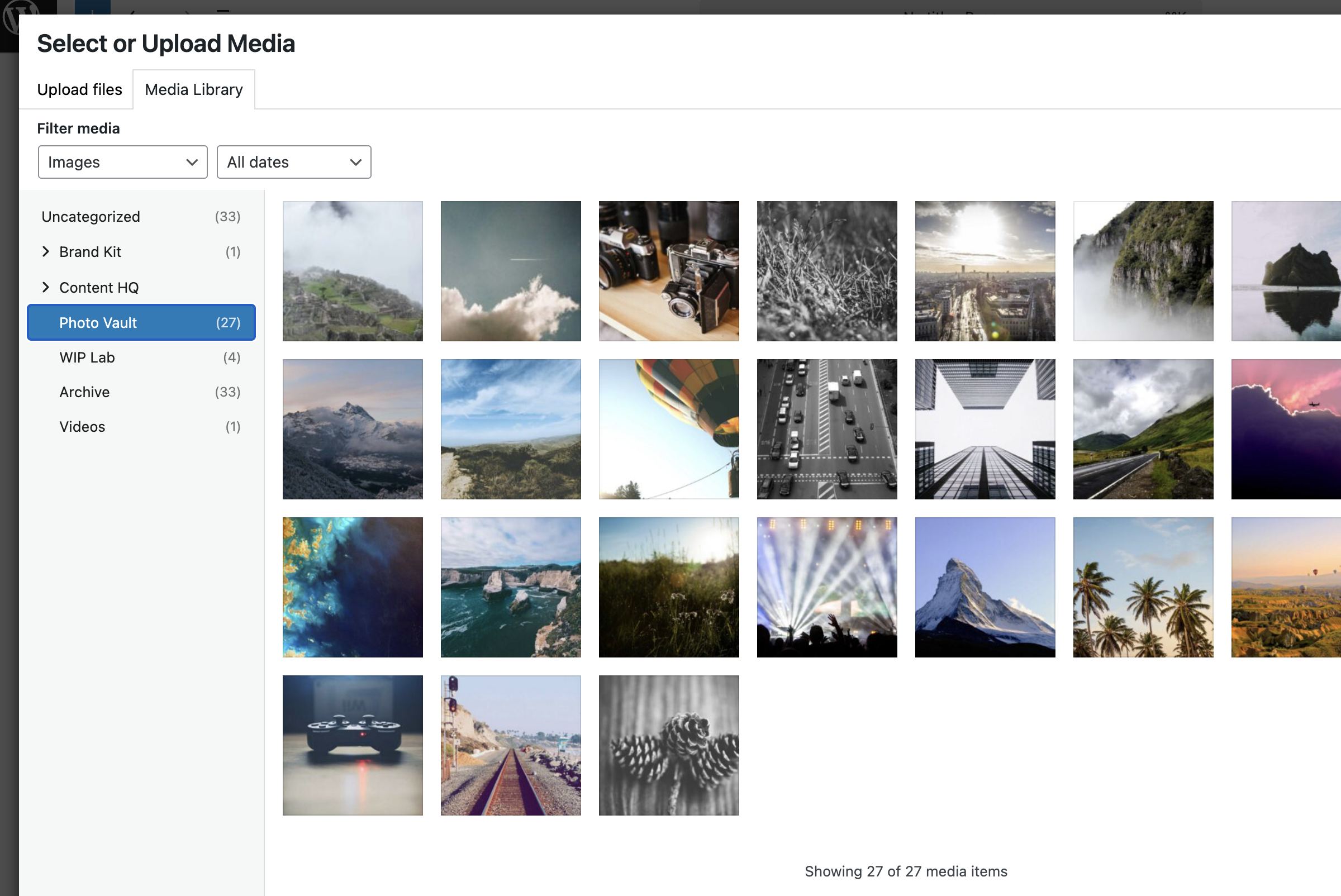
When inserting media from a block (Image, Gallery, etc.):
Open the Media Library modal
Use the folder sidebar to filter
Select your media as usual
Documentation
Privacy Policy
Virtual Media Folders does not:
Track users
Send data to external servers
Use cookies
Collect any personal information
All data is stored locally in your WordPress database.
Screenshots
Folder sidebar in Media Library
Settings page
Bulk move action
Gutenberg media modal integration
FAQ
Will this move my actual files?
No. Virtual Media Folders uses virtual folders. Your files stay exactly where they are on the server, and all URLs remain unchanged.
Can I nest folders?
Yes! You can create hierarchical folder structures with unlimited nesting levels.
Does this work with Gutenberg?
Yes! When inserting media in the block editor, you can filter by folder using the sidebar in the Media Library modal.
Can I assign media to multiple folders?
No, each media item belongs to one folder at a time. Moving media to a new folder removes it from the previous folder.
What happens if I delete a folder?
Only the folder organization is removed. Your media files are not deleted.
Is this compatible with my theme?
Virtual Media Folders works entirely within the WordPress admin. It doesn’t affect your front-end theme.
Does this .. ?
If you are missing a feature and the add-ons don’t cover it, please open a feature request 🙂
The Migrate add-on was created in response to a user request for migration from Enhanced Media Library, but it also supports FileBird, Real Media Library, HappyFiles, WP Media Folder, Media Library Assistant, and CatFolders.
ChangeLog
2.3.0
Added: vmfo_folder_counts filter so multilingual integrations can show per-language folder counts (props @jonathan-dejong).
Added: vmfo_folder_query_suppress_filters filter to keep SQL clause filters, such as WPML’s language filter, active in folder views (props @jonathan-dejong).
Fixed: Folders are marked as not translatable for WPML and Polylang via wpml-config.xml (props @jonathan-dejong).
2.2.1
Added: Classic WordPress 6.8–6.9 fallbacks for six more design tokens used by the add-ons, so success/error badges, notices and progress tracks match the classic admin palette.
2.2.0
Changed: Styles use WordPress Design System (--wpds-*) tokens, so the UI follows WordPress 7.0+ styling automatically; WordPress 6.8–6.9 gets a bundled fallback with the classic admin palette.
Changed: Accent colors follow the admin color scheme on all supported WordPress versions.
Changed: More readable warning text in the add-on UI; editor modal folder header matches the Media Library sidebar.
Removed: Separate WordPress 7 admin/editor override stylesheets.
Developer: New vmfo-tokens style handle (dependency for stylesheets using --wpds-* tokens) and npm run lint:tokens check.
2.1.5
Added: Block inserter “Media” tab now lists your top-level virtual folders as image sources, so you can insert images straight from a folder alongside Images and Openverse.
Added: “Block Inserter Folders” setting (VMF Settings → General, on by default) to enable or disable the feature.
Performance: Folder media categories skip the block editor’s per-category emptiness probe — opening the Media tab makes no requests until you open a specific folder.
2.1.4
Fixed: Folder sidebar layout in the block editor media modal on WordPress 7.1 (grid no longer overlaps the sidebar; works on 7.0–7.1).
2.1.3
Security: Resolved Dependabot alerts by updating build/test dependencies (npm audit fix, @wordpress/scripts 31 → 32). All production/runtime dependencies are clean.
Changed: Added grouped .github/dependabot.yml config (npm/composer/github-actions) to consolidate future dependency update PRs.
2.1.2
Changed: Renamed “Folder Settings” menu to “VMF Settings” for consistency.
Changed: Moved VMF Settings menu to bottom of Media submenu.
2.1.1
Fixed: Gallery block edit modal now preserves selected images by skipping VMFO sidebar injection in the gallery-edit state.
Fixed: Image block media-library folder filtering no longer returns empty results for matching virtual folders.
2.1.0
BREAKING: Abilities API integration extracted to separate add-on vmfa-ai-abilityRemoved: MCP tools (vmfo/list-folders, vmfo/create-folder, vmfo/add-to-folder) – install vmfa-ai-ability for MCP support
2.0.3
Added: vmfo/create-folder MCP ability (requires manage_categories capability)
Added: MCP integration guide (docs/mcp.md) with client configs for Claude, GitHub Copilot, and Cursor
Added: Agent skill for content-based image foldering (.github/skills/add-photo-to-folder/SKILL.md)
Changed: Smoke test script extended with optional mutating step (VMFO_RUN_MUTATING_TESTS=1)
2.0.2
Fixed: Updated ability validator return type hints to bool|WP_Error for broader parser compatibility in release/pre-commit environments
2.0.1
Added: Abilities API integration with vmfo/list-folders and vmfo/add-to-folder
Added: MCP adapter smoke test script for development and CI (scripts/mcp-adapter-smoke-test.sh)
Changed: MCP adapter examples now use gateway execution via mcp-adapter-execute-ability
Changed: Documentation examples standardized to use https://example.com
Changed: Excluded scripts/ from WordPress.org distribution package
2.0.0
Added: Add-on base classes (AbstractPlugin, AbstractSettingsTab, ActionSchedulerLoader) in VirtualMediaFolders\Addon namespace
Added: Shared WP 7.0+ compatibility CSS for add-on settings tabs
Added: Comprehensive add-on development documentation
1.9.0
Added: WordPress 7.0+ UI compatibility layer (vmfo_is_wp7() helper function)
Added: Conditional WP 7+ style overrides for admin sidebar and editor modal
1.8.3
Security: Updated npm and Composer dependencies to address dependabot alerts
1.8.2
Changed: Tested up to WordPress 7.0
Fixed: Folder icon alignment in media toolbar on WordPress 7.0
1.8.1
Added: vmfo_upload_folder filter for controlling folder assignment on upload
Added: Attachment metadata now available to upload-folder filter callbacks
Added: Add-ons can override the default folder by hooking vmfo_upload_folder
1.8.0
Changed: Sidebar preference stored server-side in user meta instead of localStorage
Changed: Folder toggle button is PHP-rendered instead of JS-injected
Changed: View switching (grid/list/folder) handled entirely server-side via mode URL parameter
Changed: Sidebar defaults to visible on plugin activation
Added: REST endpoint POST /vmfo/v1/preferences for sidebar preference
Added: vmfo_is_sidebar_visible() helper function
Added: Activation hook sets sidebar visible for activating user
Fixed: Folder sidebar no longer disappears after browser cache clearing
Fixed: Grid/list view switching now works reliably (no async race condition)
Fixed: Folder icon always appears on Media Library page after activation
Removed: folder-button.js (replaced by PHP output)
Removed: localStorage dependency for sidebar state
1.7.2
NOTE: The plugin updater for add-ons is still in early stages and may not be fully reliable. Pleas update add-ons manually from their GitHub repositories for now.
Added: Add-on version checker displays admin notices when installed add-ons need updates
Added: New AddonChecker class monitors vmfa-ai-organizer, vmfa-rules-engine, vmfa-editorial-workflow, and vmfa-media-cleanup versions
Added: Notices only appear on Media Library pages
Added: PHPUnit tests for AddonChecker class
1.7.1
Fixed: Version constant now reflects actual plugin version (was hardcoded to 1.3.8)
Fixed: Added ABSPATH guards to all source files
Fixed: Sanitize orderby parameter in Taxonomy
Changed: Extracted inline JavaScript and CSS to enqueued files
Changed: Added phpcs.xml linting configuration
1.7.0
Added: Subtab navigation system for add-on settings integration
Added: Parent plugin now renders subtab nav when add-ons register subtabs array
Added: CSS spacing fix for tabs without subtab navigation
Added: Enhanced addon-development.md documentation for subtab system
Changed: Add-on tabs can now include optional subtabs array for secondary navigation
Changed: Improved settings page architecture for better add-on UX
1.6.8
Fixed: Removed Media Folders metabox from attachment edit screen (folders are managed via the media library sidebar)
1.6.7
Changed: Updated @wordpress/scripts to 31.3.0
Changed: Updated vitest to 4.0.18
1.6.6
Added: New vmfo_can_delete_folder filter allows add-ons to prevent folder deletion
Added: New /folders/{id}/can-delete REST endpoint for checking folder deletability
Added: Delete modal now shows blocked message when folder cannot be deleted
Fixed: Sticky sidebar header now works correctly using flexbox layout
Documentation: Added vmfo_can_delete_folder hook and REST endpoint documentation
Documentation: Added JavaScript Translation Mapping (i18n-map.json) documentation
1.6.5
Fixed: Deleting a folder now selects “Uncategorized” instead of “All Media” when “Show All Media” setting is disabled
1.6.4
Fixed: REST API now returns proper 400 status code instead of 500 when creating duplicate folders
Fixed: Error messages now use “folder” terminology instead of “term” for better user experience
1.6.3
Fixed: Folder counts now update automatically when media is deleted (single or bulk delete)
Documentation: Add-on bootstrap example now includes Requires Plugins header (WordPress 6.5+)
1.6.2
Fixed: “Add Media File” button now respects “Show All Media” setting
Fixed: Block editor folder sidebar now defaults to Uncategorized when “Show All Media” is disabled
Fixed: Prevented duplicate folder selection callbacks and state updates after component unmount
Fixed: Added proper cleanup for sticky sidebar event listeners to prevent memory leaks
Changed: Folder cache now prefers PHP-preloaded data over localStorage
Changed: Exposed vmfRefreshMediaLibrary globally for add-on use
Documentation: Updated development docs with accurate REST API endpoints and hooks
1.6.1
Changed: Add-on tabs are now sorted alphabetically by title in the settings page
Documentation: Added comprehensive Add-on Development Guide with philosophy, architecture, and implementation details
1.6.0
Added: Add-on Tab System – Settings page now supports tabs for add-on plugins
Added: Add-ons can register their settings as tabs within “Folder Settings”
Added: New vmfo_settings_tabs filter for add-on registration
Added: New vmfo_settings_enqueue_scripts action for conditional script loading
Added: SUPPORTS_ADDON_TABS constant for add-on compatibility detection
Added: docs/addon-integration.md
Changed: Settings page refactored to use tab-based navigation
Changed: PAGE_SLUG constant is now public for add-on access
1.5.3
Fixed: Updated Norwegian translations for Rules Engine integration strings
1.5.2
Changed: Default Folder setting now links to Rules Engine settings when VMFA Rules Engine add-on is active
1.5.1
Fixed: Folder sidebar now repositions immediately when WordPress Help panel is opened, closed, or tabs are switched
Fixed: Added debouncing to prevent redundant sidebar position recalculations
Fixed: Memory leak from event listeners not being cleaned up on sidebar removal
1.5.0
Added: Folder search/filter functionality in sidebar header for both Media Library and Gutenberg modal
Added: Search icon appears when there are more than 10 top-level folders
Added: Search automatically expands parent folders to show matching subfolders
Added: Norwegian translations for search UI strings
Changed: Gutenberg modal sidebar header now has contrasting background
1.4.2
Fixed: Removed unintended folder name padding in Gutenberg media modal for folders without children
1.4.1
Fixed: Folder names for folders without children now align vertically with folder names of folders that have children in the sidebar
1.4.0
Added: Sticky sidebar header – folder management buttons now stay visible when scrolling the folder list
1.3.9
Fixed: Grid/List view icons now correctly show all media instead of forcing folder mode
Fixed: Folder icon now respects “Show All Media” setting
Fixed: URL encoding issue causing duplicate vmfo_folder parameter
Fixed: Memory leaks from event listeners when hiding folder view
Fixed: Race condition where duplicate folder button was created
1.3.8
Changed: Hide (0) count on folders with subfolders to avoid confusion about empty folder branches
1.3.7
Changed: Sidebar top now aligns horizontally with attachments-wrapper instead of first thumbnail
1.3.6
Fixed: Folder sidebar now properly extends to viewport bottom and scrolls when content exceeds screen height
Fixed: Sidebar uses fixed positioning to avoid clipping by parent containers
Improved: Sidebar top alignment with first image thumbnail
1.3.5
Fixed: React hook order error when entering bulk select mode
Fixed: Race condition in folder refresh when moving media
Improved: Bulk move folder dropdown now ordered like folder tree with hierarchy
1.3.4
Added: Direct URL support for folder view via upload.php?mode=folder
Fixed: Clicking folder icon from list view now correctly opens folder view
1.3.3
Changed: Media folders taxonomy screen now mirrors sidebar ordering
Changed: Removed sortable header UI from the Media Folders taxonomy list table
Changed: Media Folders taxonomy UI is only visible when WP_DEBUG is true
1.3.2
Changed: Folder counts endpoint now avoids per-folder queries for better performance
Fixed: Suggestions REST response now matches stored suggestion labels (string-based suggestions)
Fixed: Admin UI hardened notice rendering to avoid HTML injection
Fixed: Admin UI reduced risk of duplicate event handlers/observers when scripts re-run
1.3.1
Fixed: Settings page default folder dropdown now uses correct taxonomy (vmfo_folder)
Fixed: Block editor folder filter now uses correct REST API endpoint (/wp/v2/vmfo_folder)
Fixed: REST API schema title updated to vmfo-folder for consistency
Fixed: Folder drag-drop reorder now persists correctly after page refresh
1.3.0
Changed: Renamed all prefixes from VMF_ to VMFO_ for WordPress.org compliance
Changed: Renamed taxonomy from media_folder to vmfo_folder for uniqueness
Changed: Inline CSS now uses wp_add_inline_style() instead of embedded style tag
Removed: GitHub update checker (WordPress.org handles updates)
Added: Automatic migration for existing folder assignments from old taxonomy
Added: .distignore file for proper distribution builds
1.2.3
Changed: “All Media” folder now disabled by default in settings
1.2.2
Fixed: REST API now returns all folders (removed meta_key ordering that excluded folders without vmf_order)
1.2.1
Changed: Updated i18n-map.json with new accessibility component mappings
Changed: Updated Norwegian (nb_NO) translations for all new accessibility strings
1.2.0
Added: Keyboard-accessible move mode – press M to pick up media, arrow keys to navigate, Enter to drop
Added: Screen reader announcements for all move mode actions
Added: MoveModeBanner visual feedback during keyboard move mode
Added: LiveRegion component for ARIA live announcements
Added: useAnnounce and useMoveMode hooks for accessibility features
Added: Visual drop target highlighting on folders during move mode
Fixed: Screen reader instructions properly hidden from visual display
Fixed: Enter key drops to folder without navigating during move mode
Fixed: “Jump to Folder After Move” setting respected for keyboard moves
Fixed: Mouse drag now cancels keyboard move mode to prevent conflicts
1.1.7
Added: Auto-jump to target folder when moving the last file(s) from a folder
1.1.6
Added: New bulk move AJAX endpoint for efficient bulk operations
Performance: Bulk move now uses single AJAX request instead of one per file
Fixed: Missing sprintf import causing error when selecting files in bulk mode
Fixed: Sidebar visibility preserved when browser re-renders during bulk select mode
1.1.5
Performance: Optimistic folder loading with localStorage caching for instant sidebar display
Performance: Reduced API calls – secondary components read from cache instead of fetching
Fixed: Eliminated layout shift with critical inline CSS for sidebar positioning
Fixed: Folder order now persists correctly when dropping files on folders
Fixed: REST API now returns vmf_order for proper client-side sorting
1.1.4
Refactored: PHP REST API with shared helpers for capability checks, folder/attachment lookups
Refactored: Settings class with centralized option retrieval and visibility enforcement
Refactored: Admin class now uses Taxonomy::TAXONOMY constant instead of hardcoded strings
Refactored: JavaScript folder API calls consolidated into shared utility
Fixed: Test mock for useFolderData to properly handle parse:false API responses
Removed: Unused SortableFolderList.jsx component
1.1.3
Fixed: Block editor media modal now respects “Show All Media” and “Show Uncategorized” settings
Fixed: Folder sidebar in Gutenberg modal matches Media Library settings visibility
Changed: Replaced wp_localize_script with wp_add_inline_script for proper boolean handling in JS config
1.1.2
Fixed: Default folder filter not applying on initial page load when “Show All Media” is disabled
Fixed: Media Library now correctly shows only uncategorized files on load when Uncategorized is the default
1.1.1
Fixed: 500 error on plugin information page when GitHub API returns null
Fixed: Added defensive handling for null plugin info in GitHubPluginUpdater
1.1.0
Added: Drag-and-drop folder reordering with visible grip handle
Added: Custom folder order persists via vmf_order term meta
Added: Optimistic UI updates for instant visual feedback during reorder
Changed: Consolidated drag-drop implementation for better performance
Changed: Removed unused DndContext and DraggableMedia components (smaller bundle)
Fixed: Folder reorder now updates instantly without waiting for server response
1.0.7
Added: Contextual help tab “Virtual Folders” on Media Library page
Added: GitHub repository link in contextual help sidebar
1.0.6
Added: Filter hooks for settings (vmf_default_settings, vmf_settings, vmf_setting_{$key})
Added: When “Show All Media” is disabled, “Uncategorized” becomes the default folder
Changed: Removed “Sidebar Default Visible” setting (now uses localStorage)
Changed: Consolidated settings into single “Default Behavior” section
Fixed: Settings checkbox interdependency now saves correctly
1.0.5
1.0.4
Fixed: Removed duplicate item removal logic in DroppableFolder to prevent event conflicts
Fixed: Single file drag-drop now correctly delegates view refresh to refreshMediaLibrary()
1.0.3
Fixed: Moving files from “All Media” view no longer removes them from view (both bulk and single file moves)
Fixed: Sort order is now preserved when moving files from “All Media” view
1.0.2
Fixed: Updated all “Media Manager” references in source comments to “Virtual Media Folders”
Fixed: Updated console.error message in media-library.js
1.0.1
Fixed: Updated REST API paths from mediamanager/v1 to vmf/v1
Fixed: Updated custom event names from mediamanager: to vmf: prefix
Fixed: Updated WordPress filter name from mediamanager/folder-filter to vmf/folder-filter
Fixed: Updated all text domains in Settings.php commented code
Fixed: Renamed MediaManagerDndProvider to VmfDndProvider
Fixed: Updated test namespaces from MediaManagerTests to VirtualMediaFolders\Tests
Fixed: Regenerated translation files with correct references
Fixed: Regenerated composer autoload files
1.0.0
Major Release : Complete plugin rename from “Media Manager” to “Virtual Media Folders”Changed: New plugin slug “virtual-media-folders”
Changed: Updated PHP namespace from MediaManager to VirtualMediaFolders
Changed: Updated constants from MEDIAMANAGER_* to VMF_*
Changed: Updated REST API namespace from mediamanager/v1 to vmf/v1
Changed: Updated CSS class prefixes from mm- to vmf-
Changed: Updated JavaScript globals from mediaManagerData to vmfData
Changed: Updated text domain from mediamanager to virtual-media-folders
Changed: Renamed translation files to use new text domain
Note: Breaking change – customizations using old namespace/classes need updating
0.1.17
Fixed: Plugin Check compliance – added phpcs:ignore comments for false positives
Fixed: Prefixed global variables in uninstall.php
Fixed: Removed error_log debug function from GitHubPluginUpdater
0.1.16
Added: uninstall.php for clean plugin removal (deletes folders, settings, transients, user meta)
Changed: Updated folder structure in README.md to reflect PSR-4 changes
0.1.15
Added: Collapsing a parent folder now moves selection to the parent when a child folder is selected
Added: ArrowLeft keyboard navigation moves to parent folder when subfolder is collapsed or has no children
0.1.14
Added: Edit Folder modal now includes Parent Folder selector to move folders within hierarchy
Changed: “Rename Folder” modal renamed to “Edit Folder” for name and location changes
0.1.13
Added: New “Show All Media” setting to show/hide the All Media option in sidebar
Changed: Removed “Enable Drag & Drop” setting – always enabled (use bulk move as alternative)
Changed: All settings now functional – Default Folder auto-assigns uploads, Show Uncategorized controls folder visibility, Sidebar Default Visible controls initial state
Fixed: Sidebar position resets properly when uploader visibility changes
0.1.12
Changed: “Jump to Folder After Move” setting now defaults to unchecked (disabled)
0.1.11
Fixed: When “Jump to Folder After Move” is disabled, moved files are now removed from the source folder view
0.1.10
Fixed: Sort order is now preserved after moving files between folders
0.1.9
Added: New “Jump to Folder After Move” setting (enabled by default) to control whether view switches to target folder after moving files
Added: URL now uses mode=folder parameter when folder view is active
Changed: Bulk select mode is now automatically disabled after bulk moving files
Changed: Smart Suggestions settings hidden until feature is fully implemented
0.1.8
Added: Folder item counts now reflect the selected media type filter (Images, Videos, Audio, Documents)
Added: New REST API endpoint for filtered folder counts
0.1.7
Added: After bulk moving files, focus automatically switches to the target folder
0.1.6
Fixed: Folder dropdowns now dynamically update when folders are added, renamed, or deleted
Changed: BulkFolderAction and MoveToFolderMenu now listen for folder change events
0.1.5
Changed: VMF_VERSION now uses actual version number in production (WP_DEBUG=false)
Removed: Debug console.log statements from JavaScript
0.1.4
Changed: Refactored PHP classes to PSR-4 autoloading structure
Changed: Moved class files from includes/ to src/ directory
Changed: Renamed classes to follow PSR-4 naming conventions (REST_API → RestApi, GitHub_Plugin_Updater → GitHubPluginUpdater)
0.1.3
0.1.2
Changed: Refactored folder sidebar to share code between Media Library and Gutenberg modal
Changed: Created shared hooks and base components for folder tree
Added: Focus moves to Uncategorized or All Media after deleting a folder
Added: Comprehensive code documentation throughout
0.1.1
Fixed: Sticky sidebar now works correctly in Gutenberg media modal
Fixed: Improved scroll detection for modal attachments wrapper
0.1.0
Initial release
Virtual folder organization
Drag and drop support
Sticky sidebar with fixed positioning on scroll
Bulk move action with compact UI
Gutenberg integration with folder sidebar
Settings page
Norwegian Bokmål translation