
Displays a daily Bible verse with a nature photo above it.
Verse of the Day Widget for WP puts a daily Bible verse on your WordPress site in under a minute. Each day a King James Version (KJV) verse is presented over an AI-generated static or animated background, giving visitors a fresh piece of scripture every time they arrive.
Every site running the plugin shows the same verse on the same date, so your readers share a true verse of the day with the rest of the network rather than seeing a random line of scripture. The daily selection is driven by your site’s own timezone setting, so the verse of the day rolls over at your local midnight.
The verses themselves are bundled inside the plugin, so nothing is fetched from an outside verse service. No account, no API key, no signup, no paid tier, and nothing about your visitors is collected or transmitted. That makes it a straightforward fit for church websites, ministry sites, devotional blogs, Christian schools, and any site that needs a daily scripture block without a privacy review attached.
Where most daily verse tools are English-only, this one translates the King James Version (KJV) text into over 100 languages. Unlike general-purpose translation services that may prioritize contemporary readability, the translation prompt is designed to preserve the formal tone, phrasing, and emphasis of the KJV. The goal is to give Spanish, French, Tagalog, Korean, and other readers a translation that retains more of the original English text’s traditional register.
Check out the live demos to see both layouts in action: Sidebar Demo | Header Demo
Three Ways To Place The Verse Of The Day
- Gutenberg blocks (block editor / site editor): Two native blocks, Verse of the Day Header and Verse of the Day Sidebar, appear under the Widgets category in the block inserter. Both are server-side rendered, so they work in block themes, full site editing templates, template parts, and patterns, not just inside post content.
- Classic widgets: A header widget and a compact sidebar widget are registered for any theme that still uses classic widget areas.
- Shortcodes:
[votd_header_widget] and [votd_sidebar_widget] drop the verse into any post, page, or page-builder text module.
Key Features:
- Daily Bible Verses: A KJV verse of the day, chosen from a curated scripture library bundled right inside the plugin. No external verse service, no API key, no rate limits. The library is expanded with each release.
- Search-Engine Friendly (SEO): The full verse and its reference are printed straight into your page’s HTML source by WordPress, not loaded afterwards by JavaScript, so Googlebot and other crawlers can read and index the verse from the first fetch. The verse is marked up as a proper quotation (
<blockquote> with a <cite> reference and a lang attribute for translated verses), and optional schema.org “Quotation” structured data (JSON-LD) describes the verse and its King James Version source. Long verses are shortened on screen with CSS only, so the whole verse is still in the page for search engines.
- Gutenberg Block Editor Ready: Native blocks for both layouts, rendered server-side so the verse is present in the page HTML rather than painted in afterwards by JavaScript.
- Multilingual Scripture: Display the daily KJV verse in over 100 languages, with translations prompted to preserve the formal tone of the King James Version. Translations are requested once per language per day and cached locally.
- High Definition (HD) Videos: Every animated background video in every theme is High Definition. Each video is chosen for quality first, so your verse of the day always sits on crisp, polished scenery.
- Animated Backgrounds: Display the verse over AI-generated 10-second looping HD video scenery, kept light (about 1.5 MB or less per video) and only downloaded when the widget scrolls into view. Choose animated only, static only, or a mix of both.
- Nature & Animal Themes: Animated backgrounds come in three hand-picked HD themes: Autumn (falling leaves and warm fall color), Cats (cats playing and exploring), and Macaws (colorful macaws in tropical forest scenery). Choose your theme in Settings. New themes will be added in future updates, Lord willing.
- Background Library: Three animated HD video themes in three categories, plus more than 90 static images in Google’s efficient WebP format.
- Font Customization: 18 professional fonts, including Roboto, Open Sans, Inter, Lato, Source Sans Pro, Raleway, Montserrat, Nunito, EB Garamond, Merriweather, Playfair Display, Lora, Crimson Text, Roboto Mono, Source Code Pro, Fira Code, Poppins, and Quicksand.
- Self-Hosted Fonts: One click in Settings downloads every font into the plugin’s own folder, so no font request ever leaves your server.
- Privacy Clean: No visitor data collected, no analytics, no cookies set by the plugin, no third-party calls at all when the language is English.
- Dual Layouts: A full-width layout for prominent header placement and a compact layout for sidebars and footers.
- Public Domain Text: The King James Version is public domain, so there is no licensing restriction on displaying the verse of the day on your site.
Third-Party Service
The daily Bible verses themselves are bundled locally inside the plugin (data/verses.json) and require no external service. When the verse language is set to English (the default), this plugin makes no network requests for verse content. (The only other possible external request is the Google Fonts CDN, and only until fonts are self-hosted — see “Third-Party Fonts & Licenses” below.)
When a language other than English is selected, the plugin uses one third-party service:
Verse of the Day Widget for WP Translation API
– Translates the day’s KJV verse into the selected language. The request is made server-side by your WordPress site (never by your visitors’ browsers), at most once per language per day, and the result is cached locally until midnight.
– Data Sent: The verse text and the selected language code. No personal data, visitor data, or site data is sent, collected, or stored.
– Access: https://www.freesmartphoneapps.com/verseoftheday/api/translate-verse/
– Privacy Policy: https://freesmartphoneapps.com/privacy-policy-votd/ (Updated 2025-05-21).
OpenAI API
– This API is used to translate the Bible verses into over 100 languages, ensuring a multilingual experience.
– Personal Data: The API does not collect or store any personal data.
– Access: The API is accessed at https://api.openai.com/v1.
– Privacy Policy: Refer to OpenAI’s privacy policy here: https://openai.com/privacy.
Third-Party Fonts & Licenses
This plugin offers 18 Google Fonts as font-family options. When downloaded via Settings > “Download & Self-Host All Fonts,” the actual font files are saved to this plugin’s own /fonts/ directory (one subfolder per font, each including a LICENSE.txt). Both licenses below permit free use, modification, and self-hosted redistribution:
- Apache License, Version 2.0 (Roboto, Roboto Mono) — http://www.apache.org/licenses/LICENSE-2.0
- SIL Open Font License, Version 1.1 (Open Sans, Inter, Lato, Source Sans Pro, Raleway, Montserrat, Nunito, EB Garamond, Merriweather, Playfair Display, Lora, Crimson Text, Source Code Pro, Fira Code, Poppins, Quicksand) — https://scripts.sil.org/OFL
Screenshots
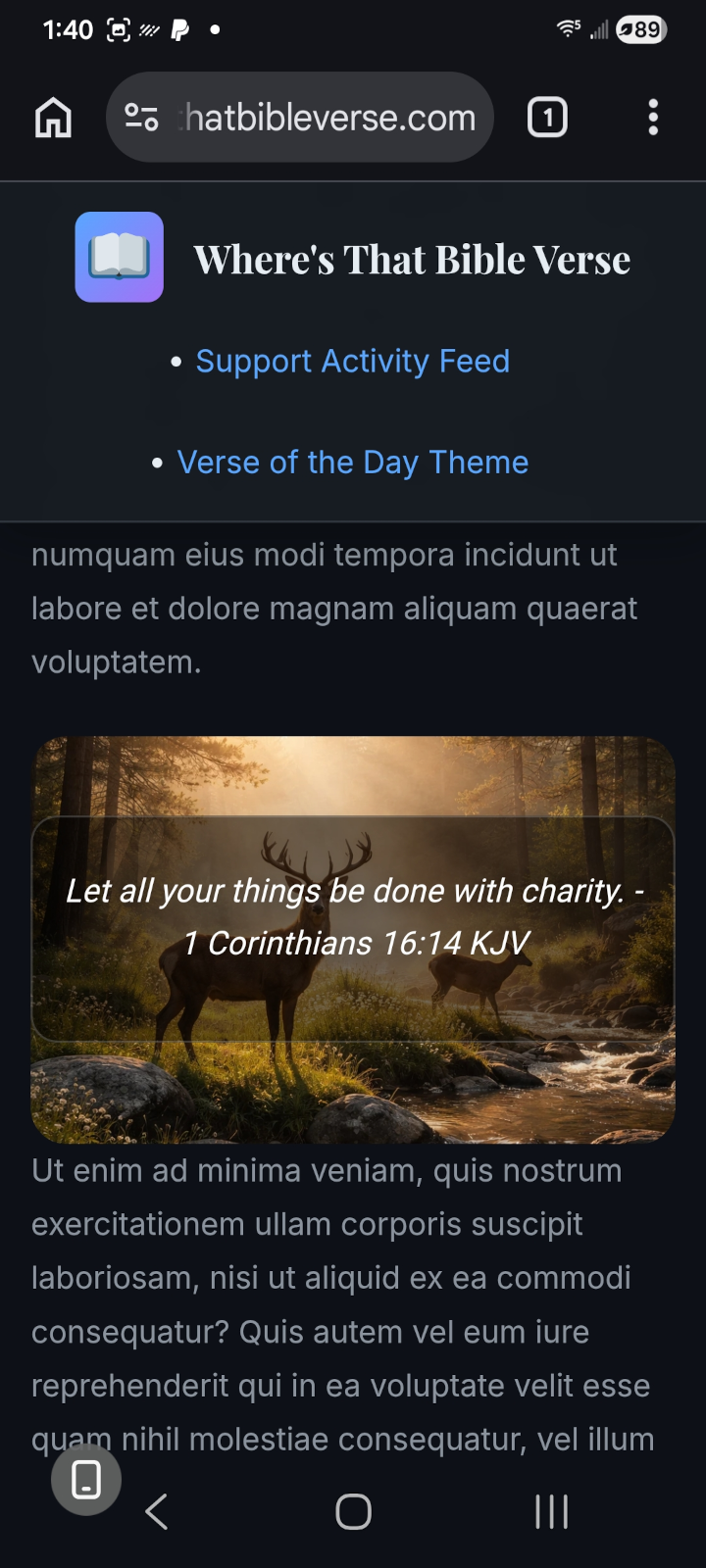
The verse of the day displayed on mobile, showing a short KJV verse over an AI-generated background.
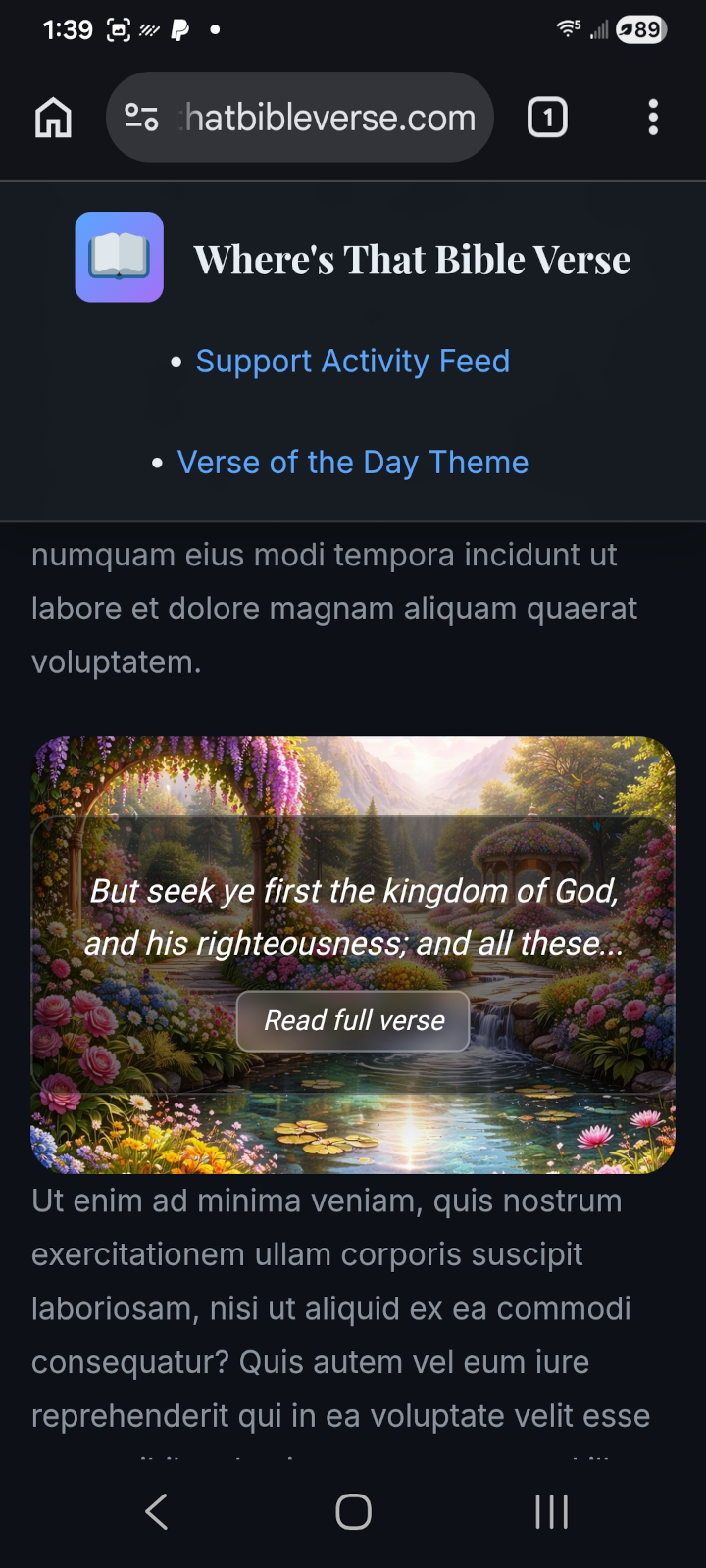
A longer KJV verse on mobile, truncated in the widget with the full passage available on tap.
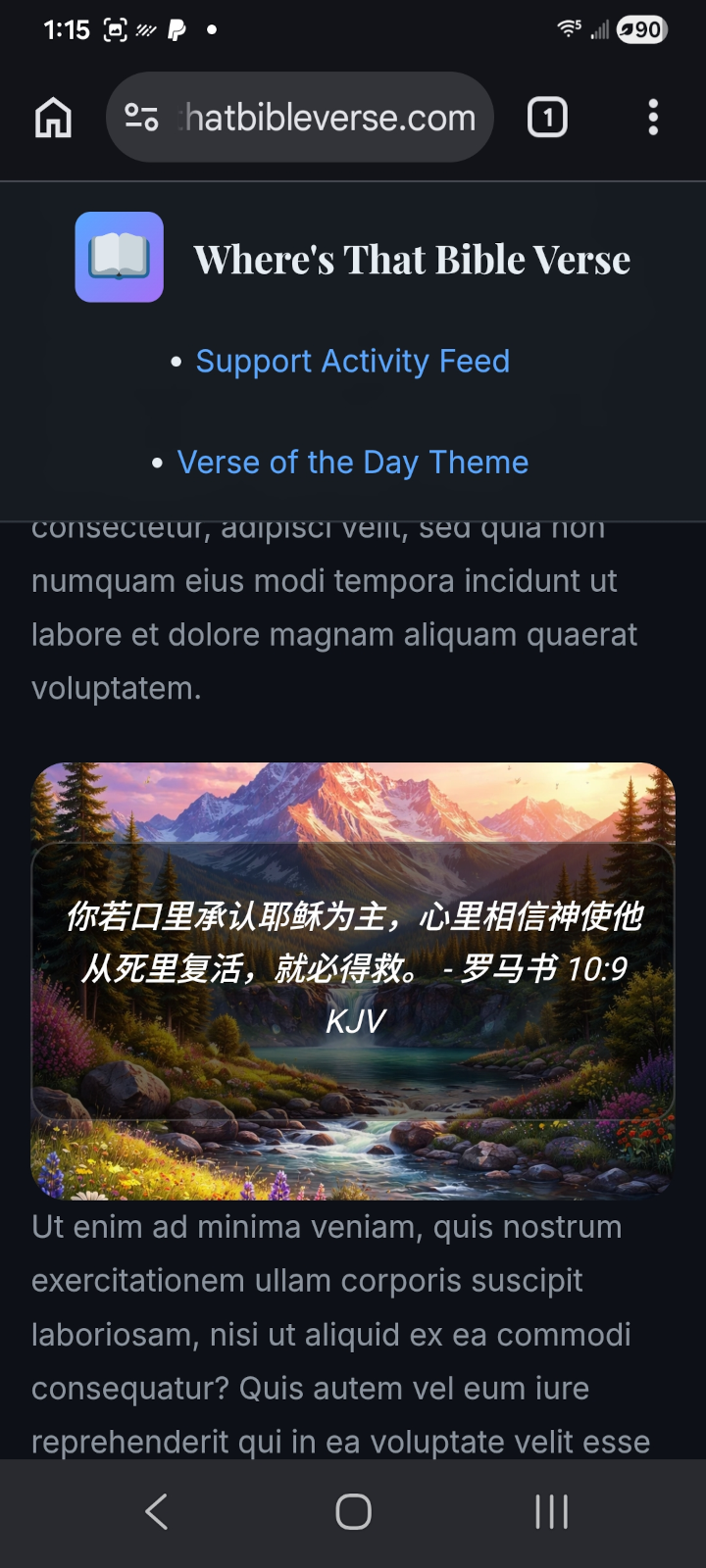
The daily verse shown in Chinese (Simplified), one of over 100 supported languages.

Plugin settings page showing the language selector for multilingual scripture.

Plugin settings page showing background type (static, animated, or mixed) and font family options.

The image displays the "Shortcodes" settings panel of the WordPress plugin on a mobile screen interface.
How do I display the verse of the day?
Three ways, all interchangeable. Add the Verse of the Day Header or Verse of the Day Sidebar block in the Gutenberg block editor or site editor; drag the header or sidebar widget into a widget area under Appearance > Widgets; or paste the [votd_header_widget] or [votd_sidebar_widget] shortcode anywhere shortcodes run. The older [votd_verse_of_the_day_widget_for_wp] shortcode still works for existing installs, but new sites should use the two layout-specific shortcodes above.
Does this verse of the day widget work with Gutenberg and block themes?
Yes. Both layouts are registered as native Gutenberg blocks, Verse of the Day Header and Verse of the Day Sidebar, and render server-side, so they can be placed in posts, pages, reusable patterns, and full site editing templates and template parts. They appear under the Widgets category in the block inserter, or you can search the inserter for “verse,” “scripture,” or “devotional.” The blocks reuse the same output as the classic widgets and the shortcodes, so all three placement methods display the verse identically.
This matters on a block theme such as Twenty Twenty-Five, because block themes have no Appearance > Widgets screen at all. On those themes, use the blocks (or a Shortcode block) rather than the classic Widgets screen.
Do I need an API key or an account?
No. There is no account, no API key, no signup, and no connected service to configure. Install, activate, place the block, and the verse of the day appears.
Is the plugin free?
Yes, entirely, under GPLv2 or later. There is no paid tier, no upsell, and no feature held back behind a license.
Which Bible translation is used?
The King James Version (KJV), which is in the public domain. Translations into other languages are derived from the KJV English text rather than from a modern translation, which is why the phrasing reads more formally than most daily verse services.
Can I display the verse of the day in Spanish, French, or another language?
Yes, over 100 languages are supported. Select your language on the plugin settings page and the daily verse is translated for you. The translation is fetched once per language per day and cached on your site until midnight.
Does the plugin send any visitor data anywhere?
No. No visitor data, personal data, or site data is collected, stored, or transmitted. When the language is set to English, the plugin makes no external requests for verse content at all, because the verses ship inside the plugin. See the Third-Party Service section below for the full data flow when a non-English language is selected.
Will this slow down my site?
It should not. The verse text is bundled locally rather than fetched over the network, backgrounds are served as WebP, translated verses are cached locally until midnight, and fonts can be self-hosted in one click so no external font request is made.
Can Google see and index the verse?
Yes. WordPress prints the full verse and its reference directly into the page’s HTML before the page is sent, whether you use the block, the classic widget, or a shortcode. Search engines read it from the page source on the first fetch, without having to run any JavaScript, and nothing is hidden behind a “Loading…” placeholder. Long verses are shortened on screen with CSS, but the complete verse is still in the HTML. Translated verses are indexed in their own language, marked with a lang attribute.
You can check this yourself: open a page that shows the widget, choose “View Page Source” in your browser, and search for today’s verse. In Google Search Console, the URL Inspection tool’s “View crawled page” shows the same HTML Googlebot sees.
Does the plugin add structured data (schema.org)?
Yes, optionally. On pages that show the widget, the plugin adds one small schema.org “Quotation” block (JSON-LD) describing the day’s verse, its reference, and its King James Version source; translated verses are described as translations of the KJV verse. It helps search engines understand what the text on your page is. Google does not currently show a special search result for quotations, so treat it as clean, accurate markup rather than a ranking trick. It is on by default and can be turned off under Settings > Verse of the Day > Search Engines & Verse Rotation, for example if your SEO plugin already marks up quotations. Developers can change or remove it with the votd_structured_data filter.
Will the verse of the day help my Bible site rank in search?
It gives search engines real, indexable scripture on every page that shows it, with a fresh verse each day, rather than an empty box filled in later by JavaScript. Like any content, though, a quoted verse is one signal among many: what earns rankings is the content you write around it, such as devotionals, studies, and commentary. No plugin can promise a ranking.
Does every site show the same verse on the same day?
Yes, and that is deliberate. The selection is derived from the date rather than picked at random, so every site running the plugin displays the same verse on a given day. Your visitors see a genuine verse of the day rather than a random verse.
When does the verse change?
At midnight in your site’s own timezone, taken from Settings > General, not from whatever timezone your web host happens to run on.
Can I use this on a ministry website?
Yes, and that is the most common use. The King James text is public domain, the plugin is GPL, nothing is tracked, and no external account is required, so there is nothing to clear with anyone before putting a daily scripture verse on a church homepage, sidebar, or footer.
Is the plugin compatible with all themes?
It is designed to work with most WordPress themes, both classic and block themes. Because the shortcodes work anywhere shortcodes run, it also drops into page builders such as Elementor, Divi, and Beaver Builder through their shortcode or text modules. If you run into a conflict, please open a topic on the support forum so the team and community can help: Official Plugin Support Page
Which background themes are included?
Three animated themes ship with the plugin, one in each of three categories: Woodland Animals (Cats), Birds (Macaws), and Seasons (Autumn). The library is kept small on purpose so that every video meets the same High Definition quality standard. Each is a set of 10-second looping High Definition (HD) videos shown behind the verse. You choose one theme in Settings, where they are listed by category, and the widget shows its videos one per day, in order. Static image backgrounds are also included for sites that prefer no motion.
Can I change the background images?
You can choose whether the widget uses static backgrounds, animated backgrounds, or a mix of the two, from the plugin settings page. The background library itself ships with the plugin and grows with each release.
Where are the fonts loaded from?
Until you self-host them, the fonts you select are loaded from Google Fonts. Going to Settings and choosing “Download & Self-Host All Fonts” copies the font files into the plugin’s own /fonts/ directory, after which no font request leaves your server. See Third-Party Fonts & Licenses below.
ChangeLog
For the complete version history (all releases), see the readme.txt revision log: https://plugins.trac.wordpress.org/log/verse-of-the-day-widget-for-wp/trunk/readme.txt
8.23.1 – (2026-11-26)
- Changed (Banner Image): Updated banner image to reflect Autumn theme and the new VOTD plugin’s design
8.23.0 – (2026-11-26)
- Happy Thanksgiving! A warm Happy Thanksgiving to every WordPress user of the Verse of the Day Widget. Thank you for making this plugin part of your site.
- New (Animated Backgrounds): Added 4 new High Definition (HD) videos to the Autumn theme, just in time for the season. The Autumn theme now has 6 festive HD videos, shown one per day in order.
- Changed (Animated Backgrounds): The animated theme library now focuses on quality over quantity. Three HD themes ship with the plugin: Cats (Woodland Animals), Macaws (Birds), and Autumn (Seasons). The Caribbean, Dogs, Dolphins, Horses, Orcas, Rabbits, Red Deer, Sea Turtles, Swans, and Wolves themes have been removed. If your site used one of the removed themes, it now shows the Autumn theme automatically, and you can pick Cats or Macaws instead in Settings > Verse of the Day.
- Docs: Updated the theme lists and counts in the readme, and noted that every animated theme video is High Definition.
8.22.3 – (2026-11-22)
- Changed (Animated Backgrounds): Each animated background’s poster still, the image shown while its video loads and to visitors who prefer reduced motion, now has the same file name as its video with a .webp extension, for example
macaws-1.mp4 and macaws-1.webp. The “-poster” suffix is no longer used. The posters that ship with the plugin have been renamed, so nothing changes on your site.
- Developers: If you add your own theme folders under
animations/, name each poster after its video (name.mp4 and name.webp) instead of name-poster.webp. VerseGlobals.getPosterFor() and votd_get_notice_media() now look for this name.
8.22.2 – (2026-11-19)
- Changed (Languages): Removed Amharic and Lao, which could not be translated reliably. Sites that had either language selected now show the daily verse in English and can choose another language in Settings > Verse of the Day.
- Fixed (Performance): When a translation fails, the plugin now shows the English verse and waits 15 minutes before trying again, instead of retrying on every page view. Pages no longer slow down while the translation service is unavailable.
- Developers: Translation failures are now written to debug.log when WP_DEBUG is enabled. The translation request timeout can be changed with the
votd_translate_timeout filter (default 8 seconds).
8.22.1 – (2026-11-18)
- Fixed (Admin): The “Leave a review” notice no longer gets squeezed into the page header on Settings > Verse of the Day. It now shows at full width above the settings, the same as on the Dashboard. WordPress’s own notices on that page, such as “Settings saved”, now appear there too.
- Fixed (Admin): The review notice keeps its own white card on the settings page instead of picking up the page’s dark notice styling.
- Fixed (Accessibility): The review notice’s background animation now plays and has a pause/play button (WCAG 2.2.2). It stays still when JavaScript is off or when reduced motion is requested in your system settings.
- Improved (Accessibility): “Maybe later”, “I already did” and the close button in the review notice are now announced as buttons by screen readers and work with the Space key, since they act on the page instead of opening a link.
8.22.0 – (2026-11-15)
- New (Animated Backgrounds): Added a new animated theme in the Majestic Wildlife category: Red Deer, with a majestic red deer stag walking through a colorful autumn forest. Choose it from the “Animated Theme” drop-down in Settings. The plugin now ships with thirteen themes.
- Docs: Updated the theme lists and counts in the readme to include Red Deer, and corrected the background library count (thirteen animated themes, not eleven).
For older releases, see changelog.txt.

