
Ultimate Downloadable Products for WooCommerce plugin enables to display downloadable files on a product page.
Ultimate Downloadable Products shows the files inside a downloadable product before the buyer pays: the list of what is in the download, with the file type, the size and a count, on the product page itself.
It works on WooCommerce or Easy Digital Downloads. The name still says WooCommerce because that is where the plugin started and its wordpress.org history lives under this slug, but the platform is a runtime choice, not a requirement: activate the plugin on a shop running either of the two and the download list appears on its product pages. When both are active, WooCommerce is used.
The free build lists the files, draws the image thumbnails, adds the tab, the shortcode and the block, schedules an unlock and reports whether the uploads folder is really closed. A Professional licence adds the previews themselves — blur, audio, video, document and archive contents — the per-product and per-file overrides, a separate schedule per file, the marketplace vendor form and the preview analytics. Every claim that needs that licence ends with (Professional) in the list below.
Eleven promises have no picture of their own and are named here instead, because no frame can show them: an unlock email tells the customer when a scheduled file opens, switchable under WooCommerce → Settings → Emails; a REST route, GET /wc/v3/products/{id}/downloads, serves the public part of a product’s files to a headless storefront; with neither WooCommerce nor Easy Digital Downloads active the plugin still activates, does nothing on the front end, and prints one admin notice naming what to install; the shortcode’s product_id, show_size, columns, types and layout attributes reshape the list, and columns turns it into a real multi-column grid; one customer’s file can be unlocked from the order screen or with wp udp schedule unlock|status, without touching the product (Professional); a schedule can count from a subscription’s start, so a renewal never restarts it (Professional); wp udp stats and the one-line wp udp status print the preview counters without a browser, and the analytics screen itself is shown only to a user with manage_woocommerce (Professional); RAR uploads are accepted as well as ZIP and ISO (Professional); on Easy Digital Downloads a per-file preview setting is keyed to the file’s condition and the file itself, so reordering the files moves no setting to another file (Professional); the WCFM and WC Vendors vendor forms carry the same preview options as the seller’s own form in picture 22, for a vendor account with no admin access (Professional); and when the server cannot render a page, a PDF preview shows the document’s opening text instead (Professional).
Video walkthrough: https://youtu.be/QVs3kOco3SE
Features
Everything in this list is in the free build.
- The
Downloads tab on a product page lists what the buyer gets — every file with its thumbnail, its name and its size — before the buyer pays
- The
[ultimate-downloadable-list] shortcode prints the product’s download list inside a product description — the same files, thumbnails, names and sizes the Downloads tab shows
- The free build shows the Professional preview settings too: visible, disabled and linked to the upgrade, so you see what a licence adds before buying it
- The unlock delay is set on the product itself, in the
Downloads block’s Unlock downloads after (days) field, with no separate screen to visit
- Until a file unlocks, My Account shows
Available in 7 days instead of a link, so nobody chases a download that is not there yet
- A download asked for before its date is refused with a page that says when it unlocks and where to go next, and the refusal costs the customer no download
- The protection screen answers whether the uploads folder is really closed: a red
not protected badge with its reason, the rule file the plugin manages, and the server configuration to paste when your host does not run it
- The
Downloadable files (UDP) block renders the list in the site editor: a live preview of the product’s files on the canvas and its five settings in the sidebar, with no shortcode in the template
- The same block prints a grid of cards on the front end — three to a row, each card carrying its thumbnail or its file-type icon, the name and the size
- On Easy Digital Downloads a download with several price options shows one labelled group per option, with the files each option includes and their sizes measured on disk
- On Easy Digital Downloads the receipt a buyer lands on after paying says
Available in 5 days under a file that has not unlocked yet
PRO Features
A Professional licence adds these, on top of the free list above.
- One settings screen decides what the product page shows: the tab, the image thumbnails, the audio and video samples, their lengths and the archive formats
- Image thumbnails can be blurred, with a strength you set, so a buyer sees the shape of the artwork without seeing the artwork
- A variable downloadable product lists the files of the variation the buyer picks: choose A2 and the list shows the three A2 files, each with its own size
- Change the choice and the list changes with it: the A5 variation shows its own two files and its own total, never the parent’s set
- A ZIP in the list opens in place, folder by folder, so the structure of the archive is readable before the purchase
- An ISO disc image opens in the same list, so a product that ships on a disc is as readable as one that ships as an archive
- Override the thumbnail width, the blur strength and the
Downloads tab for one product, or for one file inside that product, without touching the global settings
- An audio download plays a short sample in the list, cut from the product file itself, so a buyer can hear what they are buying
- A video download shows a blurred poster in the list, so the row stays quiet until the buyer asks for the sample
- The video sample opens in a modal window and closes without leaving the product page
- A PDF download shows its first page as the thumbnail, so the document is recognisable at a glance
- Each file row carries its own preview setting, and the screen counts the samples it managed to build (
Samples ready: 3 of 3), so a sample that failed is visible before the shop goes live
- A Server capabilities table tells you which previews this server can make and which tool is missing, before a customer finds out
- A schedule per file: each file unlocks N days after the purchase or on its own date, while the product keeps its own schedule
- The same preview options sit on a seller’s own product too — width, blur, strength, media preview, the
Downloads tab and a row of settings per uploaded file — so the person who owns the product sets them
- Download analytics counts every preview opened and every sample played, per product, for all time and over the last 30 days
Roadmap
The platform port and the release schedule on Easy Digital Downloads are shipped, so
the platform work is what this list now carries. Nothing below is committed by this
release:
- FluentCart support — a maybe, not a plan, and only if that platform’s file model turns out to fit the same list
- A conversion report — the plugin counts previews and sample plays; comparing them with the orders they produced, per product, is not built
- Analytics for the Free build — the counters are Professional only
- A block that edits the list in the editor rather than rendering it on the server (today’s block lists the files; the product screen still owns them)
- Marketplaces beyond WCFM, WC Vendors and Dokan
Nothing above is promised or dated.
l10n
This plugin is localization ready.
Languages this plugin is available now:
- English
- Arabic (عرب)
- Czech (čeština)
- Danish (Dansk)
- German (Deutsche)
- Greek (Ελληνικά)
- Spanish (Español)
- Persian (فارسی)
- French (Français)
- Hebrew (עִברִית)
- Hindi (हिन्दी)
- Indonesian (Bahasa Indonesia)
- Italian (Italiano)
- Japanese (日本)
- Korean (한국인)
- Malay (Melayu)
- Norwegian (Norsk)
- Netherlandish (Nederlands)
- Polish (Polski)
- Portuguese (Português)
- Russian (Русский)
- Slovak (Slovenský)
- Finnish (Suomalainen)
- Swedish (Svenska)
- Thai (ไทย)
- Philippine (Pilipinas)
- Turkish (Türk)
- Vietnamese (Tiếng Việt)
- Chinese (中国人)
Feel free to translate this plugin to your language.
Shortcode
[ultimate-downloadable-list] prints the downloadable files of a product. With no attribute it prints the product being displayed, exactly as it did in 3.2.1 — the shortcode is backward compatible in both directions.
Attribute
Default
What it does
product_id
0 — the product being displayed
Prints the list of another product, so the shortcode works outside the loop, in a page or a widget
show_size
true
show_size="0" drops every file size and the byte total from the summary line; the file count stays
columns
1
1–6; values outside the range are clamped. Above 1 the list becomes a real CSS grid (--udp-columns), not a table
types
empty — all files
A comma-separated subset of image,audio,video,archive,document,other. Files of another type are removed before counting, so the summary matches what is shown
layout
list
list or grid; grid adds the card styling. Anything else falls back to list
[ultimate-downloadable-list product_id="42" columns="3" layout="grid" show_size="0" types="audio,video"] prints the audio and video files of product 42 in three cards, without sizes.
The other shortcodes an Easy Digital Downloads store carries – [downloads], [download_cart], [download_checkout], [download_history], [download_discounts], [edd_downloads], [purchase_link], [purchase_history] and [purchase_collection] – belong to Easy Digital Downloads itself, not to this plugin: they work whether this plugin is active or not, and this list appears inside the download they print.
Block
The block is called Downloadable files (UDP) and its name is ultimate-downloadable-products/downloadable-list. It renders the same list as the shortcode — same markup, same CSS — for the product a single-product template is showing, so a block theme needs no shortcode at all.
Its inspector panel carries the same five options as the shortcode attributes above (product id, show size, columns, types, layout), and the editor shows the server-rendered list as a live preview. apiVersion is 2, so the block works on WordPress 6.0 as well as on the current release. The block is in both the Free and the PRO build.
REST API
Headless storefronts get one public route:
GET /wp-json/wc/v3/products/{id}/downloads

`
curl https://example.com/wp-json/wc/v3/products/42/downloads
`
The route lives inside wc/v3 on purpose: that is the only namespace where a WooCommerce consumer key authenticates, so a storefront authenticates the same way it does for the rest of the store. No capability is needed to read it — everything it returns is already on the product page.
Each file carries five public fields and nothing more:
id — the download idname — the file name as the shop shows ittype — image, audio, video, archive, document or othermime — the detected MIME type, or nullsize — bytes, or null when the file is remote or its size is unknown
Two fields are about what the route withholds. download_url is null, with locked: true, for any file a release schedule has not unlocked yet — unless the caller has manage_woocommerce, who always sees the file. unlock_at is the instant of a fixed-date schedule, and it is published to that caller only: for everybody else it is null, because a delay schedule counts from a purchase this route knows nothing about. No order id, user id, email, IP, download key or counter is read on this route at all.
An unknown product and a product that is not downloadable both answer 404 (udp_product_not_found, udp_product_not_downloadable); a downloadable product with no files answers 200 with an empty downloads array. The response is Cache-Control: private, no-store — it is per-caller data and must not be cached by a proxy.
The full note — every field, every refusal, the redaction table and the reason wc/v3 is borrowed — is docs/work/rest-downloads.md in the plugin repository.
Screenshots

What is in the download, before paying: the Downloads tab with a thumbnail, a name and a size for every file
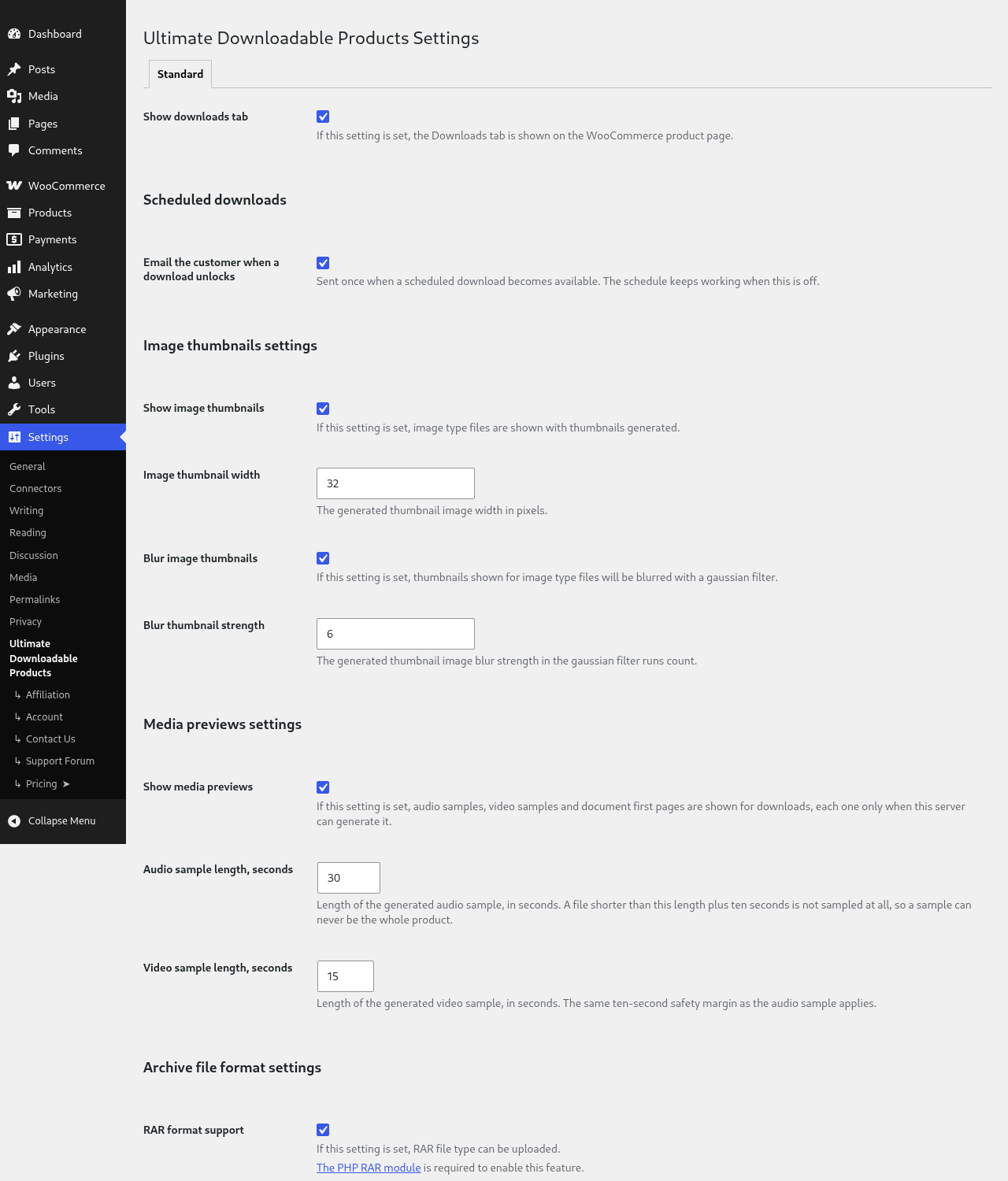
One settings screen for the tab, the thumbnails, the samples and the archive formats (Professional)

Blurred image thumbnails: the shape of the artwork, at the strength you set (Professional)

Choose A2 and the list shows the three A2 files, each with its own size (Professional)

Choose A5 and the list shows its own two files and its own total (Professional)
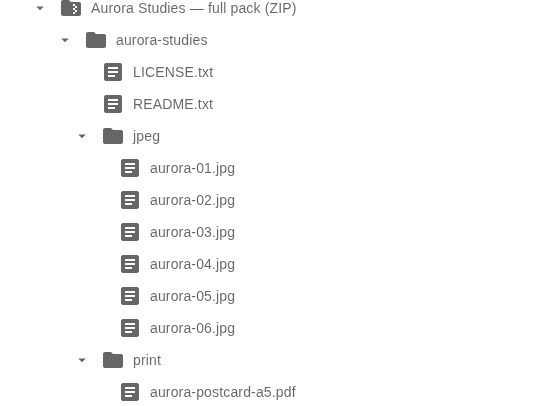
A ZIP opened in place, folder by folder, before the purchase (Professional)

An ISO disc image opened in the same list (Professional)

The [ultimate-downloadable-list] shortcode printing the same list inside a product description: thumbnails, names and sizes for two files

Thumbnail width, blur and the Downloads tab overridden for one product and for one file (Professional)

An audio download playing a short sample in the list (Professional)

A video download showing a blurred poster in the list (Professional)

The video sample opened in a modal window (Professional)

A PDF download showing its first page as the thumbnail (Professional)
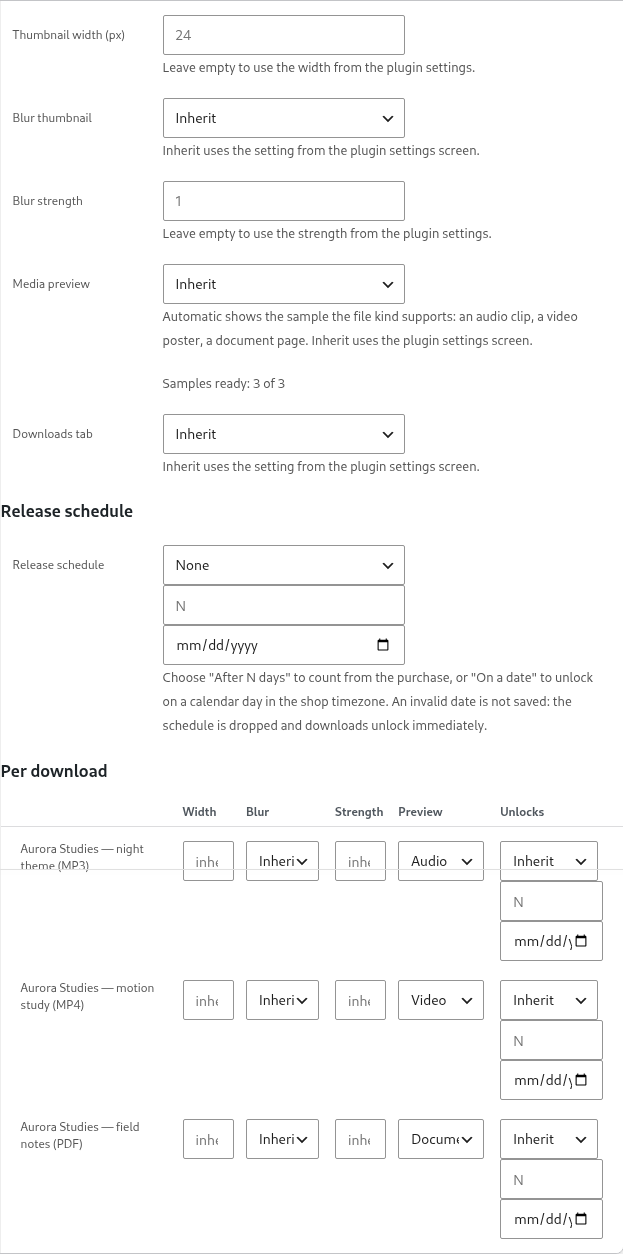
A preview setting on every file row, and a count of the samples the screen managed to build: Samples ready: 3 of 3 (Professional)
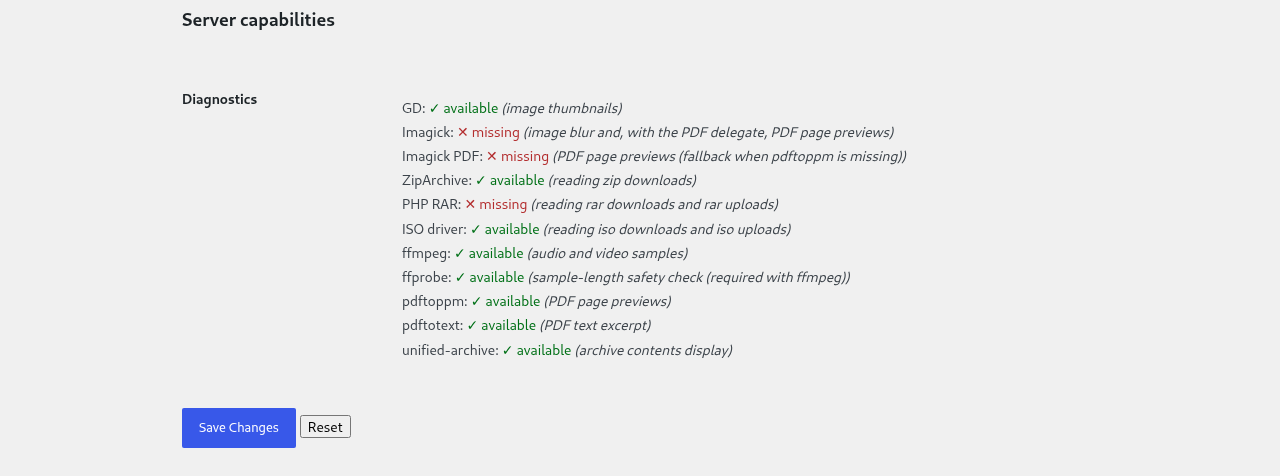
The Server capabilities table: green for the tools this server has, red for the ones it misses (Professional)
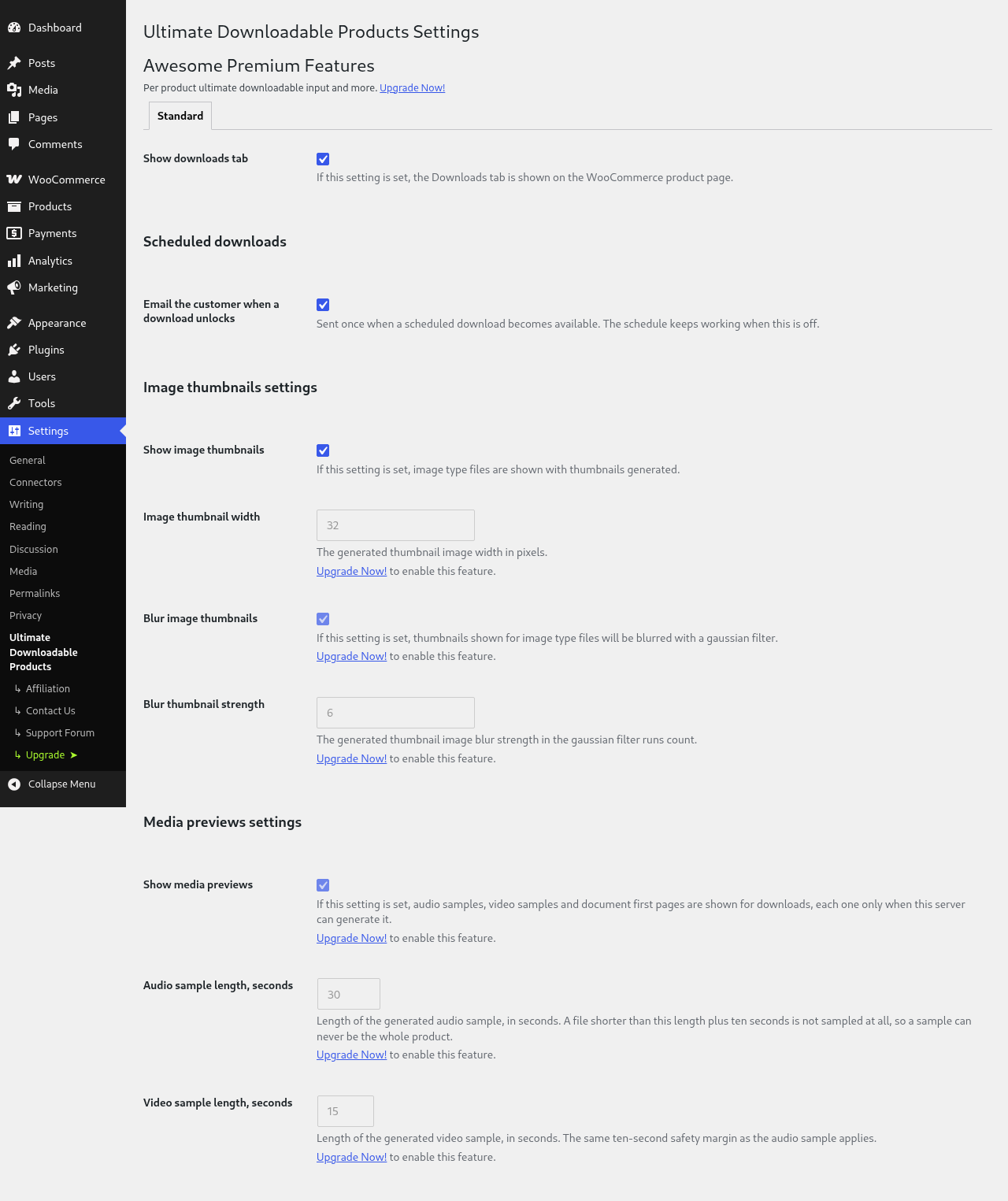
The settings screen in the free build: the Professional preview settings visible, disabled and linked to the upgrade
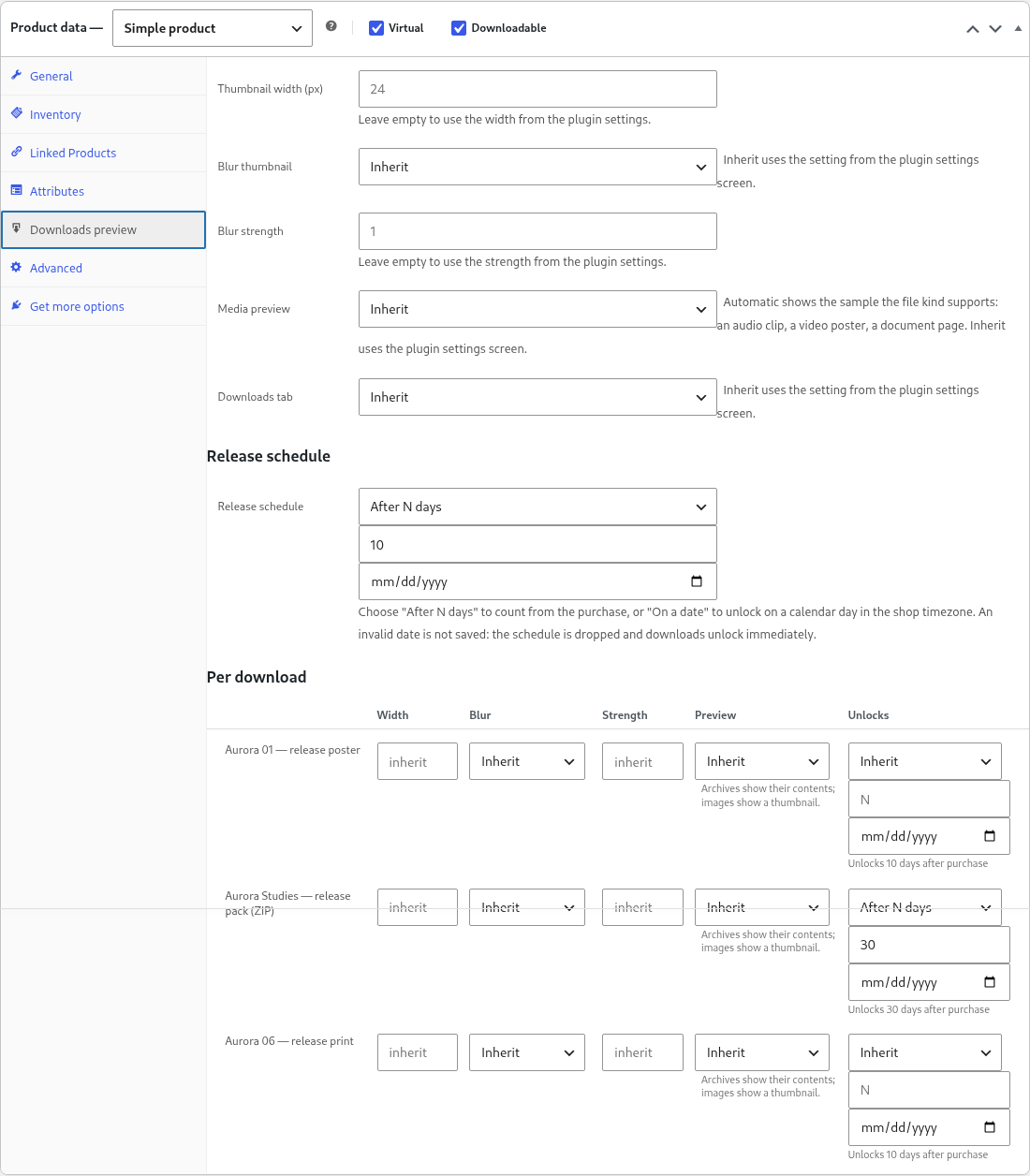
A schedule per file: each file unlocks on its own day, next to the product's own schedule (Professional)
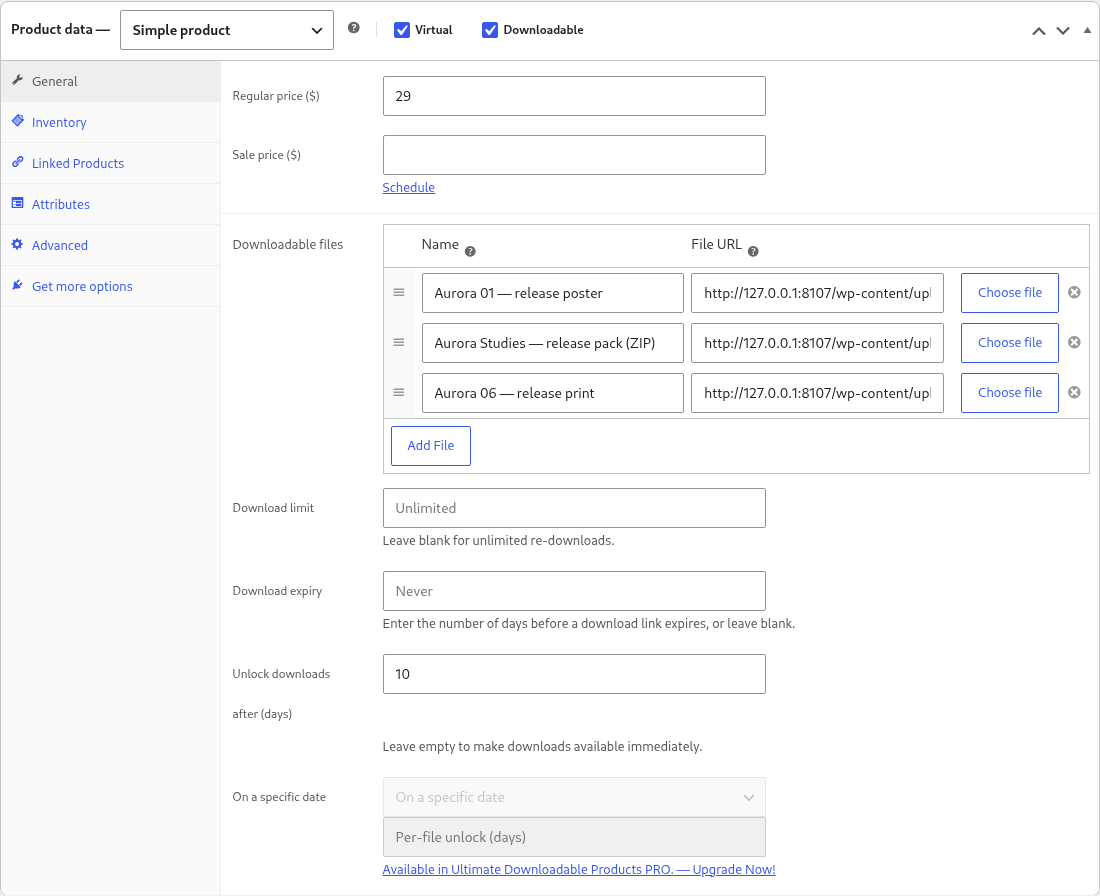
The unlock delay set on the product itself, in its own Downloads block, with no separate screen to visit

My Account: a file that has not unlocked reads Available in 7 days instead of a link, next to one that has
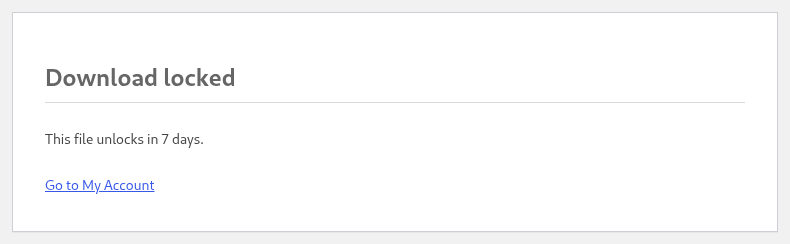
A download refused before its date: a page that says when the file unlocks and where to go next

Download protection on a server that ignores the rule: the red not protected badge and its reason, the rule file the plugin manages, and the server configuration you paste by hand
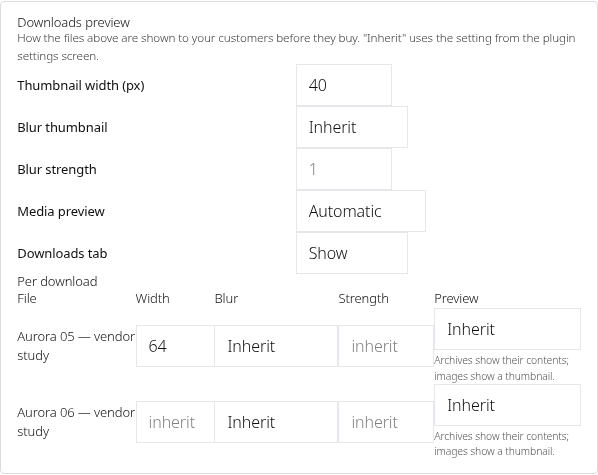
The same preview options on a seller's own product: the two vendor study files, each with its own row of settings (Professional)
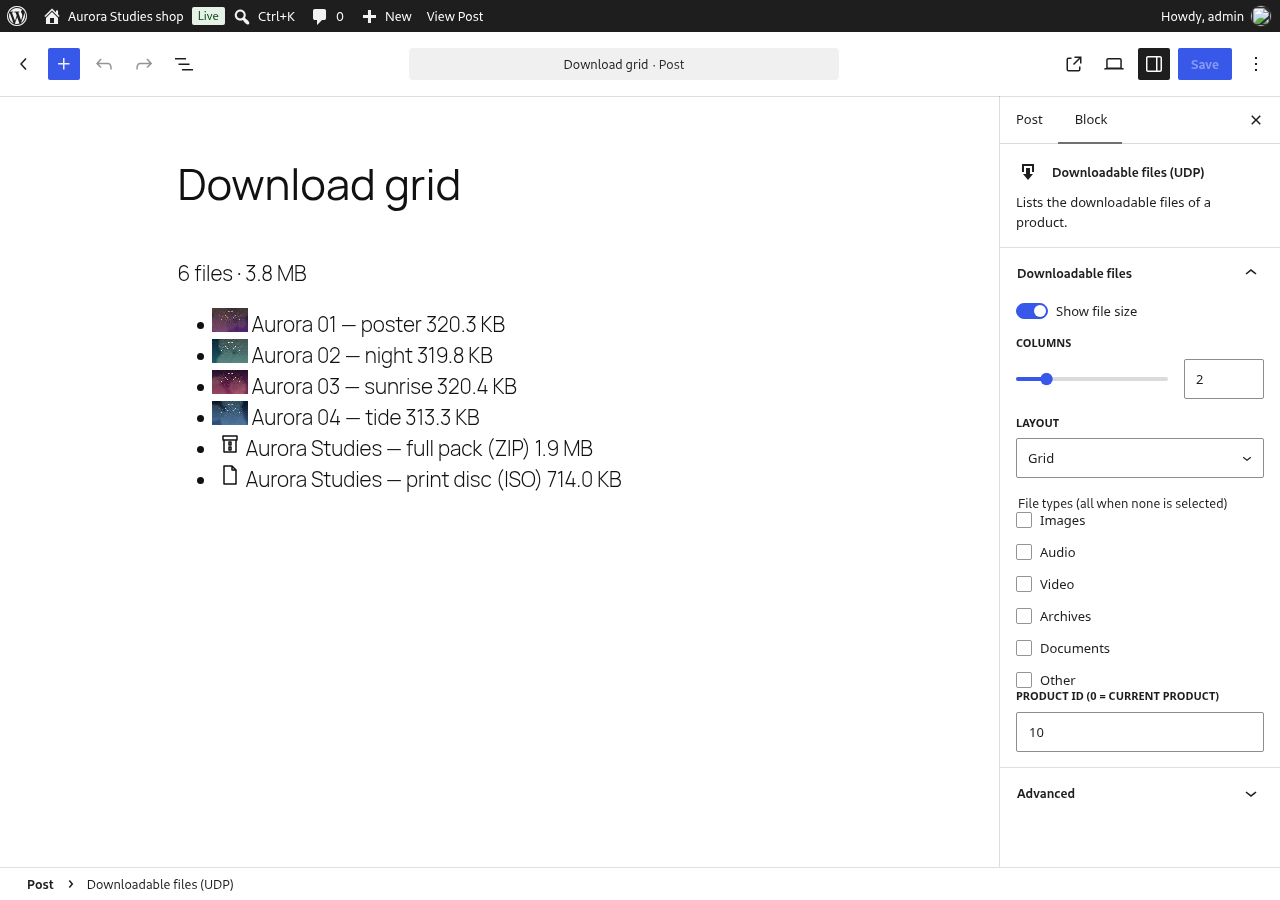
The Downloadable files (UDP) block in the site editor: the live preview on the canvas and the five settings in the sidebar

The same block on the front end: three cards to a row, each with its thumbnail or its file-type icon, the name and the size
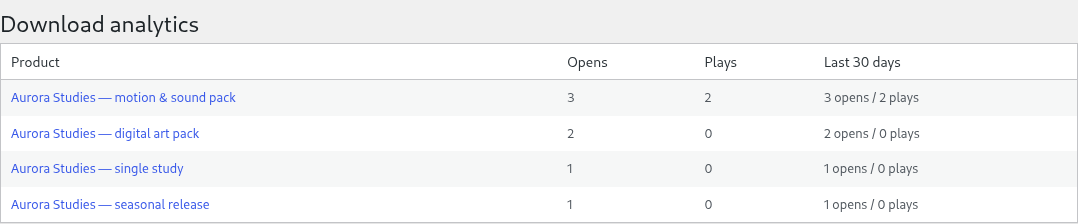
Download analytics: previews opened and samples played, per product, in total and over the last 30 days (Professional)

On Easy Digital Downloads, one labelled group per price option, Standard and Extended, with each option's files and their measured sizes

On Easy Digital Downloads, the receipt after paying: Available in 5 days under a file that has not unlocked yet
Does it work with Easy Digital Downloads?
Yes. Since 4.0.0 the plugin shows the download list on Easy Digital Downloads’ own download pages as well as on WooCommerce product pages, and the Professional previews (thumbnails, archive contents, audio/video/document samples) work on both. What changed is the activation rule: the plugin no longer declares a hard WooCommerce dependency and no longer refuses to activate without it, because the platform is now picked at runtime — WooCommerce when it is active, Easy Digital Downloads when it is the one that is active.
Can I run WooCommerce and Easy Digital Downloads on the same site?
Please don’t: the plugin works with one shop platform per site. On a site where both are active it uses WooCommerce and leaves Easy Digital Downloads alone, which means EDD downloads get no file list, no previews, no per-product settings and no release schedule. The plugin does not break anything in that state — it prints one admin notice naming the platform it is using and what the other one loses, so the situation is visible instead of silent. Deactivate the platform you are not selling with.
What happens if neither WooCommerce nor Easy Digital Downloads is active?
The plugin activates, does nothing on the front end, and prints one admin notice in the dashboard naming the platforms it can work with and linking to the plugins screen. The settings and diagnostics screens keep working, so the notice is not the only place to read the state: wp udp status says Platform: none.
Why do EDD price options appear as several lists?
Because that is how Easy Digital Downloads stores files. A download with variable prices has files attached to a price option, and a file whose condition is all belongs to every option — so EDD itself considers it part of each price, and the plugin prints it under each one, exactly as EDD would hand it out. WooCommerce variable products behave the same way: one list per variation.
Are per-file preview settings kept when I reorder EDD files?
Yes. On Easy Digital Downloads a file has no id of its own, so a per-file setting is attached to the file’s condition plus the file itself, never to its row number. Adding, removing or reordering files in the EDD download keeps every setting with the file it was made for.
What is the shortcode?
[ultimate-downloadable-list] prints the download list of the product being displayed. The Downloads tab renders the same list, so the tab and the shortcode never disagree.
Does it work with variable products?
Yes, in the PRO version: each downloadable variation is listed under its own name.
Can I use the shortcode or the block in a block theme?
Yes, both. The block needs no shortcode at all in a single-product template and is the expected way in the site editor; the shortcode still works inside a block template, and outside the loop with product_id. Both render the same list.
Is there an API for a headless storefront?
Yes: GET /wp-json/wc/v3/products/{id}/downloads returns the five public fields of each file. See the REST section above — a scheduled file comes back without its download_url, exactly as it would be hidden on the product page.
How do I see which previews customers actually open?
In the PRO version every preview opened and every sample played is counted per product. WooCommerce → Download analytics lists them with the last 30 days per product, wp udp stats (with the product id) prints one product’s counters, and wp udp status prints one summary line. The counts are a plain product meta row, so they survive an update of the plugin, and a preview being opened is never a download: the counters say what was looked at, not what was bought.
Does this stop a customer from downloading before the date?
Yes, for the shop’s own download link. Until the unlock instant WooCommerce’s download URL answers 403 with a page that says when the file opens and links back to My Account, and the My Account list shows “Available in N days” as text instead of a link. A refused attempt costs the customer nothing: it does not consume a download, does not appear in the download log, does not change the remaining count, and a media or range request (Range: bytes=...) is refused the same way instead of being served in slices. What the plugin controls is the link WooCommerce hands out — the file itself is the next question.
Can a customer download a file before the date?
Not through the shop; and on a protected server, not by copying the file URL either. The plugin writes a rule that blocks direct requests to wp-content/uploads/woocommerce_uploads/, checks once a day that the rule really works, and shows the result on its settings screen. On servers that ignore .htaccess (nginx, most CDNs) the plugin cannot write the rule: it shows you the exact snippet to paste and keeps a warning in your dashboard until the check passes. Use “Force downloads” rather than “Redirect only” — the redirect method hands the file URL to the browser by design, so no rule can protect it. This is not encryption: a file that was already downloaded stays downloaded.
Why did the unlock email arrive late?
The unlock email is a WP-Cron event scheduled for the unlock instant, and WP-Cron runs when somebody visits the site. If DISABLE_WP_CRON is set in wp-config.php and no system cron calls wp-cron.php, the event stays pending in the cron option — it is late, never lost, and it goes out with the next cron run whenever that happens. So that a waiting customer is not made to wait for a cron run, the same check also runs on the My Account downloads page: the mail leaves the first time the customer looks there, at most once an hour per site. Two switches have to be on: “Email the customer when a download unlocks” in the plugin settings, and the “Download ready” email in WooCommerce → Settings → Emails. Turn either off and the schedule still works, silently.
Do I need WooCommerce Subscriptions?
Only for the subscription-aware lock, which is a Professional feature. Without WooCommerce Subscriptions the plugin never looks at subscriptions and a schedule counts from the order. With it, a file stays locked while the subscription is on hold, cancelled or expired, and a renewal does not restart the schedule: the delay counts from the subscription’s start, not from the last payment. Verified against WooCommerce Subscriptions 7.6.0.
Why are my image thumbnails missing?
The GD PHP module is required to generate them. The settings screen ends with a Server capabilities report, and wp udp status prints the same matrix from WP-CLI — both are the first thing to check.
What do the audio, video and document previews need?
Audio samples need both the ffmpeg and the ffprobe commands, and video samples need them too; without both, audio and video downloads keep the file type icon, the file size and the file count. Document page images need poppler-utils (the pdftoppm command) or the Imagick PHP extension built with its PDF delegate; when only pdftotext is available the download shows a text excerpt instead of an image. Documents are PDF only — DOCX, ODT and other office formats keep the file type icon row, because rendering them would need a separate office suite on the server.
The samples are also bounded on purpose: the file must be stored under wp-content (a remote download is never sampled), and a source shorter than the sample length plus ten seconds is never sampled, because the sample would be the product. Generation runs in the background, so a freshly saved product may show icons until WP-Cron catches up; wp udp previews media generates the samples from WP-CLI, and the product panel’s readiness line says how many are still pending. The settings screen and wp udp status report which of these tools this server actually has.
What are the requirements?
PHP 8.1 or newer, WordPress 6.0 or newer, and either WooCommerce 7.0 or newer or Easy Digital Downloads 3.7.2 or newer (the version this release was tested against; 3.6 and earlier are not verified). Thumbnails need the GD module, the RAR and ISO formats need the matching PHP modules (see below). Audio, video and document previews need extra command line tools — see the preview question above.
Why does the plugin need to write a file to my uploads folder?
Because the link is not the only way to a file. WooCommerce keeps downloads in wp-content/uploads/woocommerce_uploads/, which your web server serves without PHP — no plugin hook is in that path, so a copied URL would work no matter what the schedule says. On an Apache-compatible server (Apache, LiteSpeed) the plugin therefore adds its own marked block to the .htaccess in that folder, adds an index.php there when the folder has none, and on uninstall removes exactly its own block. Lines it did not write are never touched: a php_value directive or a hotlink rule your host put there survives verbatim. Files stored on a remote host or a CDN are not in that folder and are not covered.
What if my server is nginx?
nginx ignores .htaccess, and the plugin does not write server configuration it does not own. The settings screen shows the exact snippet for nginx — location ^~ /wp-content/uploads/woocommerce_uploads/ { deny all; }, or internal; when you use X-Sendfile / X-Accel-Redirect — plus the Caddy and the IIS web.config versions, and it keeps a warning in your dashboard until the check passes. That warning is printed by Ultimate Downloadable Products for WooCommerce itself, because it is this plugin’s own daily check that produced it — it is not a WordPress or WooCommerce notice. After saving the snippet, reload the web server and press “Check again”.
Why is the warning still there after I added the rule?
Because the plugin believes a measurement, not the file it wrote. Once a day — and every time you press “Check again” — it puts a small temporary .txt file into the downloads folder and requests it over HTTP. 403 or 404 means protected; a 200 or a redirect means a browser can still fetch the file; a timeout, a 401 or a server error means it could not verify, and “could not verify” is never shown as protected. So if the warning survives, one of three things is true: the web server was not reloaded, it is not reading that file, or the site cannot reach itself over HTTP. The same state is written to the WooCommerce log and printed by wp udp status.
Are the downloads protected behind a CDN?
Partly, and the plugin says so where it matters. The rule protects the origin folder. A copy a CDN has already cached keeps being served from the CDN’s own URL until that cache is purged — the rule cannot purge it. A file stored on a remote host (a CDN URL in the product’s download row) was never in the uploads folder, so no rule on your server applies to it at all; the settings screen names such a file when your shop has one.
How to configure server to support RAR, 7z or ISO?
Follow recommendations from this guide please.
Contact the PRO version support for help.
ChangeLog
4.3.0
- Changed: the platform port has its third implementation.
FluentCartSource reads a FluentCart store’s own file table (fct_product_downloads — one row per file, the size the platform stores, a file scoped to a variation listed under that variation only) and Platforms detects FluentCart as the third platform, after WooCommerce and Easy Digital Downloads. A WooCommerce or Easy Digital Downloads site is unaffected: the selection order and every screen are unchanged, which is why this entry claims no new user-visible surface
- Not yet: FluentCart support is not announced in this version. The adapter has not been run on a live FluentCart store, and the release schedule and the media previews are wired to WooCommerce and Easy Digital Downloads only
- Requires WooCommerce 7.0, Easy Digital Downloads 3.7.2, WordPress 6.0 and PHP 8.1 (unchanged)
4.2.0
- New: the release schedule works on Easy Digital Downloads — the Free half of 3.1.0 (“files unlock N days after purchase”) now applies to EDD downloads as well, and a Professional per-file schedule and absolute date work there too. The merchant sets it on the download exactly as on a WooCommerce product
- New: the buyer is told before clicking. On the receipt EDD prints after payment, and in the purchase history, the plugin adds its own line under each file —
Available in 5 days / Available from 12 March — because EDD prints those links itself and offers no way to replace them. A click still explains itself: the file is refused with a 403 naming the exact date, and the refusal does not use up the buyer’s download count
- New: a per-order release override (
wp udp schedule unlock <order> <product> <file> <date>) works on both platforms, so support can open or hold one file of one order without touching the product schedule
- Fix: with Easy Digital Downloads the Professional build could answer a blank page — the analytics beacon asked WooCommerce where it was on every page. Fixed, and the same class of defect in
wp udp schedule (which called a WooCommerce function to load the order) is gone too
- Changed: the plugin works with one shop platform per site. When both WooCommerce and Easy Digital Downloads are active it uses WooCommerce and prints one admin notice saying which platform is in use and what the other one loses
- Changed: download protection is unchanged and still applies to local files; a file stored as a media-library attachment has a public URL of its own, which no rule can close — the product panel says so
- Requires WooCommerce 7.0 or Easy Digital Downloads 3.7.2, WordPress 6.0 and PHP 8.1
4.0.0
- New: the plugin is no longer WooCommerce-only — the public layer was ported onto a platform seam, and Easy Digital Downloads is the second supported platform. The same download list now appears on an EDD download page, through EDD’s own
edd_after_download_content hook and through the shortcode
- New: EDD price options are listed as separate groups, one list per price option, with the group’s own label above it. A file whose
condition is all appears under every option, because that is EDD’s own rule
- New: the Professional previews work on EDD too — thumbnails, archive contents and the audio, video and document samples. EDD stores its files locally, so the pipeline reads them unchanged; a file size on EDD is measured, because EDD stores none. Per-file preview settings are keyed to the file’s
condition plus the file, not to its row number, so your existing per-file settings are untouched and a reordered file keeps its settings
- Changed: the plugin header no longer declares
Requires Plugins: woocommerce. A runtime check now picks the platform after all plugins have loaded (WooCommerce first, Easy Digital Downloads when WooCommerce is absent), and with neither active the plugin activates, does nothing on the front end and prints one admin notice naming what to install — the settings and diagnostics screens stay usable
- New:
wp udp status prints the selected platform as a Platform: line, so support can see which one a site is running without guessing
- Uninstall now also removes the per-user banner-dismissal meta (
udp_platform_notice_dismissed, udp_protection_dismissed), so a site that deletes the plugin keeps no residue
- Requires WooCommerce 7.0 or Easy Digital Downloads 3.7.2, WordPress 6.0 and PHP 8.1
3.3.0
- New: a
Downloadable files (UDP) block (ultimate-downloadable-products/downloadable-list) for block themes and the site editor — it renders the download list of the product being viewed, with the same markup as the shortcode, so a single-product template needs no shortcode. It is in both the Free and the PRO build
- New:
[ultimate-downloadable-list] takes attributes — product_id, show_size, columns, types and layout. columns="3" is a real CSS grid built from a custom property rather than a table, types="audio,video" filters before the summary counts, and the attribute-less shortcode prints byte-for-byte what it printed in 3.2.1
- New:
GET /wp-json/wc/v3/products/{id}/downloads for headless storefronts — id, name, type, mime and size per file, and nothing that is not already public. It withholds two things: download_url is null, with locked: true, until a release schedule unlocks the file, and unlock_at is published to the shop owner only. The route reads no order, no user and no download key, and answers 404 for a product that does not exist or is not downloadable
- New (PRO): preview analytics — preview opens and sample plays are counted per product, on a
Download analytics screen under WooCommerce (capability manage_woocommerce), in wp udp stats (with the product id) and as one line of wp udp status. The Free build has no counter, no route and no screen
- Documented: the shortcode attribute table, the block name and the REST route, in this readme and in
docs/work/rest-downloads.md
- Requires WooCommerce 7.0, WordPress 6.0 and PHP 8.1 (unchanged)
3.2.1
- Fix (PRO): the
Downloads preview block fits the product form a marketplace vendor edits – the per-file columns no longer push the grid past the panel border, file names wrap at their spaces instead of breaking mid-word, and the block is capped at a readable width so a wide form does not stretch the labels away from their fields
- Tested with Dokan 5.3.1: the block is rendered by the marketplace’s own product form (its legacy editor,
Settings -> Appearance -> Vendor Product Editor), which is the form that carries the downloadable files; Dokan’s new React editor does not render a file list at all, so there is nothing there for a per-file setting to sit on
- The gallery now shows the feature: the same settings on a marketplace seller’s own product form (screenshot 22)
3.2.0
- New (PRO): marketplace vendor forms – a WCFM, WC Vendors (free or PRO) or Dokan vendor gets the
Downloads preview fields in the front-end product form and can set them for their own product: thumbnail width, blur and blur strength, the media preview, the Downloads tab, and a column per download
- The vendor form writes exactly the same meta through the same writer as the product screen, so an administrator sees and can change what a vendor set, and a marketplace re-saving a product never erases it
- The
wp udp status output and the log name the marketplace a save came from
- Requires WooCommerce 7.0, WordPress 6.0 and PHP 8.1 (unchanged)
3.1.0
- New: scheduled downloads – a product’s files unlock a number of days after purchase, set in WooCommerce’s own
Downloads block on the product
- New: until a file unlocks, My Account shows “Available in N days” instead of a link, the product page says when the files unlock, and a refused download explains itself and uses up nothing
- New: an unlock email when a scheduled file opens – a “Download ready” WooCommerce email under WooCommerce → Settings → Emails, switchable in the plugin settings
- New (PRO): unlock on a fixed date, a separate schedule per file, and an unlock date for one order on the order screen and from
wp udp schedule unlock|status
- New (PRO): subscription-aware schedules – files stay locked while the WooCommerce Subscription is not active, and a renewal does not restart the schedule
- New: download protection – the plugin blocks direct requests to the downloads folder on Apache-compatible servers, re-checks once a day that the rule really works, and shows the state, the last check and the exact nginx / Caddy / IIS snippet on the settings screen
- New: a dashboard warning on every admin screen while downloads are not protected – it can be postponed for 7 days and comes back, and the settings row stays red until the check passes
- New:
wp udp status prints the protection state, and the product panel warns the merchant when a file unlocks after its downloads expire
3.0.0
- New: audio downloads can play a short sample right in the downloads list
- New: video downloads show a blurred poster and play a short sample in a modal window
- New: PDF downloads show their first page as an image, or their opening lines as a text excerpt when no page renderer is available
- New: a per product
Media preview choice and a per file Preview column in the Downloads preview panel, with a Samples ready line for the samples still being generated
- New: the settings screen and
wp udp status tell you whether this server can make the samples, and wp udp previews media generates them from WP-CLI
- Samples are generated in the background – a product save never starts one – and every sample is a short excerpt, never the product file
- Samples need
ffmpeg and ffprobe (audio and video) or poppler / Imagick with the PDF delegate (documents); without them every download keeps its icon, size and count
2.2.0
- New: per product preview settings – thumbnail width, blur and blur strength can be set on a single product and inherit the plugin options by default
- New: per file overrides – one download can use its own width, blur or strength
- New: the
Downloads tab can be shown or hidden per product
- The product data panel gains a
Downloads preview tab with all of the above
2.1.0
- New: file type icons, file sizes and a file count in the downloads list
- Thumbnails are generated when a product is saved and served as files from the uploads directory, instead of being generated on the first visit and inlined as base64 in the product meta
- New:
wp udp previews regenerate fills the previews of an existing catalogue
- The thumbnail cache now includes the download id, so two downloads of one product can point at the same file
2.0.0
- Restructured into layered modules (the plugin behaves exactly as 1.3.5; this release moves code)
- Requires PHP 8.1, WordPress 6.0 and WooCommerce 7.0
- New:
wp udp status prints the plugin version, the settings and the server capabilities
- New: the settings screen ends with a server capability report (GD, ZipArchive, RAR, ISO, ffmpeg)
1.3.5
- freemius library version update
- tested up to WordPress 7.1 and WooCommerce 11.2
1.3.4
- freemius library version update
1.3.3
- freemius library version update
1.3.2
- freemius library version update
1.3.1
- freemius library version update
1.3.0
- Option to show image thumbnails for downloads of type image released in a free plugin version
1.2.0
- Zip and other archive types content display added
- RAR and ISO archive type upload support
1.1.0
- Variable Downloadable products support
1.0.0

