Используется для перевода ЧПУ с русского на английский язык.
| Author: | Ichi (profile at wordpress.org) |
| WordPress version required: | 7.1 |
| WordPress version tested: | 7.1.4 |
| Plugin version: | 1.9.1 |
| Added to WordPress repository: | 01-07-2012 |
| Last updated: | 07-05-2023
Warning! This plugin has not been updated in over 2 years. It may no longer be maintained or supported and may have compatibility issues when used with more recent versions of WordPress.
|
| Rating, %: | 100 |
| Rated by: | 3 |
| Plugin URI: | http://wordpress.org/extend/plugins/translit-... |
| Total downloads: | 10 158 |
| Active installs: | 100+ |

Click to start download
|
Переводит русские slugs (postname) на английский с помощью переводчика или транслитом.
Похож на плагины Cyr-To-Lat и rus-to-lat.
В отличие от оригинального плагина rus-to-lat, этот плагин может не только транслитерировать слаги постов и тегов, но переводит их с помощью переводчика.
ToDo
Планы на следующие версии:
- Вынести файл настроек отдельно.
- Изменить меню опций.
- Добавить перевод файлов
Screenshots
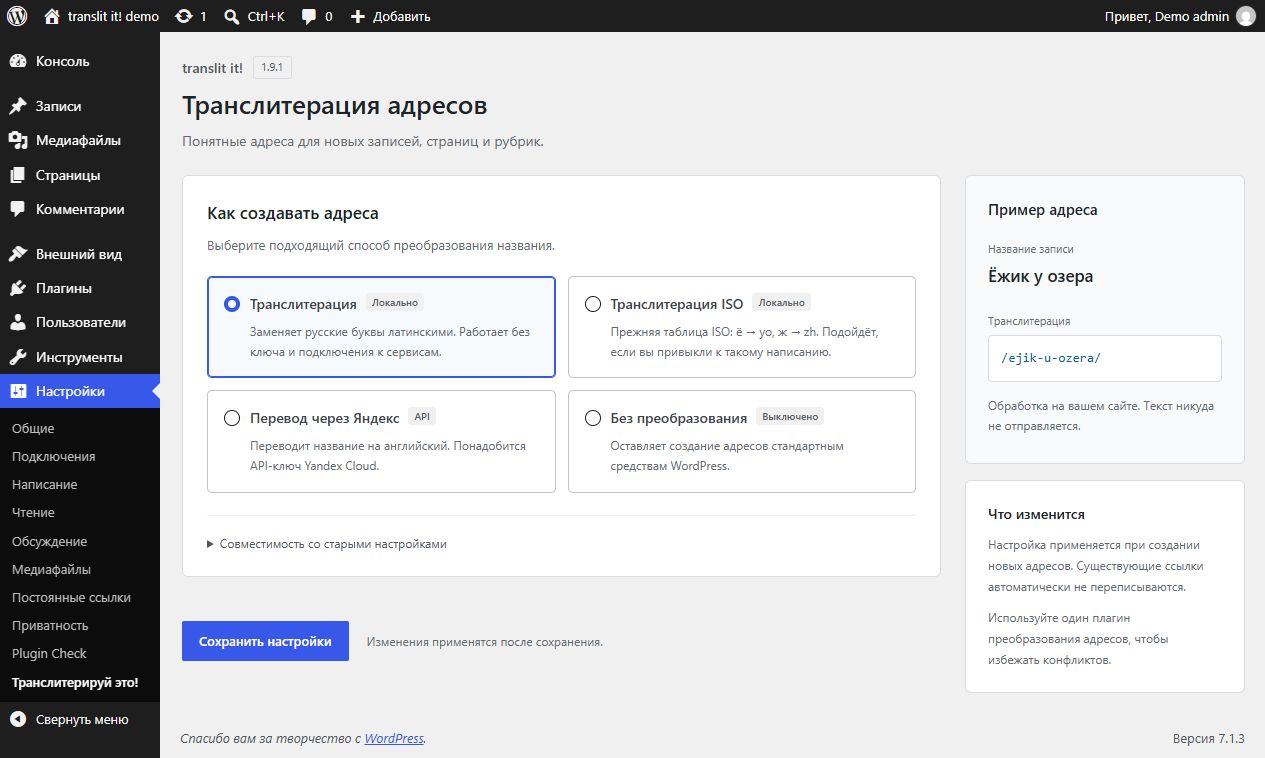
Local transliteration settings with conversion-mode cards and a sample address. No API key or external account is required.

Optional Yandex Cloud connection with saved-key status, a blank replacement field and fallback transliteration.

Legacy Yandex Translate API 1.5 settings and the preserved folder identifier in the compatibility section.
Is the plugin available in Russian?
Yes. Version 1.9.1 includes a complete Russian interface translation and English source strings. WordPress uses the administrator’s selected language; choose Russian in your WordPress user profile or site language settings. The Russian sample title stays unchanged so the transliteration example remains useful in either language.
The bundled Russian translation works immediately, without waiting for an official WordPress.org language pack. The translation notice on WordPress.org is controlled separately by the review and approval of translations on translate.wordpress.org.
How do I update from version 1.6?
First make sure your site runs WordPress 7.1 or later and PHP 8.4 or later, and back up your files and database. Open Plugins > Installed Plugins and use Update now for translit it!. You do not need to uninstall the old version.
The selected conversion mode, fallback checkbox, API key and legacy folder identifier are retained. Open Settings > Translit it! after updating to check them. Leave the API-key replacement field blank to keep the saved key.
Direct updates from 1.6 to 1.9.0 were checked through the WordPress admin on WordPress 7.1.3 / PHP 8.4 with MySQL 8.4 and, separately, SQLite. The checks covered Yandex Cloud with fallback enabled and legacy Yandex API 1.5 with fallback disabled, including saving the new form without re-entering the key. Stored options and existing post, page and category slugs were preserved. These checks used fictional keys and did not verify live Yandex translation.
Why is the API-key field empty after updating?
This is intentional: the saved key is not returned to the browser. The “Ключ сохранён” status means a valid key is already stored. Leave the replacement field blank to keep it, enter a new key to replace it, or select “Удалить сохранённый ключ” to remove it explicitly.
Will upgrading change my existing URLs?
There is no bulk conversion or database migration of existing slugs. The plugin converts text only when WordPress asks it to generate a slug for saving. Back up your site and check your normal publishing workflow before upgrading.
Can I use this together with another slug transliteration plugin?
Use only one slug conversion plugin at a time to avoid conflicting filters.
Is the ISO mode a full implementation of ISO 9?
It retains the historical ASCII table from this plugin for URL compatibility; it is not a complete implementation of the ISO 9 standard.
Why does the legacy folder identifier remain visible?
Its stored value is preserved during upgrades. Yandex Cloud API keys use their service account’s folder, so the legacy identifier is not sent in API-key requests.
ChangeLog
1.9.1
- Use English source strings and bundle a complete Russian translation, including compiled translations for immediate use.
- Respect the administrator’s WordPress language and let WordPress load translations on demand, with installed language packs taking priority.
- Keep the Russian sample title, existing settings, saved API keys and slug conversion tables unchanged.
- Test real WordPress locale switching, translated JavaScript labels and translation files in the installation package.
1.9.0
- Redesign the settings screen with accessible mode cards, conditional Yandex settings, a local permalink example and a responsive layout.
- Stop exposing saved API keys in HTML; support blank-field preservation, validated replacement and explicit deletion.
- Keep legacy settings in a collapsible section and load screen assets only on the plugin settings page.
- Include the settings template and runtime CSS/JavaScript in installation packages.
1.8.3
- Avoid repeated translation requests after a service failure within the same PHP request, while retaining successful cached responses.
- Prevent recursive translation calls triggered by third-party HTTP hooks.
- Check the 10,000-character input limit before sending a translation request.
- Add regressions for outages, HTTP-hook reentry, input length and API-key changes; keep the existing slug tables and fallback setting.
1.8.2
- Set the minimum supported versions to WordPress 7.1 and PHP 8.4.
- Align the plugin header, readme and automated compatibility matrix with these requirements; keep PHP 8.5 coverage.
1.8.1
- Confirm compatibility with WordPress 7.1.3, including block-editor REST draft previews, publishing, autosaves, pages, categories and explicit slugs.
- Add reproducible integration and authenticated settings-security tests, with automated WordPress/PHP compatibility checks.
- Keep API keys outside the REST settings endpoint and verify fallback publishing when the translation service is unavailable.
- Preserve the existing transliteration tables, settings and publishing behavior.
1.8.0
- Security: replace direct settings writes with the WordPress Settings API, capability checks and nonce protection; validate inputs and escape output. Addresses the CSRF/stored XSS issue reported as CVE-2025-39416.
- Preserve the plugin entry file, original option names and transliteration tables.
- Use the WordPress HTTP API with timeouts, redirect protection and validation of translation responses.
- Correct Yandex Cloud service-account request parameters and the legacy API status check.
- Avoid external translation in query contexts and for already Latin slugs.
- Make fallback behavior consistent when credentials are missing or translation fails.
- Prefix plugin symbols and remove the hard dependency on mbstring.
- Update metadata and document optional external services and privacy implications.
1.7
- Historical changelog: PHP 8 compatibility adjustment. The old package still declared version 1.6.
1.6
- Reworked the code and added Yandex Cloud.
1.5b
1.4b
- Added WordPress 5 support.
