
Route WordPress emails through the Mailtrap Send API with stream routing, categories, and logging.
SwiftTrap is a drop-in replacement for wp_mail() that routes WordPress email through the Mailtrap Email Sending API instead of SMTP. It is purpose-built for Mailtrap — not a generic SMTP plugin with a Mailtrap preset — so it exposes Mailtrap-native features that SMTP cannot: bulk vs transactional stream routing, email categories, custom variables for tracking, suppression lists, and domain verification status.
Why HTTP API instead of SMTP?
- Lower latency — one HTTPS call per message, no MAIL FROM / RCPT TO / DATA round-trips.
- Better deliverability — Mailtrap routes API messages through its dedicated transactional and bulk streams; SMTP doesn’t expose stream selection.
- Native categories — every email is automatically categorized (welcome, password-reset, notification, marketing, etc.) so you can filter and report on them in Mailtrap.
- No firewall headaches — port 587/465 blocked? API works over standard HTTPS 443.
Why SwiftTrap and not WP Mail SMTP / Post SMTP
- Generic SMTP plugins use Mailtrap’s SMTP credentials and lose every Mailtrap-only feature.
- SwiftTrap calls
send.api.mailtrap.io for transactional mail and bulk.api.mailtrap.io for bulk mail — automatically, based on category or via filter.
- No Mailtrap PHP SDK required. Plugin is ~30 KB total and uses only the WordPress HTTP API (
wp_remote_post).
- Stats page shows your sending domain verification status and the live suppression list (bounces, complaints, unsubscribes).
Features
- Drop-in replacement for
wp_mail() — works with WooCommerce, Contact Form 7, Gravity Forms, and any plugin that uses WordPress mail.
- Automatic email categorization and stream routing overrides via settings grid.
- Delivery Tracking & Webhooks — Real-time event tracking via custom REST route
swifttrap/v1/webhook.
- Suppression Management — CRUD panel for Mailtrap suppression lists with pre-send recipient suppression checks.
- Reliability Fallback — Graceful failover back to WordPress native
wp_mail() if the Mailtrap API call fails.
- Site Health integration — Verification test checking Mailtrap token status and sending domain verification.
- Live Email Log — Browse and filter delivery data pulled directly from the Mailtrap API; search by recipient address, status, or date range with automatic pagination.
- WP-CLI commands — Command-line management via
wp swifttrap (test, stats, prune-logs, send-suppression-sync).
- Attachment size guard — Configurable limits to prevent oversized files from rejecting at the API gateway.
- Test email button on the settings page.
- Mailtrap template support via
template_uuid.
- Falls back to default WordPress mail handler when disabled or token is empty.
Extensible via filters
swifttrap_mailtrap_email_category — override the auto-detected email category.swifttrap_mailtrap_use_bulk_stream — force a message into the bulk or transactional stream.swifttrap_mailtrap_template — send via a Mailtrap template by template_uuid.swifttrap_mailtrap_custom_variables — attach tracking metadata to outgoing emails.
Privacy
This plugin sends email payloads (recipients, subject, body, attachments) to the Mailtrap API at send.api.mailtrap.io and bulk.api.mailtrap.io. Account stats and email logs are fetched from mailtrap.io/api/accounts and mailtrap.io/api/email_logs. See the Mailtrap Privacy Policy. No data is sent anywhere else.
Screenshots

Settings page — connection, newsletters and bulk email, stream routing.
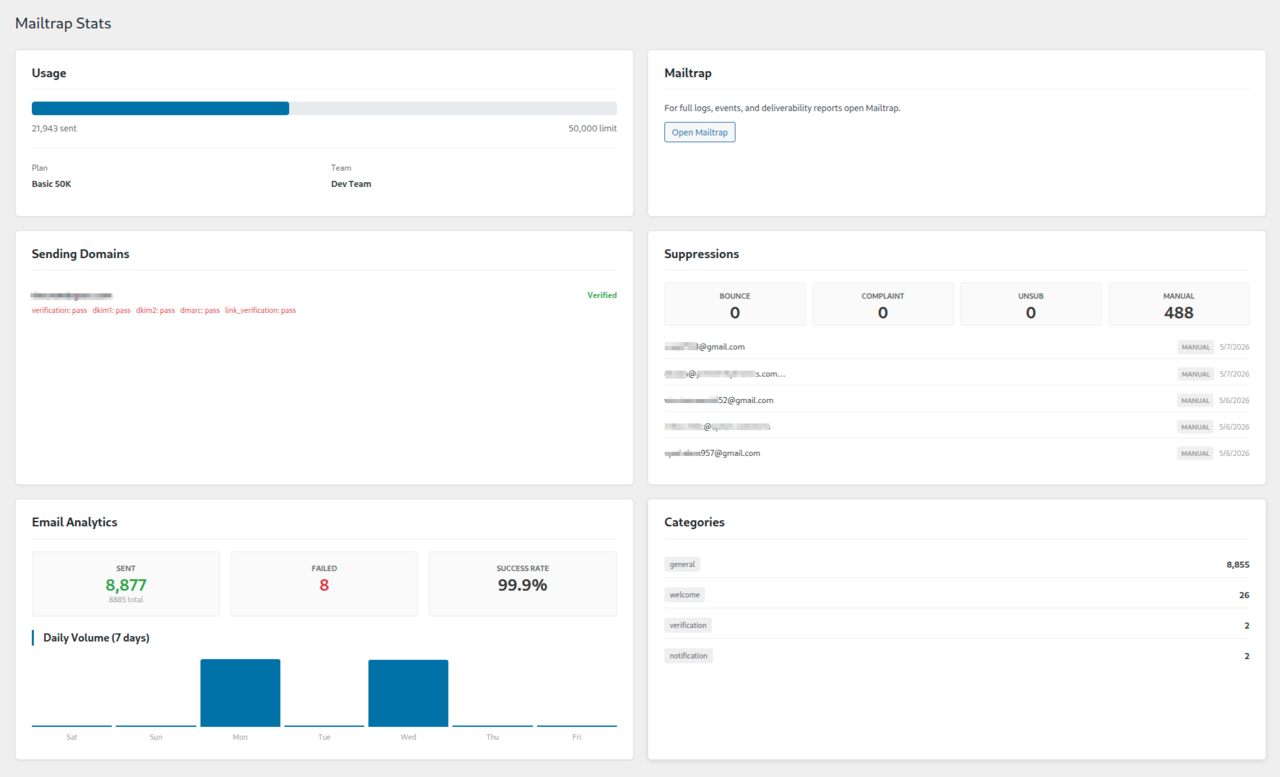
Stats page — sending domain verification status and suppression list (bounces, complaints, unsubscribes).
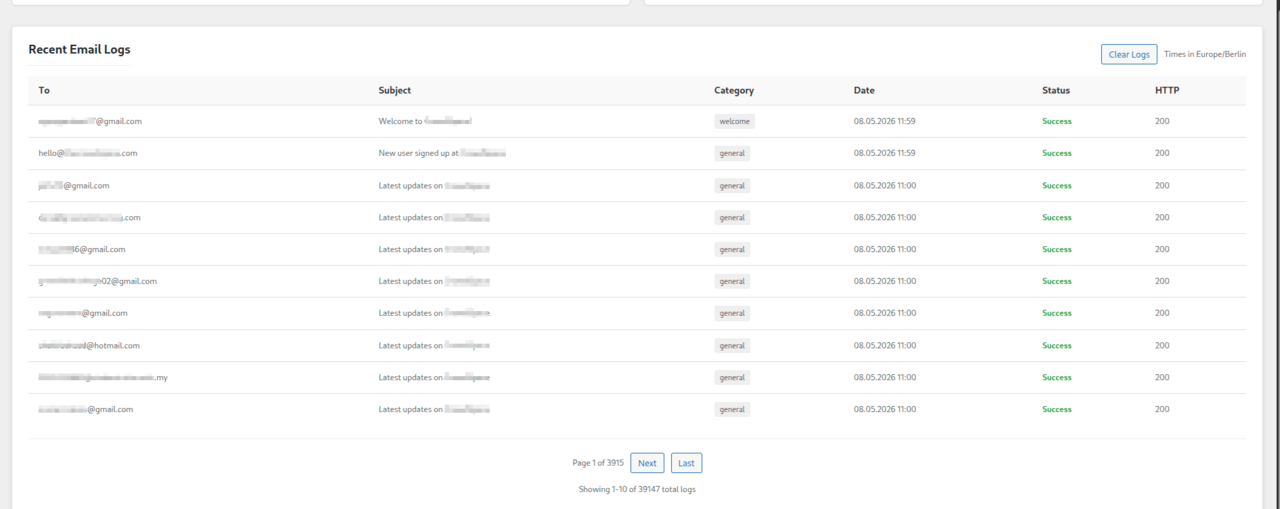
Email log — live Mailtrap API data with filters and pagination.
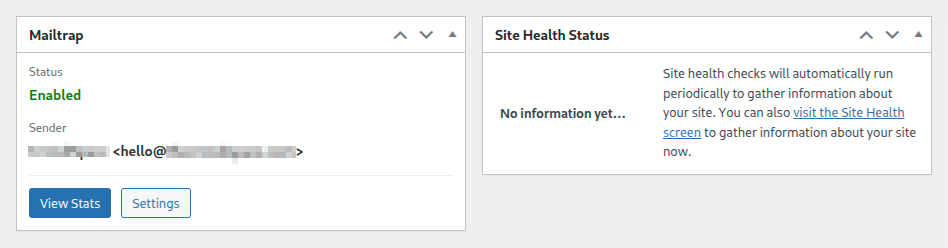
Dashboard widget showing integration status, sender, and quick links to Stats and Settings.

Test email confirmation.
Why use SwiftTrap instead of WP Mail SMTP or Post SMTP with Mailtrap credentials?
Generic mailer plugins treat Mailtrap as one provider among many: through SMTP credentials, or through the transactional API only. SwiftTrap is built for Mailtrap alone and uses what is specific to it: bulk vs transactional stream routing (including automatic routing of newsletters), categories, custom tracking variables, template UUIDs, and live suppression-list visibility. Use SwiftTrap if you want Mailtrap-native behavior; use a generic SMTP plugin if you want a one-config-fits-all-providers setup.
Does it support Mailtrap email templates?
Yes — use the swifttrap_mailtrap_template filter to send via a template_uuid. The template variables can be passed through Mailtrap’s standard template-variables payload.
How do I send my newsletter through the bulk stream and everything else through the transactional stream?
Go to Mailtrap → Settings and tick Send newsletters through the bulk stream. Campaign emails sent by Newsletter (The Newsletter Plugin), FluentCRM, Icegram Express and Groundhogg are then recognized and sent through bulk.api.mailtrap.io; password resets, orders, form notifications, signup confirmations and all other email keep using send.api.mailtrap.io. Nothing has to be configured in the newsletter plugin — leave it on its default “send through WordPress” delivery. The same API token is used for both streams.
MailPoet is the exception: it sends with its own mailer and never passes through wp_mail(), so no wp_mail() plugin can route it.
How does bulk stream routing work?
Strongest first: the swifttrap_mailtrap_use_bulk_stream filter; the X-SwiftTrap-Stream: bulk (or transactional) header on a wp_mail() call; newsletter plugin detection (when switched on); the category table on the settings screen, where the promotional category goes to the bulk stream by default. Everything else goes to send.api.mailtrap.io.
Mailtrap keeps unsubscribes and bounces separately for each stream, and so does the plugin: somebody who unsubscribed from your newsletter still receives a password reset.
Where do I get my API token?
Log in to mailtrap.io, open your sending domain, go to API Tokens, and create a token with sending permissions. After saving, the token is never displayed again. To keep it out of the database, add define( 'SWIFTTRAP_MAILTRAP_TOKEN', 'your-token' ); to wp-config.php instead.
What happens if I disable the plugin or remove the token?
WordPress falls back to its default wp_mail() handler. No emails are silently dropped.
What happens if Mailtrap refuses a message or cannot be reached?
The plugin retries briefly, then reports the failure to WordPress (wp_mail_failed, with the reason Mailtrap gave). With Use the default WordPress mailer as a backup ticked (the default) the message is then handed to the default mailer; untick it if email must never leave through your web host — wp_mail() then returns false.
Does the plugin require the Mailtrap PHP SDK?
No. SwiftTrap calls the Mailtrap REST API directly via the WordPress HTTP API. Total plugin size is around 30 KB.
What data is sent externally?
Email data (recipients, subject, body, attachments) goes to send.api.mailtrap.io and bulk.api.mailtrap.io. Account stats are fetched from mailtrap.io/api/accounts. See the Mailtrap Privacy Policy.
Is there an attachment size limit?
The plugin refuses attachments above the size you set (1–25 MB per file, 25 by default). Mailtrap itself limits the whole message, attachments included, to 10 MB by default (more on request on higher plans), so lower the setting if your plan has the default limit.
ChangeLog
3.1.1
- Fix: the WP-CLI command file can no longer be loaded directly, outside WordPress.
- Tested with WordPress 7.2 and PHP 8.6.
3.1.0
- New: Send newsletters through the bulk stream — one checkbox on the settings screen. Campaign emails from Newsletter (The Newsletter Plugin), FluentCRM, Icegram Express and Groundhogg are recognized by their headers and sent through Mailtrap’s bulk stream; everything else, including signup confirmations, stays on the transactional stream. Off by default.
- New: the
X-SwiftTrap-Stream: bulk / transactional header picks the stream for one wp_mail() call. New swifttrap_mailtrap_bulk_source filter; swifttrap_mailtrap_use_bulk_stream now also receives the email.
- New: the test email can be sent to any address, and shows the reason when Mailtrap refuses it. Before, a test that Mailtrap rejected could still say “sent” because the default mailer delivered it.
- New: “Use the default WordPress mailer as a backup” setting and
swifttrap_mailtrap_fallback_to_wp_mail filter.
- New: the API token can be defined in
wp-config.php (SWIFTTRAP_MAILTRAP_TOKEN). A saved token is no longer printed into the settings page; leave the field empty to keep it.
- Fix: unticking “Send this site’s emails through Mailtrap”, the category options — any checkbox that is on by default — was not saved.
- Fix:
wp_mail() returned a truthy error object instead of false when an email had an invalid address, a missing attachment or only suppressed recipients, so the calling plugin believed it was sent.
- Fix:
wp_mail_from / wp_mail_from_name filters are applied to each message. They were read once per request, so a From address set by WooCommerce or a form plugin for its own email was ignored or leaked into other emails.
- Fix: an address that unsubscribed from the bulk stream no longer stops transactional email (password resets, orders) to that address.
- Fix: when the suppression list cannot be loaded, the check pauses for five minutes instead of adding slow API calls to every recipient of every email.
- Fix: emails blocked by
SWIFTTRAP_BLOCK_BULK were still delivered by the default mailer.
- Fix: attachments work on sites where WordPress uses FTP/SSH file access; attachments named with
'name.pdf' => $path keep their name; inline images ($embeds, WordPress 6.9+) are sent; error messages no longer contain server paths.
- Fix: emails in a non-UTF-8 charset are converted instead of failing; API errors show Mailtrap’s explanation, not only the HTTP code; “Check connection” explains a rejected token.
- Improved: settings screen in plain language with a helper text for every field, inline messages instead of browser pop-ups, labels for screen readers, a Settings link on the Plugins screen.
- Improved: translations for German, Spanish, French, Italian, Japanese, Polish, Portuguese (Brazil), Russian and Ukrainian.
- Improved: uninstall also cleans up every site of a multisite network.
3.0.4
- Fix: the plain-text part of HTML emails now decodes entities, so a link with query parameters reads
?a=1&b=2 instead of ?a=1&b=2, and a link whose text is not its URL keeps the URL in brackets (password reset emails used to show only “address”). Line breaks follow <br> and block ends.
3.0.3
- New: a one-time, dismissible request to leave a review on WordPress.org. It appears only a week after your first email goes out through Mailtrap, only to administrators and only on the plugin’s own screens. “Maybe later” snoozes it for 30 days, “Don’t ask again” hides it for good. Nothing is sent anywhere.
3.0.2
- Tested with WordPress 7.1 (verified on 7.1.1). No functional changes.
3.0.1
- Fixed: Webhook receiver now verifies Mailtrap’s actual
Mailtrap-Signature HMAC-SHA256 header instead of a header Mailtrap never sends. Every real delivery-tracking webhook call was being rejected outright since the feature shipped in 2.4.0.
- Fixed: Webhook payload parsing now unwraps Mailtrap’s
{"events": [...]} envelope correctly, so verified events reach do_action('swifttrap_mailtrap_webhook_event', ...).
- Fixed: Usage card on the Stats page now calls Mailtrap’s current
/api/billing/usage endpoint instead of a stale account-scoped path that returned no data.
- Fixed: Uninstalling the plugin now clears the actual cached transients instead of pre-2.3.0 key names that no longer match.
- Improved: Email Logs recipient search and account API calls now consistently use bracketed filter syntax and Bearer-token authentication.
3.0.0
- Breaking: Removed all local file-based email logging. No more log files written to disk — eliminates OOM/disk-full risk on high-volume sites.
- New: Email Logs panel on the Stats page pulls live data directly from the Mailtrap API (
GET /api/email_logs).
- New: Email Logs support filtering by recipient email address, delivery status, and date range.
- New: Client-side pagination — buffers up to 1,000 entries from Mailtrap per API call, displays 20 rows at a time with Prev/Next navigation. Automatically fetches the next batch when the buffer is exhausted.
- New: Webhook handler now fires
do_action('swifttrap_mailtrap_webhook_event', $event) for every delivery event, allowing third-party integrations without modifying the plugin.
- Removed: CSV export, log file clear, log detail modal, log resend, per-page logs setting, and cron-based log cleanup. All replaced by the live API view.
- Fixed: Stats page no longer creates a redundant nonce attribute on the wrapper element.
2.4.2
- Fixed: The email log dropped most entries during high-volume or concurrent sends. Each write re-read and rewrote the whole log file, so parallel processes overwrote each other’s lines. Writes now use an atomic, exclusively-locked append, so the Stats dashboard (sends-per-day, categories, totals) reflects the real number of sent emails.
- Improved: Logging no longer slows down large mailings — appends are O(1) instead of re-reading and rewriting the entire file on every email.
2.4.1
- Fixed: Suppression list now reads the Mailtrap
type field, so the dashboard shows real BOUNCE / COMPLAINT / UNSUBSCRIBE / MANUAL counts instead of marking every record as manual.
- New: Suppression rows display the message bounce category (when provided) for hard-bounce detail.
- Fixed: Suppression dates are now formatted server-side using the site’s date format instead of the browser locale.
- New: “View all in Mailtrap” link on the Suppressions card.
- New: Per-page selector (10/25/50/100) on the Email Logs screen.
- Improved: Email Logs header actions aligned to the right; date filter input restyled to match other fields.
2.4.0
- New: REST Webhook Endpoint (
swifttrap/v1/webhook) for tracking delivered, bounced, opened, and clicked statuses.
- New: Suppression Management CRUD in Admin Stats and pre-send recipient checks to skip suppressed emails.
- New: Fallback mechanism returning
null in pre_wp_mail on API failure so native wp_mail sends the email instead.
- New: Site Health connection and verified domain status test.
- New: Upgraded Admin logs UI with search, filtering, CSV export, iframe payload preview modals, and resend actions.
- New: Category settings grid for category stream mapping rules and sender overrides.
- New: WP-CLI namespace
wp swifttrap (test, stats, prune-logs, send-suppression-sync).
- New: Attachment size guard setting.
- Refactored: Extracted CSV row formatter into a helper function for unit tests. Fully covered and verified by the test suite.
2.3.0
- PHP 8.0 is now the minimum; tested up to WordPress 7.0.
- Reliability: automatic retry with backoff on transient Mailtrap API errors (429/5xx, honors Retry-After).
- Deterministic log retention via a daily cron event (replaces the previous probabilistic cleanup).
- Account/stats/domain/suppression caches are now keyed per API token, so switching tokens no longer serves stale data.
- Robust JSON handling for all Mailtrap API responses; multisite-safe settings cache.
- New: “Verify token” button on the settings screen.
- Code modernized to PHP 8 idioms; first unit-test suite added.
2.2.2
- Plugin URI: now points to the dedicated landing page at https://plugins.symonov.com/swifttrap-for-mailtrap/
- No code or behavior changes
2.2.1
- Readme: USP-first rewrite emphasizing Mailtrap Email API (vs SMTP) and bulk/transactional stream routing
- Tags: replaced
email/mail/smtp with targeted mailtrap, transactional-email, email-api, wp-mail, email-log
- FAQ: added comparison with WP Mail SMTP / Post SMTP, Mailtrap template support, and bulk stream routing
- Tested up to WordPress 7.0
2.2.0
- Replaced all file_get_contents/file_put_contents with WP_Filesystem API
- Fixed $_GET sanitization with proper wp_unslash() and phpcs annotations
- Improved PHPDoc headers across all files
- Better WordPress Coding Standards compliance
2.1.0
- Added sending domain verification status on Stats page
- Added suppression list (bounces, complaints, unsubscribes) on Stats page
- Added
swifttrap_mailtrap_template filter for Mailtrap template support
- Added
swifttrap_mailtrap_custom_variables filter for email tracking metadata
- Extracted reusable
swifttrap_mailtrap_get_account_id() with transient caching
2.0.0
- Removed Mailtrap SDK dependency — uses WordPress HTTP API directly
- Zero external dependencies, ~30 KB total plugin size
- Improved WP.org compliance
1.3.0
- Security: protected log directory from direct web access
- Added attachment size validation (25 MB limit)
- Added empty recipient validation
- Fixed timezone handling in log display
- Optimized email category computation
- Improved log file locking

