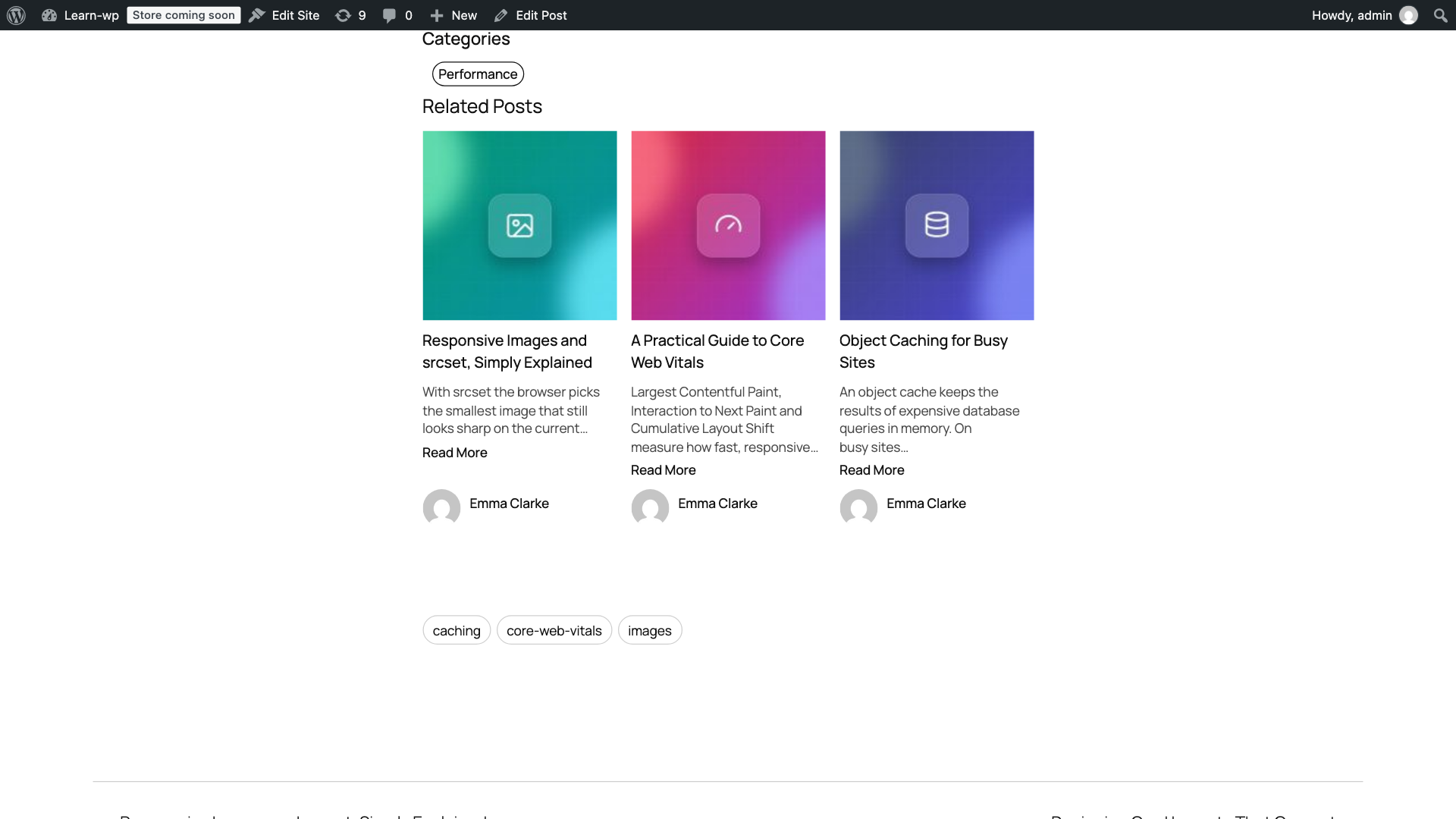
SoftIcon Related Posts shows your readers what to read next. It finds similar posts that share categories, tags or any custom taxonomy with the current article, ranks them by relevance, and displays them below your content in a clean, responsive grid, list or minimal layout.
Every related post is an internal link. More internal links help visitors discover more of your content, keep them on your site longer and help search engines understand how your articles connect.
It works the moment you activate it: related posts appear below every post with no setup. When you want more control, use the settings page, the Related Posts block, the shortcode or the sidebar widget.
Works instantly – activate and related posts appear under every article.
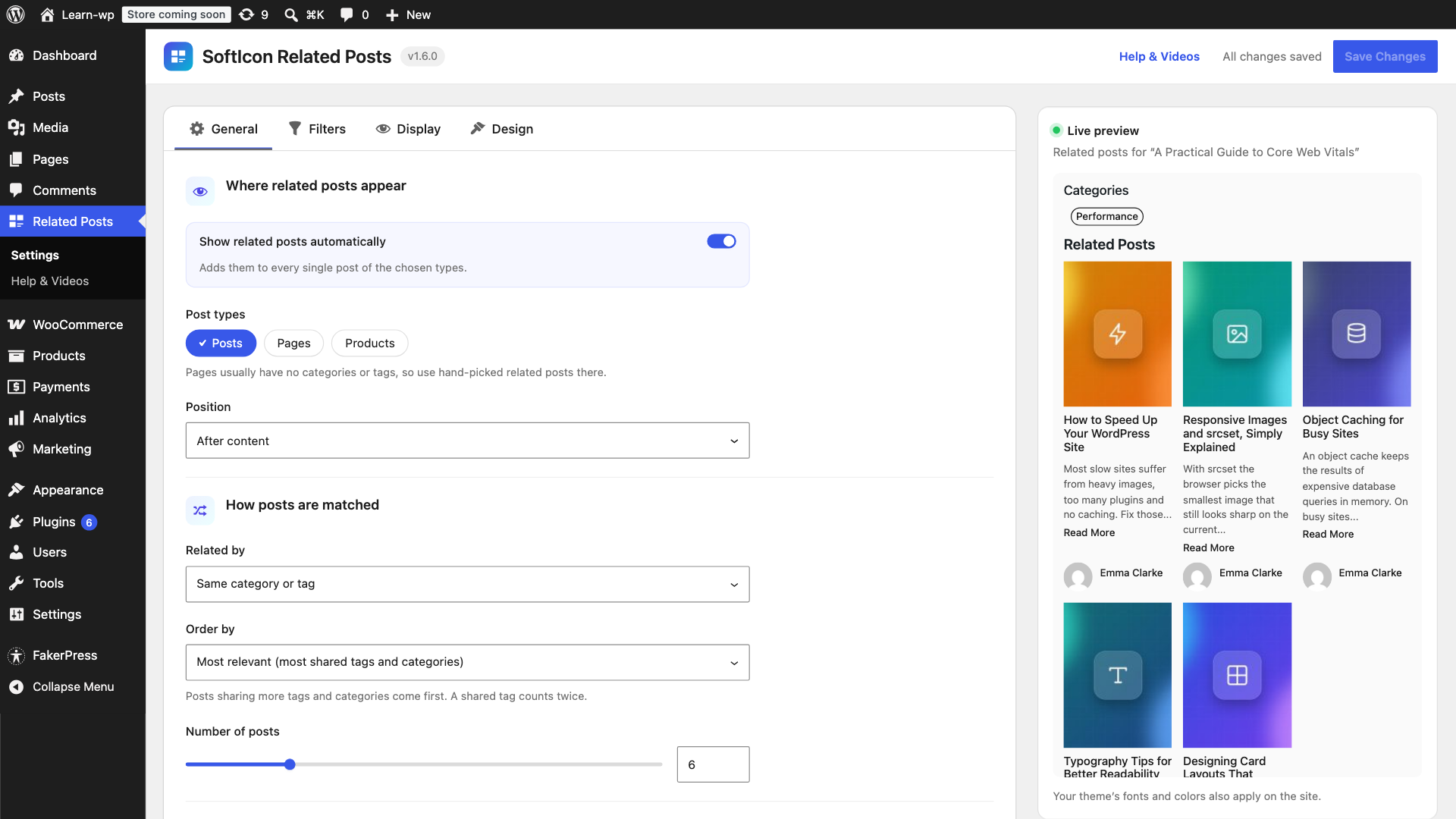
Actually relevant – “Most relevant” ranks posts by how many tags and categories they share, so the best match comes first.
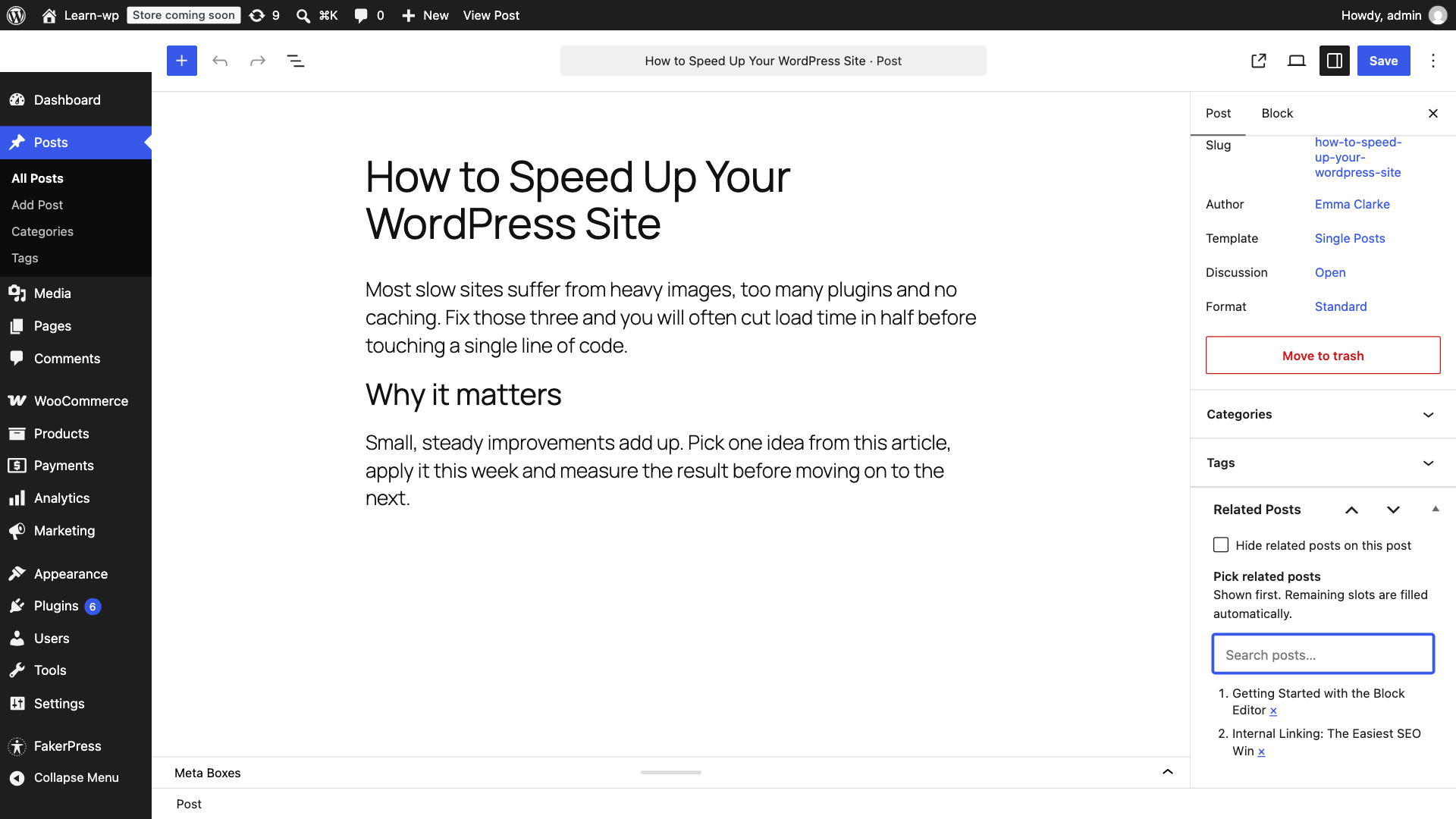
You stay in control – hand-pick related posts for any article; the remaining slots fill in automatically.
Fast and lightweight – built-in caching, responsive lazy-loaded images, and only one small stylesheet on the front end. No JavaScript on the front end.
Looks like your site – inherits your theme colors and fonts, including dark themes.
Privacy friendly – no visitor tracking and no cookies. The optional opt-in for update emails is off unless you allow it.
Smart related posts
Related posts by category, by tag, by both, or by any shared taxonomy
Order by most relevant, random, latest, recently updated, most commented or title
Hand-pick related posts per post from the post editor
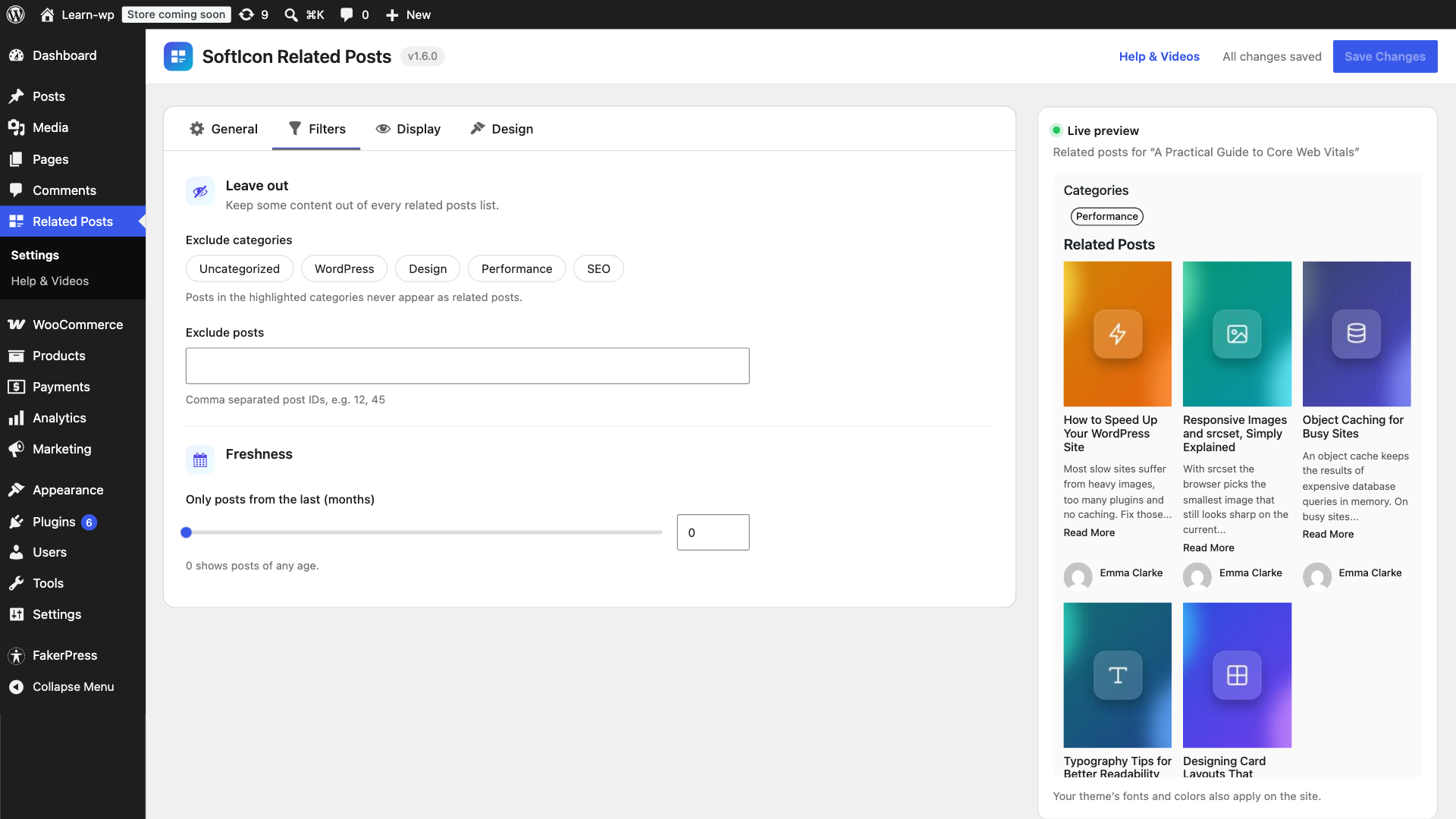
Exclude categories or individual posts
Only show posts from the last N months, so old content does not crowd out new articles
Hide related posts on any single post
Related posts block, shortcode and widget
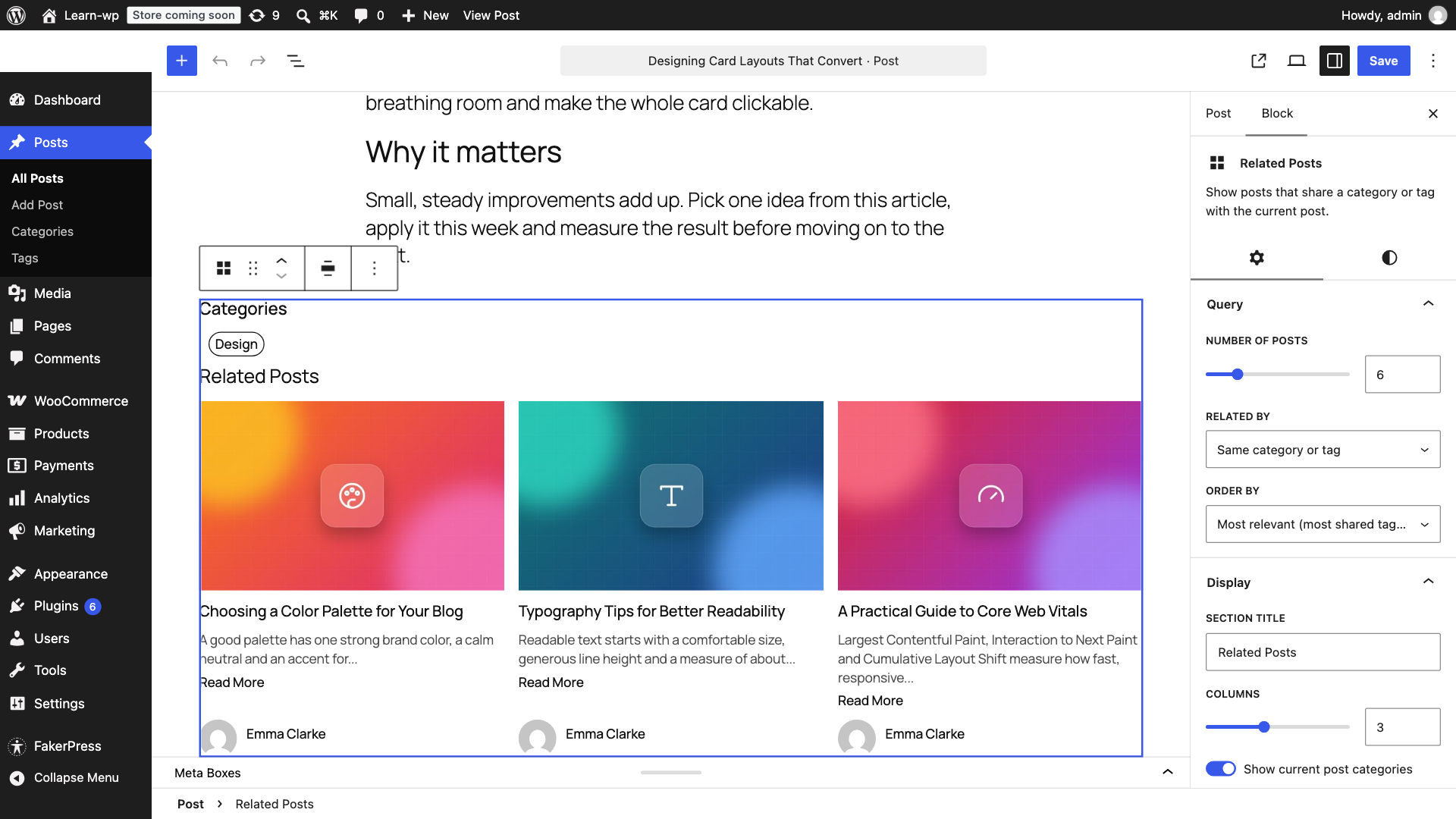
Related Posts block for the block editor with a live preview and sidebar options
Works in block themes and Full Site Editing: add the block once to the Single Posts template
Shortcode [softicon_related_posts] with every option available as an attribute
Classic sidebar widget for classic themes
Show related posts before the content, after the content, or only where you place them
Layouts and design
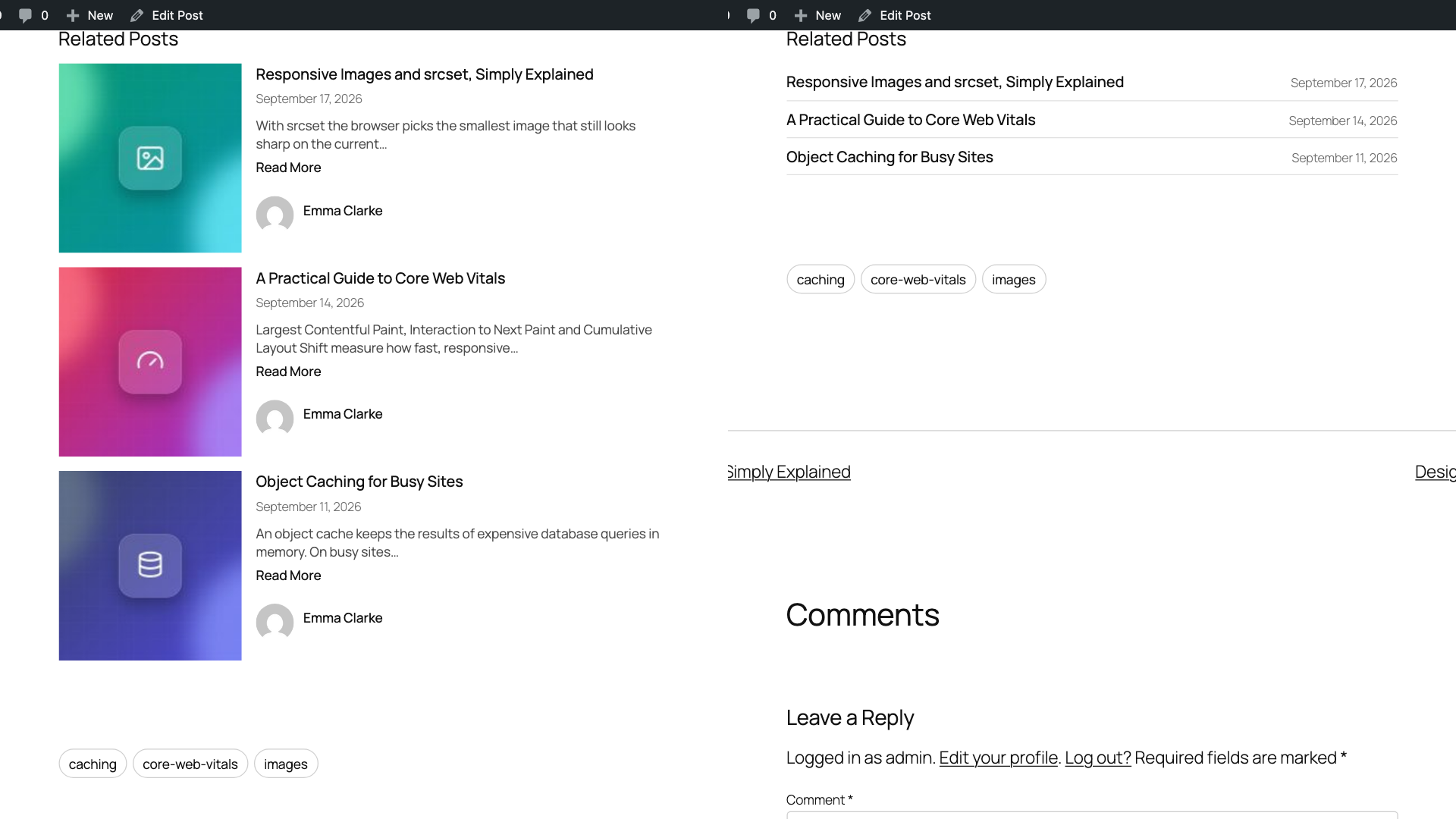
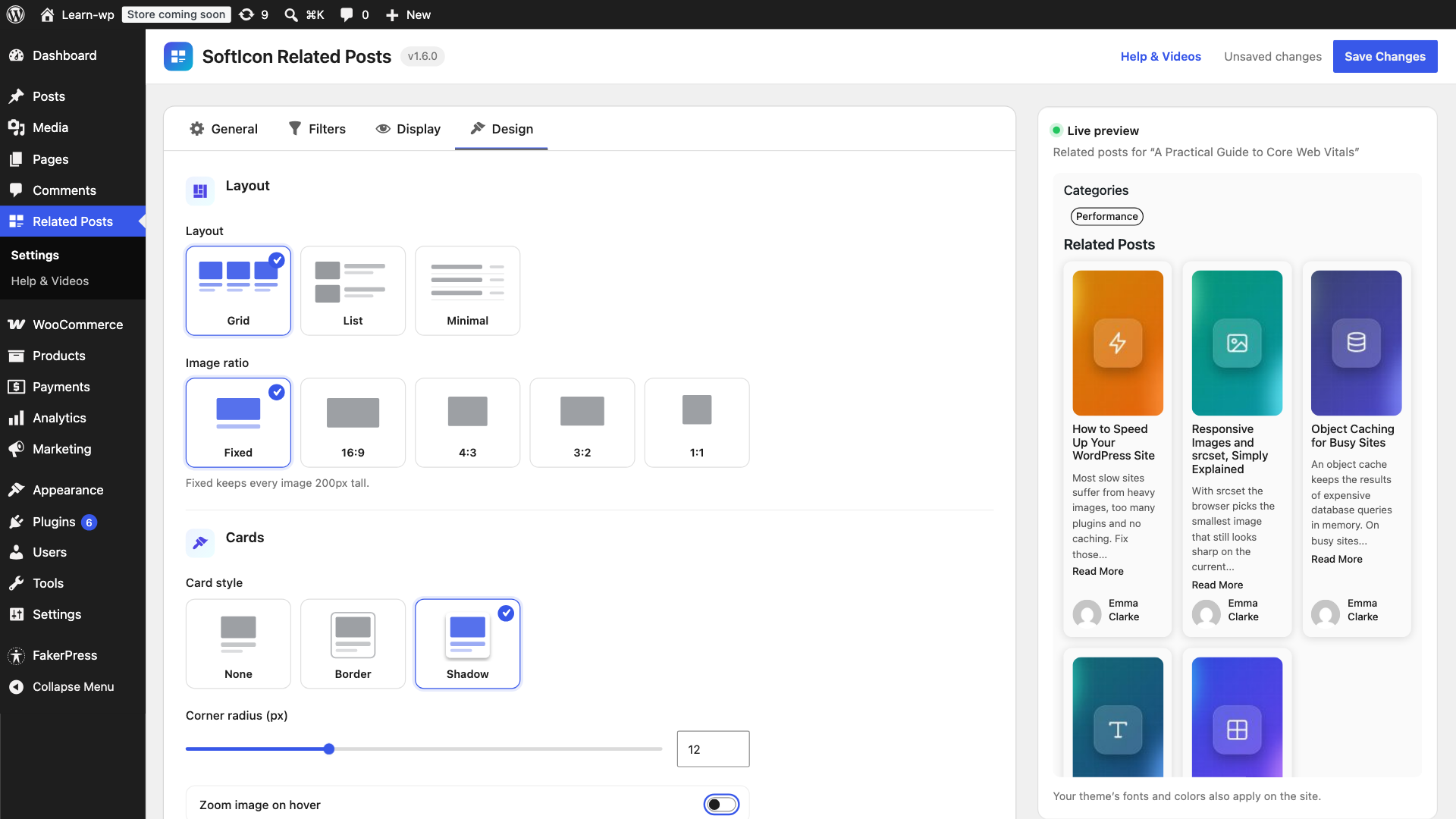
Grid, list (image on the left) and minimal (titles only) layouts
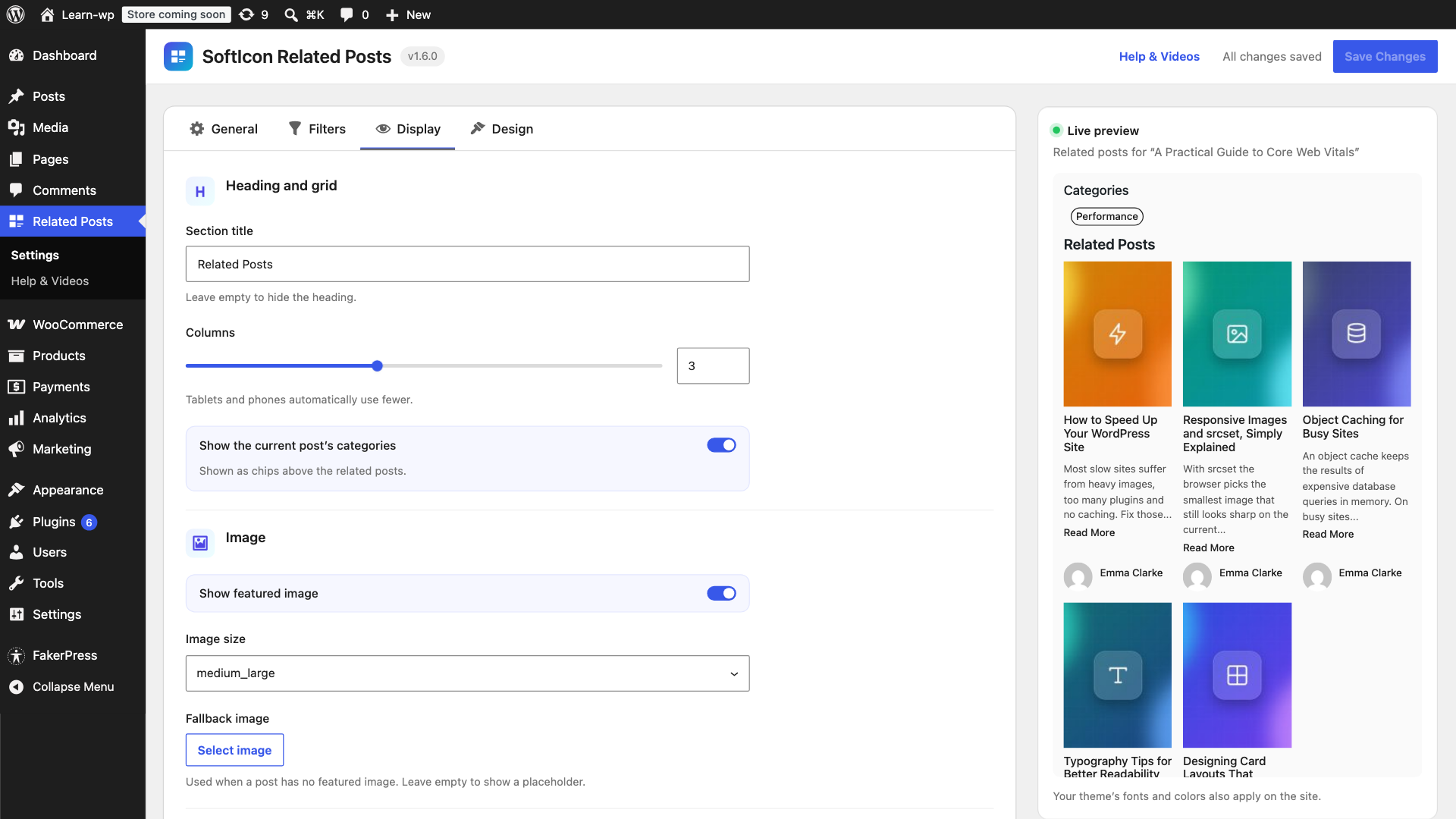
Responsive columns: 1 to 6 on desktop, automatically fewer on tablets and phones
Image ratio (16:9, 4:3, 3:2, 1:1 or fixed height), card border or shadow, rounded corners and hover zoom
Title, text and card background colors, or leave them empty to use your theme colors
Show or hide the featured image, excerpt, date, author, read more link and categories
Fallback image from the Media Library for posts without a featured image
Works everywhere
Posts, pages and custom post types
WooCommerce related products matched by product categories and tags
Related post links in your RSS feed (optional)
Translation ready
Built for speed
Related posts are cached and refreshed automatically when you publish, update or delete posts, or change categories and tags
Random order never runs a slow ORDER BY RAND() query
Images use srcset, so phones download small images
One 5 KB stylesheet, loaded only where related posts are shown
Perfect for
Blogs and personal sites
News, magazine and content sites
WooCommerce stores that want related products inside the product description
Documentation, tutorials, recipes and any site with lots of articles
How it works
Install and activate the plugin.
Related posts appear below every post right away.
Open Related Posts → Settings to choose how posts are matched, ordered and displayed.
Optional: add the Related Posts block anywhere, or hand-pick related posts in the post editor.
Shortcode
[softicon_related_posts posts="4" columns="2" relation="tag" orderby="relevance" layout="list" title="You may also like"]
Supported attributes: post_id, posts, columns, relation (category, tag, both, all), orderby (relevance, rand, date, modified, comment_count, title), title, show_categories, show_image, show_excerpt, show_date, show_author, show_read_more, layout (grid, list, minimal), image_ratio (fixed, 16-9, 4-3, 3-2, 1-1), card_style (none, border, shadow), radius, hover_zoom, title_color, text_color, card_bg. Any attribute you leave out uses the value from the settings page.
For developers
The block’s editor script is built from source. The full source code, including src/ and the build setup, is on GitHub: github.com/softiconai/softicon-related-posts. Pull requests are welcome.
Copy templates/posts.php or templates/category.php into yourtheme/softicon-related-posts/ to change the markup.
alrp_related_posts_query_args – filter the related posts query
alrp_related_posts_html – filter the final HTML
alrp_template_path – change which template file is loaded
alrp_cache_ttl – cache lifetime in seconds (default one day)
alrp_relevance_weights – points per shared term for “Most relevant” (default category 1, tag 2)
alrp_related_post_ids – filter or reorder the final list of related post IDs
alrp_auto_display – return false to stop the automatic list on a post
alrp_wrapper_classes / alrp_wrapper_style_vars – add classes or CSS variables to the wrapper
alrp_default_settings, alrp_setting_choices, alrp_sanitize_settings – add your own settings
alrp_block_atts – map extra block attributes to settings
alrp_render_settings – adjust the settings a single list is rendered with
alrp_item_after_title / alrp_item_end (actions) – add markup inside each card, e.g. a price
alrp_video_urls – tutorial video URLs shown on the settings page
Settings page (JavaScript, @wordpress/hooks): alrp.settings.tabs adds tabs, alrp.settings.layouts and alrp.settings.layoutArt add layout tiles, alrp.block.inspector adds panels to the block sidebar.
Pro add-on
Everything above is free. SoftIcon Related Posts Pro is an optional add-on with a one-time price. See Related Posts → Free vs Pro for the full comparison and Related Posts → Pricing for the plans. Pro adds:
“Read also” boxes inside articles and an “Up next” slide-in
Carousel, overlay, magazine and numbered layouts, design presets and custom CSS
Cookieless click analytics, plus “Popular” and “Trending” order
A Smart order with keyword matching, adjustable weights and cornerstone posts first
WooCommerce: smarter related products, product cards, “Shop this post”
Custom field and ACF rules, and a REST endpoint for headless sites
Install and activate SoftIcon Related Posts. Related posts appear below every post automatically. To place them somewhere else, use the Related Posts block or the [softicon_related_posts] shortcode.
How do I show related posts by tags instead of categories?
Go to Related Posts → Settings and set “Related by” to “Same tag”, or to “Same category or tag” to use both.
How does “Most relevant” work?
Posts that share more tags and categories with the current post come first. A shared tag counts twice as much as a shared category, because tags are usually more specific. Ties are broken by date, newest first.
Will it slow down my site?
No. Related posts are cached and refreshed automatically when your content changes, so most page views run no related-posts query at all. The front end loads one small stylesheet and no JavaScript.
Does it work with WooCommerce?
Yes. Tick “Products” under Related Posts → Settings → Post types and set “Related by” to “Any shared taxonomy”. Related products are matched by product categories and tags and shown inside the product description.
Does it work with block themes and Full Site Editing?
Yes. Set Position to “Manual (shortcode only)”, then open Appearance → Editor, edit the Single Posts template and add the Related Posts block where you want it.
Can I show related posts in the sidebar?
Yes. In classic themes, add the “SoftIcon Related Posts” widget to your sidebar. In block themes, add the Related Posts block to a template part or widget area.
Can I choose related posts myself?
Yes. In the post editor, use “Pick related posts” in the Related Posts box. Your picks are shown first, in the order you added them, and the remaining slots are filled automatically. Hand-picked posts are shown even if they are in an excluded category.
Can I exclude categories or posts?
Yes. Under Related Posts → Settings → Filters you can exclude categories, exclude individual posts by ID and only show posts from the last few months.
How do I hide related posts on one post?
Open the post in the editor and tick “Hide related posts on this post” in the Related Posts box.
Does the block replace the automatic related posts?
Yes. If a post already contains the Related Posts block or the shortcode, the automatic list is not added to that post, so related posts never show twice.
Why don’t related posts show on my pages?
Pages have no categories or tags, so nothing is found automatically. Enable Pages under Post types and use “Pick related posts” in the page editor.
Why don’t the RSS feed links appear?
They are added to the full text of feed items. Check that Settings → Reading → “For each post in a feed, include” is set to “Full text”.
Can I change the design or the HTML?
Use the Design options in Related Posts → Settings or in the block sidebar. For full control, copy the templates into your theme (see “For developers”).
Does it collect any data?
The plugin never tracks your visitors and sets no cookies on your site.
After activation, the plugin asks if you want to opt in to security and feature update emails and share basic, non-sensitive diagnostic data (WordPress, PHP and plugin versions, site URL and admin email) with us through Freemius. It is entirely optional: click “Skip” and nothing is sent. See the Freemius privacy policy.
The Pricing page (Related Posts → Pricing) opens the Freemius checkout only when you click “Buy now”. The checkout loads from checkout.freemius.com, and what you type there (name, email, payment details) goes to Freemius, our reseller, to complete the purchase. Nothing is sent before you click. See the Freemius terms and privacy policy.
Is it translation ready?
Yes. All text can be translated, and a translation template is included in the languages folder.
New: Black Friday offer, 26 November to 5 December 2026: 40% off SoftIcon Related Posts Pro, shown on the Related Posts settings page and the Plugins page. Close it with × and it stays closed. It disappears by itself after the sale, and never shows with Pro active.
New: “Start free trial” on the Pricing page: try Pro free for 7 days, no credit card needed
New: “Try Pro free for 7 days” link on the Free vs Pro page and a trial question in the Pricing FAQ
Fixed: Pricing page shows the current plan prices
1.7.2
Changed: After activation the standard opt-in screen opens (Allow & Continue or Skip) instead of the dialog on the Plugins page
Improved: The “Opt In” link under the plugin on the Plugins page opens the same screen later
1.7.1
New: A short welcome dialog on the Plugins page after the first activation: allow update emails or skip, then go straight to the settings
Improved: “What is shared?” in the dialog lists exactly what the optional opt-in sends
Changed: Plugin author is now softiconai
1.7.0
New: Related posts stay in the current language on WPML and Polylang sites
New: “Free vs Pro” page with a searchable feature table, and a “Pricing” page with plans and FAQ
New: Pro features are shown next to the free settings they extend, clearly marked “PRO”, with a link to the plans
New: Optional opt-in for update emails (powered by Freemius, you can skip it)
New: Developer hooks to extend settings, placement, layouts, cards, the settings page and the block sidebar
Improved: The live preview loads its images before it switches, so changing the design no longer flashes empty boxes
Improved: A layout or order from a deactivated add-on falls back to the default instead of breaking the design, and comes back when the add-on returns
Improved: Settings that belong to a deactivated add-on are kept when you save
Fix: WooCommerce products hidden from the catalog no longer appear in related lists (out of stock ones too, when the shop hides them)
1.6.1
Improved: The block sidebar uses the plugin’s own lighter controls
Improved: Smaller editor stylesheet
1.6.0
New: Pages and custom post types support
New: “Any shared taxonomy” relation for custom taxonomies
New: Classic sidebar widget
New: Related post links in the RSS feed (optional)
Improved: The block now finds the current post in widget areas and template parts
Security: The shortcode only targets publicly viewable posts and post types
Security: Excerpts now go through WordPress’ excerpt filters, so membership plugins can restrict them
Improved: Saving drafts no longer clears the related posts cache
Improved: Search results in “Pick related posts” close after you pick a post
New: Video tutorials on YouTube, linked from Related Posts → Help & Videos
New: Activating the plugin opens Related Posts → Settings (not on bulk activation or WP-CLI)
New: Settings page rebuilt in React with a live preview that updates before you save, Cmd/Ctrl+S to save and a warning for unsaved changes
New: Related Posts menu in the admin sidebar with Settings and a Help & Videos page (old Settings → Related Posts links redirect)
Improved: Related Posts block rebuilt with General and Style tabs, plus title, text and card background colors
1.5.0
New: List and Minimal layouts
New: Design options for image ratio, card style, corner radius, hover zoom and colors
New: Design panel and text/background colors in the Related Posts block
Change: Text colors now follow your theme instead of being fixed to black
1.4.0
New: “Most relevant” order, ranking posts by shared tags and categories
New: Pick related posts by hand per post
New: Exclude categories and posts
New: Only show posts from the last N months
1.3.0
New: Related Posts block with sidebar options and live preview in the editor
New: Automatic related posts are skipped on posts that already contain the block or shortcode
Change: The “Hide related posts on this post” option now also hides the shortcode and block on that post
1.2.0
New: Related posts are cached and refreshed automatically when posts, categories or tags change
New: Pick the fallback image from the Media Library
New: Theme template overrides
New: Translation template (.pot)
Improved: Responsive images with srcset
Improved: Random order no longer uses a slow ORDER BY RAND() query
Fix: A broken category link no longer causes a PHP error
1.1.0
New: Settings page with display and query options
New: Related by tag, or by category and tag
New: [softicon_related_posts] shortcode
New: Hide related posts per post
New: Before / after content / manual position
New: Show date, fallback image, image size, column count