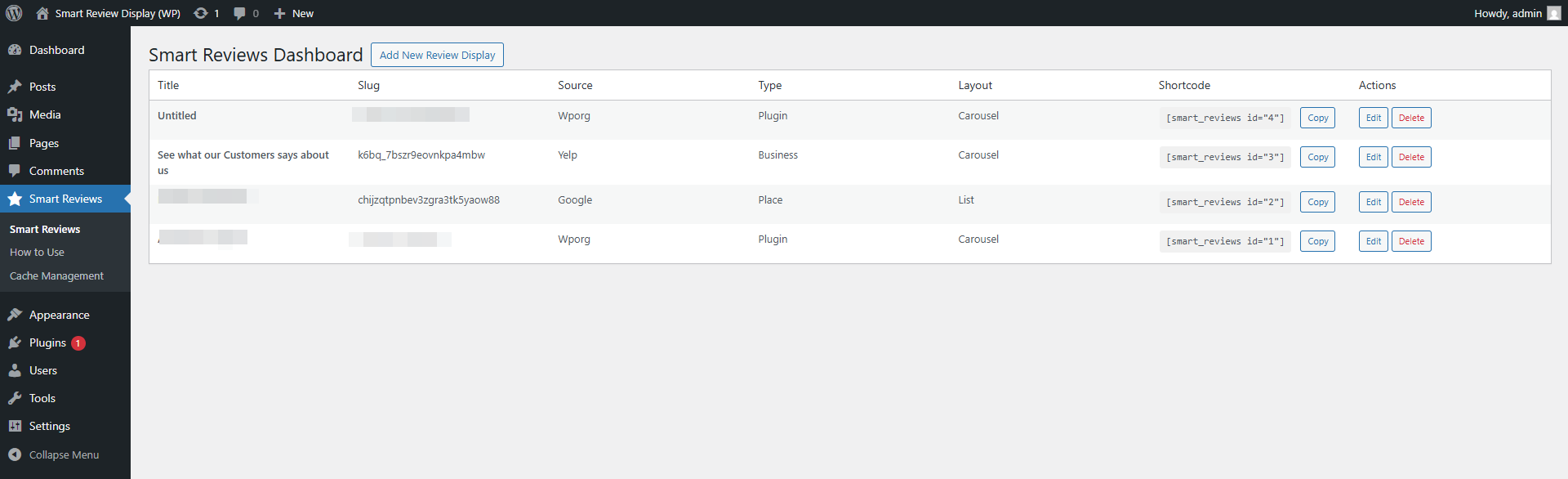
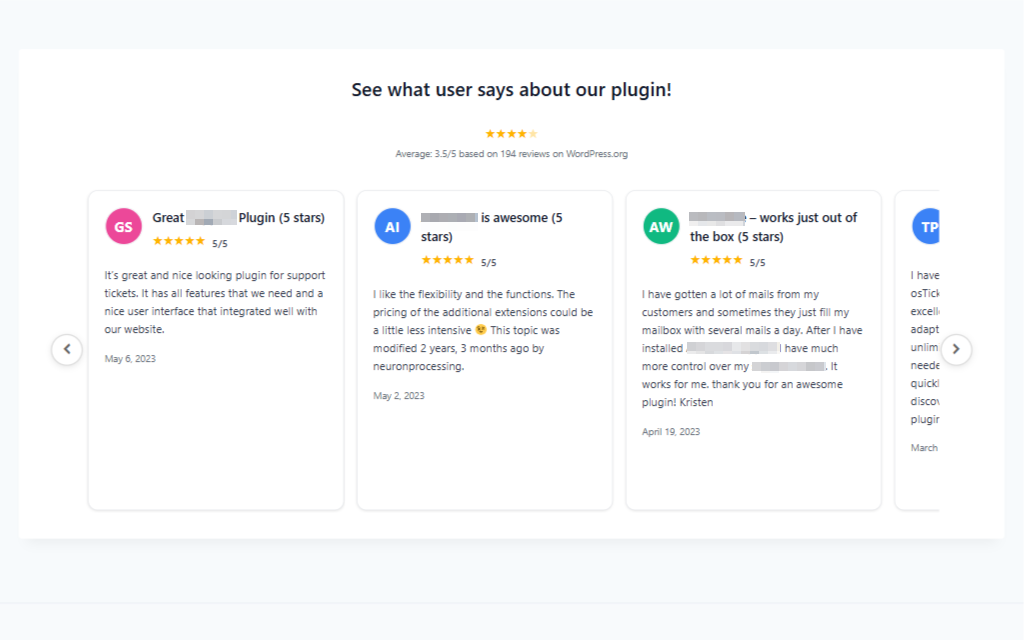
Smart Reviews Display lets you showcase reviews from multiple sources including WordPress.org, Yelp, and Google Reviews. Choose from responsive grid (masonry), list, or carousel displays with full reviewer details and smart caching.
Key Features
Multiple Review Sources: WordPress.org plugins/themes, Yelp business reviews, Google Places reviews, and custom reviews
Custom Reviews System: Create up to 10 custom reviews with full control over content, ratings, and clickable links
Review Grouping: Organize custom reviews into categories (testimonials, product-reviews, etc.)
Responsive Layouts: Masonry grid, list, and carousel (3 reviews on desktop, 2 on tablet, 1 on mobile)
Smart Management: Dashboard with add/edit/delete review displays, custom reviews management, internal vs display titles
Rich Content: Avatars, star ratings, descriptions, aggregate ratings, contextual fields, and review links
ID-Based Shortcodes: Simple [smart_reviews id="123"] format that auto-updates
Gutenberg Blocks: Full block editor support with live preview
Smart Caching: Configurable cache management and TTL controls
Upgrade Integration: Clear upgrade path to Pro version for unlimited custom reviews
Security First: WordPress coding standards compliance with proper sanitization
Lightweight: No external dependencies, optimized CSS/JS
Usage
Dashboard Management
Go to Smart Reviews Display→Dashboard
Click “Add New Review Display” to create a new configuration
Fill in the form:
Internal Title: For backend management (e.g., “WooCommerce Reviews”)
Display Title: Shown on frontend (e.g., “What our customers say”)
Description: Optional description text
Review Source: WordPress.org, Yelp, Google Reviews, or Custom
Slug/ID: Plugin slug, Yelp business ID, Google Place ID, or leave empty for Custom
Review Group: Select specific group for Custom reviews (optional)
Type: Plugin/Theme (WordPress.org only), Business (Yelp), Place (Google), or Custom
Layout: Grid (masonry), List, or Carousel
Display Options: Show title, show aggregate rating
Save and use the generated shortcode or block
Custom Reviews Management
Go to Smart Reviews Display→Custom Reviews
Click “Add Review” to create a new custom review
Fill in the custom review form:
Source: WordPress, Google, or Yelp (for styling consistency)
Username: Reviewer’s name
Profile Photo URL: Optional profile photo (default avatar used if empty)
Review Date: When the review was written
Review Text: The actual review content
Review Link: Optional clickable link to original review
Star Rating: 1-5 star rating
Review Group: Group name for organization (e.g., “testimonials”, “product-reviews”)
Business ID/Place ID: Required for Google and Yelp sources
Save the review and use it in your review displays
Note: Free version supports up to 10 custom reviews. Upgrade to Pro for unlimited reviews.
Gutenberg Block
Search for “Smart Reviews” in the block editor. You can either:
* Use ID: Select a saved review display by ID
* Configure Manually: Set all options directly in the block
Shortcode Usage
New ID-based format (recommended):
[smart_reviews id=”123″]
WordPress.org (plugins/themes), Yelp business reviews, Google Places reviews, and custom reviews.
How do I get started quickly?
Use the new ID-based shortcode [smart_reviews id="123"] after creating a review display in the dashboard.
What are custom reviews?
Custom reviews allow you to create up to 10 of your own reviews with full control over content, ratings, and links. Perfect for testimonials, case studies, or showcasing specific feedback.
How do I create custom reviews?
Go to Smart Reviews→Reviews, click “Add Review”, fill in the details (username, text, rating, optional link), and save. Use groups to organize them.
Can I group custom reviews?
Yes! Assign each custom review to a group (e.g., “testimonials”, “product-reviews”). When creating a review display, select “Custom” as source and choose a specific group.
Can custom reviews be clickable?
Yes! Add a review link when creating custom reviews. Users can click on the review to visit the original source or any URL you specify.
What’s the limit for custom reviews?
Free version supports up to 10 custom reviews. Upgrade to Smart Reviews Pro for unlimited custom reviews.
Can I show aggregate ratings?
Yes, for WordPress.org plugins and all external sources (Yelp, Google). Themes don’t have aggregate ratings on WordPress.org.
How often are reviews updated?
Reviews are cached with transients. Control TTL and clear cache in Smart Reviews Display→Cache Management.
Can I customize the appearance?
Yes. The plugin uses responsive masonry grid, list, and carousel layouts. Carousel shows 3 reviews at once on desktop, 2 on tablet, and 1 on mobile. Override with custom CSS.
What’s the difference between Internal Title and Display Title?
Internal Title is for backend management only. Display Title appears on the frontend (optional).
Do I need API keys for Yelp/Google?
Yes, you’ll need to configure Yelp Fusion API and Google Places API keys in the settings.