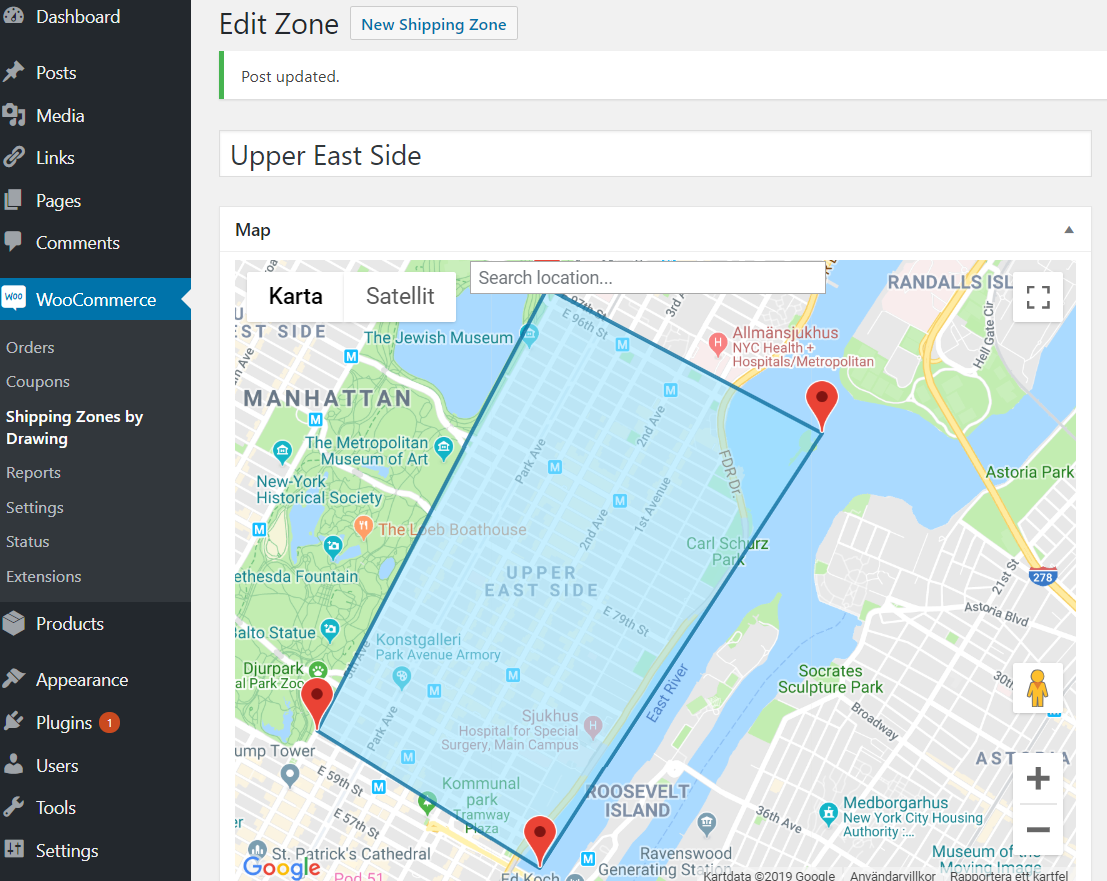
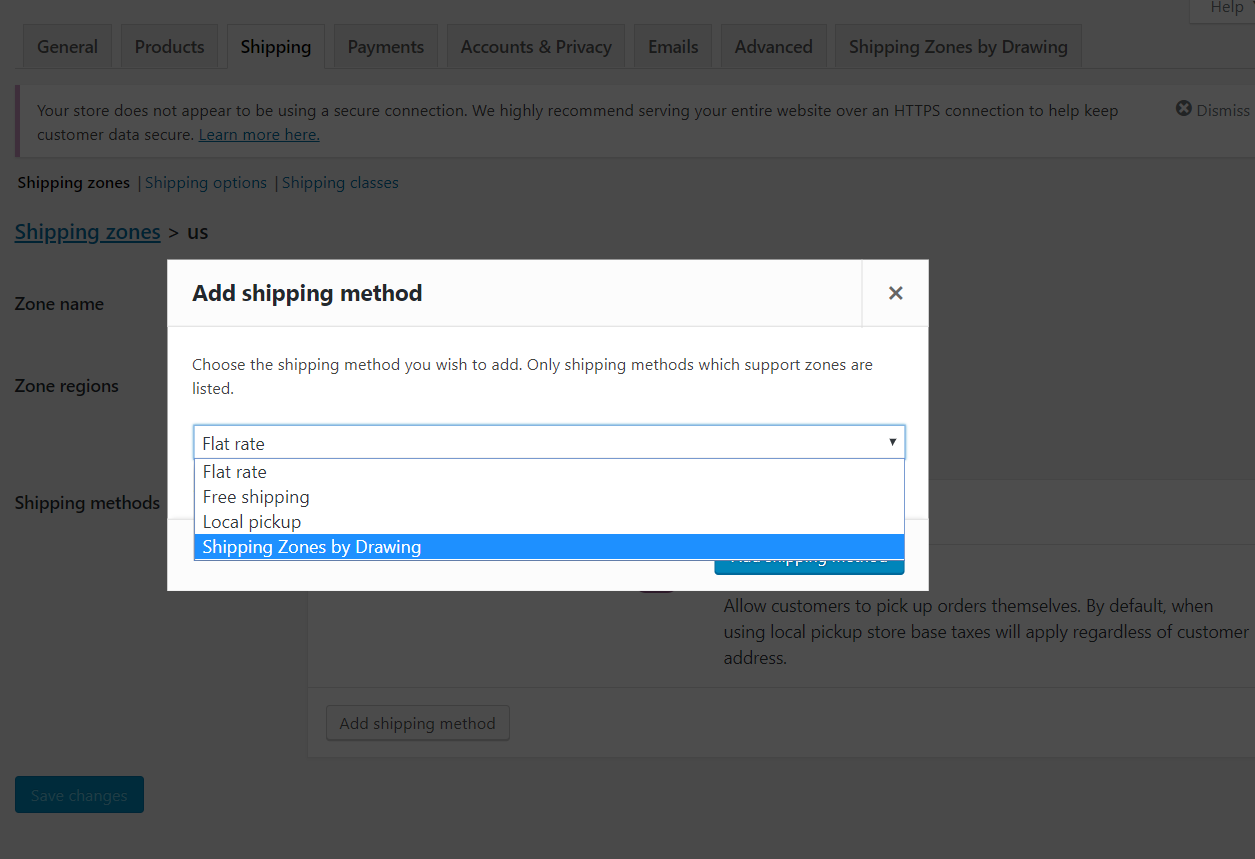
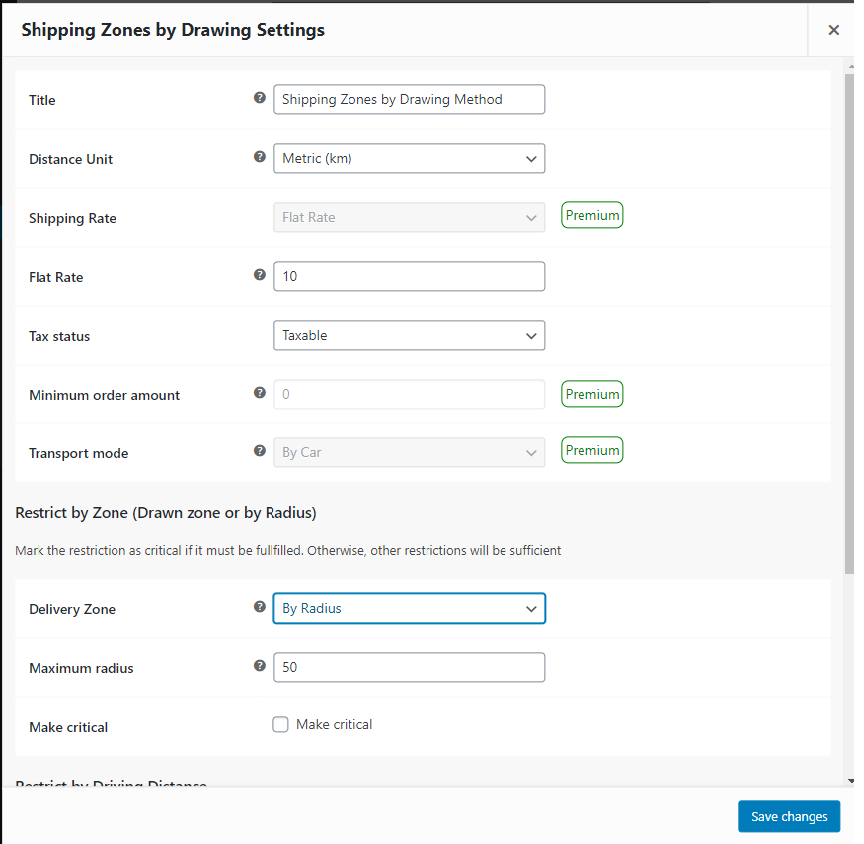
Shipping Zones by Drawing opens the possibility to draw your own shipping areas in WooCommerce.
By delegate a drawn shipping area to a WooCommerce shi …
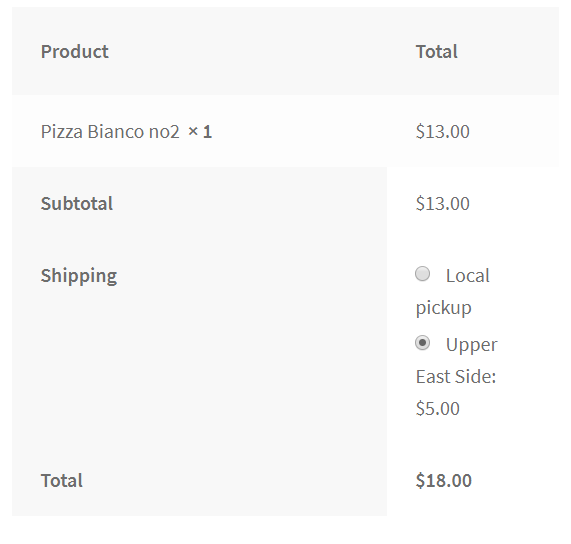
Postcodes are a blunt tool. One postcode can cover the street around the corner and a village 30 minutes away. Shipping Zones by Drawing lets you draw the exact area you deliver to on a Google map and use it as a shipping method in WooCommerce. Only addresses inside your zones can choose delivery, and each zone can have its own price.
It is made for local delivery: restaurants and takeaway, grocery and farm shops, florists, bakeries and stores with more than one location.
Works with both the classic checkout and the WooCommerce block checkout.
3.4.0
- Security: The title of the
[szbd] shortcode is now sanitized and shown as text, which prevents script injection through the shortcode.
- Security: Google server requests are now logged through the WooCommerce logger (WooCommerce > Status > Logs, source szbd-google-requests) instead of a file. If you used “Log Google Server Requests”, delete the old file szbd_google_server_request_log.log from your site root and from /wp-admin/ if it exists.
- Security: The Google API key is now written safely into the page scripts.
- Fix: Third-party plugins that check addresses through Shipping Zones by Drawing (for example Check My Address) no longer change the customer’s saved delivery point or shipping session.
- Fix: An empty method title no longer gives an empty shipping label at checkout.
- Fix: Loading the plugin settings outside the settings screen no longer causes PHP warnings or a redirect.
- Improvement: Clearer description of the “Deactivate Post Code restriction” setting, and a corrected typo.
3.3.1
- Security: Fixed a stored cross-site scripting (XSS) vulnerability. The delivery location picked on the checkout map is now validated as numeric coordinates before it is saved, and the location link and Plus Code are escaped wherever they are shown (order admin, order preview, emails and order details). Locations already saved with invalid data are no longer displayed.
3.3.0
- Fix: The delivery map in the Blocks checkout now starts reliably on page load, so it appears when Google cannot locate the entered address.
- Improvement: Documentation links now point to https://docs.arosoft.se/shipping-zones-by-drawing/.
- Improvement: On new installations, the admin maps have a new search box that uses the Geocoding API, so the Places API is no longer needed. Type an address or place, then press Enter or click the search button; the map moves to the result and shows Google’s address. Existing installations keep the current Places API (Legacy) search.
- Improvement: The admin settings script now loads its minified version unless WP_DEBUG is enabled.
- Compatibility: Tested with WordPress 7.1 and WooCommerce 11.2.
3.2.0
- Improvement: Updated translation support and improved reliability when loading bundled country data.
- Improvement: Reduced unnecessary server-side Google requests by distinguishing Checkout, Cart, and unrelated Store API traffic and preserving cached delivery data until the destination changes.
- Compatibility: Added a versioned server-mode integration for Check My PostCode 1.4.7 so selected exact locations use SZBD’s authoritative shipping availability and rates, while client mode and older integrations retain their existing fallback.
3.1.5
- Fix: Fixed shipping rates being saved incorrectly in WooCommerce zone settings when using localized thousand and decimal separators.
3.1.4.3
- Change: Some blocks packages now run at ‘woocommerce_loaded’ hook, formerly ‘plugins_loaded’.
3.1.4.2.1
- Docu: Added links to extended documentation.
3.1.4.2
- Improvement: Detection of Store API requests improvement because is_store_api_request() does not function with simple permalink structure.
3.1.4.1
- Fix: Google Map Id styling on the checkout page.
- Development: Migration to Google advanced Markers in process.
3.1.4
- Fix: Error on blocks checkout page on some installations.
3.1.3.6
- Fix: Error when enter cost over thousand due to error with thousand separator.
3.1.3.5
- Fix: Map Error when using legacy checkout and Server mode.
3.1.3.4
- Fix: Error when using legacy checkout and when not in Server mode.
3.1.3.3.1
- Fix: Error using coupons on the checkout page
3.1.3.3
- New: Google Map IDs can take over styling of checkout and shortcode delivery area maps.
- New: Support for KML polygon import.
- Change: Location updates with ENTER key in plus code checkout form.
3.1.3.2
- Fix: Checkout message now shows also if local pickup exists on the old checkout page [‘woocommerce_checkout’].
3.1.3.1
- New: Possibility to choose map type on checkout and shortcode delivery area map.
- Fix: Updated versions of checkout blocks packages for improved stability and performance.
3.1.3
- New behavior: Google Maps script loads asynchronously with the Dynamic Library Import API.
- New behavior: Shipping calculations are only made on checkout & cart pages unless the filter ‘szbd_calculate_only_on_cart_and_checkout’ returns false.
3.1.2.6
- Fix: Unexpected behaviuor of selected shipping method when placing order on blocks checkout.
3.1.2.5
- Fix: Do not send country component when plus code is global format.
3.1.2.4
- Fix: The filter “woocommerce_shipping_methods” now always returns methods.
3.1.2.3
- Fix: Blocks checkout methods filter failure.
3.1.2.2
- Improvement: Shipping methods filter improvement for blocks checkout.
3.1.2.1
- Improvement: Reduce the amount of Google requests.
3.1.2
- New: Ability to save google server requets in to a log file.
- New behavior: Never try to geolocate shipping methods if a category condition is not fulfilled.
3.1.1
- Fix: Google script loading is now made dynamic.
3.0.10
- Fix: Removed loading script async parameter.
3.0.9
Fix: Removed underscore methods from blocks.
3.0.8
Compatibility: Updated compatibility with WooCommerce 9.
3.0.7
Fix: Clear shipping rate cache when updating customer on blocks checkout.
3.0.6
Compatibility fix: Requests from the “Check My Address” extension were affected by the current Food Online delivery session.
3.0.5
New policy: Google requests from server never uses client API Key (formerly the 1st key).
3.0.4.2
Fix: Clear shipping location data when choosing pickup location on blocks checkout
3.0.4.1
Fix: Removed underscore methods from blocks
3.0.4
Fix: Import Lodash library into blocks
3.0.3.1
Fix: Missing file
3.0.3
Fix: Picked delivery location display twice at ThankYou page
3.0.1
Fix: Component request string for Google calculations
Fix: Intergration with method selection block on checkout page
3.0
MAJOR UPDATE – Please back up your installation before upgrading
New Features: Ability to show an info message on checkout when no methods are available
New behavior: Google requests from the server now using address components for better accuracy. This can be disabled by using the new filter “exprimental_szbd_piped_request” and returning FALSE
Compatibility: Compatible with WooCommerce blocks checkout
Fix: Show only one shipping method with minimum cost when running in server mode
2.8.12
Fixes: Bug fixes regarding checkout map and plus code.
2.8.11
Fix: Bug fixes
2.8.9
Important change: It is now default to run the plugin in server mode.
Backward compatibility: Compatibility with older WC versions where OrderUtil class is not defined.
2.8.8
Compatibility: Compatibility with High-Performance Order Storage (HPOS) (BETA)
2.8.7
Fix: Modify the address format for Chile to be Google compatible
2.8.6
New: Updated [szbd] shortcode arguments
2.8.5
Fix: Google Maps requires callback function on initiation
2.8.4.3.1
Fix: Google Maps now use v3 where a callback function is not required
2.8.4.3
Compatibility: Compatibility with Elementor Pro 3.7 & Eelementor 3.5. (native JS events)
2.8.4.2
Improvement: Blocks Checkout improved compatibility
Compatibility: Food Online Premium 5.4.1.10
2.8.4.1
Compatibility: Food Online Premium 5.4.1
Improvement: Blocks Checkout basic compatibility
2.8.4
Compatibility: WordPress 6.1 & WooCommerce 7.1
Improvement: Checkout map & marker behavior
2.8.3
Fix: Geolocation of store address when running in server mode
2.8.2.4
Development: Shipping method filtering compatible with block checkout.
2.8.2
Fix: Unregister szbdzones post type on plugin deactivation
2.8.1
Bug Fix: Calculation of shipping rate depending of package weight
2.8.0
New: Option to run the plugin in server -mode. All method filtering performs at the server.
New: Possibility to use cart weight as an argument when defining a shipping flat rate.
2.7.0.1
Bugfix: Error geolocating shop address when wc shipping isn´t initiated
2.7.0
- Fixes: Minor bug fixes and adjustments
2.6.0.1
Fix: Trailing whitespace may cause incorrect output
2.6.0
New: Option to enable geo-calculations on cart page
New option: Restrict shipping methods by product categories
2.5.9
Improvement: Added wp noces to ajax requests
2.5.8
Improvement: Monitoring of when shortcode [szbd] is inserted into DOM now waits until map is visible
2.5.7
Improvement: New advanced option to monitor and initialize when shortcode [szbd] is inserted into DOM
2.5.6
Improvement: More efficient way to geolocate checkout map center points
2.5.5
Fix: Reset chosen map location when set/unset “Ship to different address?”
Dev: Bind shipping method list by element id (“shipping_method”) and try with wildcard if this id does not exist
2.5.4
Compatibility: Compatibility with Food Online 5
Fix: Hide map on checkout when geolocation is not necessary
2.5.3
Bug Fix: Failure when shipping methods have class costs
2.5.2
New: Support for use of shortcodes [qty] & [fee] when defining a flat rate for a “Shipping zones by drawing” shipping method
New Option: Added option “Mandatory to precise at map”. This feature adds the possibility to force customers to use the map at checkout to precise their delivery location
Improvement: Major improvement when geolocating to always display the most relevant map at checkout
Dev: Updated checkout javascript file with increased stability and bug fixes
2.4.6.1
Improvement: Tries to not load Google Maps js if it is already loaded
2.4.6
Fix: Shortcode [szbd] with radius argument do not show
New: Argument radius_unit added for shortcode [szbd]
Fix: Removes empty locality component restrictions
2.4.5
Fix: Removed js arrow functions for improvement of browser compatibility.
2.4.4
Shortcode class [szbd] and javascript methods updated to allow multiple maps at same page
2.4.3.3.2
Updated compatibility WP 5.6 and WooCommerce 4.8
2.4.3.3.1
Bug fix: Shipping methods disappears from checkout when location is picked from map and methods are re-selected more than one time
2.4.3.3
Resolved naming conflict add to email filter
2.4.3.2
Bug Fix: Map for delivery location don´t show when Food Online plugin is installed
2.4.3.1
Bug Fix: Compatibility with Food Online when store address needs to be geolocated
2.4.3
Bug Fix: Radius methods fail at rare cases
Do not run js at order-pay endpoint page
2.4.2
Compatibility with Food Online 4.1
2.4
New Feature: As option, let user pick delivery location from map when a street address can´t be geolocated
2.3.2
New use of color argument for the [szbd] shortcode
2.3.1
WordPress 5.5 compatibility
2.3
New option on how to define the store location
New advanced option to force shortcode [szbd]. May be needed if showing the shortcode in popups etc.
New argument “radius” to the shortcode [szbd]. Display a circle with specified radius
Improved compatibility (with 3rd party plugins) when checkout fields like “Country” are removed from the checkout page
2.2.3
Improved evaluation of customer default address
2.2.2
Improved error handling at checkout along with 3rd party plugins
2.2
Impoved error handling at checkout
Improved messages at checkout
2.1.6
Improved compatibility with jQuery 3
Bug Fix: Feature “Select Top Shipping Method”
2.1.5
New option: Top sorted shipping method will be chosen at checkout
2.1.4
Bug fix: Checkout error when cart only consists of non shippable products
2.1.3
Added option to deactivate postcode restriction
2.1.2
Added shortcode argument ‘interactive’ to enable user interaction at the delivery map
Improved support for addresses in Poland
2.1.1
Bug Fix: Shortcode [szbd] map placed in wrong place
Store addresses accept establishment and route as geolocation types
2.1
Allowing Google responses with route types
Improved compatibility for Brazilian addresses
2.0.9
Now allowing geocode reults with establishment types
2.0.8
Better compatibility with states in some countries
Added support to use shipping classes
2.0.7
Bug fix: rounding rates
2.0.6
Added column in edit to show post ids.
2.0.5
Added shortcode [szbd] to display drawn delivery zones front end.
Example [szbd ids=”post_id1,post_id2″ title=”Delivery Zones” color=”#c87f93″]
2.0.4
Better compatibility when checkout is done stepwise (with external plugins)
Better compatibility with addresses in Angola
2.0.3.2
Better compatibility with checkout form where some fields are disabled
2.0.3.1
Better compatibility with addresses in Russia
2.0.3
Further improved backwards compatibility with shipping methods created prior to version 2.0.0
Better checkout perfomance.
2.0.2
Improved backwards compatibility with shipping methods created prior to version 2.0.0
2.0.0
1.1.4
- Better compatibility for addresses in Romania.
- Improved address validation.
1.1.3
- Better compatibility for addresses in Canada.
1.1.2
- Fix: Version control of javascript files
1.1.1
- Bug fix not showing shipping methods at checkout correctly
1.1.0.1
1.1.0
- Possibility to draw up to 5 zones.
1.0.10
- Better compatibility for addresses in Israel.
1.0.8.1
1.0.8
- Added option to hide shipping cost at cart page.
- Visual improvement of the checkout page behavior.
1.0.7
- Javascript bugfix at checkout
1.0.6
- Enabled map drawing with more than 4 coordinates
1.0.5
- Added option to disable Google Maps API script loading
1.0.4
- Improved compability for network installation (multisite)
1.0.3
- Bug fix: Edit link from settings page
1.0.2
- Bug fix: file path reference
1.0.1
1.0.0