Seriously Simple Podcasting is a top-rated podcasting plugin for WordPress, built by Castos. Using the onboarding wizard to start a podcast, multiple player options to display your podcast on your site, and multiple free extension modules to supercharge your content, Seriously Simple Podcasting powers over 30K+ podcasts.
The plugin is, and will always remain, free to use. The only costs associated with using Seriously Simple Podcasting is if you choose to host your audio and video files with a dedicated podcast hosting provider, such as Castos. Similar to using a website hosting provider to keep your WordPress site fast and running smoothly, we recommend hosting podcast files with a dedicated provider. But remember, this isn’t required!
Every plugin feature is fully functional, no matter who you choose as your podcast hosting provider. Seriously Simple Podcasting gives you maximum control over your content so you can start podcasting without limits.
However, Castos is specifically designed to sync with Seriously Simple Podcasting to save you time in your publishing workflow. This means anytime you update your podcast’s information or upload a new episode file, the changes automatically sync with your Castos hosting account. You only have to do the action once, saving hours each week. Read more about how Castos and Seriously Simple Podcasting work together.
With other podcast providers, you’ll need to make updates to your podcast’s RSS feed via your hosting provider account and again on WordPress to manually sync the information.
HOW TO SET UP SERIOUSLY SIMPLE PODCASTING
Getting started with Seriously Simple Podcasting is a seriously simple process. In just four steps, you’ll go from installing the plugin to your WordPress site to submitting a functioning RSS feed to every podcast directory.
Install the Seriously Simple Podcasting plugin to your WordPress site.
Begin the onboarding wizard, and create your first podcast. Here you’ll give details like the Podcast Title, Description, and upload your cover image.
Then you can connect Seriously Simple Podcasting to your Castos account, if you’re hosting with Castos. This offloads all of the file storage and delivery from your WordPress site and host.
Last, it’s time to create your first podcast episode. You can do this either in the dedicated Podcasting section of your WordPress site, or in the regular Post area.
Once your podcast is live it’s time to distribute it to podcasting directories like Apple Podcasts, Spotify, and other destinations.
SERIOUSLY SIMPLE PODCASTING KEY FEATURES
Seriously Simple Podcasting offers all of our advanced features through our free plugin. You’re not required to pay for additional add-ons or use a specific podcast hosting provider.
MANAGE YOUR RSS FEED FROM WORDPRESS
Seriously Simple Podcasting generates an RSS feed that’s fully compliant with Apple Podcasts, Spotify, Amazon Music, and every other listening platform.
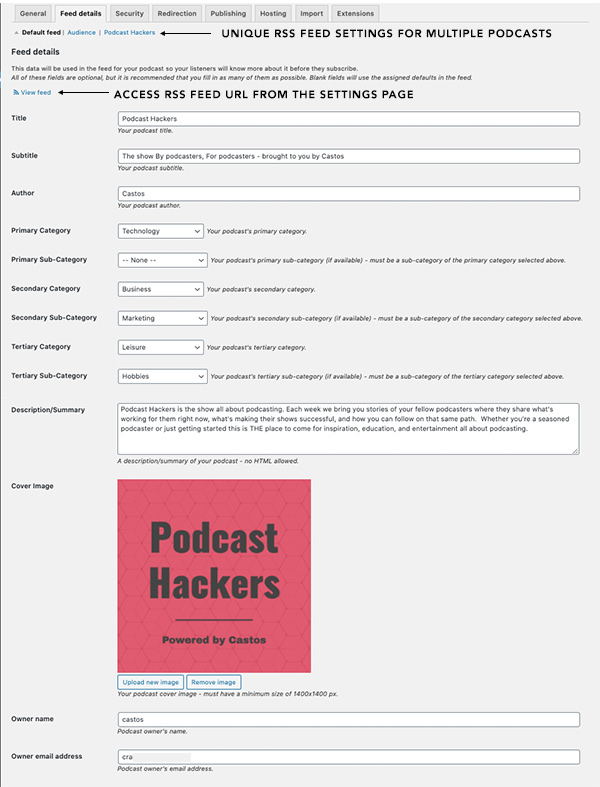
Set your podcast’s title, subtitle, description, category, cover art, explicit rating, and copyright information from WordPress.
Manage all updates to your podcast’s RSS feed from WordPress and changes automatically sync with your podcast hosting provider.
Turbo-charge RSS feeds to increase the number of episodes displayed on podcasting apps and speed up the feed’s load time.
Utilize one of several private podcasting integrations to enable private podcast functionality on your WordPress site.
With Castos, use the one-click submission feature to easily submit your podcast to Spotify, Apple Podcasts, Amazon Music, and more.
Save unique settings per podcast for easy management.
Create custom subscribe buttons for each podcast you create
Optional “catch-all” feed for podcast networks that want to aggregate all of their shows into a single feed.
With Castos, pay one price to host multiple podcasts under one account. Each plan features unlimited uploads and bandwidth so you’ll never hit a limit when managing more than one show.
CUSTOMIZE THE EMBEDDED MEDIA PLAYERS WITH BLOCKS
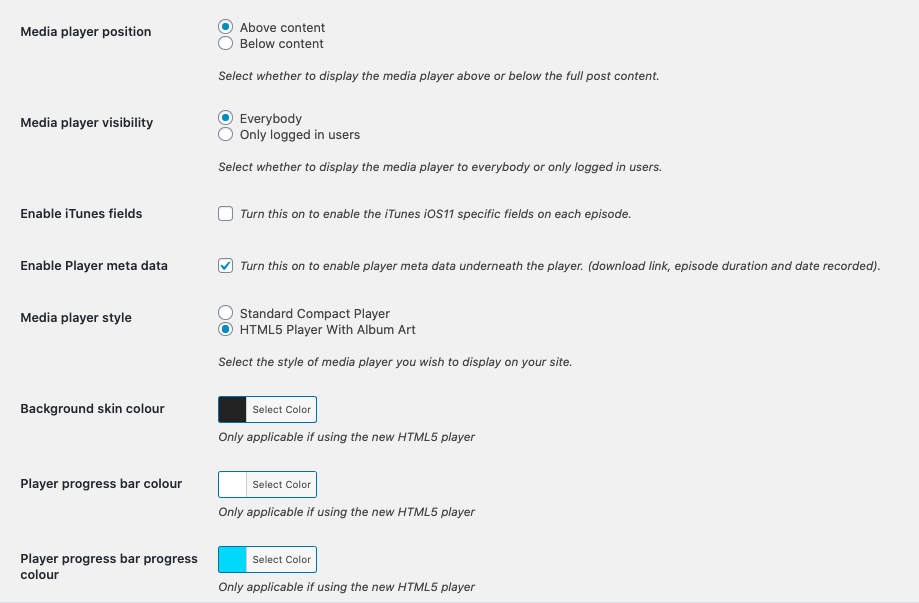
Choose between a standard compact player or feature-rich HTML5 media player that displays your cover art or episode-specific images. Change the settings to display your podcast exactly how you want it.
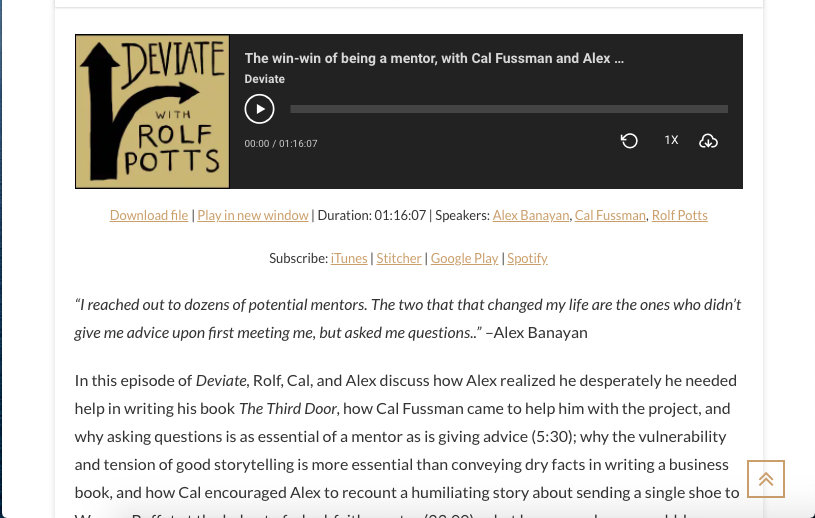
Display customizable subscribe links to Apple Podcast, Spotify, Stitcher, Overcast, and Pocketcasts. Also include links to download the content or play it in a new window.
Display episode meta data like episode durations and date published beneath the player.
Customize the background and player progress bar colors to match your brand.
Select the player’s position either above or below the post content.
Media player is mobile-responsive so podcast posts look great across desktop browsers and mobile devices.
Use the Castos Player block to feature the player anywhere on your website.
USE CUSTOM WIDGETS AND BLOCKS TO CREATE PLAYLISTS & DISPLAY THEM ANYWHERE
Curate custom playlists with embeddable widgets then display them anywhere on your website.
Insert episode player anywhere with the Castos Player block.
Create playlists featuring all episodes from specific podcast with the Episode List block.
Curate custom playlists with specific episodes with the Playlist Player block.
PUBLISH PODCAST EPISODES ON ANY POST TYPE
You have full control over how podcast episodes appear on your website by picking which post type to apply the plugin settings.
Choose which post type (from posts, the Podcast post type that SSP creates, or any other custom post type on your site) to enable podcast functions. This adds all podcast posts from the specific type to your feed.
SUPPORTS VIDEO PODCASTING
Feature embedded video players within any podcast post.
Embed video players from Vimeo, VideoPress, or the common video block.
Display the embedded video player anywhere within your podcast post.
With Castos, host your audio and video podcast files with our Pro plan.
FREE ANALYTICS ADD-ONS & INTEGRATIONS
Understand how your podcast is performing with our free Seriously Simple Stats add-on.
Install Seriously Simple Stats to access listener statistics for free. Track total listens per episode, by date range, and by listening sources.
Connect 3rd party analytics platforms like Podtrac or Chartable.
With Castos, view advanced analytics by geographic location, device, and listening platform plus total unique subscribers. Also access your Spotify-specific data from your dashboard for a holistic view of your podcast’s performance.
SIMPLIFIED IMPORTS, MIGRATIONS, AND REDIRECTS
Seriously Simple Podcasting works with any podcast hosting provider. Easily import or migrate your podcast files to the plugin then start managing your show via WordPress.
With Castos, connect Seriously Simple Podcasting to your Castos account in one click. Your podcast content will automatically sync with your Castos account as you make changes or upload new episodes from WordPress.
Redirect RSS feedd to a new location by supplying the new feed’s URL.
FULLY INTEGRATED WITH CASTOS PODCAST HOSTING
You can host your podcast with any podcast hosting provider. If you choose to host your podcast with Castos, you’ll access these unique features from your Castos dashboard.
Automatic syncing: Seriously Simple Podcasting automatically syncs with any Castos plan. Fully manage your podcast from WordPress while hosting your podcast files on our dedicated servers.
Private Podcasting: Castos has several integrations with third-party membership site tools like Paid Memberships Pro, LMS providers like LifterLMS, and payment processors such as Stripe to empower you to offer paid podcasting to your audience.
Free episode transcriptions: Pay nothing for on-demand episode transcriptions. Use these transcriptions on your website to make your podcast more accessible.
Monetize Your Podcast: You can make money from your podcast either through Castos Commerce by receiving listener donations, or by using Castos Ads to enable programmatic ad insertion on your podcast to get paid from your podcast.
Automatic YouTube republishing: Castos supports video file hosting and can automatically publish your podcast to YouTube.
Unlimited storage and bandwidth: Every Castos plan includes unlimited uploads and bandwidth. You can also host multiple podcasts under one account for one price.
Where to find help
Seriously Simple Podcasting comes with complete documentation. Please read this documentation thoroughly before posting on the support forum.
If you would like to contribute translations to this plugin you can do so through a simple web interface. Any and all translations (new languages or updates to existing ones) are always welcome.
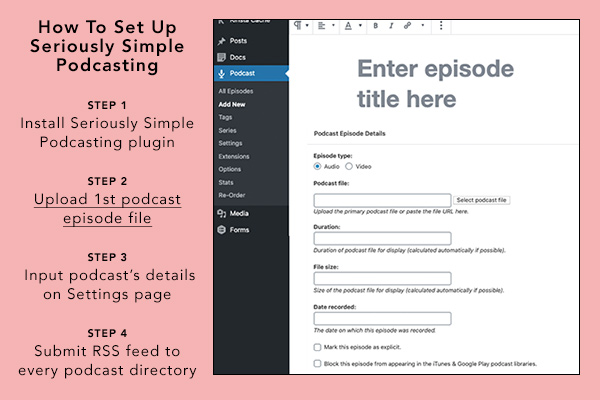
Step 1 to set up Seriously Simple Podcasting is to install the plugin on your WordPress site.
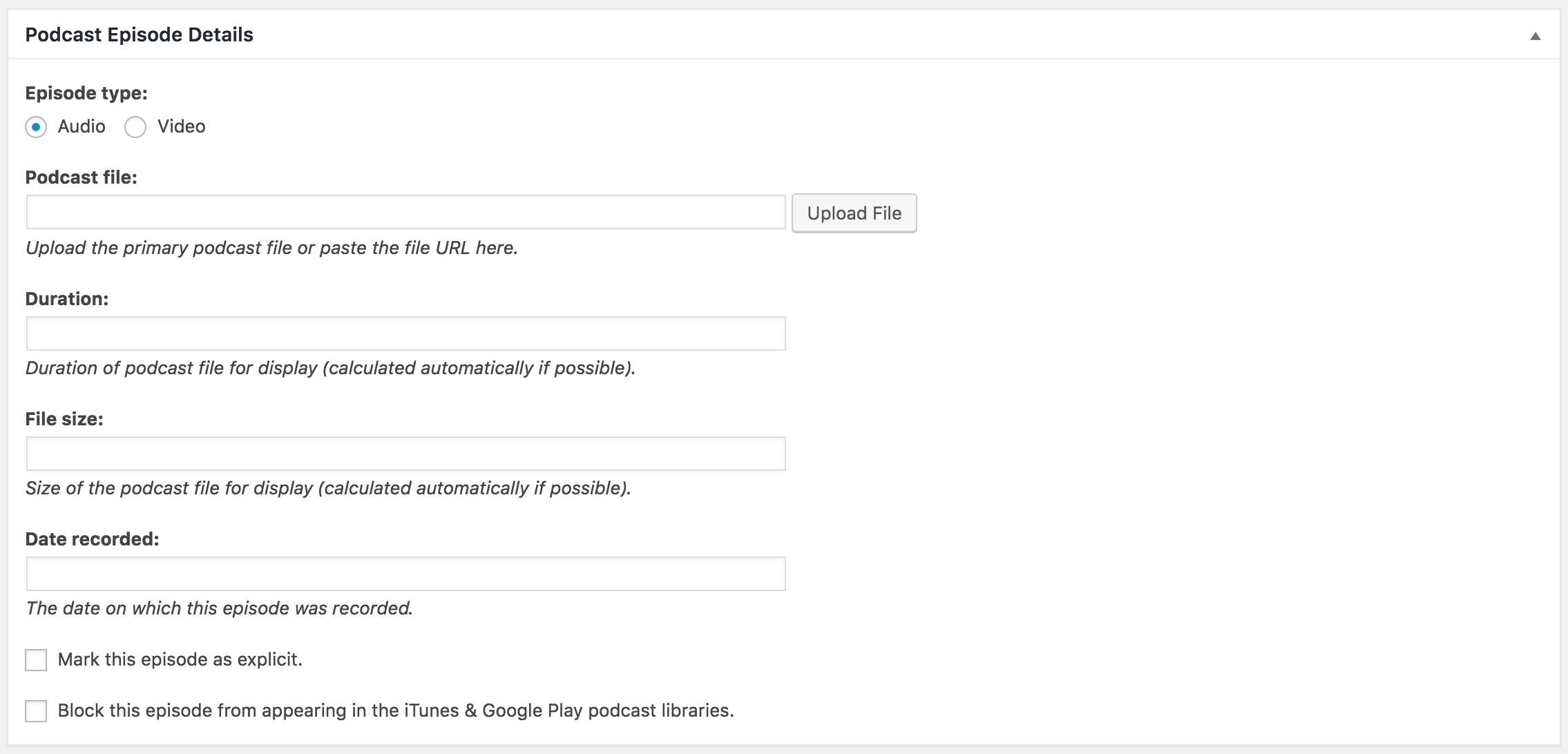
Step 2 to set up Seriously Simple Podcasting is to add your first episode. Upload the audio or video file and complete the episode's title, duration, and publish date.
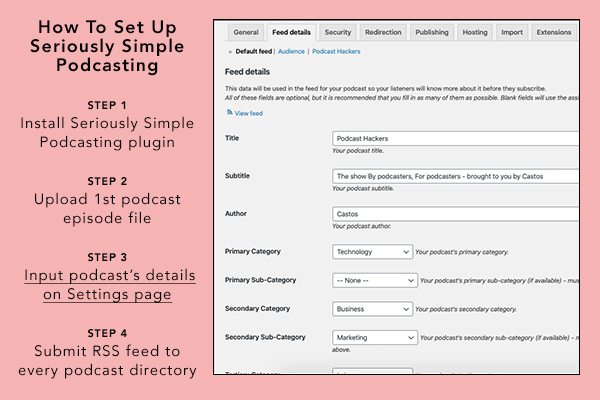
Step 3 to set up Seriously Simple Podcasting is to complete the podcast's RSS feed details. This includes things like the podcast's name, category selection, and cover art image. If you host your podcast with Castos, these details will automatically sync with your Castos dashboard.
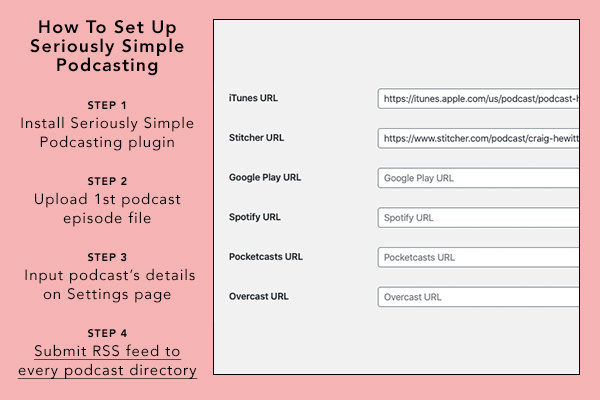
Step 4 to set up Seriously Simple Podcasting is to submit the completed RSS feed URL to podcast listing apps like Apple Podcasts and Spotify.
Customize your podcast's RSS feed details from the Settings > Feed Details tab.
Upload audio or video episode files directly to WordPress.
Customize the embedded media player settings to match your brand colors and pick the preferred location.
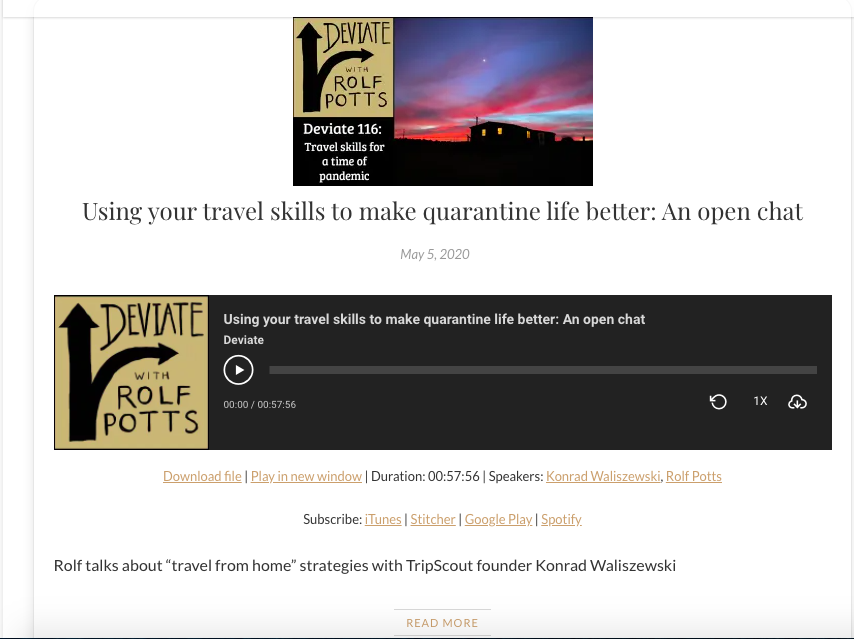
Example of the HTML5 player within a podcast post from Rolf Pott's podcast, Deviate.
Example of HTML5 player with a collection page featuring every episode from Rolf Pott's podcast, Deviate.
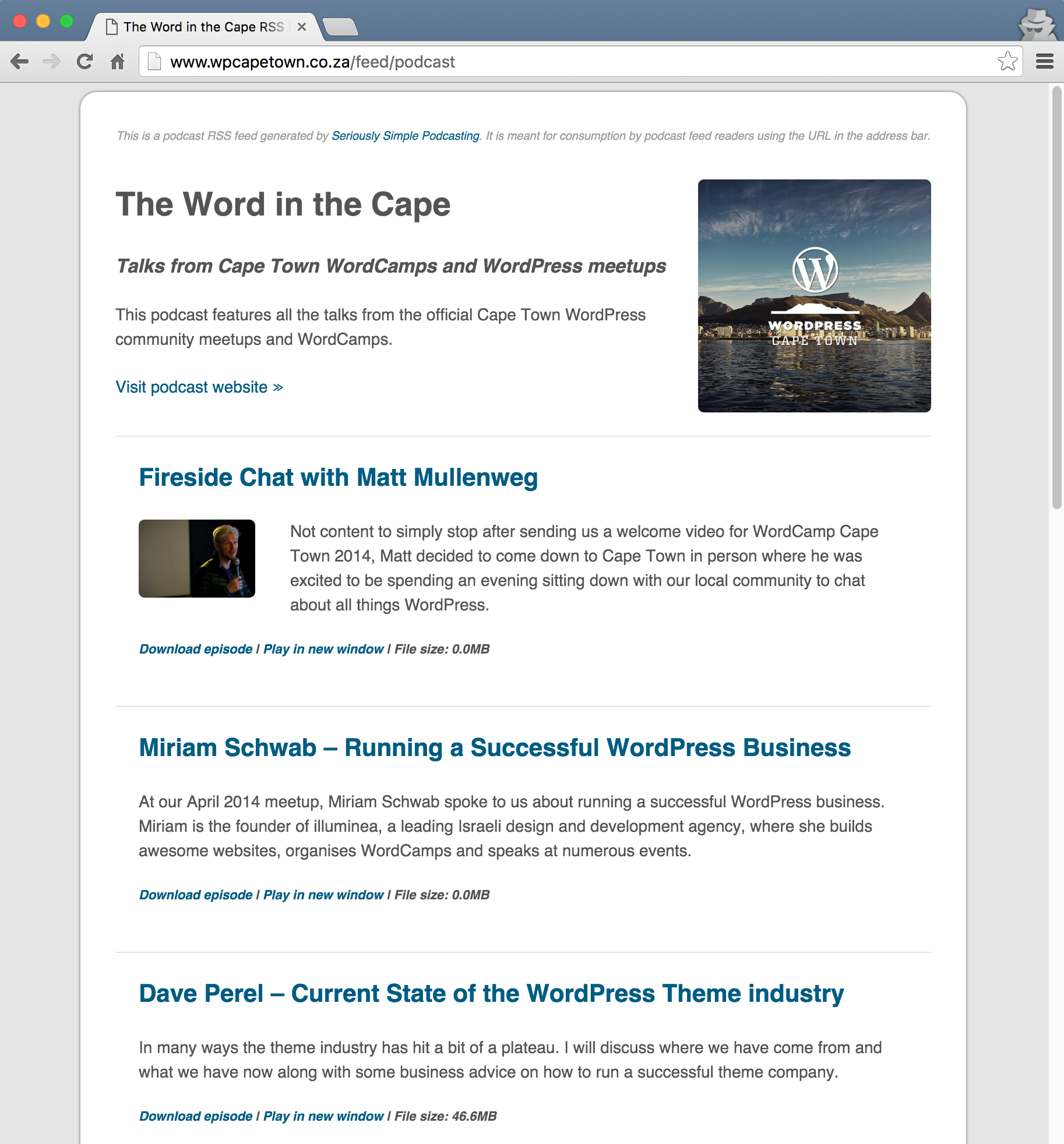
Example of a styled RSS feed when viewed in a browswer.
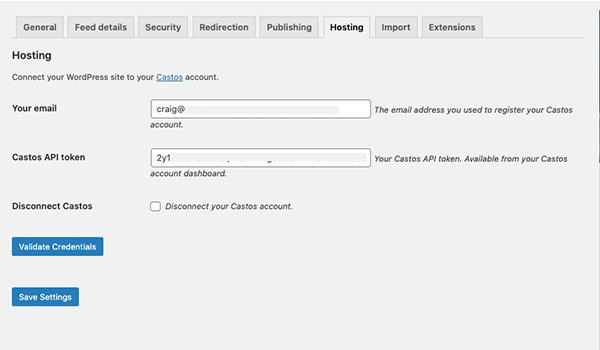
Automatically sync Castos accounts with Seriously Simple Podcasting in a few clicks.
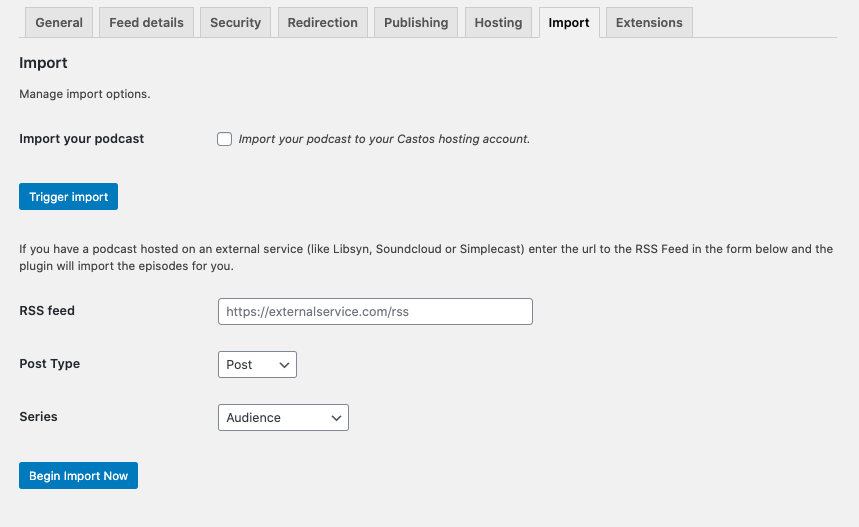
Import RSS feeds from any podcast hosting provider using Seriously Simple Podcasting.
Customize on which post type to enable podcasting features.
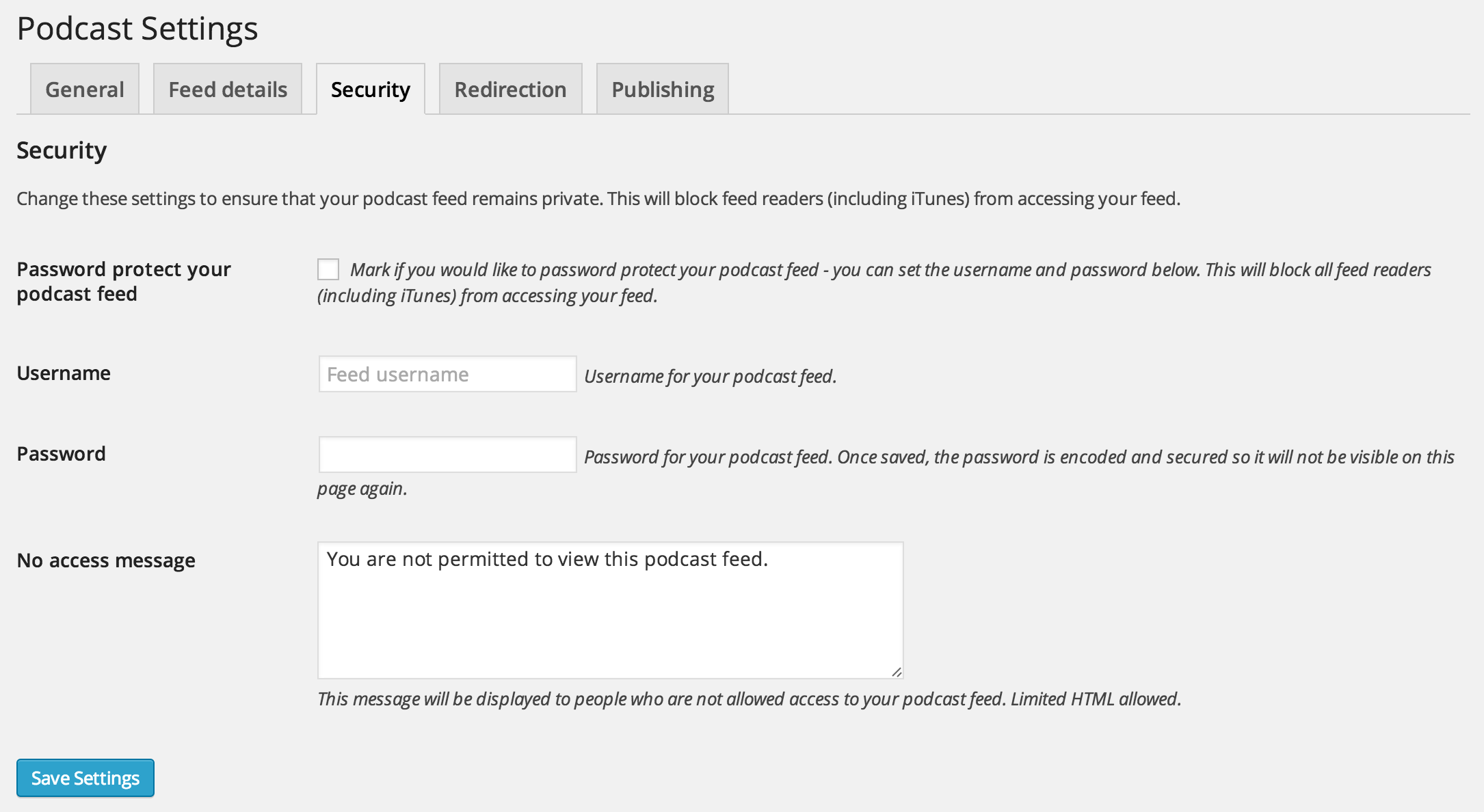
Create password protected podcast RSS feeds from the Settings > Security tag. Use this feature in combination with a membership plugin to restrict access to your podcast.
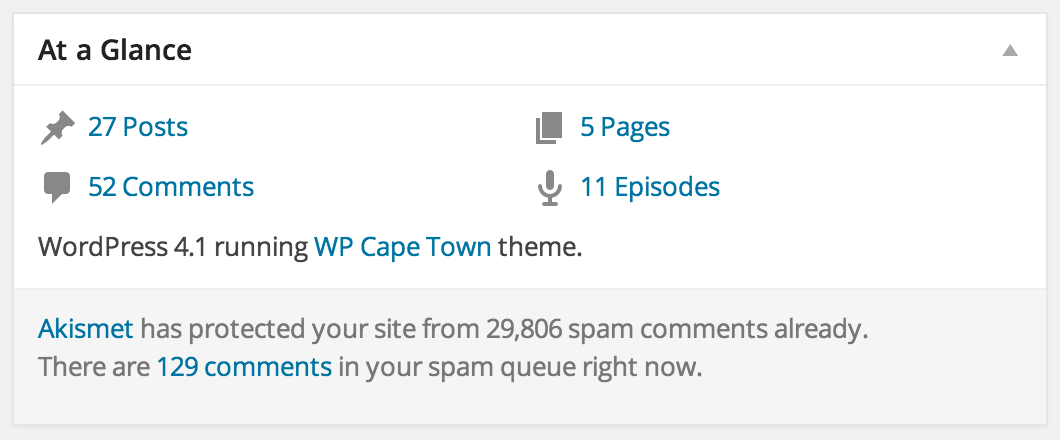
View podcast episodes in the At A Glance widget on the main WordPress dashboard.
2024-03-20
UPDATE SUMMARY: Improved WC Memberships integration, small fixes
[UPDATE] WC Memberships integration improvement – support multiple user plans
[FIX] Changed the feed image link to use the podcast archive page URL
[FIX] Removed outdated distribution links upgrade notice
[FIX] Accessibility: use alt text (if provided) for episode images in Castos player
3.1.1
2024-02-27
UPDATE SUMMARY: Elementor and Yoast SEO integration fixes, small improvements
[FIX] Removed the Elementor code showing in RSS feed
[FIX] Removed OnDemandEvent from the Yoast SEO schema graph
[UPDATE] Use the original file name for Castos files when downloading episodes
[UPDATE] Updated the plugin description
3.1.0
2024-02-22
UPDATE SUMMARY: Gutenberg block and security improvements, small fixes
[UPDATE] Gutenberg block for playlist player
[UPDATE] Possibility to use multiple player blocks
[UPDATE] Security improvements
[FIX] Yoast SEO integration fixes
[FIX] Fixed PHP errors
3.0.2
2024-02-09
UPDATE SUMMARY: Redirect non-existing feed URLs to the default feed
[FIX] Redirect non-existing feed URLs to the default feed
[FIX] Automatically create the default Podcast if it was not created during a previous plugin update
[FIX] Fixed Castos sync for the Bedrock architecture
3.0.1
2024-02-07
UPDATE SUMMARY: Resolved PHP error in podcast Yoast SEO schema generation
[FIX] Resolved PHP error on podcast pages if Yoast SEO plugin is enabled
3.0.0
2024-02-06
UPDATE SUMMARY: Use Default Podcast term as the default feed and other improvements
[UPDATE] Use Default Podcast term as the default feed
[UPDATE] Show settings banner for Castos users
[UPDATE] Made settings placeholders less visible to avoid confusion with values
[UPDATE] Removed Second Line theme extension
[UPDATE] Improved synchronization with Castos
[UPDATE] Added alt text to the player loader image
[UPDATE] 404 page for the not existing podcast feeds
[UPDATE] Code refactoring
[FIX] Fixed lost description formatting in Classic Editor
[FIX] Do not use admin email as the default email in feeds
2.25.3
2023-12-01
UPDATE SUMMARY: Fixed Seriously Simple Transcripts plugin support
[FIX] Fixed a file button, that is used by Seriously Simple Transcripts plugin
2.25.2
2023-11-18
UPDATE SUMMARY: Fixed missing iTunes Field labels
[FIX] Fixed missing iTunes Field labels
2.25.1
2023-11-16
[FIX] Castos original filename style fix
2.25.0
2023-11-16
UPDATE SUMMARY: Save and display original Castos file name, V4V improvements, minor enhancements
[UPDATE] Save and display original Castos file name
[UPDATE] V4V: custom value and key
[UPDATE] Added the date formatting filter
[UPDATE] Refactoring: moved metabox fields to separate templates
[FIX] Feed: fixed tag
2.24.0
2023-10-24
UPDATE SUMMARY: Implemented Castos Ads, bug fixes
[UPDATE] Implemented Castos Ads
[UPDATE] Updated tag on episode level to true or false
[FIX] Fixed enclosure not working for some customers from 2.23.0
[FIX] Fixed infinite sync attempts for episodes with wrong file ID
2.23.0
2023-10-02
UPDATE SUMMARY: Improved the Castos sync process
[UPDATE] Improved the Castos sync process
[UPDATE] Settings style improvements
[UPDATE] Delete audio file data when the episode is trashed
[UPDATE] Updated tag values
[UPDATE] Code refactoring
[FIX] Fixed WP assets conflict on widgets page
2.22.1
2023-09-13
UPDATE SUMMARY: Support new Elementor API
[UPDATE] Support new Elementor API ( version 3.16 )
) if it displays the episode post content, convert tags into the new lines
* [UPDATE] Revise text when uploading an episode file
* [FIX] Series feed “Episode description” option not working fix
* [FIX] Fixed episodes controller fatal error for the REST API episodes endpoint
2.7.2
2021-06-11
UPDATE SUMMARY: Hotfix for the “Exclude series from default feed” by default option
[FIX] Reverted “Exclude series from default feed” to the previous state
[FIX] Select “Exclude series from default feed” by default ONLY for the new series
2.7.1
2021-06-10
UPDATE SUMMARY: Updated the onboarding wizard video, UX improvement
[UPDATE] Updated the onboarding wizard video
[UPDATE] Added the video to the plugin description
[UPDATE] Removed the old welcome page
[FIX] When creating a new Series, select “Exclude series from default feed” by default
2.7.0
2021-05-20
UPDATE SUMMARY: Onboarding wizard, bug fixes
[UPDATE] Onboarding wizard
[FIX] Fixed the gutenberg fatal error
[FIX] Fixed the Undefined index: link warning
[FIX] Fixed the conflict with the Progress Counter Block plugin
2.6.6
2021-05-11
UPDATE SUMMARY: Fixed the Elementor icons missing issue, minor improvements
[FIX] Elementor subscribe icons missing fixes
[UPDATE] Do not request player file on page load
[UPDATE] Added religion subcategory
2.6.5
2021-05-07
UPDATE SUMMARY: Fix the feed error for the case if the author name has punctuation.
[FIX] Fixed the feed error for the case if the author name has punctuation.
2.6.4
2021-05-04
UPDATE SUMMARY: HTML player improvements and fixes, feed images fixes
[UPDATE] Changed images validation settings
[UPDATE] Options to disable the subscribe and share button in the player
[UPDATE] Options for displaying the player meta data
[UPDATE] Make player translatable
[UPDATE] Include alt attribute in web player
[UPDATE] Make HTML5 player to be the default one
[FIX] Show series feed image in the feed
[FIX] Settings UI: cover image is not being shown after image upload
[FIX] Excerpt for content:encoded tag
[FIX] Value for should be author from feed details
[FIX] Player subscribe icons
2.6.3
2021-04-19
UPDATE SUMMARY: Roles and capabilities improvements, no image issues fixes
[UPDATE] Added podcast capabilities
[UPDATE] Added series capabilities
[UPDATE] Added two roles for managing podcasts
[FIX] Users with manage_podcast capability couldn’t change the plugin settings
[FIX] Series image not displaying in series feed
[FIX] Feed cover image not displaying in the player
[UPDATE] Check the Cover Image size dimensions upon upload
[UPDATE] Added episode specific image to RSS feed
[FIX] Showing notifications when the episode is added or updated (classic editor)
[FIX] When the post is duplicated it is not synchronized with Castos
2.6.1
2021-03-05
UPDATE SUMMARY: Improvements, bug fixes for the 2.6 release
[UPDATE] Change right sidebar in settings
[UPDATE] Custom user role/podcast capabilities
[FIX] HTML player broken embed link
[FIX] Episode image missing title
[FIX] Player is not playing if the JS file is placed in the header
[FIX] Player is not playing if more then one player codes appear on the same page
[FIX] Audio files are not shown in the media library
[FIX] Uploaded cover image overwrites the audio file settings
2.6.0
2021-02-22
UPDATE SUMMARY: Improvements to the episode functionality
[UPDATE] Improvements for the trash and copy podcast actions, when using a Castos account
[UPDATE] Add episode specific image cover image to Episode Details fields
[UPDATE] Add episode specific image cover image to Episode Details fields for Podcast enabled Posts
[UPDATE] General code improvements and clean up
2.5.3
2021-02-09
UPDATE SUMMARY: Bug fixes for the 2.5 release
[UPDATE] Updates the Castos Player fonts to be loaded locally, not from Google Fonts
[FIX] Fixes an issue in the plugin settings where a specific Distribution link value doesn’t save.
[FIX] Fixes an issue where videos no longer play in the Castos Player
[FIX] Fixes a bug where the Castos Player loads on non audio enabled posts
[FIX] Fixes an issue where Castos Player links don’t count properly towards the plugin Stats
[FIX] Fixes a PHP8 Compatibility issue
2.5.2
2020-12-17
UPDATE SUMMARY: Bug fixes for the 2.5 release
[FIX] Fixes a bug where specific widgets and shortcodes were not rendering the player
[FIX] Fixes a bug where leaving all Distribution Items unchecked causes a PHP error
[FIX] Fixes a bug where loading the Block Editor assets causes a PHP notice
[FIX] Fixes various spelling errors in the plugin (props ihatehandles)
2.5.1
2020-12-08
UPDATE SUMMARY: Podcast Episode bug fixes for the 2.5 release
[FIX] Fixes a bug where podcast_episode shortcode was broken and causing fatal errors
[FIX] Fixes a bug where the compact player added some unnecessary additional html tags
2.5.0
UPDATE SUMMARY: Implements version 2 of the HTML5 player, and various smaller bug fixes
[UPDATE] Replace all regular instances of the HTML5 media player with the updated version
[UPDATE] Replaces the media player custom styling with options for either dark or light mode
[FIX] Fixes a bug in the Castos episode sync process where it would sync the raw post_content
[FIX] Fixes a bug in the Podcast List block, where specifying a custom read more link wouldn’t work as expected.
[FIX] Fixes a bug where the Podcast Distribution Upgrade message would show even on new installs
[TWEAK] Updates a message displayed to the user when the fileupload JavaScript can’t be loaded, to be more explanatory
2.4.2
2020-11-17
[FIX] Fixes a bug from the 2.4 release, where the ss_podcast shortcode doesnt render the meta data
2.4.1
2020-11-16
UPDATE SUMMARY: Bug fixes for the 2.4 release, as well as two previously submitted PRs
[FIX] Fixes a bug where the media player css affects normal subscribe links
[FIX] Fixes a PHP warning being reported relevant to the Elementor Templates on the iterations page
[FIX] Fixes a bug in the Elementor Subscribe Buttons widget, where selecting a series did not display the correct buttons
[FIX] Fixes a bug in the Elementor Media Player widgets, related to using the Latest Episode
[FIX] Fixes a bug where using the ss_podcast shortcode renders the media player incorrectly
[FIX] Changes the dynamic podcast list block to use get_permalink() instead of the episode guid. (props mikelittle)
[NEW] Added “Play/Pause”, “Rewind 30 Seconds”, and “Download Epsiode” anchor text for elements in the HTML5 player, for better accessibility with screen readers. (props edequalsawesome)
2.4
2020-11-09
UPDATE SUMMARY: Adds support for the Elementor Page Builder, by adding Elementor specific podcasting widgets. Changes how the Feed Subscribe links are managed in the Plugin Options, which requires a data upgrade
[NEW] Adds Podcast specific widgets for Elementor: Media Player, Castos Player, Subscribe Buttons, Recent Episodes and Episode List.
[NEW] Adds Podcast specific Elementor Templates: Podcast Landing page, Podcast Subscribe Page and Podcast Single Episode Page
[UPDATE] Upgrades the Subscribe/Distribution links Options process
[UPDATE] Moves the HTML player settings to their own tab
2.2.3
2020-08-19
[FIX] Update the custom REST API endpoints which where throwing a _doing_it_wrong notice.
2.2.2
2020-07-01
[FIX] Remove unused CSS font style
2.2.1
2020-07-01
[FIX] Remove unused CSS font style
2.2.0
2020-05-25
[NEW] New Blocks! Standard Audio Player block and customisable Podcast List Block
[FIX] Fixes a bug related to the HTML5 player icons conflicting with third party font icons like FontAwesome
[TWEAK] Adds an episode number field to the series widget, to limit episodes loaded by series (props lordneeko)
2.1.1
2020-05-14
[FIX] Fixes a bug which crashes sites using a version of WordPress older than 5.0
2.1.0
2020-05-11
[NEW] Block Editor support – adds a Castos Player block to the block editor, for use on posts and pages
[NEW] Minor UI message changes to the Hosting and Import settings
[FIX] Fixes a bug where in some instances, Castos users experience problems syncing episode data to their Castos account
[FIX] Fixes a bug in the Dashboard widget
2.0.4
2020-04-28
[FIX] Reverts a change to the itunes:summary and googleplay:description tags introduced in 2.0.1
2.0.3
2020-04-23
[FIX] Fixes a bug where, in some instances, the itunes:summary and googleplay:description tags contain invalid characters.
2.0.2
2020-04-22
[FIX] Fixes a bug where, in some instances, the itunes:summary and googleplay:description tags contain invalid characters.
2.0.1
2020-04-15
[FIX] Fixes a bug where the RSS feed itunes:summary and googleplay:description tags don’t respect the RSS Feed settings for Episode description
2.0.0
2020-04-14
UPDATE SUMMARY: Castos API updates, Series/Feed data improvements, Castos News dashboard widget, and various bug fixes
[UPDATE] Updated Castos API connection and data sync for Castos account users
[NEW] When creating a Series in the Series UI, the plugin will automatically add the Series name and description to the Feed settings Title, Subtitle and Description fields, respectively
[NEW] If the user is connected to Castos, creating a new Series will automatically create a new Podcast in Castos
[NEW] Adds Castos News dashboard widget
[FIX] Fixed a bug where uploading a file to an existing Castos connected episode, would not update the file in Castos
[FIX] Fixed a bug which broke series RSS feeds when using a custom feed slug. (props Maarten Hunink)
[FIX] Fixed a bug where the Importers wouldn’t work on translated sites
[FIX] Fixed a bug which raised a PHP notice when using the block editor on a “podcast” post type
1.20.13
2020-03-02
[FIX] Fixed a bug in the RSS Importer that was importing post_content incorrectly (fix missing from 1.20.12)
1.20.12
2020-02-12
[NEW] Added a setting to exclude series episodes from the default feed
[NEW] Added Second Line Themes to the extensions page
[UPDATE] Moved notifications to their own handler
[FIX] Fixed a bug in the RSS Importer that was importing post_content incorrectly
1.20.11
2018-12-20
UPDATE SUMMARY: Various community bug fixes and Castos hosting related improvements
[FIX] Fix file size not showing in RSS feed bug. (props Josephus Paye II)
[FIX] Fixes a bug related to the Music Commentary category not saving in Castos. (props Hugh Lashbrooke)
[FIX] Fixes a bug where scripts and styles for HTML5 player showing up in footer even when standard player is selected. (props rghedin)
[NEW] Added the ssp_podcast_playlist_track_data filter for track data in playlist shortcode. (props Hugh Lashbrooke)
[NEW] Added ssp_enable_get_file_size and ssp_enable_get_file_duration filters to disable the file size and duration functionality via filters
[TWEAK] Localised the PHP version error message for translations. (props Hugh Lashbrooke)
[TWEAK] Add context to localisation of podcast URL slug to prevent URLs changing when translated. (props Hugh Lashbrooke)
[UPDATE] Update to push the post featured image to the Castos episode.
[UPDATE] Update to delete an episode in Castos when a post is trashed in WordPress.
1.20.10
2019-10-14
[FIX] Fixes a bug in the javascript file uploader
1.20.9
2019-08-22
[FIX] Fixed a bug caused by the HTML player on older versions of Internet Explorer (IE10 and older)
1.20.8
2019-08-13
[NEW] Added support for RSS Feed media file prefixing, to enable measuring services like Podtrac and Chartable