Save partially filled Contact Form 7 submissions and allow users to continue later. Simple, lightweight, and secure.
Save & Continue adds a “save and continue later” button to your Contact Form 7 forms. A visitor who is not ready to send a long form can save it, get a private resume link, and come back later to find the fields filled in again.
It is made for forms that people need time to fill:
* Job application forms
* Registration forms
* Survey and feedback forms
* Any form requiring research or document gathering
Features
- Automatic draft saving – answers are saved on your site shortly after a visitor leaves a field
- Resume links – a random token in the link identifies the draft
- Email resume option – the visitor can email the link to themselves
- Admin settings – choose how many days drafts are kept (default 30), with a daily clean-up and a manual clean-up button
- Field types – text, textarea, select, checkbox and radio fields are saved. File and password fields are never saved
- Rate limiting on saving drafts and on sending resume emails
- No external services, no tracking, no ads
Good to know
- Works with single-page Contact Form 7 forms. Multi-step form plugins are not supported; see the FAQ.
- Saved answers are stored in your WordPress database until the draft expires. Tell your visitors in your privacy policy.
Support
For support, feature requests, or bug reports:
* Visit the WordPress.org support forum
* Check our documentation
Privacy
This plugin stores what visitors type in your forms in your WordPress database until the draft expires (30 days by default), and a random token in the visitor’s browser (localStorage). The resume link contains the token. If a visitor asks for the link by email, the address they type is used to send that one email. This plugin does not send data to any external service. It does not add WordPress privacy export or erase tools; add a line to your privacy policy.
Requirements
- WordPress 6.2 or higher
- PHP 7.2 or higher
- Contact Form 7 plugin (active)
- Modern browser with JavaScript enabled
Screenshots
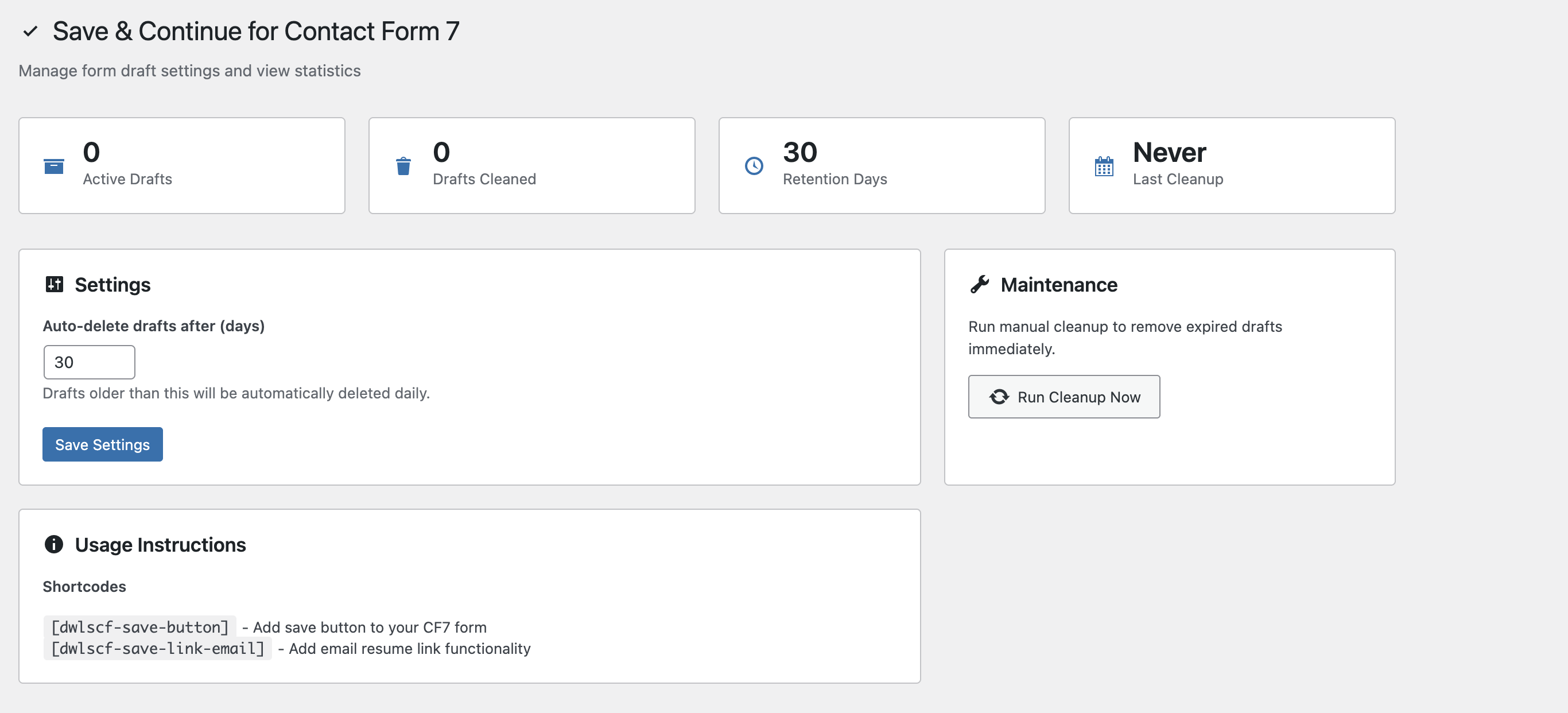
Save & Continue button integrated into Contact Form 7
How does the save and continue feature work?
The visitor’s answers are saved on your site and tied to a random resume link. Opening the link fills the form in again. Nothing is sent to you until they submit the form as usual.
Where is the form data stored?
In your WordPress database (the options table), under a random token. Only the token is kept in the visitor’s browser, not the form data.
The save button shows as plain text like [dwlscf-save-button].
Update to version 1.2.5 or later. Older versions printed the shortcode as text on recent Contact Form 7 versions.
Where do I put the email form?
Put [dwlscf-save-link-email] in the page content, outside the Contact Form 7 form. It is a form of its own and cannot sit inside another form. It appears when the page is opened with a resume link.
How long are drafts kept?
You can configure the retention period in Settings → Save & Continue CF7. Default is 30 days. Expired drafts are removed by a daily clean-up task that needs WP-Cron to be working, or you can run the manual cleanup.
Does it work with multi-step forms?
Not reliably. Plugins that split a Contact Form 7 form into steps keep their own hidden fields, and restoring a draft can leave the form on the wrong step. Single-page forms are the supported case.
Which fields are saved?
Text, textarea, dropdown, checkbox and radio fields. File uploads and password fields are never saved.
Can users email themselves the resume link?
Yes. The email form is offered through the [dwlscf-save-link-email] shortcode and is limited to a few requests per hour.
Does a draft disappear when the form is sent?
Not at the moment. It stays until it expires. Keep the retention days low if your forms hold personal data.
Can I see or delete saved drafts from the admin?
Not yet. The settings page shows the number of drafts and has a button that removes expired ones.
ChangeLog
1.2.5
- Fix: the
[dwlscf-save-button] shortcode now renders as a button inside Contact Form 7 forms instead of showing as plain text.
- Fix: saving and restoring no longer fail on cached pages. The security token is only required for logged-in users.
- Fix: the save limit is counted per visitor and per draft. Before, all logged-out visitors shared one limit of 10 saves a minute.
- Fix: a visible message is shown when a click on the save button does not work.
- Fix: line breaks in text areas are kept.
- Fix: opening a resume link on another device keeps updating the same draft.
- Privacy: the draft is deleted when the form is sent.
- Privacy: expired drafts can no longer be opened, even before the daily clean-up runs.
- Security: drafts are limited to 50 KB and 200 fields. Contact Form 7’s internal and hidden fields are no longer saved or restored.
- Change: inside a form the button shortcode prints only the button. Put
[dwlscf-save-link-email] on the page outside the form.
- Requires PHP 7.4 (the code already needed it).
1.2.4
- Compatibility: tested with WordPress 7.1.
1.2.3
- FIX: Critical bug – missing load-handler.js file causing 404 console errors on CF7 forms
- FIX: Critical bug – JavaScript nonce validation regex too restrictive, rejecting valid WordPress nonces and blocking all AJAX draft saving (changed from
/^[a-f0-9]{10}$/ to /^[a-z0-9]{10}$/)
- FIX: Missing
wp_unslash() in load draft AJAX handler for WordPress coding standards compliance
- NEW: Implemented draft restoration JavaScript (load-handler.js) to auto-populate form fields when resuming via token URL
1.2.2
- IMPROVEMENT: Enhanced code documentation and readability
- FIX: Minor performance optimizations
- MAINTENANCE: Updated compatibility testing
- **Fix data pool cache overflow.
1.2.1
- IMPROVEMENT: Improve settings page
1.2.0 – Security & Performance Update
- SECURITY: Fixed SQL injection vulnerabilities with prepared statements
- SECURITY: Enhanced XSS protection with proper input validation and safe DOM manipulation
- SECURITY: Strengthened authentication with rate limiting (10 requests/minute) and nonce verification
- SECURITY: Added CSRF protection with enhanced validation
- SECURITY: Upgraded cryptography from MD5 to SHA-256
- SECURITY: Implemented strict token format validation (12 chars alphanumeric)
- IMPROVEMENT: Comprehensive input sanitization across all components
- IMPROVEMENT: Enhanced error handling and user feedback
1.1.0 – Stability & Performance
- NEW: Token-specific nonces for enhanced security
- NEW: Rate limiting for email resume functionality
- IMPROVEMENT: Debounced AJAX requests to reduce server load
- IMPROVEMENT: Smarter payload handling to prevent redundant saves
- IMPROVEMENT: Conditional asset loading (only on CF7 pages)
- FIX: Reliable scheduled cleanup execution
- FIX: Proper asset path resolution
- FIX: Aligned uninstall hooks with cleanup events
1.0.2 – Bug Fixes
- FIX: Removed debug error logging
- IMPROVEMENT: Code cleanup and optimization
1.0.1 – UI Improvements
- IMPROVEMENT: Updated styling for better theme compatibility
- IMPROVEMENT: JavaScript code cleanup and optimization
- FIX: Minor UI inconsistencies
1.0.0 – Initial Release
- NEW: localStorage-based draft saving
- NEW: Token-based resume functionality
- NEW: Admin settings and cleanup controls
- NEW: Email resume link feature
- NEW: Automatic and manual draft cleanup
- NEW: Contact Form 7 shortcode integration

