Restaurant reservations are made easy and quick. Receive and accept online client reservations. Display available spaces at a specific time. Allow instant client reservations, with personalized notifications about the reservation status. In short, convert website visitors into restaurant guests.
Focus on your business and don’t waste time reading emails to confirm reservations manually. ReDi Restaurant Reservation is a fully automated reservation system. Everything is done without human involvement.
You may easily handle reservations for your restaurant using the ReDi Restaurant Reservation plugin. This plugin facilitates online customer reservations, your clients can view available space at a predetermined time and make reservations with instant confirmation.
Simply, configure the maximum number of reservations per person, the hours of operation, and the restaurant information. That’s it!
So. looking for the fastest and most simple restaurant reservation WordPress plugin? You are in the right place!
Get the plugin downloaded first. The process is quite simple.
Go to your WordPress website from the backend.
Click on Plugins > Add New.
On the search line, type “ReDi Restaurant Reservation.”
Click on Install > Activate.
Start your WordPress restaurant reservation page, with 3 steps:
Register & Generate/Create the API key.
Check the new Reservation page (it automatically creates a reservation page after registration).
Make all the necessary configurations and customizations.
It is not unexpected that there is an increase in demand for online restaurant reservations because most of us spend more than 24 hours per week using our mobile devices. So a credible restaurant reservation system is a must for a successful business, don’t you agree?
The benefits of using a restaurant reservation system, such as ReDi, are numerous:
Increase Conversion Rates: Extensive and catchy CTA’s (calls to action) help to increase conversions and offer visitors immediate restaurant reservations.
Save Time: As far as ReDi is fully automated it will save a lot of time from your workers, which can be used on other things.
Additional Analytics: Track the website visitors and reservation data to make more result-based decisions for your business.
Satisfied Clients: In the age of technology clients prefer to have everything easy and quick at hand. That’s why online restaurant reservations will greatly boost customer satisfaction.
Capture Abandoning Customers: Without an instant reservation confirmation, a visitor will most probably go to a few more restaurants to make a reservation. Thus, the restaurant may lose that client.
REDI RESTAURANT RESERVATION PLUGIN FEATURES, ADD-ONS, AND ADVANTAGES
KEY FEATURES
The ReDi Restaurant Reservation plugin works well for all types of businesses, including little cafés, bars, and large restaurants. The plugin includes several helpful functions and highlights.
INSTANT CONFIRMATION
Checking and confirming availability in an instant without any delays. This ReDi feature is one in its category, other reservation plugins are missing this availability. That’s why it makes ReDi stand out in the market.
RESERVATION FORM
Reservation form available for all devices (mobile, tablet, PC, etc.), allowing visitors to view all of the available reservations for that day.
RESTAURANT CAPACITY CONTROL
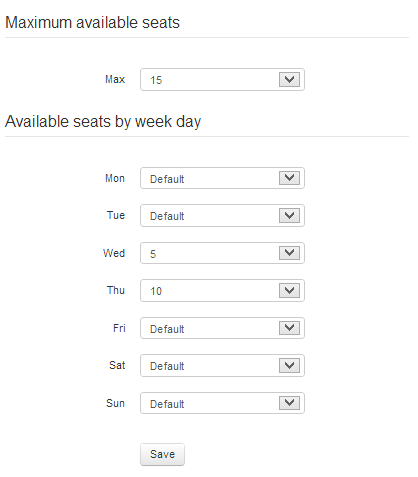
The ability to control and set a maximum number of seats based on the weekday.
Show the restaurant timing: when and how long your restaurant is open and working (also set multiple open/close times a day).
BLOCKED TIME
Establish a specified timeframe from which bookings can no longer be accepted.
EMAIL CONFIRMATION
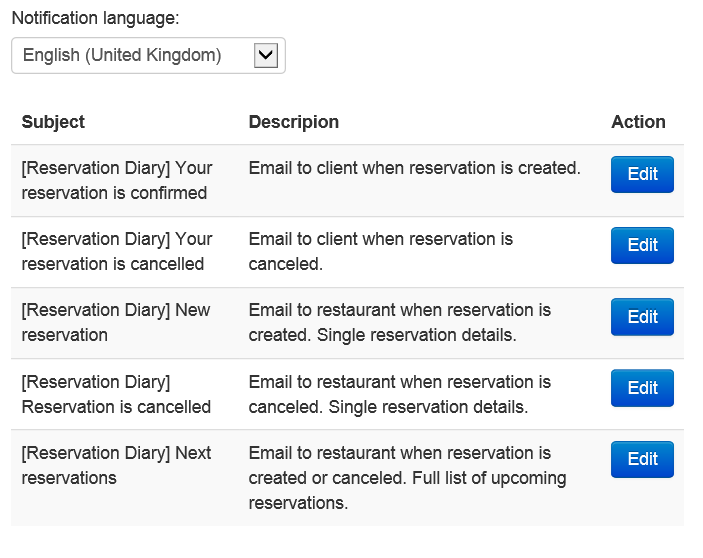
Fully customizable and multilingual email templates to send instant confirmation letters to clients.
All these features prove Redi is not a simple reservation solution, but powerful software that allows checking various aspects before making a confirmation, such as:
Is the restaurant open on that day/hour?
Is the restaurant’s capacity enough for receiving guests?
Can the kitchen serve guests without delays?
Are there free seats available?
Thus, it provides the fastest availability check and confirmation.
ADDITIONAL SERVICES
Also, the ReDi restaurant booking system offers additional restaurant reservation features and services by request, and the price of those varies from business to business. Some examples of other services include:
FACEBOOK INTEGRATION
Use Facebook for your business and turn your Facebook fans into clients. Moreover, you can further enhance your business experience with Facebook integration, and we will provide you with the profile pictures of your customers if found. When a consumer visits, especially on their first visit, you might impress them by recognizing their face.
WHITE LABELING
Upon request, you can get white-labeled reservation applications for Facebook Application, iPhone/iPad Application, Windows Phone Application, or Android Application.
Do you want to know what your clients think about their last sit? Are they satisfied with your service? We will get that info for you. Our plugin allows feedback collection to know the impressions of your clients from their last visit.
REMINDER EMAILS
Send fully personalized reservation reminder emails to your clients and remind them about upcoming reservations.
PRE-PAYMENT SERVICES
Pre-payment services. Many clients may reserve a seat and forget to show up, even after the reservation reminder email. So, to motivate them to show up or not lose profits if they do not, you can set pre-payment services for reservations.
This plugin emphasizes simplicity. However still offers everything you need, even some additional useful services.
BIRTHDAY PROMOTIONS AND RESERVATIONS
With the integration of MailChimp, you may send birthday promos or invites to return to your restaurant.
FREE VERSION
The free version allows:
Instant Availability check in a matter of seconds.
Both instant & manual confirmation.
Custom fields & Awaiting List System.
Also, you can easily send confirmation emails.
Reservations are limited to 100 guests per month.
BASIC VERSION
The Basic Version costs 19 EUR + VAT* per month.
VAT is applied to businesses and residents of the EU. VAT rate depends on the country where the customer is located. 0% VAT is applied when an EU VAT number is provided.
The basic plan offers features such as:
Everything listed in the free version
No reservation limits per months
Amazing and full-featured, yet simple in-usage dashboard for reservation management
You can enter multiple working hours per day
Reports & overall statistics
More customization options, especially when it comes to email templates
The dashboard allows you to put daily notes and any other comments inside
Feedback request that users who visited the restaurant get after their visit. This feature is quite useful as good feedback will motivate you; meanwhile, some construction criticism will give you a basis for further improvement plan implementation.
Reservation export option (CSV) that can be easily opened with Excel.
Personal Demo of how the plugin works for clients.
Also, you get a 30-day free trial period to check the Basic Version’s features.
ADDONS
So, with a one-time payment, you will get the following features:
Pre-payment for the reservations so that clients feel more responsible.
Discount functionality.
Integrations with Facebook, MailChimp, Sendinblue, BulkSMS, and others, will work perfectly fine for email marketing and notification campaigns.
Along with the centralized and fully remote restaurant booking system, restaurant owners and managers from more than 90 countries in the world can control everything from any place they wish. Moreover, the Redi Restaurant plugin completely solves the language problems between the customers and restaurant staff.
Now, let’s see other benefits of the Redi Restaurant plugin:
The plugin is available in multiple languages (including Spanish, Italian, Portuguese, Russian, and many more). Plus, you can add a language on request by contacting info@reservationdiary.eu or through our contact form: reservation diary. EU/contact.
Reservations are handled entirely automatically by the plugin.
Create fully customized reservation forms for your website with the CSS code.
Compatible and responsive reservation form that works perfectly on all devices.
Easy to install and manage
Quick automated response to your client
When a customer’s request is approved, send a copy of the confirmation to them through email.
Receive alerts each time a new reservation is made.
ADDITIONAL RESOURCES
You can check more info about us on our website: reservation diary.eu
View your upcoming reservations from your Mobile/Tablet PC and never miss your customer. This page should be open on a Tablet PC and so hostess can see all upcoming reservations for today. Page refreshes every 15 min and shows reservations that in past for 3 hours as well as upcoming reservations for next 24 hours. By clicking on reservation you will see reservation details. Demo version can be accessed using this link: reservationdiary.eu/free-demo
Setup maximum available seats for online reservation by week day
Open times. This option will enable you to choose between various working hours whichever is most convenient to you.
Support for multiple places. Number of places depends on number of subscriptions.
Blocked Time. Define time range when online reservation should not be accepted. Specify a reason why reservations are not accepted at this time to keep your clients happy.
Send client reservation confirmation emails from WordPress account
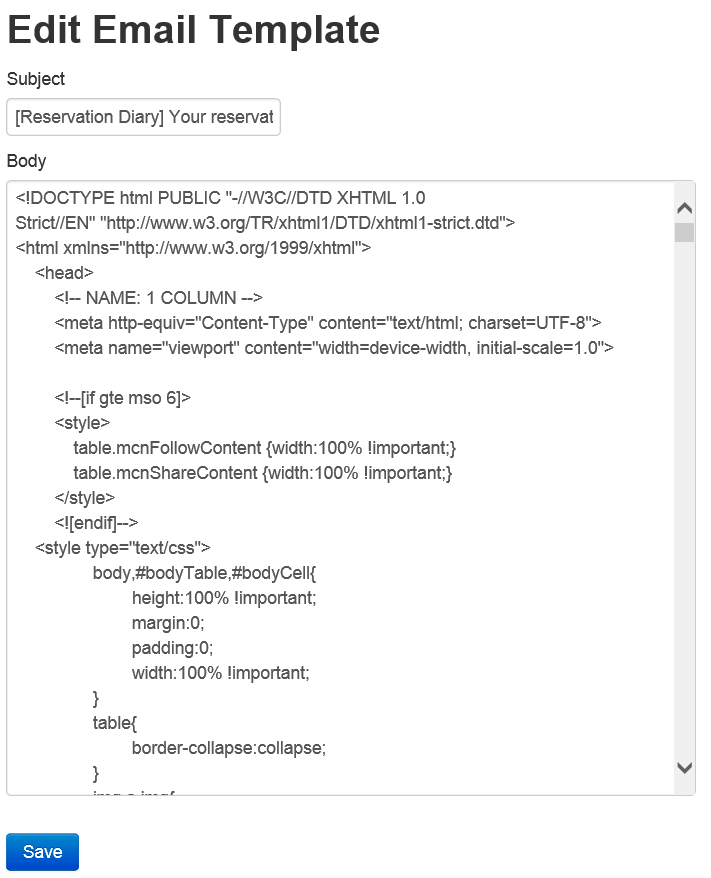
Email template customization for all supported languages
Plugin and addonds can be purchased from our landing page. Open landing page.
Additional services (by request)
Use your Facebook account for your business. Make clients from your Facebook fans. View presentation.
We can offer you white labeled restaurant reservation application for Facebook Application, iPhone/iPad Application, Windows Phone Application or Android Application. Please send request by email: info@reservationdiary.eu or through our contact form: reservationdiary.eu/contact
Enhance your business experience by using our Facebook integration service where we try to provide you with profile pictures of your customers if found. You can amaze your customer by knowing him by face when he visits you, especially at the time of first visit.
Do you want to know what your client thinks about his last visit? We will collect it for you.
Remind your customer about upcoming reservation via Email or by SMS. More information here: reservationdiary.eu/pricing
Collect pre-payment for reservations
Discouns per reservation module
Send birthday promotions or reminders to visit your restaurant again with MailChimp integration. More information here: reservationdiary.eu/pricing
If you are building a catalogue of restaurants and looking for the perfect reservation plugin for it, we can provide it to you. Just let us know through contact form: reservationdiary.eu/contact
Do you want to write your own module? We have an API. Contact us to get more information. Contact form: reservationdiary.eu/contact
Example of plugin first page installed into default theme. When plugin is activated, new "Reservation" page is created. Step 1: Requests from user to select reservation date and time, and number of seats. User has to click on a button "Check available time". System will query online database for available places at specified time and shows result.
Example of calendar control.
Example of time control.
Step 2: On this step user is requested to select available time if any.
Step 3: Once user selects available reservation time, user will be requested to fill reservation form with contact information and custom fields.
Reservation confirmation screen. At this time user has to receive confirmation email. Same time restaurant owner receives list of all upcoming reservations.
Setup screen with number of seats available, maximum persons per reservation, opening times and days of the week.
Setup screen with info on the restaurant including name, address, country, phone, email, URL
List of upcoming reservations on Mobile/Tablet PC (Available only for Basic package users). Demo version can be accessed by this link: Open demo version
Detailed reservation information on Mobile/Tablet PC (Available only for Basic package users). Photo is taken from Facebook public profile. Photo, Visits and Rating are available only by request.
Cancel reservation from Tablet PC version
Configuration for maximum available seats for online reservation by week day. (Available only for Basic package users)
Setting for custom fields that user should fill during reservation
List of Time shifts (Available only for Basic package users)
Open/close time for time shift (Available only for Basic package users)
Time before reservation for time shift by weekday (Available only for Basic package users)
Step 1: Select place, date and time (Multiple places available only for Basic package users)
Blocked Time list. (Available only for Basic package users)
Edit Blocked time. (Available only for Basic package users)
Step 1: Setup Goal with Google Analytics Tracking Code (google analytics/Conversions/Goals/Overview/Set up goals/New goal).
= 24.0422
* Support for multilingual text in message for large groups and fully booked message
* Updated catalan translation
* Fixed issue with changing and modifying places
= 24.0303
* Fixed XSS vulnerability injection in admin panel
= 24.0128
* Added option to control if reason is required when guest is canceling reservation
= 23.1219
* Added more options to alternative time step, 10 min and 20 min
= 23.1124
* Added open time validation settings
* Hide unnecessary form elements for cancel reservation, when one required fields is filled in
= 23.1106
* Removed nonce check for reservation form
* Improved admin setting form validation
* Added subscribe to newsletter box
= 23.0926
* Email Sending Update: Now, when an email is sent, the plugin will use the email address configured in the plugin settings instead of the WordPress admin email.
* Enhanced Welcome Page: We have enhanced the welcome page to include convenient links for obtaining personalized assistance and connecting with us through our social channels.
* Admin Settings Page Makeover: The admin settings page has been given a fresh, redesigned look for improved user experience.
* Translation Support: We’ve introduced support for a translation folder located outside of the plugin. This means that with each update, your translations will remain intact, ensuring a seamless multilingual experience.
= 23.0907
* Added Lithuanian and Latvian languages. Updated French translation
* Added Select place option when there more than one restaurant
= 23.0629
* Fine tuned registration flow
* Added collecting feedback about reservation experience and plugin usage for future plugin improvements
* Fixed security finding
* Added nonce check for CSRF
* Added permission check for changes in admin settings
* Added page to reconfirm reservation by guest before on a day of visiting restaurant
23.0211
Added support for reservation duration when there are multiple restaurants on one page
23.0123
Fixed bug: After first plugin installation generate API Key by email gives an error.
Fixed bug: When calendar is in popup mode, and dates are loaded, then the user has to open it again.
Fixed bug: After installation, by default reservation page does not show success page.
After installation by default calendar is click to show, changed to show always.
Timeshift normal mode is hidden for new installations
TimePicker type setting is hidden for new installations
Fixed bug: Cancel reservation error in wordpress.
Pre-selection of the country in the settings after the first installation.
Fixed bug: When saving settings after installing the plugin, an error occurred.
22.1130
Reverted settings block with time shift
22.1117
Fixed calendar to disable closed days
22.1018
Fixed custom fields appearance
Fixed hide steps setting default value
Updated Spanish translation
22.1017
Added support for discount addon
Changed date parsing from gmdate to date
Changed the way local time is obtained
22.1016
fixed date format when submitting waitlist form
split into multiple files so that loco translate picks files that is less than 100kb
added separated setting for email via SMTP
removed session init
updated calendar to show fully booked days
check box custom fiels extended to have default values
changed order between date and guests
fixed option to collect phone number with country code
added possibility to define later reservation time in minutes, hours and days
22.0322
fixed reservation form for iPad and Safari browser
22.0303
fixed date bug in wait list
updated local time preview in admin settings
added video for Reservation Form settings and Reservation settingsadded video for Reservation Form settings and Reservation settings
added more videos for settings
added support for flexible reservation duration time per time block
updated time format on modify reservation page
21.0819
Added First/Last name enable option
Added Phone number country flag disable options
Updated/Shown ‘End reservation time’ front end during reservation
Added video instructions
Added link to documentation
Reorganized place reservation settings
21.0601
Renamed Upcoming to Waiter Dashboard
Added return back to WordPress admin dashboard from Basic package settings and Waiter Dashboard
21.0524
Updated custom fields
Added new custom field Birthday for using in promotions
Fixed new key warning
21.0503
Removed unneeded folders and files
Removed settings iframes
Removed diagnostics data collection
Added data sanitization
Updated calling of files locations
Renamed constants to plugin specific
21.0426
Fixed XSS vulnarability
21.0307
Added Català language
Added link to videos
Updated German translations
Sorted admin settings
Added information where reservation was created
Fixed session creation
20.0810
Select number of guests instead of pre-selected value
20.0727
Settings to set max time before reservation in hours and days
Custom fields as dropdown and options
20.0608
Fixed date format when changing places
Added option to show seats left when time is selected
Extended size in database for custom fields
20.0516
Added edit reservation form
Fixed entry to wait list
Save custom field to local database
20.0402
Save reservations to local database
International phone number selection
Added captcha
Added children drop down
Allow to customize fully booked message
Improved first available date selection
Allow to enter into waitlist when part of the day is closed
20.0315
Added login via social network accounts on reservation form
20.0312
Fixed cancel reservation form
20.0229
When plugin is not working user can send direct email to restaurant
Fixed custom fields issue when there are multiple restaurants
Added option to enable/disable cancel reservation form
Improved reservation form auto-complete
Moved logic of showing available times to script
19.1220
Added support to override default reservation confirmation page
19.1126
Fixed blocked dates with new line in reason
19.1030
Added field for time to wait list form
19.1003
Fixed issue with waitlist and gdpr checkbox
Fixed blocked dates when ‘ is included in reason
19.0914
Removed extra slash from path
Fixed wait list to not pickup custom fields validations
Blocked wait list for current day
Added support for overriding frontend file and styles file from current theme directory
Added phone to wait list
Added GDPR checkbox to wait list
19.0513
Added Wait List feature, that allows guests to enter their information when fully busy
19.0302
Excluded custom fields from printing when specified
19.0224
Added tool tip to calendar for disabled dates
Replaced Email field to Email, Phone or Name on cancel reservation form
Allow to pre-populate fields in reservation form from the link
Added new parameter to custom fields to exclude parameter from printing
Added possibility to change API key
18.1003
Improved reducing number of seats without losing reservations
18.0610
Fixed updating disabled dates in calendar when place is changed in dropdown
Changed “allow to contact by SMS”, “Send newsletter and promotion”, “Reminder” checkbox default values to unchecked to comply with GDPR
18.0322
Fixed issue with missing custom fields
18.0225
Added specific field types for SMS/Email reminders
Added more strict validation for Phone number
17.0114
Fixed check of available time when minimum number of guests is more than one
Added reservation number to thank you page
Disabled in calendar non-working days. Limited calendar max time to 1 year.
Added support for manual reservations
Added Norwegian translation
Scroll to top of the form instead of page to support single page sites
Added no translate directive to fix Google translate issues
15.0422
Fixed cancel reservation with space in number
Changed country from free form field to dropdown
New variation is added to plugin, that displays all possible times for selected date
Updated list of languages and translation
Added diagnostics for installation troubleshooting
Added support for translation to Upcoming Reservations TabletPC version
Added description to each setting
Added widget to collect new feature requests
Disable blocked dates in calendar
Added list of reservations
14.0904
Extended view for basic package settings
Removed warnings
Improved error handling during first registration
Added support for Email CC for reservation notifications
14.0630
Limit maximum time before reservation
Fixed warnings
Fixed upcoming reservation list
New style for upcoming reservation email
Increased time out for API call
Added check for comments size
14.0511
Added settings to select Min and Max party size
Added message to client when he select Large group
Added setting to specify alternative time step
Added Portuguese (Brazil) translation
Added Swedish translation
Fixed multi language support
Fixed time displayed in drop down
Removed line brakes from javascript to prevent WordPress inserting p elements there when content formatting is turned on
Removed direct dependency from curl library
Added Google Analytic Tracking Code to thank you page
Add extra attribute to br to prevent controls displacement
Added ability to cancel reservation by client
Added possibility to override errors returned by API
New client reservation confirmation email template
14.0221
Added alternative time picker for better reservation time selection on mobile devices
Added limits to text areas
Moved all texts to language files
14.0114
Added support for multiple places (for basic package users)
Added better error handling to Admin console
Changed style of confirmation message
Scroll up page to confirmation message
Set calendar style to display on top of all elements
Moved cancel functionality to separated Tab
Fixed double click on reservation
Fixed manual date input
13.1022
Added setting for maximum persons per reservation
Added support for custom fields that user should fill during reservation
Added Polish language
13.0919
Added Portuguese language
Added German language
Refactored calendar localization support to work on PHP 5.2 version
Improved error handling
13.0817
Added calendar localization support
13.0815
Added cancel reservation from admin panel
13.0716
Added possibility to specify date format in emails
Added to configuration reservation duration time
13.0625
Added timezone support
13.0618
Fixed problem with double escaping of ‘ or \ symbols
13.0530
Added Dutch translation
Added Danish translation
Added Spainish translation
13.0505
Added support for different time formats
13.0406
Added French translation
Added possibility to provide Short and Full description about restaurant
Added language selection for emails that are sent to administrator
Added configuration of minimum time in hours before reservation
13.0316
Fixed incompatibility with plugins that resides on same page
Added multi language support to reservation form
Added translations on Russian and Estonian
13.0302
Fixed incompatibility with some themes
13.0203
Changed persons from free form text to drop down
When user changes date, time or number of persons, form is closed and user has to check reservation availability with new form data
Added required field validation on a client side
When fully booked added information message
13.0128
Added settings saved message box to admin page
Added check box that asks for permission to publish restaurant details into reservationdiary.eu catalogue
Fixed pre populating of URL field in admin page
13.0119
Updated reservation confirmation text
Selected reservation time highlighted with bold style
Added loading icon
Applied time zone of the general WordPress settings