
A simple audio player for WordPress, rendering a fully standalone app in a clean, dedicated page.
Radio Player Page gives each of your radio stations its own player page: a standalone player at the URL of a page you choose.
Add your radio shows and a weekly schedule, and the player shows what’s on air and what’s up next. Listeners can also open the full schedule and its radio shows from the player. Three blocks bring the same information to the rest of your site.
Player pages
- Standalone player page – Each station plays on its own WordPress page, with its own URL. The page skips your theme and other plugins’ scripts and styles, so they can’t break playback.
- Stream formats – Icecast, Shoutcast, MP3, OGG, HLS (
.m3u8), and DASH (.mpd). The player detects the format from the URL.
- Always live – After a pause, Play returns to the live broadcast. If the stream drops, the player reconnects on its own and only shows an error if it can’t.
- No tracking – The plugin doesn’t track listeners or load anything from third-party services. The player only connects to your site and to the streaming server you set.
Radio shows and schedule
- Radio shows – Reusable radio shows with an image, a description, and their broadcast times.
- Weekly Schedule – Build each station’s week from your radio shows, with time slots that can cross midnight. The plugin prevents overlapping time slots.
- On air and up next – The player shows the radio show on air and announces the next one when it starts within 10 minutes, in the station’s time zone.
- Reruns – Mark any time slot as a rerun. Listeners see the marker in the player and in the schedule.
- Station Time – When the station’s time zone differs from the listener’s, the player shows the station’s local time and the difference.
Station management
- Station branding – Give each station its own logo, background image, color scheme (eight to choose from), and visualizer. You can also hide the station name in the player.
- Welcome Audio – Optionally upload an MP3, such as a station ID or a greeting, that plays once before the live stream, the first time a listener presses Play. It can’t be paused or skipped.
- Test Stream – Check the streaming URL from the station edit screen. The plugin finds the stream behind a playlist or a server page and tells you what to fix.
Listener experience
- Audio visualizers – Five real-time visualizers: Oscilloscope, Bars Spectrum, Amplitude Waterfall, Amplitude Bars, and Spectral Particles. They need a stream that allows cross-origin access (CORS).
- Current song – Optionally show the song your streaming server reports, below the station name.
- Lock screen and media controls – The station name and logo appear on the lock screen, and listeners can play and pause from headphones, keyboards, and other media controls.
- Sleep timer – Listeners can stop playback after 30 minutes, 1 hour, or 2 hours.
- Sharing and search – Open Graph metadata for social sharing and schema.org structured data for search engines.
- Accessible and translated – The player works with a keyboard and screen readers, and follows your site’s language, with translations for 12 languages included.
Screenshots

Oscilloscope visualizer in blue.
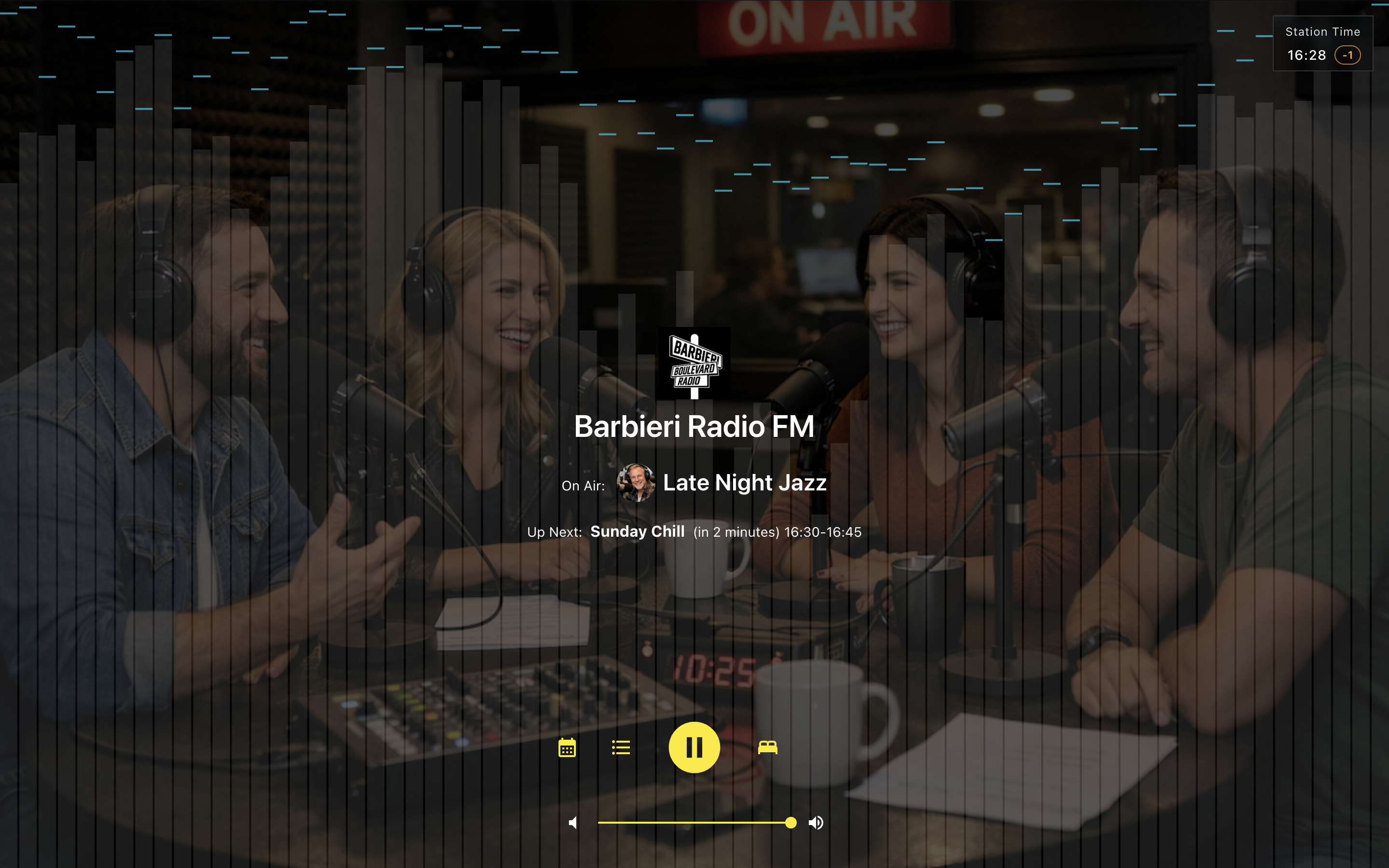
Bars Spectrum visualizer and Station Time in yellow.

Amplitude Waterfall visualizer and sleep timer countdown in green.

Amplitude Bars visualizer in red.

Current song, with the station name hidden, in black and white.

Weekly Schedule dialog in pink.

Radio Shows dialog in orange.

Safari on iPhone, with a static animation instead of the visualizer.

Station name and logo on the iPhone lock screen, with play and pause controls.

Radio Station edit screen: Streaming URL with Test Stream, Player Page, branding options, Welcome Audio, and Player Display.

Radio Station edit screen with the Weekly Schedule, its time slots, and reruns.

Radio Show edit screen with the descriptions and the Radio Show Image.
Do I need to configure anything on the WordPress page?
No. Choose the page in Player Page on the station edit screen, and the plugin shows the player at that page’s URL instead of your theme. The page’s own content isn’t shown, so an empty page works best. The page must be published and can’t be password protected or your site’s posts page, and each page can be used by only one station.
Which streaming URL do I use?
Use the address of the audio stream itself, not your station’s website. It’s usually the “Listen” link of your streaming server or control panel:
- Icecast: the URL of a mount point, for example
https://example.com:8000/live.
- Shoutcast: version 1 servers need
/; after the port. Version 2 servers use /stream or /;.
- AzuraCast, Centova Cast, and other control panels: the station’s stream or listen URL.
Not sure? Paste the playlist link from the “Listen” button (.pls or .m3u) or the address of the server’s status page, and click Test Stream next to the field. The plugin finds the stream and offers it with Use This URL.
What does Test Stream connect to?
Nothing is tested until you click Test Stream. Then:
- Your WordPress server requests the URL you entered and, only when needed, the Icecast
status-json.xsl on the same server and the https:// version of an http:// URL. Each request follows up to three redirects and sends your site’s address as its origin.
- When needed, your browser loads the stream without playing it (and tries once more without cross-origin access if the first try fails) or, for HLS and DASH, loads its manifest.
If a stream fails on the player page, administrators see why under the error message, with a link back to the test. Listeners see the usual message.
Why doesn’t my stream play, or why don’t I see the visualizer?
The player first loads the stream with cross-origin access (CORS) so the visualizer can read the audio. If your streaming server doesn’t allow it, MP3 and OGG streams still play, with a static animation instead of the visualizer. HLS and DASH streams from another domain need CORS on the streaming server to play at all (except native HLS on iPhone and iPad). An http:// stream is blocked on an https:// site; the station edit screen warns you about it, and Test Stream tells you what to fix. Safari, any browser on iPhone or iPad, and “reduce motion” also show the static animation instead of the visualizer.
Why doesn’t the current song show?
Show current song is off by default. To turn it on, select it on the station edit screen. Then, while the live stream plays (not the Welcome Audio) and the page is visible, each listener’s browser asks your streaming server for the current song:
- MP3 and OGG streams: the server’s Icecast
status-json.xsl every 20 seconds or, if that fails, the song information inside the stream every 30 seconds. On some servers, each of these lookups counts as one more listener.
- HLS streams: the song comes in the stream’s ID3 tags, with no extra requests.
- DASH streams: the song isn’t shown.
These requests only go to the stream’s own server. The song only shows if the server reports it and allows cross-origin access (CORS), which many hosting providers and Shoutcast servers don’t. An http:// server is never asked from an https:// site.
Can I use this for commercial radio stations?
Yes. The plugin is free and open source (GPLv2 or later), so you can use it for commercial and non-commercial radio stations.
Where can I get support or report issues?
Ask in the support forum for help, feature requests, and bug reports.
Where can I view the full source code?
The full source code, including the player and its build tools, is on GitHub.
ChangeLog
3.7.0
- Added the Amplitude Bars visualizer: rounded bars that show the stream’s loudness as they scroll to the left.
- Improved the broadcast times in the Radio Shows dialog and the RPP: Radio Shows List block. They’re grouped by days, for example, “Monday to Friday, 06:00 to 10:00”. In the dialog, they’re collapsed, except for the radio show on air, and show when each one next airs.
- Fixed a focus outline that showed on buttons clicked with a mouse. It still shows when you use the keyboard.
- Added a dismissible invitation, shown to administrators through January 30, 2027, to an optional, anonymous community survey. The plugin sends nothing about your site to the survey.

