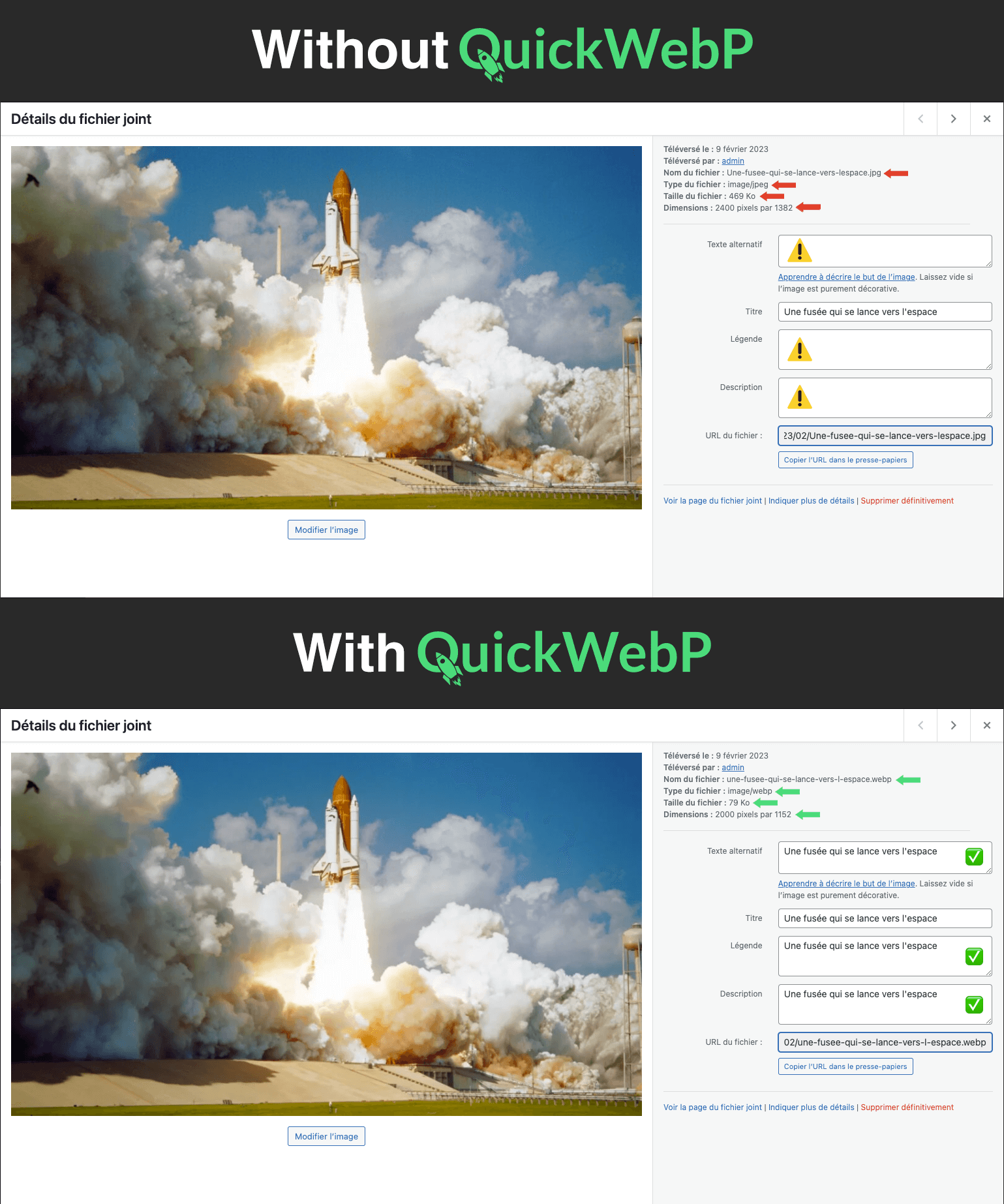
QuickWebP is an image compression and optimization plugin for WordPress that automatically converts images to WebP when they are uploaded to the media library. It also optimizes the image to improve your site’s performance. The plugin also renames the image file to the WebP format and cleans up the file name for better SEO. Additionally, the plugin uses the cleaned up name to pre-populate the alt, caption, description, legend, and title metadata, making image management on your site easier. You can also set a maximum width and height for the image, which will automatically resize it if necessary. No API is required and the plugin is completely free, with no subscriptions or additional fees.
Features
Automatically converts images to WebP format when uploaded to the media library
Optimizes images for improved site performance
Renames image files to WebP format and cleans up file names for prevent special characters (ex : “Clé d’identification.jpg” becomes “cle-d-identification.webp”)
Pre-populates image metadata (alt, caption, description, legend, and title)
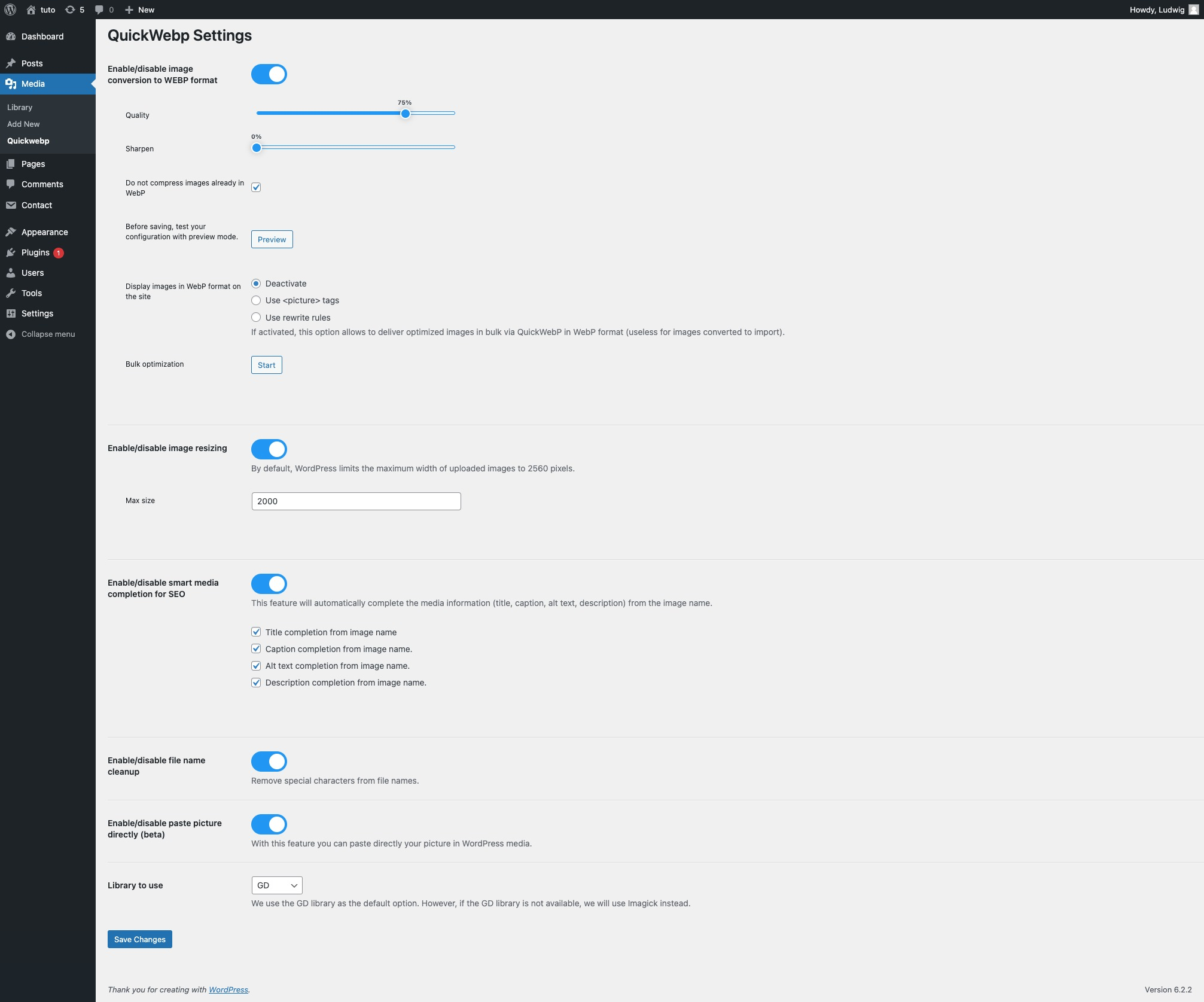
Allows for automatic image resizing based on maximum width and height (by default max 2000px)
No API required for convertion and optimization
Entirely free, with no subscriptions or additional fees.
Directly paste image from clipboard or software like Photoshop (CTRL + V OR CMD + V) directly into the WP Media Frame.
Select library for images to convert to webp (GD or Imagick).
Bulk convert images to webp format and preserve original images (for old media on your website).
Preview image optimization in settings for better optimization.
Demos
How to install QuickWebP
Paste an picture from clipboard to wp media easily
The extension converts the uploader image to webp format and replaces it with the webp image.
The extension does not replace existing images. If you want this functionality you can contact us.
Can I resize my images with this extension?
Yes, you can configure it in the Resize tab.
Can I change the compression setting to save more space?
Yes, by default we set it to 75 but you can change that in the plugin settings.
Do you use the Imagify API, tinyPNG or other?
No, we do not use an API to compress images. Everything is done locally on your server at the time of upload.
Can I use this extension with a CDN or with a caching plugin?
Yes, you can use this extension with a CDN or caching plugin such as WP Rocket, W3 Total Cache, WP Super Cache, etc.
What image formats are supported?
Supported image formats are: JPG, PNG.
Does Quick WebP improve the performance of my site?
Yes, QuickWebP improves your site’s performance by converting images to WebP format. Your images will be lighter and faster to load.
How does QuickWebP help me with SEO?
QuickWebP makes SEO easy by automatically renaming image files to a clean, SEO-friendly filename when uploaded to media. It also uses this clean filename to pre-populate alt, caption, description, caption, and title metadata, which can help optimize image visibility on search engines. Additionally, by converting images to WebP format, QuickWebP can improve your site’s performance, which can also contribute to better SEO rankings.
Does QuickWebP work with other plugins?
Yes, QuickWebP works with other plugins. It is compatible with most caching plugins, such as WP Rocket, W3 Total Cache, WP Super Cache, etc. It is also compatible with most CDN plugins, such as Cloudflare, MaxCDN, etc.
Does QuickWebP work with all themes?
Yes, QuickWebP works with all themes. It is compatible with most themes, including the most popular ones, such as Astra, OceanWP, GeneratePress, etc.
Does QuickWebP work page builders?
Yes, QuickWebP works with page builders. It is compatible with most page builders, including the most popular ones, such as Elementor, Beaver Builder, Divi, Visual composer(WPBakery), Oxygen Builder, Gutenberg, Thrive Architect, Brizy, Live Composer, etc.
Does QuickWebP work with WooCommerce?
Yes, it works with WooCommerce.
Does QuickWebP work with SEO plugins?
Yes, it works with SEO plugins. It is compatible with most SEO plugins, including the most popular ones, such as Yoast SEO, All in One SEO, Rank Math, SEOPress, etc.
From where can i copy the images to paste?
You can copy the images from any software like Adobe Photoshop & Illustrator, GIMP, Canvas, Screenshot, Affinity Photo & Designer, a webpage, Finder, etc.