
Poweruser settings for Elementor to improve your workflow
Add special settings, cloning of pages,posts/templates in Elementor. Align 3 or 4 widget buttons instead of only 2, remove the widget name and replace it with a tooltipp and remove standard WorPress widgets. Clone your post,pages and templates directly from Elementor and open it. You also can rename the post_name which mostly is used to create the permalink of your page.
If using favorite widgets, you can save them extern and retrieve them on any other installation with Elementor and Qanva Power Tools.
Screenshots
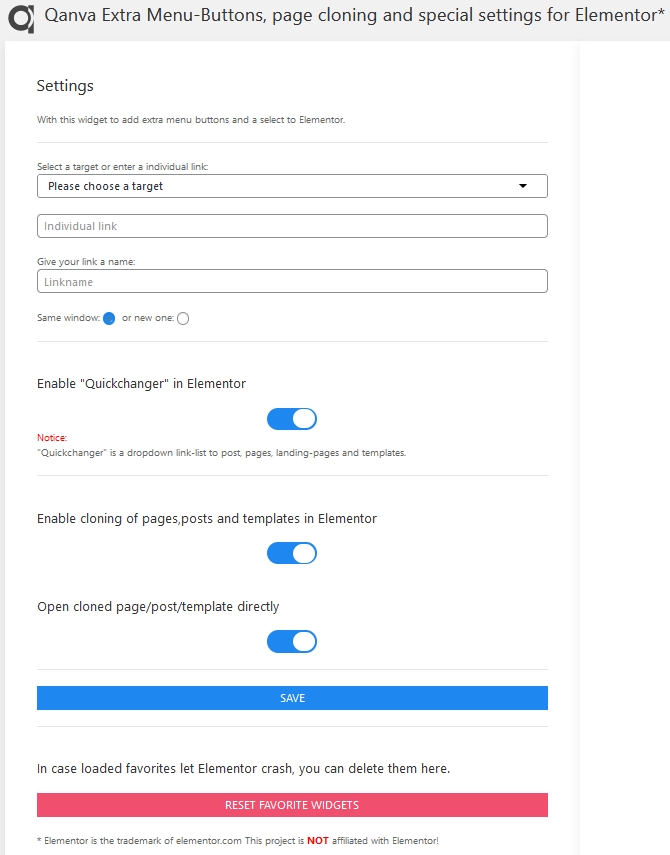
Settings for extra buttons, Quickchanger (open post,pages and templates direct from Elementor) and cloning.

Quickchanger and cloning button in Elementor panel

Open modal for selecting, renamimg of clone and cloning action.

Special settings in Elementor panel: remove widget names, show names as tooltipp, how many columns for the widgets and hiding of WordPress widgets. Change the permalink name and saving/ retrieving favorite widgets.

The new arranged Elementor widget panel.
1.0.0
Release version
1.0.1
Bugfix regarding Quickchanger
1.0.2
Fixed CSS files
2.0.0
Store your favorite widgets and reset in case of problems
2.1.0
Added removing double appearance of favorite widgets
Added auto amount of widgets on panel resizing
2.1.1
Option to save and retrieve favorite widgets optimised
2.2.0
Added function to remove Google fonts and Fontawsome from frontend
- Add special settings, cloning of pages,posts/templates in Elementor. Align 3 or 4 widget buttons instead of only 2, remove the widget name and replace it with a tooltipp and remove standard WorPress widgets. Clone your post,pages and templates directly from Elementor and open it. You also can rename the post_name which mostly is used to create the permalink of your page.
If using favorite widgets, you can save them extern and retrieve them on any other installation with Elementor and Qanva Power Tools.

