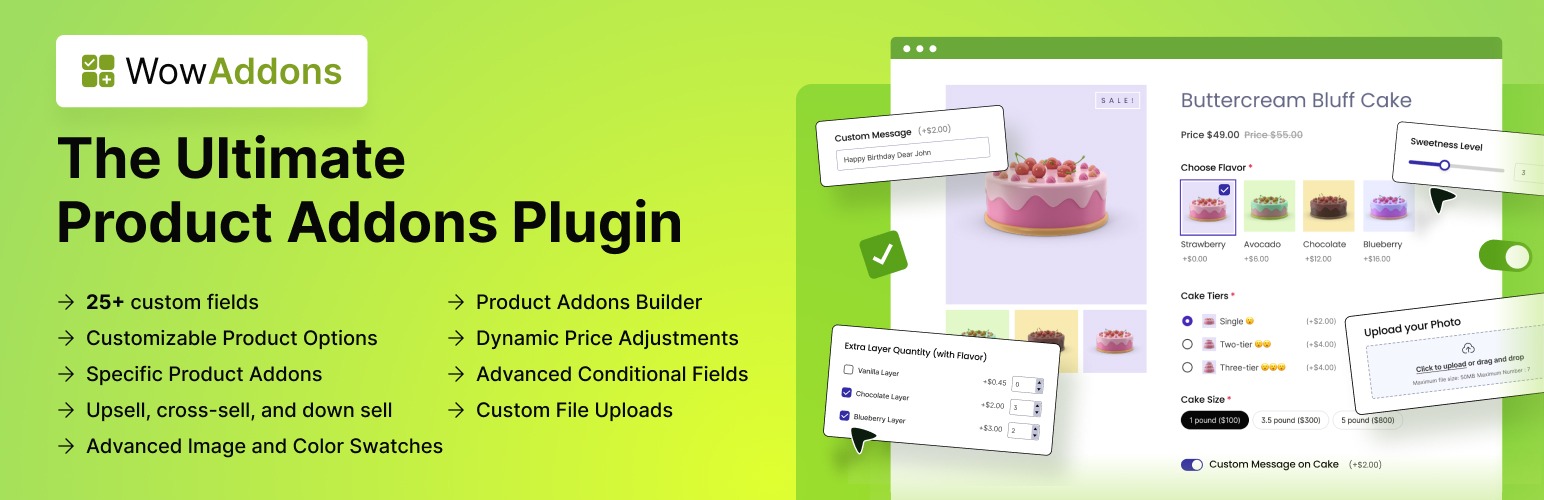
???? The Ultimate Product Addons Plugin – With UX That Wows.
???? Other Plugins Add Options. We Add Revenue.
???? A WPXPO Plugin Trusted by 65K+ Businesses.
Simplify product customization with our product addons plugin for WooCommerce! Build extra product options, including radio buttons, checkboxes, dropdowns, file uploads, sliders, date, time, and more with our state-of-the-art product addons customizer.
Allow customers to purchase items tailored to their needs while upselling through priced product addons. With advanced conditional logic and a lightweight design, our options plugin is perfect for upselling and cross-selling. Try the WowAddons now and create a standout shopping experience!
Watch the Plugin in Action – Know the Power of WowAddons!
How is it Useful?
Buyers want freedom of choice – they want product options that work for them. WowAddons helps you achieve this goal.
With the advanced custom product fields, you can offer any type of personalized product to your customers. Also, the conditional logic settings will help you make personal adjustments, helping you offer products to buyers without hassle!
Learn how easy it is to add custom product add-ons to your WooCommerce store!
Free Product Addon Fields in WowAddons
WowAddons includes a wide range of product addons in the free version. You can use these fields to collect customer input, create selectable product options, organize addon layouts, and add custom content to WooCommerce product pages.
✅ Text Field: Collect short text input from customers.
✅ Number: Let customers enter numeric values.
✅ Text Area: Collect longer text or custom instructions.
✅ Email: Add a field for customer email addresses.
✅ Telephone: Collect phone numbers with a dedicated telephone field.
✅ Range Slider: Let customers select a value from a defined range.
✅ Radio: Create single-choice product options.
✅ Checkbox: Allow customers to select one or multiple options.
✅ Switch: Add toggle-style product options.
✅ Dropdown: Display product choices in a dropdown menu.
✅ Color Picker: Let customers choose a custom color.
✅ Upload: Allow customers to upload images, documents, or other supported files.
✅ Content: Add custom content within your product addon layout.
✅ Date & Time: Let customers select dates and times.
✅ Popup: Display additional content inside a popup.
✅ Section: Organize addon fields into sections.
✅ Separator: Visually separate different groups of product options.
✅ Spacer: Add spacing between addon fields and sections.
✅ URL / Link: Collect URLs or links from customers.
✅ Shortcode: Display shortcode-generated content within the addon layout.
Pro Product Addon Fields in WowAddons
WowAddons Pro adds additional fields for more advanced product customization and pricing requirements.
⭐ Font Picker: Let customers choose from available font options.
⭐ Advanced Formula: Calculate addon pricing or values using custom formulas.
Advanced Features from WowAddons Pro
WowAddons Pro adds advanced controls to product addon fields, giving you more flexibility over pricing, option presentation, customer input, and field behavior.
⭐ Formula Value: Calculate a field’s price using your own custom formula.
⭐ Same Price: Apply the same price to every option in a field at once.
⭐ Option Images: Add thumbnail images to individual options so customers can see what they are selecting.
⭐ Sale Price: Set discounted prices for individual product addon options.
⭐ Option Descriptions: Add short descriptions or tooltips to individual addons.
⭐ Quantity Selector: Let customers choose a quantity for a product addon.
⭐ URL Key: Pre-fill supported product addon fields directly through the product URL.
⭐ Disable Next N Days: Prevent customers from selecting upcoming dates within a specified number of days.
⭐ Repeatable Section: Let customers repeat the same group of product addon fields multiple times.
⭐ Image Preview: Show a live image preview when customers select supported product options.
Why Use WowAddons Product Options Plugin for WooCommerce?
Show Options – for Any or All Products
Assign extra product options to specific products, categories, or all products instantly with WowAddons’ flexible product customizer.
It’s a Next-Gen Product Customizer
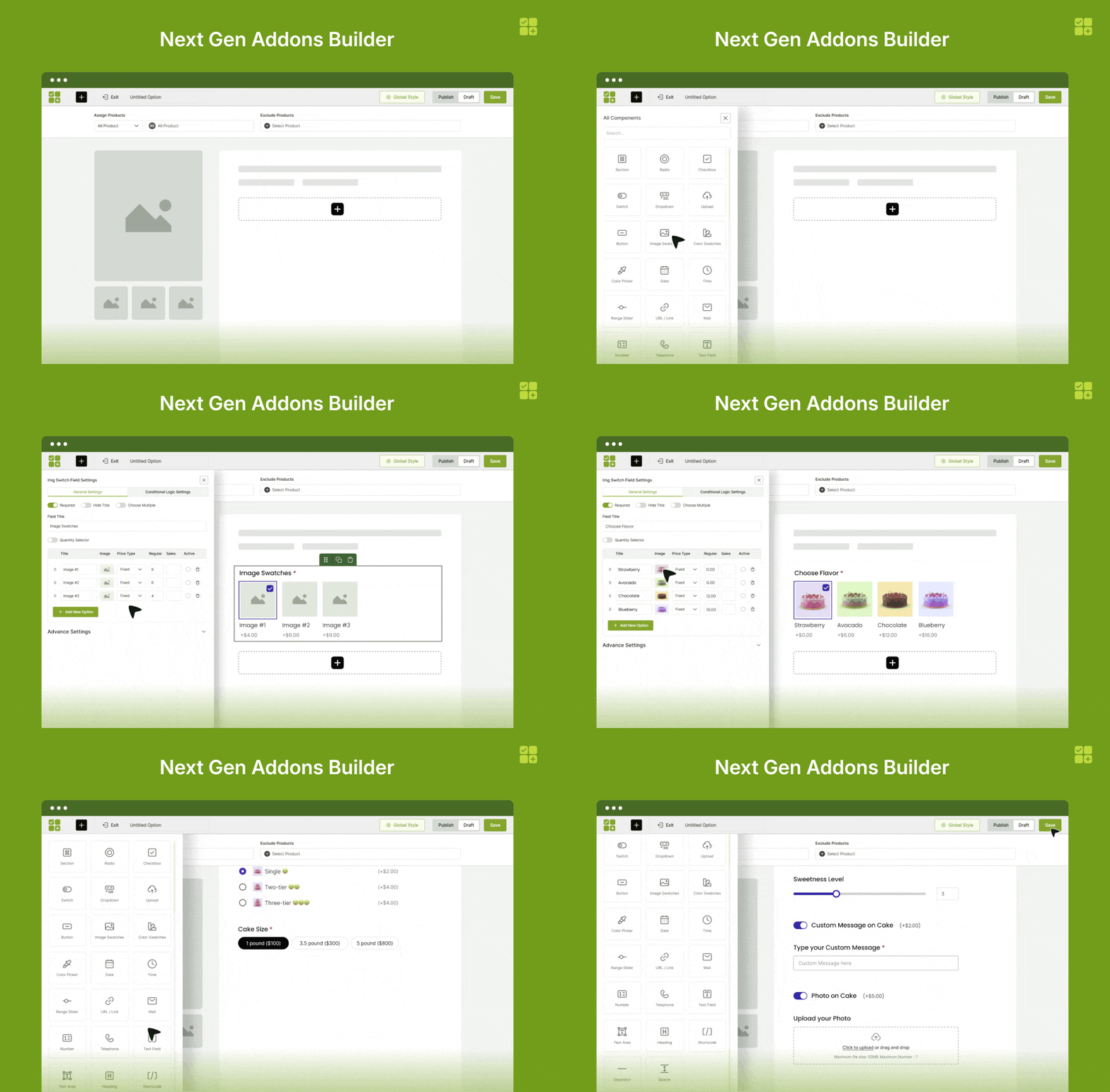
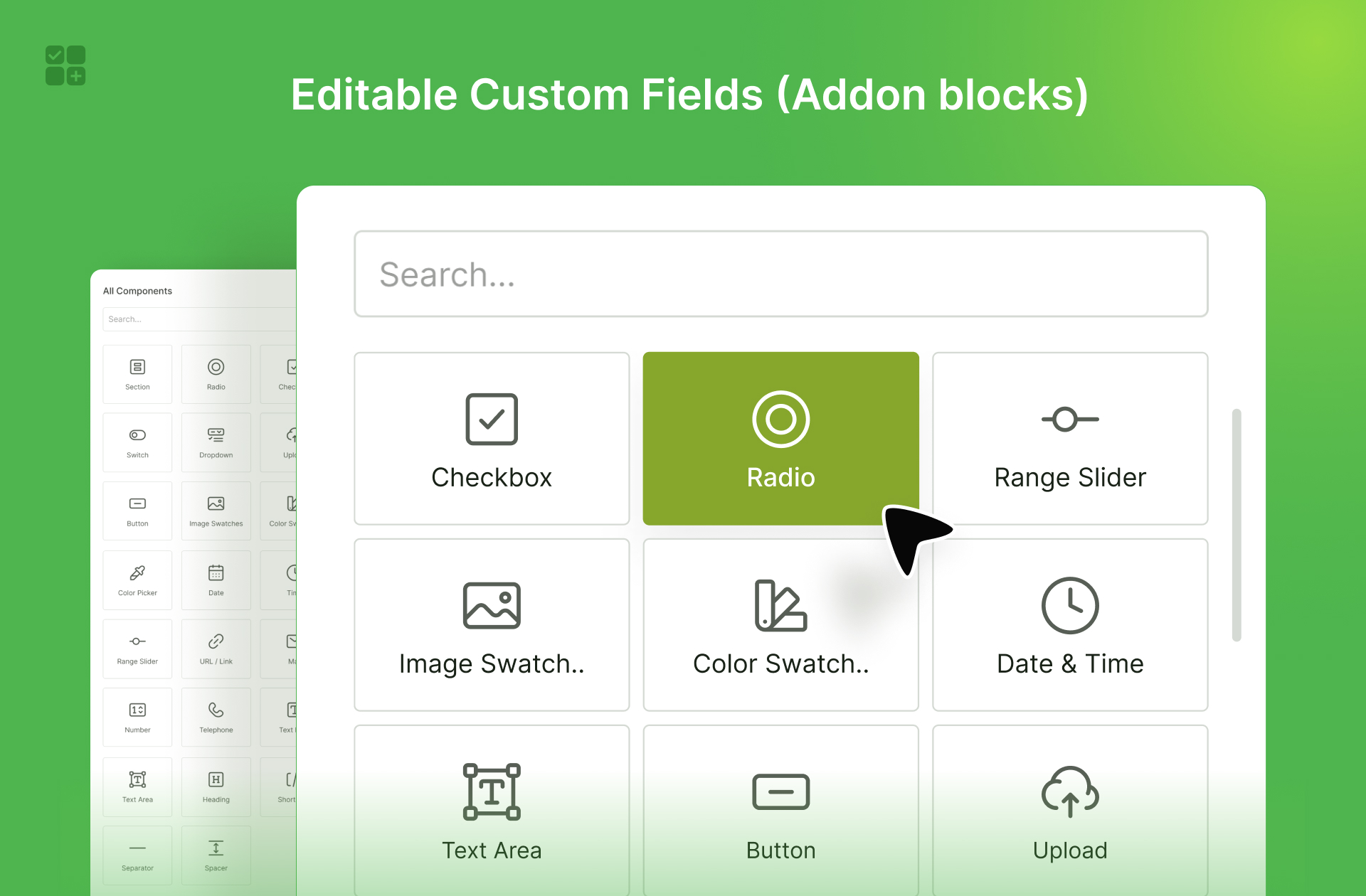
WowAddons’ intuitive builder simplifies adding product options in WooCommerce. Choose components from the addon picker view to create custom WooCommerce Product Fields effortlessly.
Dynamic Price Adjustments
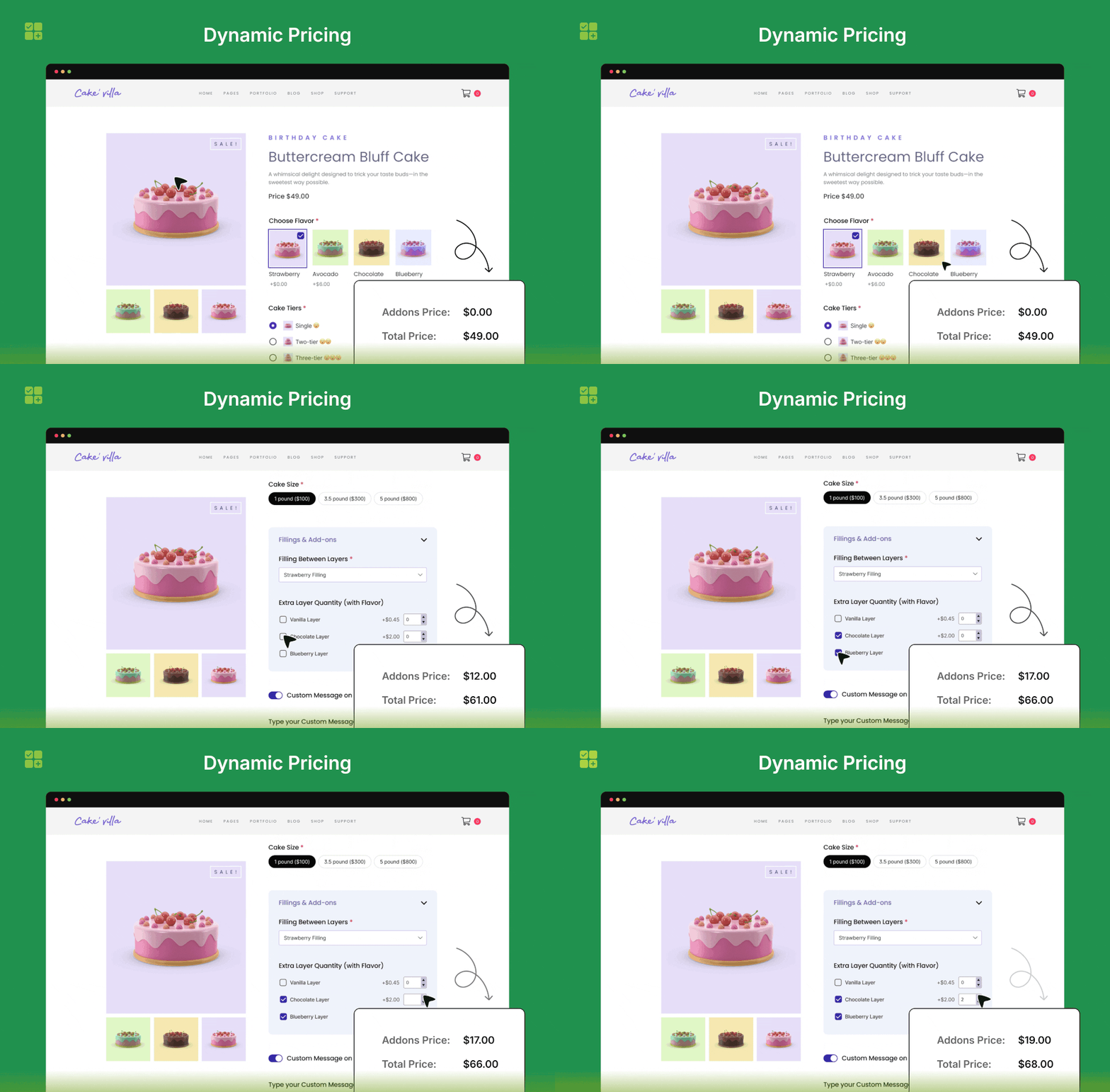
Charge for WooCommerce product options with regular or sale prices. Product pricing changes dynamically based on the selections.
Custom File and Image Uploads
Enable customers to upload images or files – if you’re running a printing business, you can let users buy shirts, mugs, etc., with the WowAddons product addons plugin.
Create Fields with Advanced Conditional Logic
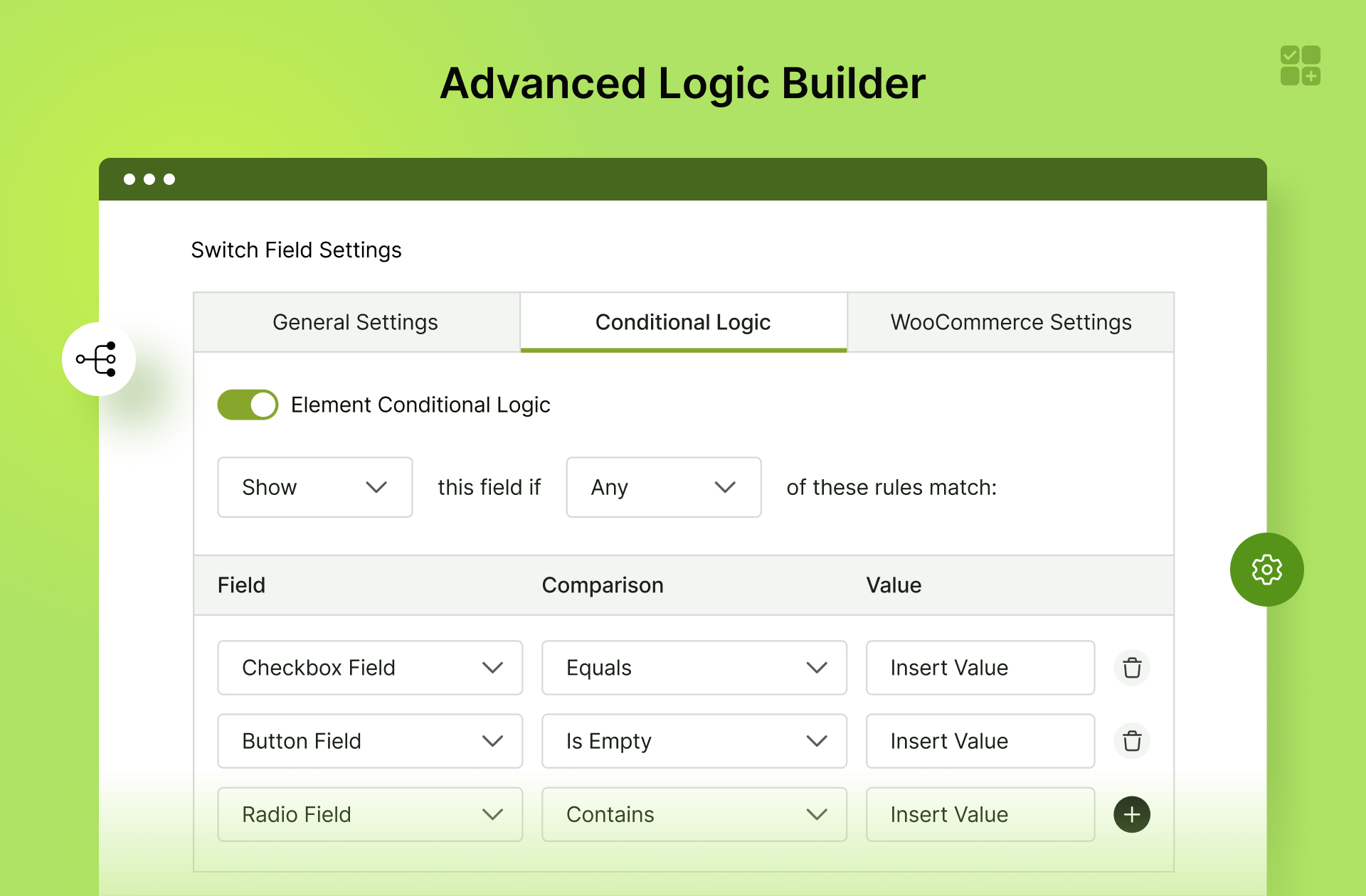
Show or hide fields based on selections! Creating dynamic, engaging product fields for shoppers is super easy with WowAddons.
Here’s another great video on the ins-and-outs of the features of WowAddons. It’s going to give you a 360-degree view of the custom product fields offered by WowAddons:
More Wow Plugins by WPXPO!
Thank you for considering WowAddons. We have more plugins that can be beneficial for your business. So please have a look at our other plugins.
???? WowInvoice ????: A comprehensive PDF invoices & packing slips plugin for WooCommerce that automates documents like invoices, packing slips, and picklists.
???? WowShipping ????: Dynamically calculate shipping rates based on weight, quantity, product, categories, country, etc, allowing you to avoid undercharging and overcharging.
???? WowStore: The ultimate WooCommerce solution for building and managing eCommerce sites. Packed with features to enhance conversions and boost sales, it streamlines your store’s performance.
???? WowRevenue: The premier WooCommerce plugin for discounts, offering product bundles, BOGO deals, bulk discounts, and more. Increase order value and revenue with seamless bundle offers.
???? WowOptin: A cutting-edge plugin for creating opt-ins and popups to capture leads and drive sales. It’s Canva-like builder ensures quick, customized designs to meet your goals.
???? WholesaleX: An all-in-one WooCommerce solution for wholesaling, with features for B2B and B2C hybrid stores. Manage retail and wholesale effortlessly with advanced tools.
???? PostX: The top plugin for creating news, magazine, or blog sites. With PostX, build professional websites in three easy steps, enjoying complete customization freedom.
The JavaScript and CSS files in the plugin’s assets folder are compiled and minified. The human-readable source (React and SCSS, in the src folder) is publicly available at bitbucket.org/wpstabon/product-addons.
To build the assets from source, run npm install and then npm run build-cross in the plugin folder. The build uses @wordpress/scripts (webpack).
Licenses and copyright notices for the third-party libraries bundled in the compiled JavaScript are listed in third-party-licenses.txt.
External services
YouTube videos
Clicking a tutorial play button loads an embedded video from YouTube (Google). YouTube receives your IP, requested video ID, and browser metadata, and may use cookies under its policies. Viewing is optional and requires no account in this plugin. Terms and Privacy.
New: The Upload field shows a check mark when a file finishes uploading.
Fix: File uploads and the statistics counter keep working on product pages served from a page cache after the page’s security token has expired. They now use the standard WordPress REST nonce.
Fix: The Date Picker no longer stops working when its disabled weekdays or dates are not saved as a list.
1.9.1 – 19th November 2026
Update: The styles of the product page, cart and checkout are now generated by the plugin from your saved design settings. The plugin no longer stores CSS text sent by the browser. Existing designs keep their look.
Update: The statistics counter and the file upload, which are open to visitors, now check that the option set is published and shown on that product, count a visitor once per hour, and limit each visitor by number and total size of uploads. A cap on the temporary upload folder keeps it from filling the disk. Stores can change the limits with filters.
Update: The affiliate parameter is removed from upgrade links.
Update: The notice dismissal data uses WordPress’s own transient functions instead of direct database queries.
Fix: The builder screens now load every script they depend on.
Fix: Text shown in the builder, such as option names and rich content previews, is sanitized before it is displayed.
Fix: The character counters of the Text Field and Text Area fields work on servers without the mbstring extension.
Fix: The readme and privacy text now say that uploads that never reach an order are deleted after 365 days, as the plugin does.
1.9.0 – 22nd October 2026
Update: The Button, Image Swatches, Color Swatches and Products fields are removed from the plugin, with their builder settings, styles, product page scripts, REST endpoints, cart handling and the “Update product image” setting. They are provided by the Pro plugin as “Advanced” fields.
Update: The per-option “Hidden from customers” switch in the builder is removed, as it only existed to hold fields to the old option limits.
Fix: The server now checks what a customer posts against the saved option set. Choice fields are priced and labelled from the saved options, a required field must hold a value, and number, range and email values must be valid, so a hand-built request can no longer change an add-on price.
Fix: Folders for uploaded files are hardened the same way before and after an order, and the files ask search engines not to index them.
Update: The privacy text now says the optional tutorial videos load from YouTube, and that uploaded files are reachable by anyone who has the exact link.
1.8.5 – 6th October 2026
New: The add-on editor has separate Publish and Save Draft buttons.
Fix: The option REST endpoints now accept only option set IDs, so they can no longer read, change or delete other posts.
1.8.4 – 30th September 2026
Fix: Performance improvements.
1.8.3 – 27th September 2026
Update: The license page, the license expiry notice, the custom fonts page, the Advanced Formula and Font Picker fields, URL Key, the image preview of Radio, Checkbox and Switch options, and the builder controls for Pro settings are removed from the plugin. They are provided by the Pro plugin. The older Formula field is kept so Formula fields you already created keep working.
Update: Button, Image Swatches, Color Swatches and Products fields are no longer limited in how many options or products they show.
Update: Options that were hidden in the builder show a button to show them again.
Update: The builder and product page scripts have extension points (filters, actions and slots) that other plugins use to add settings, field types, dashboard pages and dashboard menu entries.
Update: The quantity input, formula values, category exclusions, repeatable sections and the Advanced Formula product values are removed from the plugin. They are provided by the Pro plugin.
Update: The deprecated Button, Image Swatches, Color Swatches and Products fields show a deprecation notice in the builder on every site. Fields made with the Pro plugin’s “Advanced” versions of these fields are only shown while the Pro plugin is active.
Update: The plugin’s admin script loads only on its own dashboard, and its product page styles no longer change the box sizing of the theme’s elements.
1.8.2 – 26th September 2026
Update: Premade templates are removed from the plugin.
Update: Assigning add-ons by specific tag or brand, Same Price, Option Descriptions, Term Exclusion, sale prices on options, the “disable next N days” date setting, and per unit, per word and per character (no space) pricing are now provided by the Pro plugin.
Update: The custom font endpoints and the Fonts menu entry moved to the Pro plugin, and Pro-only fields are no longer listed in the free builder’s field picker.
Fix: The Pro link text and URL shown in the plugin action links and the Pro submenu item are now escaped.
Fix: The assignment endpoint now rejects assignment types the plugin does not support before saving anything.
1.8.1 – 24th September 2026
Fix: Custom font uploads are now checked to be genuine WOFF, WOFF2 or TTF files before they are saved.
Fix: Add-on option IDs submitted when adding a product to the cart are now sanitized and validated against the product’s published add-ons.
Fix: Add-on selections, add-on product choices and image uploads submitted from the product page are now sanitized and validated.
Fix: Option sets, global styles, settings and assignment data saved from the admin editor are now sanitized field by field.
1.8.0 – 20th September 2026
Update: Compliance and code-quality updates to align with the WordPress.org plugin guidelines.
Fix: The upload cleanup schedule is now created on activation and removed on deactivation.
1.7.2 – 9th September 2026
Fix: Minor bug fixes and performance improved.
1.7.1 – 6th September 2026
Update: Polish to the Addons Builder — improved responsiveness, refined confirmation and onboarding modals and a unified template picker experience.
Fix: Date field’s Year dropdown could show years outside the configured minimum/maximum date range.
1.7.0 – 1st September 2026
Update: Redesigned the Addons Builder with a new field list view — drag and drop fields to reorder, move in and out of sections, checkbox multi-select, and quick edit/duplicate/delete actions.
1.6.21 – 30th August 2026
Fix: Minor bug fixes and performance improved.
1.6.20 – 24th August 2026
New: Added default country option for Telephone field.
Update: Improved system stability with better state management.
Update: Enhanced onboarding experience with a cleaner UI.
1.6.19 – 03rd August 2026
New: Option description for individual choices in Radio, Checkbox, Dropdown, Image and Color Swatches fields.
New: Unique URL key per field, so a configured product can be shared.
Update: Shop Managers can now create and manage addons.
1.6.18 – 26th July 2026
New: Guided tour for new users to help set up their first addon.
Fix: Product data tabs were hidden on the product edit page.
1.6.17 – 20th July 2026
Fix: Minor bug fixes and performance improved.
1.6.16 – 6th July 2026
New: Added repeatable option to Section field.
1.6.15 – 28th June 2026
Fix: File Upload issue stated by Security Researcher Haitam Lazaar.
1.6.14 – 18th June 2026
Fix: Performance Improved.
1.6.13 – 11th June 2026
Fix: Image gallery issue in XStore theme.
Fix: Image gallery issue in Phlox theme.
Fix: Image gallery issue in PopularFX theme.
Fix: Image gallery issue in Woostify theme.
Fix: Image gallery issue in Mr Tailor theme.
Fix: Image gallery issue in ShopKeeper theme.
Fix: Image gallery issue in The Retailer theme.
Fix: Image gallery issue in BeTheme theme.
Fix: Image gallery issue in Claue theme.
Fix: Image gallery issue in MartFury theme.
Fix: Image gallery issue in Basel theme.
Fix: Image gallery issue in Goya theme.
Fix: Image gallery issue in Konte theme.
Fix: Image gallery issue in Kalium theme.
Fix: Image gallery issue in WoodMart theme.
Fix: Compatibility with Tiered Pricing Table for WooCommerce plugin by Mykola Lukin.
1.6.12 – 08th June 2026
New: Added support for applying the same pricing across multiple selected fields.
New: Option to exclude specific product categories when assigning settings to all products.
New: Ability to disable options in Date & Time fields based on future dates (e.g., tomorrow).
Update: Compatibility with YayPricing – WooCommerce Dynamic Pricing & Discounts by YayCommerce.
Fix: Resolved popup opening issue.
Fix: Minor bug fixes and performance improvements.
1.6.11 – 20th May 2026
New: Premade Template System.
1.6.10 – 18th May 2026
Fix: Performance Improved.
Fix: Minor bug fixes and improvements.
1.6.9 – 12th May 2026
Fix: Required fields are now strictly validated before the Add to Cart action, preventing incomplete submissions.
Fix: Advanced Formula field pricing now updates correctly for fields that are conditionally shown or hidden.
1.6.8 – 6th May 2026
New: Image preview support for addons fields.
New: Default active options for Product Field.
Fix: Minor bug fixes and improvements.
1.6.7 – 29th April 2026
New: Unified Global Styling System.
1.6.6 – 21th April 2026
Update: WordPress Security issues checkup.
Fix: File Upload Progress Issue.
1.6.5 – 15th April 2026
Fix: Minor bug fixes and improvements.
1.6.4 – 8th April 2026
Fix: Performance Improved.
1.6.3 – 31th March 2026
Fix: Notice transient issue.
Update: Compatibility with Lasa theme.
1.6.2 – 12th March 2026
Fix: Speed Optimization.
1.6.1 – 9th March 2026
New: Advanced Formula Field.
1.6.0 – 2nd March 2026
Update: Refactored the Addons Builder to use native WordPress components for improved UI consistency and maintainability.
1.5.11 – 19th February 2026
Fix: Prevent add to cart conflict with Rife Free theme.
1.5.10 – 9th February 2026
Fix: Improved translation support for various text strings.
New: Product Attribute support in field conditions.
1.5.9 – 29th January 2026
Fix: Dropdown field default value issue.
1.5.8 – 26th January 2026
Fix: Field condition is not working properly for Select Field.
1.5.7 – 21th January 2026
Fix: Addons fields is broken in QODE Quick View for WooCommerce plugin.
Fix: Prevent add to cart conflict with FunnelKit plugin.
Update: Compatibility with WC Multi Currency Switcher for WooCommerce plugin by palscode.
Update: Compatibility with Mudra (Woo Exchange Rate) Currency Switcher for WooCommerce plugin by Codeixer.
Update: Compatibility with WooCommerce Multilingual and Multicurrency for WooCommerce plugin by OnTheGoSystems.
Update: Compatibility with WooCommerce Product Price Based on Countries ( WCPBC ) for WooCommerce plugin by Oscar Gare.
Update: Compatibility with X-Currency for WooCommerce plugin by DoatKolom.
1.5.6 – 4th January 2026
New: New file types support in Upload field.
Fix: Compatibility with LiteSpeed Cache plugin.
Update: Settings added to hide option fields in cart or checkout page.
1.5.5 – 24th December 2025
Fix: Compatibility issue with woocommerce cart block.
1.5.4 – 14th December 2025
Fix: Image gallery issue in Elessi theme.
Fix: Prevent add to cart conflict with Astra Addons plugin.
Fix: Cart item price conflict with Bookings and Appointments For WooCommerce Premium plugin.
1.5.3 – 30th November 2025
Fix: Color Popup issue in Conditional fields.
Fix: Minimum maximum warning issue in Checkbox field.
Update: Compatibility with Currency Switcher feature of WooPayments plugin.
1.5.2 – 16th November 2025
Fix: File upload field issue when condition applied.
1.5.1 – 12th November 2025
Fix: Mini cart compatibility issue with WoodMart child theme.
Fix: Added CSS class option for Shortcode and Formula fields.
1.5.0 – 4th November 2025
New: Font Picker field.
New: Content field.
New: Popup field.
Update: Upload files cleanup cron job added.
1.0.19 – 30th October 2025
Fix: Issue in plugin links meta.
Fix: Sale price issue in Products field.
1.0.18 – 29th October 2025
Fix: Conditional logic issue in Image Swatches field.
1.0.17 – 18th September 2025
Fix: Resolved an error in the Products field that was causing unexpected behavior.
1.0.16 – 16th September 2025
Fix: Conditional logic issue in formula field.
1.0.15 – 2nd September 2025
Fix: Option Builder responsive issue.
1.0.14 – 25th August 2025
Fix: Translation issue in checkbox field minimum maximum warning message.
Fix: Conditions feature added in Heading field.
Fix: Title hide is not working in Shortcode field.
Fix: Product price is not adding properly in Formula field.
Fix: Broken Date field in Customify theme.
Fix: Broken input fields in Sober theme.
1.0.13 – 19th August 2025
Fix: Showing 5 products in product search option.
1.0.12 – 10th August 2025
Fix: Product price is not calculating properly in Formula field.
Fix: File preview is not appropriate in Upload field.
Fix: Required field conflict with Woostify theme.
Fix: Variation price is not applied correctly in JupiterX theme.
Fix: Broken select preview in Products field.
Update: Description option added in Addons fields.
1.0.11 – 22th July 2025
Fix: Addons field is not showing in order details.
Fix: Compatibility with Elessi theme add to cart.
Fix: Date format is not showing exact format in Date field.
1.0.10 – 16th July 2025
Update: Compatibility with WP Rocket caching plugin.
1.0.9 – 9th July 2025
Fix: Add to cart conflict in shop page.
Fix: Compatibility with mini cart of Sliding Cart for WooCommerce by FunnelKit.
1.0.8 – 25th June 2025
Fix: Product price is not showing tax applied price in Products field.
Update: Choose specific variation of product in Products field.
1.0.7 – 18th June 2025
New: Brand and Tag option added in addon Assign feature.
Fix: Product Gallery Image update issue with WowAddons field.
Fix: Field price is not calculating correctly for variation price.
Fix: Required field warning issue when the field is conditionally hiden.
Update: Compatibility with Aelia Currency Switcher for WooCommerce plugin.
Update: Compatibility with Discount Rules for WooCommerce plugin by Flycart.
1.0.6 – 28th May 2025
New: Formula block.
Fix: Compatibility with variations product price.
Update: Compatibility with WoodMart theme mini cart.
Update: Compatibility with Shoptimizer theme mini cart.
Update: Compatibility with WPC Product Bundles for WooCommerce plugin.
1.0.5 – 15th May 2025
Update: Compatibility with WowStore Quickview addon.
New: Country dial code selection in Telephone field
New: Update product gallery image feature in Image Swatches field – Allows users to dynamically update the product gallery images based on the selected swatch, enhancing the visual shopping experience.
New: Tax support in Addon prices, including compatibility with WooCommerce’s tax settings and support for multiple tax rates.
1.0.4 – 7 May 2025
Update: Compatibility with WowStore Currency Switcher addon.
Update: Compatibility with FOX – Currency Switcher Professional for WooCommerce plugin.
Update: Compatibility with YayCurrency – WooCommerce Multi-Currency Switcher plugin.
Update: Compatibility with CURCY – Multi Currency for WooCommerce plugin.
Update: Compatibility with Currency Switcher for WooCommerce plugin by WPExperts.
Update: Compatibility with YITH Multi Currency Switcher for WooCommerce plugin.
Update: Compatibility with Currency Switcher for WooCommerce plugin by WP Wham.
1.0.3 – 28 April 2025
Fix: Theme compatibility issues with popular themes.
Fix: Block style mismatch between frontend and backend.
Fix: Broken date picker in block condition settings.
Fix: Broken color picker in block settings.
Fix: Date picker issue with previous and next month.
Fix: Toolbar styling issue.
1.0.2-beta – 26 March 2025
Update: Option Builder drag and drop functionality