This is PowerPress, the ultimate podcasting plugin developed by Blubrry Podcasting. Designed by podcasters for podcasters, PowerPress enables you to publish and manage one or multiple podcasts directly from your WordPress website. Strengthen your brand and reach audiences across all major platforms, such as Apple Podcasts, Spotify, YouTube Music, Amazon Music, and more.
Key Features at a Glance:
Integrated Players: Choose from audio and video players with embedded support for platforms like YouTube. The ‘Skip to Position in Player’ shortcode allows listeners to jump to specific episode timestamps, and the Playlist Player will enable you to show multiple episodes at a glance.
Effortless Podcast Import and Migration: Seamlessly transition from hosts such as Spotify for Podcasters, SoundCloud, Libsyn, and more. Our Import Podcast and Migrate Media tools ensure a smooth transfer, especially to Blubrry Hosting, without losing content.
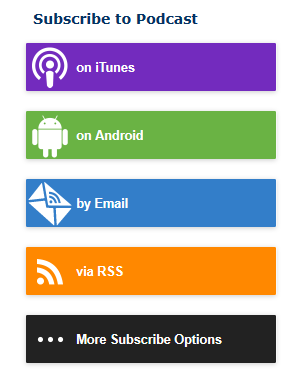
Subscribe Tools: Boost your audience engagement with our subscribe page and sidebar widgets. Designed for responsive websites and high-resolution screens, these tools are optimized for standard and Apple Retina displays.
Multiple Podcast Management: Easily handle multiple podcasts on one website with our Category Podcasting and Podcast Channels features.
Global Language Support: PowerPress speaks your language, with numerous translations available and emoji support for your podcast feed.
Podcasting 2.0: As podcasting advances, Blubrry is at the forefront, implementing new Podcasting 2.0 features regularly, such as transcripts, funding, Value Time Split, chapters, live, and many more.
Get Started with Ease:
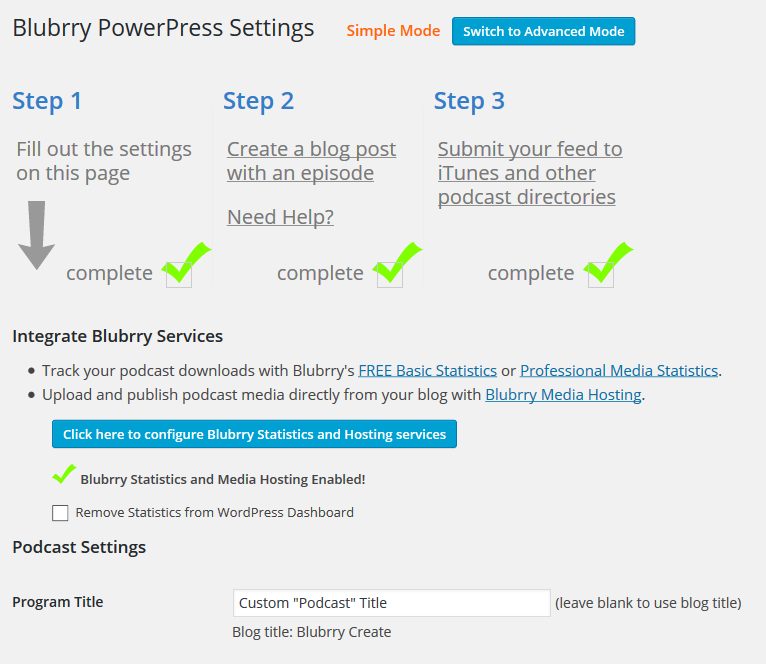
Dive into podcasting with our user-friendly onboarding. From essential settings to publishing your first episode, we guide you through each step. Plus, easily submit your podcast to major directories for maximum reach.
Integrated Media Players – Tailored for Your Content:
Audio Players: Choose from Blubrry Player (exclusive for Blubrry Hosting customers) with close captions and chapter support, MediaElement.js, the native HTML5 audio player, or use another player of your choice.
Video Players: Video podcasting support select from MediaElement.js, VideoJS, or the native HTML5 video player.
Customizable Positioning: Place your player above or below content with easy-to-use player shortcodes.
Playlist Player Embed: Showcase a playlist of your latest episodes effortlessly.
Diverse File Support: PowerPress supports various audio and video formats, with a strong recommendation for MP3 for audio & MP4 for video.
Exclusive Integrated Subscribe Tools for Audience Growth:
Create a dedicated subscribe page and a mobile-optimized sidebar widget. Our tools are designed for clarity and ease, ensuring visitors become loyal followers/subscribers.
View hosting usage and manage monthly quotas with ease.
Conveniently migrate media files to your Blubrry account.
Access IAB Certified Compliant statistics, with free and advanced options.
Automated Transcripts (Optional)
Media Mastering of Audio Files (Optional)
Migrating from Other Platforms?
PowerPress makes it easy. Whether you’re coming from another podcast plugin or a different service such as Libsyn or PodBean, our Import Podcast tool efficiently transfers your RSS feed and episodes.
PowerPress in Your Language:
Join our global community with PowerPress’ multilingual support. Interested in contributing translations? Contact us for an opportunity to get involved and gain recognition.
Ready to Transform Your Podcast?
Embrace the power of PowerPress for a seamless, feature-rich podcasting experience. Visit our website to learn more, download the plugin, and start your podcasting adventure today!
Need Help?
Contact the Blubrry Support team and look through the PowerPress documentation we’ve created.
Contributors
Angelo Mandato, CIO Blubrry – Plugin founder, architect and lead developer
Pat McSweeny, PHP Developer – Developed initial version (v0.1.0) of plugin
Jerry Stephens, Way of the Geek – Contributed initial code fix for excerpt bug resolved in v0.6.1, wrote initial code for the 4 new flash players.
Darcy Fiander, Rooty Radio – Fixed bug with category links to FeedValidator.org and category title warning when validating category feeds.
Joel Haasnoot, Personal Blog – Developed PodPress archive statistics.
Nicolas Bouliane, Personal Blog – Contributed code for get_the_powerpress_all_players() function.
Isiah Lloyd – Developed features in PowerPress 7.5, 7.6 and part of 8.0
Ben Beecroft – Developed features in PowerPress 8.1+
Translators
Danish translation for v1.0.11+ by Team Blogos – Latest translation available here
French translation for v1.0.11+ by Aur�lien Denis – Aur�lien is looking for assistance maintaining the French translation, email wpchannel [at] gmail.com if interested.
Simplified Chinese for v1.0.12+ by webmote – From webmote: Welcome to use the plugin. Very good! and then hope you to access my site.
Most themes and plugins are compatible with PowerPress. PowerPress is developed and tested using the default themes packaged with WordPress. These themes use WordPress best practices and adhere to theme rules set by WordPress.org. Any child theme based on these themes should also work without issue.
If you are having a problem specifically with the player and links, try the “Having issues?” option under PowerPress Settings > Website > PowerPress Shortcodes tab. Visit Resolving Plugin or Theme Conflicts for details.
Premium podcasting themes compatible with PowerPress
Second Line Themes are designed specifically to take advantage of built-in features, settings, and podcast episode metadata in PowerPress. The Blubrry team works with the Appendipity team during beta testing and major WordPress releases to make sure the Podcast Pro theme and PowerPress work together seamlessly.
Why doesn’t Blubrry PowerPress support multiple enclosures in one feed item/post?
PowerPress does not allow you to include multiple media files for one feed item (blog post). This is because each podcatcher handles multiple enclosures in feeds differently. Apple Podcasts will download the first enclosure that it sees in the feed ignoring the rest. Other podcatchers and podcasting directories either pick up the first enclosure or the last in each post item. This inconsistency, combined with the fact that Dave Winer does not recommend multiple enclosures, is why the Blubrry PowerPress does not support them.
As an alternative, PowerPress allows you to create additional custom podcast feeds and channels to associate any magnitude of media format and/or length in a blog post to specific custom feeds. For example, you can create one blog post associated with separate video and audio podcast feeds, saving you time from entering your show notes twice.
Why doesn’t Blubrry PowerPress include media statistics built-in?
Blubrry’s PowerPress does not include media statistics built-in. This is not because Blubrry has its own statistics service, although that’s a good reason by itself. Maintaining and calculating statistics is a resource and server intensive task that would detract from an otherwise efficient WordPress podcasting plugin. We recommend using your media hosting’s web statistics to give you basic download numbers and, if you are seeking more granular measurements, such as client and geographical information for each episode, you’re more than welcome to use the Blubrry Statistics service as well.
How do you insert the player within a blog post?
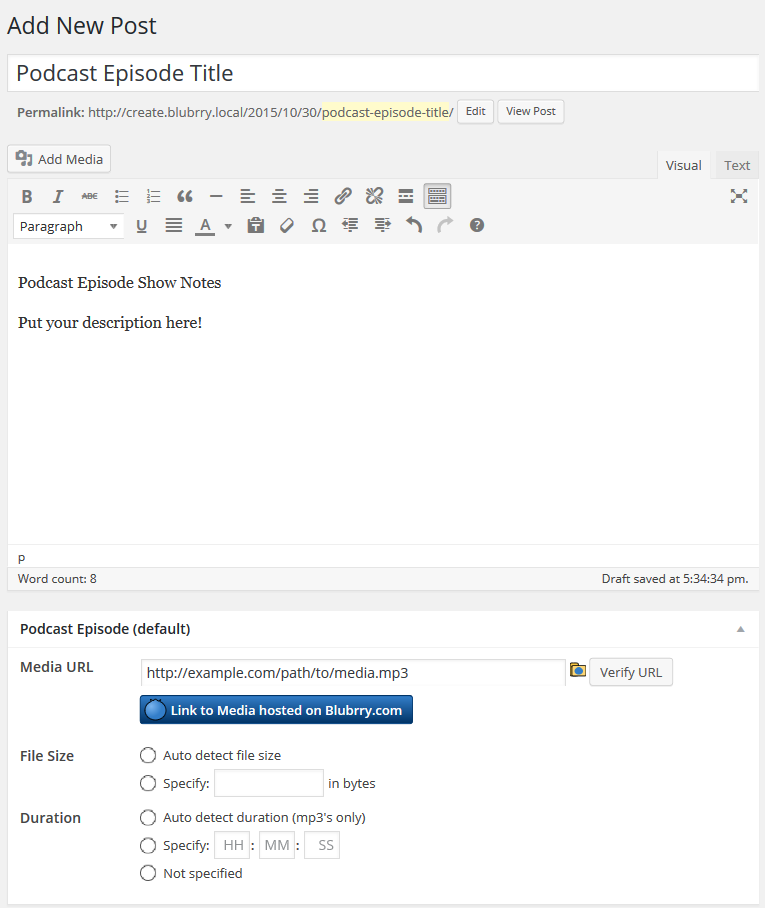
You can insert the media player within your blog posts by using the WordPress shortcode feature. The shortcode for PowerPress is [powerpress] (all lowercase).
You may use the shortcode to add a player to other media files (non episode files) by specifying the media url in the shortcode: [powerpress url=”http://example.com/path/to/media.mp3″]
For advanced users with multiple podcast feeds, you may insert the player for a specific feed by specifying the feed slug in the shortcode: [powerpress feed=”podcast”]
If you want to specify a cover image, add an image attribute which points to the specific image url: [powerpress image=”http://example.com/path/to/cover_image.jpg”] This is an experimental feature.
Why can’t you upload large media files?
File uploads are tricky to handle because there are so many web hosting variations with different upload size limits. We recommend using an FTP application to upload large media files. FTP is much more efficient than web based uploads and is typically provided by nearly all web hosting providers.
Alternatively, you can sign up for a Blubrry hosting plan, which makes file uploads in PowerPress easier.
The Media Player does not appear on my site (or the RSS feed is invalid)
This can happen when there is a theme or plugin conflict. Please visit our Diagnosing Feed and/or Player Issues for instructions how to resolve such issues.
Detect transcript plan for Blubrry users and auto-select generate if necessary
11.7.7
Released on 04/01/2024
Enable subscribe sidebar widget on taxonomy feeds
11.7.6
Released on 03/27/2024
Bugfix related to undefined variable
11.7.5
Released on 03/27/2024
Styling issue on uploader
11.7.4
Released on 03/26/2024
Bugfix relating to Statistics Widget
11.7.3
Released on 03/20/2024
Bugfix relating to artwork in the blubrry player
11.7.2
Released on 03/18/2024
Bugfix to refresh Blubrry stats more often
Updates to the readme description
11.7.1
Released on 03/13/2024
Fixed the Live Item times in the feed
Added new tag to ensure Blubrry has the correct timezone for live items
11.7
Released on 03/11/2024
Updated the rawvoice:subscribe tag with newer destinations
Revamped the chapter builder
Removed Google Podcasts as a destination
Security updates
11.6.6
Released on 03/05/2024
Updated spacing between Podcast and Subscribe rows beneath the player within a post
11.6.5
Released on 02/29/2024
Fixed issue with player embed links
11.6.4
Released on 02/28/2024
Fixed a bug that was preventing value time splits from showing up in podcast episodes in some category feeds
11.6.3
Released on 02/21/2024
Security updates
11.6.2
Released on 02/20/2024
Versioning issue
11.6.1
Released on 02/20/2024
Added check for valid string before json decoding
11.6
Released on 02/19/2024
Updates to Blubrry Player
11.5.2
Released on 02/12/2024
Implemented security updates
11.5.1
Released on 02/06/2024
Fix destinations icons
11.5
Released on 02/06/2024
Bugfix in onboarding where show info was getting double-encoded for Blubrry signups
Added Youtube Music as a destination
11.4.5
Released on 01/24/2024
Versioning issue
11.4.4
Released on 01/24/2024
Fix undefined index errors in onboarding
11.4.3
Released on 01/17/2024
Don’t render podcast guid when feed url empty
11.4.2
Released on 01/15/2024
Remove old classic player spacing from code
11.4.1
Released on 01/08/2024
Enable feed email by default
11.4
Released on 12/11/2023
Values Time Split tag
Onboarding redesign
Exclude podcast episode box from pages
11.3.1
Released on 11/29/2023
JS syntax bugfix where feed slugs with hyphens were being used as js variables
11.3
Released on 11/15/2023
Added Podcasting 2.0 tags: Remote Item/Podroll, Update Frequency, and Block
11.2.4
Released on 11/08/2023
Added a setting to specify whether the user needs to display errors in the block
11.2.3
Released on 10/31/2023
Added aac to recognized file types
Small bugfix on player page for non-blubrry customers
11.2.2
Released on 10/30/2023
Botched version number in the last release
11.2.1
Released on 10/30/2023
CSS bugfixes
Removed Stitcher from plugin description
11.2
Released on 10/23/2023
Allow editing of chapters before uploading media
11.1
Released on 10/16/2023
Remove Stitcher from destinations
11.0.14
Released on 10/04/2023
Bugfix for fresh install (no player selected)
11.0.13
Released on 09/27/2023
Fixed small live item bugs
Regex fix for hostname validation
Re-add user role management option
11.0.12
Released on 09/19/2023
Escaped user input URL
11.0.11
Released on 09/13/2023
More security updates, in onboarding and network sections
11.0.10
Released on 09/11/2023
Fixed bug with Live Item settings displaying incorrect channel
Bugfix for transcript generation for Blubrry users
11.0.9
Released on 09/07/2023
PHP 8.1 compatibility issue
Sanitize media url field to prevent XSS
11.0.8
Released on 09/06/2023
Tightened the new security checks and added clarification to new warning
Updated copy for display player setting
11.0.7
Released on 09/05/2023
Added additional security checks to media verification feature
Bugfix for undefined function register_block_type()
11.0.6
Released on 08/28/2023
Update feed values for explicit to ‘true’ and ‘false’
11.0.5
Released on 08/21/2023
Remove defunct ‘User Role Management’ option
Fix to alleviate rare Blubrry Player bugs
11.0.4
Released on 08/16/2023
Remove ‘Use as Apple Podcasts Episode Image’ option
11.0.3
Released on 08/16/2023
Fix the PowerPress Player block
Remove RSS2 image, use Apple Podcasts Image in all places
11.0.2
Released on 08/15/2023
Correct version number issue
11.0.1
Released on 08/15/2023
Undo the PowerPress Player block
11.0
Released on 08/14/2023
New PowerPress Player block
10.6.1
Released on 08/02/2023
Compatibility with WP6.3
Minor PHP fixes
Remove link to survey
10.6
Released on 07/31/2023
Compatibility with PHP8.1
10.5
Released on 07/17/2023
Added podping tag
Option to match existing posts by title when importing a podcast feed
Fixed some small bugs with the player
10.4
Added logic to handle a post being moved to the trash bin for the player
10.3
Released on 07/05/2023
Blubrry Modern Playlist Player
Blubrry Modern Most Recent Episode Player
Destinations admin section facelift
10.2.4
Released on 06/06/2023
Security update
10.2.3
Released on 05/31/2023
Fixed issue preventing storage space error from showing up
Added chapter export functionality
Fixed an issue with sideloading program-level artwork
10.2.2
Released on 05/30/2023
Fixed styling issue with chapter builder
10.2.1
Released on 05/30/2023
Fixed bug with explicit settings
10.2
Released on 05/30/2023
Chapter builder interface
10.1
Released on 05/15/2023
Added medium, soundbite, and social interact tags from podcast 2.0 namespace
10.0.8
Released on 05/08/2023
Update URL for podcastindex namespace
Fixed bug with trailer tag
Fixed bug with episode type
10.0.7
Released on 04/20/2023
Readd trailer tag logic with bug fixed
10.0.6
Released on 04/20/2023
Hide trailer tag logic
10.0.5
Released on 04/19/2023
Bugfix for trailer tag
Add Create Show Page to network section
10.0.4
Released on 04/17/2023
Bugfix in player
10.0.3
Released on 04/14/2023
Bugfix for trailer tag
10.0.2
Released on 04/14/2023
Bugfix in shortcodes
Another security update for shortcodes
10.0.1
Released on 04/10/2023
Bugfix in suscribe widget
Stop disabling widget block editor
Security updates for shortcodes
10.0
Released on 04/06/2023
Network section redesign
New features: Add program to list, undo applicant status, delete rejected applicant
9.10.5
Released on 03/07/2023
Fixed bug with taxonomy terms
Made feed email optional
9.10.4
Released on 02/23/2023
Fixed bug related to duplicate GUIDs
9.10.3
Released on 02/22/2023
Fix bugs relating to pulling episode data into the Blubrry player
Option to exclude space below Blubrry Modern Player
Fix characters warning on Blubrry Programmatic Advertising media URLs
9.10.2
Released on 02/20/2023
Value Tag – Strip whitespace from entered lightning address
GUID – Fixed bug where multiple shows could have the same GUID
9.10.1
Released on 02/13/2023
Live Item Tag – Updated GUID functionality
Live Item Tag – Added HLS media type
Miscellaneous PHP warnings
Minor display updates
Uploader bugfix
9.10
Released on 02/03/2023
Live Item Tag
9.9.1
Released on 01/25/2023
Minified css to fix styling
9.9
Released on 01/25/2023
Small bugfixes
New Podcast 2.0 tags
9.8.1
Released on 01/19/2023
Enable Media Mastering for Blubrry users
9.8
Released on 01/16/2023
Updated statistics redirect copy to stats prefix
Support for Media Mastering for Blubrry users
9.7.4
Released on 12/07/2022
Bugfix for artwork uploader
Other small bugfixes
Added Swahili to podcast feed language options
9.7.3
Released on 11/17/2022
Bugfixes for the Post Type Podcasting page
Open destinations links in a new tab
9.7.2
Released on 11/07/2022
Bugfixes for feed artwork and subscribe page styling
9.7.1
Released on 11/02/2022
Bugfix where posts with Blubrry programmatic ads would switch back to no ads when updated
9.7
Released on 10/31/2022
New subscribe page design
9.6.1
Released on 10/24/2022
Various bugfixes
Refactored Channels page and added missing ajax div
Refactored form submission on Category page
9.6
Released on 10/10/2022
Redesign pages for tools, channels, categories, taxonomies, and post types
Add Buzzsprout import option
9.5.2
Released on 10/12/2022
Bugfix for division by zero
9.5.1
Released on 09/30/2022
Allow transcripts for past episodes to be generated
Allow users to hide the RSS link
Bugfixes in media_info check and stats prefix settings
9.5
Released on 09/26/2022
Moved MP3 Tag settings to Feed settings
Updated styling on player pages
Podping implementation
9.4.2
Released on 09/20/2022
Bugfix
9.4.1
Released on 09/19/2022
Bugfix for Modern Player Customization
Bugfix for modern player embed link
9.4
Released on 09/12/2022
Customization for Modern Blubrry Player
Bugfix for generating transcripts
9.3.1
Released on 09/07/2022
Language selection for transcripts thru Blubrry
Bugfix for transcripts
9.3
Released on 08/22/2022
Support for transcripts thru Blubrry
9.2.1
Released on 08/23/2022
Bugfix for Blubrry Programmatic Ads
9.2
Released on 08/17/2022
Support for Programmatic Ads thru Blubrry
9.1.4
Released on 08/03/2022
Encode html special characters in media URLs
Allow more characters for certain Blubrry media URLs
9.1.3
Released on 07/27/2022
Updated wording for ‘Stats Prefix’
Allow some HTML tags in descriptions in the PowerPress Network section
9.1.2
Released on 07/18/2022
Small bugfixes for podcast publishing
9.1.1
Released on 06/08/2022
Bugfix for pro hosting Blubrry customers
9.1
Released on 06/01/2022
Revamped the migration flow for Blubrry hosting customers
9.0.4
Released on 05/25/2022
Small bugfixes
Styling tweaks on Welcome tab in PowerPress Settings
9.0.3
Released on 05/11/2022
Disabled php notices in podcast feeds
Removed ‘No Default’ option
Fixed a bug causing some to see an error that podcast data had been entered
9.0.2
Released on 04/19/2022
Fixed a strict category mode bug, where the player was added to non-podcast posts
9.0.1
Released on 04/11/2022
Fixed a bug in the network section related to application submission
Fixed a bug related to the new PowerPress migration alert
Added rel=”captions” attribute to podcast:transcript tag
Prevent episode numbers like 2.0 from going into the feed–ints only
Added podcast description to onboarding
Insert author name during Blubrry onboarding
9.0
Released on 03/08/2022
Updated feed import flow
Updated media migration flow
Updated Blubrry signin flow
8.7.14
Released on 03/30/2022
Fixed publishing bug that was affecting multi-program users
Allow podcast data to be saved to a post without a media URL (while excluding that post from podcast feeds)
8.7.13
Released on 03/21/2022
Fixed media publishing bug
8.7.12
Released on 03/18/2022
Fixed verify media bug
8.7.11
Released on 03/02/2022
Fixed verify media bug for drafts
Fixed clear cache button in network section
Clear cache on application accept
8.7.10
Released on 02/07/2022
Removed warning for Blubrry media URLs with query strings
Compatibility with WordPress 5.9
Added warning for PHP max query vars reached for sites with many podcast channels (commented until link is fixed)
8.7.9
Released on 01/10/2022
Fixed PHP8 fatal error
Fixed a bug with Blubrry account linking
Fixed a bug related to Blubrry uploader cross-origin issues
8.7.8
Released on 11/22/2021
Bugfix for already published media
8.7.7
Released on 11/15/2021
Bugfix for media publishing filename issue
8.7.6
Released on 11/04/2021
Solved a bug in the wp_audio_shortcode_override action
Added 2021 icon sprites
Added wp_nonce to admin-ajax actions
Updated links to Blubrry hosting onboarding
8.7.5
Released on 10/25/2021
Solved a bug that occurred when detecting a filetype on media with a query string
8.7.4
Released on 10/04/2021
Fixed a missing CSS issue in the onboarding section
Updated copy
Allow query strings in media from trusted hosts
8.7.3
Released on 09/13/2021
Corrected admin url in several places to exclude unnecessary admin.php
8.7.2
Released on 09/01/2021
Solved conflict with woocommerce
Updated video and image in readme
Added title attribute to Blubrry player for ADA compliance
8.7.1
Released on 08/18/2021
Start sending website admin URL on migrate for Blubrry users
8.7
Released 07/19/2021
Bugfixes in the PowerPress Network section
8.6.6
Released 06/09/2021
Added a setting to suppress itunes:author, itunes:isClosedCaptioned, itunes:summary, and itunes:subtitle inside item tags
Small bugfix in stats widget area
Stop caching list of applicants in network section
8.6.5
Released 06/02/2021
Bypass caching in network-related API calls
Start sending website admin URL for Blubrry users
8.6.4
Released 05/19/2021
Small bugfix from today’s earlier release
8.6.3
Released 05/19/2021
Small bugfixes
8.6.2
Released 05/10/2021
Bugfixes in Blubrry uploader, network subscribe widget, and channel CSS
Fixed a vulnerability in the PowerPress Settings section pointed out by Darius Sveikauskas
8.6.1
Released 05/04/2021
Fixed a bug related to the stats data cache
8.6
Released 05/03/2021
Add Blubrry stats widget to WordPress dashboard and PowerPress settings
Remove deprecated Post to Social feature
Small bug fixes
Changes to links and Blubrry messages
8.5.8 =
Released on 04/29/2021
Fixed a PowerPress uploader bug introduced in a chrome update
8.5.7
Released 04/22/2021
Fixed a bug in the PowerPress Network area
8.5.6
Released 04/14/2021
Fixed Create New Episode button for Post Type feeds
Fixed soon-to-be broken assets2.blubrry.com links
Small bugfixes
8.5.5
Released 04/08/2021
Accept JSON uploads in episode box
Small bugfix for PHP strpos error in feed auth
Remove unnecessary link in migrate area
8.5.4
Released 03/26/2021
Remove broken YouTube link from readme
8.5.3
Released 03/12/2021
Podcast Index namespace-related bugfix
8.5.2
Released 03/12/2021
Podcast Index namespace-related bugfix
8.5.1
Released 03/10/2021
Bugfix–added Podcast Index namespace
8.5
Released 03/10/2021
Added settings for Podcast Index tags: locked, location, funding, transcript, chapters
Several small bug fixes
8.4.8
Released 01/13/2021
Fixed a bug in the Blubrry account linking
8.4.7
Released 12/22/2020
Added destinations for JioSaavn, Gaana, and Podchaser
Added destinations to the rawvoice:subscribe tag in the feed
8.4.6
Released 12/08/2020
Tested with WordPress version 5.6
Added query string so as to circumvent server caching when grabbing Blubrry shows associated to account
Updated readme with up-to-date information about the plugin
8.4.5
Released 11/30/2020
Fixed CSRF security vulnerabilities inside the new login
Fixed XSS vulnerabilities in metamarks function
Replaced deprecated wp_make_content_images_responsive with wp_filter_content_tags
Fixed a bug that was causing the text color to be white in the Title input in post editor
8.4.4
Released 11/17/2020
Re-ordered destinations to better integrate new Amazon Music and Podcast Index
Updated the episode box so that if validation is skipped, the user doesn’t have to click Edit Media to edit
No longer forcing Apple or Google icons in any locations
Made an adjustment for the modern Blubrry icon–was getting cut off on Chrome for Mac
Fixed text in amazon music subscribe link under player–previously said “Blubrry”
8.4.3
Released 11/6/2020
Fixed text in podcast index subscribe link under player–previously said “Blubrry”
Re-added Unlink option if there is an error in Connected to Blubrry Account menu
8.4.2
Released 11/5/2020
Added subscribe links for Podcast Index
Fixed a JS error
8.4.1
Released 10/29/2020
Refactored sprites so new icons would show up
Deleted leftover code that was tagging PowerPress Network as its own plugin
8.4
Released 10/29/2020
Network Mode setting renamed to Multi-Program Mode
Added Destinations for Amazon Music and Podcast Index
Merged PowerPress Network plugin into PowerPress
Switched Blubrry authentication method to oauth2
8.3.8
Released 10/08/2020
Fixed a security vulnerability concerning image uploads
Small bugfix so that welcome tab of settings page shows the correct feed info
8.3.7
Released 08/31/2020
Fixed a bug that was displaying subscribe links that had not been set
Fixed a couple bugs that were throwing PHP errors
8.3.6
Released 08/24/2020
Fixed a bug in the player settings tab that was messing with episode artwork setting
Re-added ‘Disable Blubrry Stats in Dasboard’ option, into Advanced Settings
Fixed a jQuery bug
8.3.5
Released 08/11/2020
Small bugfix
Tested with WordPress 5.5 beta
8.3.4
Released 07/01/2020
Added Farsi language
Small CSS fixes
Stopped showing general ‘feeds’ settings for custom feeds
Fixed a bug where the Subscription Links Under Player setting wasn’t saving
8.3.3
Released 06/03/2020
Styled news items in WP Dashboard
Fixed a bug where artwork settings weren’t saving properly
Fxied bug where player link options would not save correctly
8.3.2
Released 06/02/2020
Added a check in the welcome page so that if there are >1000 posts, powerpress won’t query all of them
Added the Save button back to Audio Player, Video Player, and MP3 Tags Settings pages which it had been removed from
Started using WordPress functions to link JS code, as tags were causing an issue
8.3.1
Released 06/01/2020
Bug fix to artwork upload in Settings
8.3
Released 06/01/2020
Fresh new appearance for PowerPress settings tabs
Now, helpful info about your show and its progress appear at the top of the Welcome tab
Destinations-related settings consolidated to the Destinations tab
Podcast SEO and Advanced Settings are now within the Settings tabs
8.2.11
Released 04/29/2020
Entry Box Settings are back–this time, find them by clicking the gear in the upper right of the entry box
The Permalinks setting has been moved from the Website tab in Settings to the new Entry Box Settings
Fixed a bug from 8.2.10 where media couldn’t be removed from a post
Fixed a bug where “Verify” error messages were not showing up in the right spot
8.2.10
Released 04/23/2020
Update design for episode box–media URL section and Remove Episode moved
Artwork previews now will use default images rather than broken ones
Fixed a compatibility issue with older php versions
8.2.9
Released 04/03/2020
Corrected a typo in Non-Profit Apple category
Fixed bug with PodPress data clobbering an already imported episode in certain circumstances.
Added logic to handle importing with all supported Blubrry media URLs.
8.2.8
Released 3/30/2020
Tested with new WordPress 5.4 beta
Subscribe on Email is now toggled by the checkbox in the Settings tab
Fixed a bug where Apple category tags with no subcategory were not generated correctly
8.2.7
Released 3/20/2020
Stopped filling a default season number
Started displaying all of PowerPress to new installs so that the Settings link isn’t broken on the Plugins page
Fixed a bug where GUIDs were not preserved on import for some feeds with newer versions of WordPress
Added the dark theme again which was mistakenly removed from the minified CSS file
Deleted notification about Apple’s category changes
Fixed a number of small CSS problems
8.2.6
Released 3/4/2020
Fixed a bug that was messing with some users’ season numbers
Added an option in Settings to display the whole episode box (as opposed to verifying the media link before allowing any metadata to be entered)
Fixed a bug that was being caused by translated characters
Corrected the powerpress player shortcode [powerpress] in the episode box
Fixed some smaller bugs dealing with the functionality of the tabs and the artwork preview for multiple categories
8.2.5
Released 2/20/2020
Fixed a bug that was preventing the explicit setting from saving
8.2.4
Released 2/18/2020
Minified CSS files for faster loading times
Consolidated CSS classes and gave them more unique names so as to avoid conflict with other plugins
Added the ability for PowerPress to remember the season of the last episode published and put this as a default value in this field for new posts
Made poster image setting visible to all
8.2.3
Released 2/13/2020
Added Remove Episode option back into episode box
Fixed a bug where title input wasn’t showing up (for users who had selected to specify an episode title)
Season value is now allowed to be empty
Added a label for the explicit setting
Fixed a bug where the settings for the player size weren’t showing up for video media
8.2.2
Released 2/12/2020
Tweaked id3 library so as to prevent php compatibility errors
Fixed a bug that was throwing an error in the subscribe widget
Slight CSS tweaks
8.2.1
Released 2/11/2020
Fixed editor detection–now styling/responsiveness will accommodate for classic editor
Fixed a bug where the .js file wasn’t getting loaded for everyone
Fixed a bug that would reload the page when a “View More”-type link was clicked
8.2
Released 2/10/2020
Eliminated Episode tab–whole episode box appears
New interface with multiple tabs and cleaner, clearer settings
Media link is now verified automatically
Updated id3 library to be compatible with PHP 7.4
8.1.2
Released 1/17/2020
Now, if users define(‘POWERPRESS_NO_REMOVE_WP_HEAD’), links will not be removed from webpage head
Updated readme to reflect that PowerPress is compatible with the most recent version of WordPress
8.1.1
Added images that were missing in the Getting Started section
8.1
Eliminated Simple Mode
Replaced Simple Mode with a Getting Started section which shows up the first time someone opens PowerPress
Getting Started includes feed info settings, feed import, and media migration
Getting Started can also be revisited at any time
Added trim call for ajax returns in case website is sending extra new lines due to a theme or plugin
Now using the latest media detection library (getid3) in WordPress
8.0.3
Released on 11/15/2019
Added titles to iframes so as to be compliant with ADA
Made a styling tweak in the subscribe shortcode
Now, all three Apple categories will show up regardless of whether they are set
Users can no longer hide certain ios11 settings in their Tools tab
8.0.2
Released on 10/24/2019
Brought back the ability to render black subscribe buttons using [powerpress_subscribe style=”dark”] (Thanks @vennstone for bringing to our attention!)
Improved custom CSS setting so that !important tags could be stripped from subscribe sidebar widgets (Thanks Bree @lifesgood for pointing out the problem)
Feed Landing Page URL setting can now be set for the default podcast feed (Thanks Daniel for the suggestion)
Next week, we will release an update to Blubrry’s Media uploader to work better within PowerPress so that it is more accessible with text reading software such as JAWS and ZoomText (Thanks Gary for helping us!)
Added support for the WPML plugin (Thanks David and Bobby from WPML!)
Configured Websub publish API call timeout to 3 seconds.
8.0.1
Released on 10/09/2019
Fixed submit links for iHeartRadio, Deezer, and Pandora
New Subscribe button styling options!!!
** Buttons now use an SVG sprite, providing a small footprint while being optimized for retina displays. Subscribe buttons have never been so crisp!
** There is a new “Modern” color scheme, with the traditional square or new rounded corners.
** Subscribe Widget can now be configured horizontally for use in horizontal widget areas.
Added an option to remove !important and text-align left styling to subscribe buttons.
Switched the plugin_action_links filter to use array_push function call to avoid notice messages when another plugin or theme converts the links array to a string.
Fixed bug since recent update to WordPress where the default feed had the word feed in the URL twice. (Thanks Daniel for pointing out the issue!)
7.5.4
Released on 8/30/2019
Apple category “After Shows” updated.
Now using the https version for (castfeedvalidator.com)[https://castfeedlivadator.com] when clicking validate for feeds.
CastFeedValidator diagnoses problems with your feed that could be preventing your episodes from reaching listeners. There are four phases of testing, performing more than 100 checks on your feed�s various components.
Added class .blubrryplayer to the iframe for the Blubrry Player, for styling purposes.
7.5.3
Released on 7/31/2019
Fixed bug for older versions of PHP with WebSub, service to notify Google Podcasts of new episodes.
7.5.2
Released on 7/25/2019
Fixed logic bug introduced in 7.5 for sites using versions of PHP 5.4 or older.
Added code changes to Blubrry Hosting’s Post to Social from PowerPress feature. (Last beta release of this feature!)
7.5.1
Released on 7/23/2019
Added library for PubSubHubbub. Missed it when merging latest git release into wordpress.org svn. Sorry about that!
7.5
Released on 7/23/2019
Added new Apple categories announced in July. The new Apple Categories will be made available on Apple Podcasts mid August, 2019.
Added Multi-program Blubrry Podcast Hosting, perfect for Category podcasting.
Added Update Google PubSubHubbub, lets Google Podcasts and other podcast directory services when your podcast publishes new episodes.
Added support for various languages to podcast as including “Thai” and “Vietnamese”.
7.4.4
Releasd on 6/21/2019
Fixed bug introduced in last update that calculated the total number of episodes when viewing podcasts in channels and post types in PowerPress admin. (Thanks @edzila60610 for bringing to our attention!)
Removed all mentions of Google+. (Thanks @k_abel for bringing to our attention!)
Fixed notice message getting cut off for the “Clear Plugins Update Cache” option under “Tools”. (Thanks @k_abel for bringing to our attention!)
Added option archive=”true” for the powerpress_subscribe shortcode to allow for the shortcode to be added to archive/category pages.
7.4.3
Released on 6/12/2019
Updated labels for Subscribe buttons and links in admin.
Note: Apple has announced the end of life for iTunes desktop (except for Windows). PowerPress will be removing iTunes desktop specific features where they conflict with the Apple Podcasts iOS app.
Enhanced iTunes summary updated, optimized for latest iOS podcasts app. It is now designed for Apple Podcasts iOS app rather than for iTunes desktop. (Thanks Robin for your assistance!)
Force feed discovery on homepage only to use default podcast feed for Google Search.
Fixed bug with deleting media files hosted on Blubrry Podcast hosting.
Fixed bug with posts with revisions being part of the total number of episodes when viewing podcast feeds in PowerPress settings.
Fixed bug with skipto position time not getting included in feed show notes. (Thanks @tszt for bringing to our attention!)
7.4.2
Released on 4/26/2019
Fixed T_FUNCTION bug for PHP 5.2 (not an issue if you have PHP 5.3 or newer)
7.4.1
Released on 4/10/2019
Added logic to authentication email addresses differently for premium password protected podcasts.
Added support for YoastSEO and Google Podcasts (Thanks @sunkast for bringing to our attention!)
Removed use of create_function to fix damaged serialized data created …