
A full-featured plugin for nonprofits to manage members, emails, donations, and events.
Nonprofit Manager is the free, all-in-one WordPress plugin for small nonprofits, clubs, and community groups. You get membership management, online donations, email newsletters, and an event calendar in one place, so you don’t have to bolt four separate plugins together to run your organization.
Most tools do one job. Donation plugins only take donations. Membership plugins only track members. You keep your members and donors in one system, next to your newsletters and your events. You spend less time wrangling software and more time on your mission. Learn more at nonprofitmanager.app.
Features
Everything without an asterisk is free. Features marked with an asterisk (*) come with Nonprofit Manager Pro when you’re ready for more.
Members and donors
- Track members with membership levels, filtering, and bulk actions
- Members and donors share one contact list, so you can see anyone’s lifetime giving at a glance
- Add signup and unsubscribe forms to any page as blocks or shortcodes, protected by Cloudflare Turnstile
- Google reCAPTCHA v3 on your forms*
- Import your existing list from CSV, XLSX, Google Sheets, Mailchimp, Constant Contact, or Brevo
- Give a volunteer a Membership Manager login that sees members, donations, and newsletters, and none of your settings
- Custom member fields with 8 field types and drag-and-drop ordering*
- Segment members with an AND/OR condition builder*
- Put members in one or more groups, each with its own newsletters, events, calendar, and signup form*
Donations
- Accept one-time donations through PayPal, Venmo, and Stripe. Stripe gifts land in your Donations list, and PayPal and Venmo gifts show up in those accounts
- Drop a donation form on any page as a block or shortcode, with a thank-you message on the page
- Take gifts in US, Canadian, Australian, or New Zealand dollars, pounds, euros, yen, and 9 more currencies (Venmo is US dollars only)
- Bring donors and past gifts over from Zeffy, Givebutter, Donorbox, or a spreadsheet
- Recurring donations*
- Membership dues auto-billing*
- Donor thank-you emails with the gift amount and date*
- PayPal gifts recorded in your Donations list through PayPal Smart Buttons, with a server-side check of every capture*
Newsletters and email
- Write newsletters in the editor you already know (Gutenberg), with reusable templates, headers, and footers
- See who opens and clicks, tracked in dedicated tables that won’t bloat your database
- Send yourself a test first, let rate limiting pace large sends, and stay CAN-SPAM compliant
- One-click unsubscribe with RFC 8058 List-Unsubscribe headers, which Gmail and Yahoo now expect
- Tell subscribers about new posts and events instantly or in an automatic weekly digest, and let them pick their own preferences
- Schedule one email for each event, such as a reminder the day before, and send any newsletter later from the Scheduled Emails screen
- List past newsletters on any page with the Newsletters block or
[npmp_newsletters]. You pick which ones go public
- Past newsletters for one group on that group’s page, with
[npmp_newsletters group="computing"]*
- As many scheduled emails as you want for the whole organization, each group, and each event*
- Email automation workflows: welcome emails and donation receipts*
- Send through Amazon SES, SendGrid, Mailgun, Postmark, Brevo, or any SMTP server*
Events
- Event calendar with Month, Week, and List views, plus Calendar and Events blocks for any page, with list, grid, cards, and mosaic layouts
- iCal feed, quick-add from the dashboard, and one-click convert of any post or page into an event
- A Print or save as PDF button on calendars and event lists, with a setting to turn it off
- Move your events over from The Events Calendar, review each one, and keep redirects from the old event URLs
- Print or save as PDF any admin list or report*
Switching plugins
- Move over from MailPoet, The Newsletter Plugin, FluentCRM, Paid Memberships Pro, Ultimate Member, GiveWP, Charitable, The Events Calendar, Events Manager, Sugar Calendar, Event Organiser, My Calendar, or WP Event Manager on the Switch Plugins screen
- Import, check the results, then turn off and delete the old plugin, one step at a time
Sharing and outreach
- Auto-share new posts and events to Facebook and X, with {title}, {url}, and {excerpt} placeholders
- Auto-share to Reddit, Bluesky, Mastodon, Threads, and Nextdoor*
- Add share buttons and a contact form to any page, as blocks or shortcodes
Free vs Pro
The free plugin is the whole product for a group that takes one-time gifts. You get contacts and members, one-time donations through Stripe, PayPal and Venmo, newsletters with open and click tracking, and an events calendar with an iCal feed. There is no trial and no time limit.
With Nonprofit Manager Pro, you also get automatic billing for membership dues, recurring donations through Stripe and the PayPal API, custom member fields, segmentation, and email automation. You can buy Pro from $47 a year, and you have 30 days to ask for your money back.
You can spot every Pro feature by the asterisk in the list above, and you see its controls greyed out in the free plugin, each with one line on what you get.
External Services
Nonprofit Manager talks to outside services only where a feature needs it. Nothing below runs unless you turn that feature on or enter your own credentials.
Product update emails
If you tick the product update box in the setup wizard, your email address and display name are sent once to our newsletter system at news.nonprofitmanager.app to start a double opt-in signup. You then get one confirmation email, and nothing else is sent unless you click it. Leave the box unticked and no request is made. Data sent: your email address and display name, at that one moment. Service: Listmonk, self-hosted by Rosenberg Digital LLC. Privacy policy: https://nonprofitmanager.app/privacy-policy/
Nonprofit Manager Pro licensing
The free plugin on its own does not contact our servers. If you also install Nonprofit Manager Pro, Pro checks your license and looks for updates at nonprofitmanager.app, sending your license key, your site URL, and the installed version. Terms: https://nonprofitmanager.app/terms-of-service/ Privacy policy: https://nonprofitmanager.app/privacy-policy/
Payment processors
Donations are sent to the processor you configure with your own account credentials. Stripe (api.stripe.com), PayPal (paypal.com), and Venmo (venmo.com) receive donation amounts and the donor details you collect. Stripe: https://stripe.com/legal and https://stripe.com/privacy PayPal and Venmo: https://www.paypal.com/legalhub/useragreement-full and https://www.paypal.com/privacy
Spam protection
If you turn on a captcha, form submissions are verified with Cloudflare Turnstile (challenges.cloudflare.com) or Google reCAPTCHA (google.com/recaptcha), using your own site keys. Cloudflare: https://www.cloudflare.com/website-terms/ and https://www.cloudflare.com/privacypolicy/ Google: https://policies.google.com/terms and https://policies.google.com/privacy
List imports
Importing from Mailchimp or Constant Contact reads your list using the API key you supply. Importing from Brevo (api.brevo.com) reads your lists, contacts, and attributes with the API key you paste, sent in a request header and used only during that import. Importing from a Google Sheet (docs.google.com) fetches the published CSV at the link you paste, and Google sees your server’s address and that link. Mailchimp: https://mailchimp.com/legal/terms/ and https://www.intuit.com/privacy/statement/ Constant Contact: https://www.constantcontact.com/legal/terms and https://www.constantcontact.com/legal/privacy-notice Brevo: https://www.brevo.com/legal/termsofuse/ and https://www.brevo.com/legal/privacypolicy/ Google Sheets: https://policies.google.com/terms and https://policies.google.com/privacy
Email delivery
If you choose Amazon SES (amazonaws.com) or your own SMTP server in the email settings, we send newsletters and notices through that server with the login you enter. The server receives each message and its recipient. Amazon: https://aws.amazon.com/service-terms/ and https://aws.amazon.com/privacy/
Social sharing
Auto-sharing posts sends the title, link, and excerpt you configure to the networks you connect, using your own account credentials.
Screenshots
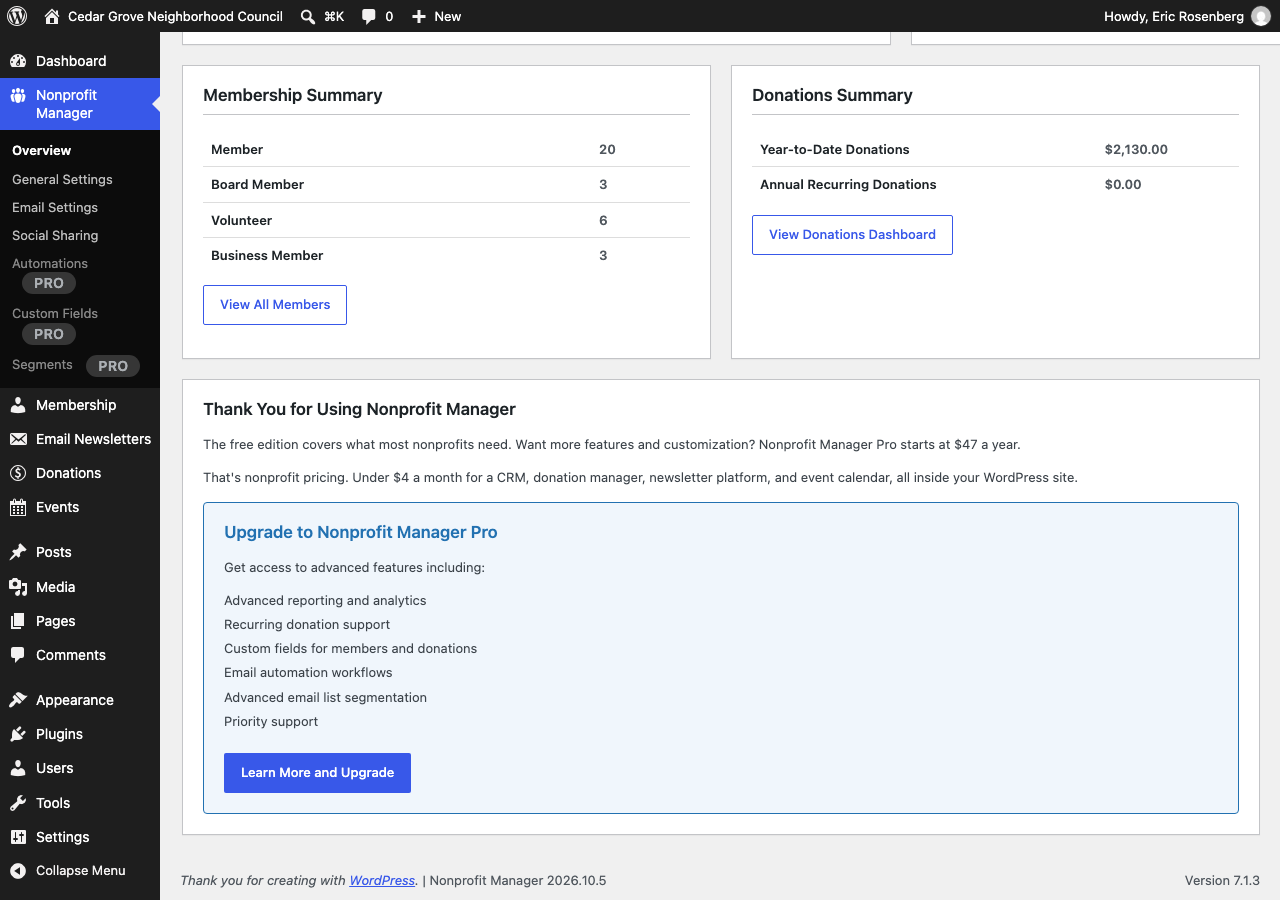
Overview with membership and donation totals
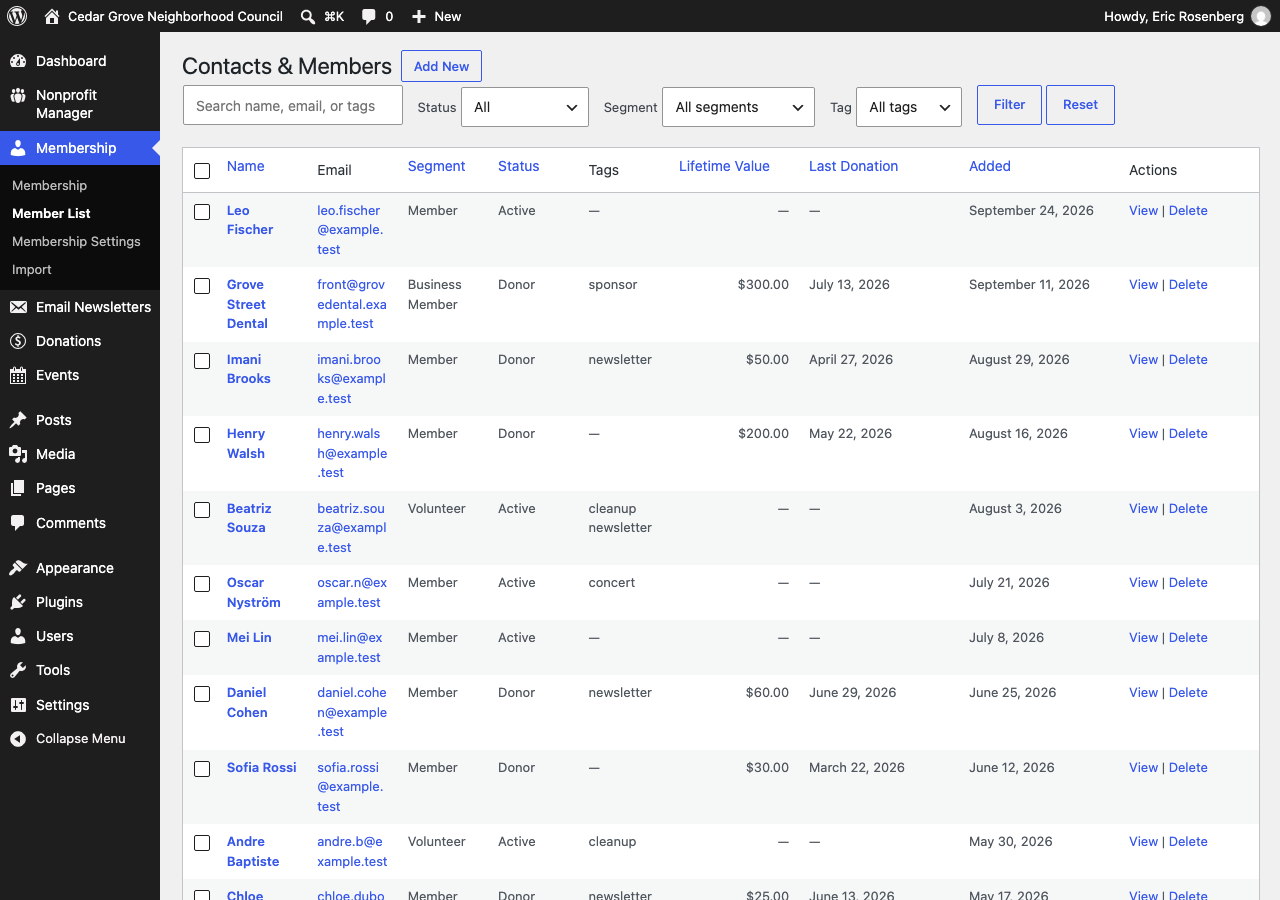
Contacts and members with filters, tags, and lifetime value
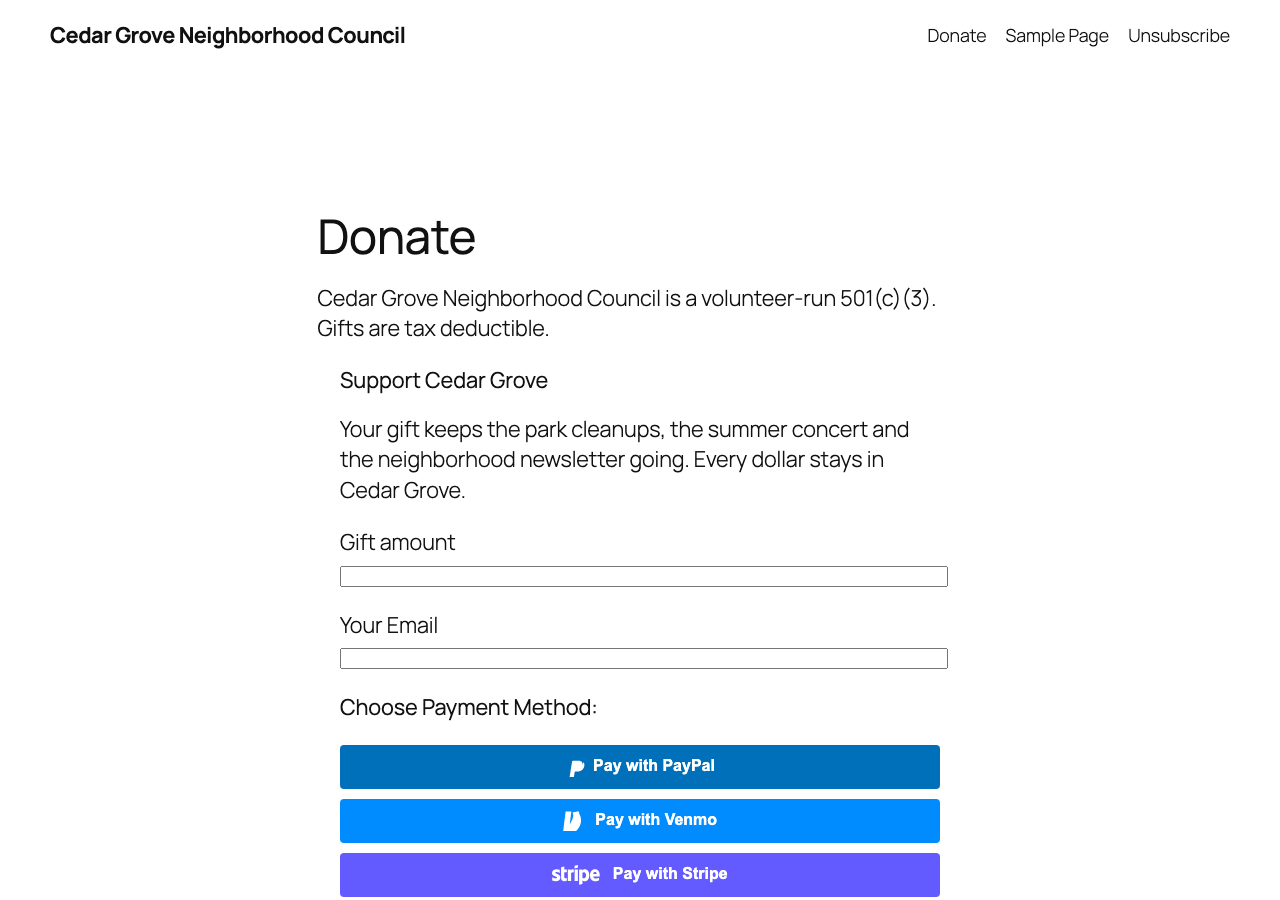
Donation form with PayPal, Venmo, and Stripe
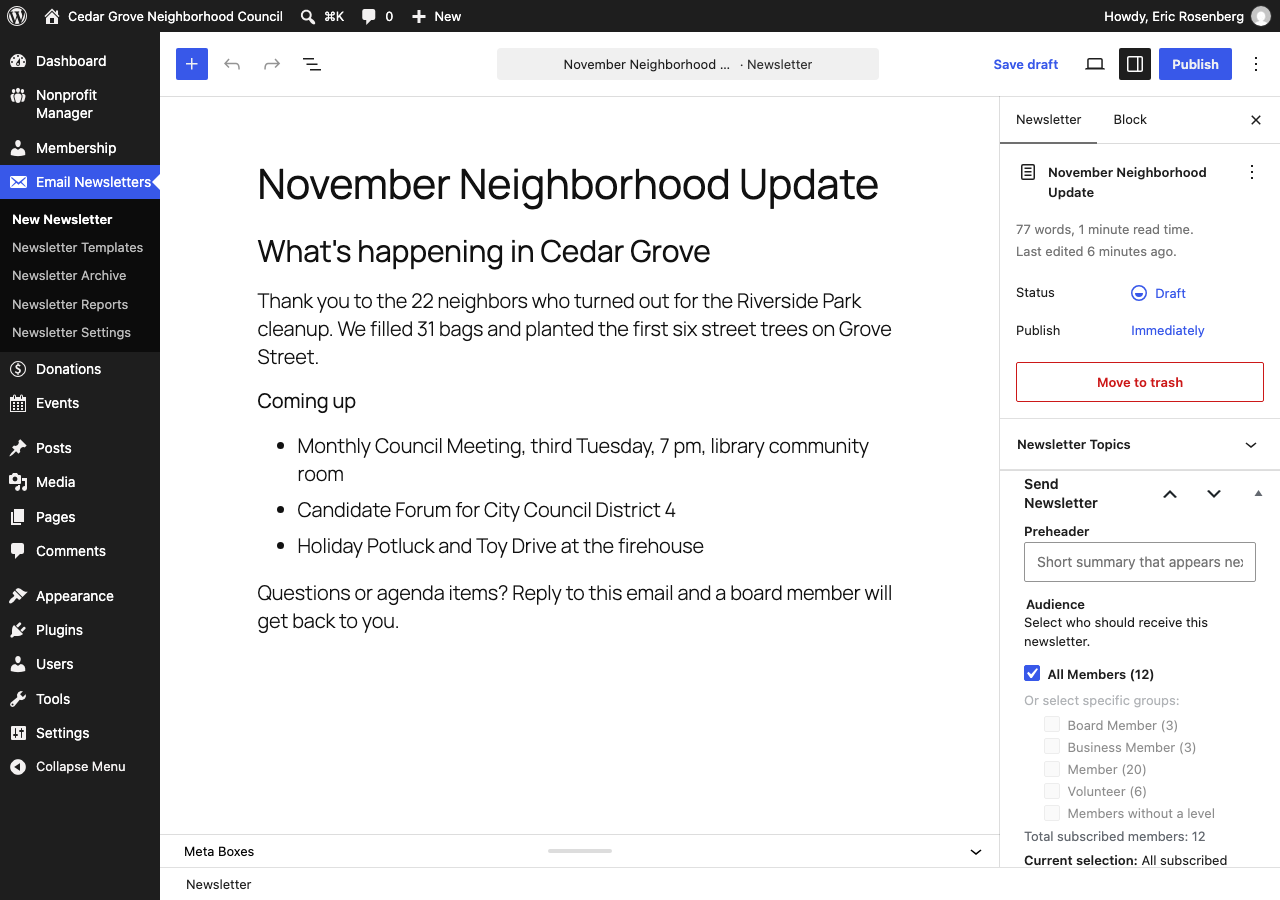
Newsletter editor with audience selection
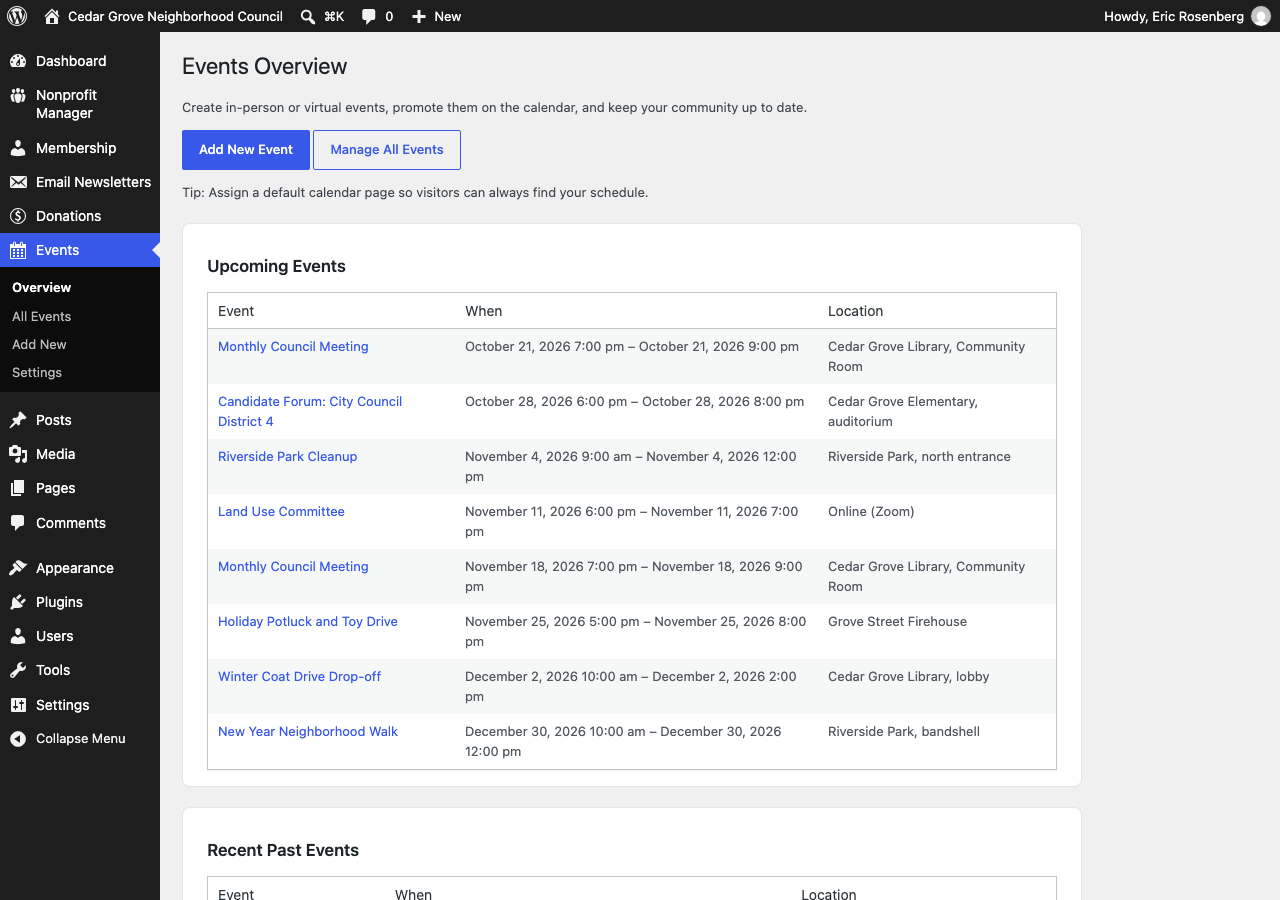
Events overview with upcoming and past events
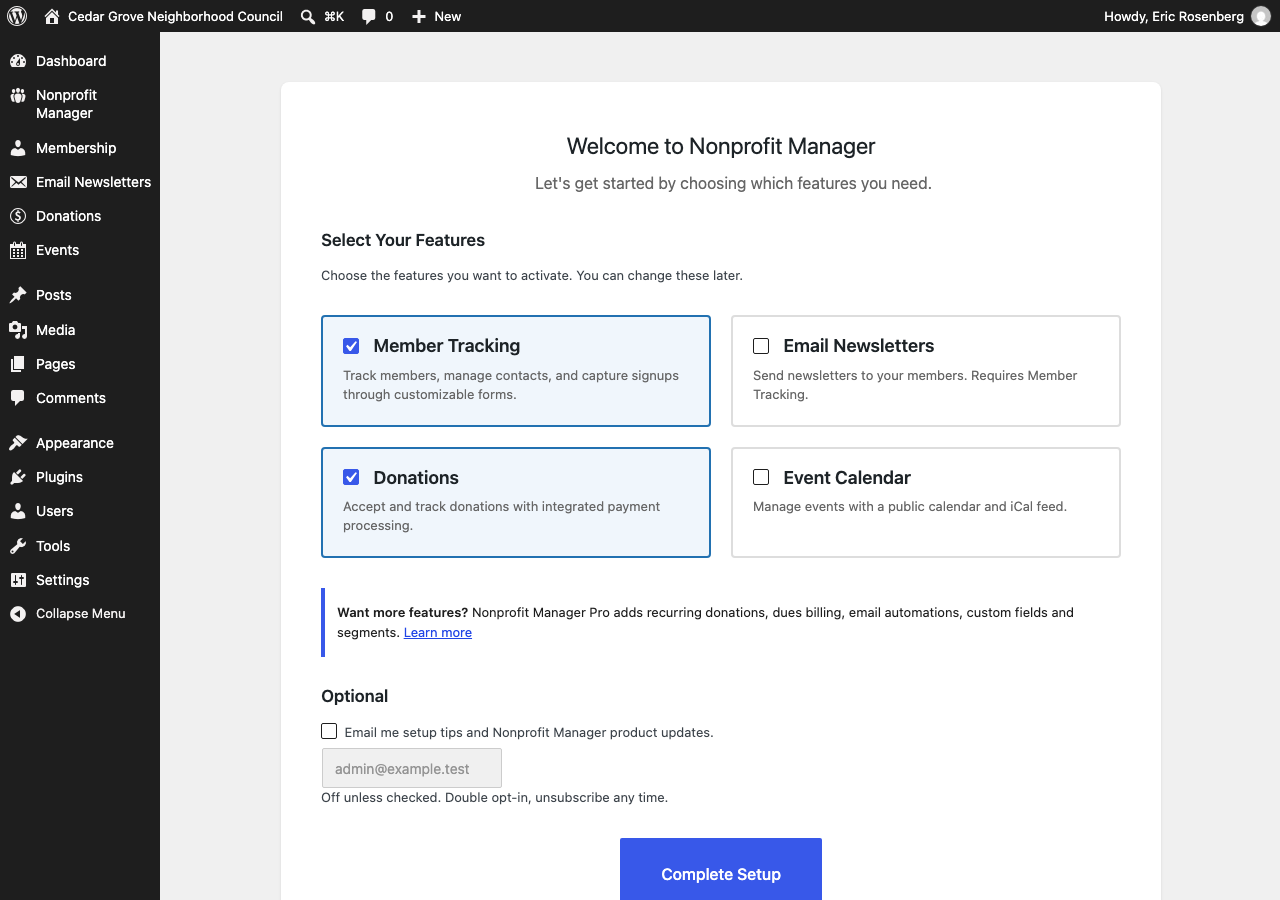
Setup wizard on first activation
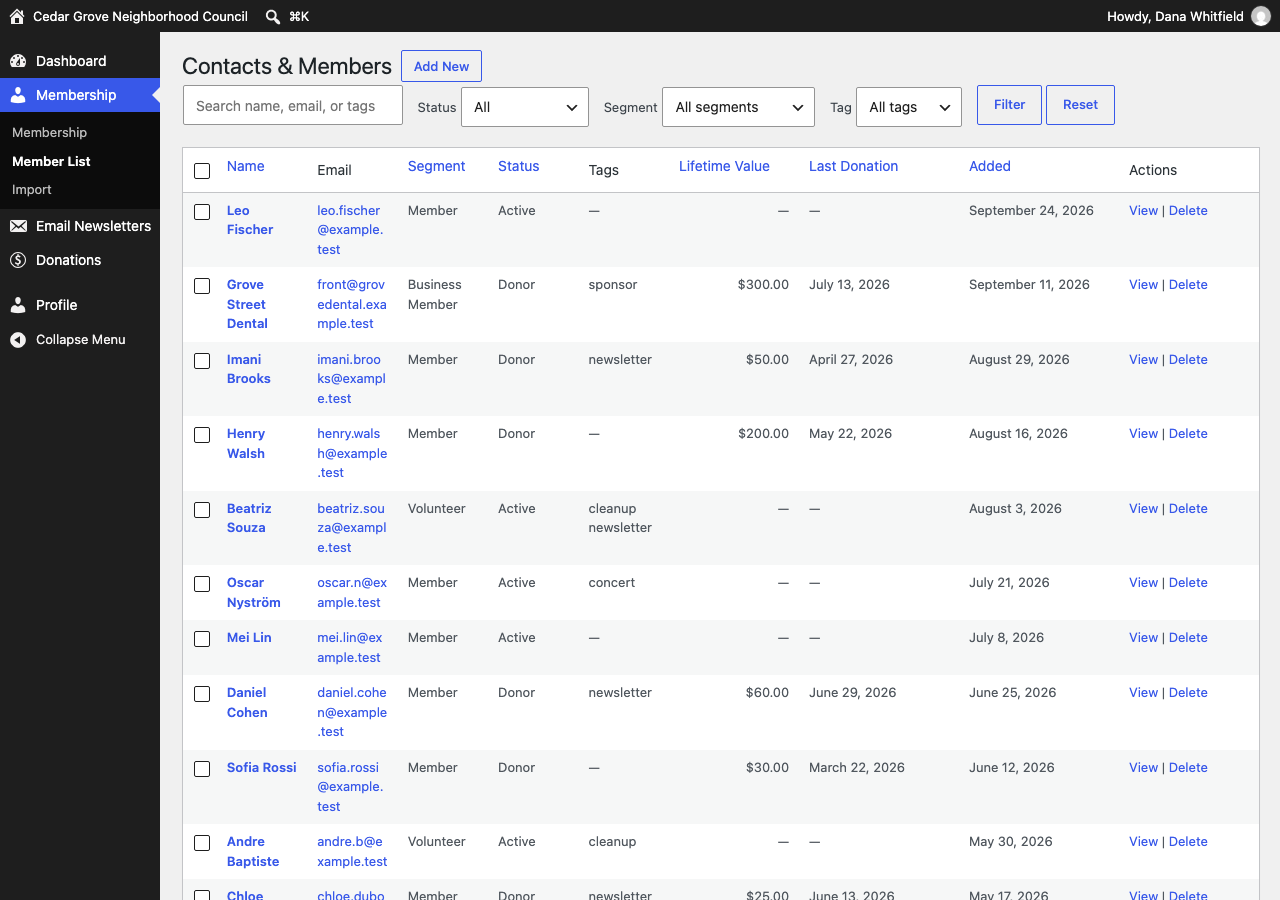
Membership Manager view: members, donations and newsletters, no settings
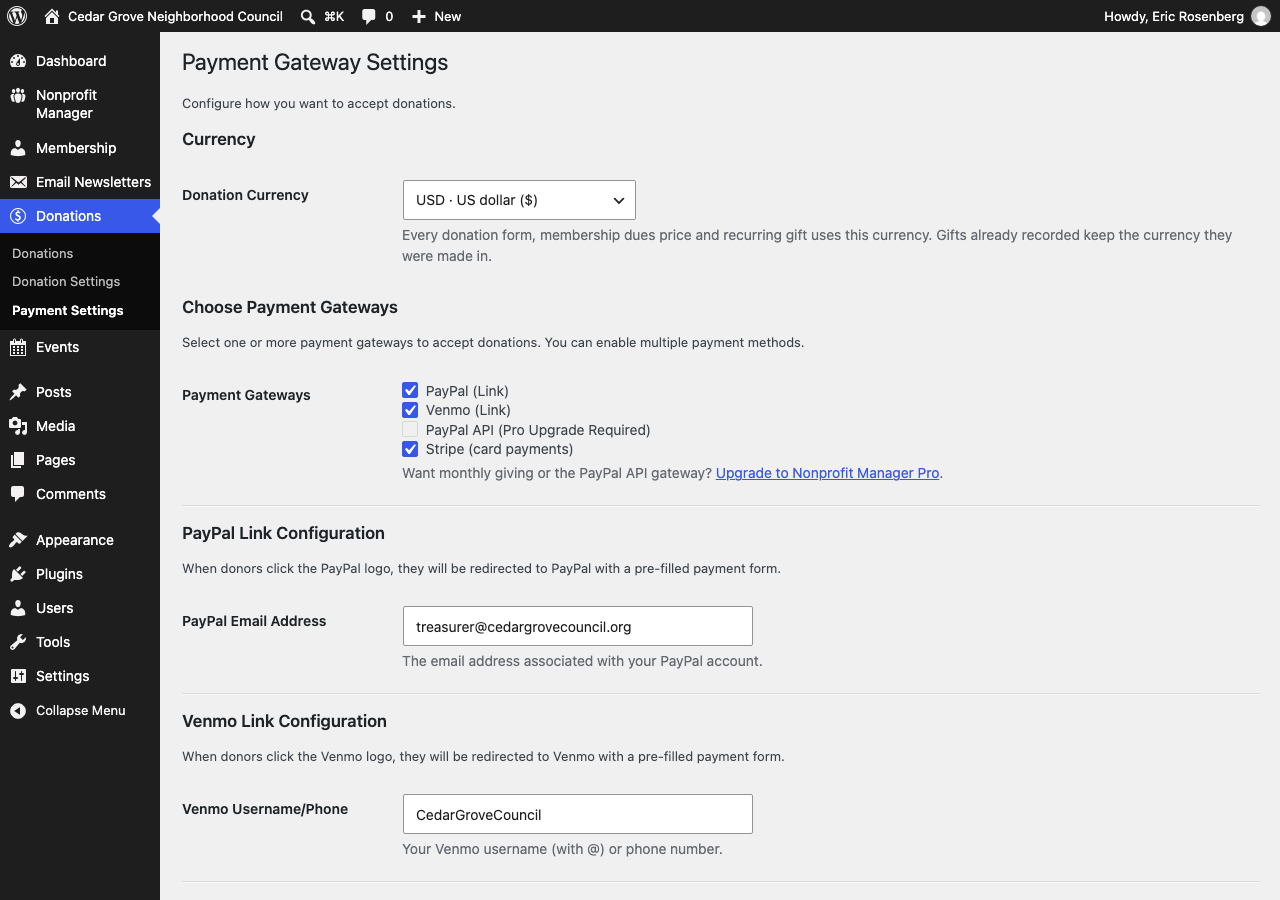
Payment settings with currency and gateways
Is Nonprofit Manager free?
Yes. You get membership management, donations, newsletters, scheduled emails, and events in the free plugin, with no trial period. With Nonprofit Manager Pro, you also get groups, recurring donations, email automation, and unlimited imports. You’ll see the Pro controls greyed out in the free plugin, each with one line about what it does.
Which payment services can I use?
PayPal, Venmo, and Stripe for one-time donations, all in the free plugin. You’ll see Stripe gifts in your Donations list. PayPal and Venmo send donors to those sites, so you’ll see those gifts in your PayPal or Venmo account. Recording PayPal gifts, recurring donations, and membership dues auto-billing come with Nonprofit Manager Pro.
Can I take recurring gifts?
One-time gifts are free, through Stripe, PayPal, and Venmo. Weekly, monthly, quarterly, and annual giving comes with Nonprofit Manager Pro, along with automatic billing for membership dues. You see the recurring options greyed out in the free plugin, so you know what they do before you decide.
Can I send email newsletters?
Yes. You write newsletters in the Gutenberg editor, reuse templates, headers, and footers, and see who opened and clicked. You can send a newsletter now or pick a time to send it later. Every newsletter carries a one-click unsubscribe link and a CAN-SPAM footer.
Which email service should I use?
We recommend Amazon SES. It costs $0.10 per 1,000 emails, and you can connect it in Nonprofit Manager Pro with an IAM access key or with SES SMTP credentials. If your host blocks ports 587 and 465, as DigitalOcean does, use SES port 2587. Your From address goes on Nonprofit Manager’s own email only, so WordPress notices and other plugins keep their own unless you turn on “Send all site email from this address.”
Does it work with my theme?
Yes. Nonprofit Manager works with any properly coded WordPress theme, and its forms and shortcodes pick up your theme’s styling automatically.
Can I move my events from The Events Calendar?
Yes. Go to Nonprofit Manager > Switch Plugins, or Events > Import from The Events Calendar. You can import your events, review each one, and then switch over. Anyone who follows an old event URL lands on the new event page.
Can I show past newsletters on my site?
Yes. Open a sent newsletter, tick “Show in the public archive” in the sidebar, and click Update. Then add the Newsletters block or [npmp_newsletters] to any page. You can set limit, order="asc", layout="grid" or "cards", topic, date="no", excerpt="no", and pagination="no", and with Pro, group="computing" lists only that group’s newsletters. You decide which newsletters go public, and we leave the box unticked on every newsletter, old and new. On the public copy, we fill name tags with their defaults and leave out unsubscribe links and tracking. Search engines skip the page unless you turn on indexing under Newsletter Settings.
Can I print my calendar?
Yes. Calendars and event lists have a Print or save as PDF button. You can turn it off for the whole site in the calendar settings, or for one calendar with print="no" on the shortcode.
Can I convert existing posts into events?
Yes. Use the “Convert to Event” action on any post or page. It carries your content over and lets you set the date, time, and location.
How do I import my existing email list?
Go to Membership > Import and choose CSV, XLSX, Google Sheets, Mailchimp, Constant Contact, or Brevo. The importer detects your columns for you. The free plugin imports up to 100 supporters in total, and Pro removes the cap.
Where can I get support?
Ask in the WordPress.org support forums and we’ll help. Pro includes email support at support@nonprofitmanager.app, with priority replies on the Multi-Site and Developer plans.
ChangeLog
2026.11.29
- Fixed errors on hosts without the mbstring PHP extension in event hashtags, newsletter link tracking, and gift CSV imports.
- Bundled the PayPal logo with the plugin.
- Added Amazon SES and SMTP to External Services.
- Cleared every Plugin Check error.
2026.11.28
- Fixed the email footer preferences link missing after you add a preferences page.
- Tested up to WordPress 7.2.
2026.11.27
- Added a Stripe webhook to record every gift.
- Allowed a signing secret for each Stripe endpoint.
- Fixed gifts crossing between sites sharing Stripe.
- Added three retries for failed newsletter sends.
- Fixed slow newsletter batches sending readers two copies.
- Sped up the newsletter queue with an index.
- Capped contact form messages per visitor and site.
- Refused PayPal gift claims with no order ID.
- Gave iCal events with no end one hour.
- Wrote all-day iCal events as dates.
- Cached Dashboard donation totals until a gift changes.
- Removed the expiry reminder claim from the listing.
2026.11.26
- Fixed a gift recording twice on simultaneous payment requests.
- Added a dismissible setup notice about Pro recurring gifts and dues billing.
- Added a Free vs Pro section and recurring gifts question to the listing.
2026.11.25
- Fixed newsletters not sending after you enable Newsletters.
- Changed Scheduled Emails to read “Sending to 2 members” during sends.
- Added a Site Health warning for a stalled email queue.
2026.11.24
- Fixed Switch Plugins marking an old plugin switched after file deletion.
- Fixed step 4 and Events Calendar step 1 wording on Switch Plugins.
- Added your sender setting beside each Newsletter Plugin and FluentCRM checkbox.
2026.11.23
- Changed embedded ONLYOFFICE documents to a link in emails.
- Changed TablePress emails to show the first page of rows.
- Added the [preferences_url] footer tag (or [subscribe_url]) for each reader’s preferences page.
2026.11.22
- Added a Help link beside each screen title and a Help panel tab.
- Removed PayPal frequency boxes from Payment Settings.
2026.11.21
- Added tags to events, shared as hashtags.
- Added featured images to newsletters, on the web version and in newsletter lists.
- Fixed unsubscribe and preferences links going to a page without the form.
2026.11.20
- Added meeting link, meeting ID, and passcode to the iCal feed.
- Added an .ics calendar file with meeting details to event emails.
- Changed embedded videos and slides in newsletter emails to links.
- Fixed long iCal feed lines by folding at 75 octets.
2026.11.19
- Fixed Givebutter imports bringing in a lost dispute as a gift.
- Fixed Givebutter offline gifts with a blank Email.
- Fixed Donorbox imports leaving Frequency blank.
2026.11.18
- Fixed Mailchimp imports listing only your first 100 audiences.
2026.11.17
- Added Meeting ID and Passcode fields, with [meeting_id] and [passcode] email tags.
- Added “Show the meeting link only in emails” to events.
- Added the meeting ID and passcode to the built-in Tomorrow email.
2026.11.16
- Fixed newsletters you send again reaching readers twice.
- Fixed sends to readers who unsubscribe or turn off the digest mid-send.
- Fixed imported events sending a “New event” email for each one.
- Fixed Email Settings corrupting SMTP passwords and API keys with %, <, or spaces.
- Fixed duplicated newsletters losing their template.
- Fixed the calendar list order and title when you show past events.
- Fixed Excel dates, blank CSV rows, undated gifts, and Constant Contact lists in imports.
- Fixed donor names with parentheses on the Donations screen.
- Fixed the “Copied” label and the Events settings screen on translated sites.
- Changed the empty events message to “No upcoming events.” or “No past events.”
- Changed signup and resubscribe confirmation links to expire after 7 days.
- Changed Facebook sharing to Graph API v26.0.
- Security: hardened past newsletter, FluentCRM, MailPoet, and XLSX imports.
- Security: sealed Mailchimp and Constant Contact keys during imports.
- Security: removed the email attribute from [npmp_can_spam].
- Security: capped unsubscribe confirmations per address and tightened reCAPTCHA checks.
- Copy: plural forms, US spelling, and clearer admin notices.
2026.11.15
- Fixed
[npmp_events past="true"] showing upcoming events. Use past="all" for both.
- Added a Categories link to the Events menu.
- Added a Groups column to the Events Overview with Nonprofit Manager Pro.
2026.11.14
- Fixed the Preview button in the Newsletter Archive and editor.
- Fixed the signup form re-subscribing Inactive contacts without email confirmation.
- Fixed “Send a test to me” using the wrong template.
- Fixed newsletters with a deleted template using the default template.
- Fixed group names in the newsletter editor’s audience label.
- Added a limit of three signup confirmation emails an hour for each address.
- Added a Donate button to newsletters and event emails.
- Added name and email prefill on donation forms.
- Added a Payment link option with amount, name, email, currency, and note prefilled.
- Added the donor’s name and email to the PayPal donation link.
2026.11.13
- Fixed the second test email and pop-up on newsletter tests.
- Fixed “All subscribed members” ticking again after you pick a group.
- Fixed Duplicate on a group newsletter dropping the group.
- Fixed Event Details position in the event editor sidebar.
- Fixed the signup form letting current subscribers join a new group after confirming.
- Fixed groups lost when an unsubscribed person signs up again.
- Fixed the signup form letting anyone change another person’s groups or email choices.
- Fixed the signup form showing different messages for different addresses.
- Added an Email Template picker to the event editor.
- Added a search box and sortable columns to the Newsletter Archive.
- Added Newsletter to the + New menu in the admin bar.
2026.11.12
- Fixed “Update existing contacts” resubscribing unsubscribed contacts.
- Added a FluentCRM importer for contacts, statuses, lists, tags, and custom fields.
- Added a Brevo import for contacts, lists, blocklisted addresses, attributes, and join dates.
- Added Pro custom field imports for CSV, Excel, Mailchimp, Constant Contact, and MailPoet.
- Added a past gifts importer for Zeffy, Givebutter, and Donorbox files.
- Added a past newsletters importer for MailPoet and The Newsletter Plugin.
- Added public archive show and hide bulk actions to the Newsletter Archive.
- Added MailPoet tags to the import’s Tags field.
- Added a link back to Switch Plugins on every import screen.
- Added a Pro note card with a button to the setup wizard.
- Fixed slow imports on sites with thousands of contacts.
- Fixed free MailPoet and Newsletter Plugin imports filling free places with subscribers first.
- Fixed the Switch Plugins step you saw while an import was still running.
- Fixed the empty groups you got from MailPoet lists with no subscribed members.
- Fixed lost parent categories from The Events Calendar.
- Fixed the review request showing the wrong threshold.
- Fixed missing commas in numbers on import and Switch Plugins screens.
- Fixed newsletters you deleted staying in the send queue.
- Fixed the blank recurring donations total on the dashboard of SQLite sites.
- Fixed HTML code showing in the import message about the Email column.
2026.11.11
- Fixed welcome emails going to imported contacts.
- Added an Ultimate Member importer for members, levels, join dates, phone, and country.
- Added an Event Organiser importer for events, dates, venues, categories, images, and links.
- Added a My Calendar importer for events, dates, locations, categories, images, and links.
- Added a WP Event Manager importer for events, venues, links, categories, and banners.
- Added the free contact limit and places left to Switch Plugins.
- Added the GiveWP and Paid Memberships Pro delete-data warning to the turn-off step.
- Fixed The Events Calendar import of cancelled and postponed events.
- Fixed GiveWP and Charitable imports changing Active and Pending status.
- Fixed MailPoet imports skipping Donors who subscribed.
- Fixed duplicate contacts on reloaded or parallel imports.
- Fixed Switch Plugins time-outs on sites with tens of thousands of subscribers.
- Fixed empty imports from plugins you never turned on.
- Fixed the MailPoet screen’s free limit wording.
2026.11.10
- Fixed paragraph breaks in event text on lists, blocks, and archives.
- Added a signup form note for administrators about Pro-only attributes.
2026.11.9
- Added your newsletter footer and unsubscribe link to notifications and the digest.
- Added a Form color setting under Membership Settings.
- Added what the person signed up for to the please-confirm email.
- Added the Newsletters block and [npmp_newsletters] shortcode for past newsletters.
- Added the [event_description] tag with full description, headings, lists, links, and images.
- Added planned emails and send times to a new event’s email box.
- Fixed line breaks between paragraphs in [event_excerpt].
- Fixed first name, last name, and full name tags in test emails.
- Fixed the event email box status after saving in the block editor.
2026.11.8
- Moved Event Details into the editor sidebar, beside the publish settings.
- Fixed adding, removing, and choosing the default membership level on Membership Settings.
- Fixed Share Now in the block editor.
- Changed Quick Add Event on the Dashboard to save a draft.
- Added a Clicks column to Newsletter Reports.
- Changed the newsletter footer to use the organization address.
- Cleaned up headings, labels, and wording on every admin screen.
- Updated the blocks to the current block editor version.
2026.11.7
- Added a Paid Memberships Pro importer for members, levels, join dates, and addresses.
- Added a Switch Plugins warning for Charitable or GiveWP data deletion settings.
2026.11.6
- Raised the free import limit from 50 to 100 contacts.
- Added calendar settings to The Events Calendar importer.
- Added the Switch Plugins screen, starting with The Events Calendar.
- Added an importer for MailPoet: contacts, lists, sender settings, and signup dates.
- Added MailPoet to the Switch Plugins screen.
- Added GiveWP and Charitable importers for donors and past gifts.
- Added a one-click update to the version notice.
- Added Events Manager and Sugar Calendar importers with event link redirects.
- Fixed old event link redirects after you turn a plugin off.
- Added a Newsletter Plugin importer for contacts, lists, sender settings, and signup dates.
2026.11.5
- Added PNG or JPG copies of WebP, AVIF, and HEIC images in emails.
- Added a test email warning for SVG images.
- Fixed the Creative Commons attribution box showing in emails.
2026.11.4
- Fixed the setup wizard newsletter signup, which wasn’t reaching the list.
2026.11.3
- New signups confirm by email first, with a setting to turn it off.
- Readers can unsubscribe without typing their address.
- Added [first_name], [last_name], and [name] tags to newsletters and event emails.
- Added [event_image] and [event_excerpt] tags to event emails.
- Added a Date Added column to contact imports.
- Fixed newsletters with templates losing their body.
- Fixed images and links in sent emails.
- Fixed HTML codes in newsletter subjects.
- Fixed the template picker hiding “No Template.”
- Removed a stray lightbox button from sent emails.
- Fixed notifications reaching unconfirmed contacts.
2026.11.2
- Added scheduled emails: one email per event, and Send later for any newsletter.
- Added a Print or save as PDF button to calendars and event lists.
- Added an importer for switching from The Events Calendar.
- Calendar weekday headers fit on phones, and category colors show on events.
- Changed Member List search to find names, emails, or tags, and fit phones.
- Fixed newsletters and digests that two overlapping runs could send twice.
- Fixed click tracking on email, phone, and same-page links.
- Fixed an event saved near its send time skipping its scheduled email.
- Fixed the Annual Recurring Donations total counting every renewal.
- Fixed the Turnstile and reCAPTCHA Test buttons, which only saved.
- Fixed calendar feed line breaks and edit times, and Reply-To names with commas.
- Clearer wording across settings, the setup wizard, and the tour.
2026.11.1
- Added list, grid, cards, and mosaic event layouts with images and excerpts.
- Past events sort newest first.
- The Events block follows the editor’s color, type, spacing, and border settings.
- Same-day events show the date once.
2026.10.11
- Admin screens, forms and the tour use the Nonprofit Manager colors.
- Existing calendars keep their current highlight color.
2026.10.10
- Version lockstep with Nonprofit Manager Pro.
2026.10.9
- Added a setup choice for the kind of group.
- Screens use words that fit your group, like Supporters.
- Fixed unrecorded Stripe gifts after an unreadable reply.
2026.10.8
- Fixed the From address on WordPress and plugin emails.
- Added a setting to send all site email from one address.
- Fixed Amazon SES delivery.
- Added Amazon SES port 2587.
2026.10.7
- Fixed unrecorded Stripe gifts after a failed save.
2026.10.6
- Fixed a PayPal error on some donate pages.
- Removed unused code from the Payment Settings screen.
2026.10.5
- Added a review reminder for event and member sites.
- Added upgrade links where Pro features appear.
- Added Automations, Custom Fields and Segments previews.
- Fixed duplicate donor thank-you emails.
2026.10.4
- Fixed: a one-time Stripe donation is recorded even when Stripe has a brief outage as the donor returns to your site.
2026.10.3
- Bug fixes and performance improvements.
2026.10.2
- Added currency support for donations, dues and recurring gifts.
- Fixed donate buttons on block themes.
- The setup wizard now opens after first activation.
- Added Skip to the setup wizard.
2026.10.1
- Added a Membership Manager role for volunteers.
- Fixed saving contacts from the member list.
- Fixed email provider test results.
- Fixed a CSV import warning on PHP 8.4.
2026.09.22
- Limited how often one visitor can sign up.
- Limited Stripe checkout attempts per visitor.
- PayPal gifts must be paid to your account.
- Newsletters are hidden from the public REST API.
2026.09.21
- Only editors and admins can send newsletters.
- Contributors’ converted events wait for review.
- Share Now only posts published content.
- Signup no longer re-subscribes people who opted out.
- Unsubscribe links ask for one confirming click.
- Import files are stored privately.
- Fixed Stripe gifts lost on pages with anchors.
- Fixed PayPal gifts missing from combined donation forms.
- Fixed newsletter links with encoded characters.
- Fixed duplicate events in calendar feeds.
- Pro newsletter segments now apply.
2026.09.20
- Fixed Constant Contact imports.
- Removed SparkPost as an email service.
- Imports no longer trigger Pro’s automations.
2026.09.19
- Added Stripe card payments for one-time gifts.
- Fixed the shortcode named in the guided tour.
- Fixed the note under the EIN field.
2026.09.18
- Version lockstep with Nonprofit Manager Pro.
2026.09.17
- The “Powered by” link is now offered after your first donation.
- The review request waits three days after that.
2026.09.16
- Automatic updates now cover both plugins together.
2026.09.15
- Added a regression test for the Members screen totals.
2026.09.14
- Faster Donations screen, donor totals and subscriber counts.
2026.09.13
- Version lockstep with Nonprofit Manager Pro.
2026.09.12
- Fixed subscriber notifications on large lists.
- Faster Dashboard and Overview counts.
2026.09.11
- Listed every outside service the plugin can contact.
2026.09.10
- Fixed the Pro price in an upgrade notice.
- Added two optional opt-ins to the setup wizard.
2026.09.9
- Added a warning when free and Pro versions differ.
2026.09.8
- Removed two development files from the plugin zip.
2026.09.7
- Version lockstep with Nonprofit Manager Pro.
2026.09.6
- Version lockstep with Nonprofit Manager Pro.
2026.09.5
- Version lockstep with Nonprofit Manager Pro.
2026.09.4
- Fixed missing form styles on the membership join form.
- Added the npmp_form_style_shortcodes filter.
2026.09.3
- Version lockstep with Nonprofit Manager Pro.
2026.09.2
- Fixed “One_time” in donation history.
- Version lockstep with Nonprofit Manager Pro.
2026.08.4
- Added a warning when PayPal donations can’t be verified.
2026.08.3
- Fixed sharing to X.
- Fixed shifted calendar event times.
- Fixed the default level for new email signups.
- Fixed unreadable dates saving as 1970.
- Fixed newsletter links that point off-site.
- Fixed the “All Members” checkbox losing its state.
- Fixed donation amounts undercharged by a cent.
- Fixed the Annual Recurring Donations total.
- Closed a gap that allowed unpaid donation records.
- Added missing permission checks on three settings screens.
- Faster newsletter sending and member counts.
- Raised the minimum PHP version to 8.1.
2026.08.2
- Version lockstep with Nonprofit Manager Pro.
2026.08.1
- Moved to a new home at nonprofitmanager.app.
- Refreshed the plugin listing.
2026.07.5
- Fixed a permissions error on the Social Sharing page.
- Large member imports now run in the background.
- Newsletter sending no longer bloats your database.
2026.07.4
- Fixed “Force From Address” changing other plugins’ mail.
- PayPal donations now keep a verification record.
- The weekly digest sends in batches.
- Large CSV and XLSX imports use less memory.
- Open and click tracking no longer bloats your database.
2026.07.3
- Fixed recurring Stripe donations charging only once.
- Fixed the thank-you page and email for Stripe donors.
- Donations are recorded only after Stripe confirms payment.
- Fixed the PayPal Smart Buttons form.
- The unsubscribe form now sends a confirmation link.
- Stored API keys are no longer shown back in settings.
- Fixed newsletter click-tracking links being altered.
- Fixed Pro custom fields, segments and notification preferences.
- Subscriber notifications no longer run while you publish.
- Faster admin dashboard, member list and calendar feed.
- Removed an upgrade notice for a feature that doesn’t exist.
2026.07.2
- Added five editor blocks for signup, unsubscribe, donations, sharing and contact.
- Added visitor social sharing buttons.
- Added a general contact form.
2026.07.1
- Added an optional “Powered by Nonprofit Manager” link.
- Added a dismissible review reminder.
- Fixed a PHP warning on the Setup screen.
2026.06.4
- Version lockstep with Nonprofit Manager Pro.
2026.06.3
- Added a redesigned events calendar with Month, Week and List views.
- Added calendar display options and two calendar blocks.
- Added an “Edit Event” button in the admin toolbar.
- Fixed the calendar rendering twice.
- Fixed quick-added events and members.
- PayPal’s script loads only on donation pages.
2026.06.2
- Added the member import wizard and a guided tour.
- Added one-click unsubscribe headers.
- Added default styles for the plugin’s forms.
- Added an organization mailing address setting.
- The unsubscribe page is created on activation.
- Fixed [unsubscribe_url] and the CAN-SPAM footer address.
- Free and Pro now ship on the same version number.
2.0.1
- Pro features work with Pro installed. A license is needed for updates.
- Fixed a conflict when upgrading Pro.
2.0.0
- Added the Stripe gateway for one-time donations.
- Added auto-sharing of posts and events to Facebook and X.
- Added subscriber notification preferences.
- Added one-click conversion of a post or page to an event.
- Added click tracking for newsletter links.
- Added a manage preferences page for subscribers.
- Added a weekly digest email.
- Newsletter tracking links no longer expire.
- Added a security check to the multi-gateway Stripe form.
- Updated the upgrade link.
- Security fix: added a missing check to the Stripe form.
- Pro: License key system with activation, deactivation, and auto-updates
- Pro: Recurring donations with Stripe subscription management
- Pro: Custom member fields (8 field types, drag-and-drop ordering)
- Pro: Email automation engine with 5 trigger types
- Pro: Advanced member segmentation with AND/OR condition builder
- Pro: Import from Mailchimp, Constant Contact, CSV, XLSX, Google Sheets
- Pro: 5 additional social networks (Reddit, Bluesky, Mastodon, Threads, Nextdoor)
- Pro: Guided email provider setup wizard with connection testing
- Pro: Email validation before sending to external provider APIs
1.1.3
- Added plugin action links.
- Added membership and donation summaries to the overview.
- Improved the main page layout.
- Membership levels moved to Membership Settings.
- Renamed “Membership Forms” to “Membership Settings”.
- Tested up to WordPress 6.8.3.
1.1.2
- Fixed the dashboard widget’s member count.
1.1.1
- Fixed the Venmo payment button.
1.1
- Added newsletter templates.
- Added a “Send to All Members” option.
- Added a version mismatch warning for Pro.
- Added admin helper functions.
- Security fix: verified nonce checks and sanitization.
- Faster member counting.
- More consistent admin screens.
- Fixed newsletter audience selection and tracking.
- Fixed PayPal button rendering.
1.0.2
- Fixed Amazon SES validation.
- Fixed PayPal and Venmo button display.
- Fixed dashboard widget member counts.
- Better email delivery error handling.
1.0.1
- Fixed activation hooks.
- Improved the setup wizard.
- Clearer payment error messages.
1.0.0
- Initial release
- Membership management system
- Donation processing (PayPal, Venmo)
- Basic email newsletter functionality
- Event calendar
- Setup wizard

