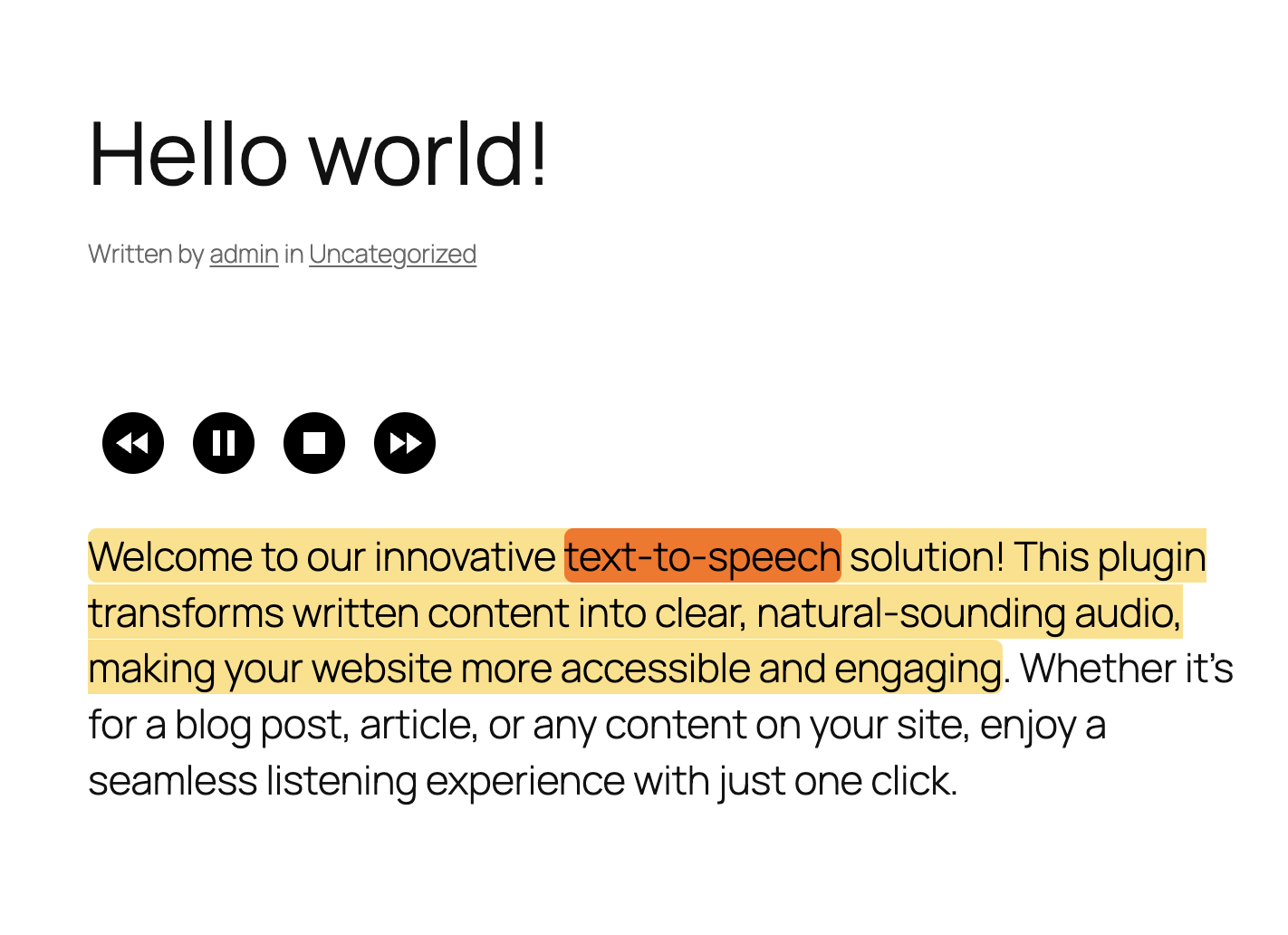
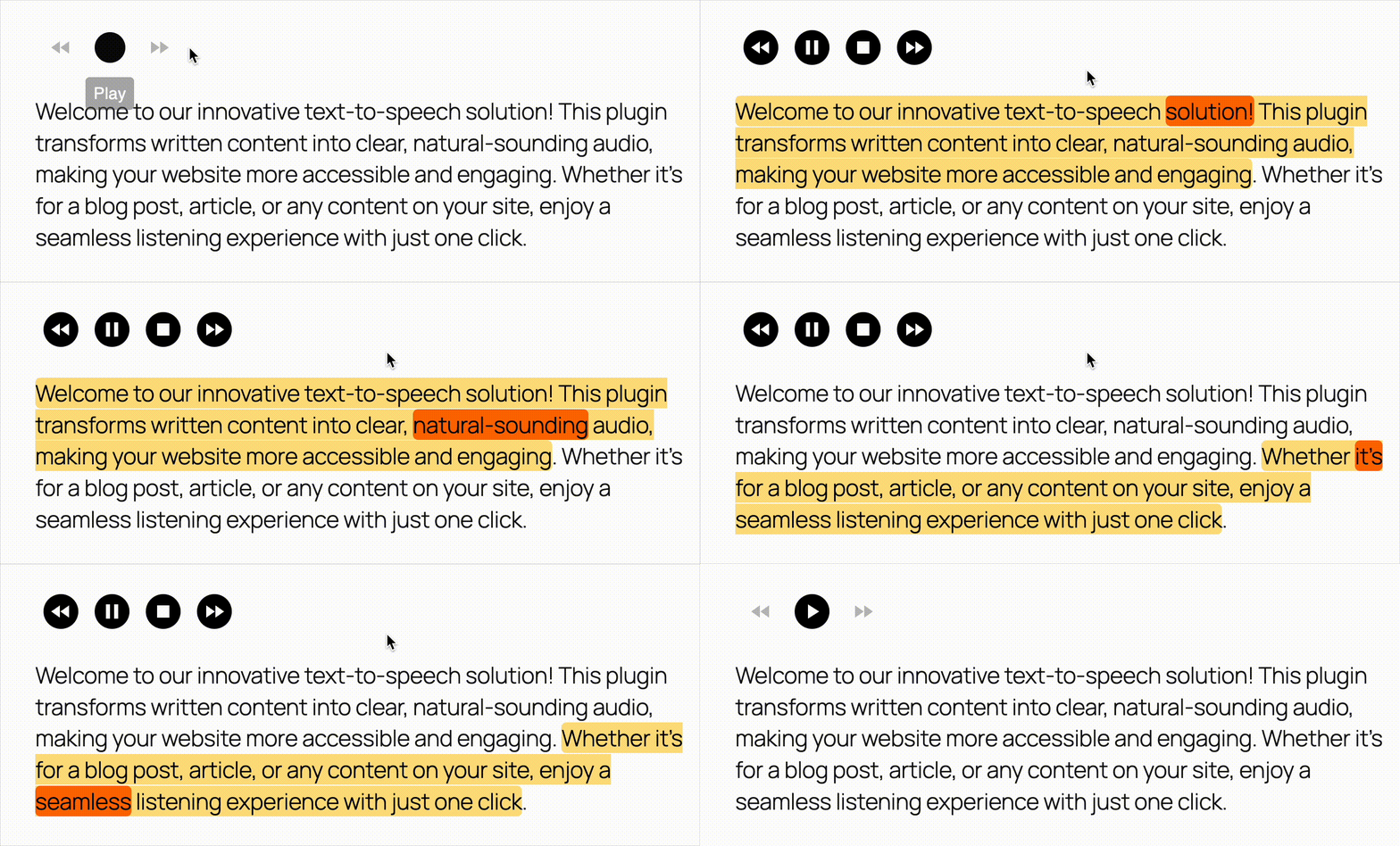
Reinvent WP Text to Speech (formerly Natural Text To Speech) adds a “Listen” button that reads your posts aloud in a natural AI voice. As the audio plays, the current sentence and word are highlighted on the page, so readers can listen and follow along at the same time. It turns any post into text to audio in seconds, with no setup.
Works right after activation. No API key, no credit card, no configuration. Activate the plugin and the player appears on your posts, powered by 20,000 free characters a month from Reinvent WP Cloud Free.
Use the voice provider you prefer. Start with free voices, connect your own ElevenLabs account (10,000 free characters a month), or upgrade to PRO to use OpenAI, ElevenLabs, Google Cloud, Amazon Polly or Azure AI Speech with your own API key. Don’t want to manage API keys? PRO also includes Reinvent WP Cloud PRO: premium voices with no API key and 40,000 characters a month. You can switch providers at any time without changing plugins.
Word highlighting with real AI voices. Every word lights up in sync with the voice, whichever provider you use. Not just robotic browser voices.
Built for news sites, blogs, online courses, accessibility-focused websites, WooCommerce stores and agencies managing many client sites.
Why site owners choose it
Word highlighting on real AI audio – Every word lights up in sync with natural AI voices from OpenAI, ElevenLabs, Google Cloud, Amazon Polly, Azure or Reinvent WP Cloud, not just robotic browser voices. Visitors can follow the text while they listen, which helps with focus, reading difficulties and long articles.
Pay your provider directly – With your own API key, you pay the voice provider for what you use, with no markup from us.
11 player styles – Modern, Classic Controls, Floating Pill, Waveform Card, Glassmorphism, Chapter Timeline, Accessible Controls, Article Contents and more. Colors adapt to your theme.
Accessible player – Keyboard controls, ARIA labels, visible focus states and screen-reader-friendly status updates.
Lightweight – About 300KB, deferred, and loaded only on pages that use the player.
Instant Play – Long posts start playing right away, with no wait for the whole article to be generated.
Free text to speech features
Text to speech player with sentence and word highlighting
The plugin works with 140+ languages and variants and 1,000+ voices across providers. The available languages and voices depend on the text to speech provider you choose:
Reinvent WP Cloud PRO characters (40,000 a month) are included with monthly and annual plans. Lifetime plans don’t include Cloud PRO characters; use your own API key instead. Compare plans
Shortcodes
The player is added to your posts automatically. Use the Gutenberg block (search for “Reinvent WP TTS”) or the shortcode to place and configure it yourself:
Used when Reinvent WP Cloud Free or Reinvent WP Cloud PRO is your voice provider (the default after activation). When a visitor presses play, their browser sends the text being read to this service to generate the audio, so the visitor’s IP address is also visible to it. Your site URL and plan are sent to check your monthly quota.
Used for license checks through Freemius when you open the plugin settings page. Your Freemius account details (email, site URL, license and plan) are sent.
Used for error logging. Error messages, plugin version and site URL are sent so we can fix problems.
Used for the list of Reinvent WP apps on the Reinvent WP → Dashboard page. When an administrator opens that page, your site downloads the current list at most once a day and keeps a copy. Nothing about your site or you is sent.
Used for the assistant (the Describe a problem with your site field) on the Reinvent WP → Dashboard page and on this plugin’s settings page. When you send a question, it is sent with any screenshots or text files you attach to it (of a file, only its newest part, with emails, IP addresses, passwords and keys hidden by your browser first), the last few messages of the conversation and the list of Reinvent WP plugins on your site (whether each is active, inactive or not installed, and its version), so the answer can point to the right plugin and setting. Nothing is stored; the conversation stays in your browser tab. If you send feedback from the assistant’s form, your email, site address and message go to the Reinvent WP team, like the feedback form.
Voice providers you connect (OpenAI, ElevenLabs, Google Cloud, Amazon Polly, Azure AI Speech)
When you choose one of these providers, the text to be spoken is sent from your site directly to that provider, using your own API key. Your API keys are stored in your WordPress database and are not sent to us.
Custom API (a text to speech API whose address you enter yourself)
When you choose Custom API, the text to be spoken is sent from your site to the address you entered, with the headers and body you set. Nothing is sent until you choose it and save, or play a preview. The audio it returns is saved on your site.
The address, headers and body you enter (which may include your API key) are saved encrypted in your WordPress database and are not sent to us or to your visitors.
Please review that service’s terms and privacy policy before connecting it.
Reinvent WP website (https://reinventwp.com)
Used to show current offers on the plugin settings page and to record basic interactions with them (shown, dismissed, coupon copied, button clicked).
Generated audio files and plugin settings are stored on your own WordPress site.
Affiliate disclosure: links to ElevenLabs (try.elevenlabs.io/reinventwp) are affiliate links. If you sign up for a paid ElevenLabs plan through them, we may earn a commission at no extra cost to you.
Yes. Open the live try-on, paste the address of one of your posts and press play. You see the player on your own article, in your own theme, in seconds, without installing anything.
Is this text to speech plugin free?
Yes. After activation you get 20,000 free characters a month from Reinvent WP Cloud Free, with no setup or credit card. You can also connect your own ElevenLabs account. Upgrade to PRO to use OpenAI, Google Cloud, Amazon Polly or Azure, or for 40,000 characters a month with Reinvent WP Cloud PRO.
Does the text to speech player work with my theme and page builder?
It works with most themes and with Gutenberg, Elementor, Divi, Avada, WPBakery, Beaver Builder, Brizy and SiteOrigin. The player is added automatically, so no template editing is needed. If it doesn’t show up on your site, please open a support topic and we’ll help.
Which languages and voices are available?
It depends on the provider you choose. See Supported languages above for the list and links to each provider’s language support.
Does it work with WooCommerce?
Yes. It supports custom post types, including WooCommerce products, as well as posts and pages.
Does it help with accessibility (WCAG / ADA)?
It gives visitors an audio alternative to your written content, with keyboard-accessible controls, ARIA labels, visible focus states, screen-reader-friendly status updates and customizable highlight colors. These help you work toward WCAG 2.1 AA. Full compliance also depends on the rest of your site.
How does word highlighting help readers?
As the voice reads the post aloud, the current sentence and word are highlighted. Visitors can follow the text without losing their place, which helps with long articles, small screens, reading difficulties and focus.
Where are my API keys stored?
In your own WordPress database. With your own key, requests go directly from your site to the provider. If you use Reinvent WP Cloud, the text being spoken is processed by our service. See External Services above.
Is it GDPR compliant?
The plugin can be used in a GDPR-compliant way, but compliance depends on which providers you enable and how you describe those data flows in your privacy policy.
Does word highlighting work with OpenAI and other providers that don’t return word timings?
Yes. The plugin works out word timings in the visitor’s browser by matching the text with the generated audio. Highlighting stays in sync with OpenAI, ElevenLabs, Google Cloud, Amazon Polly, Azure, Reinvent WP Cloud and any voice service you connect through the Custom API.
Does text to speech help SEO?
Audio can keep visitors on the page longer. The plugin also adds AudioObject schema markup to posts that have audio.
Lifetime licenses: the Cloud PRO card now shows your credit balance instead of a monthly quota that never applied, and nothing is shown as resetting.
After you buy a Lifetime license, a site on Reinvent WP Cloud Free switches to Cloud PRO by itself when the account has credits.
See your Cloud quota and credits right on the Home page, in Simple and Advanced mode: open “Show quota and credits” instead of going to another page.
Advanced mode: the Home page has a tidier, more balanced layout.
3.6.3
Lifetime licenses can now use Reinvent WP Cloud PRO. Each Lifetime license comes with 50,000 Cloud PRO credits to start (one time); after that, credit packs pay for Cloud PRO. The settings show your credit balance and where to buy more.
3.6.2
Listen to a short sample of any voice before choosing it, in the player’s voice lists and in the plugin settings.
Custom API presets for OpenRouter, Deepgram, Cartesia and Fish Audio, with an Undo button and an animation that shows how it works.
The audio download now shows its progress and time left, keeps going when you close the window, and can be stopped.
With the Custom API, the player no longer shows a voice choice.
Fixed the download window’s text being hard to read on dark websites.
3.6.1
Settings are easier to understand: hover a setting, card or tab to see a small animated example of what it does.
Choosing where the player appears now uses picture cards for posts, pages, products and portfolio.
The voice quota card now warns when your site’s own usage limit is what stops new audio.
Fixed the request limit, which could stop the audio partway through a long new article.
Improved the Reinvent WP Apps page and assistant.
3.6.0
A Reinvent WP Suite Pass can now choose Reinvent WP Cloud PRO as the voice provider.
License keys that contain a “%” followed by two letters or digits now activate correctly.
With AI Agent, the Reinvent WP Assistant can manage audio and podcasts for you.
Improved the Reinvent WP Apps page and assistant.
3.5.9
The Reinvent WP Assistant can now read and change Text to Speech settings for you (you approve every change), sum up how your audio is used, and explain problems from the error log: on the Text to Speech page, and on every admin page when AI Agent is active.
License keys are now activated through Reinvent WP Services, and Cloud requests are signed so another site can’t use your quota.
3.5.8
Earn 30% by recommending the plugin: the new “Earn 30%” button opens the affiliate program. Anyone can join for free, you are approved at once and your link shows right away.
3.5.7
The Reinvent WP Apps page is new: the plugins every site needs first, the rest of our plugins by category, and your installed apps.
The offer window has a simpler look, shows a countdown in an offer’s last days, and its button applies the coupon for you.
3.5.6
The account menu shows what makes your site PRO: your Text to Speech PRO license or a Reinvent WP Suite pass.
3.5.5
Security update, please install it: settings and admin actions now require a logged-in administrator.
Visitors can no longer change the audio provider or skip the usage limits.
Provider settings are no longer stored next to the audio files. If you use the Custom API provider, rotate its API key.
3.5.4
Advanced mode Analytics has a Time on Page card: how long readers who listen stay on the page compared with those who don’t, with a daily chart and a reset.
The Simple mode Home slideshow opens with a one-line summary of your listening.
Reinvent WP Cloud: the quota card shows your top-up credits, with links to buy more and to set your own daily and 5-hour limits.
3.5.3
New Analytics tab in Simple mode: listens, time listened, listen rate and how much of each article is heard, compared with the period before.
See how long readers who listen stay on the page compared with those who don’t.
Download your analytics as a PDF report.
Home shows rotating highlights of your listening activity and the most common playback problems.
Analytics are now kept for one year by default.
Pronunciation correction is hidden from visitors until you turn it on in Runtime.
Smaller fixes to the player settings menu and the admin layout.
3.5.2
Visitors can pick their own voice in the player’s settings.
Tidier player settings: speed and volume show their value, and the menu is translated into 58 languages.
Language presets you add now reach visitors who already opened the player.
Pronunciation correction is shown only on the PRO plan.
Redesigned admin Home that works on phones.
3.5.1
Simple mode: choose from all 8 player styles.
Fixes and layout improvements.
3.5.0
Lighter player: 130 KB on initial load instead of 210 KB (38% less).
3.4.9
Lighter player: 210 KB on initial load instead of 300 KB (30% less).
Button colours follow your theme’s accent.
Double tapping the player’s own buttons no longer stops the reading.
No more player flicker at the top of the article.
3.4.8
Lighter player: 300 KB on initial load instead of 385 KB (22% less).
Settings page is less than half the size.
3.4.7
The site report names the plugin it comes from.
3.4.6
Faster controls on phones, with smooth scrolling while reading.
Double tap any sentence to play it, also on iPhone and iPad.
Sentences across links, bold or italic text are read as one.
Audio already heard is not downloaded again.
3.4.5
New highlight engine: your page’s HTML is no longer changed.
Better sentence splitting, also for long sentences and non-Latin languages.
Hidden text and common extras (tables of contents, share buttons, author boxes) are no longer read.
Highlights stay under the player and readable on dark themes.
Highlight styles are now a background box; custom CSS for the old sps/spw tags no longer applies.
3.4.4
Usage card shows which time window runs out first.
Time Window Quota Guard warns when a limit is too small.
Saved API keys show as a short masked summary.
Clearer caching settings and player style sketches.
Tidier settings page.
3.4.3
A cancelled PRO subscription shows “Not renewing” and its end date.
3.4.2
A PRO license key turns on PRO right away.
Cloud Free switches to Cloud PRO automatically with a PRO license.
3.4.1
Block preview works on posts without text or not yet saved.
Fixed new audio failing on drafts without a URL slug.
3.4.0
Fixed the block showing an empty box in the block editor.
Fixed a block editor console error.
3.3.9
OpenAI pronunciation and language detection moved to GPT-6 models (older models were shut down).
The site check tests OpenAI only when pronunciation is on.
3.3.8
New Custom API audio source: connect any text to speech API.
Optional note next to each API key.
Links to Reinvent WP Cloud details.
Upcoming apps show as “Coming soon”.
3.3.7
New Reinvent WP Apps page.
New assistant that links you to the right setting.
Setting links open Advanced mode and highlight the setting.