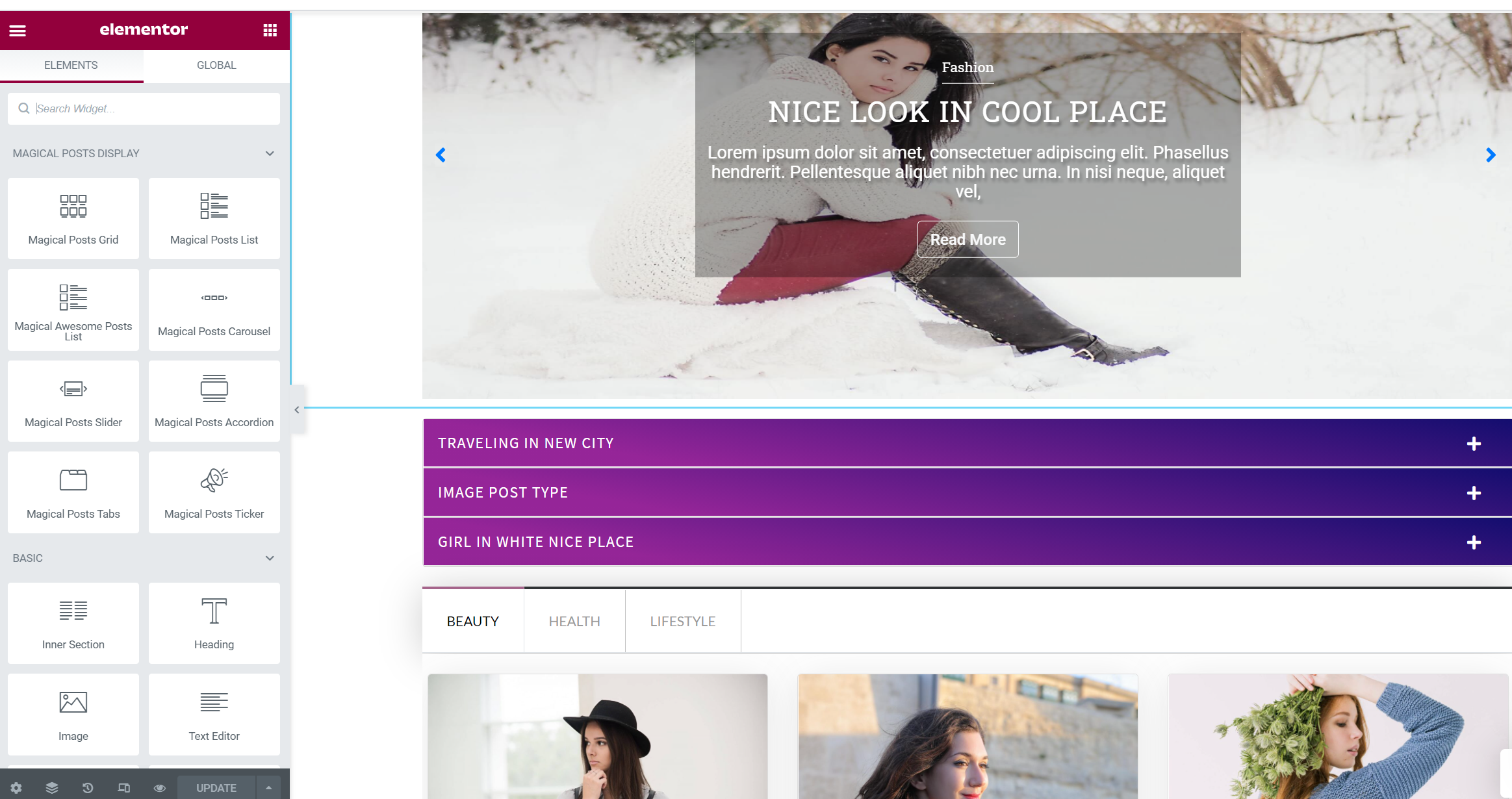
With just one click, you can easily generate posts Slider, posts carousels, posts Grids, posts accordions, posts tabs, posts tickers, and Categories & Tags Filters for Posts, Pages, and Custom Post Types. This addon helps you showcase your content in various formats, providing an engaging user experience for your visitors. Magical Posts Display is an Elementor addon that simplifies the creation of interactive content displays. Magical Posts Display is compatible with all custom post types.
✨ – Your All-in-One Tool for News, Magazines, and Blogs
Magical Posts Display is your ultimate solution for creating amazing News, Magazine, and Blog websites. Think of it as a supercharged plugin that does it all, whether you’re building a blog or a news and magazine site.
With Magical Posts Display, you get fantastic features like the Dynamic Site Builder, Popular Posts, Related Posts, Ajax Filter and Pagination, Post Carousel, Post slider, and much more. Now, with added support for Pages and Custom Post Types, it’s your secret weapon for unlocking your website’s full potential.
???? Theme Builder Widgets (Build Custom Single Post & Archive Templates)
Magical Posts Display powers your Elementor Theme Builder with a dedicated suite of dynamic widgets for single posts and archive templates. Design custom single post layouts, blog archives, category pages, author pages, search results, and custom post type templates with complete design freedom:
???? Post Single Template Widgets:
Post Title — Dynamically output the title of the current post, page, or custom post type with HTML tag selection (H1-H6, p, span), alignment, custom colors, typography, and optional link.
Post Content — Renders the complete post or page content with full typography styling, text color, link color, blockquote styles, and complete Elementor inner-layout support.
Post Excerpt — Display custom excerpts or auto-generated post summaries with custom word/character limits and customizable “Read More” button/text.
Featured Image — Display the current post’s featured image with size controls (thumbnail, medium, large, full), custom aspect ratio, border radius, box shadow, overlay, and click-to-link options.
Post Meta — Display author (with avatar), date (published/modified), categories, tags, comments count, and reading time. Includes customizable icons, badges, dividers, and inline or stacked layouts.
Author Box — Showcase author biographical info, profile picture/avatar, social links, author role/name, and a direct link to the author’s post archive.
Post Comments — Embed a fully styled WordPress comments section including comment list, avatar styling, comment reply form, submit button styling, and threaded comments.
Post Navigation — Add previous and next post pagination links with customizable arrows/icons, post title preview, and taxonomy-restricted filtering (same category/tag).
????️ Post Archive Template Widgets:
Archive Title — Dynamically display the title of the current archive (Category, Tag, Author, Date, or Search Results) with optional prefix inclusion/removal (“Category:”, “Tag:”), custom prefix text, and responsive typography.
Archive Posts — A powerful, dynamic archive loop query widget that automatically displays the posts belonging to the current archive query. Features multiple layout modes (Grid, List, Magazine), column settings, thumbnail sizes, excerpt length, meta tags, and read more buttons.
Post Pagination — Add numeric, Prev/Next, or Ajax-powered pagination to your archive templates, ensuring seamless browsing across multiple pages of posts.
Magical Posts Display comes with a range of awesome Elementor widgets that make it easy to display your posts in unique and visually appealing ways. The latest addition includes the powerful News/Magazine Image Grid widget, featuring 5 distinct layout styles perfect for news, magazine, and blog websites.
Magical Posts Display is a user-friendly addon that offers many different ways to display your site posts. Our Elementor widgets allow you to customize and set new options for each Magical Posts item, giving you complete control over your content display. In addition, our addon supports post meta, categories, tags, comments, timestamps, and more, making it easy to create a personalized and engaging user experience for your visitors.
Most powerful features:
Easily display posts, pages, and custom posts anywhere.
Elementor Widgets Manager – Toggle any of the 25 widgets on/off to maximize site speed.
Conditional Asset Loading – Fast PageSpeed; scripts & styles only load when widgets are used.
Presets & Layout Recipes – Step-by-step blueprints for 8 blog & magazine layouts.
Posts time show.
Posts category show.
Posts tag show.
All options show hide features.
User-friendly Editor.
Ajax Loadmore button.
Ajax Categories filter.
Post Position Control – Select specific posts (1st, 2nd, 3rd, 4th) or offset from any position for grid layouts.
Translations
English
Privacy Policy
Magical Posts Display – Elementor Advanced Posts widgets uses Appsero SDK to collect some telemetry data upon user’s confirmation. This helps us to troubleshoot problems faster & make product improvements.
Appsero SDK does not gather any data by default. The SDK only starts gathering basic telemetry data when a user allows it via the admin notice. We collect the data to ensure a great user experience for all our users.
Integrating Appsero SDK DOES NOT IMMEDIATELY start gathering data, without confirmation from users in any case.
You can easily use the plugin by Elementor page builder editor. If you go add new or edit page then you will get all Elementor widgets for use.
How do I display Pages and Custom Post Types using Magical Posts Display?
To display Pages and Custom Post Types, simply select the desired content type from the settings within the Elementor editor. You can then customize the display options just as you would for Posts.
Can I customize the look and feel of my content displays with Magical Posts Display?
Yes, you can customize the look and feel of your content displays using the various Elementor widgets that come with the addon. You can change the layout, colors, fonts, and more to create a unique and visually appealing content display
Can I display posts from a specific category with Magical Posts Display?
Yes, Magical Posts Display supports posts categories, allowing you to display posts from a specific category. You can use the Elementor widgets to filter posts based on categories and tags and create a more personalized user experience for your visitors
Do I need any coding skills to use Magical Posts Display?
No, you don’t need any coding skills to use Magical Posts Display. The addon comes with various Elementor widgets that allow you to create stunning content displays without any coding knowledge. Simply select the widget you want to use, customize it to your liking, and publish your content display.
Can I use Magical Posts Display on multiple websites?
Yes, you can use Magical Posts Display on multiple websites with a single license. The addon offers a flexible licensing system that allows you to use it on an unlimited number of websites, making it an excellent choice for web developers and agencies who create websites for multiple clients.
Compliance: Complete architectural refactoring to strictly comply with WordPress.org Plugin Directory Guidelines.
Compliance: Removed all license checks and pro-gating mechanisms from the free plugin codebase.
Unlocked: Author avatar, modified date, reading time, aspect ratio, fallback images, card layouts, social links, drop cap, and masonry layouts now work freely for all users.
Compliance: Updated 1-click install button to explicitly disclose both installation and activation before user click.
Compliance: Updated review link to show all community reviews instead of pre-filtering by rating.
Compliance: Synchronized stable tag with plugin version 1.3.3.
Compliance: Replaced deprecated get_terms() argument signature with current WordPress standard.
Compliance: Upgraded Appsero SDK to v2.0.7 and Swiper library to v11.2.10; removed dev-only dependencies from production bundle.
Compliance: Removed abandoned and unused weDevs Settings API wrapper class.
Compliance: Fully documented external Appsero telemetry service in readme.
Compliance: Fixed all gettext internationalization calls and missing text domains.
Compliance: Adjusted admin dashboard menu position to respect core WordPress hierarchy.
Security: Added direct file access ABSPATH guards across all PHP files.
1.3.2
Fix: Purged legacy Select2 CSS overrides in admin-style.css and added strict admin screen isolation to prevent conflicts with WooCommerce settings and third-party plugins.
Feature: Added Equal Height Cards control for Posts Grid, Posts Carousel, and Archive Posts widgets (aligns cards and buttons cleanly across all rows).
Feature: Added modern Image Aspect Ratio options (16:9 Landscape, 4:3 Standard, 1:1 Square, 3:2 Photo) with responsive cover fit.
Feature: Added interactive Image Hover Effects (Zoom In, Zoom Out, Grayscale to Color, Brightness Boost).
Feature: Added Floating Category Badge on image thumbnail with modern pill styling.
Feature: Added Show Author Avatar option in post meta for enhanced author presentation.
Enhanced: Added Sticky Posts control across widgets (Ignore, Include at Top, Only Sticky Posts).