
This Plugin helps you to hide and change the login url to any URL you want.
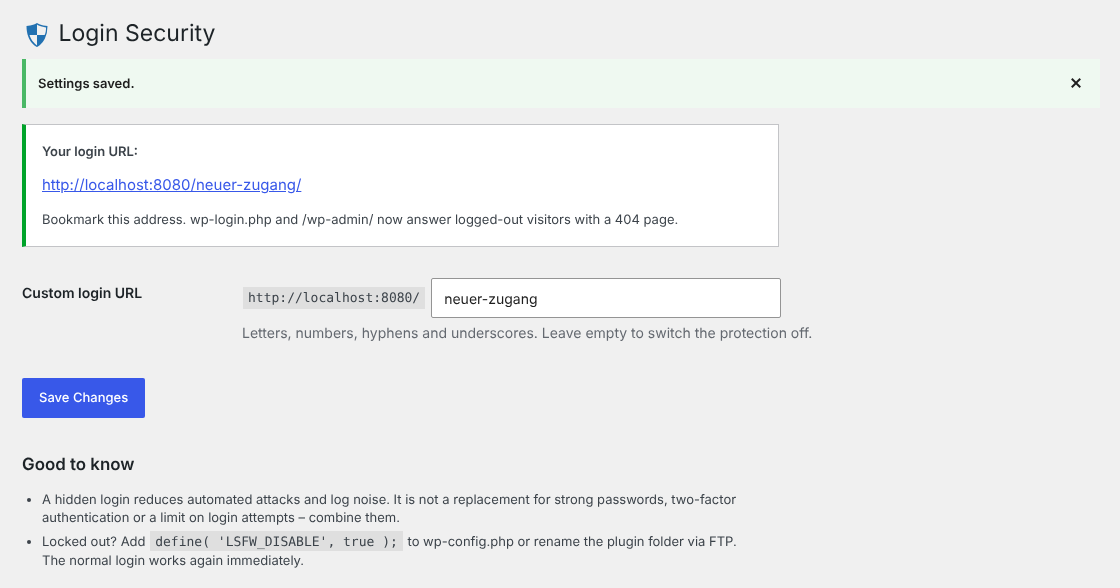
You find the Menü -> Settings -> WP Login Security
| Author: | Christian Zimpel (profile at wordpress.org) |
| WordPress version required: | 6.2 |
| WordPress version tested: | 7.1.4 |
| Plugin version: | 2.0.0 |
| Added to WordPress repository: | 21-04-2023 |
| Last updated: | 24-10-2026 |
| Rating, %: | 0 |
| Rated by: | 0 |
| Plugin URI: | https://wordpress.org/plugins/login-security-... |
| Total downloads: | 1 345 |
 Click to start download |
|
Bots hammer /wp-login.php on almost every WordPress site. This plugin moves the login form to an address only you know, for example example.com/my-door/, and answers requests to the default entry points with a regular 404 page of your theme.
Features
- Choose any login URL – letters, numbers, hyphens and underscores.
wp-login.php,wp-register.phpand/wp-admin/return a real 404 status for logged-out visitors (no white screen, no redirect that gives the new URL away).- WordPress’ shortcuts
/login,/adminand/dashboardno longer reveal the login. - Password reset, registration, logout and e-mail links automatically use the new URL.
- Works with and without pretty permalinks. Your permalink settings are never touched.
- Collision check: the plugin refuses slugs that are already used by WordPress, a page or a post.
- Emergency switch:
define( 'LSFW_DISABLE', true );inwp-config.php. - No database tables, no rewrite rules, no tracking. Uninstall removes all options.
Why hide the login at all?
Honest answer: a hidden login is no replacement for strong passwords, two-factor authentication or a login limit. Its value is different – automated attacks stop hitting your login form, which means less server load, fewer lockouts of real users and cleaner logs. It is especially handy on sites with customer accounts where a .htaccess password is not an option, and it gives your customers a nicer login address. Combine it with 2FA for real protection.
Settings
Settings Login Security
Screenshots
FAQ
ChangeLog