Meet your new personalization engine for WordPress. Logic Hop helps marketers and store owners increase conversions by dynamically changing content based on each visitor’s context—no coding required. Integrate seamlessly with HubSpot CRM to pull user data (e.g., segments, scores) for targeted rules, ensuring personalized landing pages that boost engagement and sales.
Personalize headlines, CTAs, blocks, pop‑ups, and redirects based on 40+ real‑time data points: location, device, pages viewed, UTM/source, goals, lead score, date/time, query strings, and HubSpot CRM insights.
Works seamlessly with page builders and popular plugins. Design in Elementor, Divi, Beaver Builder, or Gutenberg and let Logic Hop decide what each visitor should see via CRM-driven conditions.
Integrates with CRM and marketing tools like HubSpot, so you can mirror audience segments from your CRM for precise landing page personalization.
Why teams choose Logic Hop
– Increase conversions with tailored CTAs, offers, and messaging for every segment—e.g., show HubSpot-qualified leads a custom landing page upsell.
– Build rules visually—create conditions and goals in minutes, not weeks, using HubSpot data for smarter personalization.
– Cache‑friendly and GDPR‑ready: performance and privacy built‑in.
What you can personalize (with HubSpot CRM integration for deeper insights)
– Landing pages by campaign (UTM/source) or HubSpot segments—e.g., dynamic content for returning visitors.
– Product offers by category, cart activity, or browsing history, synced with CRM data.
– Headlines and blocks by device, location, or time, enhanced by HubSpot lead scores.
– Pop‑ups and bars by behavior (goals, lead score, pages viewed) or CRM tags.
– Conditional redirects to guide users through funnels based on HubSpot lifecycle stages.
How it works
1) Create conditions using real‑time data points, including HubSpot CRM pulls.
2) Place shortcodes, blocks, or widgets anywhere for landing page personalization.
3) Logic Hop displays the right content for each visitor, optimizing conversions.
Designed for developers and marketers
– Robust API and data object for custom integrations, including HubSpot CRM syncing.
– Session isolation with fingerprinting, versioning, and optimistic concurrency.
– JSON endpoints for headless or JS workflows.
Start personalizing in minutes—no code required.
Powerful Integrations
Logic Hop Dynamic Content works with your favorite page builders! Use Logic Hop with:
Coming soon in the next version: Enhanced integrations for even better dynamic widgets and real-time personalization in Elementor, Divi, and more builders.
Logic Hop Dynamic Content works with your favorite plugins! Use Logic Hop with:
Logic Hop Dynamic Content matches your CRM targeting! Use Logic Hop with:
HubSpot for seamless personalization using CRM data like segments and scores.
Coming soon in the next version: ActiveCampaign integration for advanced rules based on tags, automations, and custom fields—plus more CRM datasources for expanded personalization.
Get Started in Minutes
Logic Hop SaaS
Logic Hop is a standalone Software as a Service (SaaS). You must have an Logic Hop account in order to take advantage of this plugin. Click here to create your account.
Content Personalization – What is it?
Information is automatically gathered when people view your website. Such as:
What website referred the person?
Where is the person located?
Which content has the person viewed?
Using this data, and MUCH more, Logic Hop helps you target individual users and show them custom content.
Logic Hop SaaS
Logic Hop is a standalone Software as a Service (SaaS). You must have an Logic Hop account in order to take advantage of this plugin. Click here to create your account.
Powerful call-to-action conditional logic with just a few clicks for dynamic content display and landing page personalization.
Fully integrated with WordPress for easy HubSpot CRM personalization using Shortcodes & Widgets.
Personalize and control the display of any WordPress content element, including third-party widgets, with CRM data.
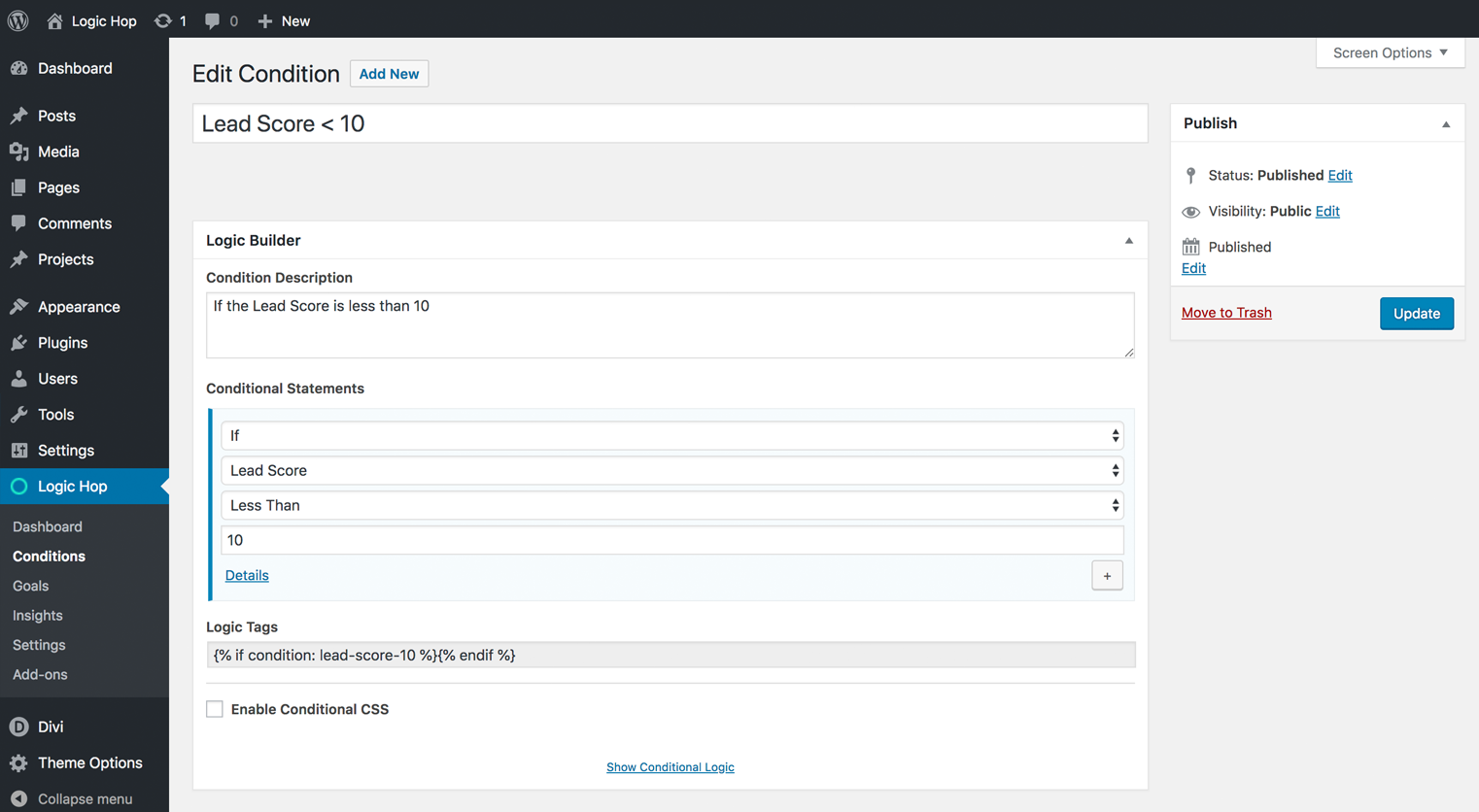
Over 40 points of real-time data include lead score, goals, page views, geolocation, referrers, query strings, dates & time—enhanced by HubSpot integration.
Coming soon in the next version: Real-time weather datasources for location-based personalization (e.g., weather-triggered offers), plus expanded CRM options like ActiveCampaign for even more dynamic rules.
Logic Blocks for personalized CTAs on landing pages.
Logic Bars for personalized header bar callouts and pop-ups.
Conditional page redirects for dynamic funnels tied to CRM segments.
Extend Logic Hop functionality with powerful Add-ons for third-party services.
Default conditions make it fast & easy to get started!
For full details, documentation and tutorials visit LogicHop.com.
Logic Hop brings the power of personalization to WordPress with click-to-build rules that display content based on over 40 pieces of data.
Logic Hop goals allow you to track and measure user activity.
I don’t have a Logic Hop Account. How can I get one?
You can sign up for a Logic Hop account at LogicHop.com
Who should use Logic Hop?
Logic Hop is perfect for e-commerce websites, marketers, growth hackers, affiliate marketers, developers and small businesses that want to add personalization to WordPress.
What are Add-on Integrations?
Add-on Integrations are plugins that extend Logic Hop to provide functionality for plugins and third-party services such as Beaver Builder, Elementor, Divi, Gravity Forms, Google Analytics, WooCommerce and ConvertKit.
What’s required to use Logic Hop?
Logic Hop requires WordPress version 4.9.6 or higher and PHP version 5.4 or higher.
What’s coming in the next version?
Exciting updates include ActiveCampaign CRM integration, real-time weather datasources for dynamic rules, and enhanced page builder support for seamless personalization.
Logic Hop works does not work with sites hosted on WordPress.com or WordPress.com VIP.
Do I need a programmer to use Logic Hop?
Definitely not. Our click-to-build tools allow you easily create conditional logic and goals without any programming knowledge.
New: Added precise Date & Time conditions (Server Time & User Time) with full ISO comparison (seconds supported) for exact scheduling.
New: Added “Reload Definitions” button in Condition Builder to fix missing conditions caused by stale cache.
Fix: Resolved license data merging issue where API responses would overwrite local conditions.
Update: Condition Builder UI now supports datetime-local input with seconds step for granular control.
3.9.3
Fix: Resolved a PHP 8 ArgumentCountError in the Logic Hop dashboard widget so the admin stays crash-free.
Fix: Resolved critical fatal error “Attempt to assign property ‘LoggedIn’ on null” in DataFactory::set_user_data() by adding null safety checks before accessing $this->data properties. This prevents crashes when session data is missing or expired.
Fix: Logic Bar condition saving now works correctly—fixed issue where condition selections were not being saved due to wp_kses() stripping values and improper handling of empty fields. Conditions are now properly converted from IDs to slugs on save and sanitized correctly.
Fix: Logic Bar condition dropdown now displays the correct selected condition—fixed issue where saved condition slugs weren’t matching dropdown IDs. Added slug-to-ID conversion for proper dropdown selection.
Fix: Logic Bars now render saved HTML correctly in both admin previews and on the front end. Fixed HTML entity encoding issues that caused content to display as escaped entities instead of rendered HTML. Added automatic decoding on both admin and public-facing sides.
Fix: Condition JSON data now decodes HTML entities safely. Fixed issue where stored condition JSON contained HTML entities (", <, etc.) that prevented proper parsing. Added automatic normalization on save and runtime decoding.
Fix: Logic Block JSON data now normalizes HTML entities on save to prevent corruption. Added automatic sanitization when Logic Blocks are saved.
New: Tools → Maintenance section with Condition Maintenance and Logic Bar Maintenance tools. Scan, preview, and repair corrupted condition JSON and Logic Bar HTML/content automatically.
New: Automatic runtime fixes for Conditions and Logic Bars on the public-facing side. Corrupted data is automatically repaired when detected during rendering, ensuring content displays correctly even if admin repair hasn’t been run.
New: Completely refreshed Support page with a single “Describe your request” field, consent capture, and remote prompt suggestions served from Logic Hop.
Change: Support tickets now sync directly with Logic Hop services—WordPress no longer stores ticket CPTs or media uploads locally.
New: Support panel now assembles a signed diagnostics bundle (usage map, affected posts, fatal error snippets) and posts it directly to the Logic Hop help desk.
3.9.2
⚠️ WARNING: This version contains critical bugs. DO NOT INSTALL.
⚠️ CRITICAL ISSUES:
⚠️ * Missing saving conditions and logic bars functionality
⚠️ * Critical fatal error when accessing user data
New: Admin Tools page with JSON session viewer
New: Frontend Debug Panel shows UID, Token, Fingerprint, Version and UpdatedAt
New: Temporary admin Tools debug promoted to dedicated Tools submenu
New: Inspect Usage page: interactive Cytoscape graph shows how Posts/Pages, Conditions, Logic Blocks, Variables, Logic Bars, and Redirects are connected; multiple layouts; node preview with edit links; orphan highlighting
New: Recipes page: import/export site “Recipes” (Conditions, Goals, Logic Blocks, Logic Bars, Redirects) with pre‑validation and legacy ZIP support
Security: Nonces and capability checks for admin/public AJAX endpoints
Security: All redirects now use wp_safe_redirect
Consistency: Standardized JSON responses with wp_send_json
Session integrity: Fingerprinting + optimistic concurrency (Version/UpdatedAt) to prevent cross‑session data mixing
Stability: DataFactory null/false safeguards when transients are missing/expired
Assets: Replaced CDN IE11 polyfill with local asset
i18n/escaping: Iterative sweep across admin screens
UI: Modernized Dashboard layout with AI theme; refreshed admin partials (Tools, Add‑Ons, Insights, Instructions)