
Scan your WordPress site for broken images in post content and featured images directly from the admin dashboard.
Find image issues visitors see, then jump straight to the affected content. Kreativ Broken Image Finder scans posts, pages and public custom post types in background batches and reports exactly where each issue was found.
- Scan post content, excerpts, custom fields and featured images
- Find image URLs and Media Library image IDs in nested custom-field values, including ACF-style data
- Identify missing Media Library originals and generated sizes
- See the source, field name, URL and HTTP status for each finding
- Filter, recheck, ignore and export the report as CSV
- Distinguish URLs reported missing from checks that need verification
- Repair missing or broken featured images with a local title-card preview
Scanning runs on your WordPress site with core APIs: no external service, tracking or cookies. AI image generation is optional and requires an administrator to select and use a provider.
Features
- Scan posts, pages and public custom post types in background batches
- Detect images in content, excerpts, custom fields,
srcset, lazy-load attributes, <source> elements and CSS url(...) references
- Check featured images and Media Library originals and generated sizes
- Inspect nested custom-field values and attachment IDs
- Filter by post type, source and status; recheck or ignore individual findings
- Export filtered results to CSV and scan from WP-CLI with
wp kbif scan
- Use relative and protocol-relative URLs with no external services or tracking
- Create a local PNG title-card preview to repair a missing or broken featured image
- Optionally generate an artwork preview with the WordPress AI Client, then accept or discard it before changing the featured image
Screenshots
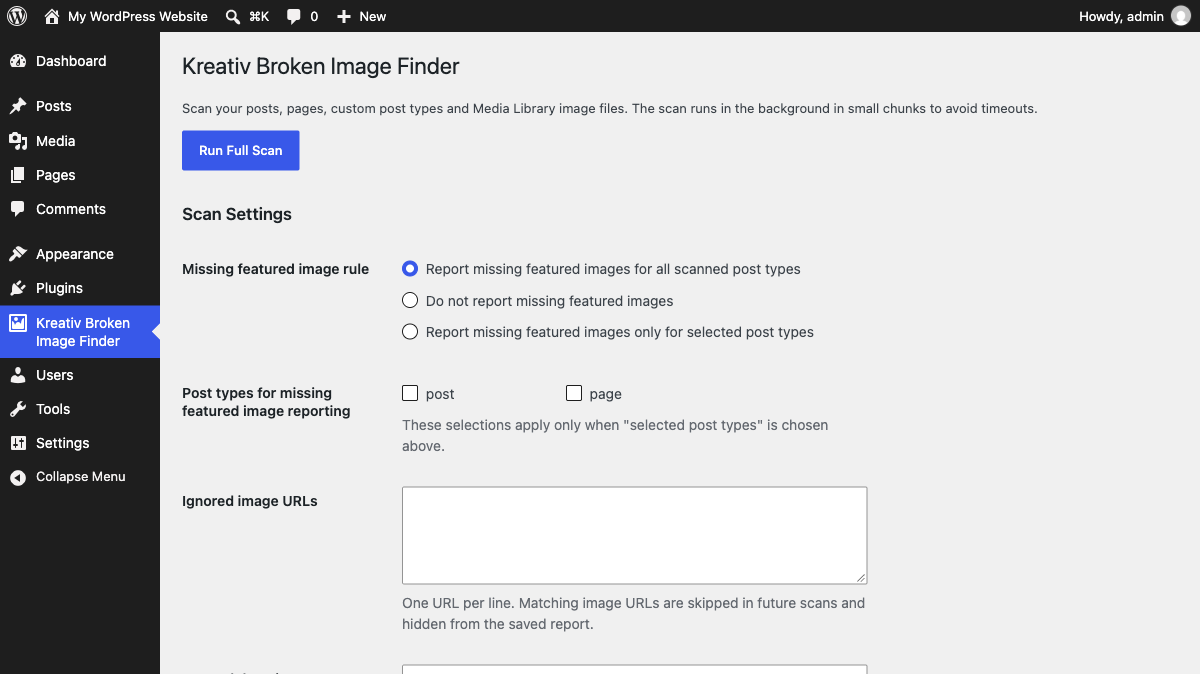
Run a scan and configure featured-image and ignore rules.
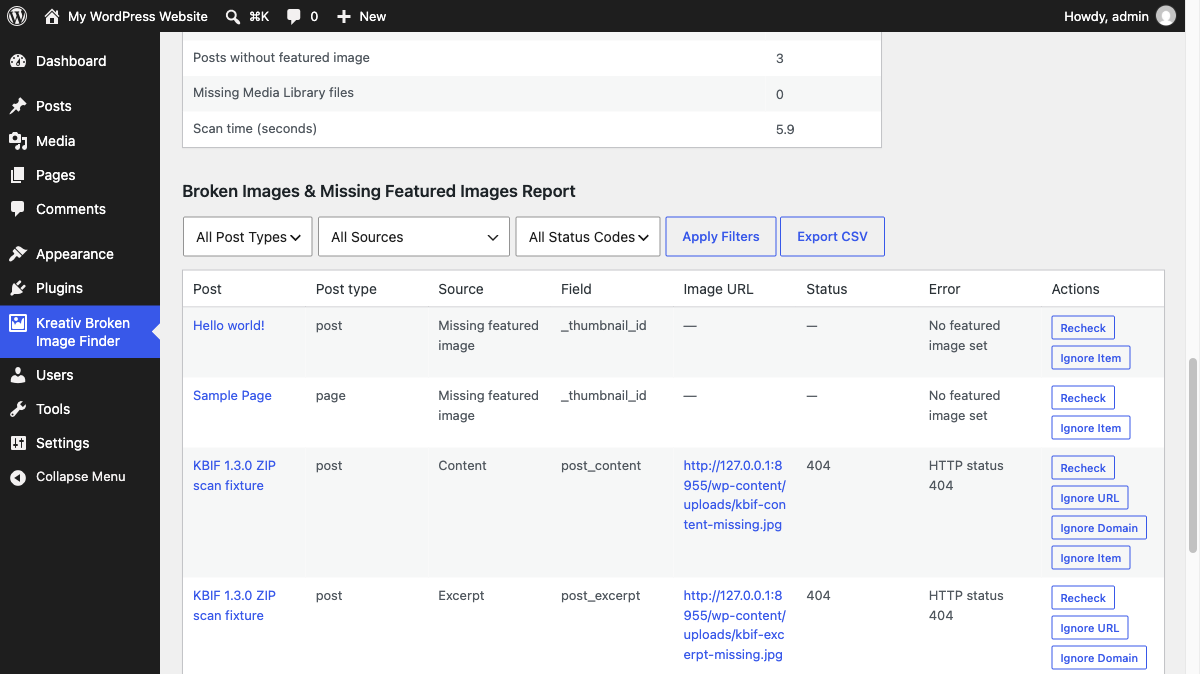
Review broken image findings from post content and excerpts.
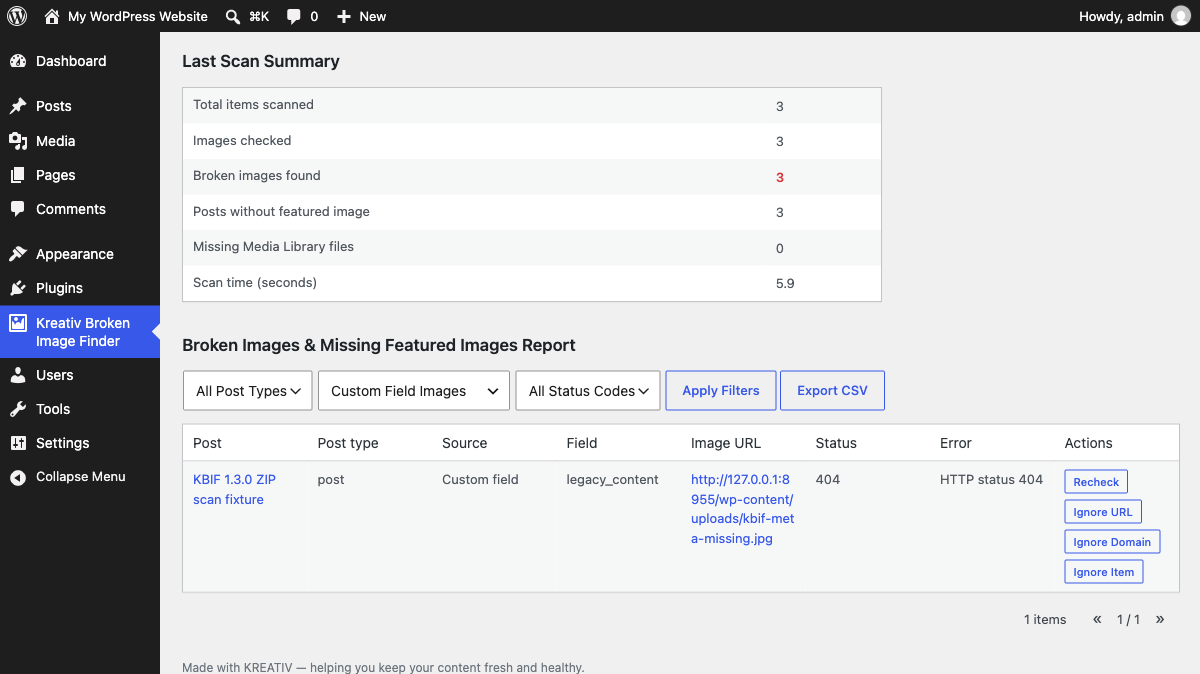
Filter findings to custom fields, including the exact field name.
Does this plugin automatically fix broken images?
No. The plugin never changes content automatically. For featured-image findings, it can create a local title-card or optional AI preview in the post editor. An administrator must explicitly accept that preview before it replaces or adds the featured image.
How does featured-image repair work?
An administrator can open the affected item with the “Repair featured image” action. The editor sidebar includes a Feature Image Repair box. Local template mode is the default and uses PHP GD with FreeType, not AI. It creates a title card with the post title, optional excerpt, site label and configured colors. WordPress AI mode requires WordPress 7.0 or a compatible AI Client and a configured image-capable provider. Only public, password-free published posts can be used; previews are stored in the Media Library and may be publicly accessible.
How does the plugin detect broken images?
It scans image references in post content, excerpts and custom fields, including lazy-load attributes, srcset, CSS URLs and nested custom-field values. It checks URLs using WordPress HTTP requests, with fallback handling for servers that do not respond properly to HEAD. It also checks featured image URLs and Media Library file integrity.
What do the finding labels mean?
“URL reported missing” means the server returned 404 or 410. “Needs verification” means a request failed or returned another error, such as a timeout or access denial; it does not prove the image is missing. Open the URL and recheck before making changes. “Missing local file” means a Media Library file was not found on the server. A missing featured image means no featured image is set, not that a file is broken.
How do I fix an image in a custom field?
Open the affected item from the report and locate the named field in its editor or the plugin that manages it. For example, an imported legacy_content field or an ACF-style field may contain an image URL or attachment ID. Correct the value, save the item, then use Recheck. The scanner does not modify field values. Images generated only by themes, external services, or unsupported locations may not be found.
Can I control missing featured image reporting?
Yes. You can choose whether missing featured images are reported for all post types, no post types, or only selected post types from the plugin settings screen.
Does it support WP-CLI?
Yes. You can run a full scan from the command line with wp kbif scan. You can also control the batch size with wp kbif scan --batch-size=10.
Does it use any external services or APIs?
Image checks use WordPress core HTTP functions. Featured-image repair uses no external service in local template mode. When an administrator generates an AI preview, the post title, excerpt, up to 900 characters of post content, and configured art direction are sent to the site’s configured WordPress AI provider; charges may apply and the provider’s terms and privacy policy apply.
Will it slow down my site?
The scan runs only when manually triggered from the admin dashboard and does not affect front-end visitors. On very large sites, the scan may take longer, but it runs in small batches to avoid timeouts.
ChangeLog
1.3.1
- Added a Feature Image Repair box to supported post editors.
- Added pending preview, accept, regenerate and discard workflows for feature-image repairs.
- Added local PNG title-card generation with configurable label, colors and image size.
- Added optional WordPress AI Client artwork generation.
- Bundled Lato Regular by Lukasz Dziedzic under the SIL Open Font License 1.1 (see assets/fonts/OFL.txt).
- Added a repair shortcut to findings for post types that support featured images.
- Distinguish URLs reported missing, missing local files, missing featured images and checks needing verification in reports and CSV exports.
- Add first-scan and source-specific repair guidance.
- Avoid reporting a successful scan when saving results fails.
1.3.0
- Added detection for
srcset, lazy-load image attributes, <source> images and CSS url(...) references.
- Added Media Library integrity checks for missing original files and generated image sizes.
- Added scanning for post excerpts and custom field values, including nested values and image attachment IDs.
- Added field names to report rows and CSV exports so findings can be fixed at the source.
- Added ignore rules for image URLs, domains, posts and media attachments.
- Added per-item recheck actions in the report table.
- Added CSV export for the current filtered report.
1.2.3
- Added per-scan URL caching to avoid repeating the same remote image checks across posts.
- Added admin settings to control missing featured image reporting by post type.
- Added a
wp kbif scan command with configurable batch size.
1.2.2
- Added GET fallback when image hosts reject HEAD requests, reducing false positives.
- Improved support for document-relative image paths in post content.
- Reworked scan batching to avoid loading all published post IDs into a single option during scan startup.
1.2.1
- Updated WordPress.org readme metadata and release notes.
- Synced plugin asset versioning with the current plugin version.
- Added WordPress.org-standard banner and icon asset variants.
1.2.0
- Added top-level admin menu for easier access.
- Added filters and pagination to the results table.
- Improved handling of relative and protocol-relative image URLs.
- Improved scan stability using background batch processing.
- Security hardening for admin actions and AJAX requests.
- General UI and performance improvements.
1.1.0
- Improved scan reliability on larger sites.
- Added scan progress tracking and summary statistics.
- Improved detection of broken featured images.
- Internal performance optimizations.
1.0.0
- Initial version.
- Scan posts, pages and custom post types for broken images in content and featured images.

