
One-click WordPress plugin that converts all posts, pages, taxonomies, metadata, and settings to Markdown and YAML which can be dropped into Jekyll.
| Author: | Ben Balter (profile at wordpress.org) |
| WordPress version required: | 6.4 |
| WordPress version tested: | 7.1.4 |
| Plugin version: | 4.6.0 |
| Added to WordPress repository: | 12-12-2014 |
| Last updated: | 07-11-2026 |
| Rating, %: | 70 |
| Rated by: | 12 |
| Plugin URI: | https://github.com/benbalter/wordpress-static... |
| Total downloads: | 46 601 |
| Active installs: | 400+ |
 Click to start download |
|
Export your WordPress posts and pages to Markdown in a couple of clicks, ready for Jekyll, Hugo, or any other static site generator.
Features
- One screen, no settings. Choose Export to Static Site from the Tools menu, click Export, and download a zip. Nothing to configure first.
- Your content, as Markdown. Posts, pages, and drafts become Markdown files. Each one starts with its title, date, author, categories, tags, and custom fields.
- Images come along. Your uploaded images and files are included, and links to them keep working.
- Jekyll, Hugo, Astro, or Eleventy. Jekyll is the default; pick another generator and the export uses its folders and config.
- Old links keep working. On Jekyll, Hugo, and Eleventy, each post keeps its original web address.
Usage
- In your WordPress dashboard, go to Plugins → Add New, search for Static Site Exporter, then install and activate it.
- Choose Export to Static Site from the Tools menu.
- Pick your static site generator (Jekyll is the default), then click Export.
- Unzip the download into your site. Output formats says where each generator’s files go.
That’s it. Need more control? You can export from the command line, pick which posts to export, include custom post types, and customize the output.
More information
- Frequently asked questions
- Advanced usage
- Changelog
- Get help or report an issue
- Help translate it into your language
- Contribute or develop locally
Screenshots

Choose Export to Static Site from the Tools menu, pick a format, and click Export to download your site as a zip file.

The zip has your posts, drafts, pages, and settings, laid out for Jekyll.
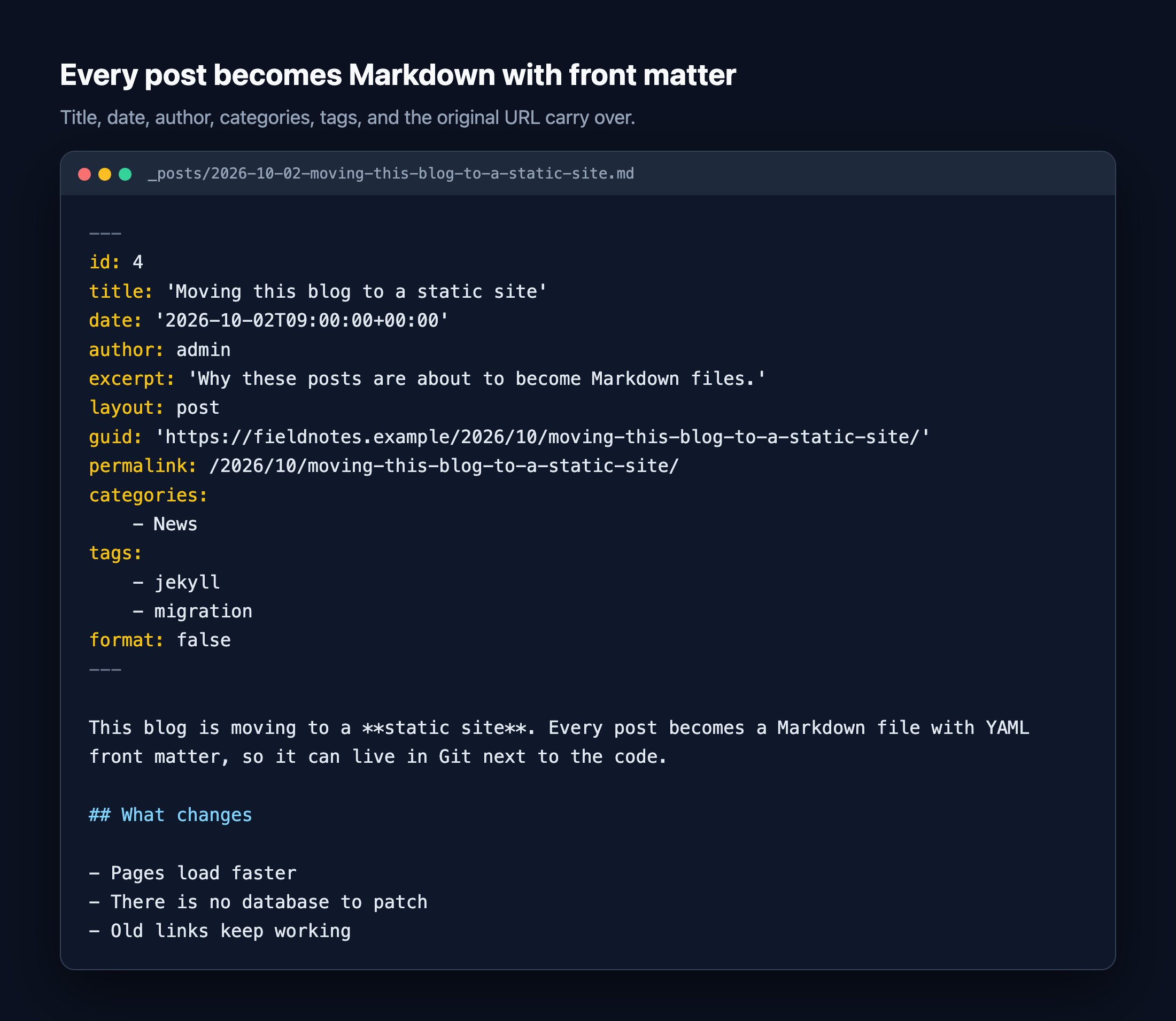
Each post is Markdown with YAML front matter: title, date, author, categories, tags, and its original URL.
Does it work with Hugo, Eleventy, or other static site generators?
Yes. Pick Hugo, Astro, or Eleventy from the format dropdown under Tools → Export to Static Site, or pass --format on the command line, and the export is laid out for that generator, with its folders, draft markers, and config file:
wp jekyll-export --format=hugo --output=export.zip
Jekyll is the default. Every format is Markdown with YAML front matter, which most other generators read too. See Output formats for what each one includes.
My export times out, or the zip file is empty. What can I do?
Large sites can run past PHP’s time or memory limits in the browser. Use WP-CLI instead, which has no time limit, and write the zip straight to a file:
wp jekyll-export --output=export.zip
If your media library is large, add --skip-uploads and copy wp-content/uploads separately. See Performance Tips for Large Sites for more.
Can I export only some of my posts?
Yes. With WP-CLI, filter by category, tag, post type, or status:
wp jekyll-export --category=technology --post_status=publish > export.zip
See Selective Export for every option, including the PHP filters.
Where do my images and other media go?
The export copies wp-content/uploads into the zip and rewrites links to your media as relative URLs (/wp-content/uploads/...), so they keep working on the new site.
Will my old URLs keep working?
Each post’s front matter includes its WordPress URL (permalink, or url for Hugo), so Jekyll, Hugo, and Eleventy publish it at the same address. For Astro, Output formats has a route that does the same.
Are drafts exported?
Yes, into _drafts/ for Jekyll. Hugo, Astro, and Eleventy keep drafts next to your posts, marked draft: true. To leave them out, use wp jekyll-export --post_status=publish.
Does it export custom post types and custom fields?
Custom fields are exported as front matter. Custom post types need one filter to include them, and the export then declares each one as a Jekyll collection. See Custom post types and Custom fields.
Does the export include the text after a “More” tag?
Yes. Each post is exported in full, including everything after a More tag (the “Continue reading” break) and every page of a post split with a Page Break. The More tag stays in the Markdown as <!--more-->, which Hugo treats as the end of a post’s summary. To use it for excerpts in Jekyll, add excerpt_separator: <!--more--> to the front matter of the posts that have one. Setting it in _config.yml instead also works, but then any post without the tag uses its whole text as the excerpt.
4.6.0
This release exports for Hugo, Astro, and Eleventy as well as Jekyll, and exports posts in full again. Review the note marked Export change before re-exporting a site you’ve exported before.
- Export for Hugo, Astro, or Eleventy, not just Jekyll. Pick a format on Tools → Export to Static Site, or pass
--formattowp jekyll-export. Each format gets that generator’s folders, draft markers, and config file, and the Eleventy export includes a config and stub layouts so it builds as is. Jekyll exports are unchanged. Plugins can add or adjust formats with thejekyll_export_formatsfilter. See Output formats (#507) - The Tools menu item is now Export to Static Site instead of “Export to Jekyll”, and it opens a short screen with the format choice instead of starting the download right away. Hook names, the
wp jekyll-exportcommand, and the text domain are unchanged, so scripts and links keep working (#505, #507) - The plugin page and README now lead with the one-click export, and WP-CLI, selective export, and large-site tips moved to a new Advanced usage page. The WP-CLI success message can now be translated (#505)
- Export change: Posts with a More tag (the “Continue reading” break) are exported in full again. Since 2.4.2, the export stopped at the tag and put a “(more…)” link in place of the rest of the post, and posts split with Page Break blocks lost every page after the first. The More tag is kept in the Markdown as
<!--more-->on its own line, which Hugo uses to end a post’s summary and Jekyll can use as its excerpt separator (#509, #510). Thanks to @shtrom for the report - The readme build now fails if the WordPress.org description goes over 2,500 words, where WordPress.org cuts it off. Repeated and outdated sections had pushed it past that (#511)
- The plugin now ships its
composer.json, so WordPress.org reviewers can see which libraries are bundled invendor/(#511)
4.5.0
This release fixes a bug in 4.4.0 that exported every post as HTML instead of Markdown, and updates the HTML-to-Markdown converter for two security fixes, which also change some converted Markdown. Review the notes marked Export change before re-exporting a site you’ve exported before.
- Export change: Posts are converted to Markdown again. 4.4.0 shipped without several files the bundled converter needs, so every post failed to convert and was exported as its original HTML, without an error. If you exported with 4.4.0, export again
- Export change: Updated
league/html-to-markdownto 5.2.3. It fixes two cases where conversion time grew with the square of a post’s size instead of in proportion to it, so a single large or unusual post could stall an export until PHP timed out (GHSA-h3wg-gqjr-jjmw, GHSA-4xjf-2r66-5r28). It also changes some output: non-breaking spaces are kept instead of becoming regular spaces, headings and paragraphs no longer run onto the same line as an image or other inline content before them, code blocks from<pre>lose a stray leading blank line, links whose text is their URL become autolinks more often, and a line of just-or+is escaped instead of becoming an empty list item. See the upstream changelog for the full list - Updated
symfony/yamlto 7.4.22, which fixes how some values are quoted and how multi-line text is written, so a few front matter values may be written differently - Code samples on the WordPress.org plugin page now render as code. They were shown as plain text, which turned
--categoryand other flags into en dashes, so copied commands failed (#499) - A test now pins how the converter escapes Markdown, so a future converter update can’t change exported output unnoticed (#465). Thanks to @theluckystrike
4.4.0
This release updates the HTML-to-Markdown converter for security fixes, which changes some converted Markdown. Review the note marked Export change before re-exporting a site you’ve exported before.
- Export change: Updated
league/html-to-markdownto 5.1.3, a security release. Content inside<pre>and<code>, attribute values of HTML kept as-is, and thehref,src,title, andaltof links and images could previously break out of the Markdown they were written into (GHSA-8m5h-gv5q-jmp5, GHSA-vc6h-86×6-wcjg, GHSA-r2cp-59h5-vgjj). The fixes change how backticks, pipes, and link and image attributes are escaped, and keep some code as HTML. See the upstream changelog for the full list - The
jekyll_export_meta,jekyll_export_terms,jekyll_export_markdown,jekyll_export_html, andjekyll_export_contentfilters now receive the post being exported as a second argument, so output can be customized per post. Existing one-argument callbacks are unaffected (#463). Thanks to @theluckystrike - The
jekyll_export_completeaction now fires once after a successful export, after the archive is sent or saved. It does not fire if the export fails. The action was documented, but the plugin never fired it (#459). Thanks to @Anandb71 - Updated
symfony/yamlto 7.4.20 (parser fixes only; the exporter only writes YAML)
4.3.0
This release changes what some exports contain. Review the notes marked Export change before re-exporting a site you’ve exported before.
- Export change: Posts are now selected with
WP_Queryand an explicit status list (publish,future,draft,pending,private, andinherit), so trashed posts and pages and auto-drafts are no longer written to_drafts/. Custom statuses registered by other plugins (e.g., PublishPress or Edit Flow’spitchandassigned) are no longer exported either. The list can be changed with the newjekyll_export_post_statusesfilter - Export change: Only link and media URLs (
href,src, and eachsrcsetcandidate) are made relative, and only where the site or home URL is followed by a path, query, or fragment. Absolute site URLs in prose, code samples, and query strings are now kept as written, which fixes exports such as the default privacy policy’s “Our website address is: .” Other attributes that pass through as raw HTML, such as the file block’s<object data>, the video block’sposter, and inlinebackground-imagestyles, now keep their absolute URLs - Export change: Posts with
[]:in a code sample are now converted to Markdown instead of falling back to raw HTML - Grandchild pages and nested upload directories are now exported.
WP_Filesystem_Direct::mkdir()isn’t recursive, so a page written before its parent (lower post ID) silently failed to write; directories are now created withwp_mkdir_p() - Front-matter
permalinkandimagevalues now strip the site and home URLs in both schemes, so featured images on subdirectory or mixed-scheme installs get relative paths - Fatal errors during an export (memory or time limits) now show an export-specific message and guidance on core’s error page. The previous shutdown handler never ran because core’s fatal error handler exits first. The public
shutdown_handler()method has been removed --categoryand--tagforwp jekyll-exportnow also split on whitespace, as well as commas- Uses core helpers (
wp_is_writable(),mysql2date(),cache_users()) in place of custom code, and the test suite no longer leaves temporary files behind - The WordPress.org listing now has a short description and updated tags, and is tested up to WordPress 7.1
4.2.0
send()now discards every output buffer left open by a theme or another plugin before it streams the archive (web requests only; under WP-CLI the caller owns stdout) (#413). A buffer with a callback (an HTML minifier, a CDN rewriter) would otherwise rewrite the binary zip on its way out, and a buffer opened without a chunk size would hold the entire archive in memory until the export died mid-stream. Both reach the browser as a truncated or unreadable download rather than an error pagesend()now disableszlib.output_compressionand opens the archive before tearing down those buffers, so a read failure is still reportable as an admin error page, and checksheaders_sent()afterwards, so content that was merely buffered is no longer mistaken for output already on the wire- The PHP version check no longer calls
wp_die()while the plugin loads. On PHP older than 8.2 that took down the whole site, front end included. The plugin now shows an admin notice and stays inactive.Requires PHPandRequires at leastare also declared in the plugin header, so WordPress refuses to activate it on an unsupported version get_posts()no longer caches the list of post IDs in the object cache. The cache key ignored thejekyll_export_post_typesandjekyll_export_taxonomy_filtersfilters and never expired, so on a site with a persistent object cache (Redis, Memcached) a filtered export, such aswp jekyll-export --category=..., could return a previous run’s postsconvert_options()no longer runsmaybe_unserialize()on valuesget_option()has already unserialized- URL localization now strips the home URL as well as the site URL, so internal links are made relative when WordPress is installed in a subdirectory
- New
--output=<file>option forwp jekyll-exportwrites the zip to a file instead of STDOUT, so a PHP notice printed during the export can no longer corrupt the archive - Posts are now exported in batches of 100. Each batch’s posts, custom fields, terms, and featured images are loaded in a few bulk queries instead of several queries per post, and released from memory afterwards, so large sites export faster and memory use no longer grows with the number of posts
- Updated
symfony/yamlto 7.4.18, which fixes CVE-2026-45304, CVE-2026-45305, and CVE-2026-45133 in its YAML parser. The exporter only writes YAML, so exposure was low. Also updatedleague/html-to-markdownto 5.1.2 - The WordPress.org package no longer includes the test suite, CI configuration, docs, or development scripts, so the download is smaller
- Translations now come exclusively from translate.wordpress.org language packs. The bundled
.pofiles have been removed; none of them contained any translated strings
4.1.1
- Fixed a zero-byte or unreadable zip download (#413).
ZipArchivedefers every write toclose(), so a full disk, an exhausted quota, or an unwritable temp directory produced a missing archive that the exporter happily streamed as an empty response.zip_folder()now throws whenclose()fails, andzip()verifies the archive exists and is non-empty before it is sent zip_folder()now detects a failedZipArchive::open().open()returns a non-zero integer error code rather thanfalseon failure, so the previous falsy check never fired and everyaddFile()call silently no-op’dsend()opens the archive before emitting any headers and throws if it cannot be read, instead of returning silently after the download headers were already sentsend()disables transparent gzip compression (zlib.output_compression) so theContent-Lengthheader cannot disagree with the bytes actually writtensend()fails with the offending file and line number when a theme or another plugin has already written to the response (a stray blank line or byte order mark), instead of shipping a corrupt archive- The temporary zip now uses the same random suffix as the temporary export directory, so concurrent or previously crashed exports cannot collide on a fixed
wp-jekyll.zipin a shared temp directory ob_start()now wraps thejekyll_exportaction, so output echoed by a third-party hook can no longer be prepended to the archive- Skip files that vanish mid-export rather than adding a zip entry with an empty name
4.1.0
- Behavior change: Post revisions are no longer exported by default. Previously
revisionwas included in the default post types, which filled the_drafts/folder with duplicate copies of every post. To restore the old behavior, re-add'revision'via thejekyll_export_post_typesfilter - Broadened the
convert_content()fallback to catch anyThrowable(not justInvalidArgumentException) from the HTML-to-Markdown converter, so an unexpected converter error falls back to the post’s raw HTML instead of aborting the entire export - Emit a
WP_DEBUG-gated warning when a public custom field shadows a reserved front matter key (e.g.layout,image,date), surfacing silent overrides. The override behavior itself is unchanged - Internal: de-duplicated the raw-HTML fallback filters in
convert_content()and the reflection boilerplate inColspanTableConverter
4.0.4
- Stream the export zip to the browser in 8 KB chunks instead of loading the entire archive into memory in
send(), so large exports no longer hitmemory_limitafter a successful build zip_folder()now throwsRuntimeExceptioninstead of callingwp_die()directly, so the existingexport()try/catch renders a friendly error and runscleanup()on partial temp files- Added
jekyll_export_html_converterfilter so integrations (and tests) can swap in a custom HTML-to-Markdown converter - Gated the v4.0.3 fallback
error_log()call behindWP_DEBUG - Hardened sanitization of
$_GET['type']in the export callback - Added regression tests for the v4.0.3
Invalid HTML was providedfallback and for the newzip_folder()throw behavior
4.0.3
- Catch
InvalidArgumentExceptionfromleague/html-to-markdowninconvert_content()and fall back to the post’s raw HTML for that single post instead of aborting the entire export with “Jekyll Export failed: Invalid HTML was provided” (#400)
4.0.2
- Add shutdown handler to surface fatal errors (memory exhaustion, max execution time) during export with actionable error messages instead of a generic WordPress critical error page
- Add proactive
memory_limitpre-flight check (warns when below 64MB) invalidate_environment() - Display admin error notice on Tools → Export when environment validation fails, before the user clicks Export
4.0.1
- Security: Use cryptographically secure randomness (
wp_generate_password) instead ofmd5(time())for the export temp directory name to prevent symlink/TOCTOU attacks on shared hosts (CWE-330/377) - Security: Reject non-CLI access in deprecated
jekyll-export-cli.phpbefore bootstrapping WordPress (CWE-665) - Security: Sanitize each path segment of page filenames as defense-in-depth against path traversal (CWE-22)
- Fix stale
$upload_basedircache incopy_recursive()on multisite by keying it on the current blog ID
4.0.0
- Breaking: Minimum PHP version bumped from 7.2.5 to 8.2
- Breaking: Minimum WordPress version bumped from 4.4 to 6.4
- Updated
symfony/yamlfrom ^5.4 to ^7.0 - Updated PHPUnit from ~8.0 to ~9.6
- Removed
symfony/polyfill-php80(no longer needed) - Added PHPStan static analysis at level 5
- Fixed
get_posts()to return integer IDs instead of strings - Fixed PHPDoc type annotations throughout codebase
- Deprecated legacy
jekyll-export-cli.phpin favor oflib/cli.php - Improved CI pipeline with PHPStan job and vendor consistency checks