Instagram Feed Plugin for WordPress – Easy & Powerful
The best Instagram widget plugin for WordPress. Display your Instagram feed, photos, videos, and reels in beautiful galleries. Works with Gutenberg blocks, widgets, shortcodes, and Elementor.
Create stunning Instagram galleries and Instagram sliders anywhere on your WordPress site. Perfect for showcasing your Instagram content, growing followers, and adding social proof to your website.
Quick & Easy Setup – Connect your Instagram account and display feeds in just 3 steps Fully Responsive – Looks perfect on desktop, tablet, and mobile devices Multiple Embed Options – Gutenberg Block, Shortcode, Widget, and Elementor support Lightweight & Fast – Optimized for performance with lazy loading Regular Updates – Fully compatible with the latest Instagram API
“Finally, an Instagram plugin that just works!” – Join thousands of satisfied users
???? FREE FEATURES
Create Unlimited Instagram Feeds – Display as many feeds as you need
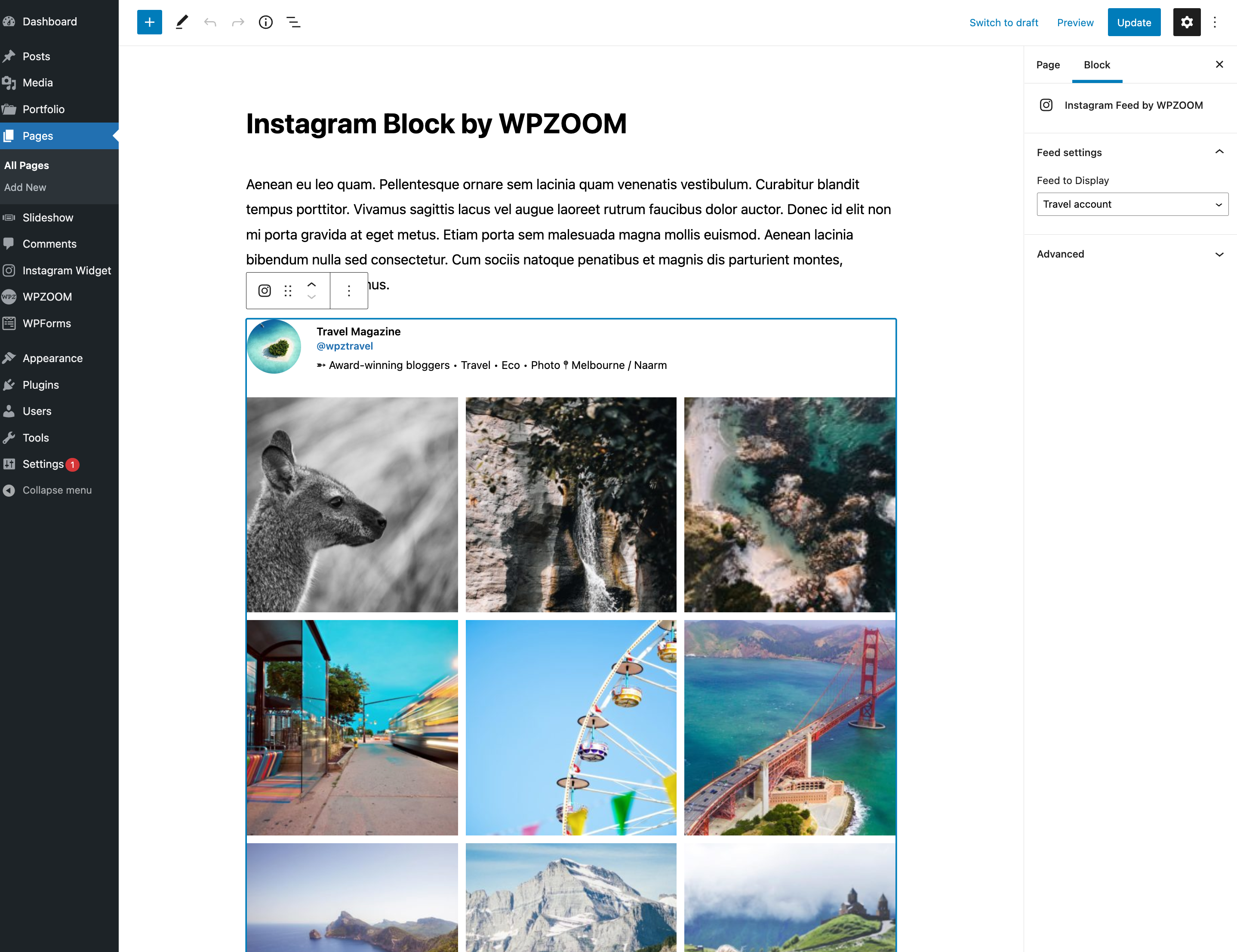
Gutenberg Block – Native WordPress block editor support
Shortcode Support – Embed feeds in Elementor, Beaver Builder, Divi, and any page builder
Multiple Layouts – Grid and other layout options to match your design
Lightbox Gallery – View photos and videos in a beautiful popup
Custom Header – Add your own avatar and bio text
Instagram Stories – A stories ring on your profile image that opens your active stories in a viewer
Lazy Loading – Improves page speed and performance
Track your Instagram performance directly from your WordPress dashboard:
Follower Growth: Monitor new followers, lost followers, and net growth over time
Reach & Impressions: See how many accounts your content is reaching
Engagement Metrics: Track accounts engaged and total interactions
Post Performance: Analyze likes, comments, saves, and reach for each post
Interactive Charts: Beautiful visualizations of your Instagram data
Multiple Date Ranges: View data for 7, 14, 30, or 90 days
????️ NEW: Shoppable Instagram Feed with WooCommerce (PRO)
Turn your Instagram feed into a sales channel by tagging posts with WooCommerce products:
Link Products to Posts: Assign one or more WooCommerce products to any Instagram post directly from the feed editor
Album Support: Tag different products on each image in carousel/album posts
Flexible Display: Choose between a subtle shopping icon with product popover or a prominent “Buy Now” button
Customizable Styling: Control colors, positioning, and appearance of product tags
Seamless Shopping: Visitors can discover and buy products without leaving your site
????️ NEW: Feed Moderation (PRO)
Take full control of which Instagram posts appear in your feed:
Hide Individual Posts: Remove specific posts from your feed with a single click
Non-Destructive: Hidden posts stay on Instagram — only removed from your website display
Easy Toggle: Use the eye icon in the Moderate tab to show or hide any post
Instant Preview: See your moderated feed in real-time before publishing
Works With Your Favorite Tools
Gutenberg / Block Editor
Elementor
Beaver Builder
Divi Builder
WPBakery Page Builder
Any theme or page builder with shortcode support
Smash Balloon Alternative
Looking for a lightweight Instagram feed plugin? WPZOOM Social Feed is a fast, easy-to-use alternative to heavier Instagram plugins. Get all the essential features without the bloat:
Creating an Instagram feed is easy:
1. Go to Instagram Widget → Connect in your WordPress dashboard
2. Connect your Instagram Business or Creator account
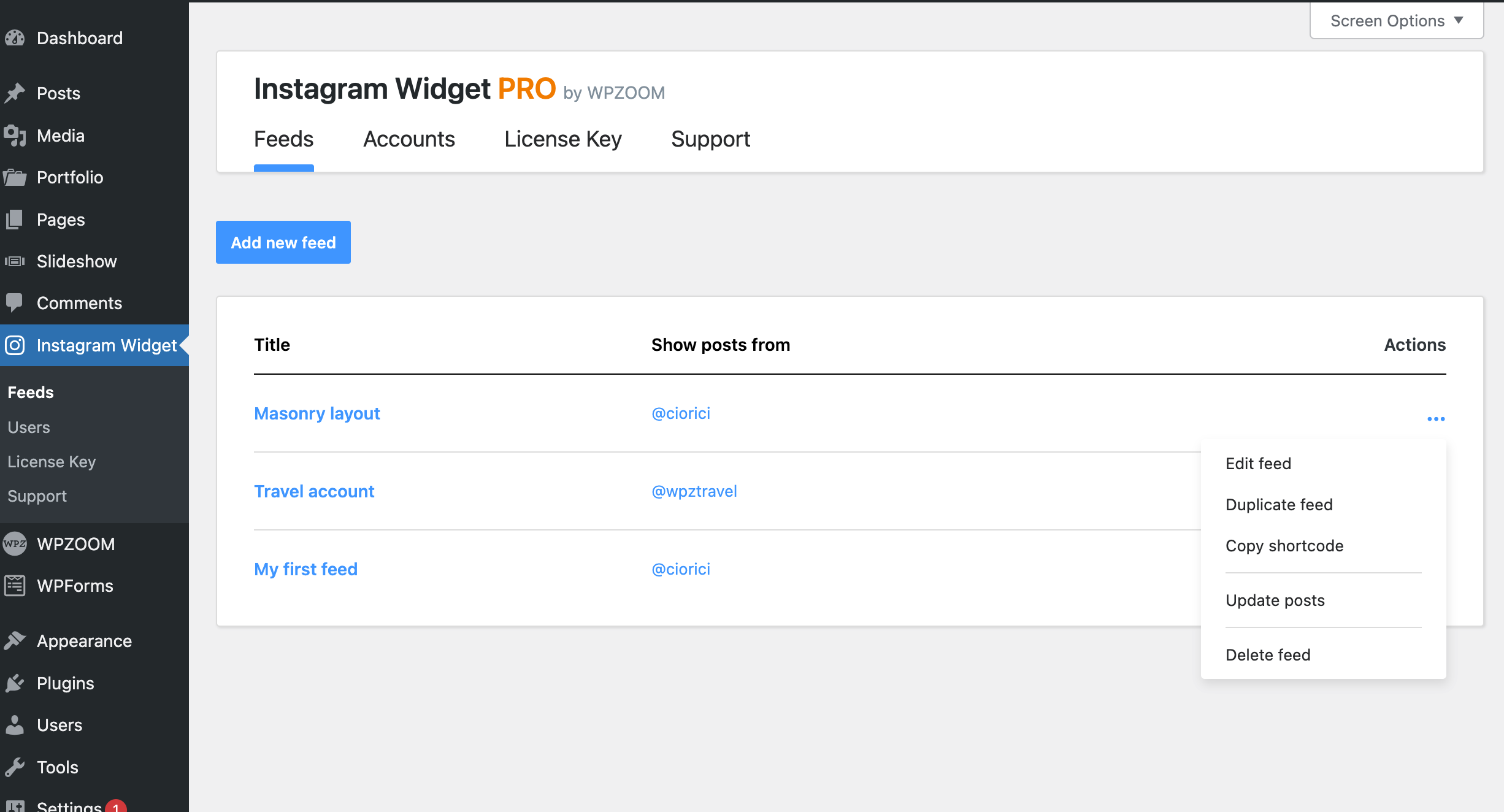
3. Go to Instagram Widget → Feeds and click “Add New”
4. Customize your feed settings and save
5. Copy the shortcode or use the Gutenberg block to embed your feed
What type of Instagram account do I need?
Due to Instagram API requirements, you need an Instagram Business or Creator account to connect. Personal Instagram accounts are no longer supported by Instagram’s API. Converting to a Business or Creator account is free and takes just a few minutes in the Instagram app.
How do I display my Instagram feed in Elementor?
You can display your Instagram feed in Elementor in two ways:
1. Use the dedicated WPZOOM Instagram Elementor widget
2. Use a Shortcode widget and paste your feed’s shortcode
Can I display multiple Instagram accounts?
Yes! You can connect multiple Instagram accounts and display a feed from each of them anywhere on your site. With the PRO version, you can also combine posts from multiple accounts into a single unified feed – perfect for brands with multiple Instagram profiles.
How can I improve my page load speed with Instagram feeds?
Enable the AJAX Initial Load option in your feed settings. This loads the Instagram feed content asynchronously after your page renders, dramatically improving initial page load time. Visitors will see an elegant skeleton placeholder with a shimmer animation while the feed loads in the background.
What are Instagram Insights and how do I access them?
Instagram Insights is a PRO feature that lets you track your Instagram performance directly from WordPress. You can monitor follower growth, reach, impressions, engagement, and individual post performance with interactive charts. To use Insights, you need a Business or Creator account connected via Facebook.
Is the plugin compatible with caching plugins?
Yes, the plugin works well with popular caching plugins like WP Rocket, W3 Total Cache, and LiteSpeed Cache. Instagram data is cached to improve performance and reduce API calls.
Is there documentation available?
Yes! We have comprehensive documentation with step-by-step guides:
You can report security bugs through the Patchstack Vulnerability Disclosure Program. The Patchstack team helps validate, triage, and handle any security vulnerabilities. Report a security vulnerability.
Changed: The lightbox no longer uses the Magnific Popup library. It now opens in the browser’s native dialog, with the same look, Escape and click-outside to close, and one less script to load
Note: If your theme relied on the copy of Magnific Popup that this plugin used to load, it now needs to load its own
2.5.0
New: Masonry and carousel layouts, highlighted posts, the Load More button, likes and comments counts, the verified badge, account stats and responsive columns are now available in the free version
New: You can now connect more than one Instagram account in the free version and show each one in its own feed
Changed: Instagram Insights, the stories row, post moderation and WooCommerce product links are now provided entirely by the Instagram Widget PRO plugin. If you use PRO, update it to version 1.6.0 or newer to keep using these features
Improved: Updated Swiper to version 14 and Magnific Popup to version 1.2.0
Improved: The readme now documents the external services the plugin connects to
Improved: Stricter sanitization of plugin settings and escaping of feed output
Fixed: Cached feed images are now located through the uploads directory, which fixes image sizes on sites with a relocated uploads folder
2.4.3
New: on the Feeds list, a tip shows how to manage your site by chatting with Claude or ChatGPT through the free WPZOOM AI Connect plugin, for example to add a feed to a page, with one button to install, activate or open it. Hide it once and it stays hidden for you. Shown on WordPress 6.9 and newer
2.4.2
Security: The Instagram access token is no longer exposed in the page source or in “Load More” responses. If your feed uses the “Load More” button (PRO), we recommend reconnecting your Instagram account after updating and clearing any page cache
2.4.1
Improved: Faster page loads – Dashicons is no longer loaded on the front-end, and feed icons are now inline SVGs
2.4.0
New: Instagram Stories are now available in the free version. Turn on “Display Instagram Stories” in the feed’s profile settings to show a stories ring on the profile image (off by default)
New: “Store cached images as WebP” option (Settings → Global) – feed image sizes downloaded from Instagram are saved as WebP, typically 30-45% smaller. Off by default; only affects images cached by the plugin
New: “Regenerate Cached Images” button to convert already-cached images after changing the option
Improved: Feed images start loading as soon as the page is ready instead of waiting for every other asset on the page
Improved: Link to the Stories row demo in the feed settings
Fixed: Stories with a song from Instagram’s music library showed as a black screen; they now show as a photo
Fixed: Block editor error when a new feed takes too long to load the first time
2.3.7
New (PRO): Stories row – a carousel of story thumbnails above the feed, with options for stories per row, thumbnail shape, account name and time
Improved: Profile settings are grouped into Account details, Stories and View on Instagram button sub-sections
Minor bug fixes
2.3.6
Minor bug fixes
2.3.5
Improvements for WordPress 7.0
2.3.4
New: Refresh button for Instagram widget preview
Improved: Design options now applied via postMessage instead of URL reload for faster preview
Improved: API item fetching optimized with over-fetching for hidden/moderated posts
Improved: Cache-based loading for AJAX Load More functionality
Improved: Album (carousel) images fetched via direct API call by media ID
Fixed: Elementor integration now loads on plugins_loaded hook instead of immediately
2.3.3
Minor bug fixes
2.3.2
New: Feed HTML caching for faster AJAX initial load – cached feed output is now served instantly
Fixed: AJAX initial load now works correctly with page caching plugins (WP Rocket, LiteSpeed, etc.)
Fixed: Nonce verification issues when pages are served from cache
2.3.1
Minor bug fixes
2.3.0
New: AJAX Initial Load option – dramatically improves page load speed by loading feed content asynchronously after the page renders
New: Skeleton placeholder with shimmer animation during AJAX feed loading
New: Likes and comments counts now displayed in the lightbox view
New: Batch API calls for account stats (3 API calls reduced to 1) for better performance
New: PRO – Multi-Account Feed feature – combine posts from multiple Instagram accounts into a single feed
Improved: Email notification system for expiring access tokens now works correctly
Fixed: “Load CSS and JS on all pages” setting now works correctly
Fixed: Cache clearing when creating new feeds no longer affects other feeds
Fixed: Various security improvements with proper input sanitization and output escaping
Fixed: Wrong text domain in some error messages
2.2.12
Minor bug fixes
2.2.11
Minor bug fixes
2.2.10
Minor bug fixes
2.2.9
Minor fixes
2.2.8
Improvements to the plugin performance
New option: Image Aspect Ratio (new 3:4 ratio)
New option to choose which post types to display in a feed.
2.2.7
Minor bug fixes
2.2.6
Minor bug fixes
2.2.5
Minor bug fixes
Added an Elementor widget to display the Instagram feed.
2.2.4
Added the ability to manually update the Instagram Business API token.
2.2.3
Minor bug fixes
2.2.2
Bug fix with emojis in bio and name
2.2.1
Multiple improvements
2.2.0
New: Major API changes to work with upcoming changes from Instagram.
New: Connect your Instagram account via your Facebook account.
Important: Due to API limitations, you can no longer connect your Personal Instagram account and feeds with accounts connected before this update will stop working on December 4, 2024. The new Facebook/Instagram API supports only Creator and Business Instagram accounts. Please reconnect your account before December 2024 after updating to version 2.2 or higher. Learn More.