
An extension of WooCommerce to create Color, Label and Image Variation Swatches for Product Attributes.
GS WooCommerce Variation Swatches is easy to use WooCommerce product variation swatches plugin. It offers an aesthetic and professional experience to select attributes for variation products. It turns the product variation select options fields into images, colors and labels. It means with the help of this powerful WooCommerce color or image variation swatches plugin, you can show product variation items in images, colors and labels. So, you can say goodbye to dropdown product attribute fields.
WooCommerce Variation Swatches not only offers the color, image and label attributes in the single WooCommerce product. It also enables them in products quick view. If you’re using WooCommerce themes like Flatsome that comes with default Quick View option, you don’t need to hassle to load color and image swatches for variable product attributes in quick view separately.
WooCommerce attribute variation plugin allows you beautiful tooltips on variation swatch hover. Based on your requirement you enable and disable hover from the settings.
GS WooCommerce Variation Swatches by GS Plugins
???? Live Demo ⬆️ Upgrade to PRO ???? Documentation ????♂️ Support
Plugin Features
- Completely integrate with WooCommerce plugin
- Work on variable product only
- Work on variable product quick view
- Enable attributes into images swatches
- Enable attributes into color swatches
- Enable attributes into label/text/button swatches
- Control attribute setting globally.
- Create new attribute swatch in product editing page.
- Compatible with popular themes and plugins.
- Flexible tooltip insert and display settings
- Settings panel available to control options.
- Free updates for one year.
- Auto update notification.
- Auto update from dashboard.
Documentation
If you have any questions regarding the WooCommerce Variation Swatches plugin and how to work with it, We recommend referring to our comprehensive online documentation. It provides detailed information and instructions to assist you in navigating and utilizing the plugin effectively. You can find the Documentation here.
Quick Support & Bug Reporting
If you encounter any problems or discover bugs, please post them in our Support channel. We aim to respond as soon as possible (excluding holidays).
Pro users are requested to contact our support channel for dedicated assistance.
????♂️ Alternatively, you can reach out to us through our Support or WordPress.org support forum.
Development Team
Crafted and Developed with Passion by GS Plugins
Confused?
???? View live Demos »
???? Documentation »
???? More Essential Plugins You Want To Get From GS Plugins
⭐ Solid Testimonials – Showcase client reviews, recommendations, and quotes creatively across pages and widgets for maximum impact.
↔️ Logo Slider – Quick & easily manageable logo slideshow plugin to display partner, client, brand & sponsor’s Logos in appealing views.
???? Filterable Portfolio – Showcase your work with clean, responsive layouts, including Grid, Slider, Filter, Masonry, and Popup.
???? Team Members – Create attractive team sections highlighting members, roles, expertise, and professional strengths.
???? Project Showcase – Display projects as a portfolio with complete details, including URL, client reviews & ratings, gallery & videos.
???? Books Showcase – Display books with authors, dates, reviews, ratings, galleries, and helpful details with 35+ designs.
???????? Coaches – Showcase coaches’ skills, experience, certifications, reviews, ratings, and professional expertise clearly.
⊞ Posts Grid – Display recent WordPress posts in elegant 50+ styles for faster browsing and seamless navigation.
???? WooCommerce Plugins
???? WooCommerce Products Slider – Display WooCommerce products in smooth sliders, helping shoppers browse items more easily.
???? WooCommerce Brands – Add brand taxonomy for organizing, displaying, and filtering WooCommerce products efficiently.
???? Social Plugins
???? Pinterest Portfolio – Showcase Pinterest pins on WordPress, increasing engagement, visibility, and profile traffic.
▶️ YouTube Gallery – Feature YouTube channel or playlist videos in attractive galleries for easier visitor viewing.
???? Branding Plugin
⚡ PowerUp – Improve WordPress security and convenience with redirects, restrictions, admin controls and many more.
Screenshots

Color, button and image swatches on a single product page.

Swatches in a product quick view.

Attribute options with their colors and images.

Editing a variable product.

Color swatches on the storefront.

Button (label) swatches on the storefront.

Image swatches on the storefront.
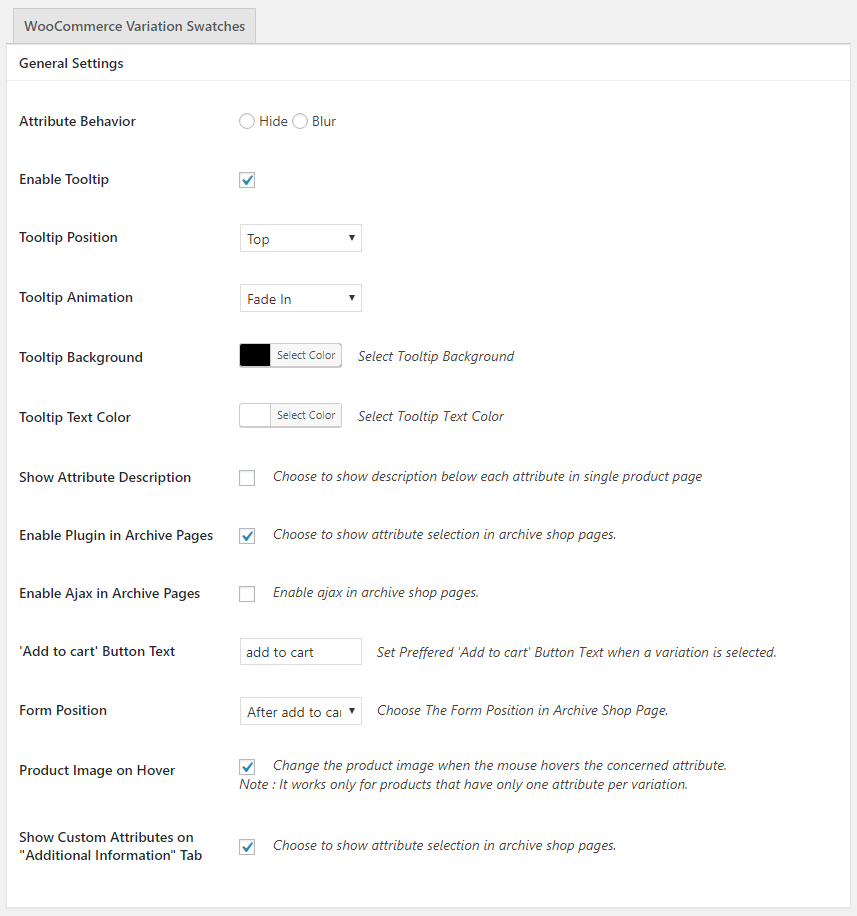
The settings dashboard.
How do I turn a dropdown into swatches?
Go to Products > Attributes, set the attribute’s Type to Color, Image, Button or Radio (not Select), then click Configure terms and pick a color or image for each option. Every variable product that uses the attribute shows swatches. The setup wizard under Woo Swatches > Setup Wizard can do this for you.
I changed the settings, but the product page still shows dropdowns. Why?
Settings only change how swatches look. A dropdown becomes swatches once its attribute type is Color, Image, Button or Radio. To turn every remaining dropdown into buttons, switch on Turn dropdowns into buttons under Woo Swatches > Settings. If you use a caching plugin, clear its cache.
Can shoppers see swatches on the shop page?
Yes. The free version shows a preview of one attribute on product cards, and picking a swatch swaps the card image. Turn it on under Shop & Catalog. Pro shows every attribute on the card, with add to cart.
Does it work with my theme?
It works with most WooCommerce themes, including Storefront, Flatsome, Avada, X Theme and Uncode. Some themes need a small CSS tweak; ask in the support forum if yours does.
Does it work in product quick views?
Yes. Swatches also load in the quick view that themes such as Flatsome add to product cards.
Can I hide or cross out options that are out of stock?
Yes, with Pro. It can disable sold-out options and show them crossed out, faded or hidden.
Is it compatible with HPOS and the Cart and Checkout blocks?
Yes. It declares compatibility with WooCommerce order storage (HPOS) and the Cart and Checkout blocks.
What happens to my data if I uninstall the plugin?
Your settings and swatch colors and images stay, so nothing is lost if you reinstall. To remove them, switch on the delete-data option under Woo Swatches > Settings > Advanced before you uninstall.
What is the difference between the free and Pro versions?
The free version gives you color, image, button and radio swatches in 10 styles, style presets, tooltips, plugin product cards and a swatch preview on shop cards. Pro adds full swatches with add to cart on shop cards, card looks, out-of-stock handling, a “+N more” link or slider for long lists, a larger image preview on hover, shareable variation links, per-product settings, extra swatch styles, a shortcode builder, a Gutenberg block, an Elementor widget and priority support. See the Pro features and plans.
ChangeLog
Version 3.0.7 [26th Nov 2026]
- [Updated]: The Swatches Settings tab on Edit Product shows which per-product settings Pro adds.
- [Added]: One-line note about Pro plans on the settings tabs; you can hide it for 30 days.
- [Fixed]: The Welcome page shows the Pro changelog on every server.
Version 3.0.6 [24th Nov 2026]
- [Added]: Setup wizard for new stores: pick a look, turn attributes into swatches, switch on shop swatches and create a sample product.
- [Added]: Welcome and Go Pro pages, and one dashboard shared with Pro (Pro options shown locked).
- [Added]: Plugin product card and catalog page styling in the free version.
- [Updated]: Redesigned admin pages, settings tabs and menu icon.
- [Updated]: Pro-only features now live in Pro (WordPress.org guidelines). Update Pro to 3.0.7.
- [Updated]: Compatible with WooCommerce order storage (HPOS) and Cart/Checkout blocks.
- [Updated]: Activates without WooCommerce and shows an Install / Activate notice instead of an error.
- [Fixed]: Updating Free before an older Pro no longer breaks the site.
- [Fixed]: Faster shop pages with far fewer database queries.
- [Fixed]: The data collection notice no longer comes back after reactivating.
- [Fixed]: Translations, accessibility, security and output escaping.
Version 3.0.5 [22nd Apr 2025]
- [Fixed]: Security Issue Capability Check.
Version 3.0.4 [1st Oct 2024]
- [Added]: Thumbnail Preview on Hover. (Pro)
- [Updated]: Woo Variation POT.
Version 3.0.3 [3rd Aug 2024]
- [Added]: Woo & Pro Compatibility Notice.
- [Fixed]: Condition.
- [Updated]: Restricted Pro Styles.
Version 3.0.2 [29th July 2024]
- [Fixed]: Attributes Not Displaying Issue.
Version 3.0.1 [18th May 2024]
Version 3.0.0 [16th May 2024]
- [Updated]: Rewritten the plugin.
version 1.6.1 [3rd Aug 2022]
- [Added]: Support for the WooCommerce Subscriptions plugin.
version 1.6.0 [12th Mar 2021]
- [Fixed]: Security Issues.
version 1.5.0 [24th May 2021]
- [Fixed]: PHP 7.3 Compatibility.
- [Fixed]: Deprecated Function Warning.
version 1.4.9 [20th Dec 2020]
- [Updated]: AppSero Client.
- [Updated]: With WordPress version 5.6
Version 1.4.8 [15th Aug 20]
- [Updated]: For WordPress 5.5
Version 1.4.7 [26th Jul 20]
- [Fixed]: Review style CSS.
Version 1.4.6 [23rd Jul 20]
- [Fixed]: Woocommerce install notice.
Version 1.4.5 [11th Jul 20]
- [Added]: Appsero client.
- [Added]: Review system.
Version 1.4.4 [18th Jun 20]
- [Fixed]: Woocommerce Image issue.
Version 1.4.3 [17th Jun 20]
- [Fixed]: Image size issue.
Version 1.4.2 [15th Jun 20]
- [Fixed]: Attribute Description field. Now Attribute Description showing on Single product template.
Version 1.4.1 [22nd Oct 19]
- [Fixed]: Domain name changed & fixed all urls.
- [Fixed]: Admin CSS.
- [Added]: New Contributors.
- [Fixed]: Attribute behaviour
- [Added]: Attribute Style
- [Fixed]: Attribute behaviour and attribute style
version 1.3
- Fixed – Attribute save function
version 1.2
- Added – Help & Documentation Info
- Fixed – Menu Position conflict with Product Slider
version 1.0

