The WP Facebook Comments plugin lets people comment on content on your site using their…
WP Social (Facebook) Comments
The WP Social (Facebook) Comments lets people comment on content on your site using their Facebook account. People can choose to share their comment activity with their friends (and friends of their friends) on Facebook as well. Also you can moderate the comments by using Facebook tools.
You May Also Like
Disable WP Comments | WP Social Post and Widget | WooSocio | WP Twitter Post (WooTweet)
NEW WP Social Comments Pro version
WP Social Comments Pro version
Just released pro version of WP Social Comments having many exciting new features.
Pro features
- Easy Moderation.
- Moderation with your Facebook Profile.
- Moderation with Facebook App.
- Facebook Comments Widget.
- Localized in 56+ Languages.
- Comments by Shortcode for pages and custom locations.
- Comments for all posts and CPT.
- Fully Responsive.
- Fully customizable.
- And many more to come…
Screenshots
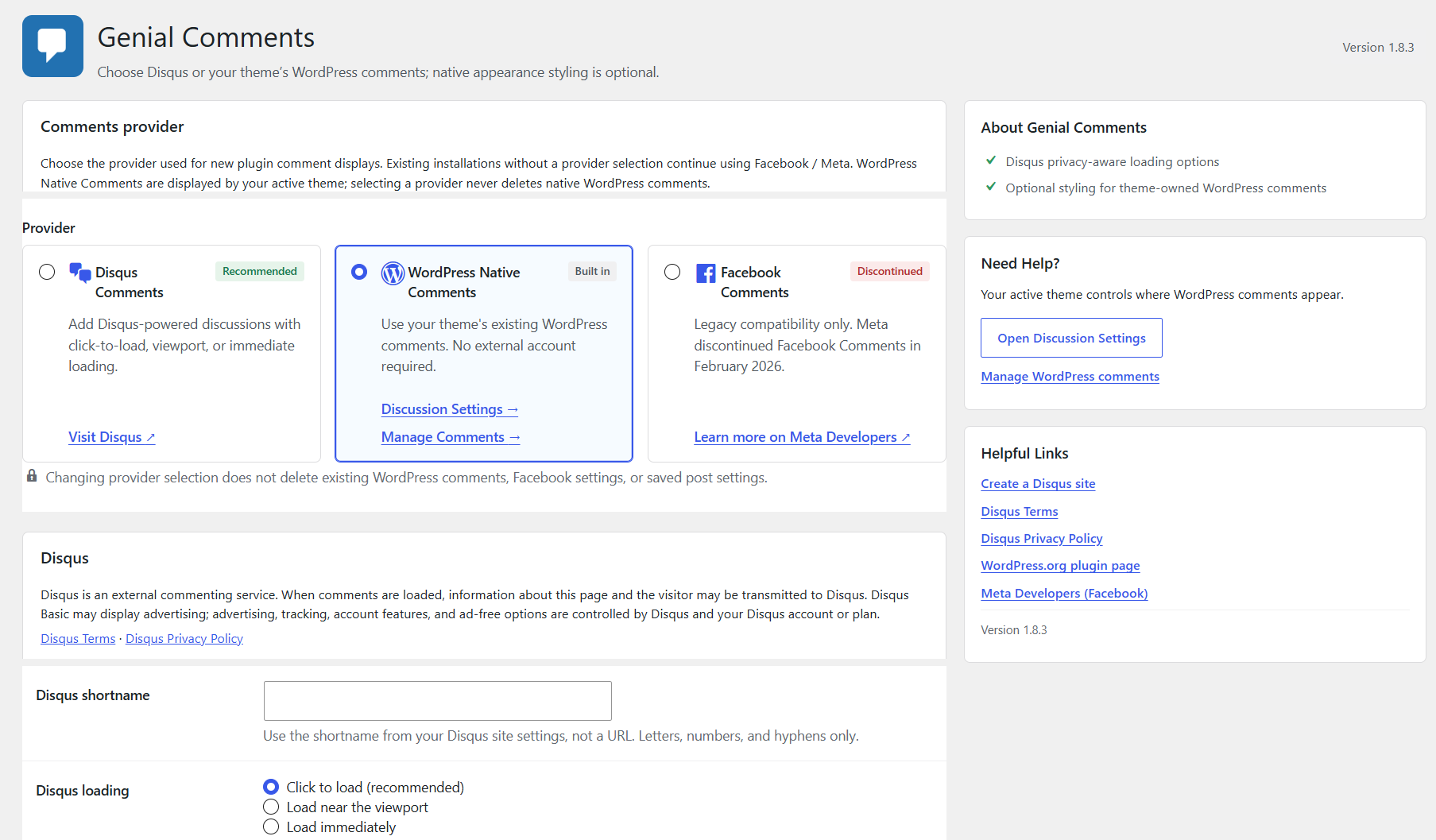
Genial Comments settings with Disqus, WordPress Native Comments, and legacy Facebook provider selection.
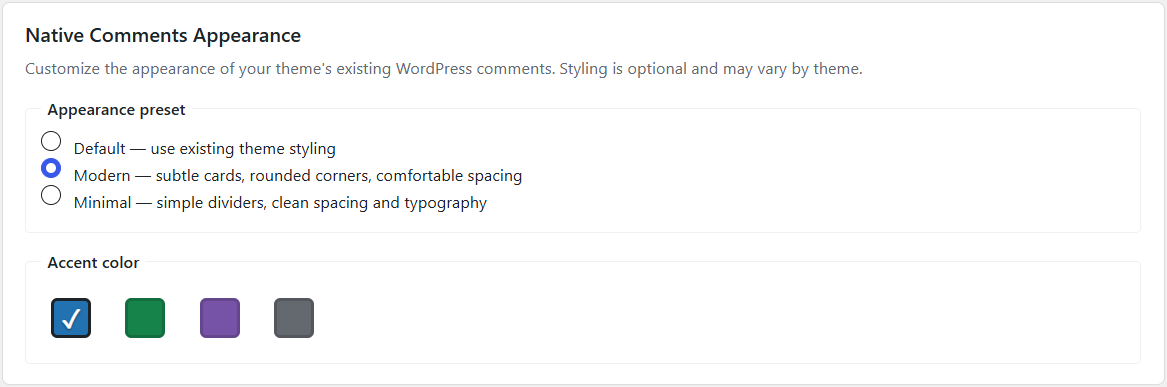
Native Comments Appearance settings featuring Default, Modern, and Minimal presets with accent-color options.
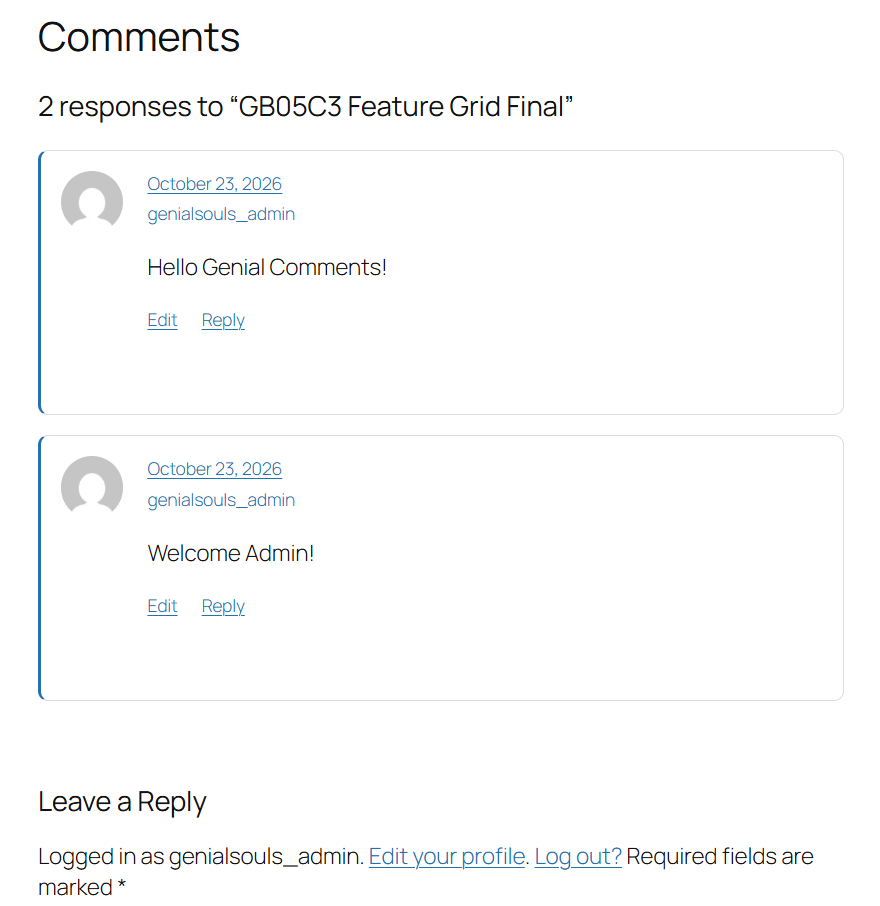
WordPress Native Comments displayed using the Modern appearance preset.
How do I use WordPress Native Comments?
Select WordPress Native Comments in the provider settings. WordPress uses its
existing comment records and Discussion settings, and comments are displayed by
your active theme. This plugin does not automatically insert a comments area or
provide a native-comments shortcode. If your theme or template does not display
comments, configure its comments area there.
Does Genial Comments automatically display WordPress Native Comments?
No. WordPress Native Comments uses the comments area provided by your active theme
or template. If your theme does not display comments, configure its comments area.
Genial Comments does not insert a second native comments section.
Can I customize native comments?
Yes. Select WordPress Native Comments and choose an optional appearance preset.
Modern and Minimal styles provide basic visual customization, with four accent
colors. Default preserves your theme’s original styling. Results may vary depending
on the active theme.
Will switching providers delete existing WordPress comments?
No. Switching providers does not delete WordPress comments or existing saved
provider settings.
Can I show external provider comments on pages?
Yes. The existing [gs-fb-comments] shortcode remains available for manual
placement with the external providers. Selecting WordPress Native Comments leaves
native placement to the theme.
Does Disqus require an API key?
No. Basic Disqus embedding requires a Disqus shortname, not an API key. API
credentials and synchronization are not part of this plugin integration.
ChangeLog
1.8.3
- Added WordPress Native Comments using the active theme’s existing comments area; no second native comments section is inserted.
- Added optional Default, Modern, and Minimal native appearance presets with Blue, Green, Purple, and Neutral accent options; styling is disabled by default.
- Preserved existing provider settings, Facebook compatibility settings, the plugin slug, text domain, and shortcode while switching providers.
- Refined the provider and appearance settings interface and updated the user-facing plugin display name to Genial Comments.
1.8.2
- Added: Disqus is the default provider for new installations when no provider is configured.
- Updated: Existing installations without an explicit provider retain their legacy Facebook settings and behavior.
- Added: Actionable admin guidance for missing Disqus configuration and invalid provider values.
- Improved: Provider resolution no longer silently falls back to Facebook for invalid values.
- Improved: Admin settings presentation, Facebook discontinuation disclosures, privacy-aware loading, security, and WordPress.org compliance.
1.8.0
- Added: Disqus as a selectable commenting provider using the Universal Embed.
- Added: Privacy-aware click, viewport, and immediate Disqus loading modes.
- Updated: Provider selection preserves existing Facebook settings and legacy identifiers.
- Improved: Security, input handling, output escaping, and WordPress.org compliance.
- Improved: Compatibility with validated current WordPress and PHP environments.
- Removed: Obsolete and insecure external resources from the legacy implementation.
1.7.5 – 04/04/2024
- Fix: Shortcode comments issue fixed.
1.7.4 – 14/03/2024
- Update: Added nonce and general capability checks to the per-post setting.
- Update: Quality check done.
1.7.3 – 08/02/2023
- Fix: Minor bugs fixed.
- Update: Quality check done.
1.7.2 – 04/04/2022
- Update: EU notice message is now optional.
- Update: FB crawler is now optional.
- Added: Shortcode crawler added. (optional)
1.7.1 – 05/10/2021
- Update: Modified post types support.
- Fix: Warning messages fixed.
- Fix: Notice messages fixed.
1.7 – 28/09/2021
- New: Option to allow comments on each post.
- New: Notice for EU Facebook users.
- New: Comments background color on shortcode.
- Update: Modified post types support.
- Update: Translations updated.
- Update: Latest Facebook API and scripts.
- Fix: Bugs fixed.
1.6 – 18/09/2020
- New: Comments background color option for dark themes.
- Update: Latest Facebook API and scripts.
- Fix: Bugs fixed.
1.5 – 27/11/2019
- New: Option to show comments before SSL.
- New: Translation ready.
- Fix: Minor bugs fixed.
1.4 – 22/08/2019
- New: Completely redesigned.
- New: WordPress standardized.
- New: Security framework.
1.3 – 10/01/2019
- Update: Gutenberg ready.
- New: Pro version launched.
- Modify: Quality standards applied.
- Fix: Comments box size issue when logged in.
1.2 – 26/09/2018
- New: Now available in multi languages.
- Update: Translation updated.
- Modify: Minor changes.
- Fix: Bug fixed when update post.
1.1 – 31/07/2018
- New: shortcode [gs-fb-comments] for pages or anywhere at your site.
- Update: Translation updated.
- Modify: Minor changes.
1.0 – 07/11/2017
- First release.
- Facebook comments

