GPTranslate is the AI-powered multilingual plugin that automatically translates and indexes your entire WordPress website in minutes, featured by WPTuts and built as a modern solution.
It automatically translates your entire WordPress site into any language — pages, posts, menus, WooCommerce and all SEO metadata.
No configuration required: install, choose your languages and your site becomes fully multilingual.
Innovative multilingual and language localization
GPTranslate is an innovative multilingual and language localization solution that redefines website translation, truly making the entire translation process incredibly smooth.
It goes beyond basic language translation, offering full localization by automatically adapting your site to different languages and regions.
GPTranslate is not just a translation plugin — it’s your AI Translation Agent.
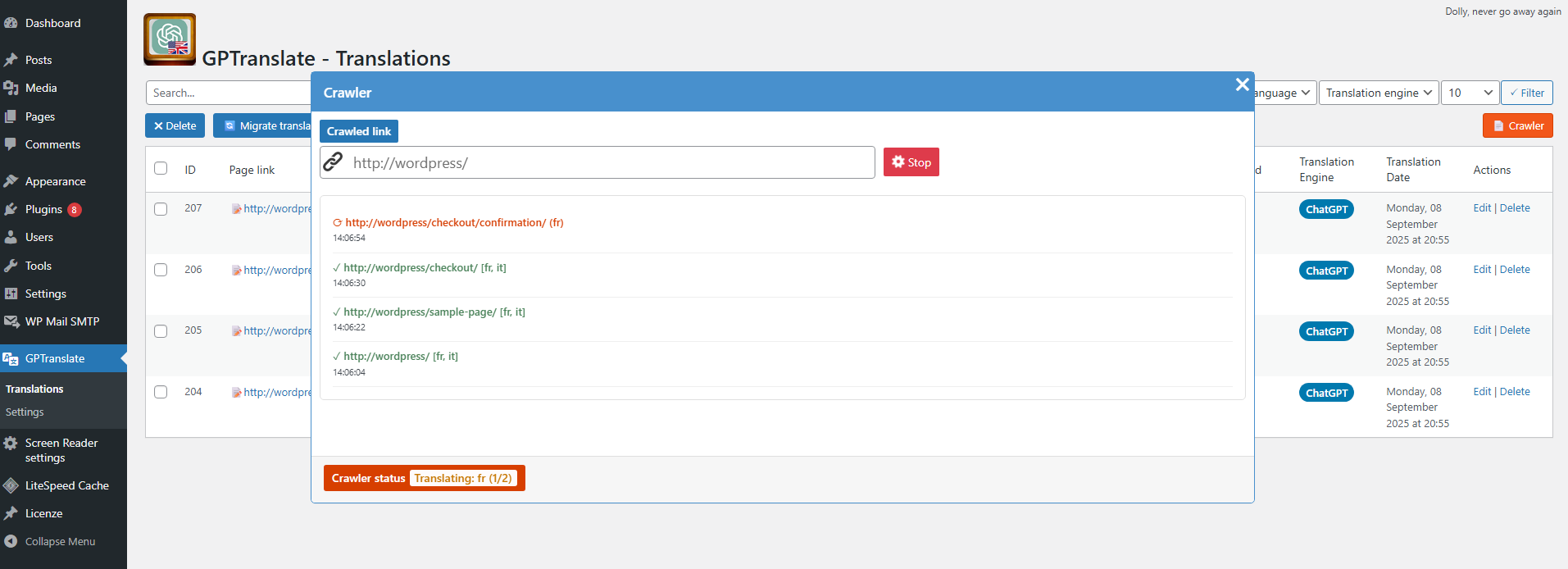
Thanks to its revolutionary AI Agent Crawler™, GPTranslate works like an autonomous assistant that intelligently scans, analyzes, and translates your entire WordPress website into every enabled language.
More than just translate
It doesn’t simply translate, it operates intelligently crawling every page, detecting all visible and hidden text, metadata, and attributes, and performing translations using the latest AI models like ChatGPT 5, Gemini, DeepSeek, Claude Fable, Grok, DeepL, Google Cloud Translation, and Google AI.
???? Looking for a multilingual localization solution? GPTranslate offers modern AI models (ChatGPT, Gemini, DeepSeek, Claude, Grok, DeepL) for higher quality translations and includes a fully automated AI crawler that other plugins do not offer.
Featured by WPTuts! Watch the GPTranslate video by Paul:
???? Why Choose GPTranslate? ????
Native & Self-Hosted: No external SaaS platform in the loop — GPTranslate runs on your own WordPress install and stores translations in your own database, not in a third-party cloud.
AI Agent Crawler™: An autonomous system that scans, analyzes, and translates your website automatically.
AI-Powered Translations: Natural and accurate translations using the power of AI.
Media SRC Localization: Automatically replace localized src URLs for images, iframes and videos using the translations defined in the alt attributes translations list.
Cost-Effective: Translate for free or save AI credits by storing translations in a database. Reuse existing translations instantly without repeated costs. Get your entire website translated using ChatGPT and DeepSeek for just $2!
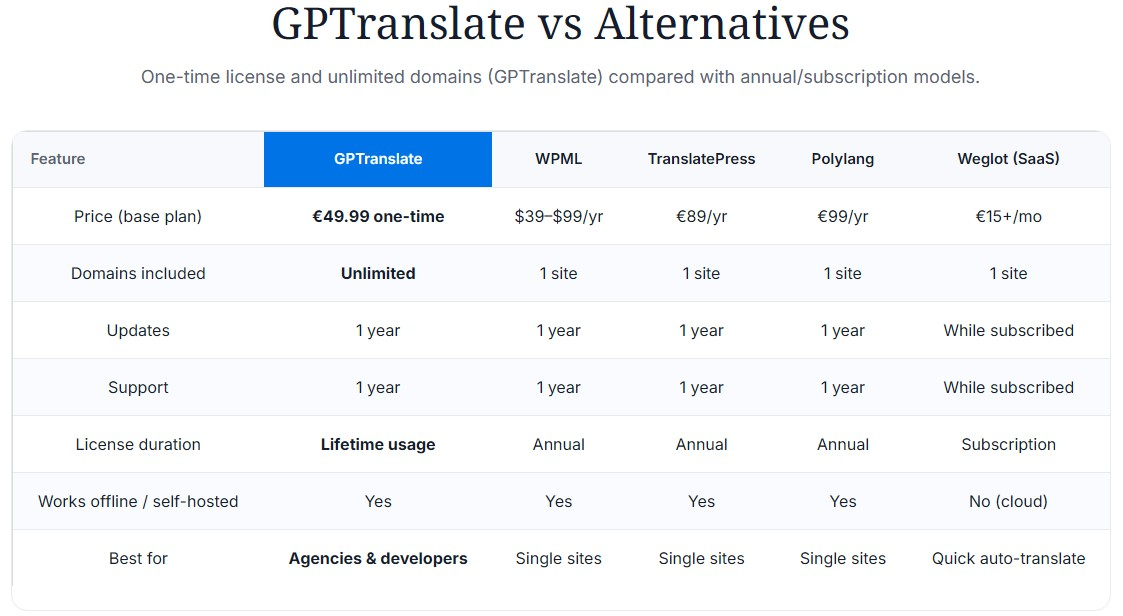
Unlimited language translations — GPTranslate Full version has no usage quotas, no hidden fees. It’s a cheap and scalable localization solution compared to competitors.
Multilingual Mastery: Supports over 110 languages and even reads the page text aloud!
Supports all plugins, themes and page builders including WooCommerce, Elementor, Divi, etc,
???? Your Site, Your Data, Your Rules — Not a Hosted Cloud Service
Unlike hosted/cloud translation services that route your pages through a third-party SaaS platform, GPTranslate is a native WordPress plugin that saves every translation directly in your own WordPress database, on your own server, fully exportable and editable with no external cloud lock-in and no forced subscription to keep your work — and you’re always free to choose your own AI provider (ChatGPT, Gemini, Claude, Grok, DeepSeek, DeepL, Google Cloud Translation or the free Google AI engine).
GPTranslate brings the next generation of AI-powered translation to WordPress. Using advanced technologies like ChatGPT (GPT-5), DeepSeek, Claude, Grok, DeepL, Google Gemini, Google Cloud Translation and Google AI, the plugin instantly transforms your website into a fully multilingual platform.
Unlike traditional translation tools, GPTranslate features an autonomous AI Agent Crawler™ that scans every page, detects visible and hidden text, metadata, slugs, attributes, and automatically translates everything into your selected languages.
GPTranslate is ideal for users needing a modern AI translation plugin for WordPress, automatic website translation, multilingual SEO support, language localization, WooCommerce translation, or GPT-based systems capable of creating a fully localized website effortlessly.
GPTranslate stores translations in the database that can be edited, managed and improved to reach excellent results. It is capable of using the ChatGPT and AI technologies to provide natural and accurate translations like never seen before.
With GPTranslate and ChatGPT 5, your WordPress website speaks every language like never before. Try it now and take your global communication to the next level!
???? Tired of manually translating your WordPress site?
???? Meet GPTranslate – the ultimate multilingual localization solution powered by AI!
???? Say Goodbye to Manual Translations, Hello to Effortless Multilingual Localization Management!
GPTranslate features
???? Features That Make GPTranslate Stand Out: ????
???? AI Agent Crawler™
A smart autonomous system that crawls, understands, and translates your whole website automatically using advanced AI logic
???? DeepSeek integration™
Requires a DeepSeek plan
???? Claude integration™
Requires a Claude plan
???? Google Gemini, Grok, DeepL and Google Cloud Translation integration™
Starts with a free tier
???? Google AI Integration™
Unlimited & fully free
???? Managed API Service (Optional)
For users who prefer a fully hands-off experience, we also offer an optional managed service where we provide a ready-to-use AI API key. No setup, no external accounts required. Contact our office for a personalized plan
???? Database Storage — On Your Own Server
Translations are saved directly in your WordPress database — not in a third-party hosted cloud — to optimize costs, refine text as needed, and keep full ownership and portability of your translated content
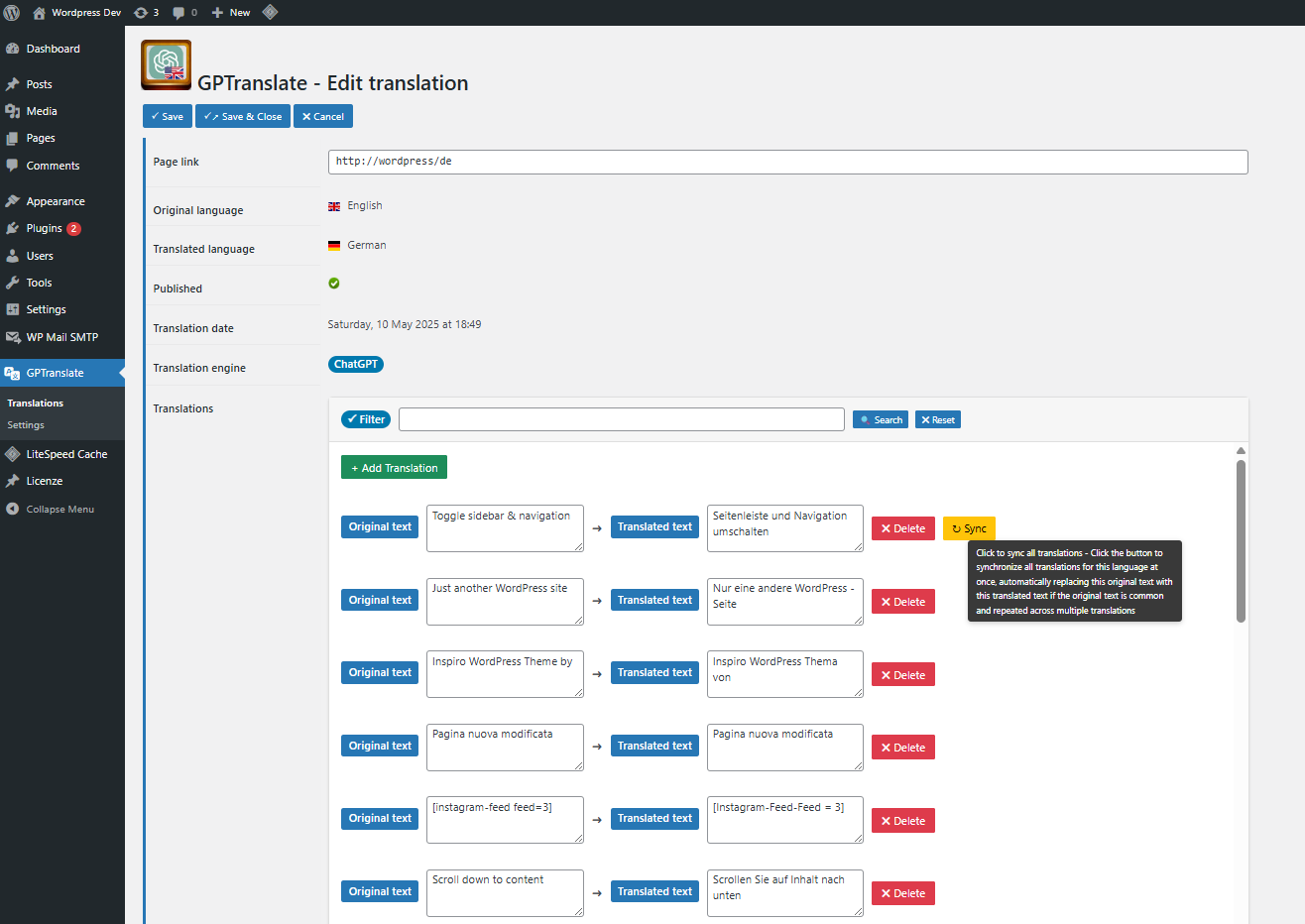
???? Manage Translations
Easily add, delete, and edit each translated piece of text, and also to set different images for each language version
???? Incremental Translations System™
Automatically detects page content changes and translates only new or modified text instead of the entire page. Reduces API costs by up to 95% for frequently updated sites, with real-time synchronization of modified content
???? Text Analysis
Extract and translate every piece of text on a page
???? Multilingual URLs
Handle multilingual URLs and transliteration for better SEO, translate metadata and add canonical and hreflang alternate tags for each language to improve SEO
???? Attributes translation
Also attributes of HTML tags like ‘alt’ for images, ‘title’, ‘value’ and ‘placeholder’ can be automatically translated for better SEO, accessibility and UX
???? Media src localization
Automatically translate/replace the src attributes of images, iframes and videos based on the translations defined in the alt attributes translations list, useful for serving different localized media per language
???? Integration with all extensions and templates
Translations are processed based on the page HTML so it makes no difference which extension, page builder or template you are using
???? WordPress Native Integration
Add missing languages to WordPress’s native multilingual system
???? Auto-Translation
Detects browser language or the WordPress multilingual for automatic translation
???? Text Reader
Read page text aloud for an immersive experience
???? XML Sitemap
GPTranslate includes an XML sitemap generator for all translated URLs
???? Multiple Layouts
Display GPTranslate as a floating widget or standard WordPress module with multilingual flags
???? Import/Export Translations (CSV & XLIFF)
Easily export all translations in CSV or industry-standard XLIFF format, so professional translators can refine content using CAT tools (Trados, MemoQ, etc.) and then reimport the corrected files back into WordPress with one click
???? Customizable Style
Easily customize widget style through simple settings
???? GDPR compliance & Privacy by Design
GPTranslate is cookie-free and compliant with privacy laws and GDPR, so there is no need to ask any consent to users. Translations are stored on your own server, not exported to a third-party hosted platform, giving you direct control over where your translated content resides
???? Experience the Future of Website Translation with GPTranslate! ????
???? Get Started Today and Transform Your WordPress Site! ????
???? Visit Our Website for more information and to get GPTranslate now!
FREE vs FULL version
The FREE version of GPTranslate is limited to the FREE quota usage:
✅ Automatically Translating up to 2500 words per page with AI
✅ Reading aloud up to 100 words per page
✅ Crawling up to 10 pages
Upgrade to the FULL version to remove limits and unlock all premium features, extended integrations, and professional support.
???? Key Features
???? AI Agent Crawler™ – Automatic Website Translation
A fully automated system that:
– crawls every page of your WordPress site
– extracts visible and hidden content
– detects metadata, alt/title/value attributes
– translates everything using AI without manual work
???? ChatGPT Integration
Supports GPT-5, GPT-4 and GPT-3.5 models for natural, human-like translations.
???? Grok Integration
Supports Grok models from xAI for high-quality AI-powered translations.
⚡ DeepSeek and Claude Integration
High-performance, ultra-efficient AI translation engine.
⚡ DeepL integration
Ultra fast and high quality AI translation engine.
???? Google Gemini and Google Cloud Translation Integration
Advanced translation quality with access to Google’s free tier.
???? Google AI – Free & Unlimited
Translate entire websites with no quotas and no usage limits.
???? Database Storage
Store translations locally to avoid repeated API usage and reduce costs.
???? Full Translation Management
Edit, refine or override any translated text.
Set different localized media sources (images, iframes and videos) for each language version.
⚡ Incremental Translations System™
Automatically detects when page content is updated and translates only what changed — identifying new and modified text segments, sending only those to the AI engine, and merging results with existing translations. Reduces API costs by up to 95% for frequently updated pages.
???? Multilingual SEO Optimization
Includes:
* translated URL slugs
* localized meta titles & descriptions
* canonical tags
* hreflang alternate tags
* metadata translation
* XML sitemap for translated pages
???? Compatible With All Themes & Builders
Elementor, Divi, WooCommerce, Gutenberg, WPBakery, custom themes — works with everything, because GPTranslate processes the final HTML output.
???? Text-to-Speech Reader
Reads page content aloud in multilingual voice.
???? Import / Export (CSV & XLIFF)
Compatible with professional translation tools like Trados and MemoQ.
???? Customizable Language Switcher
Floating or inline layout with customizable styles and flag sets.
???? GDPR Friendly
No cookies. No tracking. Fully compliant.
Documentation
Download and read the PDF documentation or visit our FAQ page on the main plugin site for more information on how the plugin works and how to configure it. If you have a license for the full version you can contact us for on site support at gptranslate@storejextensions.org
1. Does GPTranslate use AI to translate WordPress automatically?
Yes. GPTranslate uses ChatGPT, DeepSeek, Gemini, Grok, Google Cloud Translation, Claude, DeepL and Google AI to automatically translate pages, posts, WooCommerce products, menus, widgets, shortcodes and metadata.
2. Will it translate URLs, slugs and SEO metadata?
Yes. GPTranslate automatically translates URL slugs, meta titles, descriptions, canonical URLs, hreflang tags and all SEO-critical fields.
3. Does GPTranslate work with Elementor, Divi, WooCommerce and all themes?
Yes. It works with any builder or theme because it processes the final rendered HTML.
4. Does GPTranslate offer better translations than Google Translate or GTranslate?
Yes. GPTranslate uses modern AI models such as ChatGPT, DeepSeek, Claude, Grok, DeepL and Gemini, which produce far more natural and accurate translations.
5. Is there a free translation option with no limits?
Yes. Google AI offers unlimited free usage, allowing you to translate entire websites at zero cost.
6. Can I edit language translations manually?
Yes. All language translations are stored in the database and can be edited, improved or replaced at any time.
7. Does it support professional translation workflows?
Yes. GPTranslate supports CSV and XLIFF export/import for CAT tools like Trados and MemoQ.
8. Does GPTranslate replace WPML or TranslatePress?
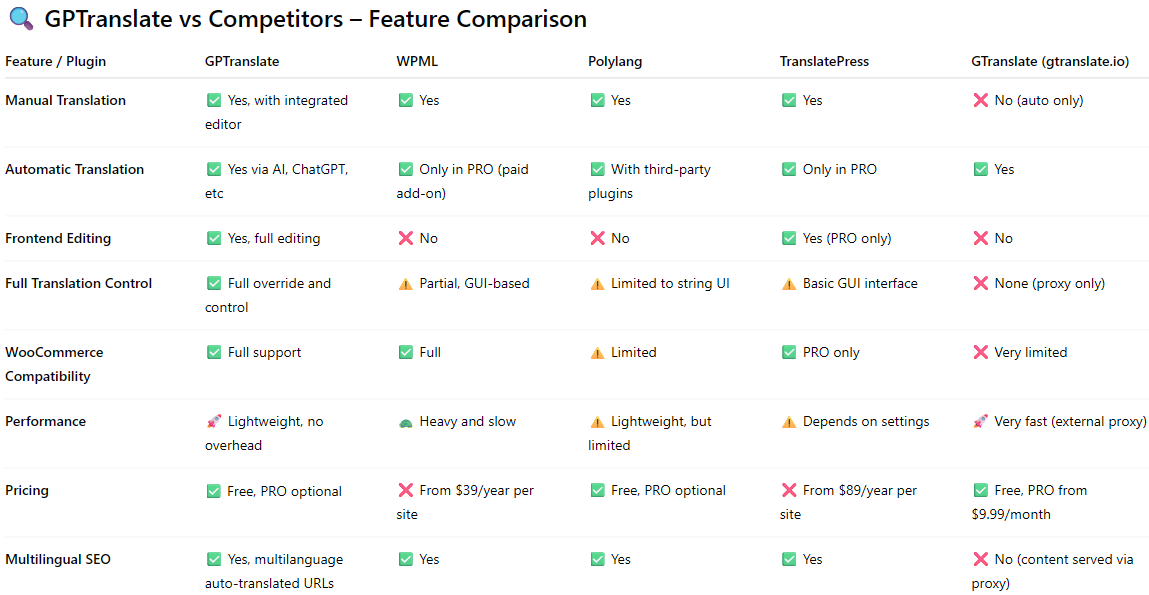
Yes. GPTranslate provides the same multilingual structure while offering automatic AI-powered translation, metadata translation, translated slugs, and a full-site AI crawler that replaces manual work required by WPML or TranslatePress.
9. Is GPTranslate GDPR compliant?
Yes. GPTranslate does not use cookies and is fully GDPR-compliant.
10. Does GPTranslate give full localization?
Yes. GPTranslate gives full localization of your WordPress website.
11. If I don’t renew the PRO license, will GPTranslate stop working or lose translations?
No. The plugin does not stop working and your existing translations remain stored in your database. License renewal is only needed for continued updates, premium support and access to future PRO releases.
Addition: the language switcher now links to the real URL of the page in each language (translated alias included, the same URLs of the hreflang tags), so the languages are real links that can be opened in a new tab and followed by crawlers; the click still changes the language through the script, and Ctrl, Cmd, Shift and middle clicks open the link normally
Addition: a hidden list of links to the page in every language is added next to the language switcher, so crawlers that do not run JavaScript can discover the translated pages; it is ignored by the server-side translation and by the page link rewriting
Addition: new “Ignored query string parameters” setting: a list of query string parameters that never identify a different page (e.g. ref, tab-*; a final * matches every parameter starting with that name). Only these parameters are removed from the page link, the other ones are kept
Addition: new “Ignored URL fragments (#hash)” setting: a list of URL fragments (the part after #) that never identify a different page, so the page opened with one of them gets the same translation as the page without it. Empty by default
Addition: new “Keep the query string in hreflang URLs” setting, disabled by default: the hreflang tags and the language links of the switcher keep the query string of the page (without the ignored parameters)
Addition: new “Page cache compatibility” setting, disabled by default: for sites served by a page cache (LiteSpeed Cache, WP Rocket, a CDN) the translations are saved with a fresh security token, so they are not rejected when the nonce printed in a cached page has expired
Addition: the text reader can now be shown as a separate widget, with its own position and an optional “Listen” / “Stop” label; the label follows the language of the page also when the plugin has no language file for it, because it is translated by GPTranslate together with the texts of the page
Addition: new alternative flags for the language switcher: USA/UK for English and Spain/Mexico for Spanish
Addition: “Remove inner formatting tags” has a new “Placeholders” option: links and formatted text inside a sentence are sent to the translation engine as numbered markers (e.g. [[1]]) so the whole sentence is translated in context and the tags are put back in the right place; invalid markers are never applied and no link is removed. The default value is unchanged
Fixed: translation keys made only of spaces (including and zero-width spaces) are now ignored when stored, read and compared, so they no longer cause repeated “???” characters on some pages
Fixed: server-side translation (regex method) now leaves a text without a translation exactly as it was, instead of normalizing it (quotes, &), and keeps the whitespace and indentation around translated texts, so the HTML of translated pages stays readable
Fixed: server-side translation (regex method) no longer touches img, iframe, video, links and forms whose attributes contain another tag, such as a LiteSpeed
Fixed: translated alt, title and meta description values containing an apostrophe or text like “$5” or “$10” were cut or lost part of the text; they are now written exactly as translated
Fixed: with the SimpleHTMLDOM engine, a translation that contains its own original text (e.g. “iPhone” translated as “iPhone-IT”) was applied repeatedly (iPhone-IT-IT-IT)
Fixed: spaces before and after links and formatted text are no longer lost when translations are applied from the stored record, which could glue words together
Fixed: after changing language from the language switcher on a server-side translated page, the browser Back button no longer opens a wrong URL (404): the page being left keeps its own URL in the history
Fixed: inline language switcher with a dropdown opening upwards: the options now open above the selector, as wide as the longest language, instead of covering it
Fixed: pages that return an error status (404 and similar) no longer output canonical and hreflang tags pointing to URLs that do not exist
Fixed: partial translation of a text now replaces the original text only as a whole word (e.g. “Home” is not replaced inside “Homepage”), and never on a text that is already a stored translation, avoiding translated words being translated again
Fixed: server-side partial translation now also works in Chinese, Japanese, Korean and Thai, where words are not separated by spaces and the previous word-boundary check blocked it
Fixed: on a page already translated by the server, the meta description was sent again to the translation engine as if it were the original text, which could replace it with a wrong translation (often in the original language) and cost one translation request per page view; it is now left as the server wrote it and copied to og:description and twitter:description
Improvement: faster server-side translation with the regex method on pages with many stored translations: the translation expressions are prepared once per page instead of once for every text segment
Improvement: the hreflang tags and the links of the language switcher now come from a single function, so they always point to the same URLs
Improvement: a page opened at the URL of a language (e.g. /fr/page) is now shown in that language even if the visitor had previously chosen another one; URLs without a language code are not affected (only with the language URL rewriting enabled)
Improvement: the hreflang tags now start with x-default (the original language), which is easier to read in the page source; the order has no effect on search engines
Improvement: with “Translate placeholders” enabled, the placeholders of the form fields are now saved with the page like the alt attributes of images and translated server-side from the stored translations; the fields already translated by the server are no longer sent again to the translation engine at every page view
Fixed: translated URL aliases of pages opened with parameters (e.g. ?class=boats) are now stored and served correctly, and the redirect to the translated alias keeps the query string
Fixed: the redirect of a URL without the language prefix no longer starts a PHP session, so no PHPSESSID cookie or no-cache headers are sent on public pages, which restores the LiteSpeed Cache hits
Improvement: the most common tracking parameters (utm_*, gclid, fbclid, msclkid, gad_source, _ga and similar) are now always ignored when the page link is matched, so a page opened from an advertisement is served translated like the page without them
Improvement: the “Strip server query string” setting is now case-insensitive and accepts a final * to match parameters by prefix
Improvement: pages excluded by the link rewriting exclusions are never translated and are redirected to the default language URL; the crawler now skips them too, and the page exclusions are merged into the crawler exclusions
Improvement: when a translated alias is saved for the first time, the original page is purged from the LiteSpeed cache
Fixed: server-side translation now translates texts saved with HTML entities (e.g. Andrés instead of the accented letter): when the text is not found as it is, the version with the entities decoded is searched and the translation is encoded back for the HTML
Fixed: dictionary words with a fixed translation (e.g. “Random Events” translated as “Eventi casuali”) are now replaced by the server straight away, instead of being shown in the original language until the page is loaded
Fixed: a dictionary row with several comma-separated terms (e.g. “News,Vehicles” translated as “Notizie,Veicoli”) now applies each translation by position also in translated URL aliases and in metadata (title, description), instead of the whole translation field
Security: fixed unauthenticated stored XSS (CVE-2026-124248) in the SimpleHTMLDOM server-side translation engine, where text written in a page (for example in a comment) could imitate the internal placeholder keys of the HTML parser and break out of an HTML attribute. The placeholder keys now contain a random value generated for every page, and the values restored into attributes are escaped. An endless loop of the parser on an unknown placeholder key is fixed too. Reported by Santh
2.34.17
Addition: new “Change language by redirecting to the language URL” setting: selecting a language from the language switcher redirects to the real URL of that language (e.g. /it/page) instead of translating the page in place. Requires the URL rewriting
Fixed: dictionary replacements of one language pair (e.g. English to French) could leak into the translations and the stored records of another language pair (e.g. English to Italian), especially when the crawler translated several languages in sequence
Fixed: the dictionary is now case-sensitive everywhere, client-side and server-side, so entries that differ only by case (e.g. “SELL” and “Sell”) keep their own translation instead of collapsing into the first one
Fixed: with the “Apply dictionary to URL aliases” option, a dictionary entry with several comma-separated words used the whole translation field (e.g. “VENDI,Vendi”) instead of the translation in the same position, producing wrong URL aliases and meta titles
Fixed: texts already translated server-side that contained excluded words could be resent to translation on the client side, showing temporary placeholders and losing the uppercase letters of the original text
Improvement: the flatten of inner formatting tags is now selective: a formatting tag that is the only content of its parent or spans a whole line (e.g.
Support
or EVERY BID DRIVES A DREAM) is kept, preserving the styling of the translated text without changing the stored translations
2.34.16
Addition: native Yoast SEO integration – og:url, canonical, title and meta description are now translated server-side, and the JSON-LD schema graph (url, inLanguage, description) is corrected for all translated pages, including the homepage
Improvement: pure numeric text nodes (e.g. “19”, “2026”, “100%”) are now excluded from translation by default, since they carry no linguistic content
2.34.15
Fixed: Chinese Traditional (zt) generated an invalid hreflang=”zt” tag; it now correctly emits hreflang=”zh-Hant” as per Google’s hreflang specification
Fixed: Chinese Traditional (zt) failed to translate with the DeepL provider because the internal code “zt” was sent to the DeepL API instead of the required “ZH-HANT”; the mapping is now applied automatically
2.34.14
Security: fixed attribute-context XSS bypass in DOMDocument and SimpleHTMLDOM engines where a whole-page html_entity_decode() call after saveHTML()/save() was decoding ” and ‘ back into literal quotes, negating the esc_attr() escaping applied in 2.34.13. Changed ENT_QUOTES to ENT_NOQUOTES so UTF-8 character entities are still decoded but quote entities are preserved. Reported by Guntur Wahyu Ramadhan via WPScan
2.34.13
Security: fixed attribute-context XSS in the DOMDocument rendering engine where alt/title/src/meta-content values were passed to setAttribute() without prior escaping. PHP DOMDocument saveHTML() does not reliably encode double quotes in attribute values; esc_attr() is now applied before every setAttribute() call for translated values. Reported by Guntur Wahyu Ramadhan via WPScan
2.34.12
Security: fixed attribute-context XSS where alt/title/src translation values were substituted into HTML attributes without esc_attr(), allowing attribute injection via quote characters. esc_attr() is now applied in all three rendering engines (regex, DOMDocument, SimpleHTMLDOM) and the incremental engine. Reported by Guntur Wahyu Ramadhan via WPScan
2.34.11
Security: fixed stored XSS where translation values were not sanitised before being written to the database or substituted into page HTML. HTML tags are now stripped from all translation values at both storage and output. Reported by Guntur Wahyu Ramadhan via WPScan
2.34.10
Fixed: Chinese Traditional (zt) not translating when a custom URL prefix is configured for it on Google AI
2.34.9
Fixed dictionary language matching with custom prefixes
Added new models for Claude provider
2.34.8
Changed: visiting a nonexistent page in another language created a translation record and added the URL to the sitemap even though the page returned a 404. GPTranslate now skips translation entirely on 404 pages by default. A new “Translate 404 pages” setting lets you opt back in if you specifically want your 404 page translated too
Added: new “Include pages without a translated alias in sitemap” setting. By default the sitemap only lists pages with a translated URL alias (requires “Rewrite URL alias for translated pages”); enabling this also includes translated pages that don’t have an alias yet, using the original URL with just the language prefix instead
2.34.7
Enhanced security system for the AI provider API key: translation requests for every engine (ChatGPT, Claude, Gemini, Grok, DeepSeek, DeepL, Google Cloud Translation) are now always routed through your own server instead of the visitor’s browser
Removed: the “Request mode” (client-side/server-side) option, since every engine now always uses the safer server-side method described above
Fixed: with some newer Claude models, translation requests could silently fall back to Google Translate instead of using Claude. Extended thinking is now explicitly disabled for translation requests and the response is parsed correctly regardless of its position in the reply
Added support for Grok 4.6 model
Added support for Gemini 3.8 Flash model
Fixed: the “og:url” meta tag (used by social media and some SEO plugins) kept pointing to the original-language URL on translated pages instead of the translated one. It’s now corrected to the translated canonical URL, both server-side and client-side
2.34.6
Fixed: on the Translations list page, the “Crawler” button stopped responding after certain actions (e.g. toggling a translation’s published state)
2.34.5
Added: The AI Agent Crawler now automatically pauses the crawl and shows an explanatory message if translation keeps failing on several pages in a row (e.g. due to a rate limit, quota, or API key issue), instead of continuing to process the remaining pages ineffectively
Added: New “Request mode” option to choose whether translation requests are made client-side (default, best performance) or server-side (routed through your own server)
Improved: Default “Crawler timeout” increased from 30 to 60 seconds, reducing false-positive stops caused by slower AI responses
Fixed: In rare cases, if the translation engine returned no usable result for a URL slug segment, the translated alias could end up missing that segment entirely, collapsing to just the language root instead of a proper localized URL. The original segment is now used as a safe fallback instead
2.34.4
Fixed: If the translation service failed, timed out, or was rate-limited, GPTranslate could save an empty translation record for the page, permanently marking it as “already translated” and preventing any future automatic retry. The page now correctly stays untranslated and is retried on a later visit or crawl instead
Added support to ChatGPT 6 Astra
2.34.3
Improved: The Dictionary table in Settings now has search filters (text, original language, translated language), new entries are added on top instead of at the bottom, and the table spans the full page width
Fixed: A page with no translated URL alias could get its link rewritten to a broken “https://” href instead of being left pointing to its normal (untranslated) URL
Fixed: Removing the last row in the Dictionary table could leave its tooltip visibly stuck on screen
2.34.2
New: Optional setting to automatically 301 redirect from the original-language URL slug to the translated alias when both are requested under a translated language prefix, preventing duplicate indexing of the same page by search engines
2.34.1
Fixed: Server-side translation could remain switched off indefinitely if a crawl (manual or auto-crawl-on-publish) was interrupted before it finished — it now automatically re-enables itself if left disabled for longer than a crawl should reasonably take
Fixed: A PHP fatal error (“Cannot redeclare function”) could occur with server-side translation enabled on sites where a theme or plugin (e.g. MasterStudy LMS Course Player) triggers WordPress’s template_redirect action more than once on the same page load
2.34
Improved: Reworked how incremental translation recognizes already-translated content, significantly reducing unnecessary AI translation requests on page load for sites with excluded words and a translation dictionary
New: The “Sync” button in the Translations editor can now also be used on newly-added translations, and propagates them to every page that needs them — not only pages that already had a (possibly incorrect) translation for that text
Improved: Clarified the dictionary feature’s help text in the settings page
Fixed: Case sensitivity handling for excluded words is now consistent between client and server, preventing already-translated paragraphs from being needlessly resent for translation
Fixed: Leftover translation placeholders could occasionally remain visible on the page instead of being replaced with the final translated text
Fixed: An excluded word could be sent to the AI translation engine even though it was fully covered by the exclusion list, particularly when it was part of a longer excluded phrase (e.g. a street name and its house number)
Fixed: A dictionary-translated phrase could be endlessly resent for translation on every page load instead of being recognized as already handled
Fixed: Composing a sentence from multiple already-known translated parts could occasionally glue two words together without a space
2.33.10
DeepSeek translation requests are now always handled fully server-side
Fixed: Adding new entries in the Translations editor and saving could silently discard them
2.33.9
Fixed: Meta title translation was skipped entirely whenever it contained a word from the metadata excluded words list, leaving the title untranslated instead of just preserving that word
Fixed: Meta description translation could leave stray protective quotes around excluded words in the translated output, and the value used for server-side matching included those quotes, preventing the description from being replaced correctly
Fixed: hreflang and canonical URLs could incorrectly point to the default/source language URL instead of the current translated page, caused by an internal setting that was read but never actually saved
Fixed: canonical and hreflang generation for URLs where the translated alias could not be resolved now consistently uses the actual requested URL instead of an unreliable fallback reconstruction
Fixed: AI Agent Crawler could get stuck attempting to load media files (mp4, mp3, images, etc.) as if they were translatable pages, instead of skipping them
Fixed: AI Agent Crawler stopped the entire crawl session the moment a single page had no language selector, instead of skipping just that page — it now continues and only stops (with a clear diagnostic message) after many consecutive pages lack one in a row, which usually indicates a misconfiguration
Fixed: the “Sync” button tooltip in the Translations editor could remain stuck open after clicking the button instead of closing
New: Added an “Expand / Collapse all” button in the Translations editor to instantly enlarge all text areas for easier proofreading, instead of resizing each one manually
Improved: The Translations editor now uses the full available width of the page, with sticky “Original text” / “Translated text” column headers that stay visible while scrolling through long translation lists
2.33.8
Added support for new Gemini AI models: gemini-3.6-flash, gemini-3.5-flash-lite, gemini-2.5-flash-lite
Added support for Grok 4.5 model
Fixed page exclusions setting not being applied to link rewriting — excluded pages are now correctly skipped by both server-side PHP and client-side JS link rewriter
Fixed translated URL alias exceeding database column limit (varchar 191) causing translation records not being saved
2.33.7
New: Added GPT-5.6 Sol, GPT-5.6 Terra and GPT-5.6 Luna models to the supported ChatGPT model list
New: Added Kalaallisut (Greenlandic, language code kl) to the supported languages list
2.33.6
New: Retrigger scope CSS selector — new setting to limit the retrigger text-node traversal to specific DOM elements only (e.g. .elementor-loop-item or .swiper-slide), leaving the rest of the page untouched for precise dynamic content translation
New: Smart MutationObserver retrigger — when a DOM mutation triggers a retrigger, only the newly added nodes inside the scope are translated, preventing already-translated content from being re-processed
New: Scroll retrigger is now scope-aware — if a scope CSS selector is defined, the scroll event listener is only registered on pages where that element actually exists, avoiding unnecessary overhead on pages without dynamic content
Fixed: After a retrigger, switching back to the original language now correctly reloads the page to restore original text instead of leaving a mixed-language state
Fix: DOMDocument saveHTML() no longer outputs the xml declaration into the page HTML when using the server-side translations DOMDocument method
2.33.5
New: Custom URL slug mapping — map a language URL prefix to a custom one (e.g. Ukrainian /uk/ to /ua/) via the new setting (format: uk:ua,zh:cn)
New: LTR/RTL awareness for URL alias slug translation — slugs are now translated respecting the correct text direction of the target language
Fixed: Switching language on server-side translated pages could cause menu links to show the wrong language prefix (e.g. /en/ instead of /es/)
2.33.2
Increased security for api key hash storage and validation
New interface for the crawler with improved usability and layout
Integration with the new and most advanced Claude Fable 5 model for higher quality translations
2.33.1
Fixed: Translations were not applied to text immediately following an excluded word when starting with an apostrophe or punctuation (e.g. “‘s own sites catalog”) — fixed both client-side and server-side
2.32.8
New: Added support for Claude Opus 4.8 AI model
New: Introduced native auto-update system for GPTranslate PRO — 1-click updates directly from the WordPress plugin dashboard with license validation via storejextensions.org
Improved: Crawler system refactored and optimized for significantly reduced server load on the lightweight AJAX endpoint
2.32.7
Added new option to hide flags for compliance with certain regulations and accessibility guidelines
Security: hardened syncTranslation to avoid potential vulnerabilities
2.32.6
Update to Gemini models
Update to CDN service for flags
2.32.5
Added Grok (xAI) support across settings, wizard, runtime translation flow, and API key testing
Added Google Cloud Translation API provider in the setup wizard with updated provider layout consistency
Added Claude Opus 4.7 model support
Added localized hreflang output support for alternative flags (for example es-MX in addition to es)
Added support to translate src for iframe and video tags using the same alt-translations workflow used for images
Improved placeholder translation scanning to include placeholders outside form wrappers (input and textarea globally)
Fixed detect current/original language mutex behavior when server-side translations are re-enabled from settings
2.32
Security: hardened the translation editor against stored XSS – translation records are now rendered with safe DOM APIs instead of innerHTML
Security: JSON data injected into admin pages is now escaped with JSON_HEX_TAG to prevent script-context breakout
Security: replaced the predictable shared API secret with a cryptographically random secret stored in the database
Security: added WordPress nonce verification to REST write operations (storetranslations, syncTranslation) for CSRF protection
2.31
Wizard app for easy plugin setup and configuration with step-by-step guidance and automatic detection of optimal settings based on the website structure and content
2.30
New incremental/differential translation system: detects page content changes and translates only new or modified text instead of entire pages
Significantly reduces API costs for frequently updated content
Added configuration options for incremental translation behavior and exclusion patterns
Added ChatGPT 5.5
New option to not revert real-time retrigger translation to original language for better dynamic content handling
Fixed retrigger DOM Mutation delay issue for dynamic content
Fixed word-boundary matching for excluded words to prevent partial word removal
Fixed emoji and special character handling in case-insensitive text matching with proper UTF-8 support
Fixed incremental translation detection to properly handle dictionary replacements before database lookups
2.29
New auto-crawl system for newly added posts and pages, to automatically translate new content without manual crawling
Removed sanitize_text_field stripping UTF-8 from server variables
Fixed 301 redirect stripping UTF-8 characters in language-prefixed URLs
Fixed language prefix insertion for subfolder installations
Fixed multilingual routing with UTF-8 characters in slugs
Fixed URL query string handling with language rewrite
2.28.1
New system to fix conflicts with inline scripts and styles during server side translations
2.28
XML sitemaps subdivision by language
Page link rewrite exclusions system
Resolution of issues in translations
2.27.10
Added JavaScript code compatibility integration with optimizers plugins like WPRocket, WP Optimize, etc. to prevent translation conflicts with minification and caching optimizations
Added SEOPress integration with custom title and description filters, preventing translation override conflicts
Added Dublin Core tags support (dc:title, dc:description, dc:language) with full server-side and client-side translation across all parsing methods
2.27.5
Added latest ChatGPT 5.4 models
Modified exclude words field to use a multiline textarea for better management of multiple words and phrases
2.27
Auto skip system to fully skip already translated URLs in the crawler, improving efficiency and preventing duplicate translations
Batch crawler system to crawl multiple URLs at once
Auto include the original language in the list of enabled languages to prevent issues with missing translations for the original language
2.26
Added new global option “Lock translations” (enabled by default) to prevent automatic overwrite of existing translations
Added Dictionary support for alias slugs via pre/post-translation placeholder system with word boundary matching
Added eye toggle button to mask API Key fields in administration interface
Added Google AI HTML translation
Added real-time XML Sitemap generation endpoint accessible via public REST API URL for Google Search Console submission
Added copyable Sitemap URL with clipboard and open-in-new-tab buttons in the Crawler modal
Added sorting options for individual translations in the edit view (A-Z, Z-A, length ascending/descending)
Fixed language selector showing wrong language on server-side translated pages regardless of storage mode (url/storage), by detecting body[data-gptranslateskip] attribute
Fixed translation sort order preserved correctly in database regardless of visual sort selection in edit view
Fixed search translations filter working with the “enter” key in addition to the search button
2.25.2
Added lightweight AJAX endpoint for server-side translation queries, bypassing the full WordPress stack for significantly faster response times
Added database indexes for improved query performance on translations lookup
Added new option to exclude server injected query string parameters from translation alias matching
Changed: Gemini 3.1 API model
Fixed WordPress critical error caused by session_start() interfering with REST API requests by adding session_write_close() after session usage
Fixed issue with auto wrap excluded words for UTF-8 characters
Fixed issue with home page language suffix
2.25.1
Fixed: Issue while reverting to original language for excluded words managed by dictionary
Fixed: Issue with spacing for excluded words managed by dictionary
2.25
Added: DeepL integration as a new AI translation provider
Added: Claude integration as a new AI translation provider
Added: Austrian German alternative flag for German language selector
Added: Form action URL rewriting support for POST forms in page link rewriting system (client-side and server-side)
Added: First-pass form action alias replacement after translation save, matching behavior already in place for anchor links
Changed: Update for WordPress 7
Fixed: Server-side replacement algorithm for short words to prevent incorrect partial matches inside longer words
Fixed: Client-side translation skipping FontAwesome and other icon elements when ‘i’ tag is listed in formatting tags to remove, preventing icon removal
Fixed: Client-side inner excluded words auto-wrap not applied correctly within nested elements
Fixed: Percent-encoded UTF-8 characters in translated URL aliases not decoded correctly in server-side and client-side link rewriting (e.g. %C3%BC instead of ü)
Fixed: Server-side form action replacement failing in subfolder installations due to base path mismatch in relative URL lookup
Fixed: Language not detected and not switched when server-side translations language switching mode is set to ‘storage’ and ‘Always detect auto-translated language’ option is active simultaneously — storage value now correctly takes precedence
Fixed: Missing Punjabi flag icon (pa.gif)
2.24
Added: Test button for ChatGPT API key validation directly from plugin settings
Added: Button to open modal popup for managing translation templates
Added: New WordPress shortcode for embedding GPTranslate functionality into pages and content
Improved: Settings UI to better integrate API key testing and template modal access
2.23
Added: Comprehensive hreflang tag implementation with database-driven translated URL aliases
Added: Automatic URL original path resolution when viewing translated pages for correct hreflang generation
Added: Support for subfolder installations in hreflang URL generation
Added: Flexible URL matching with support for encoded characters, trailing slashes variations
Fixed: Double-space bug in server-side translations by applying trim() to both original and translated text
Fixed: HTML entity decoding issue in meta description translations (ampersands and special characters)
Fixed: URL sanitization to prevent character corruption using esc_url_raw()
Fixed: Subfolder duplication in hreflang URLs for subdirectory installations
Improved: Database query flexibility with support for URL variations (encoded/decoded, with/without trailing slash)
2.22
Added: URL transliteration feature for Cyrillic to Latin conversion (e.g., Москва → Moskva, київ → kyiv)
Added: Automatic server-side translation disable on crawler start to prevent conflicts
Improved: Dictionary interface reorganization for better usability
Fixed: URL translation alias double slash bug with ChatGPT/AI translation engines
Fixed: URL normalization in crawler to prevent duplicate links with/without trailing slashes
2.21
Integrated Google Cloud Translation API as translation provider option