
Allow your users to buy and send gift cards via email, an easy and direct…
Are you looking for creating and selling unlimited gift vouchers on your WordPress/WooCommerce powered website? Then, your search ends here!
We bring you our top-notch product and an excellent customizable WordPress plugin that will cater to all your needs.
The Gift Cards by CodeMenschen is a multi-supported (Woocommerce and WordPress) plugin and a perfect solution for generating and selling gift cards. Be it a product, service or experience, your gift cards/gift packages can include a variety of things.
From rewards & promotions to fitness packages & event tickets, spread happiness across your customers and gift them the love they deserve from their loved ones.
Any merchant whose website is powered by WordPress can use this plugin.
We have made the process of creating basic vouchers for events like birthdays, anniversaries, new years, Valentine’s Day, etc extremely simple. This plugin not only reduces manual efforts but also saves you a lot of time. All you need to do is select a template of your choice from available options, set your logo or event image and you are DONE! Could it be any more simple?
Plugin Gift Cards by CodeMenschen is very easy to set up!
* One-click creation of the Gift Card product.
* Easily customizable to suit your needs.
* checkout the video how it works.
Now, this plugin is also WooCommerce compatible. So customers can redeem the vouchers in your WooCommerce store also.
Highlights
Read out the highlights and features to explore what’s more this plugin has in store for you.
- ONE FOR ALL – Allows customers to buy gift cards/vouchers much like any other product. Several customizable options: choosing card designs, assigning card values, writing personal messages in addition to offering regular product characteristics.
- BOOST YOUR BUSINESS – Connects your online store with your on-the-ground business making life easier for your customers with great customer service.
- WooCommerce COMPATIBLE – This plugin supports the WooCommerce store. Customers can check their voucher balance from ‘My Account’ and redeem the voucher/package from the checkout page. Pro
- GENERATE GIFT VOUCHERS – Admin can create gift vouchers from backend. Pro
- BARCODE ON VOUCHERS – Show Barcode on vouchers and redeem at store easily. Pro
- ADD COMMISSION – Can charge an additional amount on every voucher order of customers. Pro
- EXPIRATION DATES – Automatically set an expiration date according to your choice (fixed date or in days) based on the purchase date.
- BALANCE ADJUSTMENTS – Perform balance adjustments in the admin area. Pro
- CHECK BALANCE PAGE – A shortcode to let customers check their gift card balances. Pro
- SAFER REDEMPTION – Convenient and secured modes for purchasing & payments. Proven valid and authentic gift cards (with coupon codes)that deliver your product or service on a later date at a physical location.
- TRACKING – Powerful reporting and tracking features enable you to track the purchased voucher codes. Once the gift card is purchased, its further use can be tracked by the administrator through the unique gift card codes.
- EASY DESIGNING – Design templates for different themes as ‘Birthday’, ‘New Year’, ‘Valentine’s day’, ‘Independence day’ etc.
- POSTAL DELIVERY – You can accept postal orders for your gift cards. If you want, you can turn on the ability for your customers to buy your own printed gift cards/certificates. So you can send gift cards via post basis directly to the recipient.
- INSPIRATIONAL QUOTES – Enhance your gift cards with meaningful quotes! The plugin now includes a collection of inspirational quotes that customers can easily add to their personal messages. This feature provides suggested quotes for various occasions, making gift cards more thoughtful and personal.
Voucher Booking Forms
This plugin provides two types of voucher booking forms. They are,
* Fixed Value Vouchers: Administrators can provide their customers with a certain set of fixed priced gift items.
* Custom Priced Vouchers: Price of the vouchers can be defined as per one’s requirement.
Main Plugin Features
Front end:
- Create and design templates with your own logo as per the occasions or fests.
- Customers can pick from a variety of templates uploaded by the admin and can sort by events (Anniversaries, Birthdays, Valentine’s day, Weddings, etc.)
- Redeem gift cards from the WooCommerce Checkout page.
- Customers can view coupon balance.
- Admins can create fixed price gift items for different services and products for their customers.
- Customers can preview their Gift Card on their booking page.
- Purchased gift card/voucher is sent to the recipient’s email address.
- Add messages to be printed on the PDF gift card/voucher.
- Access to inspirational quote suggestions to enhance personal messages on gift cards.
- Redeem gift cards/vouchers using unique auto-generated coupon codes.
- Multiple payment gateway integrations available such as Stripe, PayPal, Sofort Pay, and Bank Transfer.
- Invoice based payment solutions i.e. your customers can directly pay to your bank account after purchasing the voucher
- Provides 3 varieties for voucher styles in PDF formats (See Demo)
- Set voucher expiry as fixed dates or number of days
- Remove Expiry date from vouchers
- Hide Price from vouchers
- Send customer receipt after successful order placement.
Backend:
- View all gift orders.
- Track the status of all gift cards/vouchers such as usage or payment status.
- Add edit/delete/view options to your voucher/card templates and gift items.
- View details of each gift card such as full amount, credit left, associated gift-card order, orders on which it has been applied and the total spend it generated.
- Create unlimited gift categories.
- Generate Gift Vouchers from admin.
- Export all orders from order page.
- Admin can set options like sender name, email, company name along with company details on templates from plugin settings.
- Manage and customize inspirational quotes collection for customer use in personal messages.
- Admin can customize email templates both for itself and its customers.
- Admin can also enable the postal delivery options for its customers.
- Customers can view a list of their gift cards used so far, the order in which they have been used and the available credit left.
- Customize the template vouchers.
- Printable barcode feature on vouchers.
- Additional charges feature on each voucher order.
- Custom value redemption feature from the backend.
- Check the voucher balance page on the backend.
- Stripe with SCA-ready & Ideal Payment Option, PayPal (Express checkout), MultiSafepay and Sofort Payment Gateway Integration and Bank Transfer.
- Generate Invoice for each voucher order.
- 1-year support with updates included (Get 35% off on renewal license)
- 100% Satisfaction Guarantee (14 days refund if found unsatisfactory)
Premium Live Demos
Want to discover all plugin features? Try it out in just a single click.
For an easy and simple understanding of our plugin, click the links below for quick demos –
– Gift Cards Demo
Copy this shortcode and paste it where you want the gift voucher form to appear; [wpgv_giftvoucher]
– Gift Items/Packages Demo
-
Old version 3.x.x and lower versions please use shortcode:
Copy this shortcode and paste it where you want the gift item/package form appears; [wpgv_giftitems]
Copy this shortcode and paste it where you want to display single gift item/package; [wpgv_giftitems item_id=1]
Copy this shortcode and paste it where you want to display Category wise gift item/packages; [wpgv_giftitems item_cat_id=1]
-
New version 4.0.0 for new style, please use shortcode:
Copy this shortcode and paste it where you want the gift item/package form appears; [wpgv_giftcard]
Copy this shortcode and paste it where you want to display single gift item/package; [wpgv_giftcard item_id=1]
Copy this shortcode and paste it where you want to display Category wise gift item/packages; [wpgv_giftcard item_cat_id=1]
By accessing our testing platform, you will be able to discover all plugin features and test them as per your preference in front-end mode.
For more information about the PREMIUM version of Gift Cards (Gift Vouchers and Packages) (WooCommerce Supported), visit the official page on wp-giftcard.com
This plugin is already translated in Czech (Czech Republic), Danish, Deutsch, French, Hindi, Spanish and Swedish Languages
If you help us in translating this plugin in your language, It would be very helpful for us.
You can translate this plugin by clicking on the link here.
Documentation
Please, read the official documentation of Gift Cards (Gift Cards and Packages) to learn more about all plugin features.
Suggestions
If you have suggestions about how to improve Gift Cards plugin, you can write to us.
Screenshots
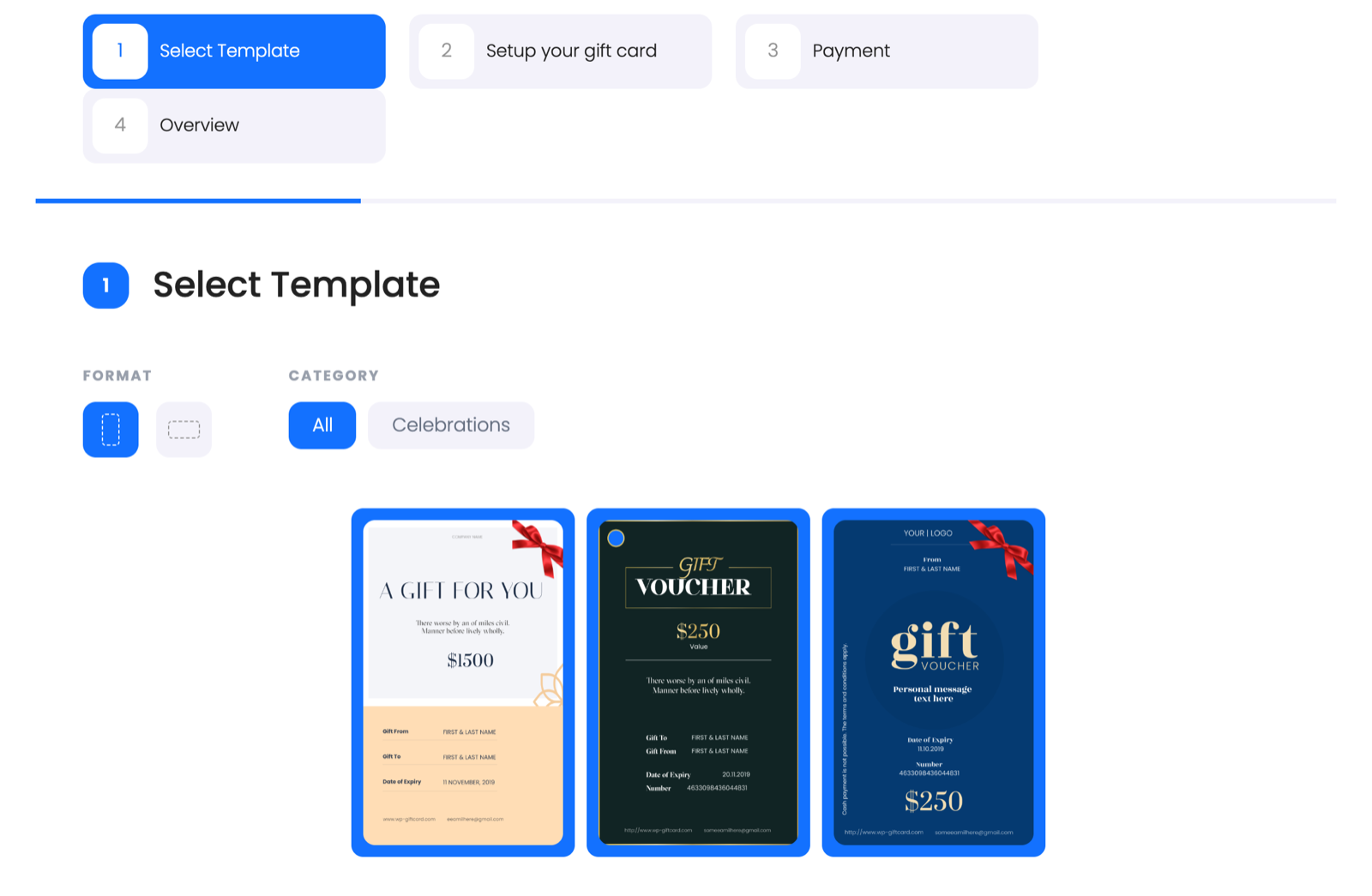
Customers choose a gift card design, filtered by format and category.
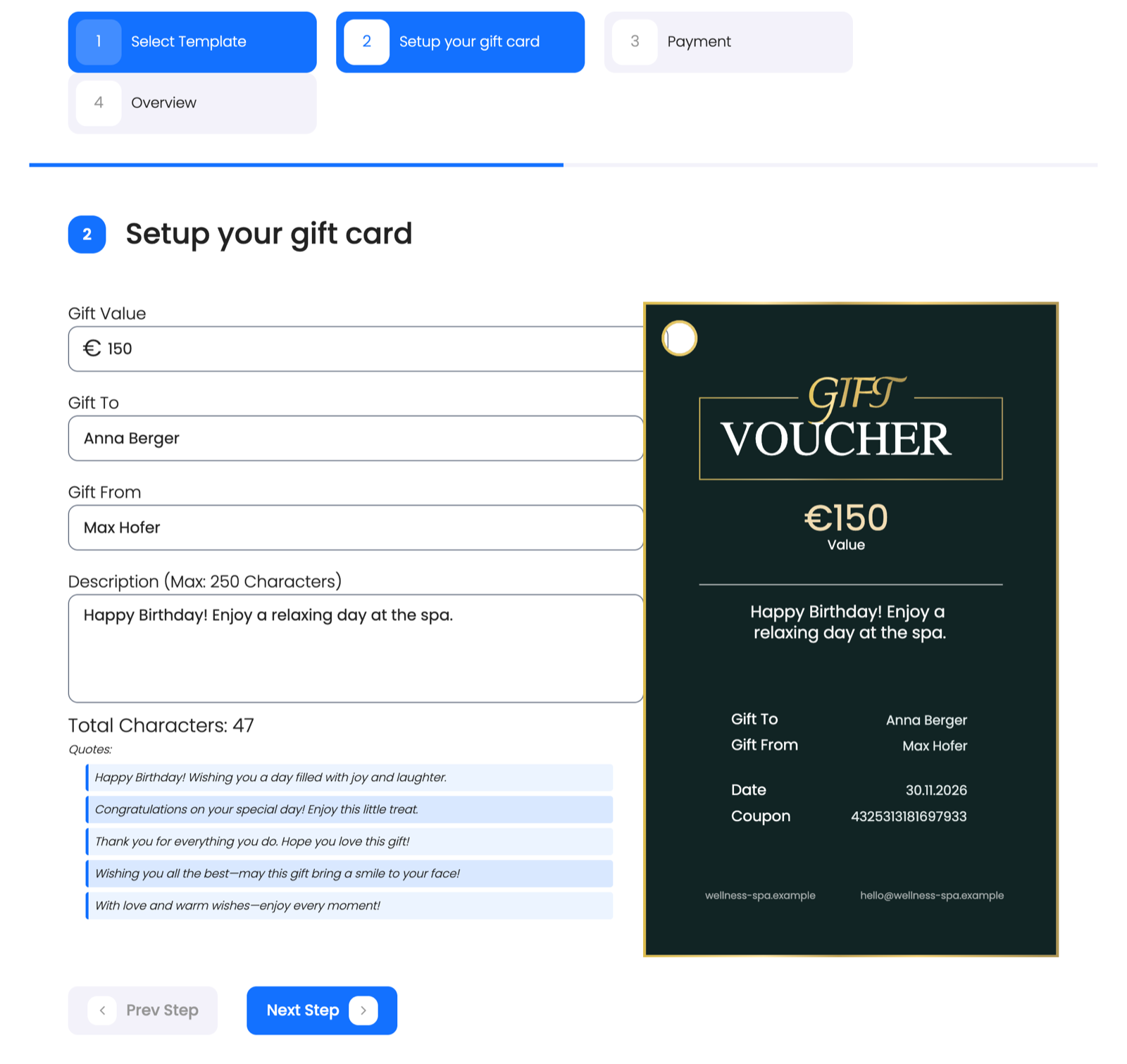
Live preview: the card updates while the customer enters the value, the names and a message.
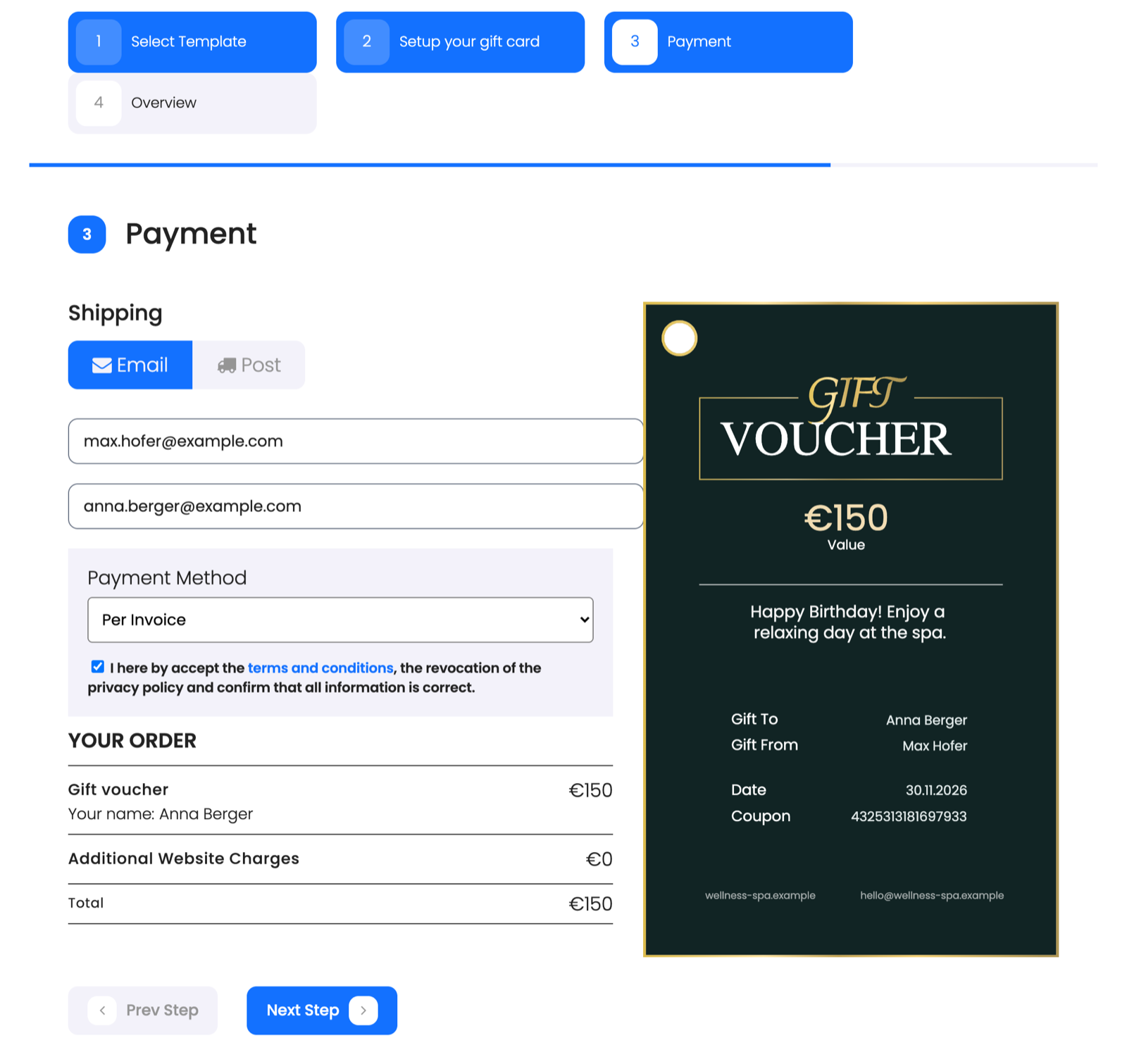
Delivery by email or post, and the payment method.
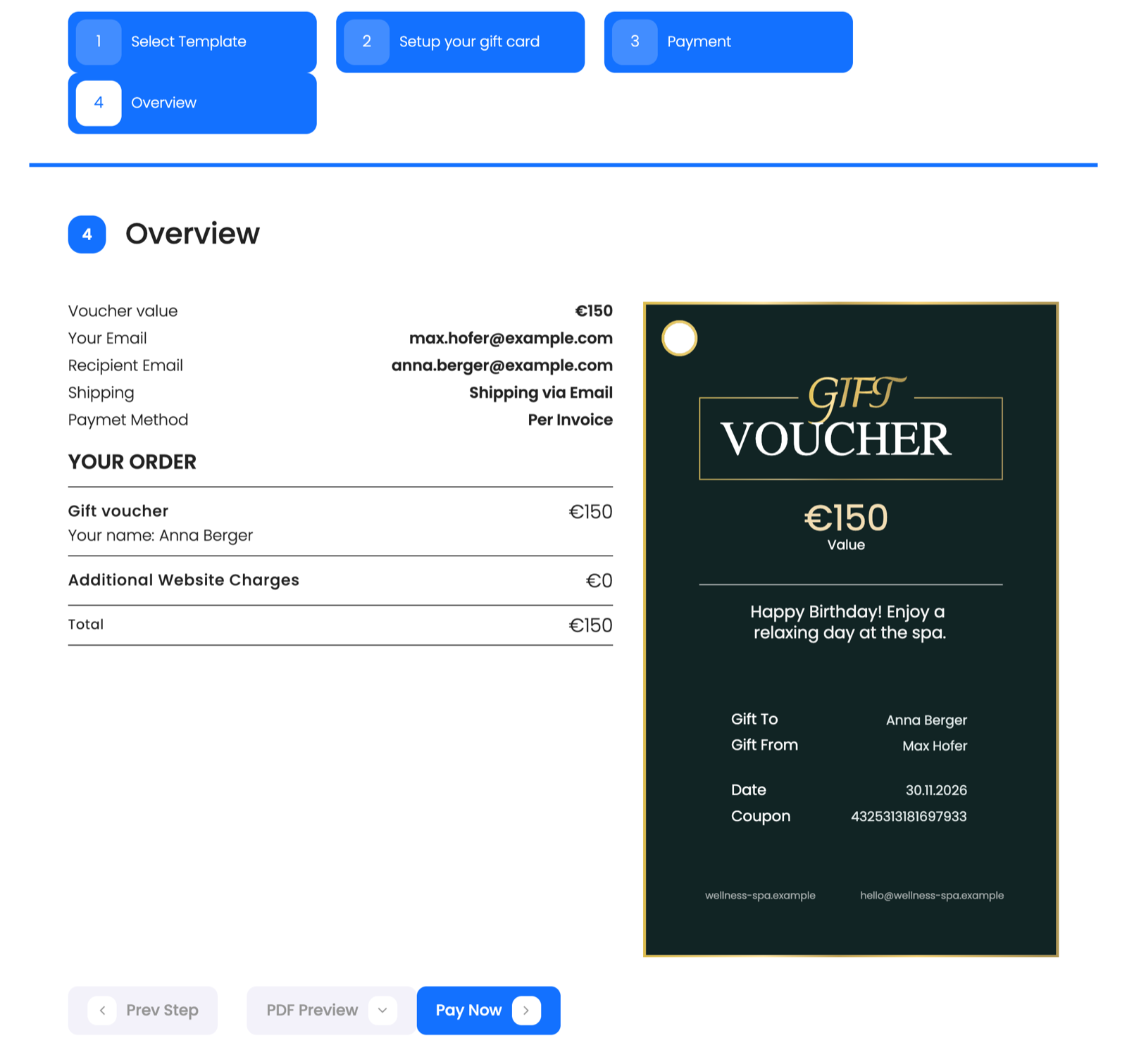
Overview of the order before payment.
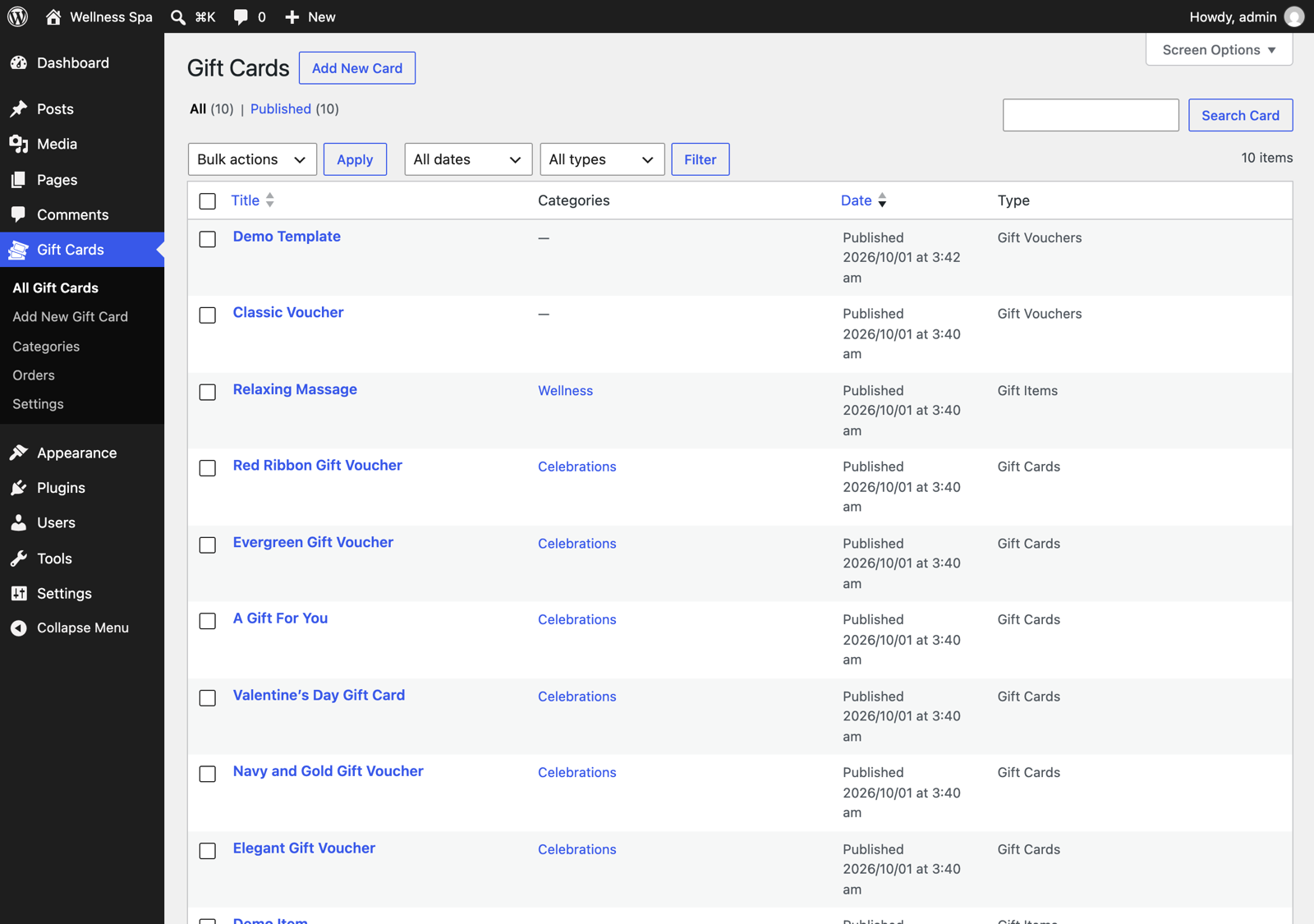
All gift cards, gift items and gift vouchers in one list, with a Type filter.
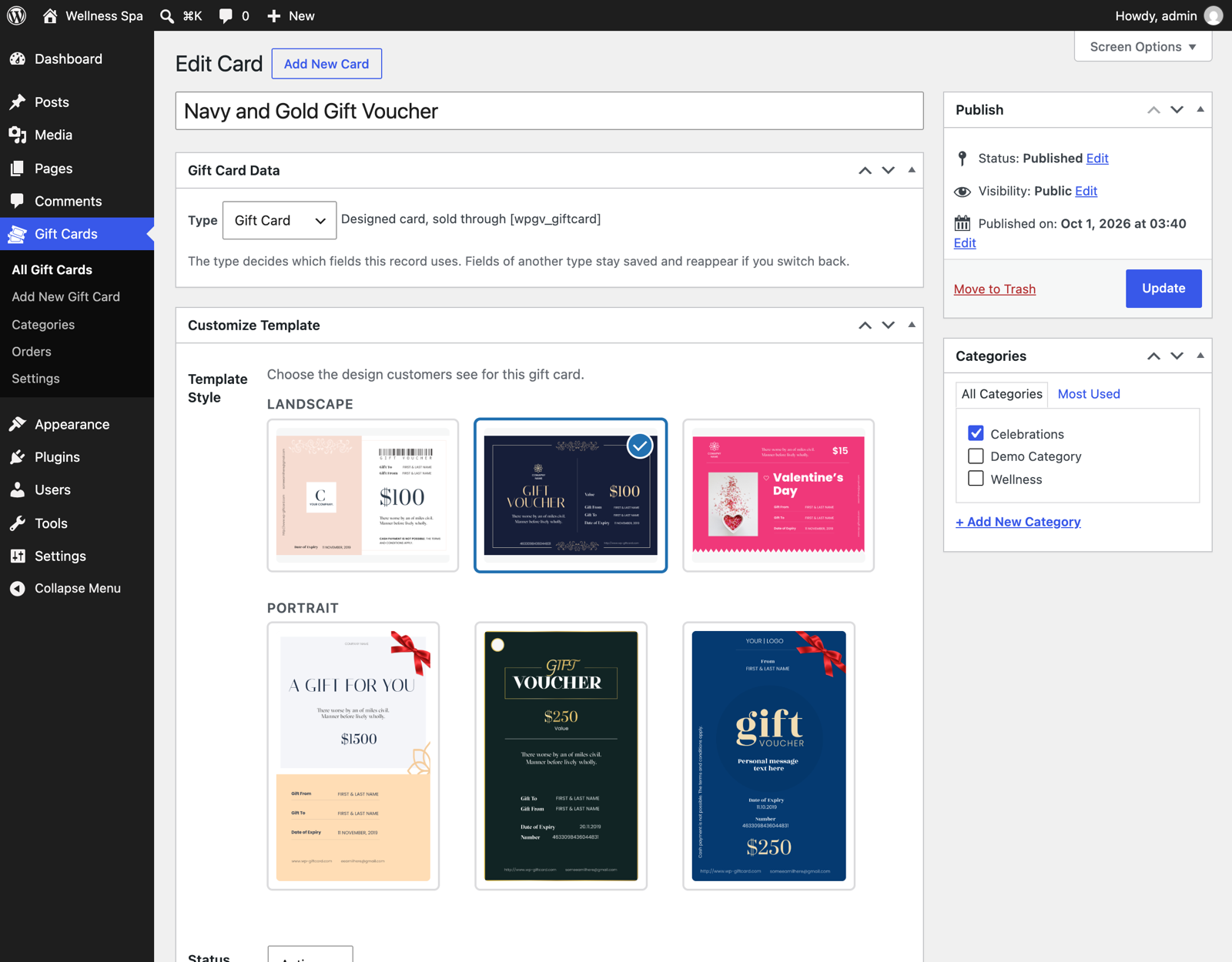
Choose the gift card design in the admin, grouped in landscape and portrait.
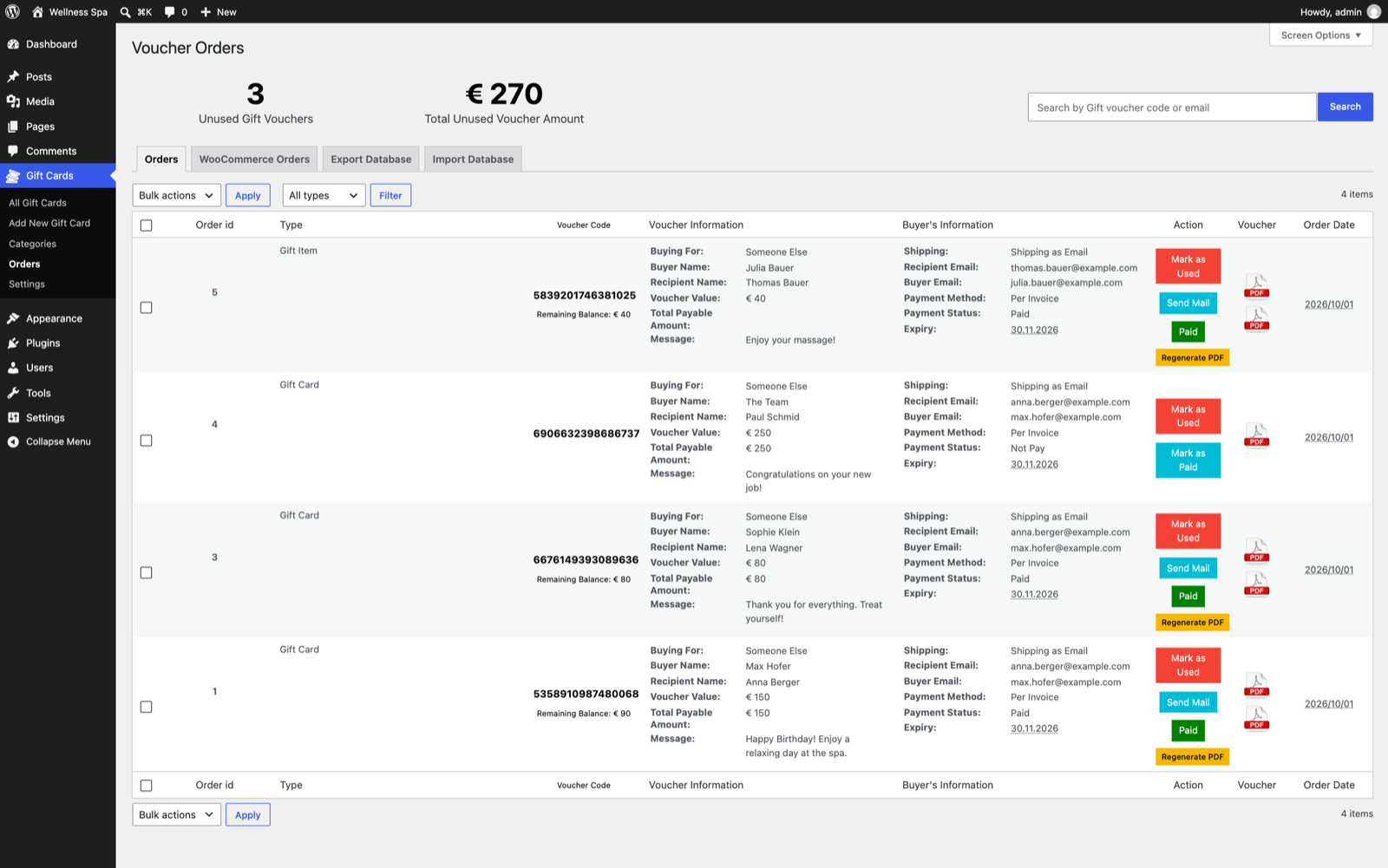
One Orders list for every order type, with payment status, PDF and actions.
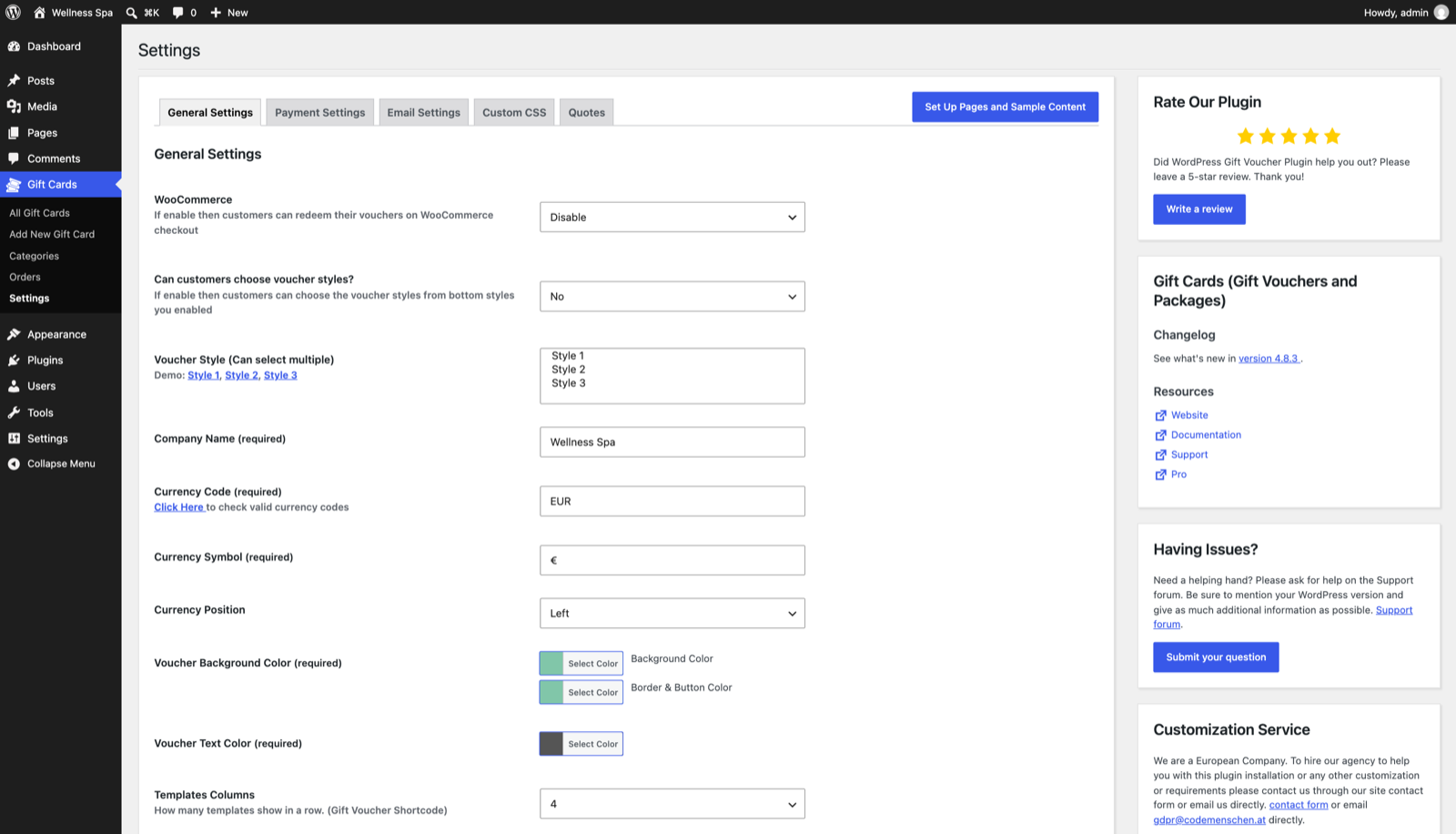
Settings, with one click to set up the pages and sample content.
Do I need WooCommerce?
No. The plugin has its own forms and payments. If you use WooCommerce, customers can also redeem their vouchers at the WooCommerce checkout.
How does the customer receive the gift card?
As a PDF by email, sent to the buyer and the recipient. You can also offer postal delivery for printed cards.
What happens if the customer spends less than the voucher value?
The rest stays on the voucher and can be used later. Logged-in customers can see the balance on the balance check page.
Which format do the voucher codes have?
The plugin creates a unique 16 digit code for every voucher.
Can I change the emails?
Yes. The emails to the buyer, the recipient and the admin can be edited in Settings.
Does it work on WordPress Multisite?
Yes.
Is my data deleted when I deactivate the plugin?
No. Deactivating the plugin does not delete any data.
Can I install Gift Cards Pro when the free plugin is active?
Deactivate the free plugin first, then install Gift Cards Pro. Your data stays and Pro uses it.
How do the AI backgrounds work?
AI backgrounds are part of Gift Cards Pro. Describe the picture you want, choose a style and a format, and the images are created for you. Every Pro license starts with free credits. A render costs 1 to 10 credits depending on the image quality, and failed renders are never charged.
How can I translate or change texts?
Use translate.wordpress.org, the Loco Translate plugin or Poedit.
ChangeLog
Version 4.9.8 – Released: November 27, 2026
- Tweak: The Gift Card form loads the Poppins font from the plugin instead of Google Fonts, so buyers’ browsers no longer contact Google. The cards look the same.
- Tweak: The forms no longer load PayPal’s JavaScript SDK, which the plugin never used. In test mode it showed an error in the browser console. PayPal payments work as before.
- Fix: Removed two PHP warnings on WooCommerce orders that issue gift vouchers (“Undefined variable $return” and “Attempt to read property email on array”).
- Fix: A WooCommerce order without a gift voucher product no longer sends again the emails (with PDFs) of the gift vouchers bought through the plugin’s own forms when it is completed.
- Fix: Removed an “Array to string conversion” PHP warning from the plugin’s admin notice.
- Fix: Removed a PHP 8.1 deprecation notice from the voucher and item preview pages, and a PHP warning from Stripe payments on the Gift Items form. Same behaviour.
Version 4.9.7 – Released: November 26, 2026
- Security: The stock voucher templates for PDFs are now loaded from the plugin’s own file storage. The old storage location could be changed by others. Your vouchers look the same and no settings need to change.
Version 4.9.6 – Released: November 26, 2026
- Tweak: Tested with WordPress 7.2.
- Tweak: The gift voucher, gift card and gift item forms no longer load a 740 KB copy of Stripe.js that they never used. Stripe payments open Stripe’s checkout page as before.
- Tweak: The plugin scripts no longer use jQuery calls that WordPress 7.2 reports as deprecated (jQuery Migrate 3.6), ahead of jQuery 4. The forms work as before.
- Tweak: Removed an unused bundled copy of jQuery UI.
- Tweak: Requires at least WordPress 5.3, the oldest version whose functions the plugin already used.
Version 4.9.5 – Released: November 24, 2026
- Fix: When Stripe refused to create the checkout, buyers saw “Stripe session creation failed.” and the reason was lost. The reason is now written to the PHP error log, and a logged-in administrator testing the form sees it in the message, for example “Invalid API Key provided”. Buyers still see the short message. Stripe keys are masked in both places.
Version 4.9.4 – Released: November 14, 2026
- Fix: The order details on the Overview step of the [wpgv_giftvoucher] form could look empty. The Voucher Text Color, meant for the voucher card, also coloured these details, so a white card text hid them on a white page. It now only colours the voucher card.
- Tweak: The “Select number format” options are now named after the decimal mark, “1,000.00 (decimal point)” and “1.000,00 (decimal comma)”, so the right one is easier to pick. Saved settings stay as they are.
- Tweak: Unpaid orders now read “Not Paid” instead of “Not Pay” in the order list, order details, receipt and the {payment_status} email tag. Only the wording changed; the stored status is the same.
Version 4.9.3 – Released: November 6, 2026
- Fix: With no active voucher template, the [wpgv_giftvoucher] form opened with an empty first step and refused the buyer at the last step with “This voucher is no longer available.” Buyers now see a short message instead of the form, and administrators also see why and where to add a gift voucher.
Version 4.9.2 – Released: November 5, 2026
- Fix: On phones, the step blocks of the [wpgv_giftvoucher] and [wpgv_giftcard] forms filled much of the first screen, so buyers had to scroll past them to reach the form. The steps are now one short row: the current step shows its number and name, the others their number.
Version 4.9.1 – Released: November 2, 2026
- Fix: PayPal’s checkout page could appear in a language neither the shop nor the buyer uses, because the plugin sent no language with the order. It now follows your site’s language. To choose another one use the wpgv_paypal_locale filter, or return an empty value to leave it to PayPal.
- Fix: An order form left open for more than a day, served from a page cache, or opened before logging in or out stopped at the last step with “Invalid security token”. The form now gets a new token by itself and the order goes through.
- Fix: On the Gift Items and Gift Card forms, pressing Pay again after a failed payment added another order each time. Pay now stays locked after a failed payment and the buyer is asked to reload the page.
- Fix: On the Gift Voucher form, a request that was refused without creating an order, such as an invalid code, locked the whole form. It now stays usable.
- Fix: Regenerate PDF stopped with “Template id is invalid for standard voucher.” on Gift Item orders made with Add Order. It now rebuilds their PDF. The same error on older Gift Item and WooCommerce orders is fixed too. Nothing needs to be changed on existing orders.
Version 4.9.0 – Released: October 28, 2026
- New: Gift Cards > Add Order. Create a paid gift voucher or gift item order by hand, for example for a sale at the counter, a present or a refund. The voucher gets its code and PDF straight away and can be emailed to the recipient, the buyer and your shop in one step. You can also set your own voucher code and expiry date.
- Update: The admin script now carries the plugin version, so browsers load the new version after an update.
- Fix: A gift card bought through the [wpgv_giftcard] form could get a PDF showing a different voucher code from the one saved with the order, so the printed code could not be redeemed. The PDF now always shows the order’s code. For gift cards sold with an earlier version, open the order in Gift Cards > Orders, use Regenerate PDF and send the voucher again.
- Fix: Regenerate PDF on a gift card order drew the template’s sample text (code 1234567812345678, $250, “FIRST & LAST NAME”) without the card picture. It now draws the card the way the [wpgv_giftcard] form does, with the order’s code, names, value, message and expiry date.
- Fix: The “Check Voucher Balance” tab in WooCommerce My Account was empty. It now shows the form, and customers can check the vouchers they bought or received.
- Fix: Bulk Delete on the old Voucher Templates page now checks that the request comes from the page itself, and a template that orders still use is switched off instead of deleted.
- Fix: The customer receipt now shows the buyer’s email address instead of the recipient’s.
- Fix: Pressing Mark as Paid again on an order that is already paid (one order or in bulk) added the voucher’s value to its balance a second time. It is now credited once.
- Fix: Mark as Used took the full face value off a voucher that was already partly spent, leaving a negative balance. It now takes only what is left.
- Fix: Changing the price of a paid voucher on its details page added the new price on top of the old balance, so 40 changed to 60 left 100 to spend. The balance now moves by the difference. An unpaid voucher gets its new price when it is marked as paid. The price box now shows the order’s price instead of 0.
- Fix: Per Invoice with “Customer receipt” on sent the voucher to the recipient, and the voucher PDF to the buyer, before the buyer had paid. The buyer now gets the receipt to pay against, and the recipient gets nothing until the payment is in. The shop’s copy is unchanged.
- Fix: Sofort payments were never marked as paid, so the vouchers were not sent. The payment success page now asks Sofort about the payment and completes the order once Sofort has the money.
- Fix: When PayPal could not be reached or refused the order, the order form stopped with a PHP fatal error. The buyer now sees an error message and the order is kept as Pending.
- Fix: The [wpgv-check-voucher-balance] shortcode did not show the balance or the dates of the voucher’s history, and every row showed the same balance. Each row now shows the balance after that entry.
- Fix: Send Mail on the Orders screen sent the mails without the shop’s sender name and address, sent the recipient’s copy to the buyer’s name, and left out the receipt. It now sends like the payment success page does.
- Fix: A voucher whose expiry was stored as a translated “No Expiry” (for example “Kein Ablaufdatum”) counted as expired. Expiry dates are now read in the date format set in Settings.
- Fix: The Gift Voucher form showed the Website Commission as 0 and a lower total than the buyer was then charged. It now shows the commission set in Settings.
- Fix: iDEAL was never offered on Stripe Checkout for orders from the Gift Voucher form. It now is when it is switched on, like on the Gift Items form.
- Fix: Stripe Checkout could not open for a voucher without a picture on a site whose Settings were never saved, and a voucher’s own picture never reached Stripe. The picture is now sent as a link, and left out when there is none.
- Fix: A gift item price lost its decimals when saved, so 49.90 became 49.
- Fix: Custom CSS lost its line breaks when saved, and child selectors (a > b) did not work on the Gift Voucher form.
- Fix: Each click on Set Up Pages added another “Demo Item”. It is now created once.
- Fix: [wpgv_giftitems item_id=..] showed a PHP warning and a Buy button without its category.
- Fix: A voucher template that is switched off or not published could still be loaded by the form and ordered. Both are refused now.
- Fix: WooCommerce: the order thank-you page stopped after the first gift voucher line for some payment methods.
- Fix: WooCommerce: gift voucher emails scheduled for a later date were never sent.
- Fix: Gift Items orders sent without a style while the style chooser was on stopped with a PHP fatal error.
- Fix: The PDF of an unpaid voucher could be opened by its link. The plugin now hands out voucher PDFs itself: a voucher opens once its order is paid, the administrator can open every PDF, and receipts open as before. Links already sent by email do not change. This needs a server that reads .htaccess files (Apache or LiteSpeed); on nginx PDF links work as before.
Version 4.8.6 – Released: October 13, 2026
- Fix: WooCommerce: the “New Voucher Order Received” notice for a Gift Voucher product went to the customer’s billing address. It now goes to the shop’s sender email, like the notices of the plugin’s own order forms.
- Fix: WooCommerce: when a second voucher was applied to a cart that the first voucher already covered in full, checkout stopped with “There was an error processing your order.” The unused voucher is now left untouched and the order goes through.
- Fix: WooCommerce product editor: an amount just added on the Gift Voucher tab could not be removed until the page was reloaded. It can now be removed straight away.
- Fix: When a site upgrades from a version before 4.8.0 and has more than 50 voucher templates, all of them are now moved to the Gift Cards list. Before, only the first 50 were moved.
Version 4.8.5 – Released: October 13, 2026
- Fix: Stripe checkout now works on Stripe accounts that use Stripe’s newest API version (2026-09-30), the default for new accounts. On those accounts the checkout stopped with “Stripe session creation failed.” The plugin now makes all its Stripe requests with a fixed API version, so checkout behaves the same on every account. No settings need to change.
Version 4.8.4 – Released: October 7, 2026
- Update: Orders are no longer removed automatically. An order whose payment could not be started, or whose buyer came back through the payment Cancel page, now stays in Gift Cards > Orders with the payment status “Pending”, and the reason is noted in its history. Orders that remain unpaid are kept until an admin deletes them; the hourly removal of orders left unpaid for 24 hours has been retired.
Version 4.8.3 – Released: October 1, 2026
- Fix: The form of the [wpgv-check-voucher-balance] shortcode appeared above the page header on block themes such as Twenty Twenty-Five. It now shows inside the page content.
- Fix: The order list showed the remaining balance with six decimals, for example “€ 150.000000”. It now shows “€ 150”. The voucher code also stays on one line.
- Update: New plugin description and screenshots for the current version.
Version 4.8.2 – Released: October 1, 2026
- Fix: After paying with Stripe, some buyers came back to “This URL is invalid. You can not access this page directly.” and received no confirmation email, although the payment went through. This started in 4.7.0. The order key checked on the success page was sometimes saved on a different post, when the voucher’s ID matched the ID of a post revision. The key and the other order data are now always saved on the voucher itself.
Version 4.8.1 – Released: September 26, 2026
- Fix: A new installation now saves the Currency Symbol, Currency Position, the email shown in the PDF footer, the Voucher Expiry Type and the Shipping Methods correctly. Each was being stored as 0, which left prices with no currency symbol, expiry dates measured against a unit that does not exist, and no shipping options for customers to pick from.
- Fix: Sites installed before this version still hold those values, and are not changed for you. The Gift Cards screens now name which settings need filling in and link you to them.
- Update: Purchased Voucher Codes and Purchased Items are now a single Orders list with a Type column and a Type filter – Gift Card, Gift Voucher or Gift Item – so finding an order no longer means remembering which tab it was filed under. Links to the old Purchased Items tab keep working, as a filter.
- Improvement: Choosing a gift card design is clearer. The six designs are grouped into Landscape and Portrait, laid out as even tiles, the chosen one is marked with a check, and the chooser can be used with the keyboard.
- Update: The button in Settings now sets up the plugin’s pages and adds sample content with them – a gift card for each of the six templates, a gift item and a gift voucher – so those pages open as a working form rather than an empty one on a new site. Edit or delete the samples once you have your own.
- Feature: A gift item can now be sold at an amount the customer chooses. Leave Item Price empty and the gift items page shows “Enter your amount” for that item; the customer types the amount when buying, within the Min and Max Voucher Value from Settings, and the voucher is issued for exactly that amount. Items with a price work as before.
- Update: Voucher Templates are now called Gift Vouchers in admin, matching the [wpgv_giftvoucher] form they are sold through. Existing records are unchanged.
- Feature: Gift Vouchers now have the same fields as Gift Items – Description, Price, Special Price and three style images with the same upload buttons. Set a Price and the Gift Voucher form fills in the Voucher Value and locks it, charging the Special Price when there is one; leave Price empty and customers enter the value themselves, as before. Each one now shows its description and price when choosing one.
Version 4.8.0 – Released: September 10, 2026
- Update: Gift Items, Gift Cards and Voucher Templates are now created and managed from one list under a single Gift Cards menu. Add New Gift Card opens one screen where you pick the Type, and the fields change to match. Your existing records, their categories and their settings are moved across automatically and keep working; nothing is deleted.
- Update: The menu is down to five entries – All Gift Cards, Add New Gift Card, Categories, Orders and Settings. The separate Voucher Templates screen and the second Categories entry are gone; everything they did now happens in the unified list.
- Update: Gift item and gift card categories are now one shared list of categories. Every category you had, and every record filed under it, is carried over unchanged, and each order form still offers only the categories that apply to it.
- Update: A record’s Type is locked once orders have been placed with it, because those orders’ PDFs are rebuilt from it. To offer the same thing as a different type, create a new record and leave the original in place so your order history stays intact.
- Breaking: Direct links to a gift card template page (addresses beginning /voucher_template/) no longer open. Those pages only ever showed the template’s name and no other content, and they were appearing in your site’s own search results. Gift card templates are still used exactly as before through the [wpgv_giftcard] shortcode.
- Breaking: Editing Gift Items now needs the same permission level as editing Gift Cards. Users with an Author or Contributor role who could previously edit gift items will no longer be able to; Editors and Administrators are unaffected.
- Breaking: Gift Items no longer use a Featured Image. The picture on a gift item’s PDF has always come from its Image – Style 1, 2 and 3 settings, so no PDF changes; the unused Featured Image box has simply been removed.
- Security: A gift item order is now fully checked before anything is saved. Ordering with an invalid item, an invalid category, or a postal shipping method that does not exist is rejected outright instead of creating an order – previously an unrecognised shipping method was charged as free postage.
- Security: Saving the “Customize Template” box on a gift card template now requires permission to edit that template, and the box only ever writes to gift card templates – a valid form token can no longer be reused to write template settings onto an unrelated post.
- Security: Added the standard direct-access guard to the PayPal authentication file, so it can only run inside WordPress.
- Security: Removed an unused 1,025-line WooCommerce product page file that was never loaded and had not been reviewed against the plugin’s current output escaping rules.
- Fix: Cancelling or refunding a WooCommerce order now stops the gift vouchers it issued from being spent. The step that was meant to do this looked for the voucher numbers under the wrong name and so never found any, leaving refunded vouchers fully usable. Deleting an order to the trash is covered too.
- Fix: Completing a WooCommerce order a second time no longer issues a second set of gift vouchers. An order that went from completed to cancelled and back, or was trashed and restored, previously handed out another full set of codes and doubled the value it had given away. Only the codes an order is still short of are issued now.
- Fix: The two functions that take a gift voucher out of use and put it back had their effects the wrong way round, so anything asking to disable a voucher enabled it, and the reverse. They are reachable through the WooCommerce order paths above.
- Fix: Editing a voucher template now takes effect on the order form. Changes made on the old separate screen were saved but never reached the front end, so a renamed template kept showing its previous name to customers.
- Fix: The order confirmation sent to PayPal now carries the gift item’s name; it was previously sent empty for gift item orders.
- Fix: Rebuilding the PDF of an older order now uses the template that order was actually bought with. The template was previously worked out by inspection, which could pick the wrong one on sites where a gift card and a voucher template happened to share the same internal number.
- Fix: Corrected a missing branch break in the template settings box that would have converted future text settings to numbers.
- Improvement: Gift item details are now stored under plugin-specific names, so they can no longer clash with data saved by other plugins. The previous names are kept in step, so any custom code you have that reads them keeps working.
- Improvement: The release package now excludes internal development notes and test tooling, and those folders also deny direct web access on Apache.
Earlier versions
- The full history back to 1.0.0 is in changelog.txt, included with the plugin.

