
Get more ready-to-buy customers, acquire the right staff and digitize your business processes with intuitive and smart multi-step forms!
| Author: | Funnelforms (profile at wordpress.org) |
| WordPress version required: | 6.5 |
| WordPress version tested: | 7.1.5 |
| Plugin version: | 5.0.11 |
| Added to WordPress repository: | 14-12-2022 |
| Last updated: | 19-02-2025 |
| Rating, %: | 96 |
| Rated by: | 32 |
| Plugin URI: | |
| Total downloads: | 53 929 |
| Active installs: | 1 000+ |

Click to start download
|
Contact form redefined: Funnelforms Multi Step Form helps you generate high-quality leads through targeted question sequences on your website for free – whether through pre-qualified contact requests, configuration of service or product packages, or direct appointment booking within the multi step form. With the help of the fully customizable design, this contact form can also be seamlessly adapted to the corporate identity of the website.
See for yourself and check out our Live Demo!
With Funnelforms Free, you can easily and intuitively create an interactive form for your lead generation efforts to attract more ready-to-buy customers, acquire the right staff and digitize your business processes. The plugin’s operation in the WordPress backend is effortless thanks to multiple drag & drop builders, making it very suitable for use by WordPress beginners. Since the form plugin is divided into the 3 main areas of question creation, contact form creation and form creation, simple and intuitive drag & drop builders are used here which also provide a live visual view of the form at the same time.
The overall goal of Funnelforms is to make efficient lead generation via website accessible to everyone. In doing so, the setup must be simple and the operation intuitive, which is why the users of the contact form plugin also range from the craftsman around the corner to real estate agents, consultants and online agencies. Depending on the industry and the use case, this means that different functions and integrations of the multi step form are used to reach the respective target group in the best possible way – with this type of contact form, this is quite easy to realize.
The Funnelforms Free contact form contains everything you need for your basic multi-step lead generation, the Funnelforms Pro contact form and its many extensions offer even more analytics data, question types, functions and integrations that take your lead generation to a whole other level, especially in terms of business automations.
IMPROVED LEAD GENERATION THROUGH INTERACTIVE MULTI STEP FORMS
To leave your competitors behind and attract new customers, you need to take care of automated lead generation of your website and make contacting them more pleasant. Multi step forms are much better for this than ordinary forms. Funnelforms helps you to easily create visually appealing contact forms and simplify the process of submission for the visitor – without overwhelming them. This includes a clear question and a well-defined choice of answers within the form. In addition, functions already integrated in the multi step form are also crucial, such as an automatic completion of addresses via Google Maps API or that of the text fields within the contact form.
Funnelforms is designed in each of its components to always achieve the optimal conversion rate on your website – even if you create a completely custom form. We believe that successful lead generation via website is the key to business success today. But we also believe that it should not require any programming or special knowledge for the user. That’s why our multi step form is packed with important features and details that make life easier for you and your website visitors.
DRAG & DROP CONTACT FORM BUILDER TO SIMPLIFY YOUR WORKFLOW
Funnelforms is packed with features to help you get the most out of your multi step and contact forms, while making the submission process as enjoyable as possible for your website visitors. Here are some of the highlights:
- Unlimited number of questions with 4 different question types for more targeted queries and more precise answers (Single Selection, Multiple Selection, Text Line and Text Area).
- Unlimited contact forms to capture all important contact details such as name, email address and phone number and receive them via notification email.
- Up to 5 simultaneously usable forms with up to 6 form steps incl. URL forwarding and categorization of questions, contact forms and forms – without visitor limits.
- Conditional logic within the form editor to better guide your visitors based on their answers and ask relevant questions.
- Fully customizable responsive form design that displays optimally on any device and extensive settings options.
- For support: First steps checklist incl. quick start video and help center for your easy start.
- [Pro] Dashboard Overview to get all the important data and statistics about the performance of your contact forms.
- [Pro] 7 more question types over the Free version to create even more powerful forms, including date picker, HTML content, address query with Google Maps integration, slider, appointment booking, file upload and dropdown.
- [Pro] Unlimited appointment booking including calendar integration and synchronization to iCloud, Google Calendar, Outlook, Exchange and Office 365.
- [Pro] More than 5000 integrations, e.g. to CRM, sales, email marketing and support systems, to achieve maximum post-submission automation.
- [Pro] 15 industry-specific demo templates for example for craftsmen, financial service providers, agencies or real estate agents to import and customize.
- [Pro] Unlimited number of questions, contact forms, form steps and logical branching and integrations.
- [Pro] Automatic email response (autoresponder) and form tracking for form views and submissions.
- [Pro] Import and export function for all questions, contact forms, forms, appointment events and settings as well as CSV export of all or individual leads.
- [Pro] App for iOS and Android to keep track of all stats, leads and lead details for your contact forms on the go. Get informed in real time via push notifications.
- [Pro] Premium Support around the clock via live chat and ticket system for all Funnelforms Pro users.
THE MAGIC OF THE DRAG & DROP FORM BUILDER
The intuitive drag-and-drop form builder within the question, contact form, and form builder is the heart of your multi step form and is itself visually designed as a sequence or “funnel”. Additionally, the questions, contact forms, and appointment events available here can be categorized and assigned to specific forms. This way you never lose track of your queries and their structure.
In the form builder, you link all your questions, contact forms, appointment events and redirects by drag and drop one after the other, so that a flow is created for your visitors and thanks to the integrated logic, all important questions are asked at the right time. In this way, based on his previous answer, the website visitor will only be asked questions that make sense to his answer in the following and thus lead him to the completion – this sales-psychological element of mutual dialogue extremely helps to increase your success in lead generation by a significant amount. The visual representation of the multi step form in the form builder itself makes the creation of the funnel much easier and the user only has to click through.
Check out the Quick Start Guide below to learn how to create your first multi step contact form:
DATA PROTECTION FROM THE GROUND UP AS STANDARD
Funnelforms’ contact form is GDPR compliant according to current, Europe-wide data protection law – which is mainly due to its technical structure and because it is installed locally on the WordPress system.
A major difference to comparable form builders available on the market is that Funnelforms, as an external plugin, does not process or store any data on its own or third-party servers. All leads and personal customer or appointment data is exclusively available to you. All personal data is stored on your web server, in your WordPress database and in the form of leads on your WordPress website and does not leave this closed system.
In the Pro version of the multi step form, connections to iCloud, Google Calendar, Outlook, Exchange and Office 365 can be established via the appointment booking to offer synchronization and automatic entry into the respective calendars. Through the many integrations that can be connected after submitting the contact form, only data selected by you will be sent to these respective third-party tools. Each of these providers of calendars and integrations offers its own data protection standard.
ACHIEVE YOUR BUSINESS GOALS ACROSS INDUSTRIES
There is hardly any contact form plugin that can be used across so many industries and still achieve such accurate results. Funnelforms covers all major sources of lead generation in many different industries.
Clients range from web agencies, lawyers and accountants, car dealerships, coaches, service providers, financial companies, healthcare and nursing facilities, real estate agents, logistics companies and shipping companies, staffing agencies, travel providers and insurance companies. All these companies use the multi step form in different ways and for different purposes. Nevertheless, due to its unique design and psychologically meaningful structure, the form builder manages to achieve very good results in each area.
Personnel recruiters, for example, use the file upload to receive the applicant’s resume along with other data while filling out the form – service providers ask for the desired services in a structured manner and thus know exactly what the potential customer expects from them – coaches have their potential customers book appointments directly for a free preliminary meeting. You see, there are many good reasons to offer your website visitors a multi step form, even if you don’t believe it yet. You have a much better data base for collaboration and can automate many digital processes and your users stay engaged.
Take a look at the Examples page to see for yourself that Funnelforms contact form can be used in almost any industry where contacts of any kind need to be generated (lead generation, recruitment, pricing, appointment setting, service and product configuration).
PREMIUM SUPPORT FOR USERS OF THE PRO VERSION
Funnelforms team will offer you any support you need. As a user of the Free version, you have the possibility to report errors via ticket, which will of course be fixed for you as soon as possible. Furthermore you have unlimited access to the Help Center. The Help Center offers many helpful articles and instructions on how to create a multi step form, contact form and tips on form builder in general. If you still have questions or can’t find an answer to your question in the Help Center, you can use the live chat on our website for all other questions and help.
But hopefully you’ll understand that we have to prioritize all Pro version customers. The individual email and ticket support is available to users who have purchased a Funnelforms Pro license. Here, in addition to classic support topics, individual adaptations of the contact form can be implemented or help with the optimal setup can be given. Furthermore, in addition to the unlimited functions mentioned above, you will benefit from other helpful tools for your lead generation via multi step form:
- Lead Training Video Tutorial of approx. 50 min. for the optimal use of Funnelforms on your website and best practices in using the form builder.
- 25,000 premium icons for download and free use in your multi step form and on your website.
- Free personal 1:1 onboarding of 45 min for contact form setup, general questions and helpful tips for custom lead generation through your website.
- Smartphone app for iOS & Android to see all your leads’ contact information on the go and get statistics from your contact forms.
- Comprehensive and customized premium support that even implements your personal requests.
So if you’re really serious about lead generation through your website and want to get the most out of it at all levels, we recommend the contact form plugin Funnelforms Pro! Costs a little, but gets you even better lead generation results!
FUNNELFORMS IS TOP-RATED WITH MANY 5 STARS ON TRUSTPILOT
We are proud that the Funnelforms contact form has already convinced so many customers and brought them further. The plugin has more than 150 reviews on Trustpilot with an average of 4.9 stars. You can see all reviews here. However, we would like to present you some insightful reviews from satisfied customers here now as well:
5 stars from Simon Krebs:
This tool is soo powerful!
I started with the first license 3 months ago and successfully upgraded to the 10 agency license today. The service is simply unbeatable and the pricing for such a powerful tool is a must-have.
This tool improves the conversion rate so much that it is almost criminal.
There is simply no wish left unfulfilled. Every problem is fixed, the staff is just there.
The software is incredibly accurate and well thought out.
I am so happy to have found this tool
5 stars from Andi:
How the hell is this possible!!!
I usually never write reviews on the internet and am more the silent customer. Here I am downright forced by my results to say something, better yet I have no choice at all!
Funnelforms purchased a few days ago, installed and license activated in less than 5 minutes. The tool? Can’t be beat for simplicity, intuitive and logical to use, all elements and buttons make sense where they are. Did it take me long to create my form? No.
Form was up and running within 2 hours on the same day. But 2 hours not because I was overwhelmed and didn’t find the functions right away, but because I took my time to create an absolutely awesome logic. So Funnelforms then went live on our website. We usually have between 3 and 5 requests per week. After going live of Funnelforms, say and write received 28 leads in the first week alone. I didn’t think this was possible – and now shut up: no junk! Flawless quality of leads, good accessibility, genuine interest. Of these leads, 6 have already been converted into customers and sales.
Again to let it sink in:
-Without changing the website
-Without increasing visitors or traffic to the website
-Without increasing the adspend
-Without creating new advertising campaigns
The only thing we did was replace our previous contact form with Funnelforms. I don’t know how you do it, but I am deeply convinced and can advise every company: Buy this software!!!
5 stars from Florian I.:
Perfect for all kind of forms with Funnel
Very very good form plugin, but actually it is much much more than that. We have been using the paid version for a while, but even now in the free version there are so many features unlocked that are really really great. Especially creating simple funnel forms is very fast and you don’t need hours of training. It is almost self-explanatory.
Top work and we are looking forward to updates.
READ MORE ABOUT THE FORM BUILDER
Need more information about multi step form builder, contact form creation and lead generation with Funnelforms? You can find us here:
Screenshots
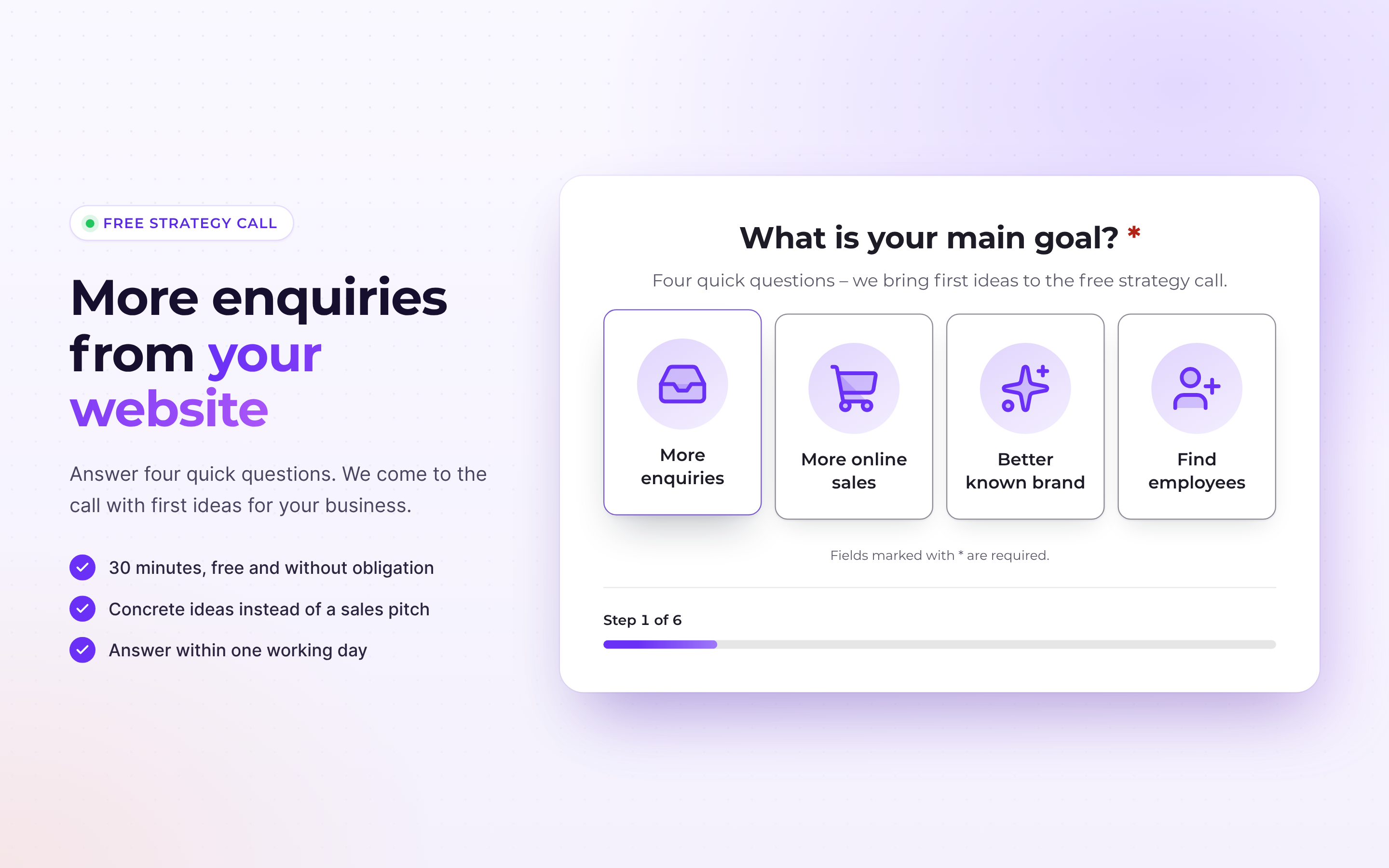
A multi-step form on a website: one clear question per step, answers as tiles and a progress bar.
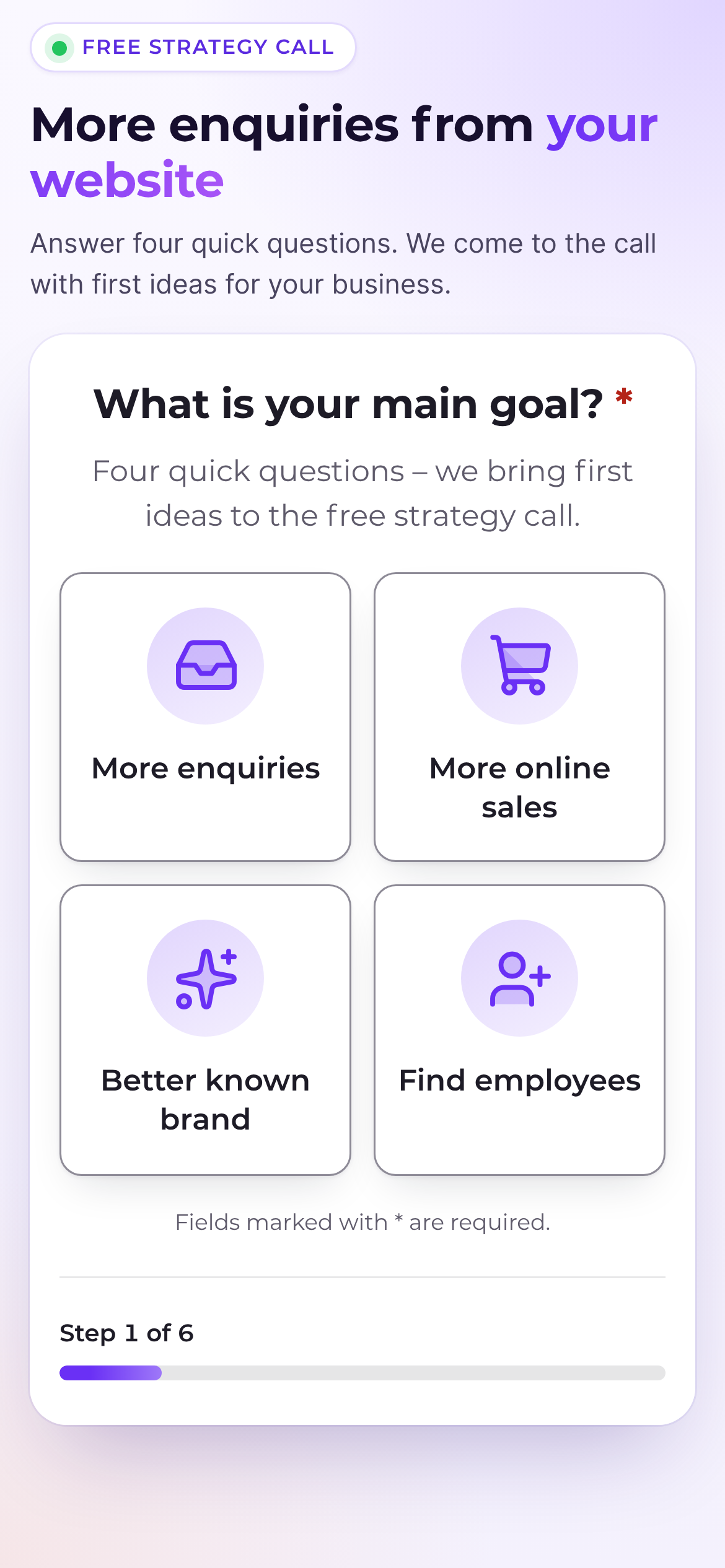
The same form on a phone: every answer is one tap away.
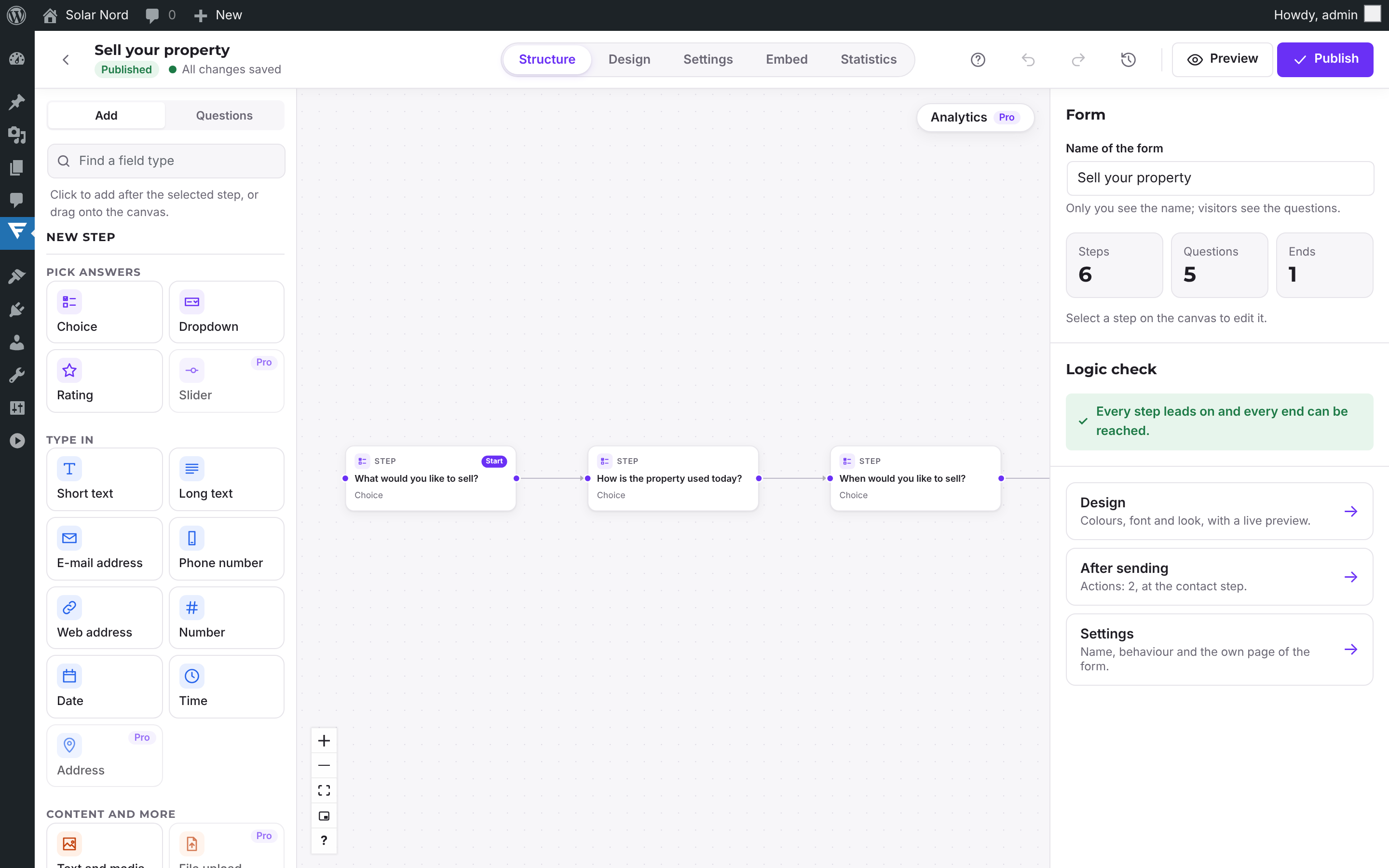
The canvas: every step and every path of a funnel at a glance, built by drag and drop.
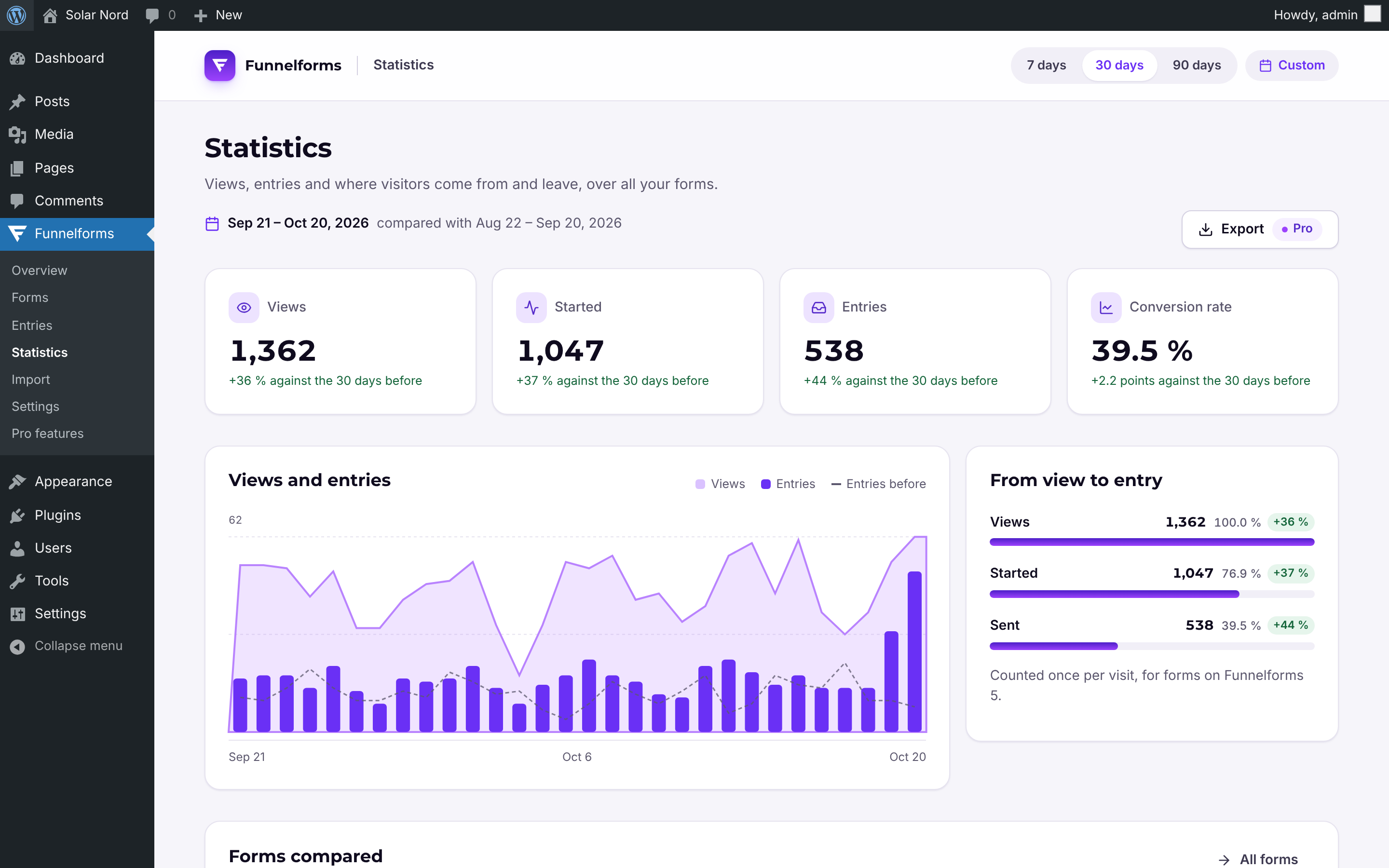
Statistics: views, entries, conversion rate and the steps where visitors leave.
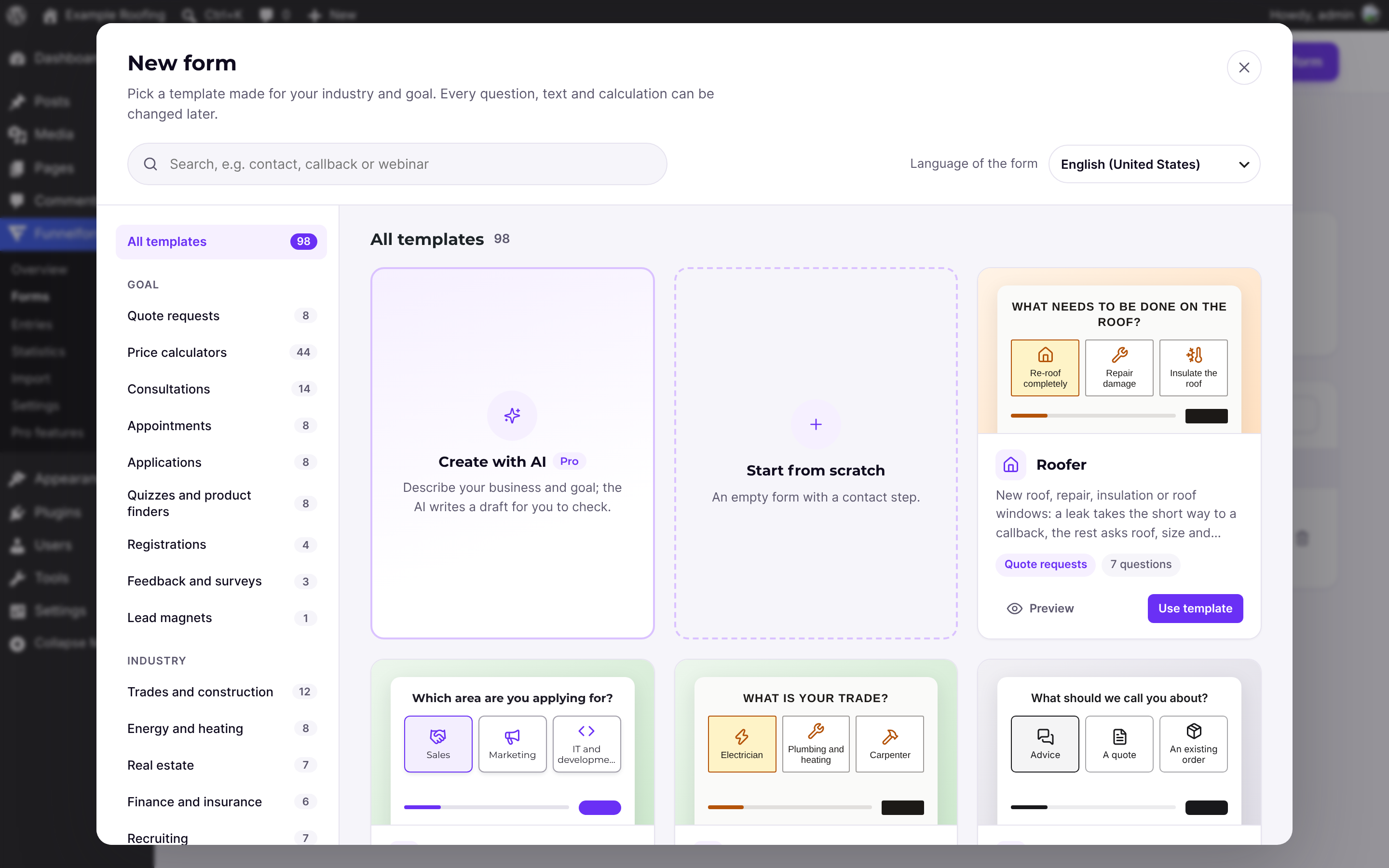
Start from one of 37 templates, sorted by goal: inquiries, appointment requests, applications and more.
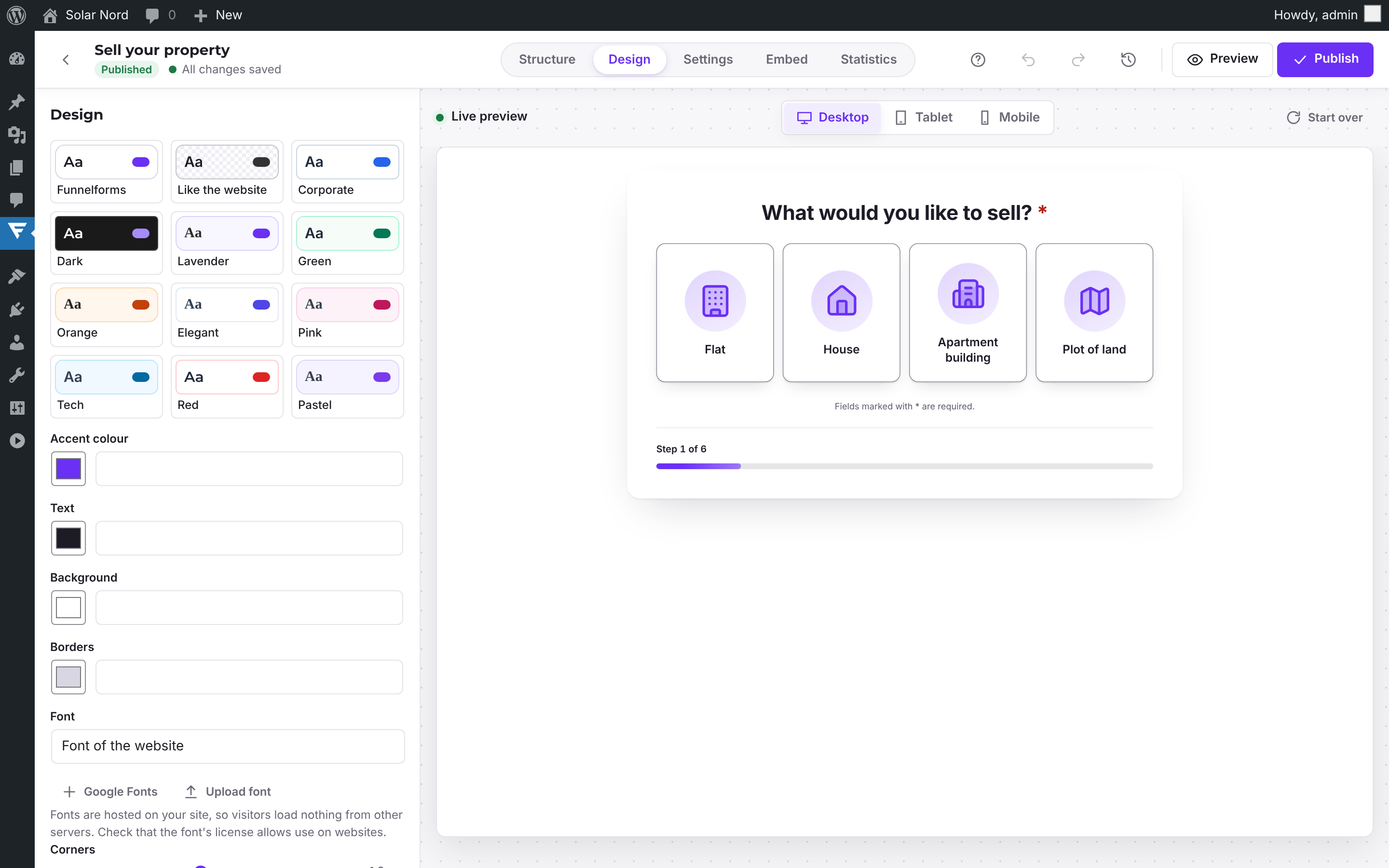
Design with a live preview on desktop, tablet and phone: theme, colours, fonts and answer layout.
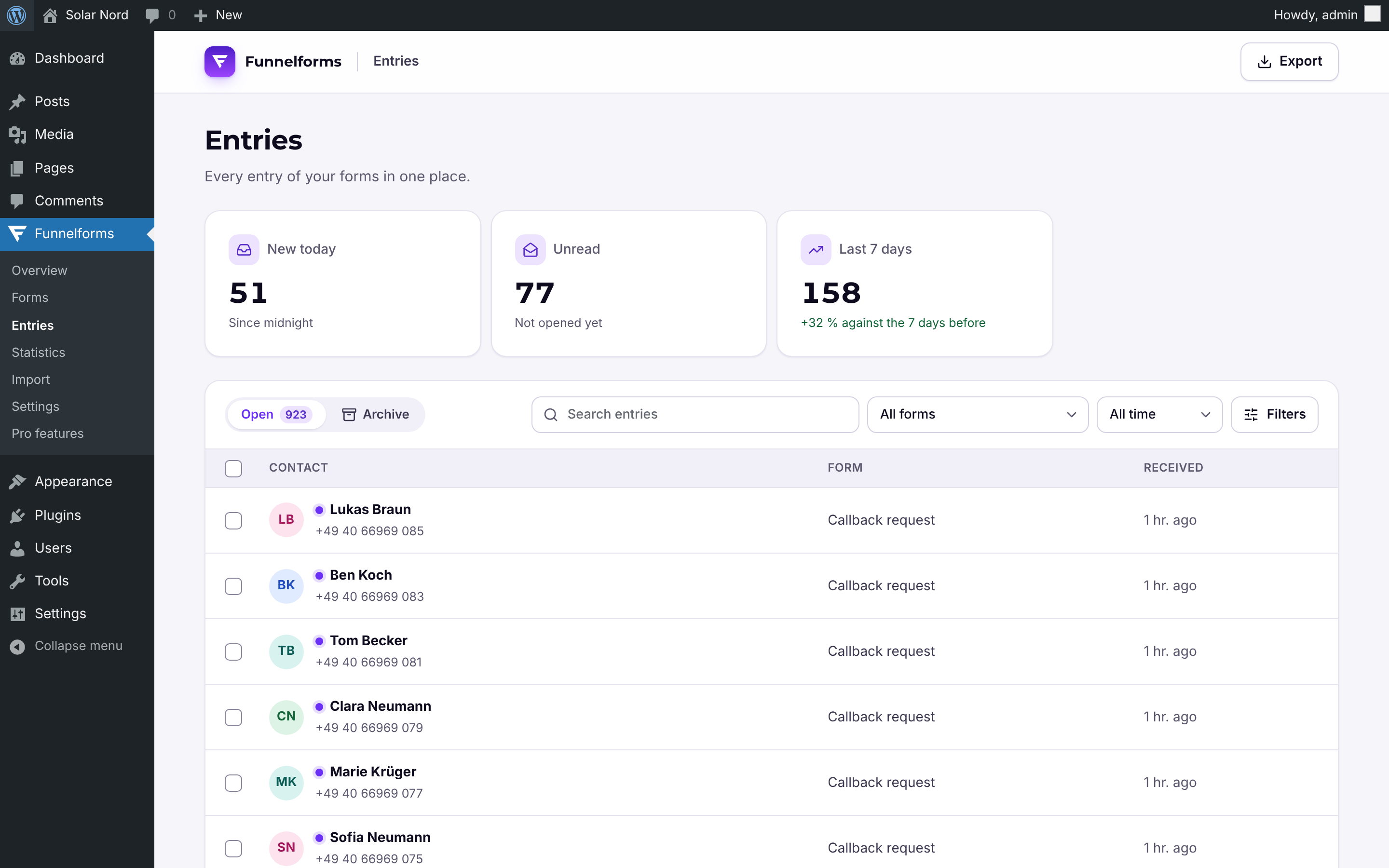
Every lead in one place: entries with search, filters and CSV export.
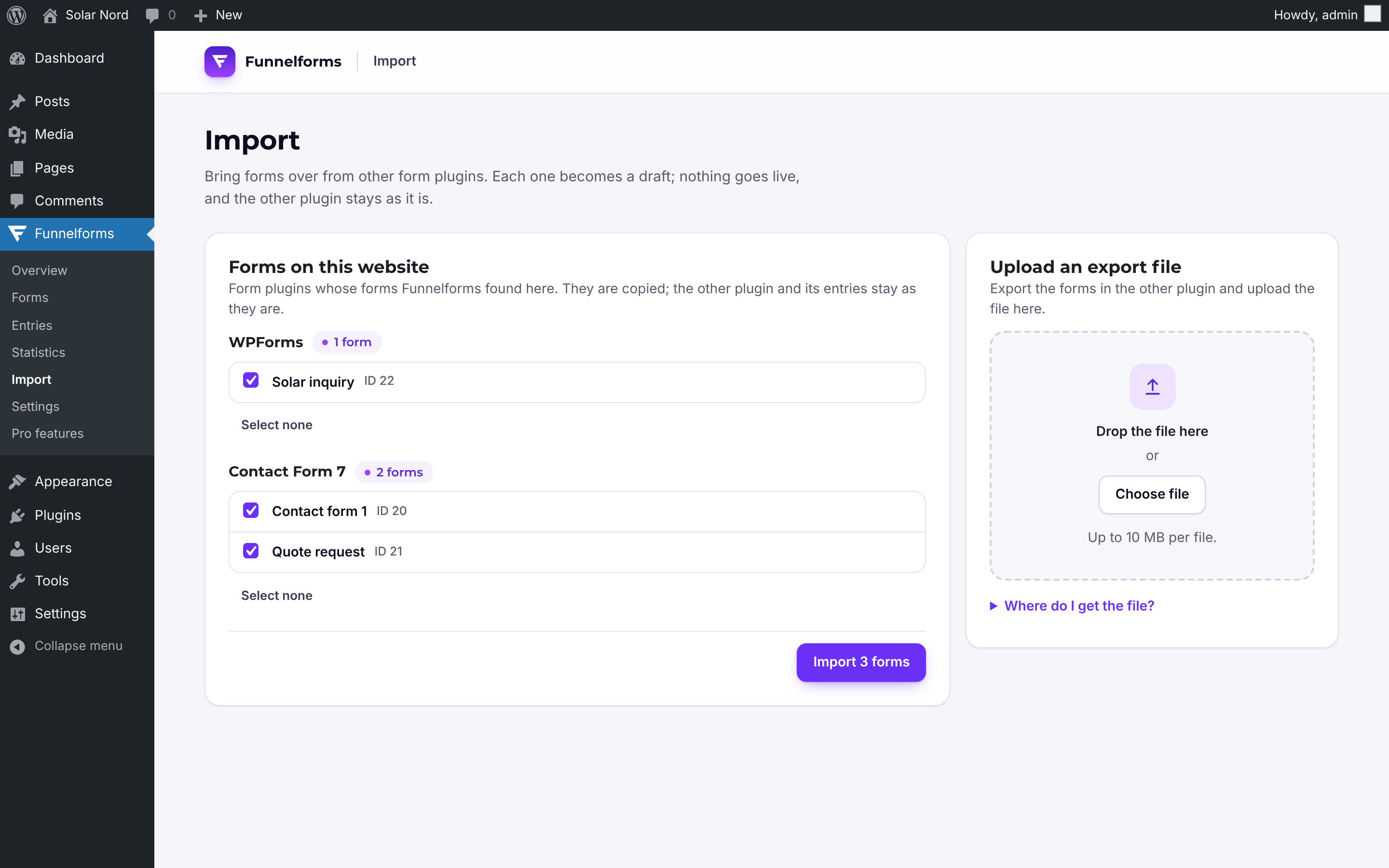
Bring your forms over from Contact Form 7, WPForms, Gravity Forms and other plugins.

The setup assistant puts your first form live in a few minutes.
Are there limits on forms, steps or entries?
No. Funnelforms Free has no limits on forms, steps, fields, entries or visitors, and no trial period.
What is a multi-step form, and why does it get more leads?
A multi-step form shows one question or a few fields at a time instead of a long page of fields. Visitors start with an easy click, see their progress and only answer the questions that fit their earlier answers. Funnelforms was built for exactly this kind of form.
How does Funnelforms get more leads than a normal form?
A normal form shows every field at once and asks for personal data before visitors have told you anything, so many leave without sending it. Funnelforms starts with one easy question, shows only the questions that fit the answers so far and asks for contact details at the end, when visitors have already invested in their answers. The statistics show the step where visitors leave, so you can improve exactly that question. And every lead arrives with its answers, so you know what each lead needs before you call.
Can I move my forms from Contact Form 7, WPForms or another plugin?
Yes. Under Funnelforms → Import from other plugins you choose the plugin on the same site or upload its export file. Supported are Contact Form 7, WPForms, Gravity Forms, Ninja Forms, Fluent Forms, Formidable Forms and Elementor forms. Each form becomes a draft in Funnelforms; nothing goes live and the other plugin stays as it is. Entries are not imported.
Does it work with my theme and page builder?
Funnelforms works with any theme. Add a form with the block in the block editor, with the widget in Elementor, or with the shortcode in any other builder. Every form also has a page of its own that you can link to.
Where are my entries stored? Does Funnelforms Free send data anywhere?
Entries are stored in your WordPress database only. Funnelforms Free does not connect to Funnelforms servers unless you opt in to diagnostic data or sign up for tips and news by email; both are off by default. Captcha services and Google Fonts are used only when you set them up; the section “External services” below lists each of them.
How does Funnelforms stop spam?
Every form has a hidden honeypot field, a time check and a limit of entries per visitor. You can add Google reCAPTCHA, Cloudflare Turnstile or hCaptcha with your own keys in the settings.
Can people with a keyboard or screen reader fill in the forms?
Yes. Every field has a label that screen readers announce, the form works with the keyboard alone, focus is always visible and animations follow the visitor’s reduced motion setting.
I use Funnelforms Free 3.x. What happens when I update?
Version 5 is a new core. After the update, Funnelforms copies your forms and entries into its new tables in the background and checks each form. Your 3.x data is only read, never changed. Each form returns on your website as soon as its copy is checked; shortcodes and pages stay as they are. If a form needs a look, Funnelforms says so on its pages and in the plugin list. Version 5 needs PHP 8.1 or newer; sites on older PHP keep version 3.8.3.
Can I switch to Funnelforms Pro later?
Yes. Funnelforms Pro uses the same forms and entries. When you activate Pro, it takes over from Free; nothing has to be moved or built again.
Can I help translate Funnelforms?
Yes, at translate.wordpress.org. Translations made there reach every site with the next language update.
ChangeLog
5.0.11
- Setup assistant: the step “What is your first form for?” can be skipped. The assistant then ends without a form and opens the overview. The storage period “Never” is now called “Permanently”.
- Editor: forms from Funnelforms 3 whose draft still had two fields with the same ID (“Two elements have the same ID”) are fixed when you open them, so the preview and publishing work again. Contact fields with only a placeholder show it as their name on the canvas, and the tag “URL” marks only hidden fields.
- Builder: every problem now names its place, marks the step, field or path in red, jumps there with “Show” and offers a one-click fix where it is safe. A new “Check” in the top bar lists all problems, and “Publish” lists what blocks it.
- Forms can wait for “Next” after a click on an answer: turn off moving on by itself for the whole form (Design, Steps and progress) or for a single step. Existing forms keep moving on as before.
- Editor: icons of answers (Font Awesome, from Funnelforms 3) show in the preview again instead of empty squares.
5.0.10
- Security: the heading above the steps and other texts of a form can no longer carry scripts onto the website (stored XSS reported by Wordfence, needed the right to edit forms without the right to post unfiltered HTML). The heading is shown as plain text.
- Editor: the outputs of a step always stand in the order the form checks them. A rule that a form made with 5.0.8 or earlier checks between the paths of two answers now shows there, on the card and in the sidebar (“Checked between the answers”); nothing in the form changes and visitors go where they went before. The note “Checked in another order” is gone.
- Editor: rules on the card read clearly, a path drawn onto a card ends at its dot, and long questions and answers in rules no longer widen the sidebar.
- Moving from Funnelforms 3: a button “Fix” solves what keeps a form on Funnelforms 3 and moves it (also for all forms at once). The page says for every form why it stays and what to do, and names where two fields share an ID. Two contact forms with the same fields and Font Awesome icons move cleanly. The page Migration is simpler, the details are folded away.
5.0.9
- Statistics: hover or click a chart to read the values of a day (also with the arrow keys), the legend switches series on and off. The funnel shows the drop-off before the first answer, and each step shows the time spent on it, back clicks and where visitors left.
- Editor: every step lists its outputs on the canvas, one per answer and one per rule, each with its own dot to draw a path from. Forms of every version show their outputs without any change to the form.
- Editor: an icon or your own image for an answer in one dialog, an image format for answers with images (4:3, square, 16:9, original), and hidden values for dropdowns.
- Editor: the logic editor follows the order in which the form checks its paths. The outputs of a card show rules, answers and “Otherwise” in that order, numbers of rules can be changed right on the card, pointing at an output lights up its path, and “Otherwise” names the answers without a path of their own. The sidebar lists the rules in their order with arrows to move them, “is between” and conditions per answer. The editor finds answers that lead nowhere and paths no answer reaches.
- Moving from Funnelforms 4: the logic of imported forms is taken over more exactly: postal code ranges, the order of the paths, address parts in separate inputs when paths check them, and cards that no longer overlap.
- Design: the gallery of new forms starts with all templates, those of your industry first. The description under a question follows its alignment, the font of the form applies to the whole form, and the live editor has the fonts next to the colours and stays in place while you drag a slider.
- Entries: the lead panel has clearer headings and a section “After sending” with each step of the form, its status and a button to run it again. Cards on the board show contact, form, badges and tags; drag a card to change its status.
- Accessibility: screen readers no longer read the check marks of answers, answers with only an image get a name, sliders read their value with the unit, popups have a name and confetti is left out with reduced motion. The editor warns about answers with an image but no text.
- Admin: the Funnelforms pages show only notices of Funnelforms and the important ones of WordPress; notices of other plugins and themes (cookie scans, cache, reviews, sales) stay on the other admin pages.
- Fix: screens such as Integrations no longer stay empty with the language “Deutsch (Sie)” or other WordPress language variants.
5.0.8
- Security: erasing personal data (Tools > Erase Personal Data) now removes only the files a person uploaded to their own Funnelforms 3 leads, and finds those leads by their contact data only.
- Security: requests of the Funnelforms screens through admin-ajax.php now respect plugins that restrict the REST API, and pass on only the routes the screens need.
- Security: new right “Delete entries” under Settings > Rights. Up to now “See entries” also allowed deleting; roles that could see entries get the new right with this update, so nothing changes until you take it away. Archiving stays with “See entries”.
- Security: the page address of an entry keeps only web addresses, and a form can be sent only once with one submit token, also by requests sent at the same moment.
- Fix: with the site-wide captcha on, forms with two contact steps can be sent through the second one again.
- Editor: values that forms moved from Funnelforms 3 brought along can be edited now: hidden values of answers, checks of contact text fields (length, numbers only, input mask, pattern), the salutations offered, back button and progress bar of the contact step, the texts of the next and back buttons, fading the form while sending, the language of buttons and messages, and the picture above a slider.
- Moving from Funnelforms 3: forms now get the Funnelforms 5 design with the colours, font and corners of the 3.x form, and the categories of 3.x forms are taken over. Forms moved earlier keep their look.
- Lead sources: a lead keeps the source of the visit when the ad, newsletter or search led to another page than the one with the form (UTM values and referrer, only with consent to statistics). Switch “Remember where a visit began” under Settings > General, on by default. Clicks from Facebook and Instagram apps count as Facebook, TikTok click ids as TikTok ads.
- Forms: the consent box in the contact step sits centred next to its text with room in between, and links in texts take the colour of the form. Phone fields of forms moved from Funnelforms 3 keep their country picker with the calling code.
- Menu: the pages of the Funnelforms menu always appear in the same order, also when other plugins add their pages earlier or later.
5.0.7
- Forms: new block “Loading animation”: shows an animation with changing texts and moves on by itself after the set duration. Choose progress bar, ring with percent, checklist, spinner, dots or magnifier, plus duration, percent display, size, position of the texts and your own colour, with a preview in the editor.
- Forms: switch “Heading above every step” under Settings > General with its own colour under Design, like the form title in Funnelforms 3. Forms moved from Funnelforms 3 keep their title and its colour.
- Integrations: submissions are reported to Independent Analytics Pro (form ID and title). Consent is also read directly from Borlabs Cookie 3 (service groups “Marketing” and “Statistics”).
- Moving from Funnelforms 3: the SMTP server your contact forms used in Funnelforms 3 becomes the mail server under Settings > E-mail, if none is set there. With several servers it takes the one used most, and the others stay with their forms.
5.0.6
- Forms: fields can be filled from the page address (for example
?kundennummer=123): switch “Fill from the page address” on text, e-mail, phone, number, choice and dropdown questions and on contact fields. New hidden field in the contact step for values from the link or a fixed value that is saved with the entry.
- Display: on themes with a CSS reset (for example OceanWP) the form keeps its inner spacing, its font and its font size.
- Forms moved from Funnelforms 3: a phone field without label and placeholder shows “Phone number” instead of only “*”.
5.0.5
- Editor: the preview and saving no longer fail with “Your WordPress login could not be confirmed” while you are logged in. Some server caches (REST API caching of LiteSpeed Cache and others, Cloudflare and other CDNs) hand out old answers with an outdated security token, and the editor used it for the next request. The editor now gets a fresh token from WordPress and tries once more, as the WordPress block editor does.
- Forms moved from Funnelforms 3: icons in contact fields sit centred before the text again instead of over it, and “Hide icons” of a question hides its answer icons again.
5.0.4
- Editor: “Cookie check failed” no longer blocks opening, editing and previewing forms. On sites whose site address and WordPress address differ (www or not, a subfolder) or whose server cache drops the login cookie outside wp-admin, the admin screens reach the plugin through admin-ajax.php.
- Forms on pages built with Elementor, Divi and other themes look as designed again: the styles of the theme and the page builder no longer reach into the form.
- Builder: a form that still runs on Funnelforms Free 3 has the button “Switch to Funnelforms 5” right at the notice in “Embed”. If something keeps it on the old version, the notice says what and how to solve it.
- Entries: a salutation field added in the Funnelforms 5 builder no longer refuses the salutation the visitor picks (“Please choose one of the options.”). Such forms could not be sent at all once a salutation was chosen; forms moved from Funnelforms 3 were not affected.
- Entries: mails, webhooks and the other actions of a new entry go out right after the entry is saved and no longer wait for WP-Cron. On sites where WP-Cron does not run, entries were saved but nobody was notified. The background job stays as a safety net.
- Forms: on sites that refuse the REST API to visitors (security plugins, firewall rules of the host), forms send their entries through admin-ajax.php.
- Forms: publishing a form, unpublishing it or moving it between Funnelforms 3 and 5 empties the page cache of the site (WP Rocket, LiteSpeed Cache, W3 Total Cache, WP Super Cache, SiteGround, WP Engine, Kinsta and others), so visitors no longer get the old form from the cache.
- Builder: a form moved from Funnelforms 3 that cannot switch to Funnelforms 5 yet no longer reports “Visitors now see this version” after publishing. The dialog says that the pages still show the Funnelforms 3 version, why, and where to fix it.
5.0.2
- After 10 complete entries, Funnelforms Free asks once for a review on wordpress.org; “No, thanks” or the review ends it for good. Only users who may change the settings see it.
- Banners of the plugin page in all 23 languages of the plugin, Persian from right to left.
- New screenshots of a form on a website and on a phone.
5.0.1
- Traditional Chinese (Taiwan): sites in zh_TW no longer show Simplified Chinese.
- The width of the whole form in the design, fixed with a slider or full width; new forms fit each step and glide between heights.
- Saving in the builder also works on servers that block PUT and DELETE requests.
- Banners of the plugin page in 16 languages and screenshots in German, Spanish, French and Italian.
5.0.0
- New core: canvas builder with several fields per step, branching by answer, twelve field types, themes, block, Elementor widget and funnel pages.
- No more limits on forms or steps.
- Import of forms from Contact Form 7, WPForms, Gravity Forms, Ninja Forms, Fluent Forms, Formidable Forms and Elementor forms.
- 37 templates and a setup assistant for the first form. The gallery starts with your industry, its search looks through all industries, and the 61 templates of Funnelforms Pro are shown locked; using one says that it needs Pro.
- Entries with CSV export, confirmation mail to the lead, statistics of all forms.
- New forms mail each entry to the site’s admin address with a {{lead}} summary of the contact details, page and source, labelled in the language of the form; numbers keep their unit (“100 m²”) in mails, entries and the CSV export.
- Mails through the SMTP server of your mail provider, with presets for common providers, a test mail and a fallback to WordPress.
- Spam protection with honeypot, time check and limit per visitor, plus reCAPTCHA, Turnstile or hCaptcha.
- Forms and entries from Funnelforms Free 3.x are copied and checked on their own; the 3.x data stays unchanged.
- Removed: the licensing and analytics SDK of version 3 and every call to it.
- The plugin in 24 languages: the 20 most used WordPress languages plus Portuguese (Portugal), Danish, Norwegian and Finnish; German with “du” and “Sie”. A site in a region without its own translation (Mexico, Canada, Belgium) gets that of its language.
- Optional sign-up for tips and news by email in the setup assistant: an unticked box, nothing is sent before you tick it, and Funnelforms asks you to confirm by e-mail.
- Forms read well on every screen: on phones the bottom bar stays at the bottom only while it holds Next, so the consent and the send button are never covered; long answer words are hyphenated inside their tile, the theme gallery shows the theme in use and the admin pages fit a phone screen.
- Light pages: a form loads one small script (about 27 KB gzipped); the code of phone fields with a country picker and of reCAPTCHA v3 loads only with the forms that use them.
- Needs PHP 8.1 and WordPress 6.5 or newer.
3.8.3 – 21 January 2026
3.8.2 – 7 March 2025
- UX improvements.
- Alt text for the success image.
3.8 – 4 February 2025
- Optional multiple selection.
- UX improvements and bug fixes.
