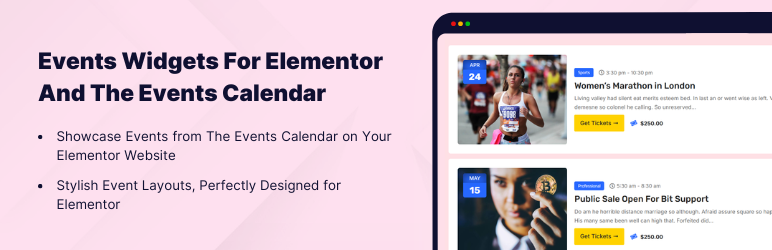
Looking for an Elementor widget for The Events Calendar plugin?
Events Widgets provides an easy-to-use The Events Calendar widget for Elementor to display upcoming events and create beautiful custom event sections inside your Elementor pages.
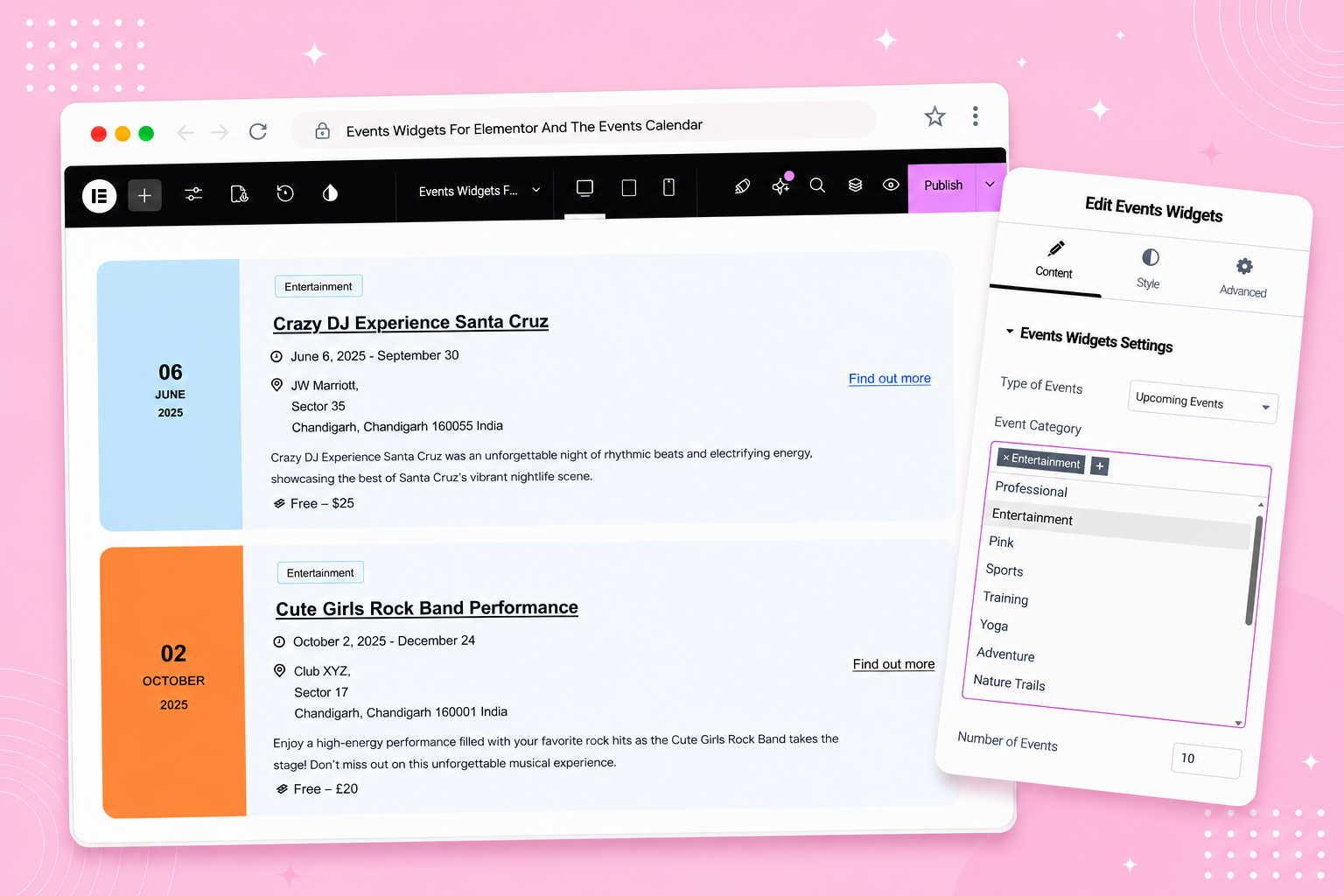
This Elementor event calendar widget helps you create a modern event calendar section using Elementor’s drag-and-drop builder. You can easily manage and display events in List or Calendar layouts with event date, time, venue, organizer and event ticket booking details. It also lets you customize typography, colors, event meta details and layout styles. This widget is ideal for creating event pages, homepage event highlights, conference websites, meetup listings, and community event portals powered by The Events Calendar WordPress plugin.
In the Pro version, this events calendar extension helps you build custom event templates using the advanced Events Loop Builder for Elementor and display a list of all events in Grid or Carousel layouts. You can also add a smart events search filter bar above your events section so visitors can quickly search and filter events by category, date, venue, organizer or tag via this WordPress events plugin.
Use this flexible events calendar addon for Elementor, allowing you to display events from this WordPress events calendar plugin in multiple layouts. This WordPress event calendar plugin for Elementor helps you design modern event displays without writing any code.
Use Events Widget for Elementor
Simply drag and drop events widget inside Elementor and easily showcase your upcoming events inside any Elementor page using a fully customizable Elementor event calendar widget. It fetches events published via the core event calendar WordPress plugin. This makes it easy to build upcoming events blocks, featured event areas, or homepage event showcases using Elementor’s visual builder.
List & Calendar Layouts
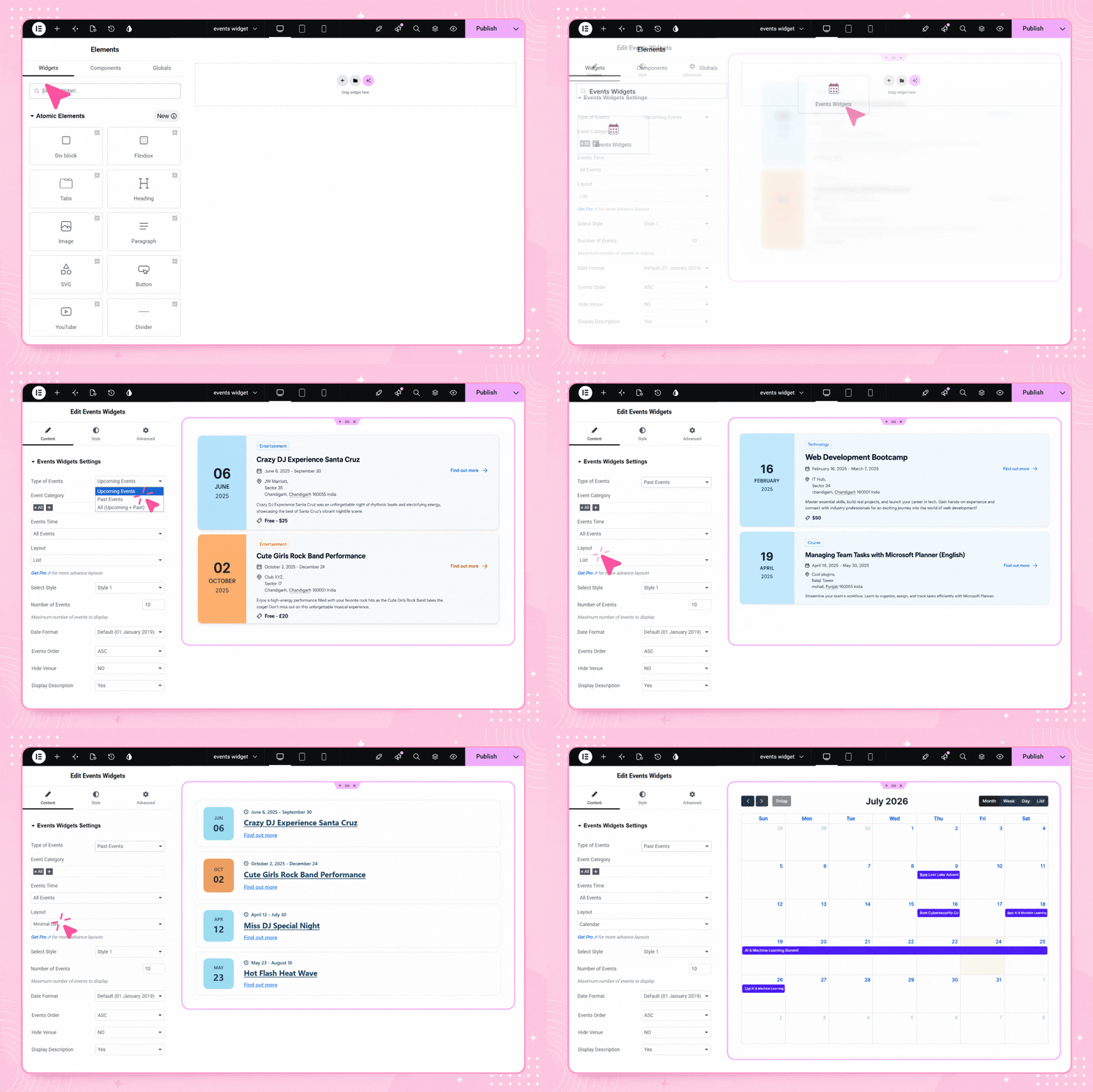
Display events in clean List or Calendar layouts that match your website design. The list layout is ideal for displaying upcoming events in a simple chronological format, while the calendar layout helps visitors browse events by date. (Pro version includes advanced List, Grid, and Carousel layouts to create dynamic event sections and modern event showcase designs.)
Full Styling Controls Inside Widget
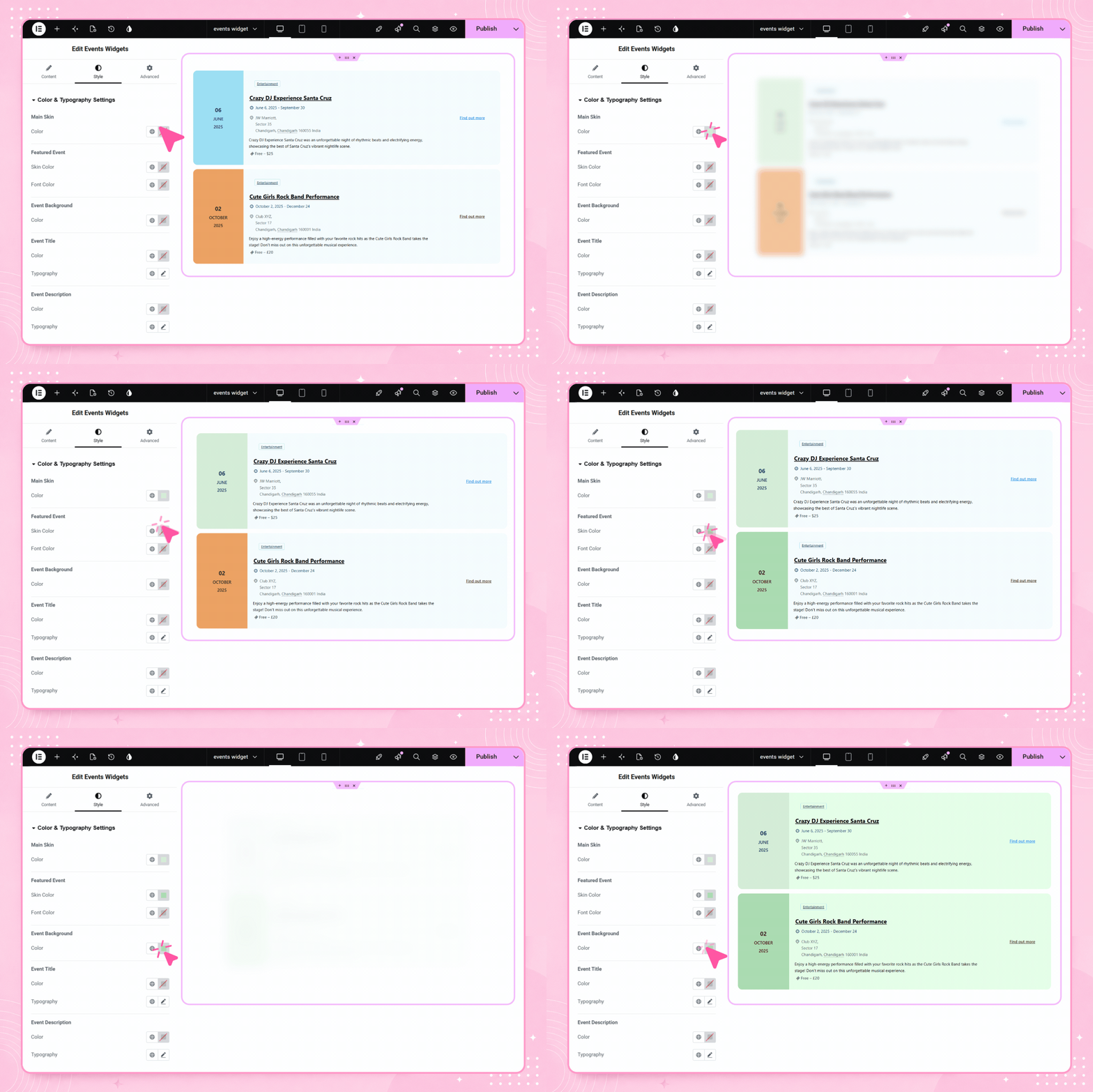
Customize colors, typography, spacing, borders, and layout settings directly from the Elementor Events widget panel. You can easily adjust the event title style, date format styling, event meta information, and overall layout design to match your Elementor website design and branding.
Advanced Settings for Events Widgets
Events Widgets provides flexible display settings that allow you to control how events appear on your website. These options help you build custom event listings, filtered event sections, and targeted event displays based on your needs.
Event Type : Show future events, past events, or both inside your events list.
Custom Date Format : Choose how event dates and event time appear in the widget to match your regional or website format.
Category Filtering : Display events from all categories or selected event categories created in The Events Calendar WordPress plugin.
Event Ordering : Sort events in ascending (ASC) or descending (DESC) order based on event start date.
Date Range Filtering : Display events within a specific date range to create targeted event sections such as upcoming weekly events or monthly events.
Venue Display Control : Show or hide event venue details inside your event display to keep the design minimal or information rich.
SEO Schema : Enable event schema markup to improve your event visibility in search engines and help search engines understand your event details better.
Want to unlock more event management capabilities? Upgrade to Events Widgets Pro and use powerful design features and advanced event display options for Elementor. The Pro version helps you create fully customized event display layouts and dynamic event grids for the WordPress events calendar plugin with Elementor.
Advanced Grid & Carousel Layouts
Events Widgets Pro provides modern event showcase designs to display events in professional Grid Layout and Carousel Layouts. The event grid widget is perfect for displaying events in a responsive card-based layout, while the event carousel widget lets you create interactive sliding event showcases. These layouts are ideal for homepage event sections, upcoming event highlights, event galleries, and dynamic event displays.
Events Loop Builder for Elementor
Create fully custom event listing templates using the powerful Elementor loop builder. With the Events Loop Item feature, you can design your own event layout and reuse it across multiple List, Grid, or Carousel event displays. This makes it easy to build custom event archive views, advanced event cards, and fully personalized event templates inside Elementor.
Events Search & Filter Bar
Add a powerful AJAX-based Events Search & Filter Bar above your event section. Visitors can quickly search and filter events by date, category, venue, organizer, or tag without reloading the page. This feature helps improve event discovery, user navigation, and event browsing experience on event websites.
Advanced Events Query Filters
Use powerful Events Query Filters inside the Elementor Calendar widget to display highly targeted event results based on custom conditions.
You can build dynamic event sections like featured events, upcoming weekly events, event highlights, or location-based event displays.
Display Events by Time : Show Today Events, Tomorrow Events, This Week Events, Next Week Events, This Month Events, Next Month Events, or events between two custom dates.
Display Events by Venue, Organizer, or Tag : Filter events by specific venue, organizer, event tag, or category to create targeted event sections.
Event Type Control : Display only upcoming events, past events, featured events, or non-featured events inside your event display.
ACF Field Support
Display custom fields created with Advanced Custom Fields (ACF) directly inside your event cards. This allows you to show additional event information such as event speakers, sponsors, ticket price, custom event details, or location information inside your Elementor event layouts.
AJAX Load More & Pagination
Add smooth AJAX Load More buttons or pagination controls below your event list, grid, or carousel layouts. This helps you manage large event collections while improving performance and user experience by loading events dynamically.
Why Use Events Widgets Addon for Elementor?
Whether you are building an event website, conference website, or webinar page, this plugin allows you to present events in a modern and engaging layout.
Turn your simple event listings into a modern events calendar layout
The default event views of The Events Calendar are functional but limited in design flexibility. Events Widgets allows you to display events in custom Elementor layouts that match your website design and branding.
Display events in List, Grid, or Carousel layouts using the Elementor Events widget
Create visually appealing event sections, upcoming events widgets, or featured event showcases using flexible layouts. These layouts help highlight events on your homepage, landing pages, or event archive pages.
Create beautiful event widgets for your homepage or event archive pages
Use the Elementor events widget to build event sections and highlight areas anywhere on your website. This is useful for showcasing upcoming events on the homepage or building a dedicated events page.
Best event management solution for event organizers and community event portals
Events Widgets is ideal for websites that use The Events Calendar as their events manager and regularly publish events such as conferences, meetups, community events, workshops, classes, seminars, appointments, and online webinars.
Add a search and filter bar above your event listings to improve user experience
With the Pro version, visitors can quickly find events using event search and filtering options such as date, venue, category, or organizer. This improves event discovery and helps users navigate large event calendars easily.
More Extensions for The Events Calendar
If you are using The Events Calendar plugin to manage events on your WordPress website, you can extend its functionality further with additional addons built by the Cool Plugins team. These extensions help you customize event layouts, add new event features, and integrate events with popular page builders.
Event Single Page Builder
Take full control of your single event page design using Elementor. This addon allows you to replace the default event single page layout provided by the core events plugin and build your own custom event template using Elementor widgets and sections. It is perfect for creating detailed event pages that highlight event information, speakers, venue details, schedules, and other custom content.
Events Shortcodes
If you are not using Elementor, this addon lets you display events anywhere on your website using shortcodes and Gutenberg blocks. You can easily create event list layouts, event grid views, timeline displays, or carousel sliders using simple shortcode options or Gutenberg blocks for The Events Calendar plugin.
Events Calendar Modules for Divi
For websites built with the Divi Theme or Divi Builder, this extension provides events modules for Divi. It allows you to insert event listings directly inside Divi layouts and customize event designs using Divi’s visual builder interface.
Event Speakers & Sponsors
Enhance your events by adding speaker and sponsor sections to your event pages. This addon allows you to manage speaker profiles, sponsor listings and related event details while displaying them with clean and structured layouts inside your event pages.
Other Elementor Addons by Cool Plugins
The Cool Plugins team builds a variety of addons that extend the capabilities of the Elementor page builder. If you are using Elementor to build your WordPress website, you may also find these plugins helpful:
Cool FormKit for Elementor Forms – Enhance the default Elementor form widget with powerful new features. Cool FormKit adds advanced form capabilities such as conditional logic fields, range slider inputs, rating fields, country code selectors, and dynamic form controls. It helps you create more interactive contact forms, feedback forms, booking forms, and data collection forms inside Elementor.
Timeline Widget for Elementor – Create visually engaging vertical or horizontal timeline layouts using Elementor. This plugin is useful for building company history timelines, project timelines, product roadmaps, and event history timelines directly inside Elementor pages.
AutoPoly – AI Translation for Polylang – Automatically translate your website content using AI-powered translation tools integrated with the Polylang plugin. AutoPoly helps convert Elementor pages, posts, and website content into multiple languages using AI services, making it easier to create multilingual WordPress websites.
Third-Party Services: To improve user experience, this plugin connects to the Cool Plugins API to display information about related plugins inside its dashboard and offers optional usage tracking and optional feedback submission on deactivation. Data is sent only after explicit user consent in compliance with the General Data Protection Regulation (GDPR), where applicable. No hidden tracking is performed, and no frontend visitor or site user data is collected. For more details, please review our Data Usage Policy, TOS, and Privacy Policy.
Disclaimer: This plugin is an independent product by Cool Plugins and is not affiliated with or endorsed by the team behind The Events Calendar (StellarWP / Liquid Web). Some links in plugin or its readme may be affiliate links, and we may earn a commission at no extra cost to you.
Big thanks to the amazing team behind The Events Calendar plugin for building such a great WordPress event plugin to manage events easily.
★★★★★ Helpful Plugin – Allowed me to get my events plugin working properly with Elementor on my site.
★★★★★ Great plugin. Really great support! – With this plugin you can style your lists of events, based on the plugin ‘The Events Calendar’, within your Elementor pages. I contacted support and they provided a solution within 24 hours. What a great help!
★★★★★ Works great out of the box – We are using Elementor (free) with the free WordPress event calendar plugin, and this plugin enabled us to add our calendar items to the Elementor-enabled home page with ease. Thanks for an effective and simple-to-use plugin.
★★★★★ Works Even Better Than Expected – This allowed us to greatly improve our event widget displays and customize them to our unique needs. Highly recommend this to anyone familiar with Elementor.
How do I display events from The Events Calendar in Elementor?
You can display events created with The Events Calendar WordPress plugin directly inside your Elementor pages using the Events Widgets for Elementor addon.
After installing Elementor and The Events Calendar plugin:
Open any page with Edit with Elementor
Search for Events Widget or The Events Calendar
Drag and drop the widget into your layout
Choose the layout and event settings you want
The widget will automatically pull events from The Events Calendar plugin and display them in List or Calendar layouts. The Pro version also supports Grid and Carousel event layouts for creating modern event sections.
This makes it easy to build upcoming events sections, homepage event blocks, conference schedules, meetup pages, and event directories using Elementor.
If you are not using Elementor, you can use Events Shortcodes for The Events Calendar to display events list, grid, or carousel layouts anywhere on your website using shortcodes or Gutenberg blocks.
How do I show upcoming events on my WordPress homepage?
You can easily show upcoming events on your WordPress homepage using The Events Calendar plugin together with Events Widgets for Elementor.
First create your events using The Events Calendar plugin.
Then open your homepage with Elementor and add the Events Widget.
From the widget settings you can choose:
Upcoming events
Past events
Featured events
You can also control the number of events displayed, event ordering, and event categories.
How can I filter events by category, venue or organizer in The Events Calendar?
Events Widgets includes filtering options so you can display specific events in your event listings.
In the free version you can filter events by:
Event category
In the Pro version you can use advanced Events Query Filters to filter events by:
Venue
Organizer
Event tag
Custom date range
Featured events
Event categories
This helps you build targeted sections like:
Events by location
Events by organizer
Conference tracks
Category-based event listings
How do I show today events or this week events on my website?
Events Widgets Pro version includes time-based event filters that allow you to display events based on time ranges.
You can show:
Today events
Tomorrow events
This week events
Next week events
This month events
Next month events
Custom date range events
These filters help create dynamic sections like:
Upcoming events this week
Today’s event schedule
Monthly event calendars
Event highlights on homepage
How can I customize the design of my event listings in Elementor?
Events Widgets allows you to fully customize the design of your event listings directly inside Elementor.
You can control:
Colors
Typography
Spacing
Layout settings
Event meta information
Date and time display
This helps you create modern event sections that match your website design and branding.
These layouts are ideal for building modern event showcase sections, homepage event sliders and event gallery displays.
How do I create an event calendar in Elementor?
To create an event calendar in Elementor, you need two plugins:
The Events Calendar plugin to manage events in WordPress.
Events Widgets for Elementor to display those events inside Elementor layouts.
After installing both plugins:
Create events using The Events Calendar plugin
Open any page with Edit with Elementor
Drag and drop the Events Widget
Choose your event layout (List or Calendar)
This allows you to build custom event calendar pages, upcoming events sections, and event listings using Elementor’s drag-and-drop builder. The Pro version also allows you to display events in Grid or Carousel layouts and build custom event templates using Elementor.
How can I add an event search and filter bar to my events page?
Events Widgets Pro version includes a powerful AJAX-based Events Search & Filter Bar.
This allows visitors to search and filter events by:
Event date
Event category
Venue
Organizer
Event tag
This feature improves the event browsing experience on event websites because the filter works using AJAX, events update instantly without reloading the page.
Does this plugin work with recurring events from The Events Calendar?
Yes. Events created with The Events Calendar plugin, including recurring events or virtual events, can be displayed using this Elementor Events widget. The widget pulls event data directly from the core plugin and displays it according to your selected layout and filters.
Does this plugin support ACF (Advanced Custom Fields)?
Yes. The Pro version supports displaying custom fields created with Advanced Custom Fields (ACF) inside your event listings using this WordPress event calendar extension for Elementor.
This allows you to display custom event information such as:
Event speakers
Sponsors
Ticket price
Custom event details
Location information
Event schedule data
Does this plugin add event schema markup for SEO in my events listing?
Yes. Events Widgets is SEO-friendly and supports event schema markup to improve the visibility of your events in Google search results.
Schema markup can help search engines display all event details and improves the chances of your events appearing in Google rich results and event search listings.
Where can I see examples of Elementor event calendar layouts?
You can explore live examples of different event layouts including:
These demos show how you can build modern event pages and event listings using Elementor and The Events Calendar plugin.
How can I report security bugs?
You can report security bugs through the Patchstack Vulnerability Disclosure Program. The Patchstack team helps validate, triage, and handle any security vulnerabilities. Report a security vulnerability.