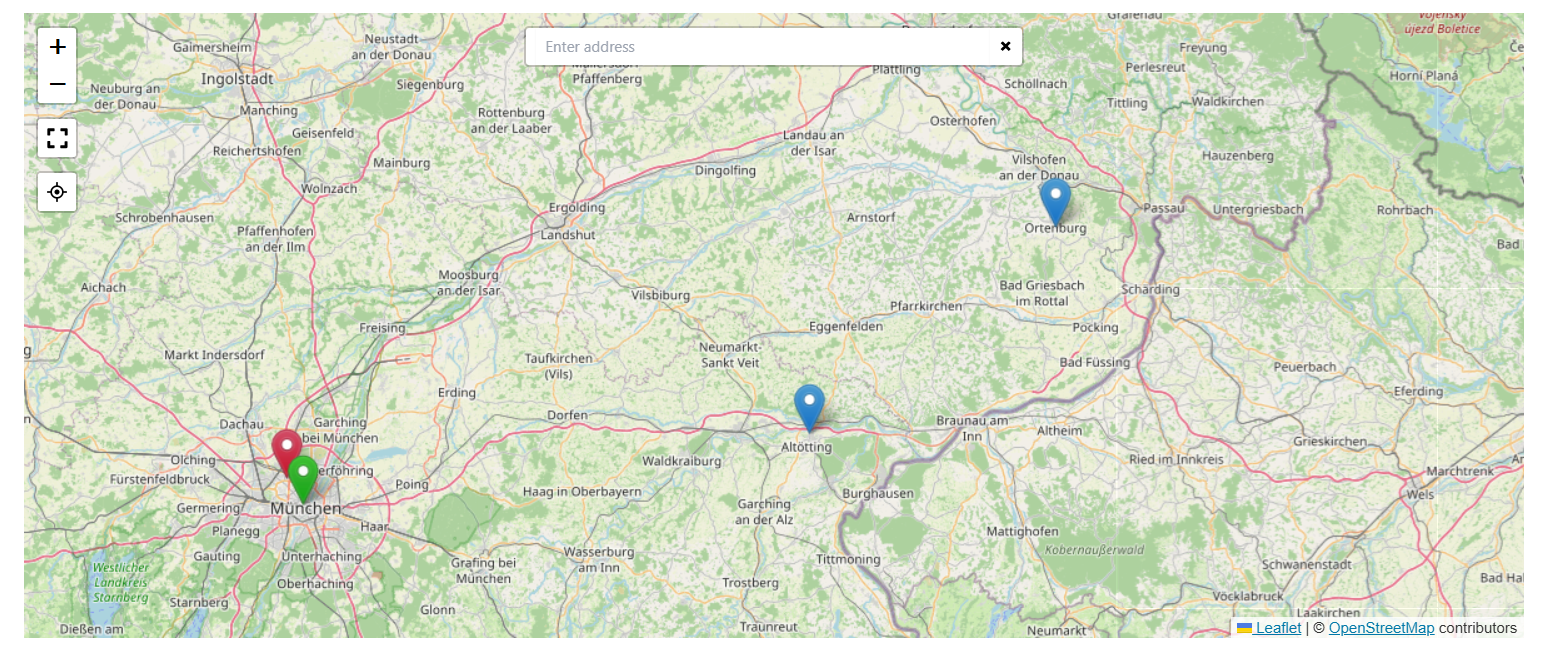
Easy Map is a WordPress store locator and interactive map plugin. Use it to add interactive maps, multiple location markers and a searchable store finder to any page. It’s built on Leaflet and uses OpenStreetMap with no API key. You can switch to Google Maps or Mapbox or CARTO at any time. Add maps with a shortcode or the Gutenberg block, show your shops, branches, dealers or offices with custom marker icons and rich popups, and draw delivery areas and routes on the map.
Anyone who wants to add Interactive map on Website
Retail chains and franchises that need a store locator or dealer locator
Restaurants, clinics, banks, gyms and salons with several branches
Agencies building location directories and “find us” pages
WooCommerce shops that want to show where products are stocked (Pro)
Anyone who wants a Google Maps alternative without API keys or billing
No API Key Required – OpenStreetMap & Leaflet
Easy Map uses OpenStreetMap tiles by default, so your map works as soon as you activate the plugin. You don’t need a Google Cloud account, an API key or billing. If you prefer another provider, choose Google Maps (roadmap) or OpenStreetMap CARTO or Mapbox in Settings and paste your key. All three providers are included in the free version.
Store Locator for WordPress
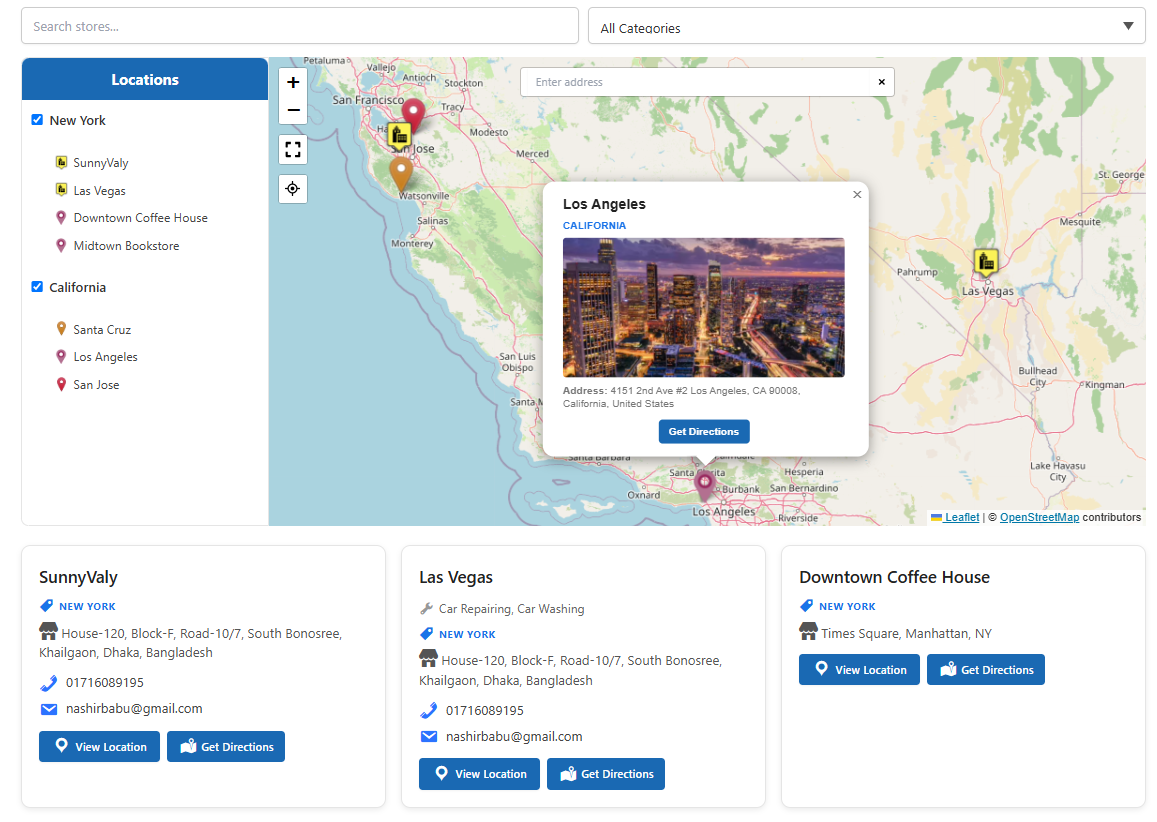
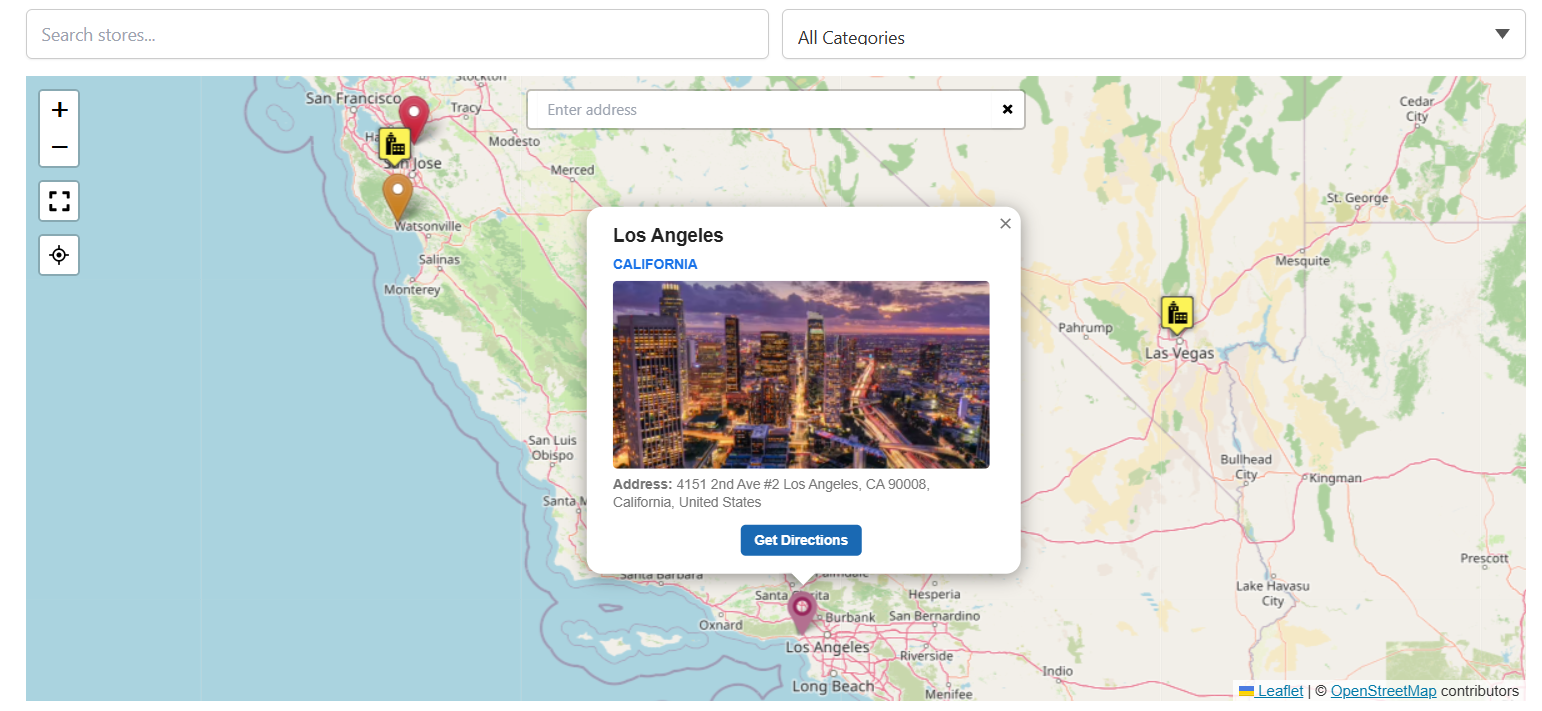
Build a complete store finder in a few clicks and add it anywhere with [easy-map-store-locator id="…"].
Live search by store name
Category filter dropdown and a category sidebar with checkboxes
Store cards that show the address, phone, email, opening hours and closing day
Automatic Open Now / Closed badge, calculated from your hours in the site’s timezone
Get Directions button that opens Google Maps route planning
Click a store card to zoom the map to it and open its popup
Pagination for long store lists (choose how many per page)
Store Categories to group locations: create, search, sort and bulk delete
Address search on the map (geo search) shown as a bar or a button
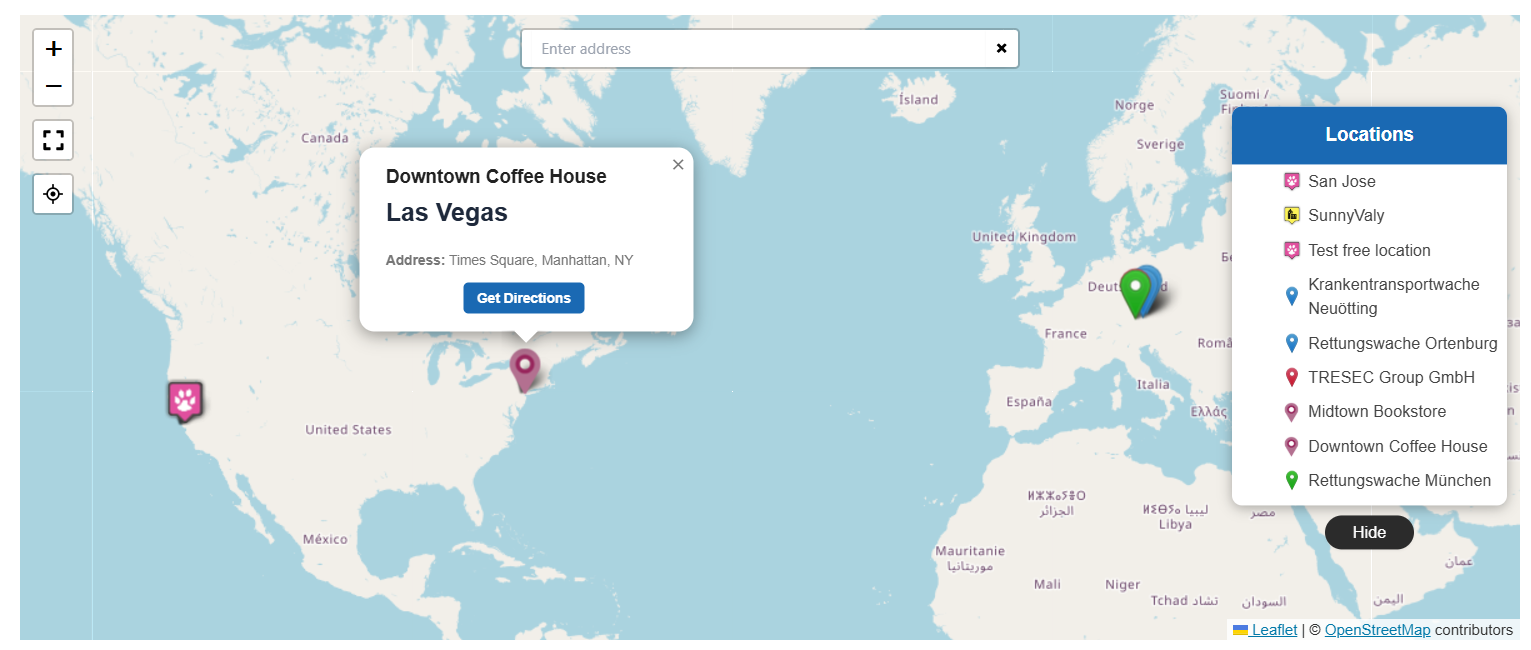
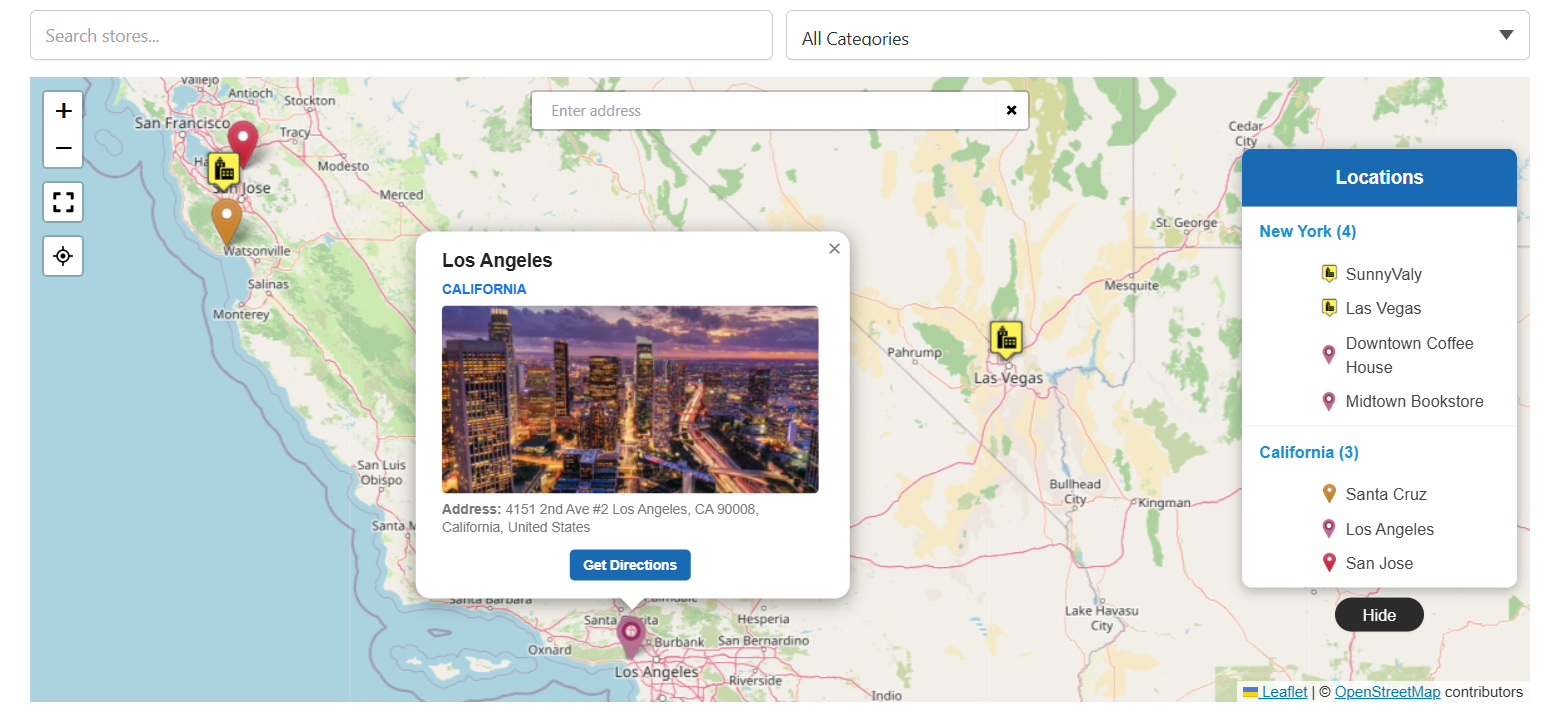
Choose from several listing layouts, including Only Map and a collapsible “Locations” floating widget over the map
Customize the button & label color and show each location’s marker icon next to its title
Responsive layout that works on mobile and desktop
How to add multiple locations and display a store locator map on your WordPress website
Interactive Maps & Multiple Locations
Create any number of maps and place each one with a short code like [easy-map id="…"]
Show multiple locations on a single map
230+ built-in marker icons, including colored pins and themed icons
Rich-text popups using the WordPress editor, or pick a ready-made popup design (Basic, Minimal, Udine) from the built-in template gallery
Get Directions button shown automatically on every popup design, with a per-map Show Directions toggle in Settings
Open a popup automatically when the map loads
Locate-me control to center the map on the visitor’s own location
Multiple tile styles per provider via Default Tile Type (e.g. Satellite, Terrain, Dark)
Zoom control (with position), scroll-wheel zoom, full-screen mode and map height
Settings page with a live map preview: click to set the center, zoom to set the default zoom level
Inline shortcode attributes (lat, lon, zoom, popup, tilelayer and more) for quick one-off maps
Draw on the Map – Polygons, Routes & Areas
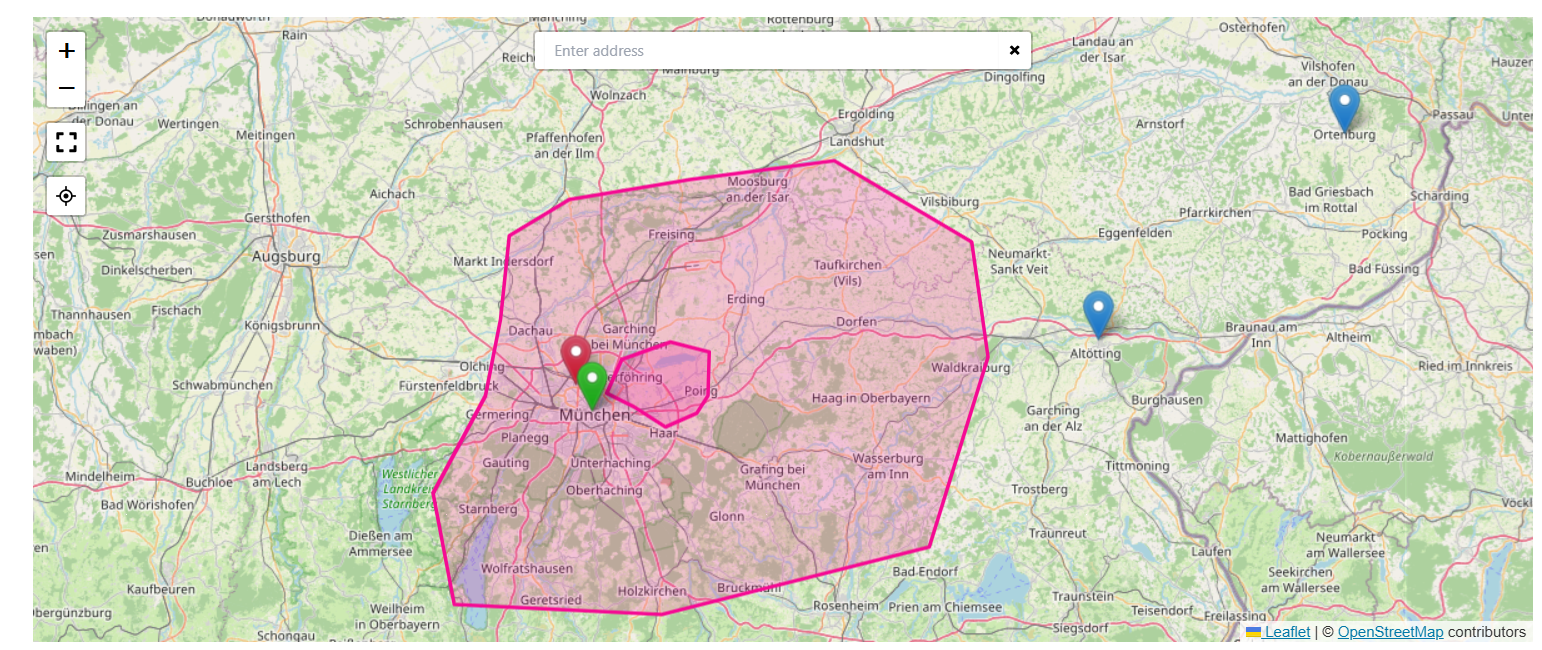
Use the drawing tools to mark delivery zones, service areas, territories, routes and points of interest.
Polygons, polylines, rectangles, circles, circle markers and markers
Add a popup message to each shape
Edit or delete a drawing’s shapes anytime
Customize each shape type’s color (Settings > Drawing Setting)
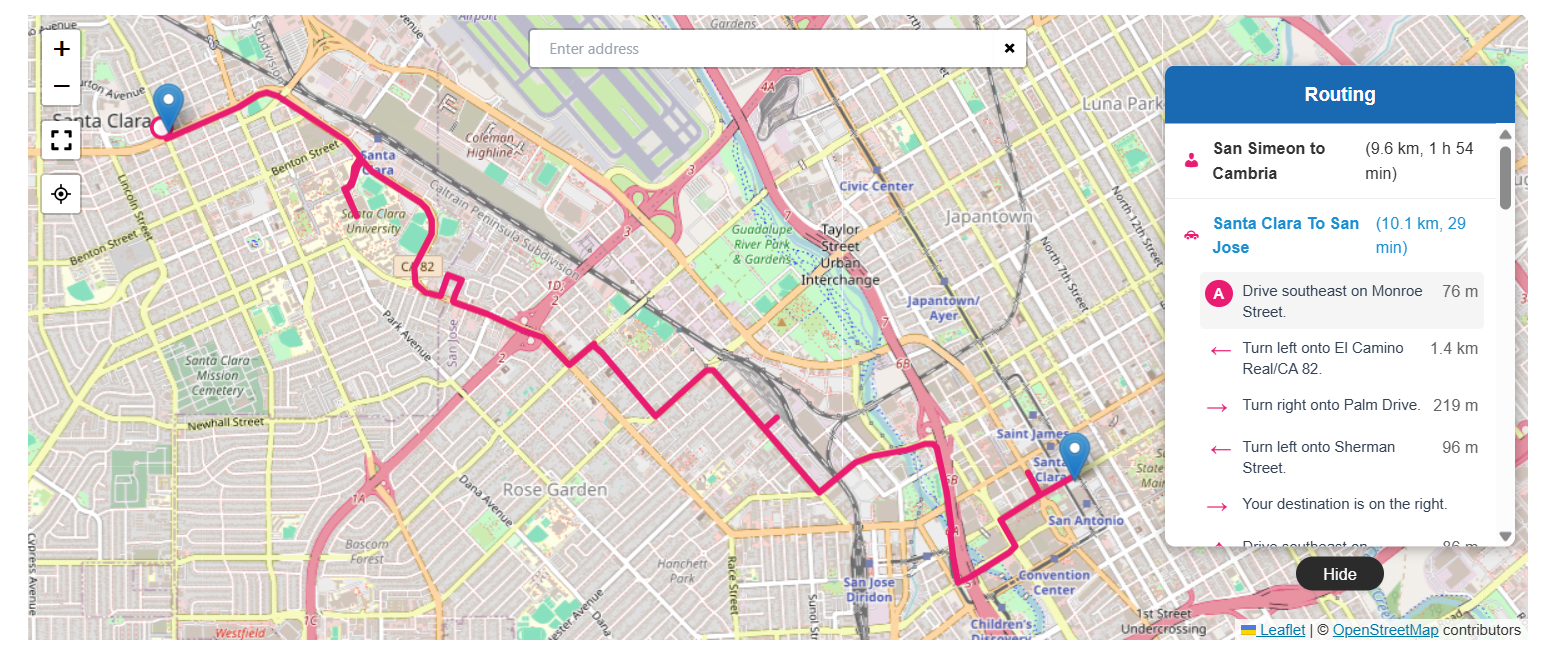
Routing: click waypoints to build a route, computed via the Mapbox or Google Directions API (driving, walking, cycling or transit), with a turn-by-turn itinerary panel showing distance, duration and every step
Embed [easy-map id="…"] with [easy-map-drawing id="…"] or a calculated route with [easy-map-routing id="…"]
Shortcodes
[easy-map id="…" ] – add a saved map
[easy-map-marker id="…"] – add a saved location marker to the map above it
[easy-map-drawing id="…"] – add saved shapes to the map above it
[easy-map-routing id="…"] – add saved route to the map above it
[easy-map-store-locator id="…"] – full store locator map
The Shortcode Sample page in the admin shows examples you can copy.
Gutenberg Map Block
The Easy Leaflet Map block lets you place a map without a shortcode. It has a live preview in the editor: click to set the location, then adjust zoom, height, popup text and map controls from the sidebar. It also supports wide and full alignment.
Use Cases – Map Solution and Integration for Every Business
Easy Map helps you build advanced location maps for any industry/business. Here are some popular use cases powered by Google Maps or OpenStreetMap via Leaflet:
Retail Store Locator – Showcase nearby outlets, branches, or chain locations
Restaurant Locator – Help users find your cafes, diners, or food franchises
Real Estate Property Map – Display property locations
Hospital & Clinic Map – Show medical centers, diagnostic labs & walk-ins
Gym & Fitness Center Locator – Promote local gyms, yoga studios & wellness hubs
Shopping Mall Directory – Build interactive directories with category filters
Hotel & Resort Locator – List resorts, Hotel and vacation rentals by location
Car Dealership Map – Map showrooms, service centers, and authorized dealers
Bank & ATM Locator – Help customers locate ATMs and branches
Pharmacy Finder – Display medical stores and pharmacy locations
Salon & Spa Locator – Show salons, nail bars, and beauty spas nearby
Near Me search: visitor geolocation, a radius slider (km/mi), a radius circle on the map and the distance to each store
Marker clustering for maps with many locations
4 additional premium layouts: Location Over Map + Grid, Map + Card Grid, Map + Split Horizontal, List + Map (on top of the free layouts)
Marker animations: bump-on-hover and blink, with a custom blink color
Custom styling controls: button and location card corner radius, popup open trigger (click or hover) and popup border radius, and an option to hide the store locator filter bar
WooCommerce product filter: link products to stores and let customers find where a product is available
Filter by Service: narrow the Store Locator down to locations offering a specific service
Custom marker image upload for the whole site, for each location or for each category
Category defaults: give a category a default image and marker, and apply them to every store in it with one click
Store images, Facebook/Instagram/website links and a custom “More Info” button
7 premium popup templates: Classic Contact, Open/Close & Info, Social Media, Parma, Aare, Acerra and Fano, on top of the free Basic, Minimal and Udine designs
Share a store: Facebook, X or copy link, with Open Graph tags so the link shows a rich preview
Sort stores and categories in your preferred order
CSV import & export for locations and store categories (comma, semicolon or tab delimiters)
GeoJSON import & export for Drawings
Multiple tile layers switcher showing every style of the selected provider
Airplane & Navy Routing: flight-path and sea-route modes for Routing with named Depart/Transit/Arrive stops and their own configurable cruise speed, on top of the free Mapbox/Google driving, walking and cycling routes
Moving Marker: animate a vehicle icon (bike, car, bus, train, ship, airplane and more, or a custom uploaded image) along a saved route, with adjustable speed and loop playback
Support
Need help using Easy Map? You can check the documentation for setup guides, shortcode examples, and feature instructions. For plugin issues, questions, or feature requests, please use
the WordPress.org support forum or email at wpeasysoft.official@gmail.com or contact the WP Easy Soft Support team
JS Libraries Used
The Third party libraries, non-compiled version of JavaScript and/or CSS-related documentation and source code can be found at the following links:
assets/js/leaflet/leaflet.js: Leaflet an open-source JavaScript library for mobile-friendly interactive map. Documentation, Source Code
assets/js/leaflet/Leaflet.draw.js: Leaflet.draw, a plugin that adds drawing and editing tools to Leaflet powered maps. Source Code
assets/js/leaflet/GoogleMutant.js: Leaflet plugin to display Google maps baselayers using DOM mutation observers. Source Code
assets/js/leaflet/leaflet-bing-layer.js: Bing Maps Layer for Leaflet. Source Code
Improved: Black Friday / Cyber Monday “Claim” button now opens the Upgrade to Pro page and the coupon is applied automatically at checkout.
2.3.4 (2026-11-20)
Added: Black Friday / Cyber Monday sale notice in the admin.
2.3.3 (2026-11-16)
Added: Free vs Pro comparison on Upgrade to Pro page
2.3.2 (2026-11-10)
Added: Polygon shape to Routes’ drawing toolbar, alongside the existing marker/circlemarker pins, and rendered on the frontend across every Listing Layout Template with the site’s configured colors
Changed: Editing an existing Drawing is now a Free feature instead of Pro-only
Improved: Locked Marker Popup and Listing Layout templates can now be previewed (gallery thumbnail, Template Preview panel, live map preview) without a blur overlay or being selected — a lock icon and Get Pro badge mark them instead
Improved: Get Pro badges consolidated to the card header for Marker Behavior, Social Links, Redirect and Product settings, and added beside the disabled Export CSV and Import GeoJSON (Pro) buttons
Fixed: Store Locator’s search/category filter wasn’t narrowing the sidebar location list to match the map markers and card grid
Fixed: Disabled WooCommerce Products & Search Products controls weren’t shown on Free when WooCommerce was inactive
2.3.1 (2026-11-06)
Added (Pro): “Enable Moving Marker” setting — animates a vehicle icon (bike, cycle, car, bus, minibus, truck, train, ship, airplane, or walking man/woman) along a saved route, with a custom-uploaded-image option, per-route icon override, Enable Loop and Moving Speed controls, and a live animated preview on the Add/Edit Routing and View Route admin pages
Added (Pro): Navy routing provider — a great-circle sea route with its own Sailing profile and configurable Default/per-route Cruise Speed, alongside the existing Airplane provider
Added: New “Routing Setting” tab in Settings consolidating Route Color and Default Routing Provider/Profile, so new routes pre-select the site’s saved defaults instead of always starting at Mapbox/Driving
Added: Configurable Default Airplane Cruise Speed on the Routing Setting tab, with a per-route override on Add/Edit Routing
Added: A loading spinner on the “Show my location” control while geolocating, on both the Map and Store Locator shortcodes
Improved: Faster map shortcode rendering, Maps REST single-item lookups and the marker icon list via caching
Fixed: Routes saved with the Pro-only Airplane/Navy provider kept rendering on the frontend after Pro was deactivated
Updated: Routing line weight thinned from 5 to 3 across admin and frontend
2.3.0 (2026-11-01)
Added: Routing — draw a route by clicking waypoints on the map, computed via the Mapbox or Google Directions API, with a turn-by-turn itinerary panel showing distance, duration and each step
Added: “Services” field on Add/Edit Location — shown in marker popups and Store Locator cards
Added: “Map Height” field on Add/Edit Map, beside Map Zoom Level — defaults to the Settings page’s global Height but can be overridden per map, and now applies across every Listing Layout Template on the [easy-map] shortcode
Added: The Default Map Provider’s own API key (Google/Bing/Mapbox/Carto) is now required on the Settings page when that provider is selected, with a warning toast and auto-focus on the empty key field
Added: A required “Map Key” field on Add/Edit Routing, beside Profile — shows the selected provider’s configured key and saves a newly entered one to the global Settings as part of saving the Route
2.2.1 (2026-10-27)
Added: “Show Location Icon on Map” setting — adds a locate-me control to every map that centers on the visitor and draws an accuracy circle
Added: “Default Tile Type” setting for per-provider map styles (e.g. Google Satellite/Terrain, Mapbox Dark, CARTO Positron)
Fixed: Adding or editing a Drawing (polygon, polyline, marker, rectangle, circle) failed with an “Invalid geojson data” error and the drawing was not saved
Fixed: Drawings and the “Show Map Center Marker” option were missing from every map layout except “Only Map”
Fixed: Locate-me control missing on the Add/Edit Location preview
Fixed: Locate-me click not reliably panning the map on Add/Edit Map
Fixed: Default Tile Type not updating the live admin preview when Google Maps was selected
2.2.0 (2026-10-24)
Added: Store Locator’s Template picker now shows a real visual gallery (Easy_Map_Listing_Templates catalog + REST endpoint) instead of a plain always-disabled dropdown
Added: The Store Locator layout Template field is now Free-owned and enforced server-side (“Default” free, other layouts require Pro), matching how Marker Popup types already work
Added: Two new free layouts, “Only Map” and “Location Over Map”, with a collapsible “Locations” floating widget that shows each location’s own marker icon
Added: The [easy-map] map shortcode can now use the same Listing Layout Templates as the Store Locator
Added: New “Layout Setting” tab in Settings with Button & Label color pickers and a “Show Marker Icon on Location Title” toggle
Added (Pro): Marker bump-on-hover and blink animations with a custom color, custom Button & Location Card corner radius, a popup open-trigger choice (click or hover) with its own border radius, a toggle to hide the store locator filter bar, and a new “Location Over Map + Grid” layout
Fixed: Multiple maps or store locators on the same page colliding on element IDs
Fixed: Full Screen mode ignoring the configured zoom control position
Fixed: The floating “Locations” widget overflowing the map on mobile
Fixed: The location sidebar and “Locations” overlay height not matching the map’s configured height
Improved: Admin list screens (Locations, Drawings, Store Categories, Store Locators, Maps) load noticeably faster via caching and a fixed N+1 query
Fixed: The promo banner no longer renders on the plugin/theme install screen
2.1.3 (2026-10-21)
Updated: Removed the free-version limits on Maps, Locations, Drawings, Store Locators and Store Categories — add as many as you need
Updated: Upgrade to Pro page now lists Easy Map Pro’s actual features (Near Me search, marker clustering, store locator layouts, WooCommerce product filter, custom marker image upload, popup templates & social share) instead of the retired “Unlimited” claims
2.1.2 (2026-10-19)
Fixed: Editing or saving a changed Google Map key on the Settings page crashed the admin and left the page blank; the preview now reloads cleanly instead
Fixed: Added an error boundary around the map preview so a preview crash no longer takes down the whole admin screen
2.1.1 (2026-10-18)
Added: Marker Popup template gallery — choose from multiple built-in popup designs (Basic, Classic Contact, Minimal, Open/Close & Info, Social Media and more) per Location, or write your own with the Custom WP Editor type
Added: Live popup template preview, a code editor for overriding any template’s HTML, and click-to-copy “Available tokens” chips
Added: “Get Directions” and “More Info” buttons now show automatically on every marker popup template (previously only 4 of them), consistently centered
Added: New “Show Directions” setting on the Map screen, matching the one Store Locator already had, to control whether the Get Directions button appears on that map’s popups
Added: Popup message editor also available on the Default Map Setting tab
Fixed: A Custom WP Editor popup left blank now shows no popup at all on marker click, instead of an empty or buttons-only popup
Fixed: Store Locator’s admin map preview wasn’t rendering the real popup template, and showed a duplicate Get Directions button
Fixed: Existing maps created before the Show Directions setting keep showing Get Directions exactly as before, until explicitly changed
Fixed: New Location’s popup type now defaults from Settings instead of silently failing to save
Fixed: Popup template images no longer stretch the popup — capped to a max height
Updated: Location form reorganized into a clearer two-column layout; Products field renamed to WooCommerce Products; Social Links moved under Marker Icon
Updated: Admin preview panels (Map, Location, Store Locator) no longer show Get Directions/More Info buttons, since those are driven by frontend-only settings
2.1.0 (2026-10-14)
Added: Mapbox as a “Default tile layer” option in Settings
Added: Address search (geo search) is now provider-aware — uses Google’s geocoder for Google tiles, Mapbox’s geocoder for Mapbox tiles, and OpenStreetMap search otherwise
Updated: Reordered the “Default tile layer” options in Settings (Mapbox and Bing Map swapped positions)
2.0.5 (2026-10-11)
Added: Store locator page rebuilt with the new React + REST API admin interface
Updated: Plugin Description
Fixed: Cache clear issue
2.0.4 (2026-10-10)
Added: Map page rebuilt with the new React + REST API admin interface
Added: Quick-add Location and quick-add Drawing directly from the Map form, without losing your in-progress changes
Added: Live preview on the Map form now shows your selected Locations and Drawings
Fixed: Map preview snapping back to the stored Latitude/Longitude on zoom, click or geosearch instead of following your edits
Fixed: Map preview overlay showing a Location’s title instead of its popup
Updated: Map form reorganized and relabeled for clarity (Map Center Latitude/Longitude, Map Center Marker Popup, Map Center Marker Icon, Map Zoom Level, Show Map Center Marker, Open Center Marker Popup on Map Load)
Updated: Popup field, “Open Center Marker Popup on Map Load” and Marker Icon picker on the Map form are now disabled while the center marker is hidden
Updated: Removed the Latitude and Longitude columns from the Manage Maps list table
2.0.3 (2026-10-08)
Added: Location page rebuilt with the new React + REST API admin interface
Added: Quick-add Store Category directly from the Location form, without losing your in-progress changes
Added: New Locations now prefill with your saved Settings marker icon and popup defaults
Added: Live popup template preview on the Location form that reflects your actual content as you type
Fixed: Reaching the free-tier Store Category limit from the Location form’s quick-add now shows the same “Limit Reached” modal used elsewhere, instead of a toast notice
Updated: Location form reorganized into Basic Information, Popup Type, Image, Marker Icon and Social cards with a live preview
Updated: “Back to list” button also added to the Store Category and Drawing screens’ headers
Updated: Store Category’s Marker Icon label clarified to “Location/Store Marker Icon”
Updated: Reset button added to the Location, Store Category and Drawing list screens
2.0.2 (2026-10-06)
Added: Drawing page rebuilt with the new React + REST API admin interface
Added: “Click to copy” tooltip on the Drawing page’s shortcode column
Updated: Drawing’s map now uses your saved Settings (tile layer, fullscreen, geo search, zoom controls, default location) instead of fixed defaults
Updated: The free-tier “limit reached” screen is now shown consistently on both Store Category and Drawing
Updated: Faster admin page loads — each Easy Map admin screen now only loads the code it actually needs
2.0.1 (2026-10-05)
Added: Store Category page rebuilt with the new React + REST API admin interface
Fixed: Store Category “Add New” silently failing to save
Fixed: Bold text in map popups now renders correctly on the frontend regardless of theme font weight
Updated: Store Category Add/Edit screen redesigned with side-by-side cards and inline marker icon preview
Updated: Saving/updating a Store Category now returns to the list automatically
Updated: Loading spinners replaced with a centered, properly sized loader across admin screens
Updated: “Get Pro” links now shown as a consistent highlighted badge on Settings and Store Category pages
2.0.0 (2026-10-03)
Added: Settings page rebuilt with a new React + REST API admin interface
Added: Automatic redirect to the Settings page right after activating the plugin
Added: Pro — custom marker image upload foundation
Fixed: Settings page Popup field now uses the full WordPress rich text editor (Visual/Code tabs, Add Media, formatting toolbar) instead of a plain text box
Fixed: Reactivating the plugin no longer resets your saved Settings back to the defaults
Fixed: Settings preview map not showing the saved custom marker image
Fixed: Manage Map/Location list tables hidden by a conflicting third-party plugin style
Updated: Solid-color markers now listed first in the marker icon picker
Updated: Settings save confirmation now shown as a toast notification
1.9.5 (2026-09-27)
Fixed: “Click to copy” shortcode on the settings page not working on sites without a secure (HTTPS/localhost) context
1.9.4 (2026-09-26)
Fixed: Location cache not invalidated for the previous category when a location’s category is changed
Fixed: Store Locator cache (Pro) not invalidated after edits
Updated: Cache clearing now works correctly on sites using a persistent external object cache (Redis/Memcached)
Updated: Cache is now purged on plugin uninstall
1.9.3 (2026-09-19)
Added: Limitation on maximum entited allowed of Map,Store Locator,Drawing and Store Category..
Updated: Upgrade to Pro page UI
Updated: Store locator pagination on center
Fixed: Carto Map API KEY REQUIRED issue
1.9.2 (2026-09-12)
Added: Display locations and drawings dropdown on Add/Edit Map page
Fixed: Map click showing default blue marker on Edit Location page
Fixed: Marker not showing on admin Add Store Locator page
Fixed: Map Shortcode issue
1.9.1 (2026-09-06)
Added: Marker Icon selection is now free — choose from 230+ bundled icons for your map and each location/store (Add/Edit Map, Add/Edit Location, and Settings pages)
1.9.0 (2026-09-03)
Added: Filter by title and category on store/location page
Added: Alert message for bulk delete
Fixed: Geo search issue
Fixed: Get PRo and Support link issue
1.8.27 (2026-08-30)
Updated: Code Refactor
1.8.26 (2026-08-22)
Tweak: WordPress 7.1 compatibility checked
1.8.25 (2026-08-16)
Added: Store Open/Close badge
1.8.24 (2026-08-05)
Added: Show Directions option
1.8.23 (2026-07-29)
Added: Geo Search option
1.8.22 (2026-07-15)
Updated: Store locator shortcode functionality
1.8.21 (2026-07-14)
Fixed: Page redirect issue
1.8.20 (2026-07-10)
Added: Store locatore pagination control
1.8.19 (2026-07-05)
Updated: Plugin description with promotional video
1.8.18 (2026-06-30)
Updated: Plugin redirect logic
1.8.17 (2026-06-20)
Updated: Plugin submenu
1.8.16 (2026-06-09)
Updated: Store locator admin UI
Updated: Store locator frontend UI
1.8.15 (2026-06-06)
Updated: Store locator admin UI
Updated: Location/Store admin UI
1.8.14 (2026-06-02)
Updated: Plugin Description
1.8.13 (2026-05-21)
Updated: Store locator frontend UI
Updated: Map admin page UI
Added: Marker Icon Popup
Fixed: Map frontend UI issue
1.8.12 (2026-05-17)
Added: Plugin deactive feedback
1.8.11 (2026-05-15)
Updated: Plugin UI and Description
1.8.10 (2026-03-15)
Updated: Plugin Description
1.8.9 (2026-03-10)
Fixed: Samole page shortcode issue
Fixed: Security vulnerability issue
1.8.8 (2026-03-05)
Updated: Drawing features code refactor
1.8.7 (2026-03-01)
Fixed: Location/Store data insert issue
1.8.6 (2026-01-18)
Fixed: Frontend Store locatore icon issue
1.8.5 (2026-01-11)
Updated: Admin Map Page UI
Updated: Admin Store Page UI
1.8.4 (2025-12-16)
Updated: Admin Map Page UI
Updated: Code Refactor
1.8.3 (2025-12-02)
Added: Location/Store addition information
Updated: Location/Store Page UI
Tweak: WordPress 6.9 compatibility checked
1.8.2 (2025-11-17)
Updated: Map Page UI
Updated: Location/Store Page UI
1.8.1 (2025-11-03)
Updated: Location/Store Page UI
Updated: Store Locator Page UI
1.8.0 (2025-10-24)
Added: Store Locator Page
Added: Store Locator Category Page
Update: Loation/Store Page
1.7.2 (2025-09-23)
Updated: Location page Add/Edit UI
1.7.1 (2025-09-17)
Updated: Map page Add/Edit UI
1.7.0 (2025-09-13)
Added: Pro version price page
Fixed: PHP Warning error
1.6.16 (2025-08-30)
Added: Accessible name alt for marker
1.6.15 (2025-06-28)
Added: OpenStreetMap Carto tile layer
Fixed: Map tile layer issue for Shortcode
1.6.14 (2025-06-15)
Updated: Map block editor
1.6.13 (2025-06-01)
Added: Rectangle draw option
Added: Circle draw option
Added: Circle Marker draw option
1.6.12 (2025-05-25)
Added: Polygon Popup message option
1.6.11 (2025-05-11)
Updated: Language pot file
1.6.10 (2025-04-19)
Added: WordPress Hook Implementation
Tweak: WordPress 6.8 compatibility checked
1.6.9 (2025-04-14)
Added: Dynamic map tile layer for Block editor
1.6.8 (2025-04-12)
Added: Block editor Zoom Control option
Added: Block editor Zoom Control Position option
Added: Block editor Scroll Wheel Zoom option
Added: Block editor Full Screen control option
1.6.7 (2025-04-06)
Updated: Gutenberg block editor
Updated: Map Shortcode grid order
Added : Map Title mandatory
1.6.6 (2025-03-02)
Fixed: Deleted Map ID Frontend render issue
1.6.5 (2025-02-22)
Fixed: Drawing Bulk delete issue
Fixed: PHP fatal and warning error issue
1.6.4 (2025-02-16)
Added: Admin end drawing marker option
1.6.3 (2025-02-09)
Fixed: Admin end drawing location render issue
Fixed: Front end marker popup view issue
1.6.2 (2024-11-28)
Updated: Plugin Information
1.6.1 (2024-11-26)
Fixed: After update data reload issue
Fixed: Plugin Check (PCP) issue
Fixed: Sample map Shortcode height issue
Fixed: Location marker issue on frontend
1.6.0 (2024-11-23)
Added: Drawing manage page
Added: Drawing add page
Added: Drawing view page
Added: Map height option
1.5.0 (2024-11-16)
Added: Location manage page
Added: Location add page
Added: Location edit page
Tweak: WordPress 6.7 compatibility checked
1.4.4 (2024-11-10)
Added: HTML Popup
Added: Open Popup settings
1.4.3 (2024-11-09)
Added: Manage map bulk delete
Updated: Menu order list
1.4.2 (2024-08-15)
Added: Edit Dynamic Shortcode page
1.4.1 (2024-07-27)
Added: Add Dynamic Shortcode page
Added: Manage Dynamic Shortcode page
Added: Dynamic Shortcode delete
Added: Dynamic Shortcode copy
1.4.0 (2024-05-22)
Added: Custom Map Gutenberg Block
Tweak: WordPress 6.5 compatibility checked
1.3.7 (2024-02-04)
Added: Default Marker shortcode
1.3.6 (2024-01-21)
Added: Polyline Shortcode
Fixed: Fullscreen icon issue
1.3.5 (2024-01-13)
Added: Fullscreen Control Setting
1.3.4 (2023-12-31)
Added: Zoom Control Position Setting
Updated: Map view responsive
1.3.3 (2023-12-25)
Added: Zoom Control Setting
Added: Scroll Wheel Zoom Setting
1.3.2 (2023-12-18)
Added: Popup funtionality for Marker Shortcode.
1.3.1 (2023-12-15)
Added: Shortcode for Marker.
Fixed: Bug Issue
1.3.0 (2023-12-02)
Updated: Code Refactor
Fixed: Bug Issue
1.2.6 (2023-11-26)
Updated: Settings page map zoom level auto update.
1.2.5 (2023-11-19)
Updated: Settings page onclick map lat-lon auto update.