
Dynamic product categories design is a woocommerce plugin extension to design shop categories section in a nice slider and grid layout.
| Author: | Maidul (profile at wordpress.org) |
| WordPress version required: | 5.0 |
| WordPress version tested: | 7.1.5 |
| Plugin version: | 1.1.18 |
| Added to WordPress repository: | 13-12-2022 |
| Last updated: | 21-11-2026 |
| Rating, %: | 100 |
| Rated by: | 2 |
| Plugin URI: | |
| Total downloads: | 8 153 |
| Active installs: | 200+ |

Click to start download
|
Dynamic Product Category Slider & Grid for WooCommerce shows your store’s product categories as a slider or a grid, so visitors can see what you sell and click straight into a category. Use it on the home page, a landing page or the shop page.
You build each display once under Category Design Builder: pick the categories, choose a layout and style, then paste the shortcode wherever you want it. Prefer a page builder? The Elementor widget gives you 7 grid layouts and 3 slider layouts.
Support Request
How to show categories
- Make sure WooCommerce is active.
- Go to Category Design Builder > Add New, choose a slider or grid, select the categories and style it.
- Publish, copy the shortcode
[dpcd_categories_design id="123"] (use the ID shown for your design) and paste it into a page or post.
What each category card can show
- Category image
- Category name
- Number of products in the category
- Category description
- Child categories
- A “Shop Now” button
Features
- Category slider with autoplay, arrows and dots.
- Category grid with several layouts.
- Create as many designs as you like and show different categories in each.
- Choose which categories to show.
- Elementor widget with 7 grid layouts and 3 slider layouts and style controls.
- Developer hooks to change the markup.
Requires WooCommerce. Elementor is optional.
External services
This plugin includes the Freemius SDK (initialised in the main plugin file). It does not contact any other outside service.
Freemius
Freemius provides the plugin’s account and update services. If you opt in on the Freemius screen, Freemius receives basic site and plugin information (such as your site URL, WordPress and PHP versions and the plugin version) and your admin email address. If you skip the opt-in, no usage data is sent. Service: https://freemius.com. Terms: https://freemius.com/terms/. Privacy: https://freemius.com/privacy/.
Screenshots

Category carousel design

Category grid design
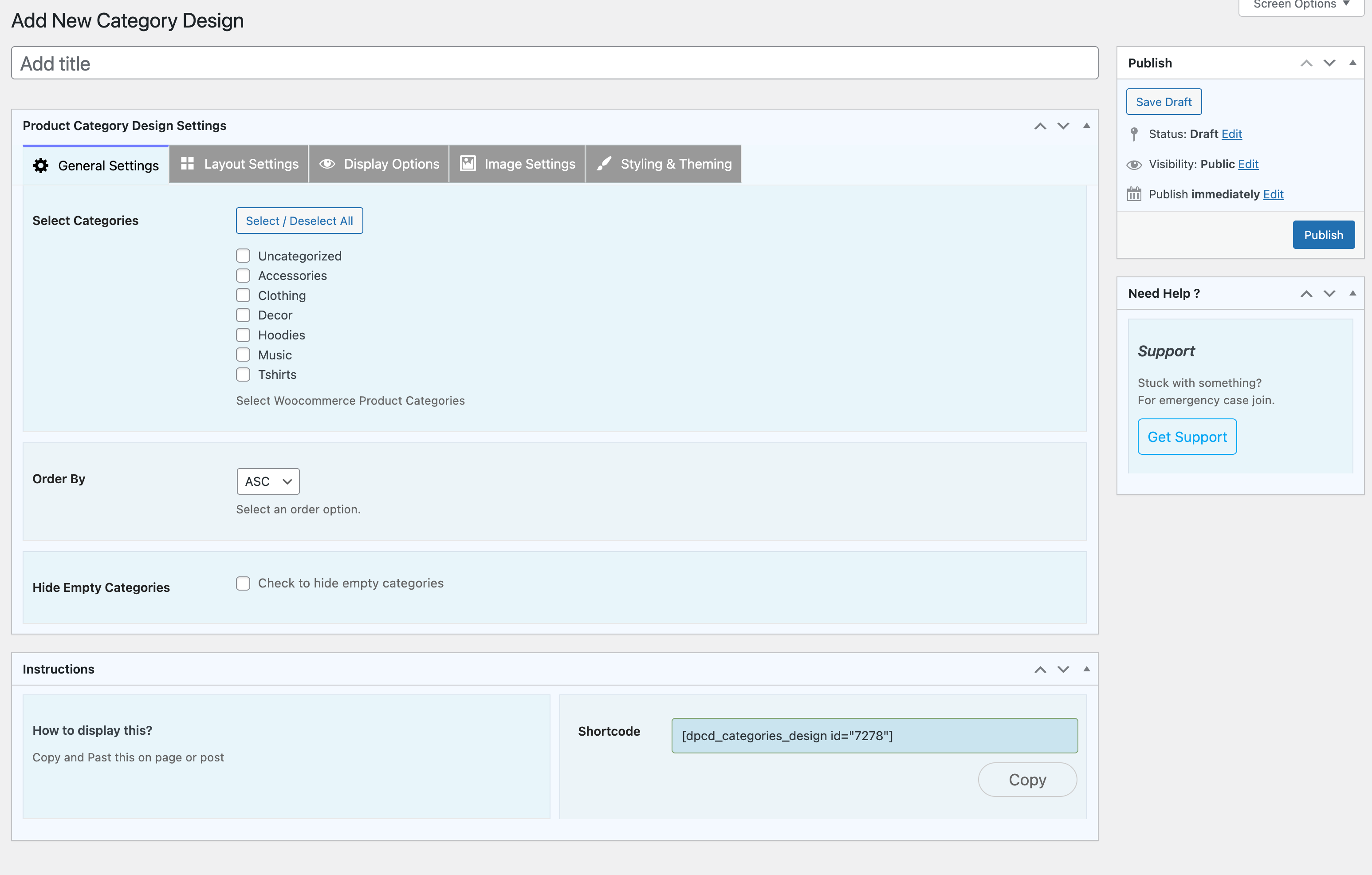
Add a new category design

What is the shortcode?
[dpcd_categories_design id=”123″], where 123 is the ID of your design. You can copy it from the Category Design Builder list or from the design’s edit screen.
Does it need WooCommerce?
Yes. The categories come from WooCommerce product categories.
Do I need Elementor?
No. The shortcode works without it. The Elementor widget is an extra way to place and style the same categories.
Does the plugin send data to other sites?
The plugin itself makes no outside requests. It includes the Freemius SDK, which can show an opt-in screen and, if you opt in, sends account data to Freemius. See External services.
ChangeLog
1.1.18
- [Security] – Fix local file inclusion / path traversal risk in template renderer by resolving and containing template paths.
- [Security] – Restrict CSS regeneration to users who can edit the design post; skip revisions and autosaves.
- [Security] – Prevent CSS injection into the generated stylesheet by validating colour values and spacing against strict patterns.
- [Security] – Stop honoring unauthenticated ?orderby= query argument in the Elementor widget; widget’s own “Order By” control is now used.
- [Security] – Guard shortcode output so it only renders published dpcd_category_design posts.
- [Fix] – Prevent white-screen fatal when a category link returns a WP_Error in shortcode grid/slider templates.
- [Fix] – Add ABSPATH direct-access guards to shortcode grid/slider templates.
- [Fix] – Display child categories in Elementor grid/slider layout 2 (missing echo).
- [Fix] – Properly invalidate the product-category options cache when categories are created, edited, or deleted.
- [Fix] – Remove double-escaping of generated CSS that could break stylesheet values.
- [Fix] – Unslash superglobal reads before sanitizing.
- [Update] – Update Freemius SDK to 2.13.4.
- [Update] – Update CMB2 library to 2.12.0.
1.1.17
- WordPress 7.1 compatibility check.
- [Update] – Replace deprecated jQuery “ready” binding with native DOMContentLoaded in slider script.
- [Update] – Modernize Elementor widget registration (use “elementor/widgets/register” hook) and rename “_register_controls()” to “register_controls()”.
- [Fix] – Correct invalid wp_register_style() argument order for the slick assets.
- [Security] – Escape category description output with wp_kses_post() across all templates.
- Raise minimum PHP requirement to 7.4 to match WordPress 7.1.
1.1.16
- [Fix] – Fixed PHP warning for magic method __wakeup() visibility in GetHelp class.
- [Fix] – Fixed “Array to string conversion” warning in Cat_Showcase_Metabox.php.
- [Security] – Improved parameter validation and type checking.
1.1.15
- [UI] – Reorganize settings tab structure to improve UX, added Layout Settings.
- [Update] – Update Get Help section.
1.1.14
- [Update] – Update css for elementor widget.
- [Update] – Added css transition for grid layput 6.
1.1.13
- [UI] – Reorganize settings tab structure to improve UX
- [Enhancement] – Add support for new layout/style separation
- [UX] – Improve admin preview thumbnails for layout selection
- [Update] – Update CMB2 library to latest version
- [Update] – Update Freemius WordPress SDK to latest version
1.1.12
- [Fix] – Image height issue in grid/slider
- [Fix] – Minor CSS bugs
- [Security] – Security vulnerability fix and improved sanitization
1.1.11
1.1.10
1.1.9
- Add few settings for elementor widgets
1.1.8
- [Bug] – Fix Sldier image issue on shortcode builder
- Make sure its working with latest wordpress
1.1.7
- [Bug] – Fix feature category issue on shortcode builder
1.1.6
- [Bug] – style control and css bug fix in elementor widget.
- [security] security and php warning fix
1.1.5
- [Feature] – Add 2 new grid layout in elementor widget.
1.1.4
- [Feature] – Add 3 new grid layout in elementor widget.
- [Feature] – Add 2 new slider layout in elementor widget.
- [Security] – Improve security while loading template file.
- Update and add elementor layout template folder structure.
1.1.3
- [Bug] – Fix slider dot navigation width issue.
- [Security] – Improve security while loading template file.
1.1.2
- [Feature] – Add a new layout in elementor widget.
- [Bug] – Fix Elemetor widget Card Setting issue.
1.1.1
- WordPress 6.5.3 compability check.
- Reduce css size
1.1.0
- Added new design and settings for category design
- Elementor widget
- Add WooCommerce plugin missing Notice
- Style Design admin screen
- Added few custom hooks
1.0.6
- Check WP Latest version compability
1.0.5
1.0.4
1.0.3
1.0.2
- Update css
- Added more control for slider layout
- Optimize jquery code
1.0.1
1.0.0
