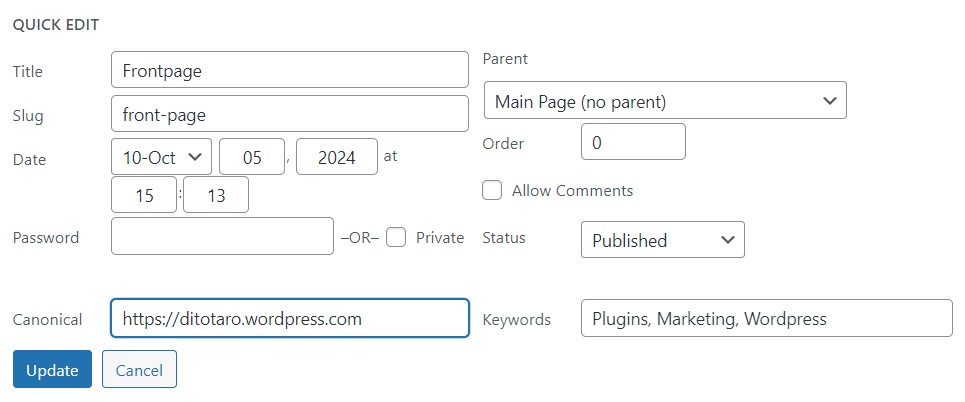
Modify or set the canonical URL and meta keywords in the Quick Edit interface of posts and pages.
| Author: | Claudio Di Totaro (profile at wordpress.org) |
| WordPress version required: | 6.5 |
| WordPress version tested: | 6.6.12 |
| Plugin version: | 1.0.0 |
| Added to WordPress repository: | 22-10-2024 |
| Last updated: | 23-10-2024
Warning! This plugin has not been updated in over 2 years. It may no longer be maintained or supported and may have compatibility issues when used with more recent versions of WordPress.
|
| Rating, %: | 0 |
| Rated by: | 0 |
| Plugin URI: | https://ditotaro.wordpress.com |
| Total downloads: | 1 470 |
| Active installs: | 20+ |
 Click to start download |
|
Modify or set the canonical URL and meta keywords in the Quick Edit interface of posts and pages.
This plugin lets you modify or set the meta tags of the canonical URL and meta keywords in the Quick Edit interface of each post or page.
Why do I need to set the canonical URL?
If you use a subdomain and point it to specific pages / posts then WordPress automatically sets the canonical URL to the main domain (usually www.), but for SEO and indexing reasons you may want to set the canonical URL to the subdomain instead.
Why do I need to set Meta Keywords?
It helps Search Engines to index your content better, especially when you have important content which is generated automatically on the page and is not part of the HTML.
Basic Features
- Go to Posts or Pages, click on Quick Edit and maintain Canonical URL or Keywords (multiple comma separated)
Support
To get your queries resolved related to ‘Custom Canonical URL and Keywords Modifier’, you can always take help from Support.
Screenshots
FAQ