
Connect Polylang with Elementor – show correct Templates, plus Elementor language switcher widget.
Connect Polylang multilingual plugin with Elementor Page Builder: Translate your Elementor templates and show them in the correct language, native customizable Language Switcher Elementor widget, Visibility Conditions of widgets and Dynamic Tags by language and much more…
What the Plugin Does
???? Template translation and show in the correct language
Create translations for your Elementor templates especially for header, footer or archive templates with Elementor Pro Theme Builder (affiliated link).
- Automatically selects the correct translation for “Template Widget”.
- Automatically selects the correct translation for
[elementor-template id="1234"] shortcodes.
- Allow Elementor Kit translation for different settings for each language.
???? Language Switcher
A native Elementor Widget to easily build a nice and fully customizable language switcher:
- Show or hide flags, language name, language code.
- Vertical list, Horizontal list or styled dropdown.
- SVG scalable flags.
????️ Language Visibility Conditions
Allow to show or hide every widget, section or column by language.
????️ Language Dynamic Tags
Use language dynamic tags (on Elementor Pro) that you can set with an specific language or the “current” one. Available tags are:
- Language Code tag type text
- Language Name tag type text
- Language Url tag type url
- Language Flag tag type image
✏️ Elementor Editor integration
Now you can view the language of the current template and change to its translations or create them from the Elementor editor.
???? Elementor Finder integration
From Elementor Finder you can access to Polylang settings pages and go the site in the selected language.
???? Plugins integration fixes and tweaks
- Automatically generate display conditions on new template translation.
- Automatically generate Elementor CSS styles on create new template translation.
- Fix home url to the current language on site-url Dynamic Tag and Search Form widget.
- Add language url trailing slash.
- Hide language on wp-admin for global widgets.
- Other integration fixes.
How to use
You can manage translated templates in two ways:
- (recommended) create linked translations for a template and only set display conditions on the default language.
- create separated translations for a template with their own display conditions.
See an example:
Site languages:
 - EN (main)
 - ES
 - IT

- Option 1 (linked translations only main language has display conditions):
╔═ Archive Template A (EN) -> condition category is "Red (EN)"
╠═ Archive Template A (ES) -> none (in front checks if category is ES translation of "Red (EN)")
╚═ Archive Template A (IT) -> none (in front checks if category is IT translation of "Red (EN)")

- Option 2 (not linked translations, all languages has display conditions):
══ Archive Template B (EN) -> condition category is "Red (EN)"
══ Archive Template B (ES) -> condition category is "Rojo (ES)"
══ Archive Template B (IT) -> condition category is "Rosso (IT)"
Support
- Plugin’s support forum here on WordPress.org
- Github plugin repo
- Polylang User Community Group at Facebook
- What is covered by our support? – All regarding THIS plugin (“Connect Polylang for Elementor”), plus the relation to Polylang, Polylang Pro, Elementor and Elementor Pro of course.
- What is NOT covered by support? – Anything general regarding multilingual topics and WordPress. Explicitely we DO NOT offer any “WPML”, “WPBakery” or “Visual Composer” support, and also not for your theme etc.!!!
Translations
We have used the strings of Elementor and Polylang whenever possible to take advantage of the fact that they are translated into many languages. For the other strings a .pot file (connect-polylang-elementor.pot) for translators is also always included ????
You can collaborate with your language translations in Translating WordPress
Credits
The following code/classes are licensed under the GPL.
Please, send your suggestions and feedback – Thank you for using or trying out this plugin!
Screenshots

Language Switcher examples
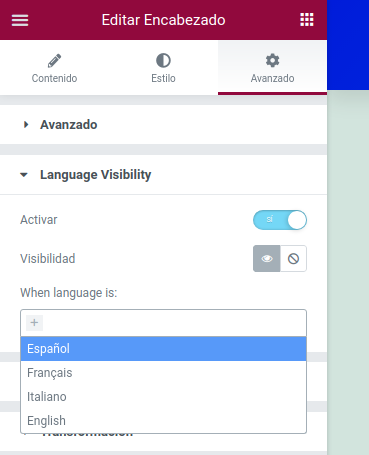
Widget Visibility Conditions

Dynamic Tag example
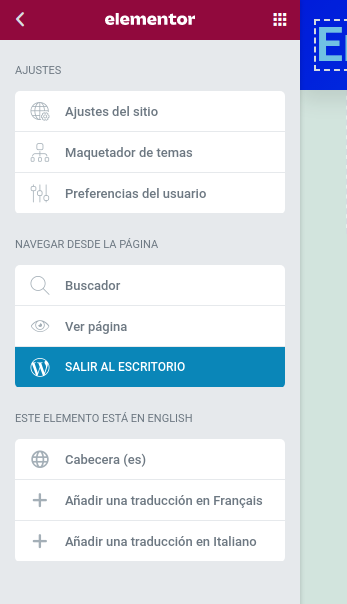
Elementor Editor translations integration
Recommended Workflow?
- Setup Polylang at first, add at least TWO languages, one of them make your default language (in Polylang)
- Add content to your default Polylang language – if Polylang asks you to apply existing content to it, you should most likely click “ok” and proceed – it works really fine 🙂
- After that setup an Elementor Theme Builder template – asign it to your Polylang default language, apply conditions in Elementor
- Next, setup a translation template for the template of 3.) — asign your second Polylang language, DO NOT apply conditions in Elementor
Where is the Elementor Widget to be found?
It’s in the widget category “General Elements” with the name “Language switcher”. Plus, if Elementor Pro is active and you’re editing a template, the widget additionally appears in the “Site” widget category.
Always via search: When searching for widgets type “polylang” or “languages” and it will show up immediately! 😉
Where is the plugin’s settings page?
This plugin has NO settings page, as it does not need one. All it does works just under the hood. Activate the plugin. Done.
Is Elementor Pro required?
Technically, Elementor Pro is not required but highly recommended.
Elementor Pro (affiliate link) is required for these features of the plugin:
- Translate Elementor Theme Builder Templates (header, footer, 404, page, archives).
- Translate Elementor Popups.
- Dynamic Tags, additionally added by the plugin.
For the other features of the plugin the free version of Elementor is sufficient – so the native Elementor language switcher widget will work 😉
Is Polylang Pro required?
Polylang Pro is not required.
All features of “Connect Polylang for Elementor” work with both, Polylang and Polylang Pro.
Are custom flags supported?
In general, custom flags are supported in the Polylang Switcher Elementor widget and in the Dynamic Tag (Current Language Flag).
However, the default flags in Polylang are sized 16px wide and 11px high, this automatically applies to custom flags – as it is fully handled internally by Polylang.
To use a different size for custom flags we are trying to find ways to implement this for Elementor in future versions of this plugin.
Typography and uppercase settings?
In the Polylang Switcher Elementor widget there are typography settings available for the Switcher menu items. These settings are CSS based of course, and applied “globally” to the various states they are for: normal, hover, active (current language). The available toggles for uppercase are done code-wise and therefore have a lower priority – this means the CSS always takes over, if wanted. That way you are most flexible with quick settings (toggles) but have all styling options at hand if needed.
Other recommended plugins for multilingual websites?
There are quite a few:
ChangeLog
2.4.4
2.4.3
- Automatically generate CSS file on bulk translation (thanks to @Elisa3232).
- Fix PHP error when PLL()->curlang not defined (thanks to @timsgr).
2.4.2
- Fix deprecation notices for Polylang 3.4.
- Bump tested versions WordPress 6.3 & Elementor 3.13.
2.4.1
- Fix plugin submission to wordpress.org.
2.4.0
- NEW language visibility conditions now also works for Flexbox containers.
- NEW Flag emojis on Elementor Editor and Theme Builder.
- Change languages styles on Elementor Editor.
- Change code improvements.
2.3.5
- NEW Elementor Widget Template translation.
- Change better languages links on Elementor Editor.
2.3.4
- Fix Elementor 3.9 hard deprecations.
- Fix JetMenu with domains as language (thanks to @mortenitp).
2.3.3
- Fix PHP warning on multidomain image undefined srcset.
- Bump tested versions WordPress 6.1 & Elementor 3.8.
2.3.2
- Fix dynamic tag image language flag don’t return svg scalable file.
- Fix Language Switcher dropdown styles with many languages.
- Fix PHP error undefined array key “HTTP_REFERER” (thanks to @nicomollet).
2.3.1
- Fix Widget initialization on Elementor 3.7
2.3.0
- Added dropdown controls to show on mouse hover and drop to up.
- Added Elementor Kit translation support.
2.2.0
- Added Elementor Pro template shortcode translation.
2.1.1
- Enable Elementor cross domain url fixes only for multidomain configurations.
- Added Elementor tested headers.
2.1.0
- Fixed cross domain issues with Polylang setup with multiple domains.
- Fix flag SVG inline with some themes.
2.0.8
- Don’t load integrations if Polylang languages are not defined.
2.0.7
- Fixed deprecated message with Elementor 3.6.
- More restricted filter for lang home urls with trailing slash.
2.0.6
- Fixed Elementor Search Form url with correct language.
2.0.5
- Use Polylang custom flags.
2.0.4
- Added better info of template instances for translations on Theme Editor and WP admin list.
- Minor tweaks on Language Switcher dropdown styles.
2.0.3
- Updated language switcher dropdown animated & toogle on mobile.
- Added Elementor icon in posts list status.
- Fixed language switcher underline style.
- Fixed SVG flags if encoded is disabled.
- SVG flags data URIs don’t need base64 and save some bytes.
2.0.2
Fixed fatal error if call home_url() before initialize Polylang.
2.0.1
Fixed critical error loading plugin classes when there are uppercase letters in the path.
2.0.0
Fully rewrited and upgraded!!
- New language switcher with SVG scalable flags and dropdown style.
- New language visibility conditions for widgets, sections and columns.
- New dynamic tags for language name, language code, language flag (icon or svg scalable) and language url.
- Better Polylang/Elementor integration:
- Automatically generate display conditios on new template translation.
- Automatically generate CSS file on new template translation.
- Update display conditios un change template language.
- Fix home and search links to point to the current language.
- Hide langue on wp-admin for global widgets.
1.0.6 – 2021-06-05
- Fixed PHP notice undefined ‘post_type’.
1.0.5 – 2021-05-17
- Fixed Elementor editor don’t load with Global Widgets in secondary language.
1.0.4 – 2021-04-30
- Translated templates with conditions for categories/tags also works with translated categories/tags.
- Fixed PHP notice on activation
1.0.3 – 2021-04-27
- Ensure Theme Builder conditions for all languages (prev. version only saves main language conditions)
- When a template is a translation override with empty conditions
1.0.2 – 2021-04-26
- Fix Elementor template display conditions reset
- Fix wp-cli error languages undefined
- Fix Elementor deprecations
- Added Elementor Landing Pages CPT translatable
- Added JetEngine Listing CPT translatable
- WordPress PHP Coding Standards
1.0.1 – 2020-06-17
- Stability update for edge cases were experiencing fatal errors
- Thanks to sebastienserre for correct fatal unknow pll_the_languages();
1.0.0 – 2018-11-28
- Official public release on WordPress.org
0.9.1 – 2018-11-27
- First Release Candidate (RC) version
- New: Automatic enabling of Elementor My Templates post type for Polylang support
- Tweak: Code improvements throughout
- Tweak: Inline documentation and PHP doc improvements
0.9.0 – 2018-11-26
- Second beta version
- New: More settings for Polylang Switcher widget
- Tweak: Improved Dynamic Tags additions
- Tweak: Improved Elementor Finder integration
0.8.0 – 2018-11-25
- First beta version
- New: Added native Elementor Widget – Polylang Language Switcher
- New: Added Dynamic Tags for Polylang (requires Elementor Pro)
0.7.0 – 2018-11-24
- Second alpha version
- New: Added Elementor Finder integration for Polylang plugin links and resources
- New: Make plugin translateable – added German translations
- New: Added Readme file, plus
composer.json
- New: First public alpha release on GitHub
0.5.0 – 2018-10-30
- Plugin idea by Brad
- First alpha version by David
- New: Template tweaks work in form of plugin code – coding standards improvements

