Warning! This plugin has not been updated in over 2 years. It may no longer be maintained or supported and may have compatibility issues when used with more recent versions of WordPress.
Welcome to the CLUEVO Learning Management System for WordPress. Our LMS allows you to add SCORM e-learning modules, video tutorials, podcasts and other media to your WordPress site. That Content can be organized into courses, chapters and modules and you can easily manage the permissions for different users and groups.
We currently support SCORM 2004 4th edition and SCORM 1.2. Other 2004 editions may work but are not officially supported. We are hard at work to provide better support for more versions of the standard. If you have any suggestions on what standards to support please don’t hesitate to get in touch with us via the support Forum.
Video/Audio
Currently many File Formats like mp3, wav, mp4 and webm are supported. With our free oEmbed extension you can also add and organize videos from Youtube, twitch and other Streaming services.
PDF
CLUEVO LMS allows you to use your PDF files as learning modules. Upload a PDF file and use it as a module in your learning tree. Your users place in the document is stored and you can see each student’s location in the document.
Learning Structure
The LMS consists of different courses that in turn contain chapters that contain modules. The first thing you’ll want to do is upload a SCORM module. To do this use the uploader on the Learning Management page in the modules tab. Once you have uploaded one (or more!) modules you can start creating your learning structure. Create some courses and add chapters and modules.
User Management
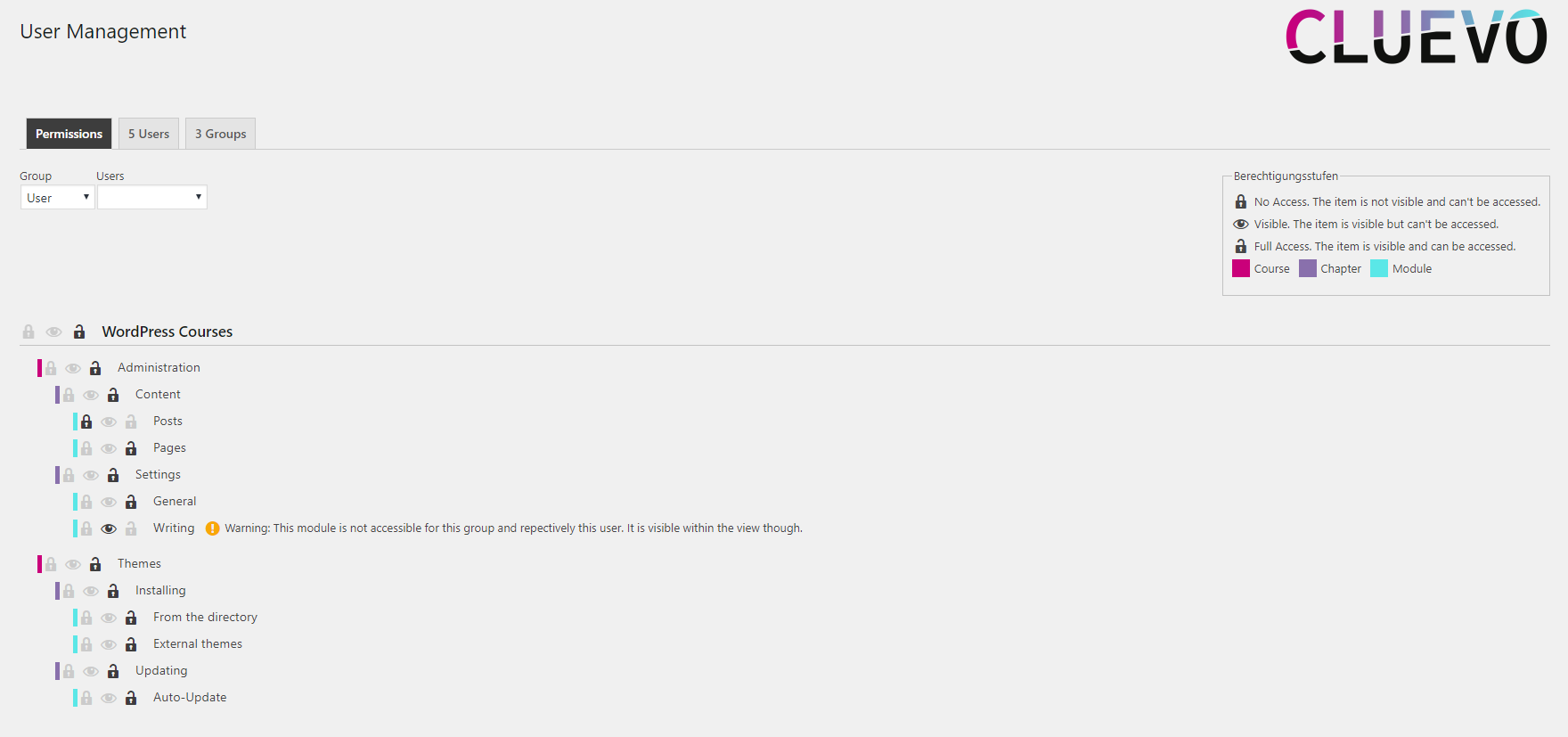
CLUEVO LMS gives you the ability to set permissions for each level of the learning tree. You can assign users to groups and set permissions for groups or just individual users. Each element of the learning tree can have one of three access levels:
0: No access. Items won’t show up anyware for this user/group
1: Visible. Items will be visible for a user/group but cannot otherwise be accessed
2: Open. The user/group has full access to this element.
It is also possible to have permissions expire at a certain date/time.
Hint: As a user with administrative capabilities you have full access to all elements by default.
Reports
The reports page gives you an overview on the progress your users have made. You can also view the different SCORM parameters.
Progress records and SCORM parameters can also be exported to csv files.
Competence
The competence system allows you to define competence areas that consist of different competences. You can then set which modules teach which competences and how much of a competence a module covers.
An example could be that you have a competence area named Backoffice that consists of the following competences:
Excel
Word
Outlook
Competences are a great alternative way to organize your courses. They enable your users to directly browse modules that teach certain competences.
Settings
CLUEVO LMS provides an in-depth settings page to customize the LMS to your liking. You can customize the way your modules are displayed, protect your modules from external access, allow your students to rate your content and much more.
Extensions
We offer a suite of extension to add functionality to your LMS. Whether it’s support for more types of modules, certificates or reporting, we have it all.
Our Extension include:
Free Extensions
oEmbed Modules: Allows you to use content like YouTube videos as modules
Google Documents: Let’s you use your Google Docs as modules. With this you can just whip up a quick presentation and use it as a module
Premium Extensions
AI Quiz Maker: Transform your Posts into multiple choice quizzes with the push of a button
Certificates: Design and issue certificates for when your users complete courses
Multiple Trees: Create and manage more than one learning tree
User Learning Progress: Adds new user focused reporting for trainers
User Import: Import users with group memberships
wooCommerce Integration: Let’s you sell course access via wooCommerce products
Your very own extension
We are always looking to improve on our LMS and also offer our services to implement extensions to your specifications. Feel free to inquire at info@cluevo.at for details.
Now Available: AI Quiz Maker
We’ve recently released our AI Quiz Maker as a premium extension. This extensions allows you to create multiple-choice quizzes from your existint posts and pages or from copy and pasted text. We analyze your content generate quiz questions for you. You can then use these questions to compose your very own quiz modules.
Support
If you encounter any issues we recommend to submit a ticket via our support system found at cluevo.at -> produkte und dienstleistungen -> support. You can also use the WordPress support forums but response times via tickets are generally faster and we can offer more in depth help via ticket.
Feedback
If you have any feedback or feature requests please do not hesitate to contact us via the support Forum (https://wordpress.org/support/plugin/cluevo-lms/).
Please check your PHP max. script execution time and increase it if necessary. Your hosting provider can adjust this value for you.
I can’t see my content
Make sure you are logged in or that you have set the permissions for the guest group accordingly.
How do I access my learning content?
You can add a link to the course index page through the menu editor or add a shortcode to any page where you want to display cluevo content
How to I get a shortcode?
You can copy the shortcode by using the [s] buttons for each element on the learning management page or by clicking on the item id that appears when you move your mouse over an item.
The shortcode supports two parameters: row and tile. By using these parameters you can set how the item is displayed on the page. You can also display elements as links by using the shortcode style [cluevo item=”x”]This is a link[/cluevo]
Can i display my modules on arbitrary pages?
Absolutely! Just an items shortcode with the [s] button on the tree page and insert the shortcode where you want to display your module
Do you take feature requests?
Absolutely! Do not hesitate to contact us via the support Forum (https://wordpress.org/support/plugin/cluevo-lms/) or send your requests to wp@cluevo.at! For more expansive features we’re happy to get back to you with a quote.
Optimized database by adding indexes where necessary
Updated styling of admin pages to be more in line with the WordPress default styling
1.12.4
Added a setting to automatically commit scorm parameters / progress when a module is completed
Clear orphan permissions when deleting tree items
Added missing translations
1.12.3
Added options to select how to handle exising page content on CLUEVO assigned pages
1.12.2
Use index page from settings for breadcrumbs index
Respect permissions when displaying toc items
1.12.1
Fixed iframe display mode if not configured for module
Removed scroll offset when scrolling to iframe
Changed iframe min-height to 100vhmin for better mobile experience
1.12.0
Added a setting to set the default item list style for learning elements
Added a setting to hide the list style switcher
Added an argument to the cluevo shortcode to display a single item directly
Added a setting to select a page to display the learning tree index
Added a setting to select where to display the user profile page
Added a setting to select where the login page is displayed
Added a setting to enable the empty item message for elements without children or accessible children
Fixed errors when guests attempt to view competence/area pages
Fixed a bug that displayed an inaccurate message about attempts to guests (guests always have zero attempts, so they can’t reach the limit)
Fixed a bug that displayed a blank page when clicking the save button on the settings page without changing any settings
Fixed some notices for guests
Added proper support for exp points for media modules
Fixed access resolution for points/level requirements
Media modules (audio/video/pdf) now always update the existing progress record until it is completed
Media modules count as success unknown until completed
Ported frontend vue components to vue 3
Fixed on page iframe module display
1.11.0
Reworked the cluevo user page
Updated the user page to display competences and competence areas
Added pages to browse competences and areas
Fixed pdf scaling on high dpi devices
Allow redirecting the lms index page the first learning tree if only one tree is available
Fixed some styling issues
Added a shortcode for the user widget
Module tree items now display the content page if the page’s content is not empty
Modules can now be started directly from the competence page
Fixed a bug that reset existing attempts when using the iframe display mode
Use 100svh for on page iframe modules
Fixed format of cmi.core.student_name to conform to standards
Fixed a security issue with saving the tree
1.10.0
Added a setting to toggle display of item types on tiles
Fixed an issue with loading pdf modules as guest users
Fixed an issue where the lightbox would close even if module rating was triggered
Fixed limited number of attempts for pdf modules
1.9.4
Fixed an issue where permissions got lost when they expired
Removed get_page_by_title calls for wordpress 6.2 compatibility
Display links to lms extensions
Fixed index link in breadcrumbs
Added missing localization for index bread crumb
1.9.3
Added settings for module ratings trigger
Ratings can now be triggered on every module close event or only on completion and/or success
Added setting to display ratings
Added setting to display only ratings at or above a threshold
Added setting to toggle the display of the corner indicator on tiles
Added a status row to tiles that display the completion status and permission expiration date
Added an icon to indicate that an item has expiring permissions
Fixed a bug where the scorm api was not properly reset
Updated first clear notification text to include more user data
Moved plugin dependency data to collapsible element to save some space on the plugins list page
Display detailed errors in case of failed module uploads
Fixed missing error list in module uploader
Fixed where the pending scorm module installation used the wrong scorm directory
1.9.2
Fixed an issue with evaluating success status of scorm 1.2 modules
1.9.1
Added tree module setting to enable notifications when modules have been completed
Moved tree item settings into collapsible containers to declutter the ui a bit
Settings that are only relevant to modules are now automatically hidden if the tree element has no module assigned
Fixed the separator character in the dependency list
Improved database version check to better detect maria db versions
Fixed an issue where access status was evaluated before resolving dependencies resulting locked out content
1.9.0
Added a setting to enable/disable the notification about saving progress for guests
Added a setting to enable/disable downloading of pdf modules
Added tags to modules
Added tags to user groups
Added tags to the learning tree
Added a search/filter component to the learning tree admin page to filter items by tags and/or title
Permissions can now be set to expire at a specific point in time so users lose access after the permission expires
Added tag filter to module progress view
Columns on the progress report page table can now be customized
Modules can now be updated specifically and don’t have to be uploaded under the same filename
Replaced the drag and drop functionality of the learning tree with movement buttons due to incompatibilities with the updated jQuery UI version
Ratings are now displayed in the lightbox instead of the lms tile
Start counting attempts at 1 instead of 0
Fixed filtering on the reporting pages
Fixed completed modules evaluation not respecting credit field
Fixed an issue with resolving dependencies
Fixed an issue where scorm 1.2 module would not store scorm parameters if the module did not explicitly call the LMSCommit method.
Fixed limited module attempts, added new error message when max attempts are reached
Fixed an issue that moved uploaded scorm modules to the wrong archive directory
Attempts no longer count if a user as access to a module via a trainer permission
Improved module attempt system to allow resumes and new attempts if user has attempts left, should now also respect global attempt setting
Always commit scorm parameters before terminating the scorm api
Delete module entries from all database tables when deleting modules
Fixed an issue when constructing archive paths
Fixed an issue with resolving dependencies
Improved db server check on lms tree page to better detect mariadb servers
1.8.4
Removed some obsolete template files
Added missing localizations
1.8.3
Re-prepare tree after deleting items
Removed some obsolete meta fields
Removed demo install functionality
1.8.2
Fixed pdf module display on-page
Improved security
Removed obsolete code
1.8.1
Fixed a XSS vulnerability on the lms tree admin page
Fixed a bug that caused items to be hydrated twice
Don’t include items the user doesn’t have access to in children counts
Fixed a bug that caused no users to be listed on the user management page if user reached max level
1.8.0
Progress records can now be edited
Added site report integration
Pending module installs can now be removed
Added a shortcode to display a toc style view of the learning tree
Display a specific element with the id attribute
Display items as opened with the attribute ‘open’ containing all opened elements or use the attribute ‘open-all’ to show all elements as opened
Use the attribute ‘level’ to open all elements up to a specific level. Levels start at 0 for the root (1 => course, 2 => chapter, 3 => module)
To display module ratings use attributes ‘stars’ and/or ‘ratings’
Added a setting to enable periodic commits of the learning progress
Sort order of tree items should now be saved again
Fixed tracking of session time and total time
Display unabbreviated text as tooltip for scorm parameters / progress reports
Added tree preparation and hydration to speed up loading of large trees
Added hooks to add new tabs to the report page
Added a filter to add new help sections to the help area
User management page should now always return all users even if they don’t yet have cluevo data
Display errors that occur when initializing attempts or saving parameters
Added a help tab for CLUEVO shortcodes
Display a message when a guest opens a module informing them that progress will not be saved
Fixed z level of error messages so they display above the module lightbox
Fixed e-mail group permission integration with turbo tree system
Fixed a bug that prevented resuming modules in the iframe display mode
1.7.1
Removed test notice on the module admin page
Fixed a bug that caused an error on the module admin page
Removed deprecated mysql function in mysql server version check
Default to first page for pdfs without progress records
1.7.0
Introducing module ratings
Optionally prompt users to rate your modules
You can view ratings via the module administration or on the dedicated ratings page
View detailed stats on how your users rated your modules
Module ratings can be enabled/disabled via the CLUEVO settings page
Added new module type: PDF
You can now upload and use PDF files as module
Added a search function to the user administration page
Added export functionality to the progress and scorm parameter admin pages
You can now export the current table as a csv file
You can now upload modules via FTP and import uploaded modules via the modules page
Upload your modules to corresponding module directory inside your wp-content/uploads/cluevo/modules directory
By default the following types are enabled
audio -> audio/
video -> video/
scorm 2004 / scorm 1.2 -> scorm-2004/
Audio/Video files can be placed directly into the directory, scorm modules need to be place into a sub directory
scorm-2004/my-module <- this directory should contain your imsmanifest file
Each type needs to have an installation handler attached in order to be able to be imported
Once modules are ready for import they should be listed on the modules admin page under your already active modules
Added user e-mail address to the progress/scorm parameters report table
Fixed a bug that prevented competence groups from being edited after creating one
You can now delete your module zips from the module administration page
Modules can now be archived as zip files and downloaded
Fixed the download module button on the module management page
Breadcrumbs can now be enabled/disabled from the settings menu
Fixed a bug that caused scorm parameters / progress entries to not show up if filtering from a page greater than 1
Use local vue instead of cdn
1.6.2
WordPress 5.7.1 compatibility
Added missing nonces to competence administration, adding/editing should now work again
1.6.2
Fixed a bug on the user admin page that caused users assigned groups to be hidden
1.6.1
Added an option to limit the amount of attempts users have to complete modules
Progress attempts can now have their credit status updated through the progress reports table
Added a message to the module upload page that is displayed if the php zip extension is missing
Added USER_EMAIL variable for ispring modules
Added default values for scorm modules completion
Fixed a bug with email domain groups that caused no groups to be displayed
Fixed a bug that caused permission overrides by groups not to be displayed
1.6.0
Optimized speed, and reduced the amount of database calls by caching the learning structure
Severely reduced the amount of needed database calls for saving the tree
Added support for scorm modules exported through the ispringsolutions authoring tool
Added danish translation
Fixed a bug that caused the basic security feature to overwrite already in place .htaccess in the modules archive directory
1.5.5
Fixed an issue with module dependencies. Dependencies should now be evaluated correctly
User data is now cleaned up when a WordPress user is deleted
LMS Posts should no longer sometimes go missing when the tree is saved
Optimized the user admin pages by adding search fields for user selection and paginating the user list
Changed the breadcrumbs display so they no longer display the complete learning structure as this led to performance issues with larger trees
Group members should now be counted correctly for larger numbers of users
Added some custom events to the cluevo lightbox
Added hooks before and after getting module parameters
Added a hook when fetching module parameters
Added a button to reset users progress
Added a setting to configure the way module attempts are handled
Rotated out old bugs, added brand new bugs to fix later
1.5.4
fixed a bug when updating the last change date for changed children’s parents
1.5.3
Added a feature to force module installs by url if the url could not be verified to exist
Added a last changed date to modified lms tree item pages
Moved the register settings hook to the end so new tabs are appended instead of prepended
1.5.2
Removed mysql version check while we work on a better way to check
1.5.1
Added temporary fix for a notice when checking the server version with some mariadb servers
1.5.0
Completely rebuilt the settings page
Fixed a bug that caused groups to not load due to collation issues
Made the empty element message box customizable
Items can now be made into links. Assigned modules have no effect, instead users are sent to the entered link
The login page can now be enabled/disabled and configured. You can use the cluevo login page, the WordPress default login page or select a different page alltogether
Improved the MySQL server version warning, it should now no longer display for MariaDB users
Fixed a bug that caused dependencies to reset when manipulating the learning tree
Fixed a bug that caused the has-dependencies icon to not display
Fixed a bug in the permissions system that sometimes failed to get the effective permissions for users with multiple group memberships
Fixed an error with the evaluation of a user’s completed content
1.4.7
Fixed a bug that caused items a user shouldn’t be able to see to show up when using the shortcode
1.4.6
Added a basic security feature that protects modules from being accessed from outside the site. Can be enabled in the general settings.
Added an option force modules to load via https regardless of the site url
Added new shortcode arguments to display items as tiles, rows or links
Added an indicator to items on the tree admin page that flags items with dependencies
Fixed a bug that caused items/modules to not properly update their dependencies
Fixed a bug that prevented resetting permissions
Added the student_id parameter to the set of default scorm parameters
1.4.5
Fixed a bug that prevented modules from displaying when using the shortcode
Some minor styling changes
1.4.4
Resolve effective permissions for users in permission view
Build a group cache on init to speed up user loading in permission view
Added button to the permission view to completely remove a permission entry
Fixed a bug caused by translating internal module types that cause modules to not load on the frontend side of things
Improved support for older SCORM 1.2 modules
Added an option to keep data after uninstall. The default is that your data now persists after uninstalling the plugin, so be sure to disable if you want a complete uninstall.
1.4.3
Fixed some php warnings
Removed deprecated session start that caused some errors during the WordPress health check
1.4.2
Added a page reload when a completed module is closed to refresh the displayed items for updated dependencies
Fixed dependency system. Module dependencies should now work again.
Fixed a bug that caused new attempts to be created when a module was completed and then closed
Fixed a bug that cause module progress to not update
Fixed queries that queried the WordPress users table to work with sites that have the custom user table consts set
Changed the way module progress is handled. New attempts are no now longer automatically started, instead the user get’s a prompt where they can select if they want to resume the old attempt or start a new one
Added the extension compatibility table to plugin manager. This will show you what extensions you have installed and inform you about their compatibility
Replaced all german localized strings with the english ones to make it easier for people to translate
Display error messages if module installation fails
Check http status code before attempting to download modules from urls
Before attempting to install zips as scorm modules, check if the module has a manifest present
Check the size of selected files in the uploader and block upload if the size is over the max. upload size
Did some housecleaning, moved some functions to properly named files
Added a blacklist of filenames and extension to the uploader to prevent the upload of malicious code (also checks inside zips)
Fixed sco selection
Optimized filesizes of placeholder images, they really didn’t need to be in 4k…
Fixed lookup of users completed modules and the resulting dependency check
1.4.1
Added a missing permission callback to the upload process
Prepared for future extensions
1.4.0
Modules can now be added at each level of the learning tree, you are no longer required to create courses and chapters to create a module entry
Added a dialog to assign a modules to tree items. You can search and filter the available modules from this dialog.
Added a tile for available extensions to the add module dialog
The changed the name of the api settings variable to avoid naming conflicts with other plugins
Added a popup for displaying error messages like permission denied errors when trying to open modules the user has no permission to access
Meta icons on tiles no longer scale up when hovering an item
Fixed some missing localized strings
Added dashicons to frontend so breadcrumbs show their separators
Fixed a bug that caused permissions to not work correctly for not-logged in users occasionally
Fixed a permission bug when displaying items on pages via shortcodes
Disabled creation of guest user ids for module progress, progress is now only stored for logged in users
Fixed a bug that caused font-awesome icons to no longer work on certain themes
Reworked guest permission handling
Only display missing module message if a module page has no content if no module is assigned
Separated breadcrumbs and list display switch. Breadcrumbs are now always at the start of the page
1.3.1
There should now appear a notice to update the database if an update is necessary
1.3.0
Added a new module upload ui
Modules can now be renamed
Any API calls now work regardless of permalink settings
Added support for e-mail groups. Any group that starts with an ‘@’ sign is an e-mail group. All users that have an e-mail with a matching domain are automatically members of this group.
Elements in the learning tree can now activated and deactivated. Post status changes accordingly to published or draft.
The display mode can now be set individually for each element in the learning tree
Added some customization options to the lightbox that can be set individually for each module in the tree
Max. possible upload filesize is now diplayed in the module file selection
Pressing the return key while editing the names of elements in the learning tree now no longer creates new items
WordPress posts of learning tree items now open in new windows/tabs
1.2.2
Fixed a bug that prevented modules from loading
1.2.1
Improved support for SCORM 1.2
Progress for SCORM 1.2 modules should now be correctly determined and stored
Supress the select sco dialog if only one sco is available
Only ever make one scorm api (2004 OR 1.2) available to modules
Added SCORM 1.2 support to the progress table
Added a field to store a modules scorm version
1.2.0
Added initial version of SCORM 1.2 support. Please report any bugs via the support forum.
Added support for SCORM modules with multiple SCOs, when a module has more than one sco you can now select which sco to launch
Added a hook to handle non-file/non-url module installs
Added a button to reset all dependencies on a tree
Temporarily removed module dependencies from courses/chapters while we come up with a better system
Enabled comment support for CLUEVO LMS post types, this enables your users to leave comments on your courses, chapter etc. To enable comments for an item open the WordPress post and check the comment checkbox.
Fixed a bug that caused invalid paths by converting complete module paths to lowercase
Fixed the module dependency display in the tree view
Items can now no longer depend on themselves
The dependency list now refreshes when you select another module via the dropdown
Added the lightbox active class to the html element to fix scrollbars on the html root element
Fixed a bug that deleted too many metadata pages when deleting a module which caused the tree to become broken
1.1.1
Removed empty-module class from non-module items in frontend
Hover effect for frontend tiles (expanding corner)
Styling fixes
Added missing text-domains
Improved breadcrumb styling
1.1
Added an additional button to the save the learning tree at the bottom of the page
Added a new listing style to the frontend (display items as rows)
Modules are now stored in a subdirectory for each module type, this means a video module should no longer overwrite a audio or scorm module
Fixed inconsistent behaviour of save buttons in the competence and competence area pages
Changed the way you select if a module is to be installed by file upload or url
Migrated modules from the root of the module directories to each module type
Added a version check before running the plugin
Now supports php versions >= 5.6
Module tree items now support not assigning a module
Module tree items can now have their display mode set individually
Made the add course button on the tree page more prominent if no courses have been added yet
Removed a bug that caused emojis to not work if the plugin is activated
Fixed the maximum height of modals on the admin pages
Added hooks to handle module installs in preparation for upcoming extensions
Added a hook to handle saving progress for upcoming extensions
Upated localization files
Updated styling of the lms admin page
Added an indicator to the lms admin page to show where new items will be inserted
Updated the icons on the lms tree admin page
Disabled module download button for modules that can’t be downloaded
Post thumbnails are now supported for cluevo posts even if the theme does not support them
The edit metadata button should now show up for trees
Javascript and CSS files are now registered with the current cluevo version for better cache invalidation
Renamed competence areas to competence groups
Added basic help tabs to all CLUEVO admin pages
Added a confirmation prompt before deleting tree items
Fixed the on-page module navigation when viewing a modules post
Added breadcrumb system to lms pages
Unified button styles
Added a colored indicator to lms item tiles in the frontend
You can now install a demo course with demo modules from our homepage