

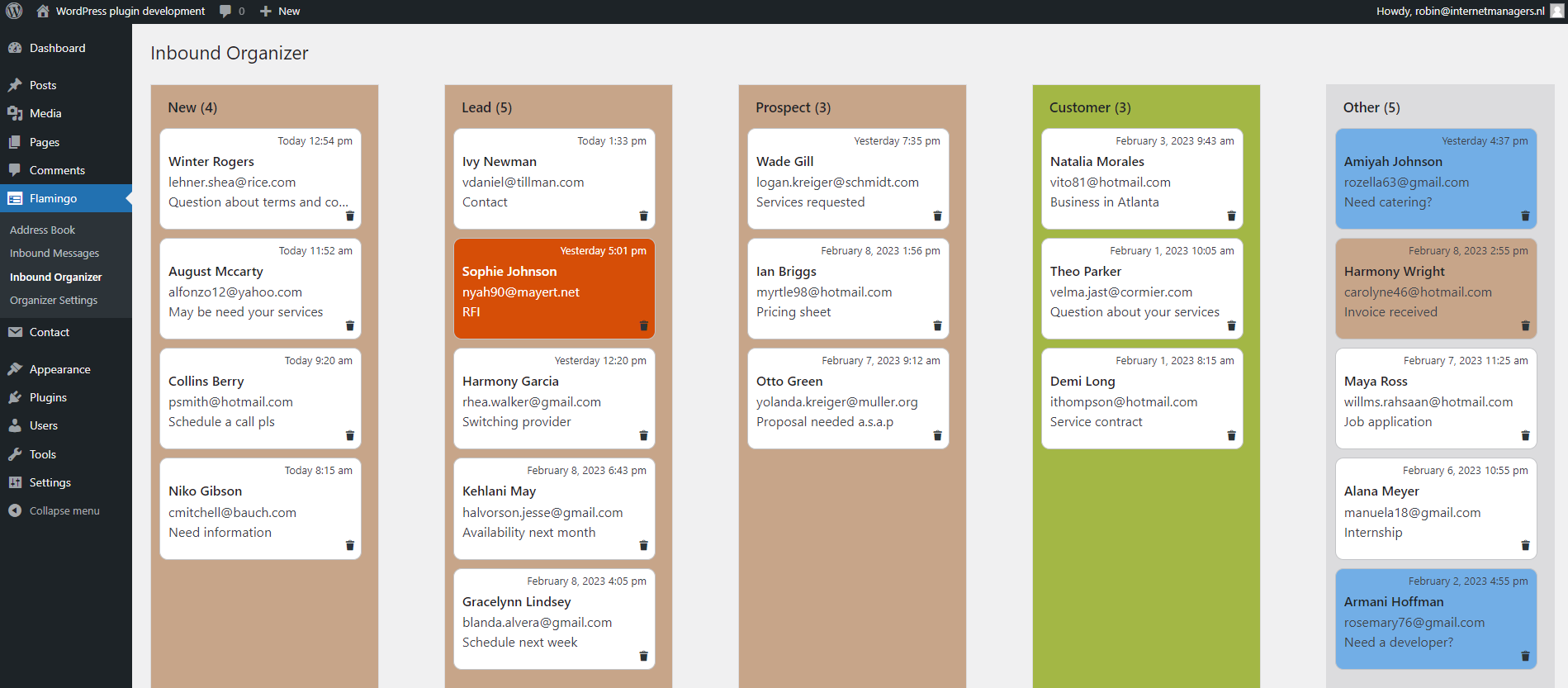
Inbound messages from Contact Form 7 are organized on a board with 2 to 5 columns to track message processing. Depends on CF7 and Flamingo.
| Author: | De Internet Managers (profile at wordpress.org) |
| WordPress version required: | 6.0 |
| WordPress version tested: | 6.7.1 |
| Plugin version: | 1.0.2 |
| Added to WordPress repository: | 17-02-2023 |
| Last updated: | 24-01-2025 |
| Rating, %: | 0 |
| Rated by: | 0 |
| Plugin URI: | https://wordpress.org/plugins/cf7-inbound-org... |
| Total downloads: | 1 964 |
| Active installs: | 50+ |
 Click to start download |
|
This plugin helps you to keep track of submitted CF7 forms that need to be processed by you or
your team. Use it for example to track leads, support tickets or contact requests.
It is built on top of Contact Form 7 and Flamingo (store form submissions).
To use the Inbound Organizer, users need to have the Flamingo permission to edit Inbound Messages.
The plugin adds a submenu in the WordPress Admin environment (Flamingo).
Messages are displayed visually in 2 to 5 columns representing the tracking status as you see fit.
1. Drag and drop a message to another column to reflect a status change.
1. Read message details by clicking on it.
1. Enrich messages by adding notes and colors.
1. Trash irrelevant ones.
Screenshots
FAQ


ChangeLog