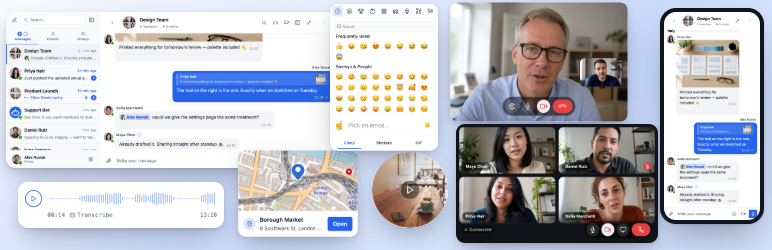
Fully featured replacement for standard BuddyPress Messages.
Better Messages is the most feature-rich realtime private messaging system for WordPress, with native integrations for BuddyPress, BuddyBoss Platform, Ultimate Member, PeepSo and any other WordPress powered websites.
Transform your WordPress site into a powerful communication platform with private messaging, chat rooms, video and audio calls, group video calls with recording, AI chat bots, and native mobile apps.
Whether you’re building a private or public community, social network, intranet, chat-rooms site, marketplace, membership site, dating platform, or creator economy site – Better Messages provides enterprise-level messaging features with an easy-to-use interface.
Try Better Messages:
For developers:
Popular use cases:
- Private communities — members-only platforms, cohorts and coaching circles, role-restricted messaging, AI Chat Bots, end-to-end encryption
- Public communities and social networks — BuddyPress, BuddyBoss, PeepSo and FluentCommunity sites, group conversations, chat rooms, mini chat widgets
- Intranet and corporate websites — team channels, access by WordPress role, file sharing, calls for remote teams
- Chat rooms websites — public and private topic rooms, guest access for unregistered visitors
- Dating and matchmaking sites — private 1-on-1 chat, photos and videos, calls, chat buttons on member directories
- Creator economy and paid DMs — paid messaging per message or call via GamiPress or MyCRED, mass messaging to fans
- Coaching and mentorship platforms — client-to-coach DMs, video calls, voice messages, file sharing
- Online stores (WooCommerce) — pre-sales chat on product pages, order support, inbox in My Account
- Marketplaces, classifieds and real estate — buyer-to-seller and agent chat on every listing, guest chat for visitors
- Online courses (LMS) — course chat rooms, instructor-to-student DMs
- Forums and Q&A communities — Private Message link on every reply
- Live events and webinars — event lobby chat rooms, guest access, group calls for AMAs
- Booking and appointment platforms — a conversation and a video call for every booking, with no account needed for customers
- Crypto and Web3 communities — token-gated chat rooms, AMA group calls, AI knowledge bots
“Better Messages” plugin is formerly called “BP Better Messages“.
Translate Better Messages to your language
Core Messaging Features:
- AJAX or WebSocket powered realtime conversations
- Private one-to-one conversations
- Group conversations with unlimited participants
- Chat Rooms with guest access support
- Guest sign-up form with captcha and sign-in by email
- Polls with anonymous votes, quizzes and an end time
- Messages for BuddyPress Groups, PeepSo Groups, Ultimate Member Groups, FluentCommunity Groups
- Subjects for conversations
- Search across all messages
- Mark messages as favorite
- Pin important messages to conversation top
- Pin favorite conversations to list top
- Filter conversations list to show only unread conversations
- Reply to specific messages
- Edit sent messages (with edit indicator)
- Delete messages
- Forward messages to other conversations
- Mark conversations as unread
- Mute conversation notifications, for good or for a set time
- Message draft autosave with recovery
AI & Automation:
- AI Chat Bots powered by OpenAI, Anthropic (Claude) and Google Gemini
- AI Chat Bots in group conversations with mention-based responses
- Conversation summarization and scheduled digests with AI
- Token usage and cost tracking, with a price list of the models kept up to date from WordPlus Cloud
- Voice message transcription powered by Better Messages Cloud AI or OpenAI
- Web Search capability for AI bots
- File Search tool for AI bots
- Image generation with AI
- PDF file support for AI conversations
Media & Content:
- File sharing with resumable uploads and ability to protect files from direct access (images, videos, documents)
- Cloud Storage for attachments in Cloudflare R2, Bunny.net Storage, Amazon S3 or any S3-compatible service, with files uploaded straight from the browser
- Upload limits for each type of file
- Image and video optimization in the browser: format conversion, quality control, metadata stripping
- Photo cropping and editing before sending
- Location messages with a map picker and nearby place suggestions
- Voice messages and video messages (available as addon)
- Embedded links with thumbnails and descriptions
- oEmbed support for YouTube, Vimeo, Spotify, SoundCloud, Flickr and 20+ services
- Emoji selector
- Built-in sticker packs with role-based access and per-locale support
- GIF integration with GIPHY and Klipy providers
- Inline sticker suggestions while typing
- Markdown text formatting support
Notifications:
- Email notifications for unread messages (customizable templates)
- Notification levels for group conversations and chat rooms: All messages, Mentions and replies, or Nothing, chosen by each member
- Unsubscribe link support in emails
- Sound notifications for new messages
- On-site toast notifications anywhere on your website
Moderation & Security:
- AI Content Moderation by Better Messages Moderation AI (included with the WebSocket license, no API keys) or the free OpenAI Moderation API
- Custom moderation rules in plain text, and conversation context awareness that catches patterns split across messages
- “Flag Only” (recommended) or “Hold for Review” moderation actions
- Pre-Moderated Messages – review messages before delivery
- Report messages feature
- Bad words filter with customizable blacklist
- Spam Protection and message requests: protection levels, limits for new accounts and guests, and a Review tab for moderators
- Block user feature
- Role-based access control
- User whitelist/blacklist for moderation
- Site moderators: roles that open the Administration page, with a flag in the messenger while reports or held messages wait
- Chat room moderators who mute, ban and remove members, with bans that say until when and system messages that can name the moderator
Engagement Features:
- Reactions to messages
- Mentions (@username), and @all to mention everyone in a group conversation or chat room
- Mass messaging from WP Admin with scheduling, file attachments, and background processing
- Suggested conversations for new users
Mini Widgets:
- Embed conversation entry points anywhere on your site without using shortcodes
- Five widgets: Friends, Groups, Users, AI Bots, Chat Rooms
- Two display styles: Classic Bar or Floating Bubble (with chat heads)
- Three placement surfaces: bottom bar, side panel, mobile tab bar
- Per-widget icon picker, search box, role restrictions, and “Hide Tab When Empty” toggle
- Users widget with three display modes (all / by role / hand-picked) and sorting by last activity or registration date
- Customizable order of tabs in mini widgets, side panel and mobile view
Customization:
- Modern, fully customizable design
- Appearance tab — repaint every part of the messenger, reshape its corners and spacing and tune dark mode, with a live preview
- Custom tabs on the widget bar, the side panel and the mobile tab bar: a link, a page or shortcode content, and new names for the built-in tabs
- Custom notification sounds
- RTL layout support
- White label solution
- Fully translatable
- Auto-delete old messages option
Setup and help:
- Get started page that sets up the Messages page, chat with visitors, a chat room on its own page and the plugins on your site, one click each
- Better Messages Assistant on the Support page, an AI assistant that answers from the documentation and your settings and prepares setting changes for you to review, free version included
Privacy & GDPR:
- Dedicated Privacy & GDPR settings page
- All message data stored on your own server
- AI moderation, when enabled, sends message content for analysis — Better Messages Cloud stores none of it
- WordPress personal data export and erasure support
- Suggested privacy policy text that follows the enabled features
- Self-hosted emoji images option — no external CDN requests
- Privacy-friendly video embeds — YouTube, Vimeo load only after user clicks
- No analytics or tracking scripts, and no cookies except for sign-in by an emailed link or from the mobile app
- Privacy & GDPR documentation
This is not a complete list of features — new ones come with every release.
Compatible plugins & themes — 40+ native integrations:
Better Messages works on any WordPress site out of the box, and plugs straight into the plugins below, with their members, groups, courses, listings and bookings.
Community & Membership Platforms — replaces the built-in messenger and inherits members, profiles, friends, and groups:
Learning Management Systems (LMS) — course chat rooms, instructor messaging, and student-to-student conversations:
E-commerce — WooCommerce — pre-sales and order support chat for online stores:
- WooCommerce — Contact buttons on product, cart, checkout and order pages that post the cart or the order into the conversation as a card, product links shown as product cards, and the inbox inside My Account. HPOS-compatible, works with guest checkout, in both the free and WebSocket versions.
Marketplaces & Multi-Vendor — buyer-to-vendor chat on top of WooCommerce, with per-vendor opt-in and contact buttons on vendor stores, product pages, and order details:
Listings, Directories & Classifieds — contact buttons on every listing, with per-listing threads:
Bookings & Appointments — a conversation for every booking:
Real Estate Themes — agent and inquiry messaging on property listings:
Forums — Private Message link on every reply:
Gamification, Points & Paid Access — charge per message or call with per-role pricing and balance display:
Automation & Page Builders:
Push & PWA:
Multilingual sites — the messenger follows the language of the page:
Live streaming (WebSocket version):
- Live Stream — a host streams from the browser or OBS into a chat room, which is the chat of the stream
Universal Shortcode Builder — add chat to anything else:
The Shortcode Builder at WP Admin → Better Messages → Shortcodes adds a Live Chat Button to any custom post type, listing or profile without writing PHP, in Gutenberg, Elementor, Bricks, Divi or a theme template. Every post gets a conversation of its own.
Full list of integrations
Report any incompatibility or request an integration — it helps improve Better Messages!
WebSocket version:
The WebSocket version is a paid subscription from WordPlus Cloud, with a free trial.
It connects your site and its members through dedicated realtime servers. Messages stay in your database: the servers pass them on encrypted and keep only the last few minutes of each conversation, also encrypted, so pages reload and reconnect at once.
Performance & Reliability:
- Significantly reduces the load on your server
- Instant message delivery in realtime, up to 200x faster than AJAX
- Works with any hosting including shared hosting
- No limits on concurrent connections or monthly active users
Video & Audio Calls:
- HD one-to-one video and audio calls
- Group video and group audio calls with no limit on people in a call: each site includes 32 people on video or 50 on audio at once, plus 5,000 WordPlus Cloud credits every month for more
- Screen sharing in one-to-one and group calls
- Call recording of group calls, with a transcript and captions
- Background blur, virtual backgrounds and AI Noise Removal
- Device settings with a camera preview and microphone and speaker tests
- Host Controls: Mute Everyone, Lock Room, Broadcast Mode, End for Everyone, Spotlight for Everyone, and Remove and Ban from Calls
- Raised hands, Participants, Auto, Speaker and Tiled layouts, picture in picture and keyboard shortcuts
- Optional end-to-end encryption of group calls
- Group call alerts by push, email and pop-up when a call starts
- Video calls for bookings
Mobile Apps:
- iOS and Android apps under your own name and developer accounts, built from WP Admin
- Push notifications for messages and calls, and VoIP notifications for incoming calls
- Native call screens for one-to-one and group calls
- Website sign-in through your site’s login page, with its two-factor authentication and login plugins
- App lock with Face ID, Touch ID or the fingerprint
- Links that open the app, signed-in devices with sign-out, and Delete Account
- A login screen in your brand, with a logo for dark mode
Realtime Features:
- Messages Delivery Status (sent, delivered, seen)
- Typing, voice recording and file uploading activity indicators
- Online/Offline presence indicator
- User statuses (Online, Away, Do Not Disturb)
- Invisible mode: chosen roles can appear offline
- Mini Chats – chat windows anywhere on your site
- Mini Conversations widget – list and continue recent threads from any page
- Online-only filter and online-first ordering for the Users mini widget
Better Messages Cloud AI:
- Automatic message translation in private and group conversations — 53 languages, auto-detection
- AI Content Moderation — 23 categories, custom rules, conversation context awareness
- Voice message transcription — 99+ languages with auto-detection
- No third-party API keys required — included with WebSocket license at no additional cost
Security & Encryption:
- Optional End-to-End Encryption (E2EE) — can be enabled at the website level and per conversation, messages and files encrypted in users’ browsers with AES-256-GCM, server never sees plaintext
- Optional encryption of stored data — messages, files and guest details encrypted in the database and the uploads folder with a key kept in wp-config.php
- Local browser encryption (AES256) for offline message storage
- Web Push Notifications (works even when the browser is closed)
- All data encrypted in transit, so we can’t read it on our servers
Support:
- Priority email support
- Regular updates and new features
WebSocket version pricing | Terms of Use
Translate the plugin to your language with Loco Translate or participate in plugin translation.
Screenshots
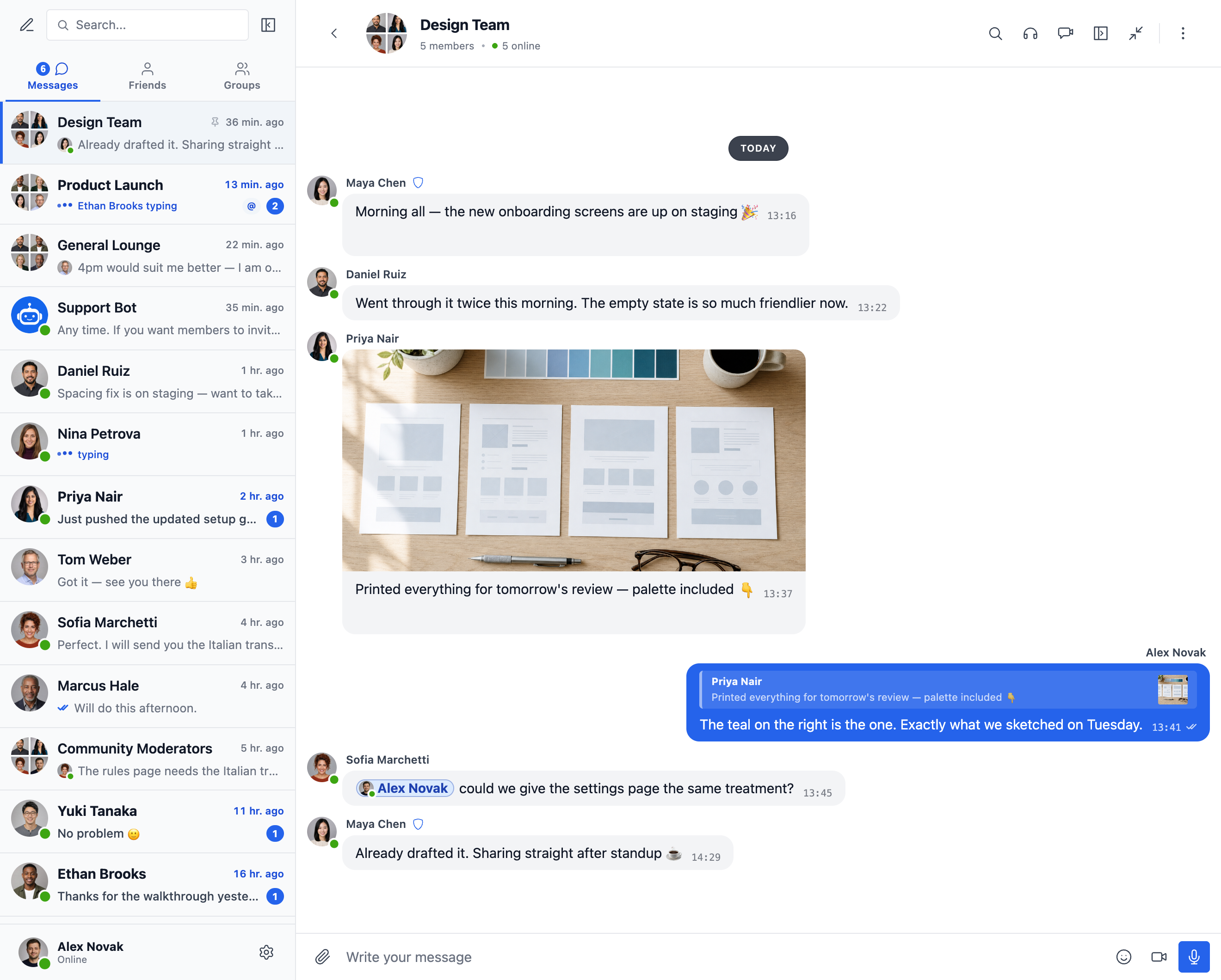
Group conversation with photo sharing, emoji reactions, replies and @mentions — alongside a conversations list with unread badges, pinned chats, online presence and live typing indicators
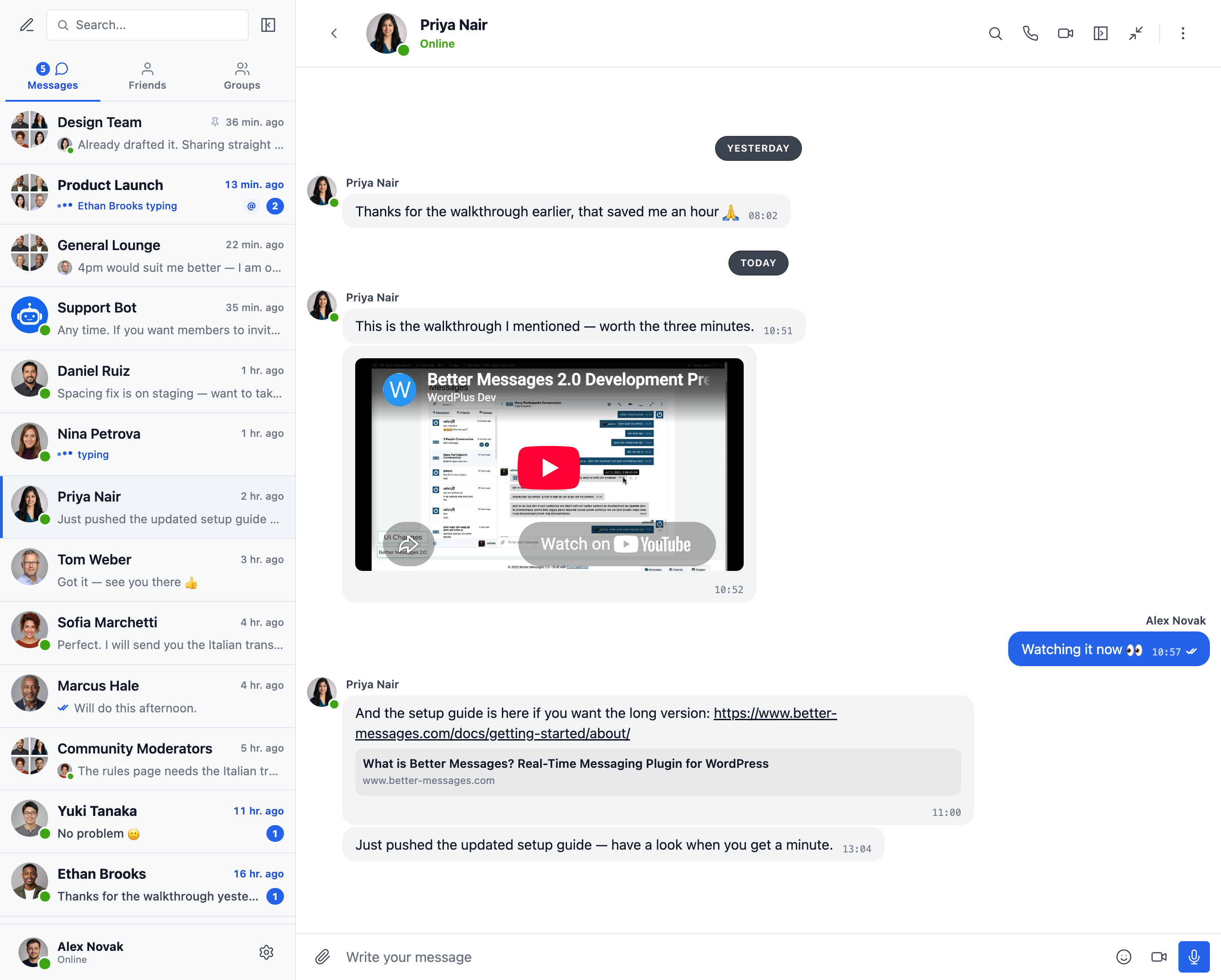
Embedded video and link previews — YouTube, Vimeo, Spotify, and 20+ oEmbed providers
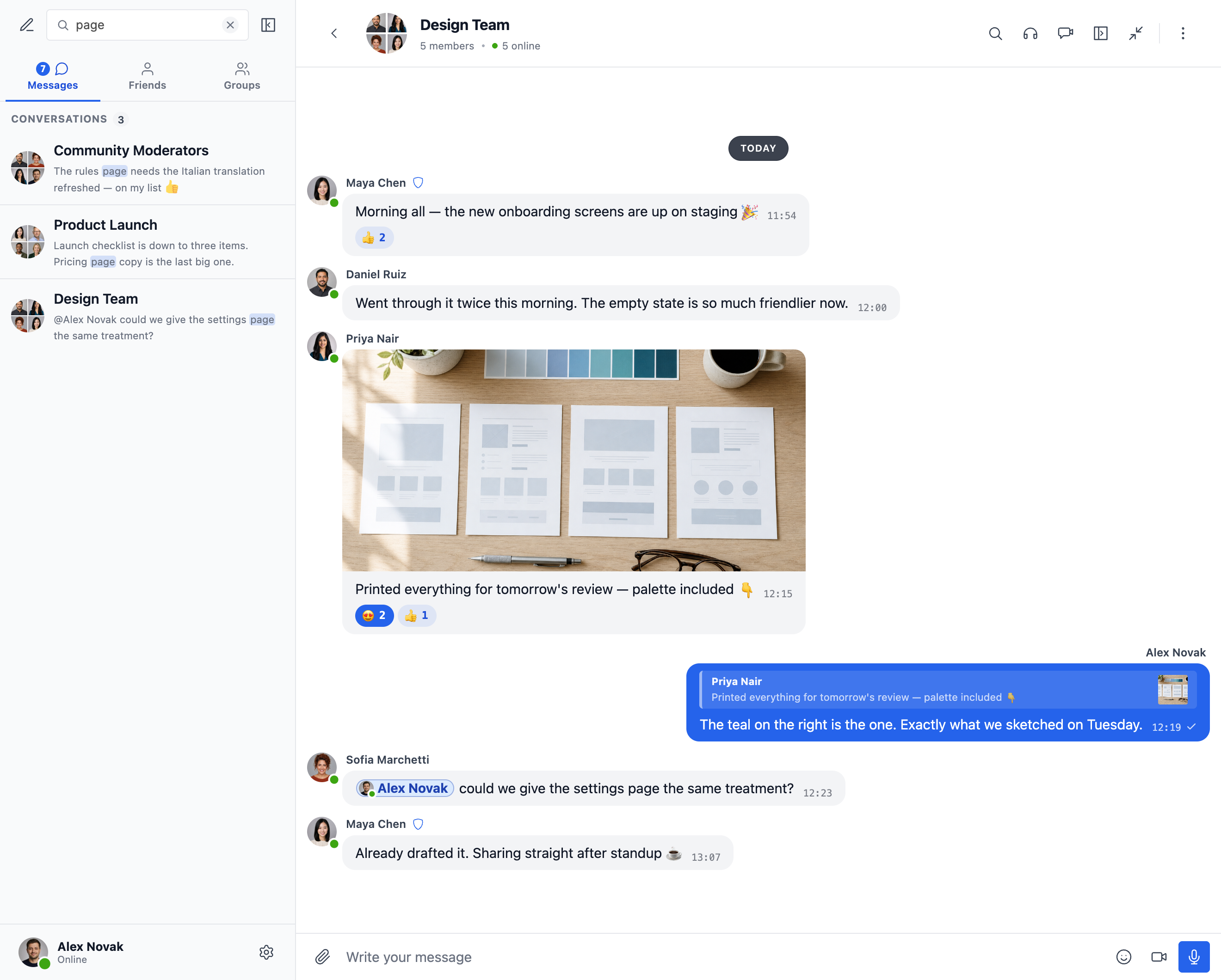
Full-text search across every message, with matches highlighted in the conversations list
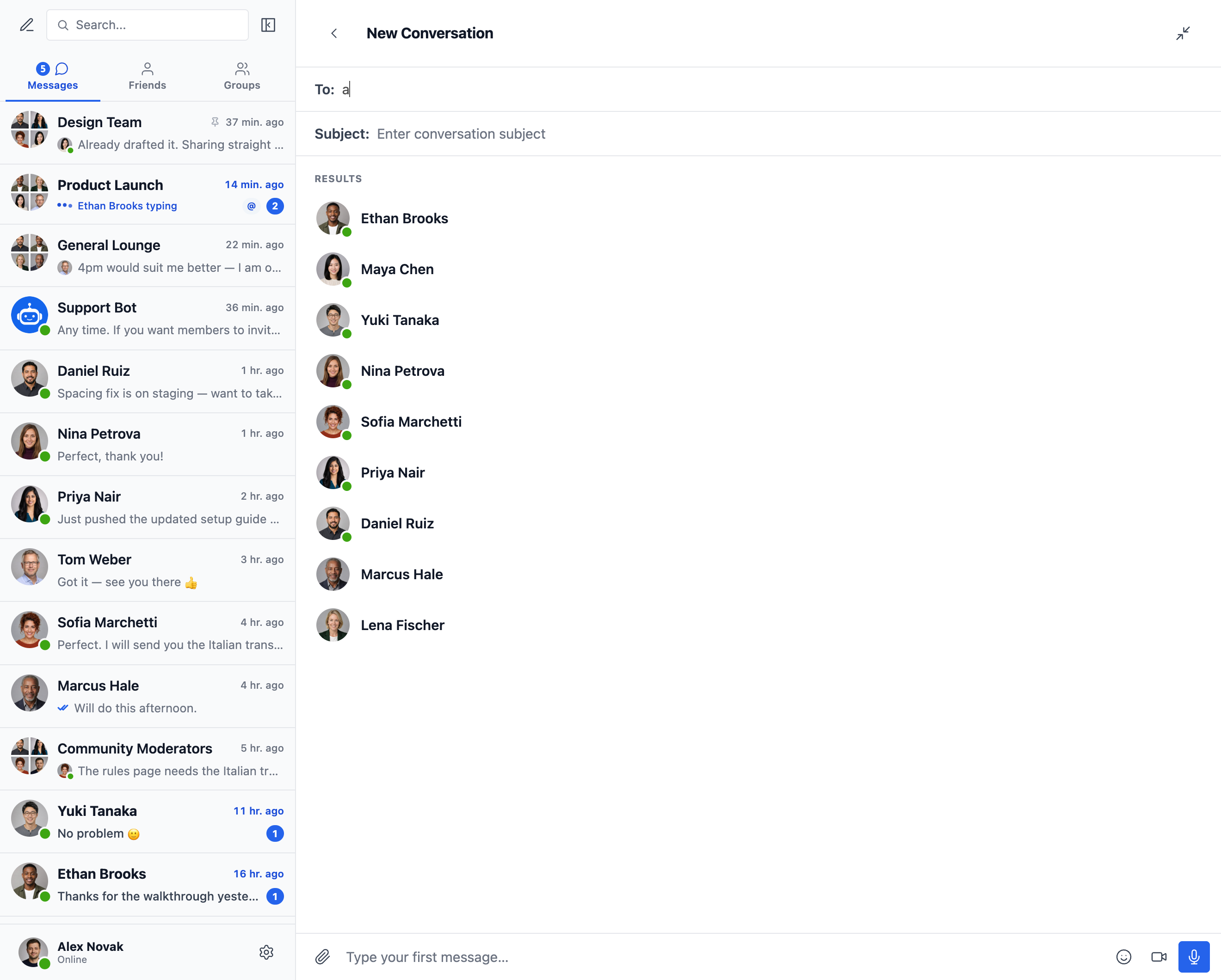
Start a new conversation — recipient search with live results and online status
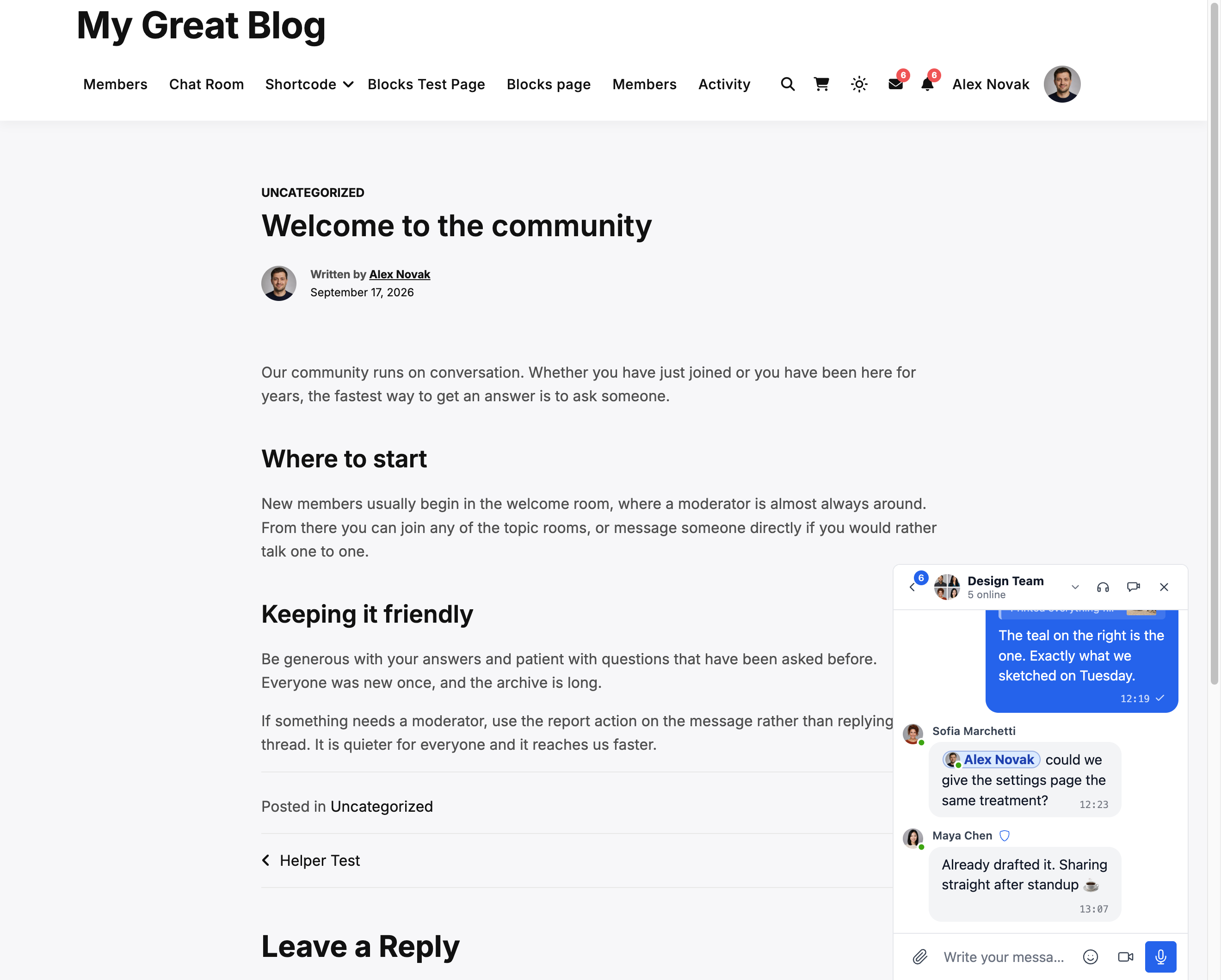
Mini chat window that follows members across your whole WordPress site
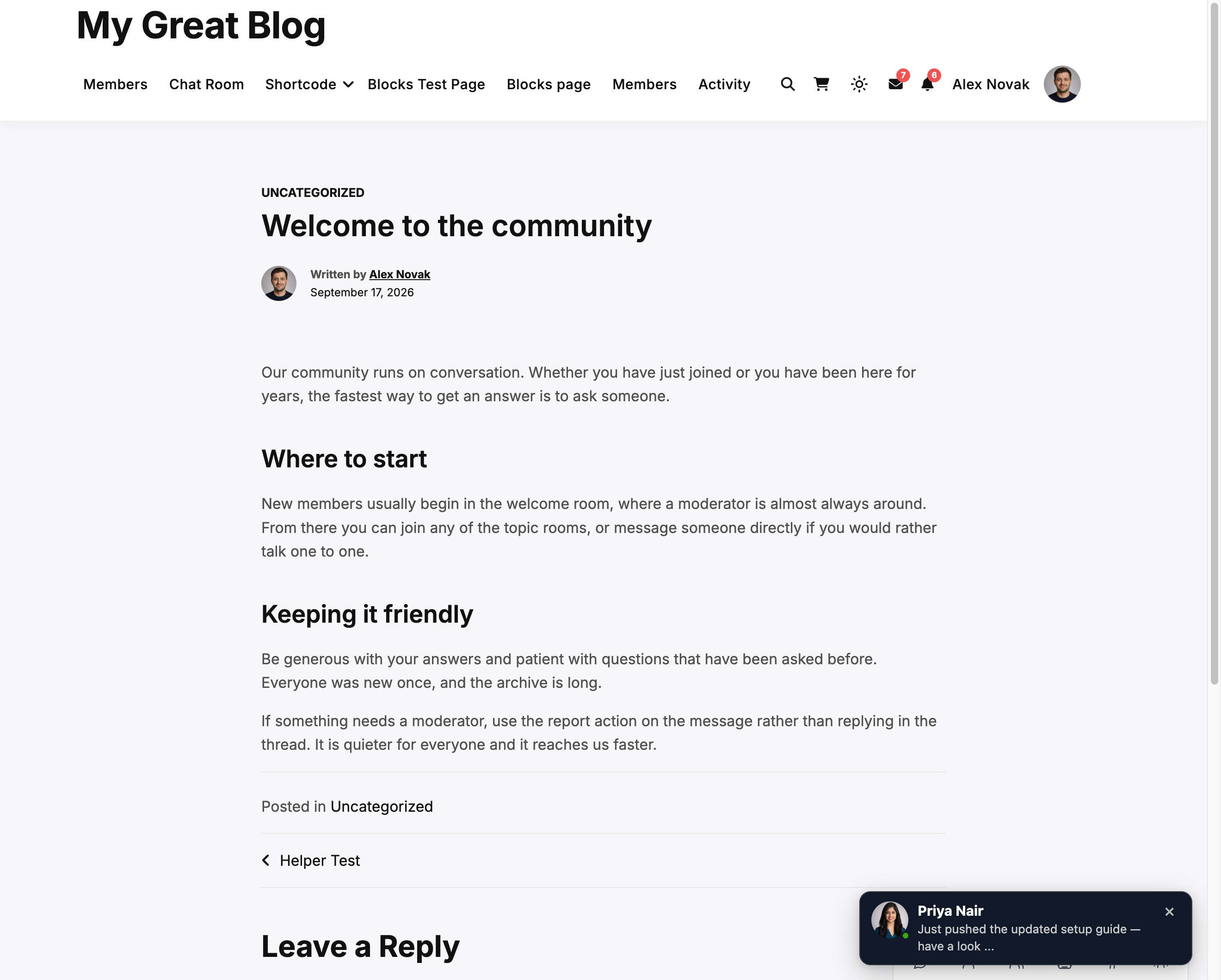
On-site toast notifications for new messages — visible anywhere on your WordPress site
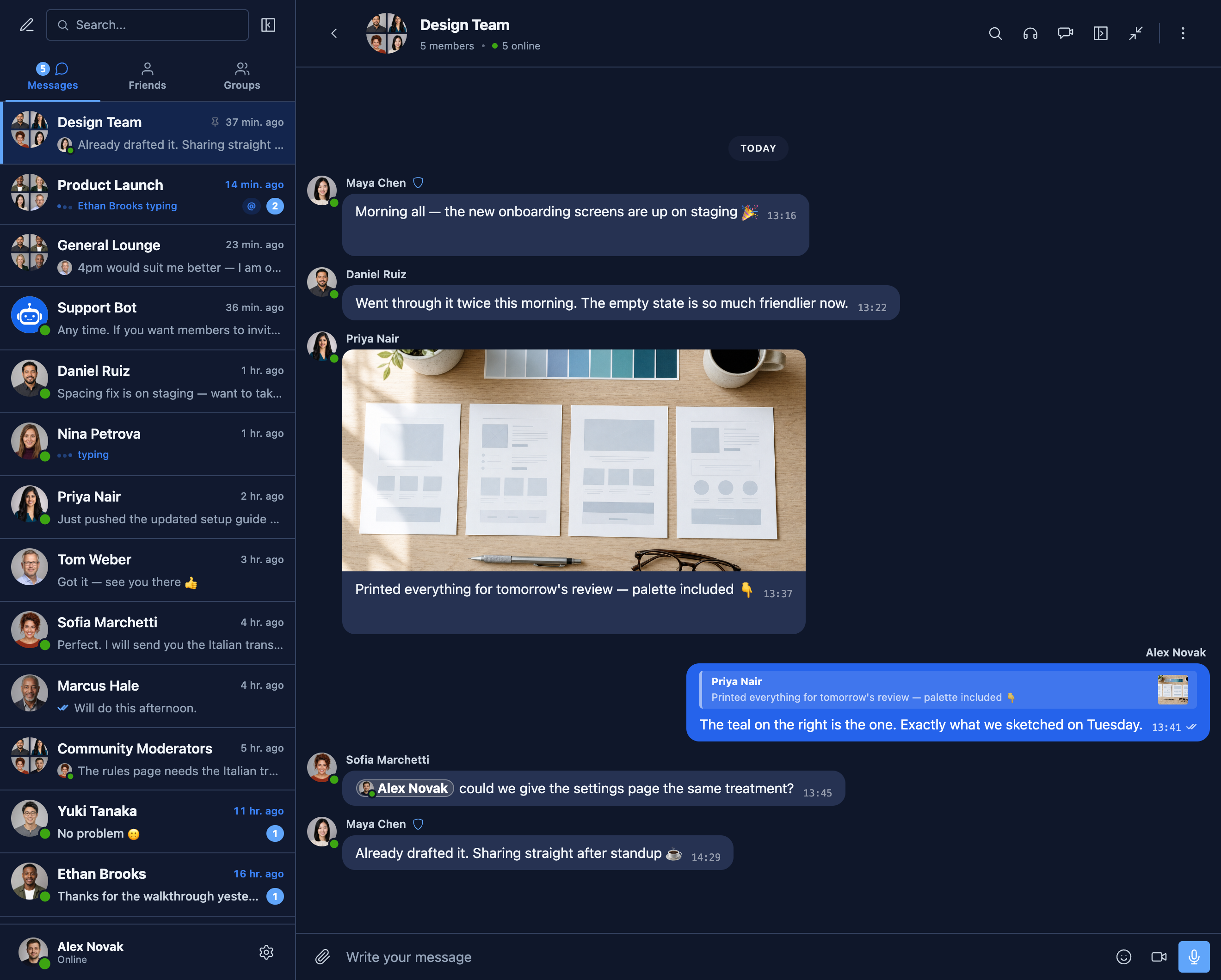
Dark mode across every surface of the messenger
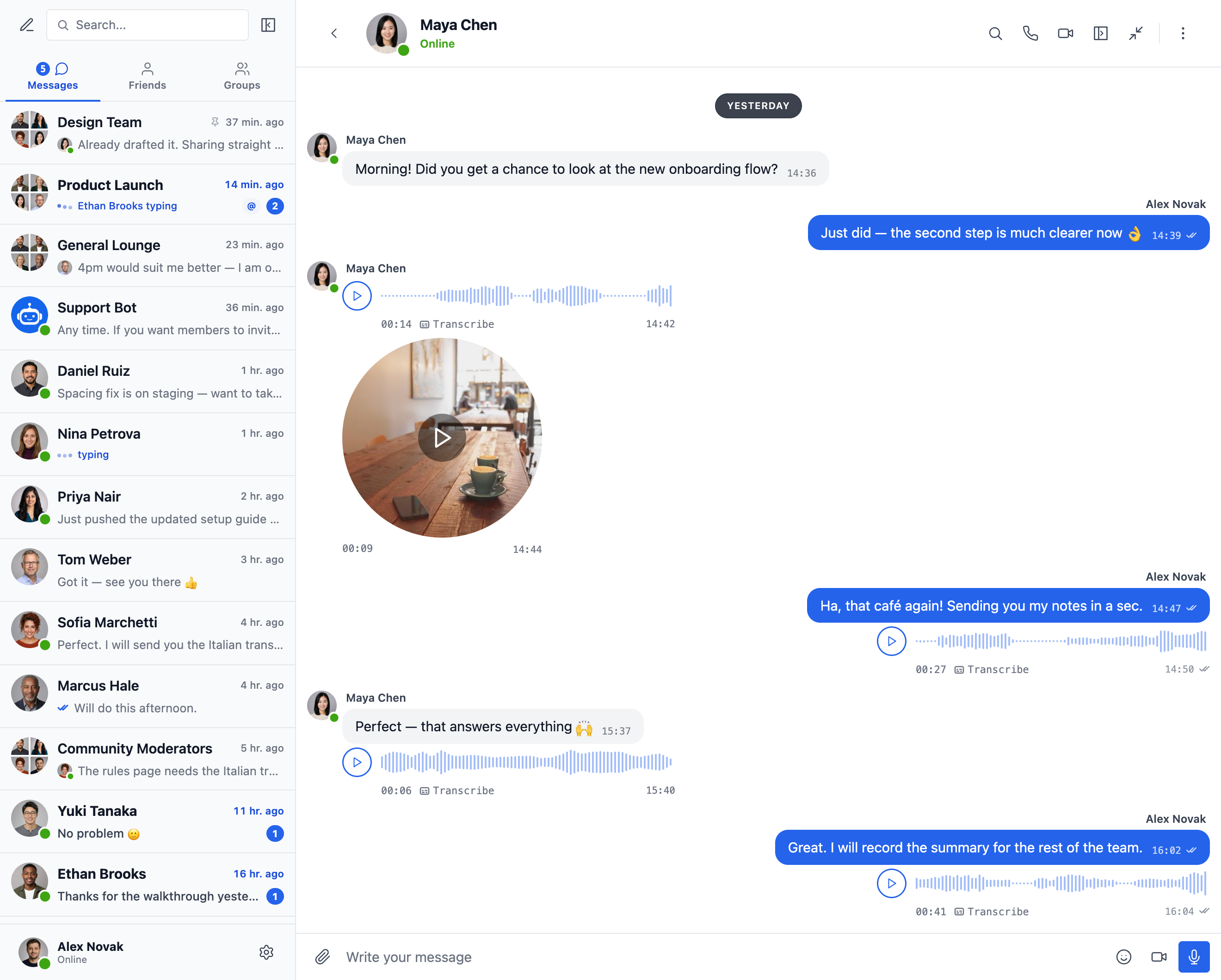
Voice and video messages, with one-tap transcription
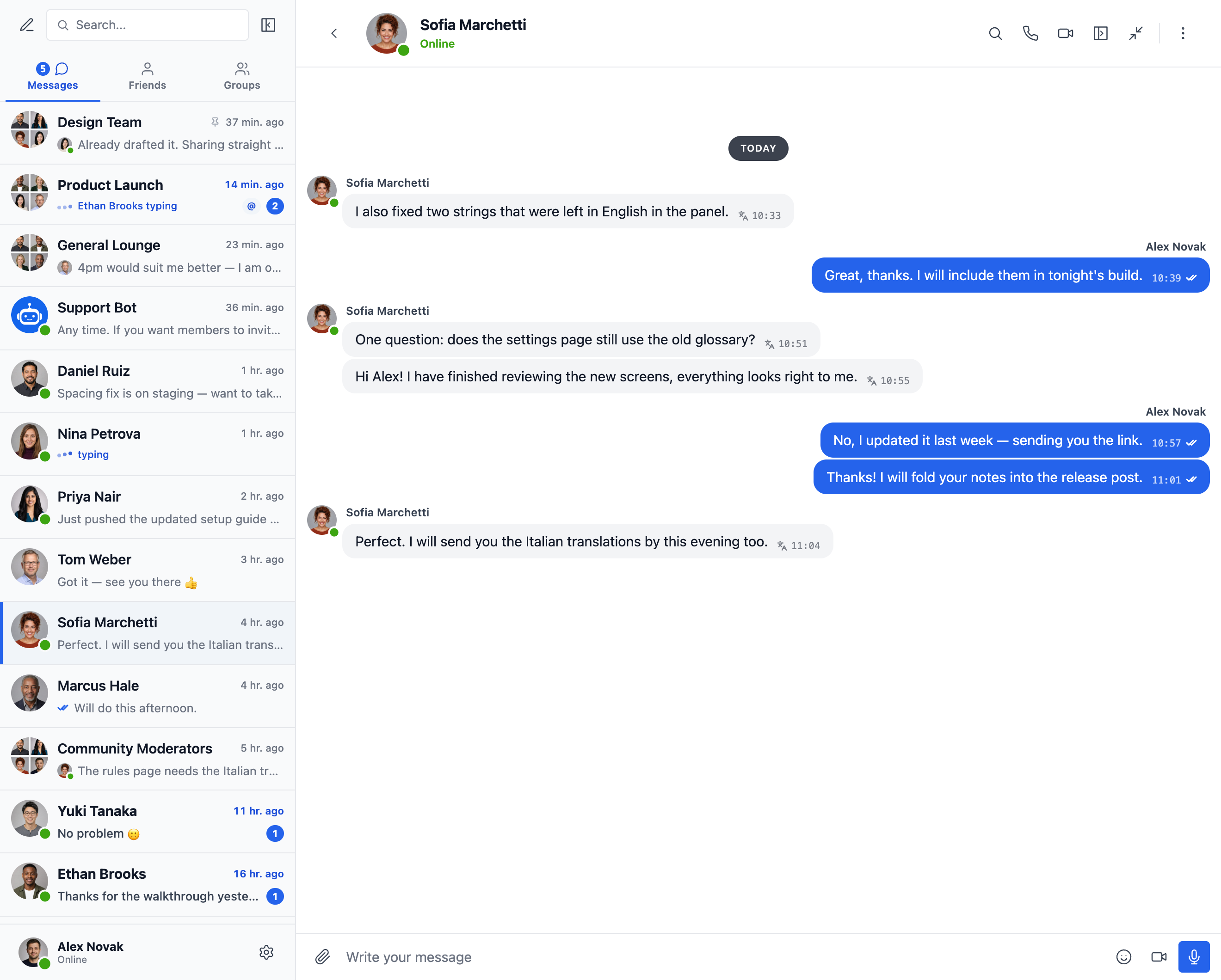
Read a conversation in your own language — messages arrive translated, with the original one tap away
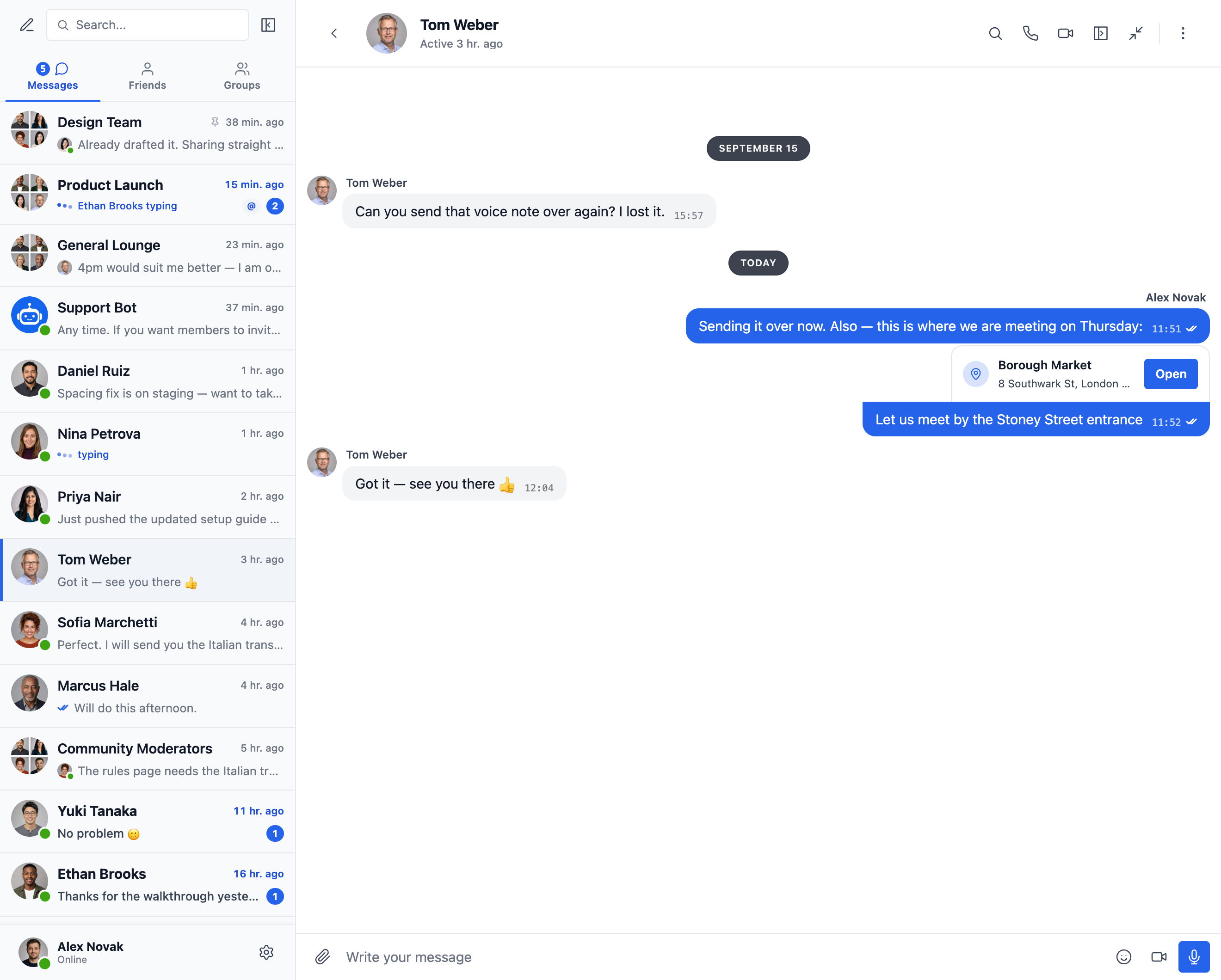
Share a location with a map picker and nearby place suggestions
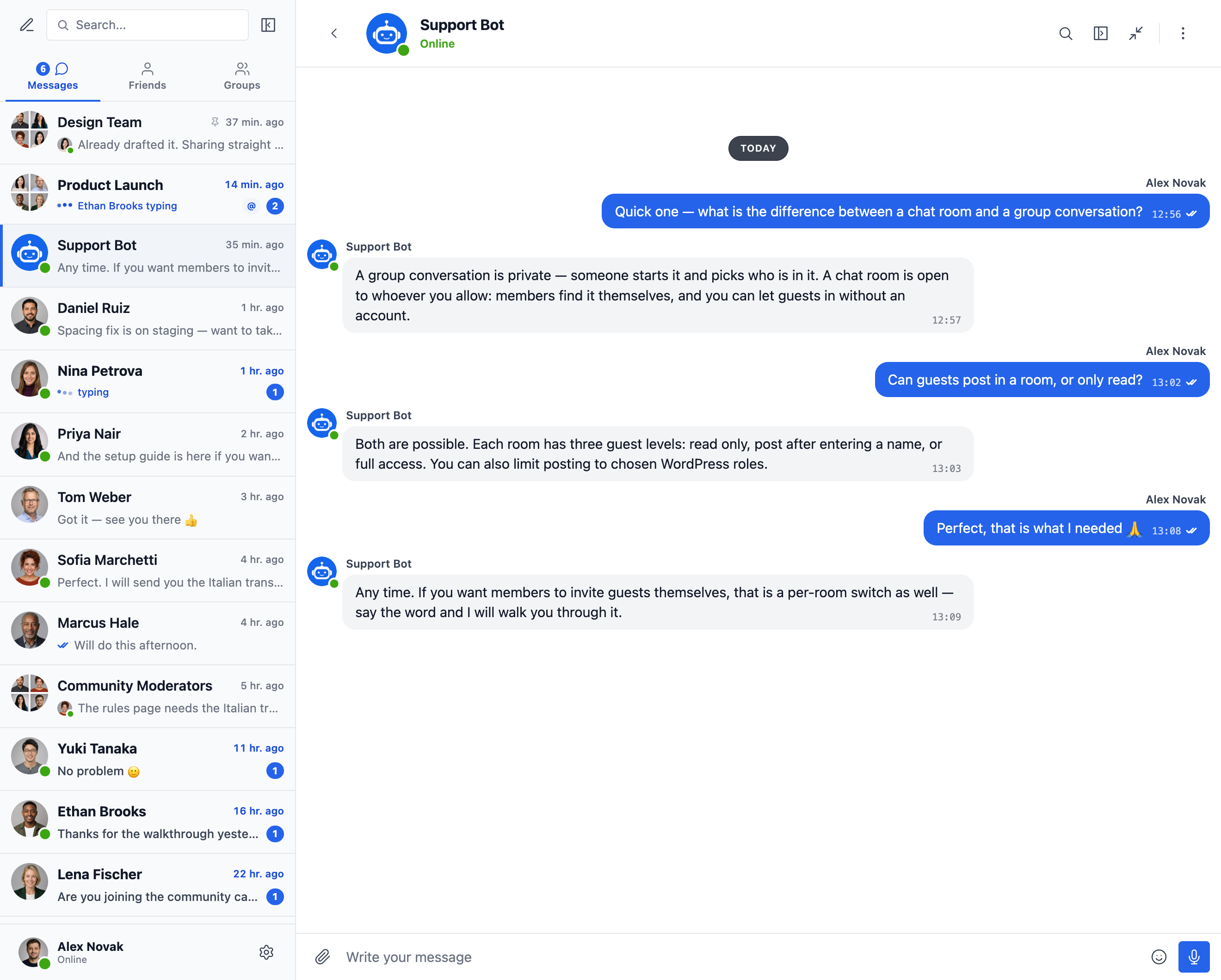
AI chat bots powered by OpenAI, Anthropic (Claude) and Google Gemini
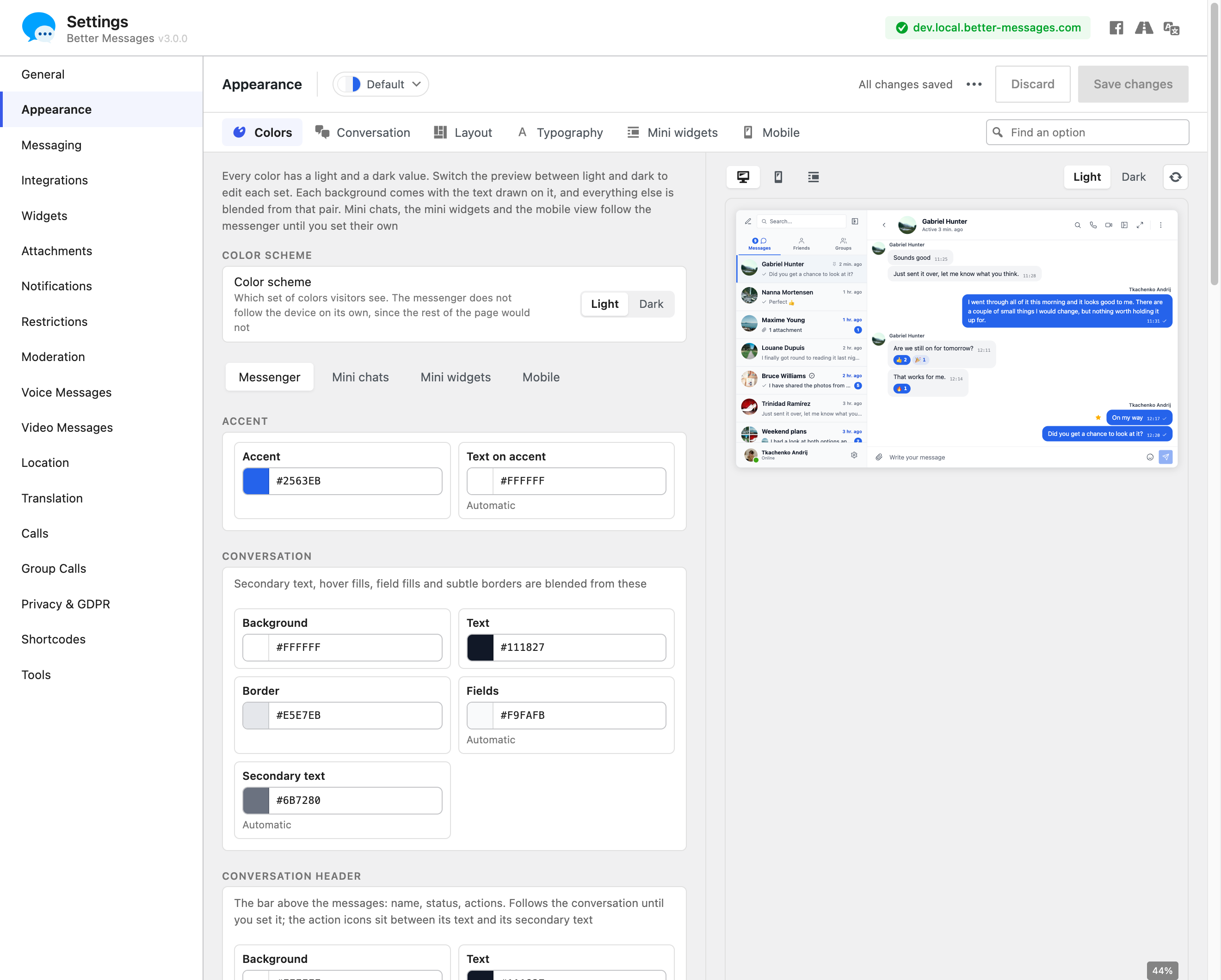
Appearance tab — repaint any part of the messenger and watch every change in the live preview
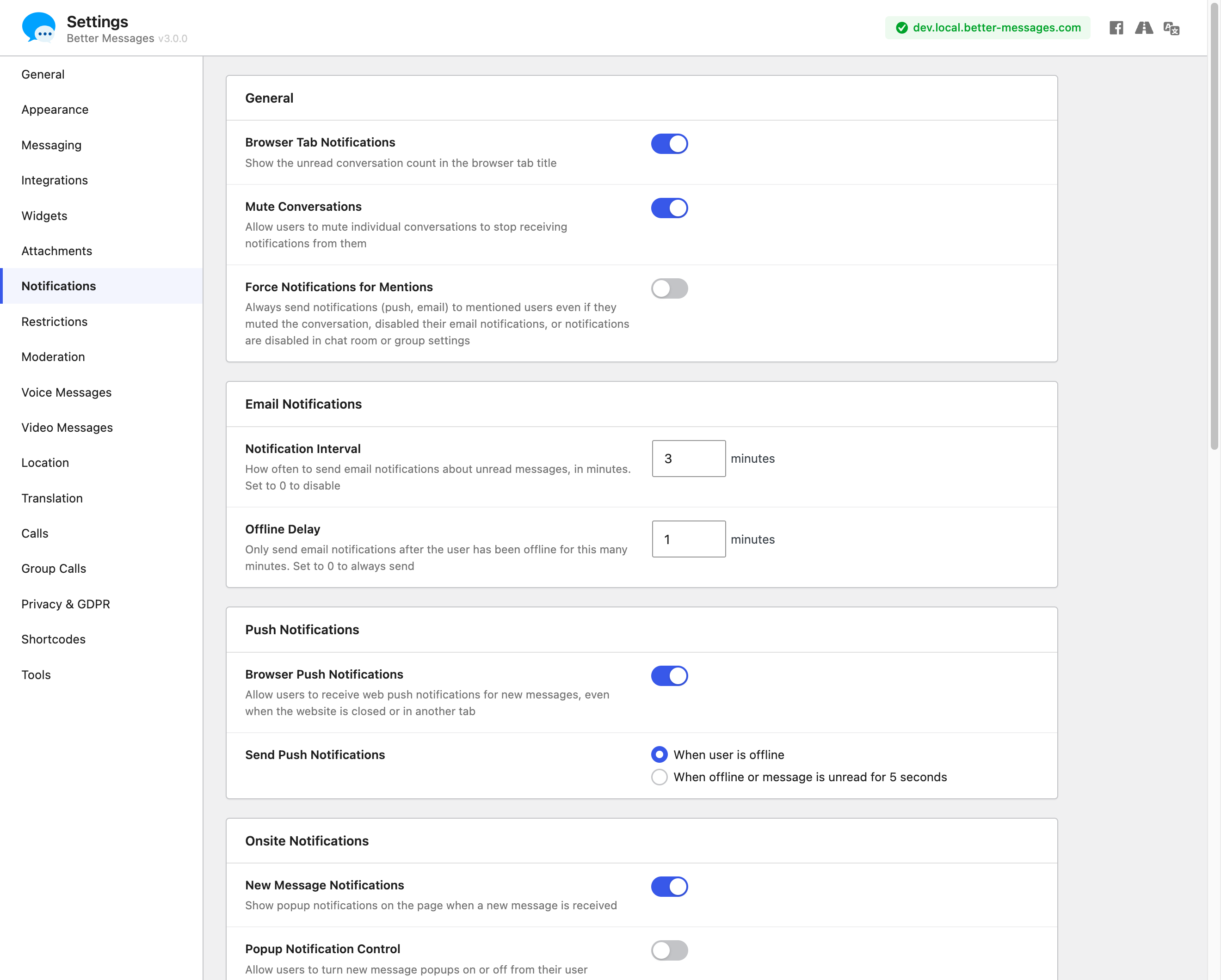
Settings — email, browser push and on-site notifications, and 18 more tabs of options
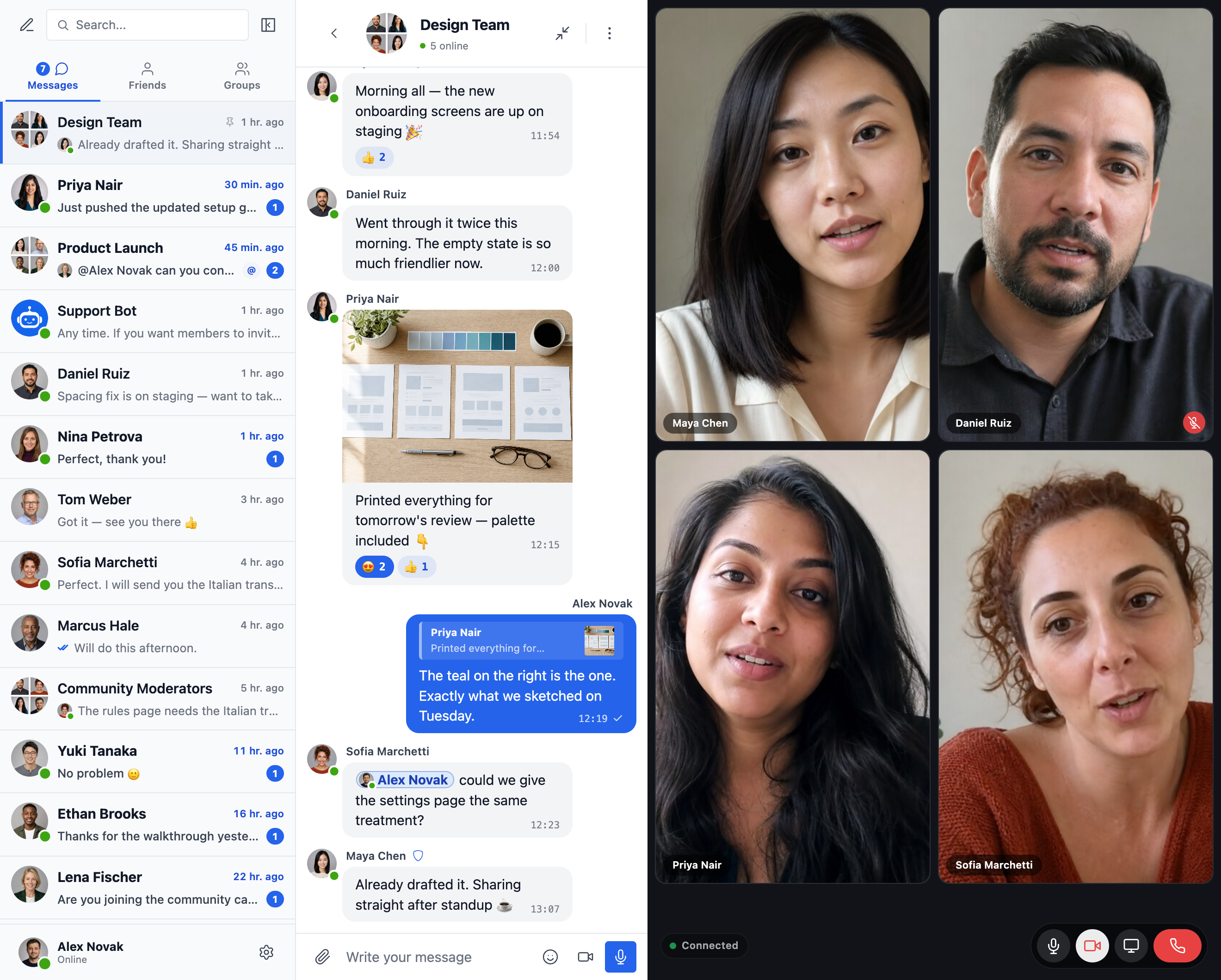
Group video calls right beside the conversation, with no fixed number of participants (WebSocket version)
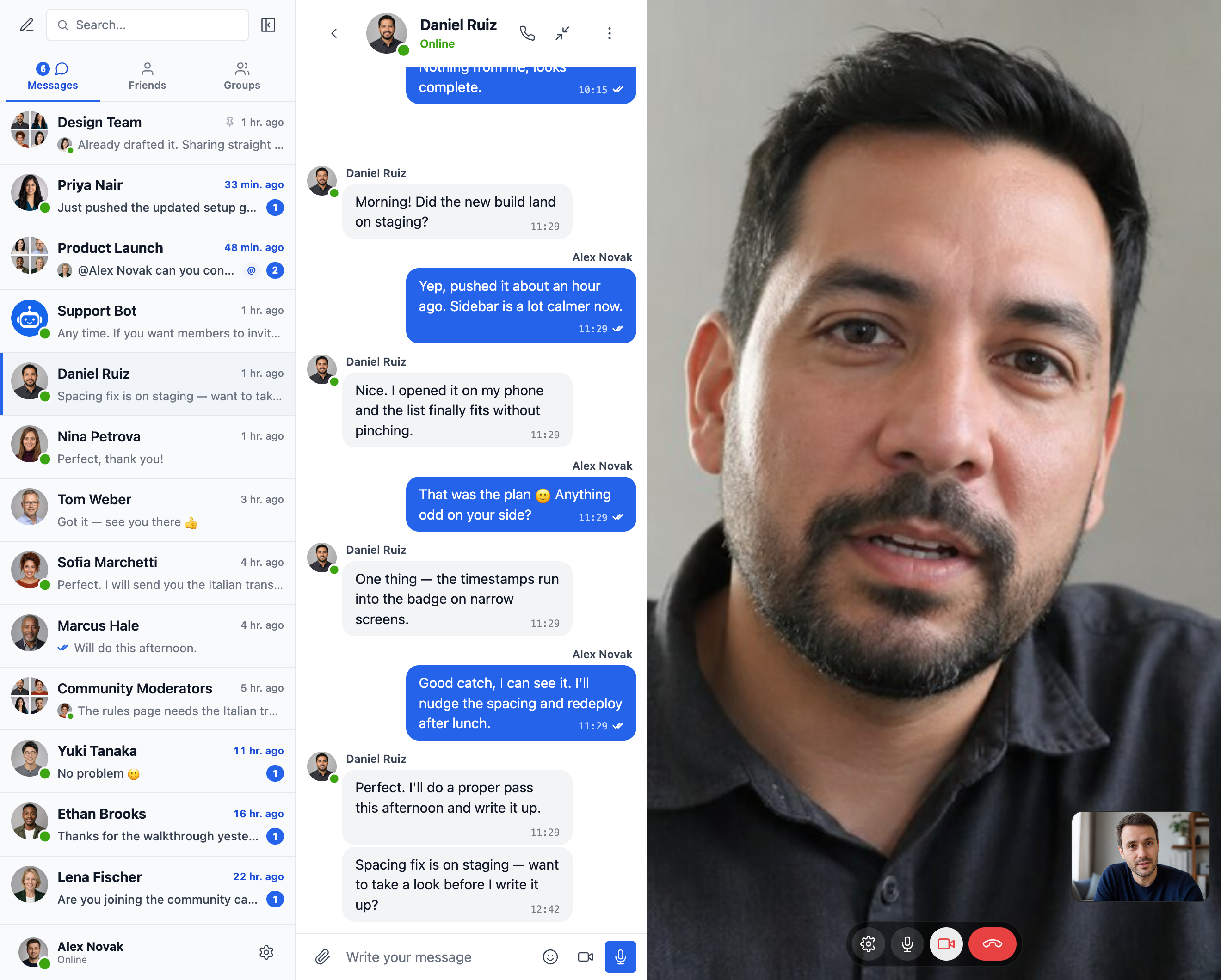
One-to-one HD video and audio calls from any conversation (WebSocket version)
Is Better Messages free?
Yes — install the free version from WordPress.org. It supports private and group conversations, chat rooms, file sharing, oEmbed previews, smart-batched email notifications, role-based access, guest chat, polls, spam protection, chat for bookings, and the standard messenger feature set. The WebSocket version is paid and unlocks instant delivery, one-on-one and group voice / video calls with backgrounds, noise removal and recording, Better Messages Cloud AI (content moderation, message translation and voice message transcription with no API key of your own), web push, end-to-end encryption, and your own iOS and Android apps.
Which WordPress plugins does Better Messages integrate with?
40+ native integrations across community platforms (BuddyPress, BuddyBoss Platform, PeepSo, Ultimate Member, FluentCommunity, SureDash, ProfileGrid, UsersWP, WP User Manager), LMS (LearnDash, LearnPress, Tutor LMS, MasterStudy LMS), e-commerce (WooCommerce — pre-sales and order support chat with contact buttons on product, cart, checkout, and order pages), multi-vendor marketplaces (Dokan, WCFM, WC Vendors, MultiVendorX), listings and directories (HivePress, Directorist, GeoDirectory, Classified Listing, Motors, WP Job Manager), bookings (Amelia, LatePoint, FluentBooking, Simply Schedule Appointments), real estate themes (Houzez, RealHomes), forums (wpForo, bbPress), gamification (GamiPress, MyCRED), automation (Uncanny Automator, AutomatorWP), page builders (Crocoblock JetEngine), push / PWA (FluentNotify, OneSignal, Progressify), and multilingual sites (GTranslate, Weglot). If your plugin isn’t listed, the built-in visual Shortcode Builder lets you add a Live Chat Button to any custom post type without writing PHP. See the full list of integrations.
Does it support group conversations?
Yes — first-class group chats with shared history, mentions, reactions, file uploads, replies, edit / delete / forward, and group voice / video calls (WebSocket version). Group chats can be auto-paired with BuddyPress / BuddyBoss / PeepSo / Ultimate Member / FluentCommunity groups, with members joining and leaving the chat in sync with the source community group.
Can unregistered visitors (guests) chat?
Yes — Guest Chat lets unregistered visitors join chat rooms, message vendors on marketplaces, ask questions on directory listings, chat about a booking, or chat with site support. Guests fill in a sign-up form that can ask for a name and an email and can be protected by a captcha, then participate as a guest user. A guest with a confirmed email signs in again on another device with a link sent to it, and a guest who registers later is asked to move the conversations into the account.
Does it support voice and video calls on WordPress?
Yes (WebSocket version) — one-on-one and group voice / video calls live inside the messenger thread, not as a separate Zoom / Whereby integration. Hosted media relay is included with the WebSocket license, no separate Twilio account, no Daily / Whereby subscription, no Zoom developer plan. There is no limit on people in a group call: each site includes 32 people on video or 50 on audio at once across its group calls, plus 5,000 WordPlus Cloud credits every month for more. Calls have device settings, background blur and virtual backgrounds, AI noise removal, screen sharing, host controls and picture in picture, and group calls can be recorded with a transcript.
Is Better Messages GDPR-compatible?
Yes. All message data is stored only in your WordPress database. The WebSocket cloud relay is blind to message content — it routes encrypted events and keeps only the last few minutes of each conversation, still encrypted, but cannot read or inspect what passes through. Better Messages also integrates with WordPress’s built-in Personal Data Export and Erasure tools. Call recordings, when an administrator turns them on, are kept on your site or in your own cloud storage. For sites with stricter data-sovereignty requirements (GDPR Article 9, HIPAA-adjacent, regulated-data workloads), a self-hosted plan is available — contact support.
Does it have AI features?
Yes. AI Chat Bots (OpenAI, Anthropic Claude, Google Gemini) work in the free version with your own provider API key. They act as full participants in any thread, with custom system prompts and per-bot points charging via GamiPress / MyCRED. Better Messages Cloud AI (WebSocket version) provides AI Content Moderation (23+ categories including spam, scam, doxxing, contact sharing), AI Message Translation (53 languages with auto-detection), and Voice Message Transcription (99+ languages) — all included with the WebSocket license, no third-party API key required.
Does it have native iOS and Android apps?
Yes (WebSocket version) — Better Messages makes native iOS and Android apps for your site, on Capacitor, with push notifications, real-time delivery, native voice / video call screens, website sign-in with your two-factor authentication, an app lock with Face ID or the fingerprint, and the messenger’s features. You build your branded app from WP Admin and publish it on the App Store / Play Store under your own developer accounts.
Can I translate the messenger interface to my language?
Yes — Better Messages is fully translatable through standard WordPress translation tools (Loco Translate, WPML, Polylang) using the bp-better-messages text domain. Ships with 30+ community translations. Contribute or improve a translation at translate.wordpress.org.
Does it support end-to-end encryption?
Yes (WebSocket version). End-to-end encryption is enabled per thread — messages and file attachments are encrypted in the sender’s browser with AES-256-GCM before transmission, stay encrypted at rest in the database, and decrypt only in the recipient’s browser. The server stores ciphertext only, no admin, host engineer, or attacker with database access can read the message content of an E2E thread.
Does it protect against spam?
Yes, in the free version too. Spam Protection under Settings → Moderation has a level (Monitor only, Balanced, Strict or Custom) that flags, holds for a moderator or refuses what accounts behaving like spammers send, with tighter limits for new accounts and guests. Email addresses, phone numbers and messenger usernames in messages can be hidden, held or refused, first messages from strangers can wait as message requests until the member accepts them, and the Review tab under Administration gathers the reported, flagged and held messages and the accounts under review, with Mark as spammer. A site updated from an older version starts at Monitor only, which changes nothing and shows what would have been stopped.
Does it work with booking plugins?
Yes. Each booking of Amelia, LatePoint, FluentBooking and Simply Schedule Appointments gets a conversation between the customer and the staff member, opened from the Message button or from the link in the booking emails, with a card that shows the service, the time and the status and follows the booking when it is moved or cancelled. A customer who booked without an account chats as a guest. In the WebSocket version the video call of a booking opens for the customer shortly before the appointment.
Does it have polls?
Yes, in the free version too. Members make a poll from the attachment menu of a conversation and everyone votes on its card. A poll can be anonymous, allow multiple answers, be a quiz with a right answer, or end at a time you choose. Settings → Polls chooses the kinds of conversations and the roles that can make polls.
Can it encrypt what is stored in my database?
Yes (WebSocket version). Settings → Messaging → Stored Data Encryption creates a key in wp-config.php and keeps messages, conversation names, files, and the email and IP address of guests encrypted in the database and the uploads folder, so a copy of the database cannot be read without the key. It is separate from end-to-end encryption: the site still shows the messages to moderators, and search still finds whole words.
Where can I find detailed documentation?
The complete documentation, integration guides, REST API reference, hooks reference, video tutorials, and 80+ blog posts are at www.better-messages.com.
Which external services does Better Messages connect to?
The plugin connects to WordPlus Cloud, the plugin author’s service that sells and licenses the WebSocket version, only when an administrator uses one of these features:
- Plans, prices and reviews. When an administrator opens Better Messages → Upgrade, the site asks WordPlus Cloud (api.wordplus.cloud) for the current plans, prices and customer reviews, and keeps the answer for an hour. No personal data is sent, only the request itself, which WordPress makes with the site’s address. The administrator’s browser then loads the reviews’ photos from WordPlus Cloud.
- Contact form. When an administrator sends a message from Better Messages → Support, the plugin sends what they wrote, their name and email address, any files they attach, any access details they choose to share, and the site’s address and technical details (the WordPress, PHP, database and web server versions, the theme and the active plugins), which the form shows before sending.
- Better Messages Assistant, only after you press Start. The AI assistant on Better Messages → Support sends nothing until an administrator presses Start under the list of what it sends. Start registers the site with WordPlus Cloud (its address, the plugin version and whether it is the free or the WebSocket version). Then each question goes to WordPlus Cloud’s assistant service (rest.wordplus.cloud) with the site’s address, the plugin’s settings (without keys or passwords), the plugin, WordPress, PHP and theme versions, the active plugins and the administrator’s language, and the answer comes back to the page. Questions and answers are stored and read by the plugin’s team to improve the assistant. Visitors’ data is never sent. “Turn off the assistant” under the chat stops it, and the
wordplus_sdk_assistant_enabled filter hides it.
- Buying. Buying happens on the WordPlus Cloud website (www.wordplus.cloud), never inside WordPress. The Upgrade buttons open it with the site’s address. After paying, the plugin sends WordPlus Cloud the one-time code it came back with, the site’s address, the plugin version and a random identifier of the site, and gets the licence key and a link to download the WebSocket version, which the administrator uploads under Plugins. This plugin installs nothing itself.
- Licence check. Once a licence key is saved, the site sends the key, its address and the plugin version to WordPlus Cloud once a day to confirm the licence.
- Emoji and sticker downloads, only when an administrator asks. “Download emoji images to your server”, the emoji names in other languages and the sticker packs come from WordPlus Cloud’s CDN (cdn.wordplus.cloud), or from WordPlus Cloud (api.wordplus.cloud) when the CDN fails, and the sticker settings ask it for the list of packs when they open. The administrator’s browser loads the packs’ cover pictures from the same addresses. These requests send the plugin’s name and version, and WordPress adds the site’s address to every request it makes.
- Usage data, only if you opt in. After the plugin is first activated, it asks once whether to share usage data, and nothing is sent unless an administrator chooses Allow & Continue. Then the site sends the administrator’s name and email address (to tell them about security and feature updates), the site’s address, title, language and time zone, the WordPress, PHP and plugin versions and whether the plugin is active, and, unless switched off, which of the plugin’s features and settings are in use (on/off values, numbers and short setting values, never your content, addresses or keys, and the size of the site’s messaging only as a range) and the names and versions of its plugins and themes. With them goes how far the setup in Get started has come (which of its cards are done or dismissed), and when the free trial notice was shown and which of its buttons was clicked. It sends them once a day when something changed, and when the plugin is activated, deactivated or deleted. The newsletter is a separate choice, off unless switched on. Each choice can be changed, or the sharing stopped, from the Opt out link under the plugin on the Plugins screen. Opting out has WordPlus Cloud erase what was shared. A site that opted in through Freemius in an earlier version stays opted in, and its administrators are told once that its data goes to WordPlus Cloud now. Only the WebSocket version adds the features and settings in use to what such a site shares, unless switched off. The free version shares them only once an administrator switches them on. A site that skipped Freemius’s opt-in is not asked again.
- AI model prices, only when an administrator asks, or with a licence. The AI chat bots count what their answers cost by a price list of the AI models that comes with the plugin. Check for new prices in Settings → Integrations → AI Services asks WordPlus Cloud for a newer list, from its CDN (cdn.wordplus.cloud) or from WordPlus Cloud (api.wordplus.cloud) when the CDN fails, and a site with an active WebSocket licence asks once a week, after its licence check. The request sends the version of the WordPlus code in the plugin, and WordPress adds the address of the site to every request it makes. Only the list comes back, which the site reads as prices and nothing else.
- Deactivation feedback, only when you send it. When the plugin is deactivated, it may ask why. The answer is sent to WordPlus Cloud only if the administrator submits it, without their email or the site’s address unless they opted in to usage data and left “Anonymous feedback” unticked.
The WebSocket version, which WordPlus Cloud sells and which is not on WordPress.org, also connects to WordPlus Cloud for these:
- Realtime delivery and calls. Messages, typing, online statuses and call signals go through WordPlus Cloud’s realtime servers (ws.wordplus.cloud, rest.wordplus.cloud), encrypted with keys only the site gives out, and calls through its call servers (*.rtc.wordplus.cloud). Better Messages Cloud AI, where an administrator switches it on, sends the message or voice message it moderates, translates or transcribes, and keeps nothing. The licence status at the top of the settings shows the WordPlus Cloud credits of the site’s account, which group calls above the 32 people a site includes and call recordings use.
- Video effects, only when an administrator downloads them. Settings → Calls → Video Effects downloads the background effects and AI Noise Removal from WordPlus Cloud’s CDN (cdn.wordplus.cloud), or from WordPlus Cloud (api.wordplus.cloud) when the CDN fails, and reads its catalog of built-in backgrounds there, downloading the pictures an administrator picks. The administrator’s browser loads the catalog’s thumbnails from the same addresses. After an update of the plugin, a site that downloaded them gets the newer files the same way. Calls then load the effects and backgrounds from the site itself. WordPress adds the address of the site to every request it makes.
- Installing an add-on, only when asked for. If the buyer of the Voice Messages add-on asks for it on the WordPlus Cloud checkout page, WordPlus Cloud contacts the site, and the site downloads the add-on from WordPlus Cloud and installs it. Nothing is installed unless the buyer asks on that page.
- Call recording, only when an administrator turns it on. With Record Group Calls on, a moderator’s Record has WordPlus Cloud’s recorder join that group call: it receives the call’s sound, video and shared screens, with the names and profile pictures of the people in it, makes the recording and, unless switched off, its transcript, and puts the files into the site’s cloud storage, or keeps them until the site downloads them, for seven days at most. Each minute recorded takes a WordPlus Cloud credit.
WordPlus Cloud: terms of service, privacy policy.
Which other services can Better Messages use?
Besides WordPlus Cloud, the plugin uses these services, each as described:
- Emoji images (jsDelivr). Emoji show as Apple’s images by default, and until the site downloads them, browsers load the image sheet from jsDelivr (cdn.jsdelivr.net), which receives the visitor’s IP address. “Download emoji images to your server” in the emoji settings, or the native emoji set, stops it. jsDelivr: terms of service, privacy policy.
- Video and media links (YouTube, Vimeo and other oEmbed providers). With oEmbeds on, which is the default, a link to a provider WordPress’s oEmbed support knows makes the site ask that provider for its player, and the player loads from the provider in the conversation. With “Privacy-friendly oEmbeds” on, a video loads only after a click. YouTube: terms of service, Google privacy policy. Vimeo: terms of service, privacy policy.
- GIFs (GIPHY, KLIPY), only with your own API key. Searches typed in the GIF picker go from the site to the chosen provider, with a random identifier for each member and never their name, and GIFs load in browsers from the provider’s servers. GIPHY: terms of service, privacy policy. KLIPY: API terms, privacy policy.
- Stipop stickers, only with your own API key. The sticker store and sticker searches go to Stipop (messenger.stipop.io) with the member’s numeric ID on the site and the chosen language, and the stickers load in browsers from img.stipop.io. Stipop: terms of service, privacy policy.
- AI chat bots on another AI provider, only when you choose one for a bot. The messages of conversations with that bot, with its instructions, go to the provider you chose and to no other: OpenRouter (terms, privacy), Mistral AI (terms, privacy), Groq (terms, privacy), DeepSeek (terms, privacy), xAI (terms, privacy), Azure OpenAI (terms, privacy), Together AI (terms, privacy), Fireworks AI (terms, privacy), Cerebras (terms, privacy), Hugging Face (terms, privacy), or the address of a server you enter yourself.
- Tools of AI chat bots, only when you connect a server. When an AI chat bot calls a tool of an MCP server you connected, what the bot asks the tool goes to the address of that server, which you entered.
- Websites for AI chat bots, only when you add one. When you add a website for your AI chat bots to answer from, your site downloads the pages of that website from the address you entered, in the background and again once a day. Nothing of your site is sent to it. Files you add are read on your site and sent nowhere.
- AI chat bots and AI features, only with your own API key. With an OpenAI,Anthropic or Google Gemini key, the messages of conversations with an AI bot, with the bot’s instructions, and the content an AI feature works on (messages it checks, voice messages it transcribes) go to that provider. OpenAI: terms of use, privacy policy. Anthropic: commercial terms, privacy policy. Google Gemini: API terms, privacy policy.
- Location sharing, only when switched on. Browsers showing a shared place load the map from tile.openstreetmap.org, and the place search and nearby places send the search text or the map’s position to nominatim.openstreetmap.org and overpass-api.de. These addresses can be changed in the location settings. OpenStreetMap: tile usage policy, Nominatim usage policy, privacy policy. Overpass API: terms.
- OneSignal, only with the OneSignal plugin. When the OneSignal integration is used, the site links each member’s push subscription to their numeric ID on the site at OneSignal (api.onesignal.com), so message notifications reach them. OneSignal: terms of service, privacy policy.
- Cloud storage, only when connected. With a storage provider connected (Amazon S3, Cloudflare R2 or another S3-compatible service), files sent in messages are kept with that provider in the administrator’s own account, and browsers upload and download them there. The provider’s own terms and privacy policy apply.
- Mobile App, only when an administrator sets one up. On Better Messages → Mobile App, the Android signing key and its passwords are sent to the plugin author’s app builder (builder.better-messages.com) to check or create them, and the Apple and Google keys the administrator enters are checked with Apple (api.appstoreconnect.apple.com) and Google. Apple: privacy policy. Google Firebase: terms, privacy policy.
- FFmpeg, only when downloaded. “FFmpeg WASM (~30 MB)” in the media settings downloads the video converter once from better-messages.com to the site, which then serves it to the browsers that convert videos before sending them.
ChangeLog
Noticed something wrong after updating? Email support@better-messages.com or open a topic on the support forum.
3.3.1
- Added Scheduled Messages: members write a message, a poll, a location, a voice or a video message and choose when it is sent from the menu of the Send button, the + menu, the poll dialog or the recorder, see what waits by a clock beside the reply area and in the list of conversations, with the message and its file previews in a list to edit, reschedule, send now or delete, and a message that can no longer be sent stays there as Not sent with the reason. Turned on in Settings → Messaging → Conversation Features, with the roles that may use it — docs
- Added Video and audio rooms: a chat room whose Room format is Video or Audio puts everyone who opens it in its call at once with the camera and microphone off, the chat beside it, with opening hours, a choice for members who can read but not write and what closing time does, in the chat room editor (WebSocket version) — docs
- Added more AI providers for AI chat bots: OpenRouter, Mistral AI, Groq, DeepSeek, xAI, Azure OpenAI, Together AI, Fireworks AI, Cerebras, Hugging Face, a model on your own server (Ollama, LM Studio, vLLM, LocalAI) and any OpenAI-compatible address
- Added tools for AI chat bots: a bot looks things up through MCP servers you connect and through tools of plugins on the site (
better_messages_ai_tools)
- Added site content for AI chat bots: a bot searches the published content of the site while it answers and shows the pages it read under its answer
- Added files and websites for AI chat bots: a bot answers from the PDF, Word and text files you add and from the pages of a website (an llms.txt, a sitemap or a page), read on the site itself
- Added monthly spending limits for AI chat bots: one for the whole site, one for each API key and one for each bot, off by default, after which a bot says it reached its limit for the month, with an email to the administrator at 80% and one when it is reached, and AI Services shows what each provider cost this month, voice messages transcribed by OpenAI included
- Added built-in prices for AI chat bots on xAI, Together AI and the Groq models with a published price, so their costs are counted without entering prices by hand
- Added a Try again button under an AI chat bot’s message when its AI service was busy or unavailable, which asks the same question again in the same message, and a Try Again Later switch for one automatic try a few minutes later
- Added an AI badge and a “Generated by AI” label: when you turn them on, members see that a bot is an AI and which messages an AI wrote, with the words of the label your own
- Added alerts when an AI chat bot cannot answer: an email to the administrator, an error log of every failed AI request and a mark on the bot
- Added Conversations, Calls and Members to Administration: every conversation with its kind, participants and size, filtered by its state and its last message and sorted by activity or size, to open its messages, clear or delete it one by one or many at once, rename a group conversation and change its settings, start a conversation, and manage its participants: add, remove, make moderators, mute and ban. One-to-one calls with who called whom, the outcome and the length. Group calls running now, with who started each, who is in it and End Call, and their history from this version on with everyone who joined and the credits each call took. A one-to-one call shows the points its caller was charged, and a message in Messages the points its sender was charged for it and for starting the conversation. Members with what they sent and their moderation status, to trust, review or suspend them. Conversations, Messages and Calls show what is new by themselves, without a reload. People are linked to their profile and, for who may edit users, to their WordPress profile, and a conversation opens in the messenger from its arrow
- Added mute and ban in group conversations and in the conversations of groups, courses and bookings, where they held in chat rooms only: a muted member reads but cannot write, and a banned member is kept out even while still a member of the group, the course or the booking
- Added a search to Settings, at the start of the header of the page: it finds any setting on any tab by its name or description, whatever the case and accents of the words, in the language of the page, and opens it, marked
- Added a Docs link to the settings cards that have a documentation page, and a Settings Reference to the documentation, made from the settings page itself
- Added Browser Tab in Settings → Notifications: a round or square badge with the unread count or a dot on the site icon of the tab, a symbol after the count in the title, a title that flashes when a message arrives in the background, and a switch for members to turn them off. When another plugin shows its own count in the title, the title is left to it — docs
- Added AI Noise Removal by Default in Settings → Calls → Audio Effects: on Auto it is on for people on a computer who never chose, with a notice in the call to turn it off or not show it again, and a badge on Device Settings while it runs — docs
- Added the faces of who is in a group video or audio chat to its banner in the conversation, so members see who they would join before pressing Join (WebSocket version)
- Added export of several transcripts at once: in Administration → Conversations, select conversations or every conversation a filter finds, such as every conversation of one member, and download them as a ZIP with a file each or as one file
- Added Download Transcript, off by default: members download a conversation they are in as a web page from its menu, for the roles and the kinds of conversation you choose, and each chat room can turn it off
- Added the App Store version for an iOS production build uploaded to TestFlight: the site makes the version in App Store Connect when the app has none in preparation and selects the build in it once Apple has processed it, so only What’s New and the submission for review are left
- Added the iPhone 6.3″ size to the store screenshots, the iPhone size App Store Connect now requires, made by default beside 6.9″
- Added the
better_messages_points_providers filter, with which another plugin adds its own points system beside MyCred and GamiPress in Settings → Integrations → Points Systems — docs
- Added a question about staging copies, as WordPlus plugins now keep a staging copy apart from the live site: after the update the Dashboard of WP Admin asks once whether the site is a staging copy — on the live site press It is the live site
- New WordPlus plugin Poly Community, in beta: a member site built from blocks, with profiles, posts, spaces and notifications, in any block or classic theme, in portal mode or with its own theme. Better Messages works inside it: Messages in its menu and on each profile with the unread count, a group conversation for each space with its tab and group calls, its verified badges, names and pictures, statuses and invisible mode shared with its member statuses, and the rules of its young members and matching kits on who may message whom — try it at wordplus.org
- New WordPlus plugin Evo Support, on its way to WordPress.org: live chat for a site, with a chat bubble for visitors, an inbox for the team, an AI assistant, tickets and a help center, and the chat bubble of better-messages.com runs on it. Beside Better Messages a visitor is one guest to both, and each plugin keeps its own AI providers and keys
- Improved the choice of an AI provider: a bot’s provider is shown with its logo and chosen from tiles with logos and a search, AI Services lists the providers of the site in one place with Add a Provider, every provider among them, Azure OpenAI, servers of your own network and any other address set up for the whole site, each marked Working or Not working, and the model list shows each model’s tier and price
- Improved the editor of an AI chat bot, which is six tabs (Bot, Model, Abilities, Summaries and Digests, Pricing, Activity) in place of one long page, and added Data Retention to Settings → Privacy & GDPR, which lists everything deleted by its age with a link to where each is set
- Improved the chat room editor: its settings are in six tabs (Room, Access, Participants, Chat, Calls and Cleanup) in place of one long page, and the open tab is kept in the address, so a link leads to it
- Improved the access of chat rooms: a room now has one choice, Who can use this room (Logged-in members, Everyone, Selected roles or Only people added by hand), asked when the room is created, so a new room works at once where it let in nobody until its roles were ticked. Rooms from before are not changed, and one that nobody can join is marked in the list — docs
- Improved the wording of the settings: about sixty labels and descriptions say what they do in plain words, such as the three kinds of encryption in Messaging, Pop-up Notifications, Media Embeds, Administration Page and the switches that leave a choice to members (Members Can …). No setting changed what it does
- Improved how the settings are organised: the tabs of Settings stand under five headings, Messaging and Notifications are split into sub-tabs, one choice says what happens when a conversation with the same person exists, and email notifications, sounds and the automatic deletions have a switch where 0 had to be typed to turn them off. The menu scrolls by itself under a thin bar
- Improved Administration → Messages: the conversation filter finds a conversation by its number, its subject or a participant, and a message that waits for a moderator has Review it, which opens it in Review, where it is approved, rejected or dismissed
- Improved the role lists outside Settings, which work both ways as the ones in Settings do: the Role Based Access table of a chat room (Allow only selected roles or Allow all except selected roles, so a role the site gets later is let in), the roles a room removes inactive participants of, the Exempt Roles of an AI chat bot, and the roles of a bulk message, each with Select all and Deselect all
- Improved long transcripts of voice messages, which now take four lines in the conversation with a Read full transcript button that opens the whole text under the message’s player
- Improved the Transcribe button of voice messages, now a larger chip that keeps its label on phones and in narrow chats
- Improved the main plugin file, which security scanners such as MalCare reported as infected after the update to 3.3.0 although it was not: it no longer reads the address of each request as it loads, and the free version leaves out the code of the mobile app it ran
- Improved chat rooms and group conversations with more than 500 members: adding or removing one member now sends only that change to every open page instead of the whole list of members, which in a room of 100,000 members was about half a megabyte each time
- Improved the speed of bulk messages on the WebSocket version: each batch now hands its messages to the realtime server 25 at a time instead of one after another, so a large Send rate is no longer slowed down by the distance to the server
- Improved the online counts of the Chat Rooms list: the realtime server counts every room in one request, where each room sent the page all its members once a minute and the page followed each of them, so the list of a big room loads and refreshes much lighter (WebSocket version)
- Improved blocking: members can now block guests the same way they block other members, from the user menu and the conversation, while AI bots still can’t be blocked
- Improved the header of the admin pages: Join Community is a button that leads to the Better Messages group at wordplus.org, which takes the place of the Facebook group, and Contact Support, Roadmap and Translate are icons in the header again
- Improved the explanation of a failed iOS build when the App Group of the app is not set up in the Apple Developer account: it now names the App Group and the App IDs to select it on, where it blamed the App Store Connect key before
- Improved Lock Room in group calls: someone already in the call gets back in after a reload or a dropped connection, where the lock kept them out of their own call, while someone a moderator removed stays out
- Improved one-to-one calls: the site now refuses a call its call buttons would not offer, such as a video call while video calls are off or a call between non-friends where calls are for friends only, and a call in a conversation of more than three people, which left an empty call message
- Improved mini chats while the site is open in several tabs of the browser: only the tab in use asks the server for the conversation of a mini chat, and the other tabs take it from that tab instead of each sending the same request
- Improved the slides of mini chats and mini widgets: they no longer skip their first frames when opening, minimizing or closing, and a minimized mini chat keeps its conversation until it is down
- Improved email notifications: the unread messages and missed calls of all the conversations show only when another conversation has some, where an email about the only unread conversation repeated its own messages as the total
- Changed the free version, as WordPress.org asks of the plugins it hosts: it no longer has the route that let WordPlus Cloud install the WebSocket version after a purchase — the Upgrade page gives the download, and the WebSocket version is uploaded under Plugins → Add New
- Fixed an AI chat bot staying silent in a group conversation when its provider failed, for example with no credit left: the bot now says that it could not answer, and the failure is in the error log
- Fixed Block user missing from the menu of a member in the online list of a presence chat room, and the list no longer reorders its members every minute
- Fixed the joined and left messages of presence-based chat rooms, which never showed although they could be turned on: the realtime server now tells the site who comes into such a room and who leaves it
- Fixed the conversations in the Design preview and the store screenshots, which were in English on sites in another language
- Fixed the store screenshot choices (sizes, screens, captions and frame colours), which were not kept between visits and are now saved with Save Settings
- Fixed an iOS production build of an app whose newest App Store version Apple already approved, which TestFlight refused because the build took that version again instead of the next one
- Fixed notifications standing high up the screen when a reply area beside them reached under their edge: they now stay at the bottom and narrow beside it
- Fixed the initials of a sender without a photo in email notifications, which stood at the top of their circle in mail apps that strip some styles, such as FreeScout
- Fixed the Appearance settings on a phone: the bar with Save changes stays at the top of the screen once the admin bar scrolls away, where it left a gap above it, and each option’s control goes under its name when the two do not fit side by side, where the name wrapped a word to a line
- Fixed Broadcast Mode, Lock Room and Mute Everyone with more than one moderator in a group call: every moderator’s switch now shows what another moderator set, where pressing it sent the rule to everyone again, and broadcast mode took their cameras and microphones a second time
- Fixed Pin for Me in group video chats: a pinned tile now stands alone on the large tiles in broadcast mode, where it stood among the speakers at the same size, and Pin for Me is offered only where it shows, not while a moderator has someone in the spotlight or in the Speaker and Tiled layouts
- Fixed the same in the mobile apps’ group calls, from their next build: a moderator’s Broadcast Mode, Lock Room and Mute Everyone follow what another moderator set in the app or on the web, and Pin for Me is offered only where it shows and stands alone in broadcast mode
- Fixed a moderator’s actions on one person in a group call being lost when that person rejoined: a microphone kept off, a camera and microphone stopped and a speaker promoted in broadcast mode now stay so until the call ends, where a reload or a dropped connection undid them
- Fixed the unread count in the browser tab on sites that change pages without reloading, such as FluentCommunity: it no longer puts the title of the first page back over the current one, and the count shows on the new page at once
- Fixed an unread badge that never went away after a member deleted their account: their unread messages no longer count for the members they wrote to, and the counts accounts deleted before the update left behind are cleared once
- Fixed uneven spacing in Mobile App → Builds: the note above the list, the platform and build type tiles, and the summary of a new build
- Fixed the phone layout of Administration: Conversations, Calls and Members show each row as a card with the name of every column, the number of guests is in line with its table, and going to another section starts it at its top
- Fixed the message button in the BuddyBoss ReadyLaunch members directory, which was a purple square with its icon off its centre for a member the viewer is not connected to, and could not be clicked even when Better Messages allows that conversation
- Fixed dialogs asked from the chat room of a live stream whose player fills the window, such as the confirmation of Delete, which opened hidden under the player
- Fixed the first sender of a group conversation becoming its moderator again right after being removed, and of a group chat becoming its moderator with no way to remove them
- Fixed a mini chat closing by itself a moment after it opened while the site was open in other tabs of the browser: a tab left open from before a new login, or one whose request the server refused, closed the window in every tab, a narrower tab in the background closed the first window when a second one opened, and a reply the site did not allow closed the window it was written in
- Fixed the @ mark of a chat room staying on its row while the room was open, when a mention or an AI chat bot’s answer to the viewer arrived in it
- Fixed typing lagging in the message field on sites whose theme checks :empty inside :has() in its styles, where every key restyled the whole page
- Security improvement: transcribing a voice message and forwarding a message only work for a message the member can read, so a member can no longer read a voice message of another conversation, of a chat room only its members may read, or one held for review
- Security improvement: joining a one-to-one call and recording that it started or was missed only work for a call of the member’s own conversation, so the keys of another conversation’s call are no longer given out
- Security improvement: a protected file (File Proxy and Cloud Storage) of a chat room only its members may read, or of a message held for review, now opens only for those who can read that message
- Security improvement: a display name can no longer carry the classes of the plugin’s message and live chat buttons, and a button’s loading icon is put back from the page itself rather than from an attribute, so clicking a member’s name can no longer run a script they put in it
- Security improvement: the AI chat bots’ background requests check their secret in constant time and accept the previous one for an hour, so a request started just before the secret changed is no longer refused
- Other minor bugfixes and improvements
See the full changelog for every earlier version.

