
Convert post content to most popular formats for readers and displays a form for download.
| Author: | VBog (profile at wordpress.org) |
| WordPress version required: | 3.0.1 |
| WordPress version tested: | 6.0 |
| Plugin version: | 3.0 |
| Added to WordPress repository: | 20-04-2016 |
| Last updated: | 23-05-2022
Warning! This plugin has not been updated in over 2 years. It may no longer be maintained or supported and may have compatibility issues when used with more recent versions of WordPress.
|
| Rating, %: | 100 |
| Rated by: | 3 |
| Plugin URI: | https://bogaiskov.ru/bg_forreaders |
| Total downloads: | 7 571 |
| Active installs: | 60+ |

Click to start download
|
The plugin convert content of your blog posts and pages to most popular e-book formats for readers – pdf, ePub, mobi and fb2, using php-librasries:
Plugin displays a icons form for download converted files before and/or after content on your blog pages.
You can create OPDS catalogue on your site with this plugin, if you enable the option.
OPDS catalog support the file-types: 'epub', 'fb2', 'pdf', 'mobi', 'zip', 'rtf', 'doc', 'docx', 'htm', 'html', 'txt', 'djvu', 'mp3', 'm4a', 'm4b'.
Allowed filename:
* <post_slug>_<post_ID>.ext
* <post_slug>_<post_ID>p.ext – (p – protected)
* <post_ID>.ext
Screenshots
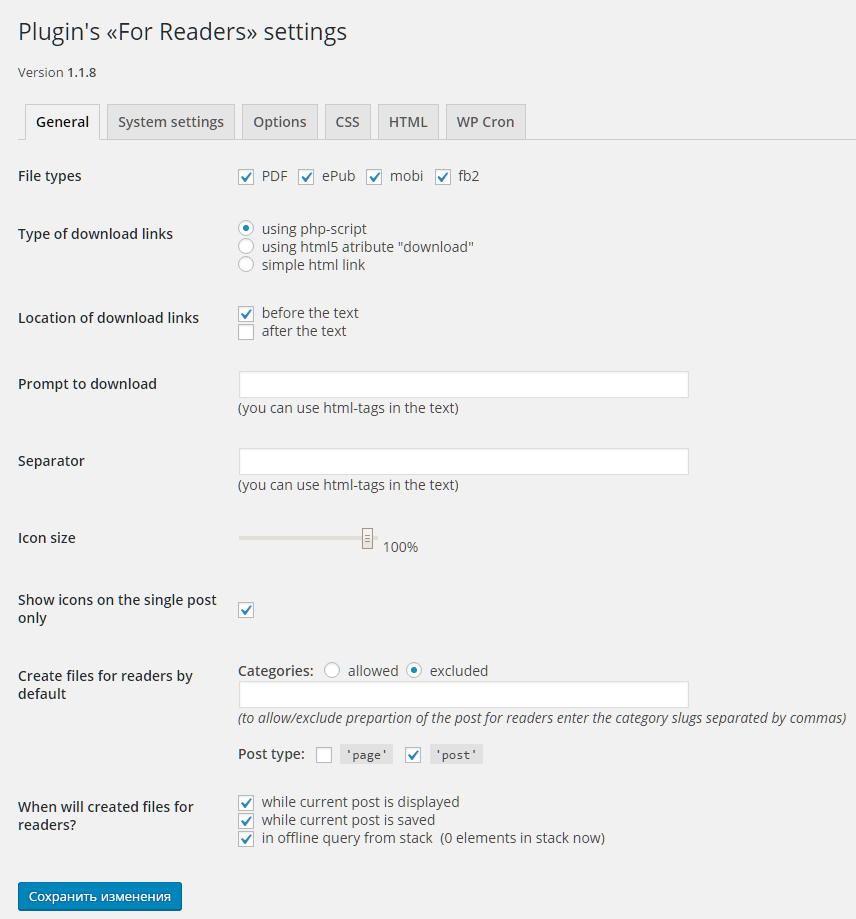
Plugin settings

Icons form
Q.: I have the cool pregenerated file for one my post. How do I use them together with the plugin?
A.: Generated by plugin files has names <post_slug>_<post_id>.ext, where ext is pdf, epub, mobi or fb2.
Rename your file (e.g. book.pdf) to <post_slug>_<post_id>p.pdf and upload it to folder http://yoursite.com/wp-content/upload/bg_forreaders.
When you added letter “p” at the end of filename you said plugin that this is protected file, don’t update it!
Q.: How can I change icons of download form at my site?
A.: Just replace image files document_pdf.png, document_epub.png, document_mobi.png, document_fb2.png, in folder http://yoursite.com/wp-content/upload/bg_forreaders.
Q.: How can I say to plugin to ignore some text on the site for readers?
A.: Place this text into shortcode [noread]...[/noread].
Q.: How can users access the OPDS catalogue?
A.: OPDS catalogue URL http://yoursite.com/feed/opds.
Q.: I have set the Generate OPDS catalogue option, but my OPDS catalogue isn’t available yet. What should I do now?
A.: In this case, to display your OPDS catalogue, you’ll first need to flush your WordPress rewrite rules. In the WordPress admin dashboard, click Settings -> Permalinks. Once here, just click Save Changes, which will flush the rewrite rules.
3.0
- Updated mPDF library upto 8.1.
- Added old cyrillic font Hirmos Ponomar.
- Requires PHP version 7.1 and more. PHP 8.1 is supported.
- Tested for WP version 6.0.
2.1.7-9
2.1.6
- Allowed svg format for icons in download form.
2.1.5
- Fixed error while autosave post.
2.1.4
- Minor changes in fb2 convertor.
- Fixed small bugs.
2.1.3
2.1.1-2
2.1.0
- Option to upload book files to
wp-content/uploads/bg_forreaders folder when you use Add Media button on the edit screen
2.0.1
- Added book file-types: ‘zip’, ‘rtf’, ‘doc’, ‘docx’, ‘htm’, ‘html’, ‘txt’, ‘djvu”, ‘mp3’, ‘m4a’, ‘m4b’.
2.0.0
1.2.4
- Fixed bug from version 1.2.3.
1.2.3
- Fixed issue with
<br> tag inside text formatting tags in fb2.
1.2.2
- Added transliteration of file names for Slavic languages (Belorussian, Bulgarian, Serbian, Macedonian, Russian, Ukrainian).
1.2.1
- Allowed tag
<a> in headers (<h1>-<h6>).
- Fixed some bugs in fb2.
- Added option
Allow paragraphs in table cells of fb2.
1.2.0
- Added shortcode [noread]…[/noread].
1.1.14
- Disable any tags in headers (
<h1>-<h6>).
1.1.13
- In editor dashboard added the button to Create Files without saving of a post.
- Allowed relative links to anchors in multi-page mode.
- Fixed bugs.
1.1.12
1.1.7-11
1.1.6
- Added choise of default value for option “create files for readers On/Off” in plugin’s settings.
1.1.5
- Added option “create files for readers On/Off” for post type “post” as well as “page”. But for “post” default is “On”.
1.1.4
- Removed examples and utils folders from mPDF library v.6.0.
1.1.3
- Changed the location of the cover image files.
- Full version of mPDF library v.6.0.
1.1.2
- Added offline mode to prepare all allowed files for readers.
- Fixed some errors.
1.1.1
1.1.0
- Added offline mode to prepare files for readers from stack.
- Added Russian translation.
- Fixed some errors.
1.0.1
1.0
Startup version.
