Choose right WordPress plugin from thousands others in a moment
AR VR 3D Model Try On
Showcase your WordPress products in 3D and augmented reality! Elevate your eCommerce store with interactive 3D models, AR experiences, and AI-powered …
Showcase your 3D Models with immersive AR experiences directly in the browser using advanced 3D Viewer WordPress plugin. No apps or coding needed. Just add a browser-based 3d model, Experience in real environment and build confidence, cut returns, and boost conversions.
???? NEW IN VERSION 1.8.0: Pro version now available with Dimensions, Hotspots, Slider Configurators, and Automatic Compression!
???? View Pro Pricing & Features
Go to the AtlasAR metabox in the post edit screen.
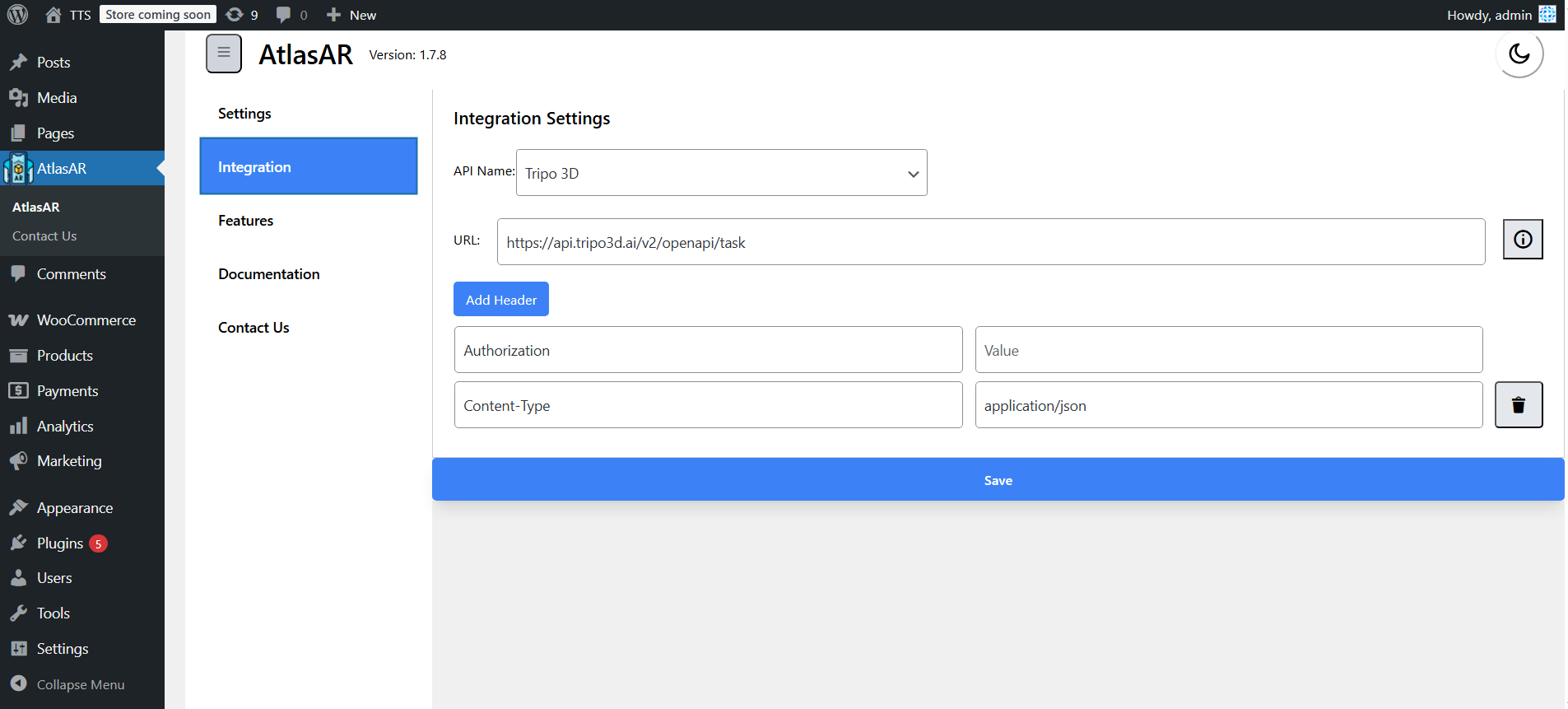
Click on the Integration tab.
Paste your API key in the Integration settings and save.
Now, go back to the Edit Post page.
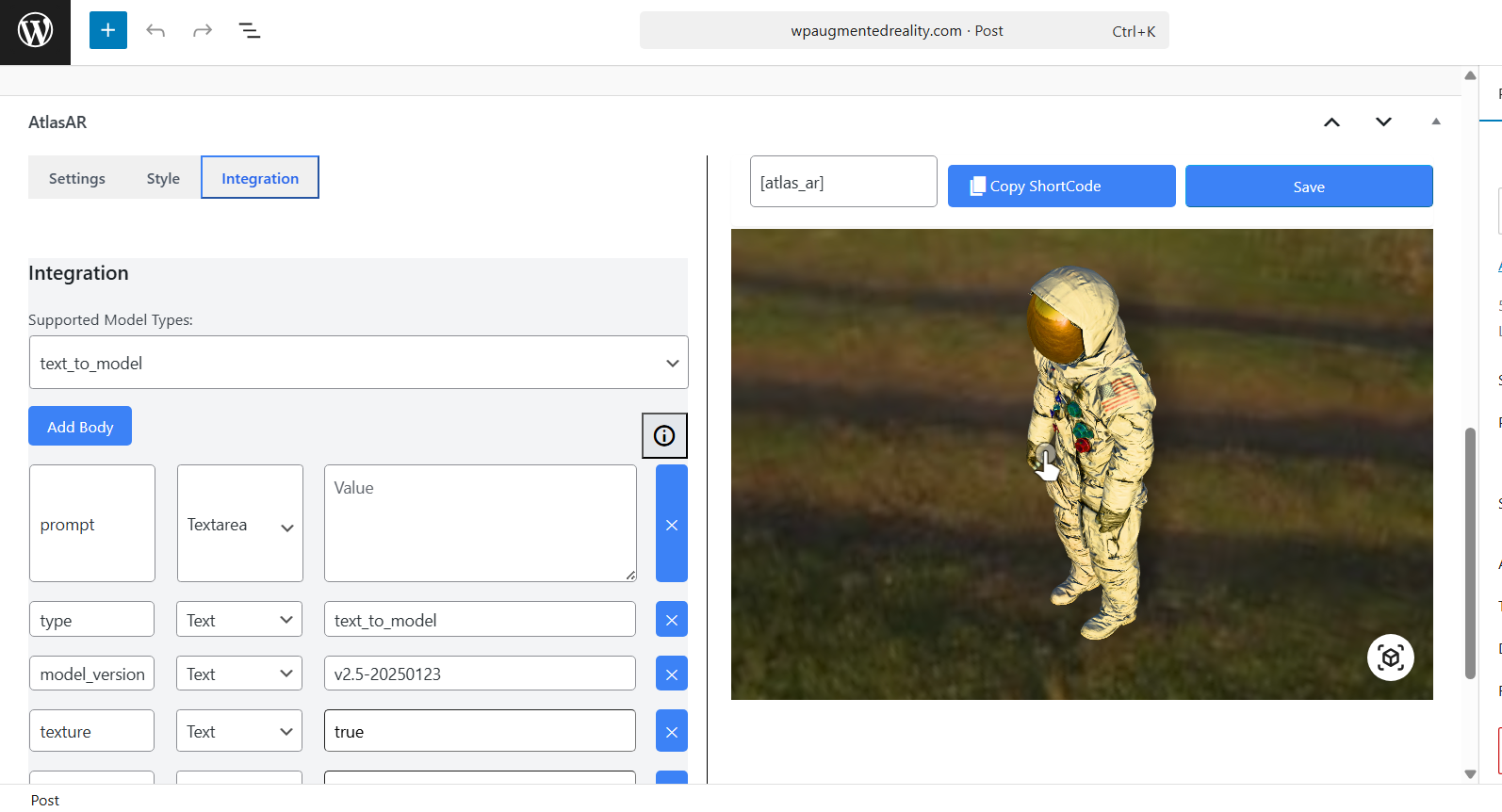
In the AtlasAR metabox, enter your prompt for the 3D model.
Click on the Generate Model button.
A task_id will be generated.
Wait a few seconds while the model is being processed.
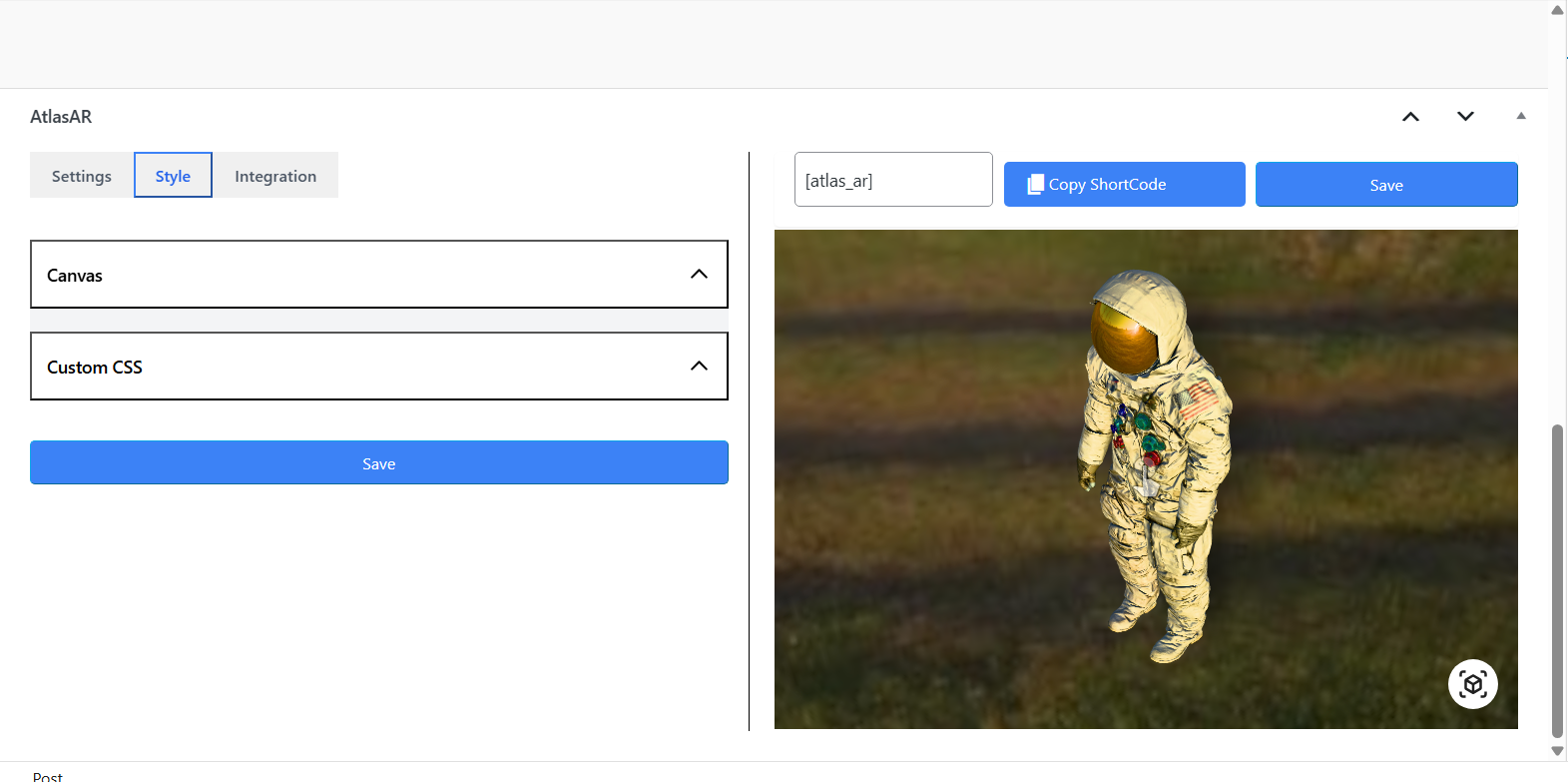
Once the model is generated, a 3D preview will appear on the right side.
Click on the Save This Model button to save the generated model and update the post data.
After saving, you can view the generated 3D model on the front end of your site.
How It Works – 3 Simple Steps
Install & Activate:
In your WordPress admin panel, go to Plugins → Add New.
Search for “AR VR 3D Model Try On”.
Click “Install Now” and then “Activate.”
Find the “AtlasAR” menu.
Setup you basic settings.
Upload Models:
Navigate to a WordPress post eiditing screen
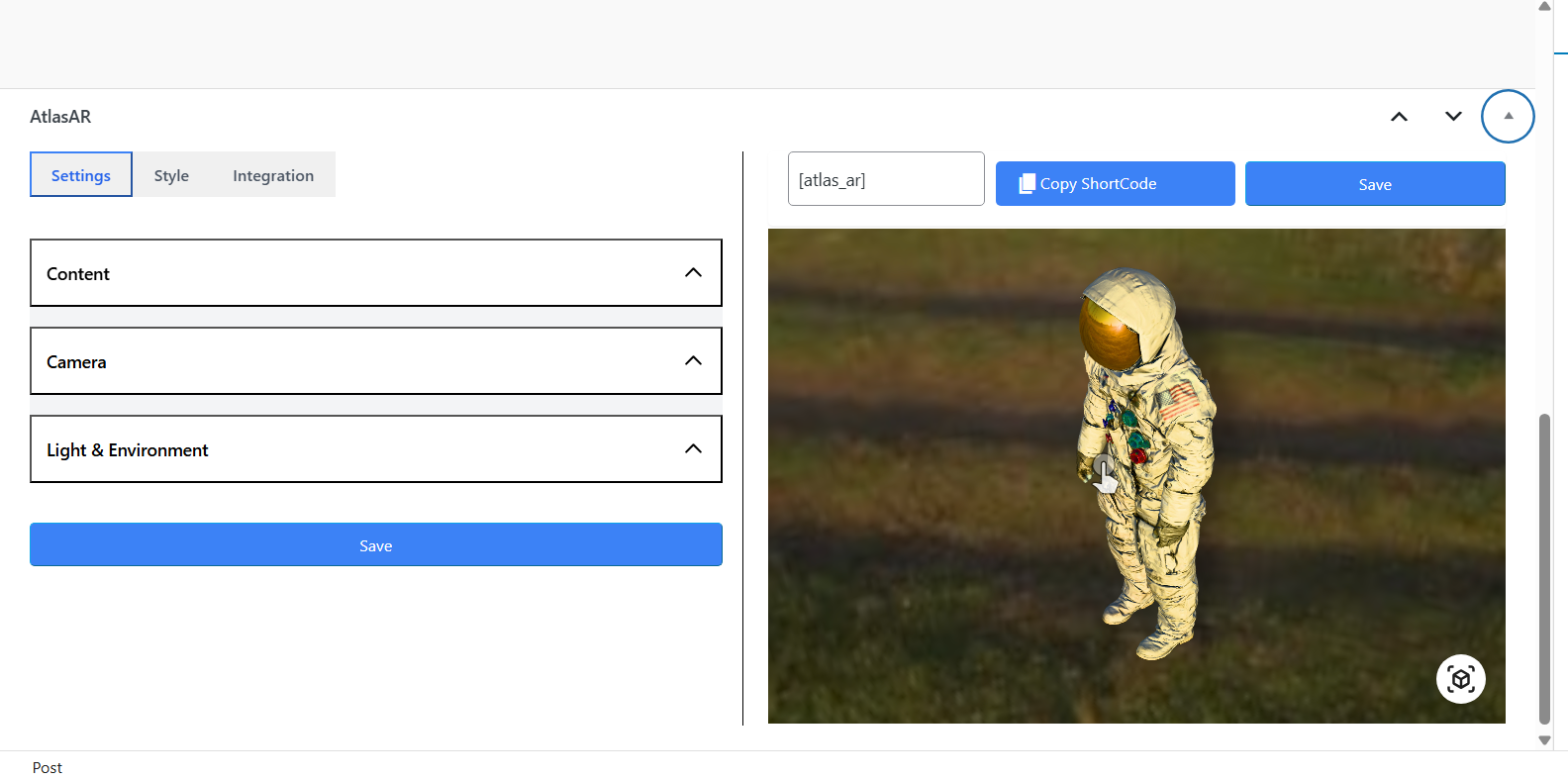
Find the “AtlasAR” Metabox.
Select the place where you want to display the 3D Model like Floor/Wall etc.
Upload your Android Model: .glb/.gltf file.
Upload your iOS Model: .usdz file.
Optionally, add a Poster Image (thumbnail) for the 3D model viewer.
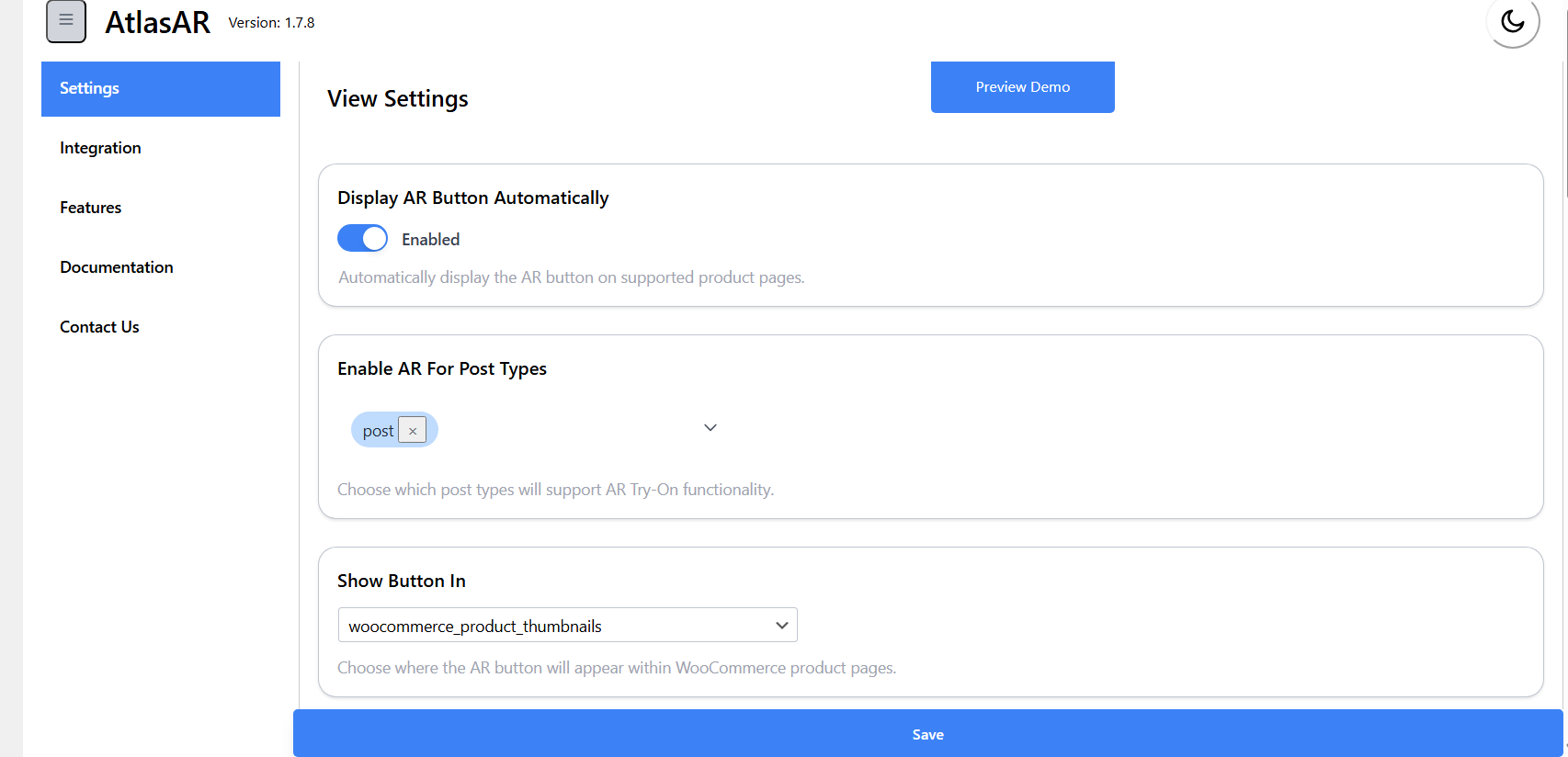
If your site is WooCommerce Store then first go to settings page of the plugin. And Look “Enable AR For Post Types” by default If would be post' change it toproduct’ and save.
Display 3D Model Viewer:
The “View in AR ” button is automatically placed on your WordPress Posts/WooCommerce product pages.
For manual placement in other locations, you can use the shortcode: [atlas_ar].
Pro Users: Enable dimensions, hotspots, and sliders from the AtlasAR metabox settings.
Real-World 3D Viewer Applications
???? Furniture Stores: “Customers visualize sofas in their living rooms before buying.” Office Chair Demo
????️ Home Decor: “Preview wall art placement through phone camera.” Dining Armchair Demo
????️ Pro Feature – Dimensions: Show exact measurements in AR to answer “will it fit?” questions
???? Pro Feature – Configurators: Let customers customize furniture colors and materials before purchase
Competitive Advantages
Free Model Limits
– Our Plugin: Unlimited ⭐
– Others: Often 1–10 models
iOS AR Support
– Our Plugin: Full native .USDZ compatibility ⭐
– Others: Android-only or limited iOS support
WooCommerce Integration
– Our Plugin: Native, seamless implementation ⭐
– Others: May require add-ons or hacks
Model Compression
– Our Plugin: Automatic compression up to 70% savings ⭐
– Others: Manual compression required
Product Dimensions
– Our Plugin: Real-world size display in AR (Pro) ⭐
– Others: No dimension features
Pro Version Features
???? Upgrade to Pro and unlock powerful features that boost conversions and reduce returns!
???? See Pro Pricing Plans
Available Now in Pro:
⭐ Dimensions Display:
* Show product measurements (length, width, height) directly in AR view
* Help customers answer “will it fit?” before buying
* Reduce returns caused by size mismatches
* Perfect for furniture, appliances, home decor
⭐ Interactive Hotspots:
* Add clickable information points on your 3D models
* Educate customers about product features, materials, care instructions
* Increase customer confidence and reduce support questions
* Perfect for complex products like furniture, electronics, jewelry
⭐ Product Configurators (Sliders):
* Let customers customize colors, materials, finishes, and options
* Increase engagement and time spent viewing products
* Higher average order value through personalization
* Perfect for furniture, fashion, custom products
⭐ Automatic Model Compression:
* Reduce 3D file sizes by up to 70% automatically
* Faster loading times = better user experience
* Uses industry-standard Draco geometry compression
* Basis Universal texture compression for optimal quality
* Keeps original files for backup
Coming Soon in Pro:
???? Advanced Analytics Dashboard (Q1 2026):
* Track AR engagement, device types, placement attempts
* See which products perform best in AR
* Prove ROI with conversion tracking
* Integration with Google Analytics
???? Per-Variation 3D Models (Q1 2026):
* Upload different 3D models for each product variation (color, size, style)
* Critical for WooCommerce stores with variable products
* Automatic model switching when customers select variations
???? Background Processing & Bulk Compression (Q2 2026):
* Compress large files in background (no upload delays)
* Bulk compress your entire product catalog with one click
* Queue system for processing multiple models
???? Glass Mode Virtual Try-On (Q2 2026):
* Enable realistic virtual try-ons for eyewear and jewelry
* Face tracking for accurate placement
* Unique feature – no other AR plugin has this!
???? Desktop WebAR (Q3 2026):
* AR experiences on desktop browsers (no phone needed)
* Broader accessibility for all users
???? Multi-Model Scenes (Q3 2026):
* Display multiple products together in AR
* Room planning and outfit builders
* Advanced configurators
Pro Support & Updates:
Priority email support (24-hour response time)
Regular feature updates
Early access to beta features
Dedicated documentation
???? Upgrade to Pro Now
???? Starter Plan: Only $49.99/year – All Pro features for 1 site
Technical Specifications
Supported 3D Formats: .glb, .gltf (for Android/Web 3D), .usdz (for iOS AR Quick Look).
Mobile Device Requirements: Android 9.0+ with ARCore support, iOS 12+ with ARKit support.
WooCommerce Compatibility: Version 3.0 and above.
WordPress Compatibility: Version 5.0 and above.
Performance: Models load asynchronously. Lazy loading implemented for archive pages to minimize performance impact. Optimized for mobile 3D rendering.
Pro Compression: Draco geometry compression + Basis Universal texture compression for up to 70% file size reduction.
Start Your AR Journey Today
Install the Free Version: Get started with unlimited 3D model uploads, no credit card needed.
Upload Your First Model: Add a .glb/.gltf file for Android/Web and a .usdz file for iOS to a product.
Watch Engagement Soar: Provide interactive AR experiences.
Upgrade to Pro: Unlock dimensions, hotspots, compression, and configurators to maximize conversions.
???? Text To Speech TTS Accessibility – Text To Speech TTS Accessibility is the most user-friendly Text-to-Speech tts plugin. Just install and automatically add a text to audio player to your WordPress site!.
Yes. Simple and variable products, several positions on the product page (gallery, slide, button, tab) and HPOS. It also works on posts, pages and custom post types, so you do not need a shop.
Does it work with my editor or page builder?
Yes: the AtlasAR panel works in the block editor and the classic editor; there is an AtlasAR block with a live preview and an Elementor widget; with any other builder (Divi, Beaver Builder, Bricks…), add the [atlas_ar] shortcode.
Do my customers need an app for AR?
No. AR opens from the browser: Scene Viewer on Android, AR Quick Look on iPhone and iPad. On a desktop, a QR code opens the product on a phone.
Which 3D files can I use?
.glb and single-file .gltf for the 3D view, .usdz for iPhone AR (optional: iPhones can also use the GLB), and a poster image. OBJ and FBX files are converted to GLB in your browser. Other formats (STL, DAE, 3DS, BLEND, STEP…) must be converted to GLB first, for example with the free Blender (File › Export › glTF 2.0). For the best iPhone quality, upload a .usdz with the same name as the GLB (Apple’s Reality Converter on a Mac, or Blender’s USD export).
Can I use a 3D scan from my phone?
Yes. Scan the product with Polycam, Scaniverse, Luma AI or Object Capture on an iPhone, export a GLB file and upload it to the 3D Library (AtlasAR › 3D Library › “From a phone scan” has the steps). Scans are heavy; they are made lighter on the way in, at their real size, with their textures kept. A scan saved only as .usdz needs a GLB too: export one with Reality Composer or Blender.
My model file is big. What can I do?
Open AtlasAR › 3D Library, choose the model and click Optimise: it is made lighter in your browser, at its real size if you enter its height, and the original is kept. Very big files can be optimised on AtlasAR Cloud (free plan); AtlasAR Pro optimises many at once.
Is there a limit on models or products?
No. As many models, products and 3D views per page as you like.
How do I turn on the virtual try-on?
In AtlasAR › Try-on, turn it on; then in the product’s AtlasAR panel choose Glasses or Cap. A “Try it on” button appears on the product page.
Is the shopper’s camera picture sent anywhere?
No. The face tracking runs in the shopper’s browser; no video, picture or face data leaves the device.
Are my models locked in to AtlasAR?
No. Every model is a file in your own uploads folder (wp-content/uploads/atlasar/), the 3D views work without AtlasAR Cloud, and nothing is hosted elsewhere unless you choose the Cloud. If you delete the plugin, your models and settings stay unless you turned on “Delete all AtlasAR settings, 3D Library models and product data when the plugin is deleted” (off by default).
What do I write in my privacy policy?
AtlasAR adds ready-made text to Settings › Privacy › Policy Guide: no cookies, no personal data, the try-on camera picture stays on the visitor’s device, and which public servers the try-on’s tracking files come from (unless you serve them from your own site).
Can my products show in 3D on Google?
AtlasAR adds each product’s 3D model to the product data Google reads on the product page (WooCommerce’s own, Rank Math or Yoast). For Google Shopping, map the custom field atlas_ar_virtual_model_link to Merchant Center’s virtual_model_link in your product feed plugin: it gives the model’s GLB file (15 MB or less; use Optimise). Google decides when to show a 3D result. To turn this off: add_filter( 'atlas_ar_structured_data', '__return_false' );.
Can shoppers open the 3D view from the shop page, before they open a product?
Yes. In AtlasAR › Placement › Product cards, turn on the “View in 3D and AR” button: it appears on every product card that has a 3D model, on the shop and category pages, related products and the Product Collection block, in your theme’s button style. Glasses and caps get the “Try it on” button. You can also show a small 3D badge on the product image, or show the 3D view itself first. Nothing is downloaded before a shopper clicks, so the pages stay fast. New installs start with the button on; a shop that updates keeps everything as it is until you turn it on (a one-time notice points you to the setting).
Will 3D views slow my site down?
The viewer loads only on pages that show a 3D view, the model only when it comes into view, and the try-on only after a click. Lighter files load faster: use Optimise.
What is AtlasAR Cloud? Do I need it?
An optional service by AtlasAiDev, with a free plan of 20 optimisations a month: it makes your existing models lighter at their real size and hosts them. Making new 3D models with AI (photo to 3D) is part of AtlasAR Pro, not of the free plan. Connect it in AtlasAR › Integrations with your email; nothing is sent until you click a Cloud button. Everything else works without it.
What does AtlasAR Pro add?
Hotspots, sizes on the 3D view, more models and WooCommerce variations, the try-on fit, 3D models made with AI from a photo or a description (AtlasAR Cloud, Meshy AI, Tripo3D), bulk optimisation and AtlasAR Cloud Premium. See Pro →
The Pro features stop; your site keeps everything the free plugin does, and your models and settings stay.
Can I manage it with WP-CLI or an AI agent?
Yes: wp atlas-ar settings | library | product | cloud | tryon-files | check, and a REST API (ar_try_on/v1) where every route and field is described, so tools like AtlasMCP can use it.
Where do I report security bugs found in this plugin?
Please report security bugs found in the source code of the 3D Viewer – 3D Model Viewer – Augmented Reality – Virtual Try On plugin through the Patchstack Vulnerability Disclosure Program. The Patchstack team will assist you with verification, CVE assignment, and notify the developers of this plugin.
Compatibility: Tested with WordPress 7.2. Nothing changes in how the plugin works.
3.1.0 ( 16 November 2026 )
New: A new AtlasAR admin that works like a desktop app: a side menu with groups and icons, one screen at a time, and the WordPress page no longer scrolls under it. On phones the menu slides in.
New: Search every screen and setting from the top bar. Press Ctrl+K (⌘K on a Mac) or “/”, type a word, and AtlasAR opens the right screen and tab and points at the setting.
New: Notices from WordPress and other plugins are gathered in a bell at the top instead of pushing the page down. Nothing is hidden: open the bell to read them.
New: A redesigned AtlasAR panel in the product editor: the 3D, AR and try-on status at a glance, clear tabs, and a layout that fits both the wide editor and a narrow side column. On pages and posts it uses words for pages and posts.
New: A “View in 3D and AR” button and a small 3D badge on the product cards of your shop, category pages, related products and product blocks, with button text you can change. New shops start with the button on; a shop that updates keeps everything as it is, and a one-time notice shows where to turn it on.
Improvement: Every AtlasAR screen has the same look, and the Save button is always in view.
3.0.1 ( 7 November 2026 )
Security: Authors and other users who can upload files but not edit other people’s posts now see only their own 3D models in the 3D Library and the product panel, and no longer see the titles of private or draft posts that use a model. Editors and administrators see everything as before. Thanks to the security researcher who reported this privately.
3.0.0 ( 30 October 2026 )
New: AtlasAR 3.0 is a complete rebuild. Your products, models and settings move over by themselves after the update, and your old data is kept.
New: The 3D Library keeps all your 3D models and their files in one place, apart from the Media Library. Add a model once and use it on any product.
New: Choose where shoppers see 3D: in the product gallery, behind a “View in 3D” button that opens a window, or in a product tab. It works with block themes and classic themes.
New: Virtual try-on for glasses and caps with the camera, and a sample face for shoppers without a camera. A product without a 3D model can use a straight-on photo for try-on.
New: Make a 3D model in your browser from a photo of a flat product (wall art, posters, framed prints, rugs, tiles) at its real size, also for many products at once.
New: Free 3D models: search a library of ready-made models and add one to your 3D Library with one click (with a free AtlasAR Cloud account).
New: Optional AtlasAR Cloud: make models lighter and faster to load, at their real size, without leaving WordPress.
New: Faster pages: the 3D viewer can load only when a shopper opens a model, and a health check points out models that are too heavy or have missing parts.
New: A setup guide, a new dashboard and simpler settings for the 3D view, the AR button and try-on.
2.3.2 ( 26 October 2026 )
Fix: Making a 3D model with Meshy AI works again. Meshy retired the model the plugin used by default, so it now uses Meshy’s current model (meshy-6), also for settings you saved before. A model you chose yourself stays as it is.
2.3.1 ( 25 October 2026 )
New: Administrators can now see short notices from the AtlasAR team in the WordPress admin, such as an invitation to try the next version early. They show only to administrators, can be closed with one click and stay closed.
2.3.0 ( 8 October 2026 )
New: A setup guide walks you through where 3D appears, adding your first model, previewing it in 3D and AR, page speed, the AR button, compression and virtual try-on. It opens once on new sites and can be run again from the Overview tab.
New: Sites that were already using the plugin see a one-time notice offering the guide instead of being redirected. The guide starts from your current settings and only saves what you change.
Fix: Deactivating and re-activating the plugin no longer resets your settings to the defaults.
Fix: Compressing a 3D model in your browser no longer fails to load one of its helper files, so compression completes without errors.
2.2.8 ( 18 September 2026 )
Fix: The plugin no longer loads the block editor’s files on other WordPress admin screens. This also clears a browser error that some other plugins ran into on those screens.
Fix: Opening a product or post with a 3D model no longer records a harmless “not found” error in the browser console when the model has not been compressed yet.
2.2.7 ( 6 September 2026 )
Maintenance: Tested and confirmed working with the latest WordPress release.
Fix: Upgrade prompts — the “Buy Now” button, the 14-day free-trial card and the Pricing tab — no longer appear on the dashboard for sites that already have Pro installed.
2.2.6 ( 6 September 2026 )
Improvement: New installs now load the 3D viewer only when a shopper opens a model, so pages load faster. Already-running sites can switch to this with a one-click prompt in the dashboard.
Performance: Trimmed per-request memory use so the plugin is lighter on your server.
Fix: Updated the AtlasAR block to the latest WordPress block format, clearing a compatibility notice on recent WordPress versions.
Improvement: Removed leftover debug messages from the browser console on the front end and admin.
New: Added a “Need help?” link (Contact us, Report an issue, Suggest a feature) inside the AtlasAR box, so you can reach us right where you set up your models.
2.2.5 ( 25 July 2026 )
New: You can now choose Meshy AI as your 3D-model generator on the free version too, not just Tripo3D — pick whichever provider you prefer and generate models from a written description.
Fix: Changing a value on the Integration settings screen (for example pasting a new API key) now saves correctly instead of reporting “No changes detected”.
Fix: The same “No changes detected” issue when updating a product’s 3D settings has been resolved, so your edits save reliably.
Fix: Cleaned up an unused internal scheduled task so it no longer writes a harmless notice to your site’s error log on WordPress 6.7 and newer.
2.2.4 ( 8 July 2026 )
New: You can now create 3D models with Meshy AI, right from the AtlasAR box — generate a model from a written description or from a product image, the same easy way as the existing Tripo3D option.
Improvement: A newly generated model now appears straight away, without needing to refresh the page.
Fix: Your saved 3D-generation API key now stays visible on the Integration settings screen instead of showing up blank.
2.2.3 ( 30 June 2026 )
New: A friendly, dismissible review reminder for site admins — shown only after you’ve added your own 3D model and used the plugin for a couple of weeks. It includes “Remind me later”, “I already did” and “Never ask again” options, and never appears for Pro users.
Maintenance: Refreshed the plugin description, search tags and FAQ so it is clearer at a glance what the plugin does — 3D model viewing, augmented reality, and webcam virtual try-on for glasses and caps.
2.2.1 ( 21 June 2026 )
New: “Model Loading Behavior” setting — choose whether the ~1 MB 3D viewer library loads with the page (Automatic) or only when the shopper clicks “View in 3D” (On interaction). Includes a per-product override in the product’s AR settings. Improves initial page load and reduces server and bandwidth use.
Performance: Reduced per-request database work — memoized repeated supported-post-type checks, removed a redundant option read, and stopped the cached-ID list from growing unbounded.
Performance: Combined the front-end stylesheets into a single request.
Fix: Pro-registered post types are no longer dropped from the cached supported-post-types list.
Maintenance: Restored the usage-tracking interval to its intended weekly schedule, clarified the “Loading Type” setting descriptions, and made admin script bundles cache-bust on rebuild. Default behavior is unchanged.
2.2.0 ( 18 June 2026 )
Security: Per-product Custom CSS is now sanitized when saved and rendered safely, closing a stored-content injection vector.
Security: Downloaded 3D model files are now written only inside the uploads/atlas_ar directory, with hardened path checks.
Improvement: Reworked front-end output (3D viewer, Try-On buttons, QR code, gallery toggle) to fully escape markup and load all scripts and styles as proper assets.
Maintenance: Refreshed external-service links and tightened input handling across the plugin.
2.1.0 ( 2 June 2026 )
Improvement: Hotspots, Dimensions, Sliders, bulk compression, analytics and multi-post-type now show a clear Pro badge instead of locked controls.
Improvement: Server-side compression for files over 10 MB is provided by the separately installed Pro plugin; Free’s client-side compression up to 10 MB is unchanged.
Improvement: New filter and action hooks let Pro and add-ons extend the dashboard, metabox sections, supported formats and compression method without touching Free code.
Fix: 3D-model compression assets now load correctly on WordPress installs that are not at the root of their domain.
Maintenance: Restructured the Free build to remove premium-only code paths, per WordPress.org guidelines.
2.0.3 ( 25 May 2026 )
Security: Fix CVE-2026-8682 — POST /wp-json/ar_try_on/v1/settings no longer accepts requests from non-administrators. The shared get_route_access() permission callback never enforced a capability check, so any authenticated user (Subscriber and above) could overwrite the ar_try_on_settings option. Replaced with per-route current_user_can( 'manage_options' ) checks on /settings, /demo_preview, and /generate_3d_model, and a per-post current_user_can( 'edit_post', $post_id ) check on /get_model_and_settings writes. Credit to Legion Hunter via Wordfence.
Security: Tightened /get_model_and_settings so non-admin POSTs can no longer write to arbitrary post meta — the same authorization bypass applied to this endpoint and is now closed.
Security: Tightened /generate_3d_model so only administrators can trigger Tripo3D / Meshy AI API calls and upload model files.
Maintenance: Plugin no longer mis-loads WordPress core files (wp-admin/includes/plugin.php, wp-includes/vars.php) — every remaining require_once now uses a function from the included file immediately afterward.
Maintenance: libs/AtlasAiDev/Client.php now uses get_theme_root() + wp_normalize_path() instead of a hardcoded WP_CONTENT_DIR . '/themes/', so the theme/plugin detection honours custom theme roots.
Maintenance: Replaced anonymous closures passed to remove_filter( 'upload_dir', … ) with a named instance callback so the filter actually unregisters after a compressed-file upload.
Maintenance: All 50 i18n strings inside libs/AtlasAiDev/ now use the ar-vr-3d-model-try-on text domain (was atlasaidev), so translations served by WordPress.org reach them.
Maintenance: Admin top-level menu moved from position 20 (which collided with WordPress core’s Pages slot) to '58.5', placing AtlasAR alongside other plugin menus.
2.0.2 ( 18 May 2026 )
New: Rename the “View in AR” button store-wide, per product, or per shortcode — “See it in 3D”, “Try a 360° view” or any text that fits your store
New: Built-in 360° rotation hint — a gentle wiggle (or simple hand-pointer) prompts shoppers to drag the model after a few seconds of inactivity, configurable globally and per product (Mode / Style / Idle Delay)
New: AtlasAR Gutenberg block adds a “Button label” field and the shortcode now accepts button_label="…" for one-off CTA overrides
Improvement: Neutral studio lighting for 3D models by default — fixes the pink/orange sheen that previously appeared on reflective white surfaces and keeps product colours true to the source file
Fix: 3D modal no longer opens empty when shoppers navigate between products in the same session — model now loads correctly on every product
Fix: [atlas_ar reveal="false"] shortcode on non-WooCommerce posts now renders the View in AR button at the shortcode location instead of falling silent
2.0.1 ( 13 May 2026 )
New: AtlasAR block now has a “Reveal model by default” toggle plus width, height, aspect ratio, padding and margin controls — choose between an inline 3D viewer or a clean Try-On / View in AR button pair
New: AtlasTryOn and the 3D viewer now work on regular WordPress posts and pages, not just WooCommerce products
Improvement: Try-On, View in AR, and 3D viewer buttons now automatically match the colors and style of your active theme — works with any block theme or classic theme
Improvement: QR code now appears on every page where you’ve enabled the 3D viewer
Improvement: Cleaner, more polished QR card with a tidier close button and a discreet AtlasAR brand stamp
Improvement: Buttons and the 3D viewer now line up with the rest of your post content instead of floating to the side
Fix: Tapping the 3D toggle on a product image no longer shows two Try-On buttons
Fix: View in AR button colour and alignment now look right on all themes
2.0.0 ( 12 May 2026 )
New: AtlasTryOn — virtual try-on for glasses & caps using your webcam, no app required
New: Works on iOS, Android and desktop browsers
New: Snapshot button so shoppers can save and share their look
New: Faster, smoother mobile fullscreen experience
New: Free 14-day Pro trial banner on the dashboard
Improvement: Cleaner, more responsive plugin dashboard
1.9.2 (10 Apr 2026)
New: Plugins page now fetches data remotely with 24-hour caching
New: WP.org star ratings and active install counts on plugin cards
New: Plugin icons, NEW/PRO/RECOMMENDED/YOU’RE HERE badges
New: Go Pro button and Configure button for active plugins
New: Top banner showing current plugin context
New: Google Analytics UTM parameters on all outbound links
New: Priority-based card ordering with recommendations first
Improvement: Tested up to WordPress 7.0
1.9.0 ( 21 February 2026 )
Added : Per variation preview added.
Added : Per variation added (Pro)
Added : Plugins menu added.
1.8.2 ( 6 February 2026 )
fixed : file upload issue solved
1.8.1 ( 2 February 2026 )
Added : Overview section added
1.8.0 ( 25 January 2026 )
Added : .glb file compression feature added (Pro).
Added : Dimensions feature added (Pro) – Display product measurements in AR.
Added : Hotspots feature added (Pro) – Interactive information points on 3D models.
Added : Slider feature added (Pro) – Product configurators for customization.
Added : Pro version released – Professional features for WooCommerce stores.
Improved : Plugin performance improved.
Improved : README updated with comprehensive Pro feature documentation.
Improved : FAQ expanded with Pro-specific questions.
1.7.8 ( 28 December 2025 )
Updated : documentation updated
1.7.6 ( 26 November 2025 )
Introduced : gutenbarg block added for shortcode [atlas_ar].
Fixed : normal post page 3d render issue fixed when woocommerce is not active.
1.7.5 ( 21 November 2025 )
Improved : Fatal error fixed
1.7.4 ( 21 November 2025 )
Improved : Spinner added during saving.
Improved : Modal UI improved.
Fixed : Modal title special character issue fixed.
Fixed : Modal title special character issue fixed.
Improved : Dashboard UI improved.
1.7.3 ( 19 November 2025 )
Improved : Settings buttons primary color set.
Improved : Integration buttons color matched to settings page.
Fixed : 3d model hide after scroll down in metabox, issue fixed.
1.7.2 ( 25 October 2025 )
Added: woocommerce_product_thumbnails woocommerce product thumbnail action hook added for Showing 3D file.
1.7.1 ( 17 October 2025 )
Improved: Dashboard UI improved.
1.7.0 ( 13 October 2025 )
Improved: UI improved.
Introduced: Dark Mode and Light Mode feature added.
1.6.1 ( 26 September 2025 )
Introduced: New modal added for 3d model display.
Improved: 3d Model loading time improved.
1.6.0 ( 04 September 2025 )
Introduced: model generation UI.
Introduced: User can generate model from post edit page.
integrated with Tripo3D API
1.5.4 ( 31 August 2025 )
Fixed: model upload issue fixed.
Fixed: multiple model load issue fixed.
Fixed: Cache issue not working issue fixed.
Fixed: QR code , post types settings not working issue fixed.
1.5.3 ( 31 August 2025 )
Introduced: Documentation menu added’
Changed: Plugin menu and tab and metabox name changed.
Fixed: minor bug fixed.
1.5.2 ( 14 August 2025 )
Fixed: Default model loading issue solved when current post have any model.
1.5.1 ( 13 August 2025 )
Fixed: Reload issue onClick on tab fixed.
1.5.0 ( 13 August 2025 )
Added: auto retate option added.
Added: skybox image option added.
Added: environment image option added.
Added: disable tap option added.
Added: disable zoom option added.
Added: shadow intesity option added.
Added: alignment, margin, padding, width, height option added.
Improved: Metabox UI improved.
Added: Default model value added.
Improved: performance of model loading improved.
Added: Custom css option added.
1.4.8 ( 07 August 2025 )
Fixed: 3D view button not showing up is fixed.
1.4.7 ( 04 August 2025 )
Improved: QR code will only load for Desktop.
Changed: AR button Name changed.
Updated: Documentation updated.
1.4.6 ( 24 July 2025 )
Fixed: UI related bug fixed.
1.4.5 ( 20 July 2025 )
Fixed: QR Code issue fixed.
1.4.4 ( 20 July 2025 )
Fixed: Major bug fixed.
1.4.3 ( 14 July 2025 )
Introduced: QR code feature added.
1.4.2 ( 11 July 2025 )
Fixed: Activation issue fixed.
1.4.1 ( 03 July 2025 )
Minor change.
1.4. ( 19 June 2025 )
Added: ShortCode “[atlas_ar]” introduced.
Added: Option for adding AR button automatically.
Improved: Code structure improved.
Fixed: Minor bug fixed.
1.3.4 ( 17 June 2025 )
Added: Model preview added to woocommerce tab in front end.
1.3.3 ( 15 June 2025 )
Changed: Contact Us page link changed.
Added: Link added to preview demo page.
Updated: Feature list updated.
1.3.2 ( 12 May 2025 )
Added: Documentation, youtube video link added.
Added: Real application of the plugin demo added
1.3.1 ( 08 May 2025 )
Added: Readme.txt updated.
1.3.0 ( 21 April 2025 )
Added: Preview added in admin metabox.
1.2.0 ( 16 April 2025 )
Added: tracker added.
1.1.2 ( 08 April 2025 )
Added: Compatible with wordpress 6.8.0
Added: Screenshots added of the plugin.
1.1.1 ( 25 Mar 2025 )
Added: Initial setup video added.
1.1.0 ( 09 Mar 2025 )
Freemius integrated.
1.0.12 ( 10 Feb 2025 )
Title changed.
1.0.11 ( 09 Feb 2025 )
Fixed bug on helper file.
1.0.10 ( 09 Feb 2025 )
Fixed: Unnecessary button load issue solved.
Fixed: Unnecessary tab adding in woocommerce solved.
1.0.9 ( 28 Jan 2025 )
Improved: Minor changes.
Improved: Documentation improved.
1.0.8 ( 20 Jan 2025 )
Improved: UI improved.
Contact information added.
Feature added to dashboard
1.0.7 ( 14 Jan 2025 )
Fixed: Settings save issue fixed.
Moved: AR placement moved to model settings metabox.