A WordPress plugin that allows administrators to safely edit usernames of registered users with an activation checkbox to prevent accidental changes.
The Allow Username Edit plugin provides a secure and user-friendly way for WordPress administrators to edit user usernames. By default, WordPress prevents username changes to maintain data integrity. This plugin overrides that limitation but adds a crucial safety feature: an activation checkbox.
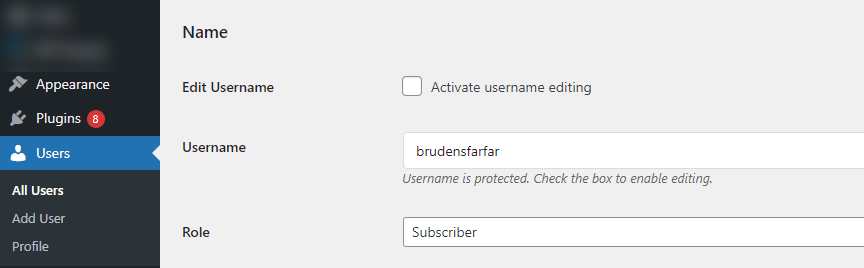
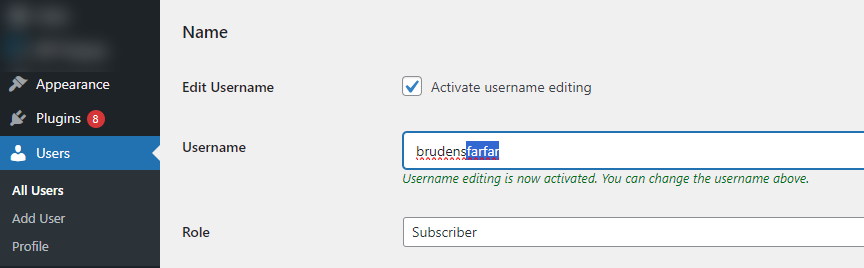
The username field is read-only by default, protecting it from accidental edits. To make a change, an administrator must explicitly check the “Activate username editing” box. This two-step process ensures that every username change is intentional.
Key Features:
* Safe Username Editing: Prevents accidental edits by requiring an activation checkbox to be checked.
* User-Friendly Interface: Integrates seamlessly into the WordPress user profile and user edit screens.
* Dynamic Help Text: The description below the username field updates dynamically to inform the admin whether editing is enabled or protected.
* Settings Page: Includes a dedicated settings page under “Settings > Username Edit” with plugin information, usage instructions, and a link to support future development.
* Secure and Compliant: Follows WordPress best practices, including the use of nonces, proper permission checks, and a consistent text domain for internationalization.
This plugin is ideal for site managers who need the flexibility to correct username typos or update usernames upon user request, without compromising on safety.
Screenshots
FAQ
How does the username protection work?
The plugin makes the username input field “read-only” by default. To edit the username, you must first check the “Activate username editing” checkbox above the username field. This prevents accidental changes.
Can I use email addresses as usernames?
No. For security reasons, the plugin prevents usernames that contain the “@” symbol or resemble email addresses. If you try to enter an email-like username, you will see a warning and the change will be blocked.
ChangeLog
1.0.7 – 2025-10-01
- Security: Improved security by centralizing permission and nonce checks in a helper function.
- Security: Added validation to prevent email-like usernames containing “@” symbol with error message.
- Enhancement: Added real-time warning when typing “@” in username field to discourage email usage.
- Enhancement: Ensured nonce verification and current_user_can() checks are consistent and not bypassable.
- Internationalization: Added all labels and warning texts to translation template for full i18n support.
- Refactor: Updated validation and update functions to use centralized checks.
- Maintenance: Refactored code for better maintainability and security.
1.0.6 – 2025-09-30
- Security: Enhanced nonce verification and input sanitization across all user input handling functions.
- Fix: Resolved username saving issue by implementing direct database update with proper validation.
- Fix: Prevented infinite recursion in username update function using static flag.
1.0.5 – 2025-09-29
- Tweak: Corrected plugin asset structure and removed inaccurate screenshot references from readme.txt to adhere to WordPress.org standards.
1.0.4 – 2025-09-28
- Fix: Refactored code to remove heredoc syntax, adhering to stricter WordPress coding standards.
1.0.3 – 2025-09-27
- Fix: Corrected all internationalization (i18n) function calls to include a consistent text domain (
allow-username-edit) as required by WordPress standards.
- Tweak: Standardized the
Text Domain in the plugin header to allow-username-edit for consistency.
1.0.2 – 2025-09-26
- Fix: Reworked the checkbox injection logic to use a more reliable
admin_footer hook and JavaScript DOM manipulation.
1.0.1 – 2025-09-25
- Fix: Corrected a fatal PHP syntax error.
1.0.0 – 2025-09-24
- Feature: Added a checkbox to activate/deactivate username editing.
- Feature: Added a settings page with a PayPal donate link.
1.0.0